2021 AUDI E-TRON charging time
[x] Cancel search: charging timePage 181 of 308
4KE012721BF
Telephone
— The charging time and temperature will vary
depending on the mobile device being used.
Mobile device reminder signal
Applies to: vehicles with Audi phone box
When the device reminder signal is switched on,
you will be notified that your mobile device is still
in the Audi phone box when you leave the vehicle.
Requirement: your mobile device must be located
in the Audi phone box (if Qi-capable) or connect-
ed to the Audi music interface with a USB adapt-
er, and the Audi smartphone interface must be
active or your iPhone must be connected to the
MMI via Bluetooth and charging using a USB
adapter connected to the Audi music interface.
> Applies to: MMI: Select on the home screen:
SETTINGS > General > Reminder signal and
mobile device charging.
The following settings may be available, depend-
ing on vehicle equipment:
— Signal tone
— Off
Spoken cue
this setting is switched on at the factory.
Mobile device notes: reminder, charge level
When this function is switched on, the charge
status of your mobile device is displayed. You will
also be reminded not to forget your mobile de-
vice when leaving the vehicle.
Using the telephone
Accessing the telephone functions
Applies to: vehicles with telephone
rence?
Daa
Nerecunt Gis
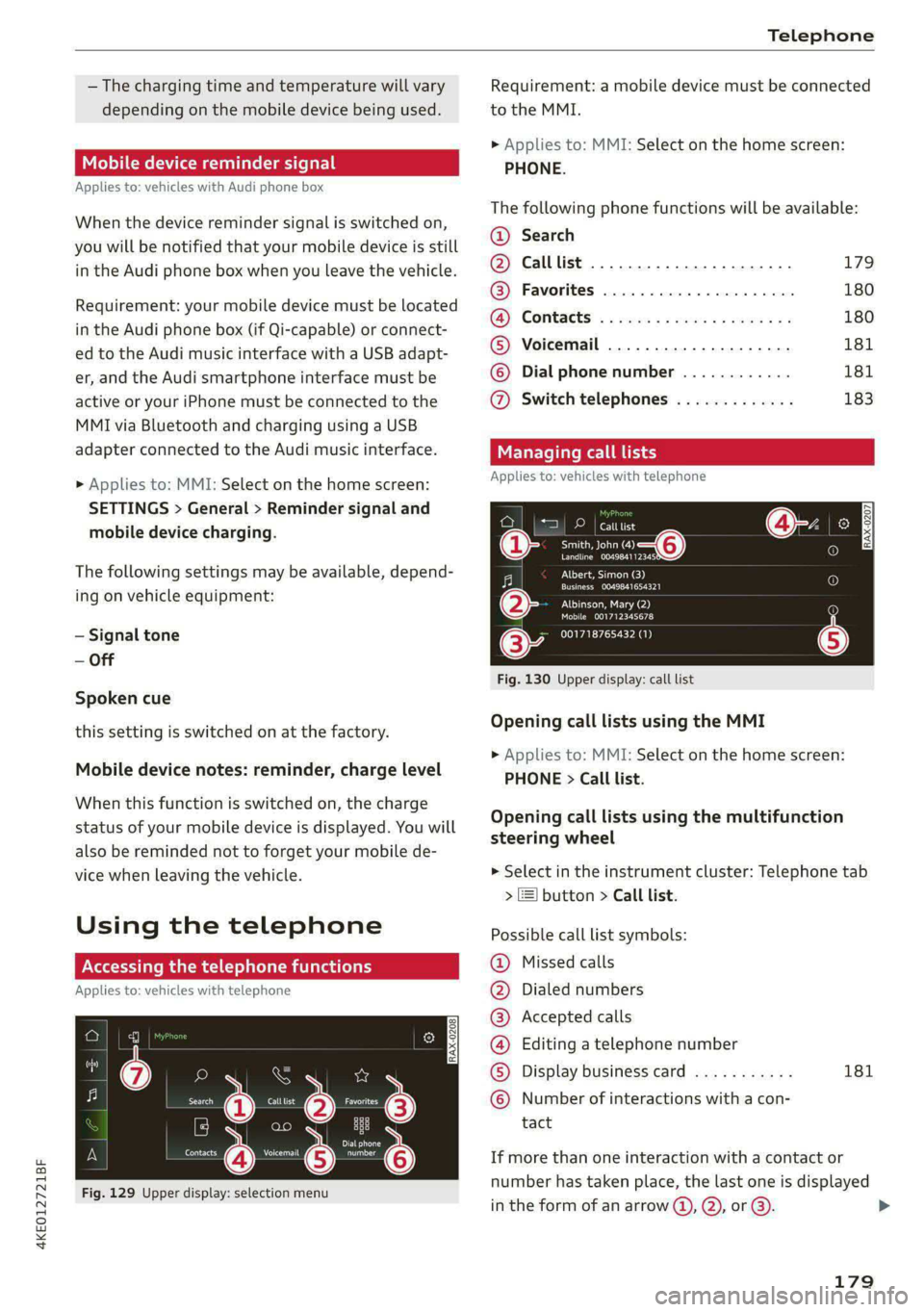
Fig. 129 Upper display: selection menu
Requirement: a mobile device must be connected
to the MMI.
> Applies to: MMI: Select on the home screen:
PHONE.
The following phone functions will be available:
@® Search
@ Calllist 20.0.0... eee. 179
@ Favorites ................0.00. 180
(@) Contacts: « ¢ esos ss cores ay cows yes 180
® Voicemail ..................2. 181
© Dial phone number ............ 181
@ Switch telephones ............. 183
Managing call
Applies to: vehicles with telephone
eae
Treas oT o—@
Landline 004984112345
Albert, Simon (3)
Cree acer)
PILE lea ea
Mobile 001712345678
001718765432 (1)
Fig. 130 Upper display: call list
Opening call lists using the MMI
> Applies to: MMI: Select on the home screen:
PHONE > Call list.
Opening call lists using the multifunction
steering wheel
> Select in the instrument cluster: Telephone tab
> ] button > Call list.
Possible call list symbols:
Missed calls
Dialed numbers
Accepted calls
Editing a telephone number
Display business card 181
QOOOCOLO Number of interactions with a con-
tact
If more than one interaction with a contact or
number has taken place, the last one is displayed
in the form of an arrow (4), Q), or @).
179
>
Page 200 of 308

Navigation
Selecting map content (such as POIs) as the
destination
Requirement: map content must be displayed
=> page 205.
> Press on map content on the map (for example,
fib.
Selecting the destination
> Select: F4 > Start.
Route guidance will be activated and the map will
be displayed > page 199, fig. 136.
Stopovers and route plan
Applies to: vehicles with navigation system
You can enter additional destinations during ac-
tive route guidance.
Entering a stopover
Requirement: route guidance must be active.
> Enter a destination > page 195.
Displaying stopovers or the route plan
All destinations are listed in the route plan.
> Press on fin the side menu on the map
=> page 199, fig. 136.
Editing stopovers
> Press on Pin the side menu on the map
=> page 199, fig. 136.
> Adding a stopover: Select: Add destination >
select a destination > Add to route.
> Moving a stopover: press Z. Touch the > sym-
bol and move the entry to the desired position.
Press Done.
> Deleting a stopover: Select: Z > one or more
entries or Select all > Delete > (Done).
Ce eels
Applies to: vehicles with navigation system and e-tron route
planner
The MMI includes the charging stations along the
route, if the destination cannot be reached with
the current battery charge level.
Requirement: the e-tron route planner must be
switched on > page 205.
198
Entering a destination using e-tron route
planner
> Enter a destination.
If the destination is out of range, a fast route
with stopovers for charging is automatically sug-
gested.
> To start the suggested route guidance, press
Accept.
> To display the route, press F) > page 199,
fig. 136 in the map side menu.
The destination is located outside of the
range
The F! symbol will be displayed if the destination
in the current route plan cannot be reached.
> Press on on the map. The route plan will be
displayed.
> Press e-tron route planner to calculate an al-
ternative route with suitable charging stations.
In the e-tron route planner, the following items
will be shown for each destination: the calculated
arrival time and the estimated battery charge
level at arrival (6 and after charging >, as well as
the suggested charging duration s= and the dis-
tance from the current location.
Gi) Tips
— The calculated arrival time at the destina-
tion incorporates the suggested time for
charging at the stopovers.
— The e-tron route planner continuously calcu-
lates the fastest route while taking into ac-
count the charging times at various charg-
ing stations. Therefore, a route with multi-
ple charging stops could be faster than a
route with fewer charging stops.
Stopping route guidance
Applies to: vehicles with navigation system
Requirement: route guidance must be active and
the map must be displayed.
> Applies to: MMI: Press BX > page 199, fig. 136.
> Applies to: multifunction steering wheel: Select
in the instrument cluster: Navigation tab >
button > Cancel route guidance.
Page 219 of 308
4KE012721BF
Media
» Applies to: MMI: Select on the home screen:
MEDIA > Source > Amazon Alexa.
@) Note
Read the information about Audi connect, and
be sure to note the connectivity costs section
=> page 186.
Multimedia connections
Oy ETE Tela
ae
a| =
oS
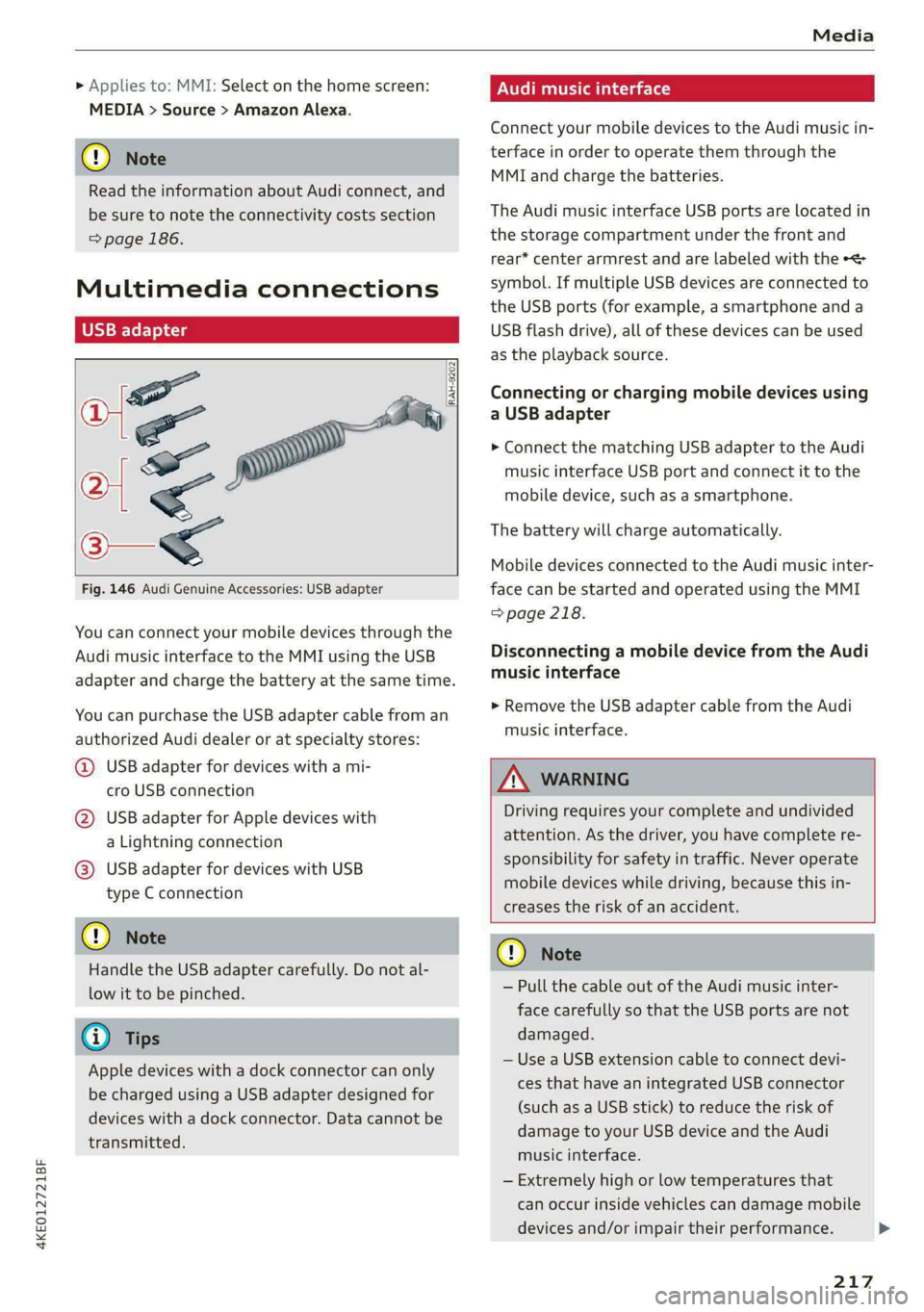
Fig. 146 Audi Genuine Accessories: USB adapter
RAH-9202
\
You can connect your mobile devices through the
Audi music interface to the MMI using the USB
adapter and charge the battery at the same time.
You can purchase the USB adapter cable from an
authorized Audi dealer or at specialty stores:
@ USB adapter for devices with a mi-
cro USB connection
@ USB adapter for Apple devices with
a Lightning connection
@ USB adapter for devices with USB
type C connection
@) Note
Handle the USB adapter carefully. Do not al-
low it to be pinched.
@) Tips
Apple devices with a dock connector can only
be charged using a USB adapter designed for
devices with a dock connector. Data cannot be
transmitted.
Audi music interface
Connect your mobile devices to the Audi music in-
terface in order to operate them through the
MMI and charge the batteries.
The Audi music interface USB ports are located in
the storage compartment under the front and
rear* center armrest and are labeled with the «<>
symbol. If multiple USB devices are connected to
the USB ports (for example, a smartphone anda
USB flash drive), all of these devices can be used
as the playback source.
Connecting or charging mobile devices using
a USB adapter
> Connect the matching USB adapter to the Audi
music interface USB port and connect it to the
mobile device, such as a smartphone.
The battery will charge automatically.
Mobile devices connected to the Audi music inter:
face can be started and operated using the MMI
> page 218.
Disconnecting a mobile device from the Audi
music interface
> Remove the USB adapter cable from the Audi
music interface.
ZA\ WARNING
Driving requires your complete and undivided
attention. As the driver, you have complete re-
sponsibility for safety in traffic. Never operate
mobile devices while driving, because this in-
creases the risk of an accident.
@) Note
— Pull the cable out of the Audi music inter-
face carefully so that the USB ports are not
damaged.
— Use a USB extension cable to connect devi-
ces that have an integrated USB connector
(such as a USB stick) to reduce the risk of
damage to your USB device and the Audi
music interface.
— Extremely high or low temperatures that
can occur inside vehicles can damage mobile
devices and/or impair their performance.
217
>
Page 240 of 308

Checking and Filling
authorized Audi dealer or authorized Audi
Service Facility for assistance.
Battery
eae elec acl)
Because of the complex power supply, all work on
batteries such as disconnecting, replacing, etc.,
should only be performed by an authorized Audi
dealer or authorized Audi Service Facility > A\.
Batteries with different technologies are instal-
led in your vehicle:
— 12 volt vehicle battery (for example, for basic
power supply) > page 238, 12 Volt vehicle bat-
tery
— High-voltage battery (for example, for electric
drive system, climate control) > page 108, In-
troduction
Not running the vehicle for long periods of
time
When the vehicle is not used for long periods, the
12 Volt vehicle battery will drain little by little. To
ensure that the vehicle can still be started, the
electrical equipment will be limited or switched
off. Some convenience functions, such as interior
lighting or power seat adjustment, may not be
available under certain circumstances. The con-
venience functions will be available again when
you establish drive ready mode.
Even when electrical equipment is switched off,
the equipment can still drain the 12 Volt vehicle
battery if the vehicle is not driven for long peri-
ods of time. Deep draining results in a chemical
reaction that destroys the inside of the battery.
To reduce the risk of this, the battery must be
charged monthly by an authorized Audi dealer or
authorized Audi Service Facility > page 239. Con-
tact an authorized Audi dealer or authorized Audi
Service Facility for more information.
Winter operation
Cold weather places an especially high load on
the 12 Volt vehicle battery. Have the battery
checked by an authorized Audi dealer or author-
238
ized Audi Service Facility before cold weather be-
gins.
ZA WARNING
All work on the battery or electrical system in
your vehicle can result in injuries, chemical
burns, accidents, or burns. Because of this, all
work must be performed only by an author-
ized Audi dealer or authorized Audi Service Fa-
cility.
ZA WARNING
California Proposition 65 Warning:
— Battery posts, terminals and related acces-
sories contain lead and lead compounds,
chemicals known to the State of California
to cause cancer and reproductive harms.
Wash hands after handling.
@) Note
If the vehicle will be parked for long periods
of time, protect the 12 Volt vehicle battery
against the cold so that it will not “freeze”
and become damaged. Have the battery
charged by an authorized Audi dealer or au-
thorized Audi Service Facility > page 239,
Charging the 12 Volt vehicle battery.
AAO) CM alate ey pan-18 7
Explanation of warnings:
Always wear eye protection.
Battery acid is highly corrosive. Always
wear protective gloves and eye protection.
Fire, sparks, open flame, and smoking are
forbidden.
A highly explosive mixture of gases can
form when charging batteries.
Always keep children away from battery
acid and the battery.
Always follow the instructions in the oper-
se
@
> @
PE
©
ating manual. >
Page 241 of 308

4KE012721BF
Checking and Filling
@ For the sake of the environment
© ¥ Lead-acid batteries must be disposed of
using methods that will not harm the environ-
ment. Do not dispose of them in household
trash. They contain harmful substances, such
as sulfuric acid and lead, and also recyclable
raw materials. Contact an authorized Audi
dealer or authorized Audi Service Facility for
more information.
Charging the 12 Volt vehicle battery
The vehicle cannot be operated when the 12 Volt
vehicle battery is drained. The vehicle battery
must not be charged under any circumstances.
Contact an authorized Audi dealer or authorized
Audi Service Facility.
@) Note
The charging of the vehicle battery requires
specialized knowledge and technology.
— The vehicle battery may only be charged by
an authorized Audi dealer or authorized
Audi Service Facility. Otherwise, the elec-
tronic systems in the vehicle may be severe-
ly damaged.
— The jump start pins in the motor compart-
ment are designed specifically for qualified
technicians.
Windshield washer
system
B4M-0135|
Fig. 154 Motor compartment: washer fluid reservoir cap
Observe the safety precautions > page 233, Gen-
eral information.
The windshield washer reservoir © contains the
cleaning solution for the windshield/rear window
and the headlight washer system* > fig. 154,
=> page 235. The reservoir capacity can be found
in > page 291.
To reduce the risk of lime scale deposits on the
spray nozzles, use clean water with low amounts
of calcium. Always add window cleaner to the wa-
ter. When the outside temperatures are cold, an
anti-freezing agent should be added to the water
so that it does not freeze.
Messages
3 Please add washer fluid
Fill the washer fluid for the windshield washer
system and the headlight washer system* when
the ignition is switched off.
@) Note
— The concentration of anti-freezing agent
must be adjusted to the vehicle operating
conditions and the climate. A concentration
that is too high can lead to vehicle damage.
— Never add radiator anti-freeze or other addi-
tives to the washer fluid.
— Do not use a glass cleaner that contains
paint solvents, because this could damage
the paint.
Service interval display
The service interval display detects when your ve-
hicle is due for service.
The service interval display works in two stages:
— Inspection reminder: after driving a certain
distance, a message appears in the instrument
cluster display each time the ignition is switch-
ed on or off. The remaining distance or time is
displayed briefly.
— Inspection due: if your vehicle has reached an
inspection interval, the message Inspection
due! appears briefly after the ignition is switch-
ed on and off.
Checking service intervals
You can check the remaining distance or time un-
til the next service.
239
>
Page 295 of 308

4KE012721BF
Index
High-voltage battery.................. 108
Vehicle battery (12 Volt)............... 238
Winter operation (12 Volt vehicle battery) . 238
Battery (vehicle)
refer to High-voltage battery........... 108
Blinds
refer to Panoramic glass roof............ 44
Block TOU C cms & oscars ao aes oe eeeee & wae 201
BLOWERS woven: ae onsen 2 2 comes 2 2 cme ooo avo 85
Bluetooth
Audio playeh sre x 6 ceca ve wacene ao erties ow 216
Connecting adevice...............0-0- 230
Connecting a mobile phone............ 175
Deleting a device
Device overview..............02.0000-
Disconnecting adevice................ 230
Displaying/profiles « sscvie + » ensue 6 « seowee sv 6 231
Selecting adevice.............0..000. 230
Specifying a favorite.................. 23:1
Boost function...................000 eee 93
Brake fluid
Checking the brake fluid level........... 236
BrakeSiss « ¢ sas s & ewes 5 hee oe eee se eS 96
Brake tluidis ss sass 2 maim o wana ys won ee 236
Emergency braking function............. 99
HGCisu ¢ s sayou & @ Sayan % § MaWE ¢ & BaeoR 5 SeRDR 100
New brake pads..........-...--0000005 97
Brands = wee s 2 owen x ¢ eeu < eee 2 tom FE 232
Break-in security feature...............-. 35
Breaking in
New brake pads..............--0000005 97
ING WEEITOSE. « sxctons co sucesin wo semen oe 6 azectinn on a 248
Bulbireplacementss. «x issn s « sesrve + & arent w vo 280
Business'address’s « « sss os wows oo mewn ow 201
{.
California Proposition 65 Warning........ 233
Battery specific........... cece 238
GALLUISE cesses » sense @ © amscans a o omens a 6 emNEAU & 179
GaMOKaSiiwse 2 wim + mem o 6 emu ee om a Yo 130
Locations ..... 2... ee eee eee e ee eee 131
Capacities
Washer fluid reservoir................. 291
Cargo floor. ....... eee eee eee eee 83
Cargonet....... 2... eee eee ee 82
Garwash «5 sce so aspen «ome oo iene: © stents 261
Cell phone
refer to Telephone...........-.0eee eee 175
Cell phone compartment
refer to Audi phone box............... 177
Central locking....... eee eee cree eens 32
AULOILOGK « coos 2 5 canes 5 5 ten so ees Go eG 32
Convenience key sie + « soccais 2 6 seve + 6 sone « 37
Convenience opening and closing......... 44
Luggage compartment lid............... 40
Mechanically unlocking and locking....... 35
MessageS ......--. 0c cece eects 34
Remote control key.........0eee eee eee 37
SeGUING): © wwe: s 2 wesems x arene @ een aH ewe 33
Vehicle key... 0... cece eee ee eee ee 37
Central locking switch................5-5 34
Gentifieatiomis a < cvessus eo mano we wannew © a caste 288
Changing light bulbs................0.. 280
Charging
refer to Power sourceS.........--.000005 78
Charging clip
refer to Wall mount clip............... 125
Charging display...............2--000-- 114
Charging the battery
USB... eee 178, 217
Wirelessi. « wos « < auc a 2 sogee 4 2 mee 2 2 oe 178
Charging times « eves sz eee ee eews e ewewse 110
Child safety lock
Climate control system controls in the rear. 42
Power windows.............2.020 eee 42
Rear dGGFSs: « s saan x « seme as eee oo ew eo 42
Child safety seats.............0..000 eee 72
Securing to the top tether anchor........ 76
Securing with a safety belt.............. 75
Securing with LATCH..............--00. 74
Cleaning........... eee eee 261
Cleaning Alcantara................0000. 264
Cleaning artificial leather............... 264
Cleaning carbon components........ 263, 264
Cleaning controls « ses ss eens se cee s 6 ves 264
Cleaning decorative parts andtrim........ 263
Cleaning plastic parts.................. 263
Cleaning textiles...................... 264
Climate control system ...............0-- 84
Climate control system controls in the rear
CHINA SARELY LOCK wer ss saan ¢ seen Fo eee 2 42
293
Page 298 of 308

Index
FRAQKAMNCCb scons a secswin «+ cwevne vo eeu v shew 86, 87
Free text search
Media.... 2... cece eee eee eee 222
R&Oterax ¢ = sans ¢ = Sots ¢ ¥ Hae 7 eRe gE 209
also refer to Intelligent search.......... 195
Freeze protection
COOLANE sncosns « 0 ences x 0 oman + 6 orem = ut aemawe 235
Windshield washer system............. 239
Frequency band.............e eee eee eee 207
also refer to Frequency band........... 207
Front center armrest............2....00. 62
Front collision warning
refer to Audi pre sense front............ 156
Front passenger’s seat adjustment
FROME so sees oo nase 3 a nen 2 wae ae MREO wo 62
Rear... eee eee eee 61
Front wiper blades
Changing.......... eee eee eee ee 56
ClOANING s « = eee = « neues to Hewat Bea ee 56
Functions ondemand............--..-- 188
Functions that require a license.......... 188
also refer to Functions on demand....... 188
G
Garage door opener.............--+2200- 45
Garment HOOKS ec
GAWR
refer to Gross Axle Weight Rating (GAWR) . 291
GOat sce: 2 s gome 2 x wee ey BES GF Be Ge ees 92
Glossary of tire and loading terminology... 244
Glove compartment..............-00000- 79
Gross Axle Weight Rating (GAWR)........ 291
Gross Vehicle Weight Rating (GVWR)...... 291
GVWR
refer to Gross Vehicle Weight
Ratirig (GVWR) « sce « 2 eevee x « caus 8 2 eeu 291.
H
Handsfree: = 2can s gems sv seen ey eee ee ee 176
Hands Free Profile.................-.-- 176
Head-up display
AG\OStING an se meas x pwan ee wees s wenn os 24
Adjusting the brightness................ 52
Operating ............ 0.0 e eee eee eee 24
Headlight range control................0. 48
296
Headlights
Cleaning....... 06... cece eee eee ee eee 262
Headlight range control................ 48
Washerisystem). «2 escioe ence ee eee ¥ 6 oe 54
Washer system (filling washer fluid) .... . 239
Head restraints
Adjusting... 0.0... 0.00 e cece eee eee 63
Removing and installing................ 63
Heated rear window.............0eee eee 86
Heated steering wheel................0.. 87
Heating..............0 0.2 cee eee eee 84
HFP
refer to Hands Free Profile............. 175
High-voltage battery................... 108
Advanced charging settings............ 116
Audi e-tron compact charging system.... 119
GHAGING scas + = sevou x = Saree 3 5 eee a 109, 112
Charging display on the vehicle......... 114
Charging equipment................0- 117
Charging methods...............-.... 109
Charging ports on the vehicle........... 109
Charging time...............0. eee ee 110
Connecting the charging cable.......... 112
Messages while driving................ 11/7
Not running for long periods of time..... Lit
Opening the charging port door......... 112
QUICK CHANGING ews « « eos s quem x 2 Beme Bs 109
Setting the charging target............ 115
Setting the timer..................0.. 116
Transporting charging equipment....... 119
High-voltage system.............0.005- 108
High beams
High beam assistant................... 49
Highway lights’: s scsn ss ease # weee sz oes x 48
Hill.descentassist, ¢ cca ceeasssiaaases 101
Hill hold assist... 0.0... cc cece e eee eee ee 92
Hold assist... 0.2... eee eee 99
also refer to Hold assist..............-. 99
Hold Assist
Hefer'to HOldassists. wave + wins av waren evo 99
Home
refer to Home address............00 0s 201
Home.addresss « « ssc « « wenn 3 « wwe 6 o owe 201
HomeLink
refer to Garage door opener............. 45
HOMEISEFEC Mises so seis « ononans wa crowns 4 ooes 16
HOBM: 5 3 aceases oo aera & 3 anos «wae @ % aMweaM 6 2 O88 6
Page 303 of 308
4KE012721BF
Replacement parts.............-.00000- 287
Replacing fuses ........ 000 esc ce eee ees 277
Reporting Safety Defects................ 287
Reverse gear
refer to Gear's « ssc » waver 6 owe es eter 92
RIMS:s ss sesccie = o secece oo ee 2 ween eo a eo 255
Cleaning ....... 0... cece cece eee 263
Road Garnier crs ao sumene 2 3 omme o wneno © woe 103
ROLLING 2 sccmnes 2 snece ev mice ee anaes =n aerene @ ¥ 91
Rolling ability
Electromechanical parking brake......... 98
Hold assist....................0.00005 99
Transmission idle’s « 2 wees + ease 2 5 pea o 5 we 93
Roof
refer to Panoramic glass roof............ 44
ROOFLOA « swisins as sxawes oo orosaun oo imaeen ow a 291
Roofifackeuws s ¢ geen ss news sy ewes ¢ oREES ¢ ae 83
also refer to Roof rack..............0--. 83
Route guidance
StOpPiINg...... cece eee eee eee eee 198
also refer to Navigation............... 194
Raeute planner (@-trOn): « «cows oe coen sc eee 198
Running direction (tires)...........00005 272
S
Safety belts. ........ 0... cee eee eee eee 64
Cleaning « ¢ ecews ¢ 2 sews ¢ e seems co oem ee os 264
LOCKING ire = = wosicens w= coevece « © eweere © w cireuene ou ee 75
Securing child safety seats.............. 75
Satellite map... 2.2... eee eee eee 202
Screen
refer to Touch display..............000. 15
Screwdriver .......... 0c c eee e eee eee 267
Search function
refer to Free text search............... 222
Seat heating............ 0. eee eee eee 86
Seats
Adjusting the front seats............... 60
Cleaning « « sess vs ewes ow seen 2 a sure & o oe 264
Folding
Front passenger’s seat adjustment....... 62
Head restraints: « sisi so oun 2 x svemve © 2 ome 63
Massage function.............. eee eee 60
Memory function..............2-.0 eee 67
Resetting the position.................. 61
Storing aseat profile................... 67
Seatventilationrc «cow «x cecsoee wx awavous oo as 86
Securing the vehicle ............c0eeeeees 91
Selecting a source (media).............. 218
Selector lever's « saws « x warms s g eres ag es g 92
Sensors
Coverage areas aves. w 3 saves w 2 coms o 0 ous 130
Locations..... 00.0.0... ce eee ee eee 131
Service interval display..............0.. 239
Setting measurement units.............. 228
SOCLINGS’s 5 2 ssees w & come © o cone so meses oH Hee 228
Announcements and tones............. 228
Bluetooth........................005 229
Datetaniel tim@iss s ¢ wusu s ¢ eeens « ¢ caves a 2s 228
Dit CORY. cesses x © cance 4 o memes ow memes % sree 183
E-mail... eee eee 184
LANGUAGE sce x + mewn x 2 eS 4 2 EEE 4 2 ce 228
Measurement:umitsice 6 2 cance so namie x + anne 228
Media... .. 2... cee eee eee eee eee 222
NaVigatioOnies + « sac = « sat ¢ x news se ees 205
Radi@iavsns x © suns ov svarene sw amma © x xno Wa 0 213
Sound .......... 0000 eee eee eee eee 228
SYStEM s < s dawg < fae & @ Hotes GY Here ¥ oe 228
Telephone :evccsie = seceses o = eierewe = 4 aoeuene © v eeeve 182
Text MesSageS... 1.2... cee eee eee 183
TIME ZONGicas « s awe 3 y Gee + EES Ge eR 228
WWicEi OTSPOE acces 2 6 cee ov ee a coe oo 189
Setting the charging target.............. 115
Setting the language...............-... 228
Setting the time ss ¢ ¢ ees ss pees cv teas 9? 228
Shift paddles
Adjusting recuperation................. 95
Ship ¢arriet > sees <= ewe s 5 eews =e ewe ee oe 103
SHOp)s = = ews ¢ o ees 2 o ees ge teen gs eee 188
Shortcut
referto Shortcuts « sess a seas ss ova sean 21
SHOPteUtss « < means = nwa ov ewe yy BeeE Ge 21
SHUfElGnye = = soem : seems ¢ SRR GE ReGH s Fe 220
Side assist... .............0 00000 c eee 160
Cleaning the sensors...........00e0 00 262
SIMPGStG 's seus x + emmys xs eae ge Ree ee GOR 187
Sliding/tilting sunroof
refer to Panoramic glass roof............ 44
Smart Favorites
refer to PresetS.........-..00--00 eee 210
Smartphone
refer to Telephone.............02e0 00s 175
301