2021 AUDI E-TRON Tire
[x] Cancel search: TirePage 97 of 308
4KE012721BF
Driving
When you press the brake pedal, recuperation is
used to brake the vehicle. The brakes will only be
activated if necessary. When driving normally,
this makes it possible to brake using only recu-
peration just before coming to stop and to lose
little energy and range from braking.
Setting options
You can set how strongly the vehicle should be
braked by recuperation while coasting.
> Applies to: MMI: Select on the home screen:
VEHICLE > Charging & Efficiency > Efficiency
assist > Recuperation.
Automatic: the recuperation braking effect is ad-
justed proactively* to the route or vehicles driv-
ing ahead, for example. You can temporarily ad-
just the braking effect by selecting a recuperation
level with the shift paddles.
Manual: the recuperation braking effect is con-
trolled manually. You can select a recuperation
level using the shift paddles.
Settings using the shift paddles:
>» Select © for a stronger braking effect.
> Select (+) for a weaker braking effect.
ZA WARNING
In certain situations, the recuperation may
brake proactively. However, the recuperation
braking effect is limited. Always be ready to
brake to reduce the risk of an accident.
G) Tips
If the ESC is limited or switched off, automat-
ic recuperation is not available and will not
brake.
Deuce ee
) 2)
(1)
(3 ae
@- Ceneae
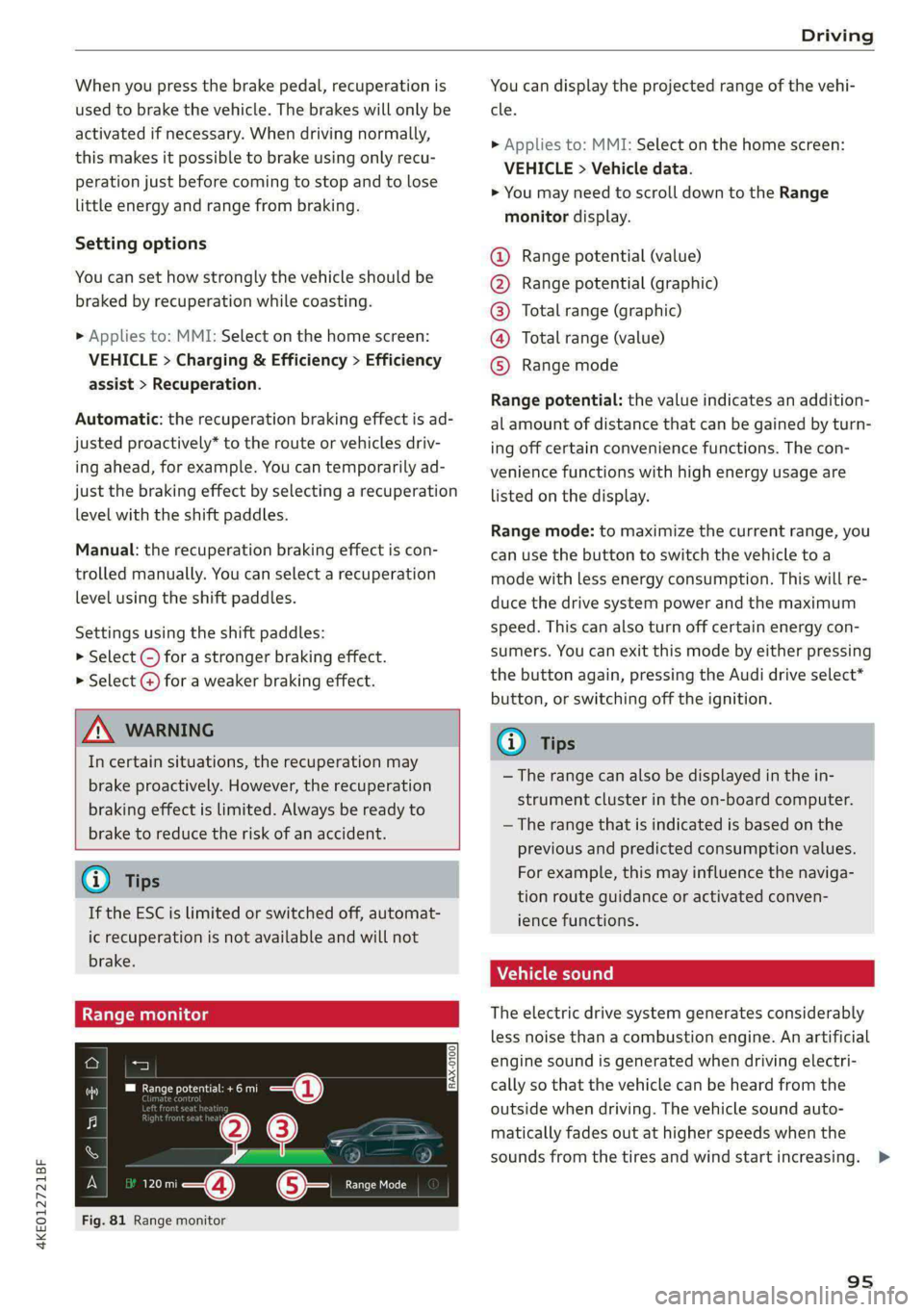
Fig. 81 Range monitor
You can display the projected range of the vehi-
cle.
> Applies to: MMI: Select on the home screen:
VEHICLE > Vehicle data.
> You may need to scroll down to the Range
monitor display.
Range potential (value)
Range potential (graphic)
Total range (graphic)
Total range (value)
Range mode OOOO
Range potential: the value indicates an addition-
al amount of distance that can be gained by turn-
ing off certain convenience functions. The con-
venience functions with high energy usage are
listed on
the display.
Range mode: to maximize the current range, you
can use the button to switch the vehicle to a
mode with less energy consumption. This will re-
duce the drive system power and the maximum
speed. This can also turn off certain energy con-
sumers. You can exit this mode by either pressing
the button again, pressing the Audi drive select*
button, or switching off the ignition.
G) Tips
— The range can also be displayed in the in-
strument cluster in the on-board computer.
— The range that is indicated is based on the
previous and predicted consumption values.
For example, this may influence the naviga-
tion route guidance or activated conven-
ience functions.
Vehicle sound
The electric drive system generates considerably
less noise than a combustion engine. An artificial
engine sound is generated when driving electri-
cally so that the vehicle can be heard from the
outside when driving. The vehicle sound auto-
matically fades out at higher speeds when the
sounds from the tires and wind start increasing. >
95
Page 98 of 308

Driving
ZA\ WARNING
Other road users may not be able to defini-
tively hear electric vehicles when they are
driving. This increases the risk of an accident
particularly when driving in areas with little
traffic, when maneuvering, or when driving in
reverse.
ient and environmentally-friendly
i}
Your driving style greatly influences the amount
of fuel and energy consumed, the environmental
impact, and the wear on the motor, brakes, and
tires. Note the following information for efficient
and environmentally-conscious driving:
— Select the Audi drive select* efficiency mode.
— Turn off electrical equipment that is not need-
ed, for example seat heating*.
— Anticipate upcoming traffic situations while
driving to avoid unnecessary acceleration and
braking.
— Avoid driving at high speeds.
— Avoid adding extra weight to the vehicle if pos-
sible, for example by not leaving roof racks or
bike racks installed when they are not needed.
— Make sure the tire pressure is correct.
— Have maintenance performed regularly on the
vehicle.
— Do not drive with winter tires during the summ-
er.
— Brake early and evenly to use recuperation.
Messages
B Drive system: malfunction! Safely stop vehi-
cle
There is a malfunction in the drive system. The
vehicle can no longer be driven. Park the vehicle
in a safe location as soon as possible. Secure the
vehicle against rolling before exiting the vehicle
= page 91. See an authorized Audi dealer or au-
thorized Audi Service Facility for assistance.
B Drive system: malfunction! Please contact
Service
96
There is a malfunction in the drive system. Drive
slowly to an authorized Audi dealer or authorized
Audi Service Facility to have the malfunction cor-
rected.
oO Drive system: warning! Limited performance
The driving power is limited. The high-voltage
battery may not be sufficiently charged or is at
the operating temperature threshold, for exam-
ple, when the outside temperatures are extreme-
ly cold.
BS Vehicle sound: malfunction! Pedestrians
cannot hear vehicle. Please contact Service
There is a malfunction in the vehicle sound func-
tion. Drive extremely carefully, since other road
users may not be able to hear your electric vehi-
cle. Drive to an authorized Audi dealer or author-
ized Audi Service Facility immediately to have the
malfunction corrected.
Brakes
ere el eiy
You can apply the vehicle's brakes using the brake
pedal.
Operating noise
Noises may occur when braking depending on the
speed, braking force, and outside conditions such
as temperature and humidity.
When the vehicle is stationary, the brake system
performs system tests at regular intervals. This
can cause brief noise and haptic feedback effects
on the brake pedal.
Braking effect
The response time from the brakes depends on
the weather and environmental conditions. To
ensure the optimal braking effect, the brake sys-
tem is cleaned at regular intervals. This is done
by applying the brake pads to the brake rotors for
a short period of time when driving at high
speeds when the windshield wipers are switched
on.
If the brake system becomes damp, for example
after driving in heavy rain, the braking effect may >
Page 105 of 308

4KE012721BF
Driving dynamic
Suspension
CET tes un) Led
Applies to: vehicles with suspension control
The adaptive dampers are an electronically-con-
trolled damping system. The firmness of the sus-
pension will adapt to the driving conditions and
the driving situation. The settings depend on the
selected Audi drive select* mode.
Air suspension
Applies to: vehicles with air suspension
The air suspension is an electronically-controlled
suspension and leveling system. The firmness of
the suspension will adapt to the driving condi-
tions and the driving situation. The system balan-
ces out changes in load. The vehicle level will also
adapt gradually to the vehicle speed in order to
reduce the wind resistance at high speeds and in-
crease the ground clearance at low speeds. The
settings depend on the selected Audi drive se-
lect* mode.
Displaying the vehicle level
> Applies to MMI: Select on the home screen: VE-
HICLE > Audi drive select.
The filled-in boxes represent the current vehicle
level. The more boxes that are filled in, the high-
er the ground clearance. The box that corre-
sponds with the current vehicle level will flash
while the vehicle is lifting or lowering. The target
level is highlighted in color.
Raising the vehicle
> Applies to MMI: Select on the home screen: VE-
HICLE > Audi drive select.
> Press Raise to reach the highest vehicle level
and thus the maximum ground clearance.
> Press Lower to lower the vehicle down again.
The Audi drive select* mode will be changed if
necessary when the vehicle is raised.
The vehicle will lower at speeds of approximately
22 mph (35 km/h) and below. This function may
only be used temporarily when increased ground
clearance is necessary. It is not intended for long
drives.
CG) Note
—Also refer to the information about ground
clearance > page 103.
— When transporting the vehicle on a road
carrier, rail carrier, ship carrier, or other car-
rier, it may only be secured at the running
surfaces of the tires (circumference). Secur-
ing the vehicle at the axle components, sus-
pension struts, or towing eyes is not permit-
ted because the pressure in the air suspen-
sion struts can change during transport. The
vehicle might not be secured sufficiently if
this happens.
Ground clearance
The vehicle height and clearance can be influ-
enced by the following factors:
— Change in temperature
— Change in load
— Change to the Audi drive select* mode
— Lifting and lowering via the air suspension*
ZA WARNING
To reduce the risk of injury, make sure no one
gets pinched when the vehicle level is chang-
ing, for example when cleaning the under-
body or the wheel housings.
CG) Note
Always make sure there is enough clearance
above and below the vehicle. This is especially
important for entrances with height restric-
tions, for example, before driving into under-
ground garages. You could also scrape the
ground when driving over the edges of curbs
or on steep ramps, which could damage your
vehicle.
B Air suspension: malfunction! You may con-
tinue driving slowly at max. XX mph (km/h)
103
>
Page 108 of 308

Driving dynamic
Selective wheel torque control
Selective wheel torque control is used when driv-
ing on curves. Braking is targeted toward the
wheels on the inside of the curve as needed. This
allows more precise driving in curves.
Power steering
The ESC can also support vehicle stability
through steering.
ZA\ WARNING
— The ESC and its integrated systems cannot
overcome the limits imposed by natural
physical laws. This is especially important on
slippery or wet roads. If the systems begin
acting to stabilize your vehicle, you should
immediately alter your speed to match the
road and traffic conditions. Do not let the in-
creased safety provided tempt you into tak-
ing risks. This could increase your risk of a
collision.
— Please note the risk of a collision increases
when driving fast, especially through curves
and on slippery or wet roads, and when driv-
ing too close to objects ahead. There is still
a risk of accidents because the ESC and its
integrated systems cannot always prevent
collisions.
— Accelerate carefully when driving on
smooth, slippery surfaces such as ice and
snow. The drive wheels can spin even when
these control systems are installed and this
can affect driving stability and increase the
risk of a collision.
— As the vehicle load increases, especially the
roof load, the vehicle's center of gravity also
increases along with the risk of the vehicle
tipping. To reduce the risk of an accident, al-
ways adapt your driving style to the current
conditions and avoid sudden driving maneu-
vers.
@) Tips
— The ABS and ASR only function correctly
when all four wheels have a similar wear
condition. Different tire sizes can lead toa
reduction in motor power.
106
— You may hear noises when the systems de-
scribed are working.
The So button (or #, depending on the model)
for controlling the ESC is located in the center
console, in front of the selector lever. The ESC is
automatically switched on when the ignition is
switched on.
Limiting ESC
In some situations, it may make sense to limit
the stabilizing function of the ESC so that the
wheels can spin, for example to rock a vehicle to
free it when it is stuck or to drive with snow
chains. The ESC can also be limited to provide
more sporty driving characteristics with fewer
stabilizing corrective actions.
—To limit the ESC, press the 0 button briefly.
The B indicator light will turn on.
— To completely reactivate the ESC stabilization
function, press the button again. The indicator
light turns off.
Depending on the Audi drive select mode that is
selected, one of the following ESC modes will be
selected automatically:
— sport - this mode is designed for driving ona
level surface. It is used in all Audi drive select
modes except offroad.
— offroad - this mode is suited for driving offroad
and is designed for uneven terrain or loose
ground. If you select the offroad Audi drive se-
lect mode, the offroad ESC mode will be auto-
matically used.
Switching off ESC
For a more active control of the vehicle where the
stabilizing functions of the ESC cannot intervene,
the ESC can be switched off.
— To switch off the ESC, press and hold the Sor
button for more than three seconds. The B
and Ea indicator lights turn on.
— To completely reactivate the ESC stabilization
function, press the button again. The indicator
lights turn off.
Page 127 of 308

4KE012721BF
High-voltage system
— Only change cables in a dry environment.
— The Audi charging system may only be used
as a complete unit consisting of the power
cables, the control unit, and the vehicle ca-
ble. Depending on the country, the total
length of the power cable, control panel and
vehicle cable may be restricted, for example
to 24.6 feet (7.5 m) in the USA. Audi recom-
mends using only cables approved by Audi.
@) Tips
The power cable with the power connector for
industrial sockets and the Audi charging sys-
tem control unit are designed to work togeth-
er. Changing the power cable to another con-
nector type may reduce the available charging
power of the entire system. Limitations on
the ability to transfer power (current capacity)
depending on the phase and the number of
available phases may affect the available
charging power.
Wall mo clip
Applies to: vehicles with wall mount clip
RAZ-0638,
Fig. 89 Wall mount clip: securing the Audi charging system
Securing the Audi charging system
> First insert the control unit in the bottom tabs
on the wall mount clip and then into the upper
tabs.
> Push the control unit in the direction of the ar-
row toward the rear > fig. 89 and let it lock into
place.
> Wrap the excess length of cable around the
charging connector mount @ when you are not
charging the high-voltage battery.
> Plug the power cable into the socket (2).
> After charging, you can hook the vehicle charg-
ing connector to the charging connector mount
©.
Locking and unlocking the Audi charging
system
> You can lock or unlock the Audi charging sys-
tem using the key provided by turning it to the
lock position @) or the unlock position 6).
Removing the Audi charging system
> Remove the power cable connector from the
socket (2).
> Unwind the cable from the charging connector
mount (@).
> To loosen the control unit from the bracket,
push the locking mechanism @) upward.
ZX WARNING
Observe the safety precautions in the assem-
bly instructions for the wall mount clip.
125
Page 129 of 308

4KE012721BF
Trailer towing
— Secure objects so that they do not slide.
— Utilize the maximum permitted tongue weight
if possible.
Tires
Set the tire pressure on your vehicle for a “full
load”; see the tire pressure sticker > page 251. If
necessary, also adjust the tire pressure on the
trailer according to the manufacturer's specifica-
tions.
The trailer and the vehicle should be equipped
with winter tires when driving in winter tempera-
tures.
Outside mirrors
Make sure that you can also observe the traffic
area behind the vehicle using the exterior mir-
rors, and use additional exterior mirrors if neces-
sary. Adjust the additional exterior mirrors so
that you have a sufficient visibility behind the ve-
hicle. Follow the local legal regulations for instal-
ling additional exterior mirrors.
Exterior lighting
Follow the legal regulations for lighting on your
trailer that are applicable in the country where
you are operating the vehicle. Contact an author-
ized Audi dealer or authorized Audi Service Facili-
ty for more information.
Before you start driving, check all lighting equip-
ment on the trailer while it is hitched to the vehi-
cle.
The headlight range control automatically ad-
justs the light range of the headlights.
Safety chains
Make sure the safety chains are correctly applied
when pulling a trailer. The chains should hang
enough so that the trailer can drive around
curves. However, they must not touch the
ground.
Air suspension
Applies to: vehicles with air suspension
The Audi drive select* comfort mode > page 102
must be selected before you adjust the tongue
weight on the trailer and hitch the trailer >@,
=> page 103.
The air suspension trailer mode must be switched
on.
Applies to MMI: select on the home screen: VE-
HICLE > Settings & Service > Air suspension:
trailer.
Switch trailer mode off again when you are no
longer towing a trailer.
For vehicles with a factory-installed trailer hitch,
the air suspension trailer mode will automatically
switch on if you connect the trailer connector to
the socket.
When using rear carrier systems that are mount-
ed directly on the trailer hitch ball head, you can
also switch trailer mode off manually.
If you must drive on roads that are in poor condi-
tion, you can raise the vehicle again after hitching
the trailer or after adjusting the tongue weight
=> page 103.
You can also increase ground clearance by select-
ing the Audi drive select* offroad or allroad
modes > page 102.
Vehicle levels below the values set in the comfort
level will no longer be available, even if you are
lowering the vehicle manually.
ZA WARNING
Applies to: vehicles with air suspension
— Never turn off trailer mode while driving
when a trailer is hitched, because then the
restrictions for controlling the vehicle level
will be turned off.
— Driving with a trailer on unpaved roads when
the vehicle is raised may change the vehicle
handling. Adapt your speed.
— Note that the vehicle will lower automatical-
ly at certain speeds if you have lifted the ve-
hicle manually.
@) Note
— Applies to: vehicles with air suspension: Se-
lect the Audi drive select* comfort mode.
127
Page 132 of 308

Assist systems
intervention requests from the steering as-
sist systems may vary as well.
Surrounding area
detection
Sensor and camera coverage areas
RAZ-O6T1
Fig. 91 Rearview camera coverage area
The assist systems analyze the data from various
sensors and cameras installed in the vehicle. Do
not use any assist systems if there is damage to
the vehicle in an area where sensors and cameras
are located or on the vehicle underbody, or if the
vehicle was involved in a collision. The functional-
ity of the sensors and cameras could be impaired,
or they could malfunction. Have an authorized
130
Audi dealer or authorized Audi Service Facility
check their function.
Radar sensors
Depending on the vehicle equipment, the area
surrounding the entire vehicle may be detected
> fig. 90 ©.
The wheel sensors on the rear corners of the vehi-
cle are positioned so that the adjacent lanes to
the left and right are detected on roads with a
normal lane width.
Ultrasonic sensors
Depending on vehicle equipment, various areas
may be displayed in the MMI using the ultrasonic
sensors > fig. 90.
The range of the displays depends on the location
of the ultrasonic sensors:
@ Approximately 4 feet (1.20 m)
@® Approximately 3 feet (0.90 m)
@® Approximately 5.2 feet (1.60 m)
© Approximately 3 feet (0.90 m)
© Approximately 3 feet (0.90 m)
The side area ©) is detected and evaluated when
passing. There may have been changes to the sur-
rounding area after switching the ignition off and
on again, after opening the doors, or if the vehi-
cle is left stationary for a period of time. In this
case, the area will appear black until the area has
been detected and evaluated.
Cameras
Use the camera image on the display to assist you
only if it shows a good, clear picture. Keep in
mind that the image in the display is enlarged
and distorted. Under certain circumstances, ob-
jects may appear different and unclear on the dis-
play.
The rearview camera can only detect the area
marked in red > fig. 91. Only this area is dis-
played on the upper display > A\.
LN WARNING
Sensors and cameras have spots in which the
surrounding area cannot be detected. Objects,
animals, and people may only be detected >
Page 136 of 308

Driving information
Driving information
Speed warning system
Applies to: vehicles with speed warning system
The speed warning system helps the driver to
stay below a specified maximum speed. A warn-
ing threshold can be set in the MMI for this pur-
pose.
Once the speed slightly exceeds the stored
threshold, the speed warning system will alert
the driver with an indicator in the instrument
cluster and a warning tone. Once the speed drops
below the stored maximum speed, the indicator
will turn off.
Setting a threshold is recommended if you would
like to be reminded when you reach a certain
maximum speed. Situations where you may want
to do so include driving in a country with a gener-
al speed limit or if there is a specified maximum
speed for winter tires.
@ Tips
Regardless of the speed warning system, you
should always monitor your speed using the
speedometer and make sure you are following
the legal speed limit.
Setting the warning threshold
Applies to: vehicles with speed warning system
> Applies to MMI: Select on the home screen: VE-
HICLE > Driver assistance > (<3) > Speed warn-
ing.
Messages
Applies to: vehicles with speed warning system
ol Manually set speed limit XX mph
(km/h) exceeded
The stored speed was exceeded.
134
Camera-based traffic
sign recognition
Applies to: vehicles with camera-based traffic sign recognition
Fig. 95 Instrument cluster: traffic sign recognition
The traffic sign recognition shows the traffic
signs detected by the front camera in the instru-
ment cluster display and in the head-up display”.
Data from the navigation system is also included
in the display. Up to three traffic signs can be dis-
played in the instrument cluster at once. The
speed limit that is currently applicable is dis-
played in the status line. If necessary, it will be
hidden if the system detects that turning right is
prohibited at a red light. The display in the head-
up display* can be switched off > page 24.
Within the limits of the system and depending
on the market, speed limit restrictions @ in
school zones, highways, construction zones, or at
night may be displayed.
Limitations
The traffic sign recognition is subject to certain
system limitations and may be unavailable or on-
ly partially available in the following situations:
— When visibility is poor, such as in snow, rain,
fog, or heavy spray
— When there is glare, for example from oncom-
ing traffic or the sun
— At high speeds
—If the camera's visual field > page 130 is cov-
ered, for example by dirt or stickers. For infor-
mation on cleaning, see > page 261.
— If the traffic signs are completely or partially
covered, for example by trees, snow, dirt, or
other vehicles