2021 AUDI A8 lock
[x] Cancel search: lockPage 63 of 362
4N0012721BF
Lights and Vision
The B indicator light turns on if the laser lights
are switched on.
The laser lights are switched off when the speed
decreases below approximately 30 mph (50
km/h) or when the high beam assistant switches
the LED headlights off.
Nv WARNING
— Observe the safety precautions and note the
limits of the assist systems, sensors, and
cameras > page 150.
— All repair procedures on the headlights must
be performed by an authorized Audi dealer
or authorized Audi Service Facility that will
perform the work according to Audi factory
specifications. Incorrect repairs could result
in eye injury, impair the function, and may
void the vehicle's operating license.
— Opening the laser module is not permitted
and could cause permanent injuries to the
eyes.
— Dangerous exposure to laser beams may oc-
cur if the covers are removed or if the head-
lamp module housing is opened.
G) Tips
— The headlight contains a class 4 laser. The
technical design converts the laser beam so
that there is no danger when it is used for
its intended purpose.
—The laser beam emission from the head-
lamp has been classified in accordance with
IEC 60825-1:2007.
— The possible emission is below the thresh-
old for laser class 2.
—
Maximum laser beam output: 5W (continu-
ous emission), wavelength range A= 400 nm
- 700 nm.
— The headlamp light functions are rated in
accordance with IEC 62471-5:2015.
— The beam emitted from the headlamp was
classified as risk group 2.
Adjusting the exterior lighting
You can adjust the exterior lighting separately.
The settings depend on the vehicle equipment.
> Applies to: MMI: Select on the home screen:
VEHICLE > Light & Visibility > Exterior light-
ing.
Automatic headlights
You can adjust the following settings in the Auto-
matic
headlights menu:
Activation time - You can adjust if the headlights
switch on Early, Medium, or Late based on the
sensitivity of the light sensor.
High beam assistant - You can switch the high
beam assistant on and off.
Laser lights - You can switch the laser lights on
and off.
Entry/exit lighting
The Entry/exit lighting illuminates the area
around the vehicle when the vehicle is unlocked
or when the driver’s door is opened while the ig-
nition is off. The entry/exit lighting works when it
is dark and when the AUTO light function is
switched on. The front and rear daytime running
lights* switch on automatically each time the ve-
hicle is unlocked regardless of how bright it is
outside the vehicle.
Daytime running lights
USA models: The daytime running lights can be
switched on and off.
Canada models: The daytime running lights can-
not be switched off. The lights activate automati-
cally each time the ignition is switched on.
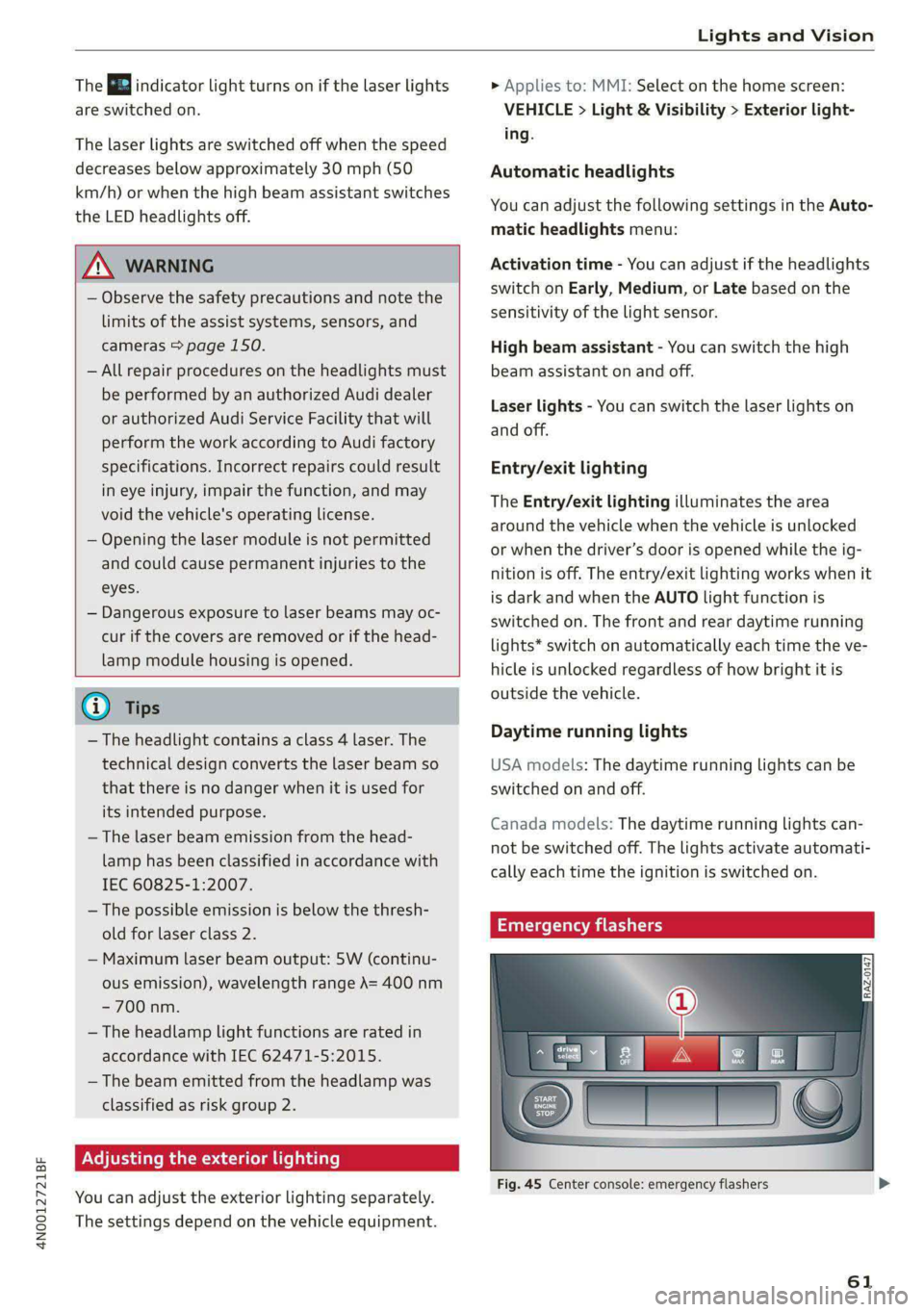
rgency flashers
Fig. 45 Center console: emergency flashers
61
Page 64 of 362

Lights and Vision
The emergency flashers help to make other driv-
ers aware of your vehicle in dangerous situations.
> Press the A @ button to switch the emergency
flashers on or off.
When the emergency flashers are turned on, the
a and B indicator lights will flash at the same
time.
You can indicate a lane change or a turn when the
emergency flashers are switched on by using the
turn signal lever. The emergency flashers stop
temporarily.
The emergency flashers also work when the igni-
tion is turned off.
@) Tips
You should switch the emergency flashers on
if:
— you are the last car ina traffic jam so that
all other vehicles approaching from behind
can see your vehicle
— your vehicle has broken down or you are
having an emergency
— your vehicle is being towed or if you are tow-
ing another vehicle
Messages
If the 8, indicator light turns on, a bulb has
failed. The displayed message indicates the cause
and possible solutions. If one of the messages re-
mains on, drive immediately to an authorized
Audi dealer or authorized Audi Service Facility to
have the malfunction repaired.
By Audi adaptive light: malfunction! See own-
er's manual
Adaptive light* is not working. The headlights
still function. Drive immediately to an authorized
Audi dealer or authorized Audi Service Facility to
have the malfunction repaired.
OLED tail light: malfunction! Switched off
permanently. See owner's manual
Drive immediately to an authorized Audi dealer
or authorized Audi Service Facility to have the
malfunction repaired.
62
High beam assistant: malfunction! See own-
er's manual
You can still switch the high beams on or off
manually. Drive immediately to an authorized
Audi dealer or authorized Audi Service Facility to
have the malfunction repaired.
High beam assistant: currently unavailable.
Camera view limited due to surroundings. See
owner's manual
This message appears if the camera's visual field
is blocked. The system will switch itself off. Try
switching the systems on later.
a Automatic headlights: malfunction! See
owner's manual
The light/rain sensor is malfunctioning. When
the AUTO light function is on, the low beams will
remain switched on at all times for safety rea-
sons. Drive immediately to an authorized Audi
dealer or authorized Audi Service Facility to have
the malfunction repaired.
Interior lighting
ry 3S
S 2
> a
oO
Fig. 46 Headliner: interior lighting
Interior lighting buttons
axs* - Interior lighting on/off
con® - Rear interior lighting on/off
4 - Door contact switch on/off. The interior light-
ing is controlled automatically.
Touch-sensitive reading lights
> To turn a reading light on or off, touch the sur-
face @ briefly.
Page 66 of 362

Lights and Vision
Vision
Adjusting exterior mirrors
RAZ-0150
Fig. 48 Driver's door: knob for the exterior mirrors
> Turn the knob in the driver's door to the desired
position:
0 - Deactivates all adjustment functions.
Q/ §- Selects the left or right exterior mirror.
To adjust the mirror glass in a mirror, press the
knob in the desired direction.
GA - Heats* the mirror glass depending on the
outside temperature.
©) - Folds the exterior mirrors*. To fold the mir-
rors out, turn the knob to one of the other posi-
tions. In the MMI, you can select if the mirrors
fold in automatically when you lock the vehicle
=> page 42.
Front passenger's exterior mirror tilt
function*
Requirement: the knob must be in the position
for the front passenger’s exterior mirror.
The mirror surfaces tilt slightly when reverse
gear is selected to provide a better view, for ex-
ample of the edge of the curb.
You can adjust the mirror surface by turning the
knob in the desired direction.
The mirror moves from the reversing position
back to the original position:
— When you switch the ignition off
— When you drive forward at speeds faster than 9
mph (15 km/h).
— When the knob is no longer in the position for
the front passenger exterior mirror
64
ZA WARNING
Curved mirror surfaces (for example convex)
enlarge the field of vision. However, they
make objects in the mirror appear smaller and
farther away. When using these mirrors to es-
timate your distance to vehicles behind you
when changing lanes, you could estimate in-
correctly, which increases the risk of an acci-
dent.
@) Note
— Applies to: vehicles with power folding exte-
rior mirrors: If the mirror housing was
moved by outside forces (such as an impact
when maneuvering), you must use the pow-
er folding function to fold the mirror all the
way out. The mirrors will make a loud noise
when they latch into place. The mirror hous-
ing must not be moved back into place by
hand because this could impair the function
of the mirror mechanism.
— Applies to: vehicles without power folding
exterior mirrors: If the mirror housing was
moved by outside forces (such as an impact
when maneuvering), you must move it back
in place by hand.
— If you wash the vehicle in an automatic car
wash, you must fold the exterior mirrors in
to reduce the risk of damage to the mirrors.
Never fold power folding exterior mirrors*
by hand. Only fold them in and out using
the power controls.
G) Tips
If the power adjusting function malfunctions,
the glass in both mirrors can be adjusted by
pressing on the edge of it by hand.
Dimming the mirrors
> The interior and exterior mirrors dim automati-
cally when light shines on them, for example
from headlights on a vehicle behind you.
ZX WARNING
— If the glass on an automatic dimming mirror
breaks, electrolyte can leak out. This liquid >
Page 69 of 362

4N0012721BF
Lights and Vision
switched on again by moving the windshield
wiper lever to any position. The single wipe
function (lever in position @) also functions
when the ignition is switched off.
— Worn or dirty windshield wiper blades result
in streaking. This can affect the rain sensor
function. Check your windshield wiper
blades regularly.
— The washer fluid nozzles for the windshield
washer system are heated when the ignition
is on if the outside temperature is low.
— When stopping temporarily, such as at a
traffic light, the speed of the windshield
wipers automatically reduces by one level.
[eG ce a es ce wiper blades
B8V-0696]
Ae
Fig. 52 Windshield wipers: changing the wiper blades
Wiper blade replacement position
> Switch off the ignition and hold the windshield
wiper lever in position @) > page 66, fig. 51 un-
til the windshield wiper moves into the wiper
blade replacement position.
> To bring the windshield wipers into the normal
position, switch the ignition on and hold the
windshield wiper lever in position @) until the
windshield wipers go back to the original posi-
tion, or drive faster than 8 mph (12 km/h).
You can also turn the wiper blade replacement
position on or off in the MMI:
> Switch the windshield wipers off (position @
=> page 66, fig. 51).
> Applies to MMI: Select on the home screen: VE-
HICLE > Settings & Service > Wiper change po-
sition.
Cleaning the wiper blades
Requirement: the windshield wipers must be in
the wiper blade replacement position.
> Fold the windshield wiper arm away from the
windshield.
> For information on cleaning, see > table on
page 311.
Replacing the wiper blades
Requirement: the windshield wipers must be in
the wiper blade replacement position.
> Fold the windshield wiper arm away from the
windshield.
> Press the locking knob @) on the wiper blade.
Hold the wiper blade firmly.
» Remove the wiper blade from the windshield
wiper arm mount (2).
> Insert the new wiper blade into the mount on
the wiper arm until it clicks into place.
> Place the wiper arm back on the windshield.
> Exit the wiper blade replacement position.
ZA WARNING
— For safety reasons, the windshield wiper
blades should be replaced once or twice
each year.
— Dirty windshield wiper blades can impair vi-
sion, which increases the risk of an accident.
@) Note
— The windshield wipers must only be lifted
up when in the wiper blade replacement po-
sition.
Otherwise, you risk damaging the
paint on the hood or the windshield wiper
motor.
— You should not move your vehicle or press
the windshield wiper lever when the wiper
arms are folded up from the windshield. The
windshield wipers would move back into
their original position and could damage the
hood and windshield.
67
>
Page 78 of 362

Sitting correctly and safely
Requirements
> Read and follow the important safety precau-
tions about the reclining rear seats > /\ in Ad-
justing the comfort position on page 77.
> Make sure Passenger side rear seat adjustment
is switched on in the MMI > page 73.
> To activate the front passenger's seat adjust-
ment, press the button @)= page 74, fig. 59.
The LED in the button will turn on.
» Applies to: Rear Seat Remote: Press SEATS on
the Rear Seat Remote. Press the desired func-
tion and select the front passenger seat
=> page 75, fig. 60.
Adjusting the backrests
> Applies to: buttons in the center console/center
armrest: Press the button (2) to the left or right
=> page 74, fig. 59.
> Applies to: Rear Seat Remote: Press the < but-
ton. Press the respective arrow until the desired
position is reached.
Adjusting the front passenger seat forward
or backward
> Applies to: buttons in the center armrest/
center console: Push the button @) > page 74,
fig. 59 to the left or right.
> Applies to: Rear Seat Remote: Press the 2 but-
ton.
Press the respective arrow until the desired
position is reached.
Adjusting the front passenger seat upward
and downward
» Applies to: buttons in the center armrest/
center console: Press the button @) > page 74,
fig. 59 upward or downward.
> Applies to: Rear Seat Remote: Press the 2 but-
ton. Press the respective arrow until the desired
position is reached.
Adjusting the leg support
Applies to: reclining rear seats
Requirement: the reclining position must be se-
lected.
>» Applies to: Rear Seat Remote: Press the 24 but-
ton to fold the leg support out and in. Press the
respective arrow until the desired position is
reached.
76
> To adjust the height or depth of the leg sup-
port, adjust the front passenger seat forward/
backward or upward/downward.
> To adjust the foot massage area, adjust the an-
gle of the front passenger seat backrest.
Z\ WARNING
Applies to: reclining seats: To reduce the risk
of injury, make sure the area between the leg
support and the front passenger's seat back-
rest is clear before folding in the leg support.
G@) Tips
— If the settings cannot be applied from the
rear, then the child safety lock may be
switched on or the front passenger’s seat
adjustment for the rear seats may be
switched off in the MMI > page 73. If the
child safety lock is switched on, the @ but-
ton in the driver's door > page 51 turns on.
PNA m da Meolicela a eth ela|
Applies to: vehicles with reclining/upright position or reclin-
ing seat system
Depending on the equipment, you may be able to
adjust the comfort position using the buttons in
the rear door or on the Rear Seat Remote.
Selecting the reclining position
> Applies to: buttons in the rear door for the re-
clining/upright position: To adjust the reclining
position, press the =% button until the seat has
reached its end position.
> Applies to: Rear Seat Remote: Select on the
home screen: SEATS > Seat setting.
> Press ) or ( until the x= or = symbol is dis-
played.
> Press & or =.
Selecting the upright position
> Applies to: buttons in the rear door for the re-
clining/upright position: To set the upright po-
sition, press the & or J button until the seat
has reached its end position.
> Applies to: Rear Seat Remote: Select on the
home screen: SEATS > Seat setting.
Page 79 of 362

4N0012721BF
Sitting correctly and safely
> Press ) or (until the & or J symbol is dis-
played.
> Press & or J.
Reclining rear seat
Applies to: reclining rear seats
In the reclining position, the front passenger
seat is moved forward, the head restraint on the
front passenger seat is folded forward, and the
backrest is tilted forward. Depending on the last
setting in the Rear Seat Remote, the leg support
may fold out and the screen on the front pas-
senger's seat may tilt forward.
In the reclining position, you can adjust the foot
massage, for example > page 75.
In the upright position, the leg support is folded
in, the front passenger seat is moved back into
the original position, and the head restraint is
moved to the upright position > /A\.
AN WARNING
Applies to: reclining rear seats:
— Due to the risk of fatal injury, the front pas-
senger's seat must not be used as a seat
when it is in the reclining position.
— Due to the risk of injury, never select the re-
clining position when the front passenger's
seat is occupied.
— Do not tilt the screens in the rear if the driv-
er's view of the right exterior mirror will be
obstructed.
@® Tips
— Applies to: reclining rear seats and screens
in the rear: When adjusting the screen on
the front passenger's seat, make sure the
driver has a clear view of the exterior mir-
rors. Make sure that the view of the exterior
mirror is not obstructed in the MMI. Other-
wise, move the screen back to an upright
position.
— If the settings cannot be applied from the
rear, the child safety lock might be switched
on. If the child safety lock is switched on,
the @ button in the driver's door > page 51
turns on.
Clare slg
Applies to: vehicles with footrests in rear
BGA-0030
8 3 3 < G a
Fig. 62 Rear footwell: footrest
The angle of the footrest can be adjusted to two
positions > fig. 61:
@ Higher angle
Lower angle
® Note
To reduce the risk of damaging the footrests,
you must make sure the footrests under the
seat will not be crushed when adjusting the
driver's or front passenger's seat.
Steering wheel
General information
Make sure that:
— The distance between your upper body and the
steering wheel is at least 10 inches (25 cm)
— Your arms are bent slightly at the elbows
— You have a sufficient view of the area around
the vehicle and you have a clear view of the in-
strument cluster and head-up display”.
77
>
Page 81 of 362
4N0012721BF
Sitting correctly and safely
immediately by an authorized Audi dealer or
authorized Audi Service Facility.
Front head restraints
Applies to: vehicles with adjustable head restraints
RAZ-0684
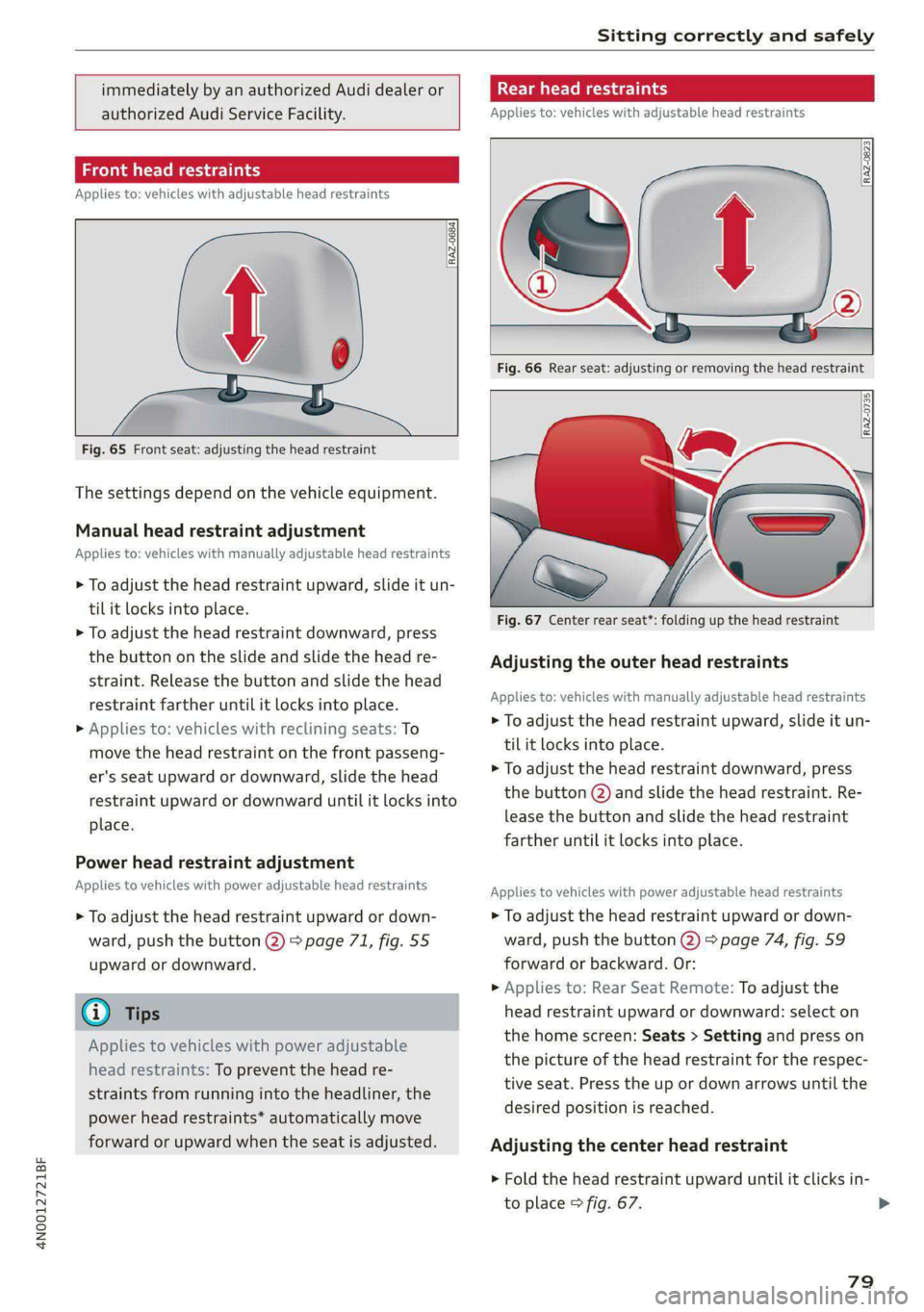
Fig. 65 Front seat: adjusting the head restraint
The settings depend on the vehicle equipment.
Manual head restraint adjustment
Applies to: vehicles with manually adjustable head restraints
> To adjust the head restraint upward, slide it un-
til it locks into place.
> To adjust the head restraint downward, press
the button on the slide and slide the head re-
straint. Release the button and slide the head
restraint farther until it locks into place.
> Applies to: vehicles with reclining seats: To
move the head restraint on the front passeng-
er's seat upward or downward, slide the head
restraint upward or downward until it locks into
place.
Power head restraint adjustment
Applies to vehicles with power adjustable head restraints
> To adjust the head restraint upward or down-
ward, push the button @) > page 71, fig. 55
upward or downward.
@® Tips
Applies to vehicles with power adjustable
head restraints: To prevent the head re-
straints from running into the headliner, the
power head restraints* automatically move
forward or upward when the seat is adjusted.
mate Mera y
Applies to: vehicles with adjustable head restraints
Fig. 66 Rear seat: adjusting or removing the head restraint
RAZ-0735
Fig. 67 Center rear seat*: folding up the head restraint
Adjusting the outer head restraints
Applies to: vehicles with manually adjustable head restraints
> To adjust the head restraint upward, slide it un-
til it locks into place.
> To adjust the head restraint downward, press
the button @) and slide the head restraint. Re-
lease the button and slide the head restraint
farther until it locks into place.
Applies to vehicles with power adjustable head restraints
> To adjust the head restraint upward or down-
ward, push the button @) > page 74, fig. 59
forward or backward. Or:
> Applies to: Rear Seat Remote: To adjust the
head restraint upward or downward: select on
the home screen: Seats > Setting and press on
the picture of the head restraint for the respec-
tive seat. Press the up or down arrows until the
desired position is reached.
Adjusting the center head restraint
> Fold the head restraint upward until it clicks in-
to place > fig. 67. >
79
Page 84 of 362

Sitting correctly and safely
rivets on clothing in the area where the safety
belt is worn. Otherwise, the safety belt could
be damaged.
Cm cele tL mre
a 3
z
2 =z x a.
B4H-0270
led while driving. Above certain speeds, addition-
al warning tones will sound.
Depending on the equipment, the safety belts in
the rear may also be monitored using the follow-
ing indicator lights:
aI - If this indicator light turns on, the safety
belt for the corresponding rear seat is not fas-
tened.
Ba - If this indicator light turns on, the safety
belt for the rear seat has been fastened.
OXIA) We mT Aad
B4G-0004
Fig. 71 Releasing the belt buckle from the belt latch
Observe the safety precautions > page 80.
Fastening the safety belt
> Pull the safety belt by the belt buckle evenly
across your chest and lap.
> Insert the belt buckle in the belt latch belong-
ing to the seat until it audibly engages
> fig. 70.
> Pull on the belt to make sure that the belt is se-
curely locked in the latch.
Unfastening the safety belt
> Press the red button on the belt latch > fig. 71.
The belt buckle will pop out.
> Guide the belt back by hand so that the safety
belt can roll up more easily.
Safety belt monitoring system
eB - If the indicator light turns on or flashes, a
safety belt is not fastened or it has been unbuck-
82
Fig. 72 Belt height adjustment for the front seats - safety
belt relay
> To move the belt higher, slide the safety belt re-
lay @ upward.
> To move the belt lower, press the release but-
ton @ and slide the safety belt relay @) down-
ward.
> To check if the safety belt relay is securely
locked in place, pull firmly on the belt.
G) Tips
You can also adjust the height of the front
seats to change the position of the safety
belts.
PN esata delay
Belt retractor lock
The safety belts on the rear seats and on the
front passenger seat are equipped with a belt re-
tractor lock.
> If you secure a child safety seat with a safety
belt, the belt retractor lock on the safety belt >