2021 ALFA ROMEO GIULIA brakes
[x] Cancel search: brakesPage 153 of 284
151
NOTE:
In the event of a DAA system failure, an
amber symbol will appear in the instrument
cluster display along with a dedicated
message.
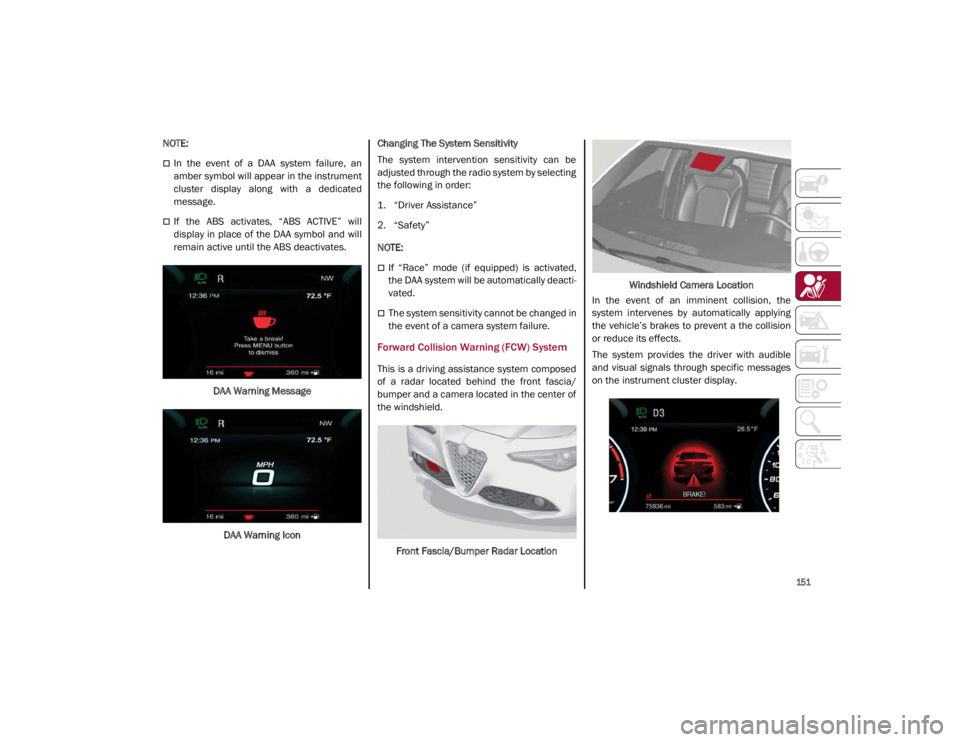
If the ABS activates, “ABS ACTIVE” will
display in place of the DAA symbol and will
remain active until the ABS deactivates.DAA Warning MessageDAA Warning Icon Changing The System Sensitivity
The system intervention sensitivity can be
adjusted through the radio system by selecting
the following in order:
1. “Driver Assistance”
2. “Safety”
NOTE:
If “Race” mode (if equipped) is activated,
the DAA system will be automatically deacti
-
vated.
The system sensitivity cannot be changed in
the event of a camera system failure.
Forward Collision Warning (FCW) System
This is a driving assistance system composed
of a radar located behind the front fascia/
bumper and a camera located in the center of
the windshield.
Front Fascia/Bumper Radar Location Windshield Camera Location
In the event of an imminent collision, the
system intervenes by automatically applying
the vehicle’s brakes to prevent a the collision
or reduce its effects.
The system provides the driver with audible
and visual signals through specific messages
on the instrument cluster display.
21_GA_OM_EN_USC_t.book Page 151
Page 155 of 284

153
NOTE:
If the safety belts of the front seats are not
correctly fastened, the system will not inter-
vene on the braking system (only audible and
visual signals will be provided).
Changing The System Sensitivity
The sensitivity of the system can be changed
through the radio system menu, choosing from
one of the following three options: "Near",
"Medium" or "Far". Refer to the description in
the Information and Entertainment System
Owner’s Manual Supplement for how to
change the settings.
The default setting is "Medium". With this
setting, the system warns the driver of a
possible collision with the vehicle in front
when that vehicle is at a standard distance,
between that of the other two settings.
With the system sensitivity set to "Far", the
system will warn the driver of a possible colli -
sion with the vehicle in front when that vehicle
is at a greater distance, thus providing the
possibility of acting on the brakes more lightly
and gradually. This setting provides the driver
with the maximum possible reaction time to
prevent a potential collision.
With the option set to "Near", the system will
alert the driver of a possible collision with the
vehicle in front when that vehicle is close. This
setting offers the driver a lower reaction time
compared to the "Medium" and "Far" settings,
in the event of a potential collision, but
permits more dynamic driving of the vehicle. The system sensitivity setting is kept in the
memory when the engine is turned off.
System Limited Operation Warning
If a dedicated message is displayed, a condi
-
tion limiting the system operation may have
occurred. The possible reasons of this limita -
tion are if something is blocking the camera
view, or a fault is present.
If an obstruction is signaled, clean the area of
the windshield.
Although the vehicle can still be driven in
normal conditions, the system may be not
completely available.
When the conditions limiting the system func -
tions end, this will go back to normal and
complete operation. Should the fault persist,
contact an authorized dealer.
System Failure Signaling
If the system turns off and a dedicated
message is shown on the display, it means
that there is a fault with the system.
In this case, it is still possible to drive the
vehicle, but you are advised to contact an
authorized dealer as soon as possible.
Radar Indication Not Available
If conditions are such that the radar cannot
detect obstacles correctly, the system is deac -
tivated and a dedicated message appears on
the display. This generally occurs in the event
of poor visibility, such as when it is snowing or
raining heavily. The function of this system can also be tempo
-
rarily reduced due to obstructions such as
mud, dirt or ice on the fascia/bumper. In such
cases, a dedicated message will be shown on
the display and the system will be deactivated.
This message can sometimes appear in condi -
tions of high reflectivity (e.g. tunnels with
reflective tiles or ice or snow). When the condi -
tions limiting the system functions end, it will
go back to normal and complete operation.
In certain cases, this dedicated message
could be displayed when the radar is not
detecting any vehicles or objects within its
view range.
If atmospheric conditions are not the reason
behind this message, check if the sensor is
dirty. It could be necessary to clean or remove
any obstructions in the area.
If the message appears frequently, even in the
absence of atmospheric conditions such as
snow, rain, mud or other obstructions, contact an
authorized dealer for a sensor alignment check.
In the absence of visible obstructions, manu -
ally removing the decorative cover trim and
cleaning the radar surface could be required.
Have this operation performed at an autho -
rized dealer.
NOTE:
It is recommended that you do not install
devices, accessories, or aerodynamic attach -
ments in front of the sensor or darken it in any
way, as this can compromise the correct func -
tioning of the system.
21_GA_OM_EN_USC_t.book Page 153
Page 156 of 284
SAFETY
154
Frontal Collision Alarm With Active Braking
If this function is selected, the brakes are
operated to reduce the speed of the vehicle in
the event of potential collision.
This function applies an additional braking
pressure if the braking pressure applied by the
driver does not suffice to prevent potential
collision.
The function is active with speed above 2 mph
(4 km/h).
NOTE:
When using an automatic car wash it is recom-
mended to deactivate the system through the
settings of the radio system. The system may
detect the presence of a car, a wall or another
obstacle and activate.
Driving In Special Conditions
In certain driving conditions, system interven -
tion might be unexpected or delayed. The
driver must therefore be very careful, keeping
control of the vehicle.
Driving close to a bend.
The vehicle ahead is leaving a roundabout.
Vehicles with small dimensions and/or not
aligned in the driving lane.
Lane change by other vehicles.
Vehicles traveling at right angles to the
vehicle.
NOTE:
In particularly complex traffic conditions,
the driver can deactivate the system manu -
ally through the radio system.
If the driver depresses the brake pedal fully
or makes an excessive steering maneuver
during system operation, the automatic
braking function may deactivate (e.g. to
allow a possible maneuver to avoid the
obstacle).
The FCW system is automatically deacti -
vated when operating in race mode and a
warning message will be displayed on the
instrument cluster
Ú
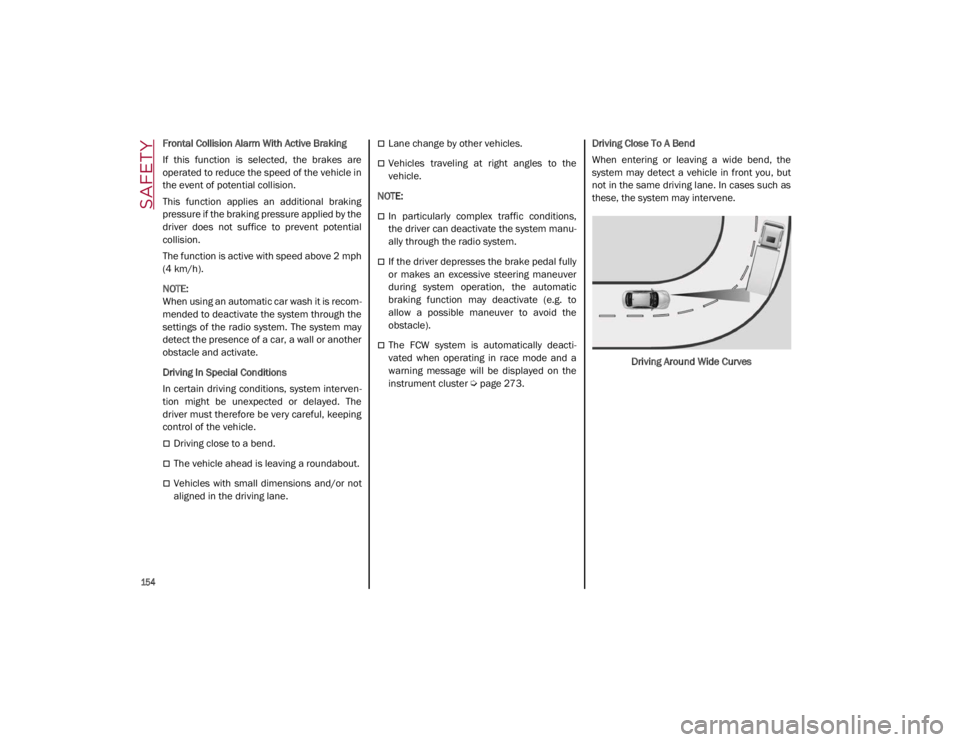
page 273. Driving Close To A Bend
When entering or leaving a wide bend, the
system may detect a vehicle in front you, but
not in the same driving lane. In cases such as
these, the system may intervene.
Driving Around Wide Curves
21_GA_OM_EN_USC_t.book Page 154
Page 206 of 284

204
SERVICING AND MAINTENANCE
Correct servicing permits the performance of
the vehicle to be maintained over time, as well
as limited running costs and safeguarding the
efficiency of the safety systems.
This chapter explains how.
SCHEDULED SERVICING
Correct servicing is crucial for guaranteeing a
long life for the vehicle under the best condi-
tions.
For this reason, Alfa Romeo has planned a
series of checks and services for your vehicle
at fixed intervals based on distance and time,
as described in the Scheduled Servicing Plan.
Before each service, it is always necessary to
carefully follow the instructions in the Sched -
uled Servicing Plan (e.g. periodically check
level of fluids, tire pressure, etc.).
Scheduled Servicing is offered by an autho -
rized dealer according to a set time schedule.
If, during each operation, in addition to the
ones scheduled, the need arises for further
replacements or repairs, these may be carried
out with the owner’s explicit consent only.
NOTE:
Scheduled Servicing intervals are required by
FCA US LLC. Failure to have them carried out
may invalidate the New Vehicle Limited
Warranty.
You are advised to inform an authorized
dealer of any small operating irregularities
without waiting for the next service.
Periodic Checks
Every month or every 600 miles (1,000 km) or
before long trips check and, if necessary, top
off:
Engine coolant level.
Brake fluid level (if insufficient, see an
authorized dealer as soon as possible).
Windshield washer fluid level.
Tire inflation pressure and condition.
Operation of lighting system (headlights,
direction indicators, hazard warning lights,
etc.).
Operation of windshield washing/wiping
system and positioning/wear of wiper
blades.
Inspect the CV/Universal joints.
Oil consumption of the engine depends on
conditions and driving style. For this reason,
the engine oil level must be checked every
1,860 miles (3,000 km), and top off if neces -
sary
Ú
page 213.
Heavy Usage Of The Vehicle
If the vehicle is used under one of the following
conditions:
Dusty roads.
Short, repeated journeys less than 4 miles
(7 km) at sub-zero outside temperatures.
Engine often idling or driving long distances
at low speeds or long periods of inactivity.
In the event of a long period of inactivity.
The following checks must be carried out more
often than indicated in the Scheduled
Servicing Plan:
Check cleanliness of hood and trunk locks,
cleanliness and lubrication of linkage.
Visually inspect conditions of: engine, trans -
mission, pipes and hoses (exhaust/fuel
system/brakes) and rubber elements
(sleeves/bushes, etc.).
Check battery charge and battery fluid level
(electrolyte).
Visually inspect conditions of the accessory
drive belts.
Check and, if necessary, change engine oil
and replace oil filter.
Check and, if necessary, replace cabin air
filter.
Check and, if necessary, replace engine air
cleaner.
Severe Duty All Models
Vehicles that are operated in a dusty and
off-road environment, or predominately at idle
or very low engine RPM are known as Severe
Duty vehicles. It is recommended that you
change engine oil at 4,000 miles (6,500 km)
or 350 hours of engine run time.
21_GA_OM_EN_USC_t.book Page 204
Page 207 of 284

205
Maintenance Plan — 2.0L Engine
Thousands of miles102030405060708090100110120130140150
Years123456789101112131415
Thousands of kilometers163248648096112128144160176192208224240
SOS back up battery replacement (if equipped)1●●●
Check battery charge status with the proper
instrument
●●●●●●●●●●●●●●●
Check tire condition/wear and adjust pressure, if
necessary. Check the tire repair kit recharge
condition and expiration date
●●●●●●●●●●●●●●●
Check operation of lighting system (headlights,
direction indicators, hazard warning lights, trunk lid,
passenger compartment, glove compartment,
instrument panel warning lights, etc.)
●●●●●●●●●●●●●●●
Check and, if necessary, top up fluid levels
●●●●●●●●●●●●●●●
Check engine control system operation (via
diagnostic tool) and, if equipped, engine oil
degradation
2●●●●●●●●●●●●●●●
Visually inspect conditions of: exterior bodywork,
underbody protection, pipes and hoses (exhaust, fuel
system, brakes), rubber elements (sleeves, bushes,
etc.)
●●●●●●●
Check position/wear of front windshield wiper blade●●●●●●●●
Check operation of the windshield wiper/washer
system and adjust nozzles, if necessary
●●●●●●●●
21_GA_OM_EN_USC_t.book Page 205
Page 210 of 284
SERVICING AND MAINTENANCE
208
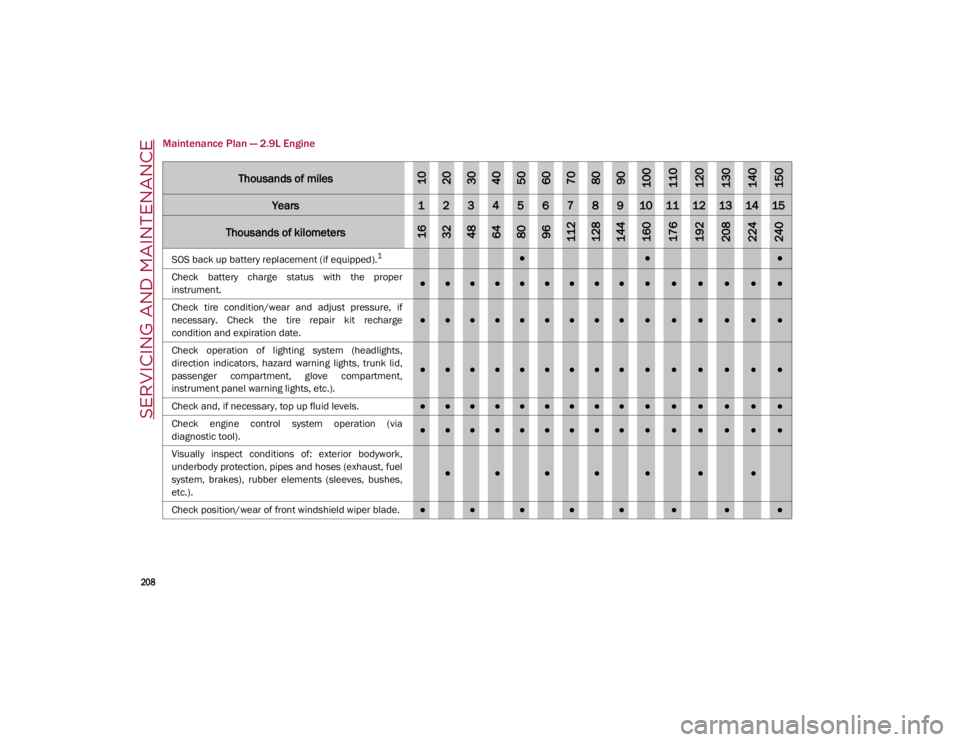
Maintenance Plan — 2.9L Engine
Thousands of miles102030405060708090100110120130140150
Years123456789101112131415
Thousands of kilometers163248648096112128144160176192208224240
SOS back up battery replacement (if equipped).1●●●
Check battery charge status with the proper
instrument.
●●●●●●●●●●●●●●●
Check tire condition/wear and adjust pressure, if
necessary. Check the tire repair kit recharge
condition and expiration date.
●●●●●●●●●●●●●●●
Check operation of lighting system (headlights,
direction indicators, hazard warning lights, trunk lid,
passenger compartment, glove compartment,
instrument panel warning lights, etc.).
●●●●●●●●●●●●●●●
Check and, if necessary, top up fluid levels.
●●●●●●●●●●●●●●●
Check engine control system operation (via
diagnostic tool).
●●●●●●●●●●●●●●●
Visually inspect conditions of: exterior bodywork,
underbody protection, pipes and hoses (exhaust, fuel
system, brakes), rubber elements (sleeves, bushes,
etc.).
●●●●●●●
Check position/wear of front windshield wiper blade.●●●●●●●●
21_GA_OM_EN_USC_t.book Page 208
Page 224 of 284
SERVICING AND MAINTENANCE
222
Braking System
In order to guarantee the efficiency of the
braking system, periodically check its compo-
nents; for this operation, contact an autho -
rized dealer.
For the correct servicing intervals
Ú
page 204.
NOTE:
Driving with your foot resting on the brake
pedal may compromise its efficiency,
increasing the risk of accidents. When driving,
never keep your foot on the brake pedal and
don’t put unnecessary strain on it to prevent
the brakes from overheating: excess pad wear
may cause damage to the braking system.
When an insufficient oil level is detected,
contact an authorized dealer to have the
system checked.
Always keep the cap of the brake fluid reser-
voir (in the engine compartment)
completely closed.
Automatic Transmission
Use only a transmission oil with the same char -
acteristics as those indicated on
Ú
page 268.
Special Additives
Do not use any type of additive with the auto -
matic transmission oil. The automatic trans -
mission oil is a product designed specially for
this vehicle and its performance may be
compromised through the use of further addi -
tives.
Frequency Of Oil Changes
In normal vehicle operating conditions, it is not
necessary to change the transmission oil.
WARNING!
Use only FCA US LLC recommended brake
fluid
Ú
page 268. Using the wrong type of
brake fluid can severely damage your
brake system and/or impair its perfor -
mance. The proper type of brake fluid for
your vehicle is also identified on the orig -
inal factory installed hydraulic master
cylinder reservoir.
To avoid contamination from foreign
matter or moisture, use only new brake
fluid or fluid that has been in a tightly
closed container. Keep the master
cylinder reservoir cap secured at all times.
Brake fluid in a open container absorbs
moisture from the air resulting in a lower
boiling point. This may cause it to boil
unexpectedly during hard or prolonged
braking, resulting in sudden brake failure.
This could result in a collision.
Overfilling the brake fluid reservoir can
result in spilling brake fluid on hot engine
parts, causing the brake fluid to catch fire.
Brake fluid can also damage painted and
vinyl surfaces, care should be taken to
avoid its contact with these surfaces.
Do not allow petroleum-based fluid to
contaminate the brake fluid. Brake seal
components could be damaged, causing
partial or complete brake failure. This
could result in a collision.
CAUTION!
Do not use chemical flushes in your
transmission as the chemicals can damage
your transmission components. Such
damage is not covered by the New Vehicle
Limited Warranty.
CAUTION!
If a transmission fluid leak occurs, visit an
authorized dealer immediately. Severe
transmission damage may occur. An
authorized dealer has the proper tools to
adjust the fluid level accurately.
21_GA_OM_EN_USC_t.book Page 222
Page 249 of 284

247
soap to wipe away promptly. Do not use harsh
chemicals or a stiff brush. They can damage
the wheel’s protective coating that helps keep
them from corroding and tarnishing.
When cleaning extremely dirty wheels
including excessive brake dust, care must be
taken in the selection of tire and wheel
cleaning chemicals and equipment to prevent
damage to the wheels. Select a non-abrasive,
non-acidic cleaner for aluminum or chrome
wheels.
NOTE:
If you intend parking or storing your vehicle for
an extended period after cleaning the wheels
with wheel cleaner, drive your vehicle and
apply the brakes to remove the water droplets
from the brake components. This activity will
remove the red rust on the brake rotors and
prevent vehicle vibration when braking.
Dark Or Low Gloss Wheels
Tire Types
All Season Tires — If Equipped
All Season tires provide traction for all seasons
(Spring, Summer, Autumn, and Winter). Trac
-
tion levels may vary between different all
season tires. All season tires can be identified
by the M+S, M&S, M/S or MS designation on
the tire sidewall. Use all season tires only in
sets of four; failure to do so may adversely
affect the safety and handling of your vehicle.
Summer Or Three Season Tires — If
Equipped
Summer tires provide traction in both wet and
dry conditions, and are not intended to be
driven in snow or on ice. If your vehicle is
equipped with Summer tires, be aware these
tires are not designed for Winter or cold driving
conditions. Install Winter tires on your vehicle
when ambient temperatures are less than
40°F (5°C) or if roads are covered with ice or
snow. For more information, contact an autho -
rized dealer.
Summer tires do not contain the all season
designation or mountain/snowflake symbol on
the tire sidewall. Use Summer tires only in sets
of four; failure to do so may adversely affect
the safety and handling of your vehicle.
Snow Tires
Some areas of the country require the use of
snow tires during the Winter. Snow tires can
be identified by a “mountain/snowflake”
symbol on the tire sidewall.
CAUTION!
Avoid products or automatic car washes
that use acidic solutions or strong alkaline
additives or harsh brushes. Many
aftermarket wheel cleaners and automatic
car washes may damage the wheel's
protective finish. Such damage is not
covered by the New Vehicle Limited
Warranty. Only car wash soap is
recommended.
CAUTION!
Do not use scouring pads, steel wool, a
bristle brush, metal polishes or oven
cleaner. These products may damage the
wheel's protective finish. Such damage is
not covered by the New Vehicle Limited
Warranty. Only car wash soap is
recommended.
CAUTION!
If your vehicle is equipped with these
specialty wheels, DO NOT USE wheel
cleaners, abrasives, or polishing
compounds. They will permanently damage
this finish and such damage is not covered
by the New Vehicle Limited Warranty. HAND
WASH ONLY USING MILD SOAP AND WATER
WITH A SOFT CLOTH. Used on a regular
basis; this is all that is required to maintain
this finish.
WARNING!
Do not use Summer tires in snow/ice
conditions. You could lose vehicle control,
resulting in severe injury or death. Driving
too fast for conditions also creates the
possibility of loss of vehicle control.
21_GA_OM_EN_USC_t.book Page 247