2020 VOLVO S90 TWIN ENGINE brake
[x] Cancel search: brakePage 374 of 655

DRIVER SUPPORT
* Option/accessory.
372
Using Park Assist Pilot *
Park Assist Pilot (PAP 98
) helps the driver park
using three different steps. The function can also help the driver pull out of a parkingspace.
The function measures the space and steers the vehicle. The driver's role is to:
keep close watch of the area around thevehicle
follow the instructions on the center dis-play
change gears (reverse/forward) – an audi-ble signal indicates when the driver needsto change gears
regulating and maintaining a safe speed
applying the brakes and stopping the vehi-cle.
Information about the actions required by thedriver are provided in the center display usingsymbols, graphics and/or text. The function can be activated if the following criteria have been met after the engine isstarted:
Your vehicle's speed is lower than30 km/h (20 mph).
NOTE
The distance between the vehicle and parking spots should be 0.5–1.5 meters(1.6–5.0 ft) when the function is lookingfor parking.
Parking with Park Assist PilotThe function helps park the vehicle using the following steps:
1. The system searches for and measures
potential parking spaces.
2. The vehicle is steered while it is backing into the parking space.
3. The vehicle is positioned in the parking space (the driver may be prompted to shift gears and apply the brakes).
Searching and measuring potential parking spots
The function can be activated in the center display's Func-tion view. It can also be accessed from the camera views.
GREEN button indicator light – the func- tion is activated.
GRAY button indicator light – the functionis deactivated.
Parallel parking search overview.
Perpendicular parking search overview.
The vehicle's speed may not exceed 30 km/h (20 mph) when parallel parking or 20 km/h(12 mph) when perpendicular parking.
98
Park Assist Pilot
Page 376 of 655

||
DRIVER SUPPORT
* Option/accessory.
374
Positioning the vehicle in the parking space
Parallel parking positioning overview.
Perpendicular parking positioning overview.
1. Move the gear selector to the gear instruc-
ted by the system. Wait until the steering wheel turns and then drive slowly forward.
2. Be prepared to stop the vehicle when instructed to do so by a graphic and mes-sage in the center display.
3. Engage reverse gear and back up slowly.
4. Be prepared to apply the brakes when instructed to do so by a graphic and mes- sage in the center display.
The function will switch off automatically anda graphic and message will appear to indicatethat parking has been completed. Adjust-ments can always be made be the driver after-ward. Only the driver can determine when thevehicle is correctly parked.
CAUTION
The warning distance is shorter when the sensors are used by Park Assist Pilot (PAP 99
) compared to when they are used
by the Parking Assist system.
Related information
Park Assist Pilot
* (p. 370)
Park Assist Pilot
* limitations (p. 375)
Leaving a parallel parking space with Park Assist Pilot *
The
Park Out function can help the driver to
pull out of a parking space when the vehicle is parallel-parked.
NOTE
Leaving a parking space with the Park Outfunction should only be used in connection with parallel parking – it does not work forperpendicular parking.
The Park Out function is acti-
vated in the center display's Function view or in Cameraview.
GREEN button indicator light – the func- tion is activated.
GRAY button indicator light – the functionis deactivated.
1. Tap
Park Out in Function view or in Cam-
era view.
2. Move the gear selector to the suitable position (e.g. D or R) for the direction in which you will be pulling out of the park-ing space.
99Park Assist Pilot
Page 377 of 655

DRIVER SUPPORT
}}
* Option/accessory.375
3. Be prepared to stop the vehicle when
instructed to do so by a graphic and mes- sage in the center display. Follow theinstructions in the same way as for theparking procedure.
Note that the steering wheel can "spring"back when the procedure is completed andthe driver may need to turn the steering wheelback to the maximum position in order to pullout of the parking space. If the function determines that the driver can pull out of the parking space without any extramaneuvers, the function will be deactivated,even if it seems as though the vehicle is notcompletely out of the parking space.
Related information
Park Assist Pilot
* (p. 370)
Park Assist Pilot
* limitations (p. 375)
Park Assist Pilot * limitations
Park Assist Pilot (PAP 100
) may not be able to
detect all conditions in all situations and func- tionality may therefore be limited.
WARNING
The parking sensors have dead/blind spots where objects cannot bedetected.
Pay particular attention to people andanimals near the vehicle.
Bear in mind that the front end of thevehicle may swing out towards oncom-ing traffic during the parking maneuver.
CAUTION
Objects situated higher than the detection area of the sensors are not included whenthe parking maneuver is calculated, whichcould cause the function to swing into theparking space too early. Such parkingspaces should be avoided for this reason.
The driver should be aware of the following limitations for Park Assist Pilot:
The parking sequence is cancelledA parking sequence will be cancelled if: the driver moves the steering wheel
the vehicle's speed exceeds 7 km/h (4 mph)
the driver taps
Cancel in the center dis-
play
when the anti-lock brakes or the Elec- tronic stability control are engaged - e.g.when a wheel loses grip on a slippery road
when speed-dependent power steeringwheel resistance is working at reducedpower – e.g. during cooling due to over-heating.
A message in the center display will explainwhy the parking sequence was cancelled.
CAUTION
Under certain circumstances, the function may not be able to find parking spaces –one reason may be that the sensors aredisrupted by external sound sources thatemit the same ultrasonic frequencies thatthe system works with. Examples of such sources include horns, wet tires on asphalt, pneumatic brakes,exhaust noise from motorcycles, etc.
100 Park Assist Pilot
Page 382 of 655

HYBRID INFORMATION
380
General information about Twin Engine Twin Engine vehicles are driven just like any other vehicle, but certain functions differ froma vehicle powered exclusively by gasoline.The electric motor powers the vehicle primar-ily at low speeds; the gasoline engine is usedat higher speeds or during more active driv-ing.
The instrument panel displays Twin Engine- specific information - charging information,selected drive mode, distance to dischargedbattery and hybrid battery charge level. Different drive modes can be selected while driving, e.g. electric power only or, if morepower is needed, a combination of electric andgasoline power. The vehicle calculates a com-bination of driveability, driving experience,environmental impact and fuel economy forthe selected drive mode. In order to function optimally, the hybrid bat- tery (and its electrical drive systems) and thegasoline engine (and its drive systems) mustbe at the correct operating temperature. Bat-tery capacity can be considerably reduced ifthe battery is too cold or too hot. Precondi-tioning prepares the vehicle's drive systemsand passenger compartment before driving tohelp reduce both wear and energy consump-tion. It also helps increase the hybrid battery'srange.The hybrid battery which powers the electricmotor is recharged using the charging cable. Itcan also be recharged during light braking andthrough engine braking in gear position
B. The
combustion engine can also help recharge thehybrid battery.
Important
No electrical current
Keep in mind that if there is no electrical cur- rent to the vehicle, i.e. the ignition is switchedoff or the start battery is discharged, certainfunctions such as brakes, power steering, etc.will not work.
WARNING
If the vehicle does not have electrical cur- rent and both the electric motor and thegasoline engine are switched off, thebrakes cannot be used to stop the vehicle.
Towing not permitted
Never tow a Twin Engine vehicle behind another vehicle, as this could damage theelectric motor.
Exterior engine noise
Because there is no sound from the engine when only the electric motor is running, thevehicle is equipped with artificial exteriorbackground noise. This sound is intended tohelp warn children, pedestrians, cyclists, ani- mals, etc. outside the vehicle of the vehicle'sapproach.
High-voltage electrical current
WARNING
A number of electrical components in Twin Engine Plug-in Hybrid vehicles use high-voltage current and can be extremely dan-gerous if handled incorrectly. These com-ponents and any orange wiring in the vehi-cle may only be handled by trained andqualified Volvo service technicians.
Do not touch anything that is not clearly described in this Owner's Manual.
Related information
Charging the hybrid battery (p. 381)
Hybrid gauge (p. 83)
Drive modes (p. 419)
Starting and stopping preconditioning(p. 225)
Hybrid battery (p. 583)
Page 384 of 655
||
HYBRID INFORMATION
382
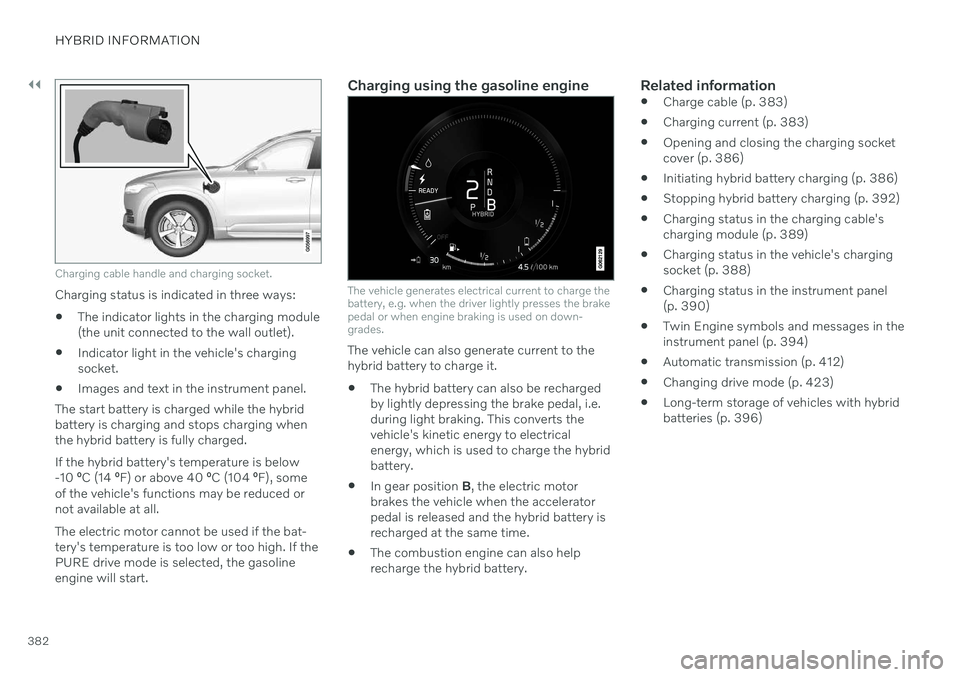
Charging cable handle and charging socket.
Charging status is indicated in three ways:
The indicator lights in the charging module (the unit connected to the wall outlet).
Indicator light in the vehicle's chargingsocket.
Images and text in the instrument panel.
The start battery is charged while the hybridbattery is charging and stops charging whenthe hybrid battery is fully charged. If the hybrid battery's temperature is below -10 ºC (14 ºF) or above 40 ºC (104 ºF), some
of the vehicle's functions may be reduced ornot available at all. The electric motor cannot be used if the bat- tery's temperature is too low or too high. If thePURE drive mode is selected, the gasolineengine will start.
Charging using the gasoline engine
The vehicle generates electrical current to charge the battery, e.g. when the driver lightly presses the brakepedal or when engine braking is used on down-grades.
The vehicle can also generate current to the hybrid battery to charge it. The hybrid battery can also be recharged by lightly depressing the brake pedal, i.e.during light braking. This converts thevehicle's kinetic energy to electricalenergy, which is used to charge the hybridbattery.
In gear position
B, the electric motor
brakes the vehicle when the acceleratorpedal is released and the hybrid battery isrecharged at the same time.
The combustion engine can also helprecharge the hybrid battery.
Related information
Charge cable (p. 383)
Charging current (p. 383)
Opening and closing the charging socketcover (p. 386)
Initiating hybrid battery charging (p. 386)
Stopping hybrid battery charging (p. 392)
Charging status in the charging cable'scharging module (p. 389)
Charging status in the vehicle's chargingsocket (p. 388)
Charging status in the instrument panel(p. 390)
Twin Engine symbols and messages in theinstrument panel (p. 394)
Automatic transmission (p. 412)
Changing drive mode (p. 423)
Long-term storage of vehicles with hybridbatteries (p. 396)
Page 393 of 655

HYBRID INFORMATION
391
NOTE
If the instrument panel is not used, it will go dark after a period of time. To reactivatethe display: depress the brake pedal,
open one of the doors, or
put the ignition in mode
I by turning
the START knob clockwise and then
releasing.
Related information
Charging the hybrid battery (p. 381)
Twin Engine symbols and messages in the instrument panel (p. 394)
Charging status in the vehicle's chargingsocket (p. 388)
Charging status in the charging cable'scharging module (p. 389)
Stopping hybrid battery charging (p. 392)
Page 400 of 655

STARTING AND DRIVING
* Option/accessory.
398
Starting the vehicle
The vehicle can be started using the start knob in the tunnel console when the remotekey is in the passenger compartment.
Start knob in the tunnel console.
WARNING
Before starting:
Buckle your seat belt.
Adjust the seat, steering wheel and mirrors.
Make sure you can fully depress thebrake pedal.
The remote key is not physically used to startthe ignition because the vehicle is equippedwith the keyless Passive Start system. To start the vehicle:
CAUTION
The vehicle cannot be started if the charg- ing cable is still plugged in. Make sure topull out the charging cable from the charg-ing socket before starting the vehicle.
1. The remote key must be inside the vehicle.
For vehicles with Passive Start, the key must be in the front section of the passen-ger compartment. With the optional key- less locking/unlocking function *, the key
can be anywhere in the vehicle.
2. Press and hold down the brake pedal 1
as
far as possible.
3. Turn the start knob clockwise and release. The control will automatically return to the original position.
WARNING
Never use more than one inlay mat at a time on the driver's floor. If any othertype of floor mat is used, remove theoriginal mat from the driver's seat floorbefore driving. All types of mats mustbe securely anchored in the attach-ment points in the floor. Make sure thefloor mat does not impede the move-ment of the brake pedal or acceleratorpedal in any way, as this could be aserious safety hazard.
Volvo's floor mats are specially manu-factured for your vehicle. They must beproperly secured in the attachmentpoints in the floor to help ensure theycannot slide and become trappedunder the pedals.
The starter motor will crank until the enginestarts or until overheating protection is trig-gered. During normal start conditions, the vehicle's electric motor will be prioritized and the gaso-line engine will remain off. This means thatonce the start knob is turned clockwise, theelectric motor has been "started" and the vehi-cle is ready to be driven. The warning andinformation symbols in the instrument panel
1 If the vehicle is moving, it is only necessary to turn the start knob clockwise to start the engine.
Page 401 of 655

STARTING AND DRIVING
}}
399
will go out and the selected theme will be dis- played to indicate that the electric motor isactivated. In some situations, such as in cold weather or if the hybrid battery's charge level is too low,the gasoline engine will start instead.
Error messagesIf the Vehicle key not found message is
shown in the instrument panel at start, place the remote key at the backup reader and thenmake a new start attempt.
Location of the backup reader in the tunnel console.
NOTE
When the remote key is placed in the backup reader, make sure that no othervehicle keys, metal objects or electronicdevices (e.g. cellular phones, tablets, lap-tops or chargers) are in the backup reader.Multiple vehicle keys close to each other inthe backup reader can disrupt their func-tionality.
If Vehicle start System check, wait is dis-
played in the instrument panel while attempt- ing to start the vehicle, wait until the messagedisappears and try again to start the vehicle.
CAUTION
If the engine has not responded after 3 attempts – wait for 3 minutes before star-ting a new attempt. Starting capabilityincreases if the starter battery is given timeto recover.
NOTE
The vehicle cannot be started if the hybrid battery is discharged.
WARNING
Never remove the remote control key from
the vehicle while driving.
WARNING
Always remove the remote key from the passenger compartment when youleave the vehicle and make sure theignition is in mode
0.
Always put the gear selector in
P and
apply the parking brake before leavingthe vehicle. Never leave the vehicleunsupervised while the engine is run-ning.
Always open the garage door fully andmake sure that ventilation is very goodbefore starting the engine in a garage.The exhaust fumes produced by thevehicle contain carbon monoxide,which is invisible and odorless but verytoxic.