2020 VOLVO S60 TWIN ENGINE door lock
[x] Cancel search: door lockPage 194 of 657

SEATS AND STEERING WHEEL
* Option/accessory.
192
Folding down the rear seat backrests *
The rear seat backrest is split into two sec- tions. The two sections can be folded forwardindividually.
WARNING
Adjust the seat and ensure it locks into position before driving. Use cautionwhen adjusting the seat. Uncontrolledor careless adjustments could lead toinjury.
Long objects must always be securelytied down to help prevent injury ordamage in the event of sudden brak-ing.
Always turn off the engine and applythe parking brake when loading orunloading the vehicle.
Put the gear selector in
P to help pre-
vent the gear selector from being inad-vertently moved.
CAUTION
When the backrest is folded down, make sure there are no objects in the rear seat,and the seat belts are not buckled. Other-wise there is a risk of damage to theupholstery.
CAUTION
The armrest * in the center seat must be
raised before the seat backrest is folded down. The ski hatch * must be closed before the
seat backrest is folded down.
NOTE
The rear seat must be in the upright posi- tion when private locking is activated inorder for the seats to lock. Seats in thefolded-down position will not lock.
NOTE
The front seats may need to be pushed for- ward and/or the backrest adjusted so thatthe rear seat backrests can be fully low-ered.
Folding down the backrestsThe vehicle must be stationary and at least one of the rear doors must be open before abackrest can be folded down.
Buttons for folding down the seats, located on the top section of the left-side rear seat.
1. Make sure that the rear seat is unoccupied and that there are no objects on the seat.
2. Push down the center seat's head restraint manually.
3. Press and hold one of the buttons located on the left side of the parcel shelf in the rear window.
4. The backrest lock will release but the backrest will remain in the same position.The head restraint will fold down automat-ically.
5. Manually fold the backrest down to its horizontal position.
Page 203 of 657

CLIMATE CONTROL
* Option/accessory.201
Clean Zone*
The Clean Zone function monitors the condi- tions affecting good air quality in the passen-ger compartment and indicates whether theyare fulfilled or not.
The indicator is shown in the center dis- play's Climate view.
The indicator is shown in the climate bar when Climate view is not open.
If the conditions are not met, the text
Clean
Zone will be shown in white. When all the
conditions are met, the text will change to blue. The following conditions must be met:
All doors and trunk lid are closed.
All side windows and panoramic roof
* are
closed.
The Interior Air Quality System
* is acti-
vated.
The blower is activated.
Air recirculation is deactivated.
NOTE
Clean Zone does not indicate that the air quality is good, but only that the conditionsfor good air quality have been met.
Related information
Air quality (p. 200)
Clean Zone Interior Package
* (p. 201)
Interior Air Quality System
* (p. 202)
Passenger compartment air filter (p. 203)
Clean Zone Interior Package
*
Clean Zone Interior Package (CZIP) is a series of modifications that filters even more allergyand asthma-inducing substances from thepassenger compartment.
CZIP includes the following:
An enhanced function that starts the blower when the vehicle is unlocked usingthe remote key. The blower will then fillthe passenger compartment with fresh air.The function starts when required andswitches off automatically after a period oftime or when one of the passenger com-partment doors is opened. The amount oftime the blower runs gradually decreasesdue to reduced need up until the vehicle is4 years old.
The fully automatic Interior Air QualitySystem (IAQS).
Related information
Air quality (p. 200)
Clean Zone
* (p. 201)
Interior Air Quality System
* (p. 202)
Passenger compartment air filter (p. 203)
Page 232 of 657
KEY, LOCKS AND ALARM
* Option/accessory.
230
Lock indication
The turn signals will flash when the vehicle is locked or unlocked.
Exterior confirmationLocking
The turn signals will flash once and the door mirrors will fold in 1
to confirm the
vehicle is locked.
Unlocking
The turn signals will flash twice and thedoor mirrors will fold out 1
to confirm the
vehicle is unlocked.
The trunk lid, hood and all doors must be closed for confirmation to be given. If only thedriver's door is closed when the vehicle is locked 2
, the vehicle will be locked but the turn
signals will only flash to indicate locking when all doors and the trunk and hood have beenclosed.
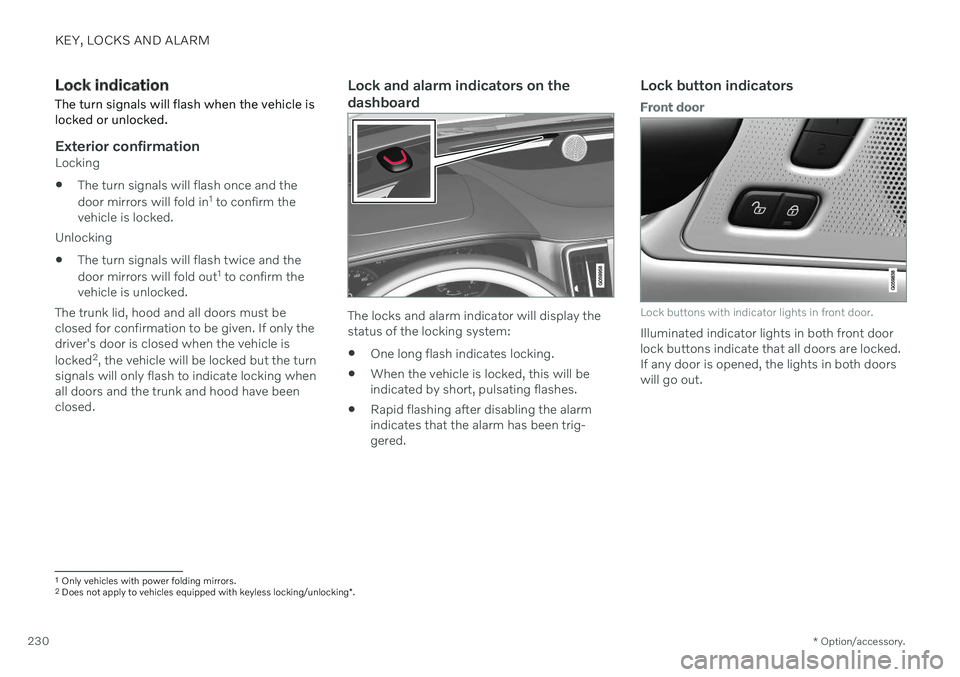
Lock and alarm indicators on the dashboard
The locks and alarm indicator will display the status of the locking system:
One long flash indicates locking.
When the vehicle is locked, this will beindicated by short, pulsating flashes.
Rapid flashing after disabling the alarmindicates that the alarm has been trig-gered.
Lock button indicators
Front door
Lock buttons with indicator lights in front door.
Illuminated indicator lights in both front door lock buttons indicate that all doors are locked.If any door is opened, the lights in both doorswill go out.
1
Only vehicles with power folding mirrors.
2 Does not apply to vehicles equipped with keyless locking/unlocking *.
Page 233 of 657

KEY, LOCKS AND ALARM
* Option/accessory.231
Rear door*
Lock button with indicator light in rear door.
Illuminated indicator lights in each door indi- cate that that particular door is locked. If anydoor is unlocked and opened, the indicatorlight in that door will go out. The lights in theother doors will remain illuminated.
Other indicatorsThe approach lighting and home safe lightingfunctions may be activated when locking andunlocking.
Related information
Lock confirmation settings (p. 231)
Welcome Light (p. 160)
Using home safe lighting (p. 160)
Lock confirmation settings
Settings for how the vehicle confirms locking and unlocking can be adjusted in the centerdisplay's Settings menu.
To change the locking response settings: 1. Tap
Settings in the center display's Top
view.
2. Tap
My CarLocking.
3. Tap
Visible Locking Feedback to select
when the vehicle should provide a visible response:
Lock
Unlock
Both
Or turn off the function by marking Off .
4. Select to receive an audible response when locking the vehicle by marking
Audible Locking Feedback.
To change the settings for folding door mir- rors * when locking:
1. Tap
Settings in the center display's Top
view.
2. Tap
My CarMirrors and Convenience.
3. Select
Fold Mirror When Locked to acti-
vate or deactivate the function.
Related information
Lock indication (p. 230)
Page 234 of 657

KEY, LOCKS AND ALARM
* Option/accessory.
232
Remote key
The remote key is used to lock and unlock doors and the trunk lid. The remote key mustbe in the vehicle in order to start the engine.
Remote key 3
and button-less key (Key Tag) *.
The remote key is not physically used to start the ignition because the vehicle is standard-equipped with keyless start (Passive Start).The key only needs to be in the front section ofthe passenger compartment. For vehicles equipped with keyless locking and unlocking (Passive Entry) *, the engine can
be started with the key anywhere in the vehi- cle. A smaller, lighter and button-less key (KeyTag) is also provided. The remote keys can be linked to different driver profiles to store personal settings in thevehicle.
Remote key buttons
The remote key has four buttons, one on the left side and three on the right.
Locking - Press once to lock the doors,
trunk lid and fuel filler door and arm the alarm. Press and hold to close all windows.
Unlocking - Press once to unlock the
doors and trunk lid and disarm the alarm. Press and hold to open all windows at the same time. This total airing function canbe used to e.g. quickly air out the vehiclein hot weather.
Trunk lid - Press to unlock and disarm
the trunk lid only. Pressing and holding will open the trunk lid mechanically due to the preloaded springs.
Panic alarm - Used to attract attention in
emergency situations. Press and hold the button for at least 3 seconds or presstwice within 3 seconds to activate theturn signals and horn. To deactivate, waitat least 5 seconds and press the buttonagain. If no action is taken, the panic alarmwill deactivate automatically after 3minutes.
WARNING
If anyone is left in the vehicle, make sure that power to the power windows and pan- oramic roof * is cut off by always taking the
remote key with you when you leave the vehicle.
3 The illustration is generic - details may vary according to vehicle model.
Page 236 of 657

||
KEY, LOCKS AND ALARM
* Option/accessory.
234
Related information
Starting the vehicle (p. 392)
Locking and unlocking using the remote key (p. 234)
Remote key range (p. 235)
Replacing the remote key's battery(p. 236)
Detachable key blade (p. 242)
Electronic immobilizer (p. 244)
Linking a remote key to a driver profile(p. 135)
Locking and unlocking using the remote key
All doors and the trunk lid can be locked and unlocked simultaneously using the buttonson the remote key.
Locking with remote key
The illustration is generic - details may vary accord- ing to vehicle model.
–Press the button on the remote key to
lock the vehicle.
To activate the locking sequence, the driver's door must be closed 5
. If any of the other doors
or the trunk lid are open, they will be locked and the alarm will be armed once they areclosed.
NOTE
Be aware of the risk of locking the remote key in the vehicle. If the remote key or key tag is left in the vehicle, it will be deactivated whenthe vehicle is locked and the alarm setusing another valid key. The key will bereactivated when the vehicle isunlocked.
If the remote key or Red Key is left inthe vehicle, it will be deactivated evenif the vehicle is locked using Volvo OnCall, and will be reactivated when thevehicle is unlocked using Volvo On Callor another valid key.
Locking when the trunk lid is open
NOTE
If the vehicle is locked and the trunk lid is still open, make sure that the remote key isnot left in the trunk when the trunk lid is closed and the entire vehicle is locked 6
.
Unlocking with remote key
–Press the button on the remote key to
unlock the vehicle.
5 If the vehicle is equipped with keyless locking/unlocking *, all side doors must be closed.
6 If the vehicle is equipped with keyless locking/unlocking and the key is detected inside the vehicle, the trunk lid will not lock when it is closed. *
Page 237 of 657

KEY, LOCKS AND ALARM
}}
* Option/accessory.235
Automatic relockingIf none of the doors or trunk lid are opened within two minutes after being unlocked, theywill automatically relock. This function reducesthe risk of inadvertently leaving the vehicleunlocked.
Remote key not working
NOTE
Move closer to the vehicle and try to unlock it again.
If the remote key is not working to lock or unlock the vehicle, its battery may be dis-charged. Use the detachable key blade tolock/unlock the driver's door instead.
Related information
Settings for remote and inside door unlock(p. 235)
Remote key (p. 232)
Replacing the remote key's battery(p. 236)
Locking and unlocking with detachablekey blade (p. 243)
Settings for remote and inside door unlock Several different sequences are available for remote unlocking.
To change this setting: 1.
Tap
Settings in the center display's Top
view.
2. Tap
My CarLockingRemote and
Interior Unlock.
3. Select alternative:
All Doors – unlocks all doors at the
same time.
Single Door – unlocks the driver's
door. Press the remote key unlock but- ton twice to unlock all doors.
The settings made here also affect centrallocking using the inside door handle.
Related information
Locking and unlocking using the remotekey (p. 234)
Locking and unlocking from inside thevehicle (p. 250)
Remote key range
In order to function correctly, the remote key must be within a certain distance from thevehicle.
Manual useThe remote key's functions for e.g. locking and unlocking, which are activated by pressing
or , have a range of approx. 20 meters
(65 feet) from the vehicle. If the vehicle's locks do not react, move closer and try again.
Keyless * use
The shaded areas around the vehicle illustrate the range of the system's antennas.
For keyless use, a remote key or the Key Tag must be within the shaded areas shown in theillustration, i.e. a semicircle with a radius of
Page 238 of 657

||
KEY, LOCKS AND ALARM
* Option/accessory.
236 approx. 1.5 meter (5 feet) along the sides of the vehicle or approx. 1 meter (3 feet) from thetrunk lid.
NOTE
The functions of the remote control key can be disrupted by ambient radio waves,buildings, topographical conditions, etc.The vehicle can always be locked/unlockedusing the key blade.
If the remote key is removed from the vehicle
If the remote key is removed from the vehicle while the engine is run- ning, the warning message
Vehicle
key not found Removed from
vehicle will be displayed in the instrument
panel and an audible signal will sound when the last door is closed.
The message will disappear when the key is returned to the vehicle and the O button on
the right-side steering wheel keypad ispressed or when the last door is closed again.
Related information
Remote key (p. 232)
Antenna locations for the start and locksystem (p. 249)
Keyless and touch-sensitive surfaces
*
(p. 246)
Replacing the remote key's battery
The battery in the remote key must be replaced when it is discharged.
NOTE
All batteries have a limited service life and must eventually be replaced (does notapply for Key Tag). The battery's service lifevaries depending on how often thevehicle/key is used.
The remote key battery should be replaced if
the information symbol illuminates and the message
Vehicle key bat. low is dis-
played in the instrument panel
the locks do not react after several attempts to lock or unlock the vehicleusing the remote key within approx.20 meter (65 feet) from the vehicle.
NOTE
Move closer to the vehicle and try to unlock it again.
The battery in the smaller key without but- tons 7
(the Key Tag) cannot be replaced. A new key can be ordered from an authorized Volvo workshop.
CAUTION
An end-of-life Key Tag must be turned in to an authorized Volvo workshop. The keymust be deleted from the vehicle becauseit can still be used to start the vehicle viabackup start.
Opening the key and replacing the battery
Hold the remote key with the front side
(with the Volvo logo) facing up and move the button on the key ring section to theright. Slide the front cover slightly upward.
The cover will loosen and can be
removed from the key.