2020 VOLKSWAGEN TRANSPORTER range display
[x] Cancel search: range displayPage 306 of 486

Acceleration can be stopped at any time by de-pressing the brake pedal or pressing the(@ or @ button on the multifunction steering wheel 302.
When driving through bends
While driving through bends, the radar sensor may sometimes lose the vehicle travelling ahead or may react to a vehicle in the next lane 242 !Al. In such situations, the vehicle might decelerate unnecessarily or not react to the vehicle in front. In this case the driver must override the adaptive cruise control (ACC) by depressing the accelerator, or interrupt the braking procedure by depressing the brake pedal or pressing or @ button on the multifunction steering wheel 302.
Driving in tunnels
The radar sensor function may be restricted in tun-nels. Switch off the adaptive cruise control (ACC) in tunnels.
Narrow vehicles and a zig-zag traffic situation
Narrow vehicles and vehicles travelling slightly to the left or right of your vehicle will only be recog-nised by the radar sensor once they have entered the radar range 242@ This applies in par-ticular to narrow vehicles such as motorbikes. If re-quired, brake the vehicle yourself.
Vehicles with special load or special equipment
Any load or accessories on other vehicles that pro-trude from the side, rear or over the roof of the ve-hicle may not be detected by the adaptive cruise control (ACC) .
Switch off the adaptive cruise control (ACC) when the vehicle ahead has special load or special equipment, or while overtaking vehicles of this kind. If required. brake the vehicle yourself.
When other vehicles change lanes
Vehicles that are very close when they move into your lane can only be detected by the radar sen-sors when they have moved into the sensor range. This means that the adaptive cruise control (ACC) may have a delayed reaction =>Fig. 243@]. If re-quired, brake the vehicle yourself.
Stationary vehicles
The adaptive cruise control (ACC) does not detect stationary objects during a journey, e.g. stationary traffic or a vehicle that has broken down.
306 I While driving
If a stationary vehicle is hidden behind a vehicle that has been detected by the adaptive cruise con-trol (ACC) and this vehicle turns off the road or changes lane, the adaptive cruise control (ACC) will not be able to react to the stationary vehicle 243 [Q]. If required, brake the vehicle your-self.
Oncoming vehicles and vehicles crossing your path
The adaptive cruise control (ACC) does not react to approaching vehicles or vehicles crossing your path.
Metal objects
Metal objects, such as tracks in the road or metal plates used in roadworks, can confuse the radar sensor and cause incorrect reactions from the adaptive cruise control (ACC) .
Possible radar sensor function impairments
The adaptive cruise control (ACC) will switch off temporarily if the radar sensor function is impaired, e.g. due to heavy rain, spray, snow, ice or mud. A corresponding message will appear on the instru-ment cluster display. Clean the radar sensors as required.
The adaptive cruise control (ACC) will automatical-ly be available again as soon as the radar sensors are no longer impaired. The message on the in-strument cluster display goes out, and the adaptive cruise control (ACC) can be reactivated.
Strong reflected radiation of the radar signal, e.g. in multi-storey car parks, can impair the function of the radar sensor.
Towing a trailer
The adaptive cruise control (ACC) operates with reduced dynamics when the vehicle is towing a trailer.
Overheated brakes
If the brakes overheat, e.g. following heavy braking or when driving down steep inclines for long peri-ods, the adaptive cruise control (ACC) may be de-activated temporarily. A corresponding message will appear on the instrument cluster display. lt is then not possible to activate the adaptive cruise control (ACC).
As soon as the temperature of the brakes has de-creased sufficiently, the adaptive cruise control (ACC) can be activated again. The message on the instrument cluster display goes out. If the mes-sage ACC not ava i 1 able does not go out for a long time, there is a fault. Go to a qualified work-shop. Volkswagen recommends using a Volkswa-gen dealership for this purpose.
Page 307 of 486

Area monitoring system (Front Assist)
COJ Introduction
This chapter contains information on the following subjects:
Displays . . . . . . . . . 308
Radar sensor . . 309
Front scan system (Front Assist) 309 Temporarily switch off the front scan system (Front Assist) in the following situations 310
City Emergency Brake function 311
System limits . . . . . . . . . . . . . . . . 312
The area monitoring system (Front As-
sist) can help to avoid rear-end colli-
sions.
Within the limits of the system, Front Assist can warn the driver about imminent collisions, prepare the vehicle for emergency braking in case of dan-ger, assist with braking, and initiate automatic braking.
Front Assist is not a substitute for the full con-centration of the driver.
Additional information and warnings:
• Exterior views 5
• Volkswagen information system 24
• Cruise control system (CCS) 295
• Adaptive cruise control (ACC) 298
• Accessories, modifications, repairs and renewal of parts 394
Distance warning
If the system detects danger from driving too close to the vehicle in front, within the speed range of approx. 60 km/h (37 mph) up to 210 km/h (130 mph), the system warns the driver by showing a corresponding message on the instrument clus-ter display 244 [ID.
The warning period varies according to the traffic situation and the driver's response.
Advance warning
If the system detects a danger of collision with the vehicle ahead, within the speed range of approx. 30 km/h (18 m ph) up to 210 km/h (130 mph), the system warns the driver by emitting a signal tone and showing a corresponding message on the in-strument cluster display 245.
The warning period varies according to the traffic situation and the driver's response. At the same time it prepares the vehicle for possible emergency
Urgent warning
If the driver fails to respond to the advance warn-ing, within a speed range of approx. 30 km/h (18 mph) to 210 km/h (130 mph), the system can initiate a quick jolt of the brake in order to draw the driver's attention to the increasing danger of a colli-sion. The warning period varies according to the traffic situation and the driver's response.
Automatic braking
If the driver does not react to the acute warning, within a speed range of approx. 4 km/h (2.5 mph) to 210 km/h (130 mph), the vehicle can brake auto-matically using brake pressure with gradually in-creasing intensity. By reducing speed during a pos-sible collision the system can help to minimise the consequences of an accident.
Brake assistance
If the system detects that the driver is not braking sufficiently when there is a risk of collision, the sys-tem can increase the braking force and thereby help to prevent a collision from speeds of approxi-mately 4 km/h (2.5 mph) to 210 km/h (130 mph). Brake assistance works only for as long as the brake pedal is pressed hard.
A WARNING
The Intelligent technology used in Front As-sist cannot overcome the laws of physics, and functions only within the limits of the system. The driver Is always responsible for braking in time. If Front Assist issues a warn-ing, immediately apply the foot brake to slow the vehicle down or avoid the obstacle, de-pending on the traffic situation.
• Adapt your speed and distance from the vehicles ahead to suit visibility, weather, road and traffic conditions.
• Front Assist cannot prevent accidents and serious injuries on Its own.
• Front Assist can issue unnecessary warn-Ings and carry out unwanted braking inter-ventions in certain complex driving situa-tions, e.g. at traffic Islands.
Driver assist systems 307
Page 311 of 486

City Emergency Brake function
Fig. 247 The display in the instrument cluster: ad-vance warning display.
,...-m First read and observe the introductory information and safety warnings & on page 307.
The City Emergency Brake function is part of the area monitoring system (Front Assist) and is active when Front Assist is switched on.
The front scan system and thus the City Emergen-cy Brake function can be activated and deactivated using the Assistant menu in the Volkswagen in-formation system or the Front Assist option in the Assistant submenu of the Settings menu 24.
The City Emergency Brake function gathers infor-mation on the traffic situation up to a distance of about 10 m in front of the vehicle within a speed range of about 5 km/h (3 m ph) to 30 kmlh (19 mph).
The system prepares the vehicle for emergency braking if it detects a possible collision with a vehi-cle ahead &.
If the driver does not react to a possible serious collision, the system can automatically stop the ve-hicle with brake pressure with increasing intensity so as to reduce the speed in a possible collision. Hence the system can help minimise the conse-quences of an accident.
Display
Automatic deceleration by the City Emergency Brake function will be shown by the advance warn-ing display in the instrument Fig. 247.
A wARNING
The intelligent technology used in the City Emergency Brake cannot overcome the laws of physics, and functions only within the lim-its of the system. The driver is always re-sponsible for braking In time.
• Adapt your speed and distance from the vehicles ahead to suit visibility, weather, road and traffic conditions.
• The City Emergency Brake function can-not prevent accidents and serious injuries by itself.
• The City Emergency Brake function can carry out unwanted brake interventions in certain complex driving situations, e.g. at building sites and metal tracks.
• The City Emergency Brake can carry out unwanted braking interventions when its function is impaired, e.g. if the position of the radar sensor has been contaminated or changed.
• The City Emergency Brake function does not react to persons, animals or vehicles crossing or approaching in the same lane.
m The brake pedal feels "harder" when the City l!J Emergency Brake function triggers the brakes.
m Automatic brake intervention by the City l!J Emergency Brake function can be stopped by using the accelerator or through steering interven-tion.
m The City Emergency Brake function can L!J brake the vehicle to a standstill. The vehicle will not be held for any extended period by the braking system. Depress the brake.
m Switch off Front Assist and the City Emergen-L!J cy Brake function in the event of multiple un-wanted interventions. Go to a qualified workshop. Volkswagen recommends using a Volkswagen dealership for this purpose.
m Multiple interventions can lead to automatic l!J deactivation of the City Emergency Brake function.
Page 337 of 486

Action Indicator lamp Fig. 267
Attempt to switch on: lights up orange for approximately Attempt to switch on or off using button @ or@ when the battery in the remote con-trol is low. The auxiliary coolant heater is blocked bl.
2 seconds, then flashes green in very short intervals for an-other 2 seconds. The switch-on signal is not processed. Attempt to switch off: lights up orange for approximately 2 seconds, then turns red for another 2 seconds. The switch-off signal is not processed.
Attempt to switch on or off using button @ or@ when the battery in the remote con-trol is empty.
Flashes orange in very short intervals for approximately 5 seconds. The switch-on or switch-off signal is not pro-cessed.
•> If you are at the edge of the receiving range, the remote control may not be able to receive the confirmation signal from the sen-sor in the vehicle. If this is the case, the remote control will show a fault even though the supplementary heating system has ac-tually been switched on or off. Move closer to the vehicle and try pressing the corresponding button on the remote control again.
b) If the automatic switch-off for electrical consumers page 365 is activated or if the reserve level in lhe fuel tank page 340 has been reached, the auxiliary coolant heater may be blocked automatically.
Settings for remote control
The supplementary heating system is activated or deactivated by means of the remote control. The Start Time menu can be used to program the oper-ating duration and the heating level (auxiliary air heater) or the operating mode (auxiliary coolant heater).
• Press any button on the roof display to activate the roof display.
• Press and hold down the (ill) button for several seconds.
• Press the function button ...... or ,... as often as necessary until "REMOTE CONT." is displayed.
• Press the (ill) button to confirm.
• Press the function button ...... or ,... until the re-quired temperature or mode is displayed.
• Press the (ill) button to confirm the selected heating level or operating mode. The operating du-ration menu is displayed.
• Press the function button ...... or ,... until the re-quired operating duration is displayed.
• Press button @)to confirm the operating dura-tion. A summary of the settings is displayed.
Replacing the battery for the remote control
Auxiliary air heater: the battery is located on the back of the remote control underneath a cover 266 [ID. Pull off the cover® towards the rear.
Auxiliary coolant heater: the battery is located on the back of the remote control underneath a cover 267 [ID. Use a flat object, e.g. a coin, to turn the slot anti-clockwise in order to open the cover
®-
When changing the batteries, ensure you insert them the right way (poles) and that they are the same type
Range
The receiver is located in the vehicle interior. The remote control key has a range of several hundred metres when the battery is fully charged. The range of the remote control key can be considera-bly reduced by obstacles between the remote con-trol key and the vehicle, bad weather conditions, and a flat battery.
To achieve optimal range, hold the remote control vertically with the aerial 266 or 267 at the top. Do not hold the aer-ial with your fingers or the palm of your hand.
The distance between the remote control and the vehicle must be at least 2 metres.
CD
• The remote control contains electronic com-ponents. Protect the remote control from mois-ture, excessive vibration and direct sunlight.
• Unsuitable batteries can damage the remote control. Only replace discharged batteries with a new battery of the same voltage rating, size and specification.
Discharged batteries must be disposed of in W accordance with regulations governing the protection of the environment.
The battery in the remote control may contain W perchlorate. Please comply with legislation regarding disposal.
m Protect the remote control against inadver-L!.J tent operation in order to prevent the supple-mentary heater from being switched on uninten-
Air conditioning system I 337
Page 346 of 486

CD
• Your vehicle is not suitable for use with bio-diesel and must not be filled up or driven with biodiesel. Failure to observe this point can re-sult in damage to the fuel system and engine.
• Some diesel manufacturers blend biodiesel with diesel fuel in compliance with European Standard 590 or an equivalent standard (in Ger-many). Use of this diesel is allowed and will not damage the engine or fuel system.
• The diesel engine has been developed for use with diesel only. For this reason, petrol, heating oil or other unsuitable fuels may not be used. These fuels can cause serious damage to the fuel system and engine.
CD
• The service life of the diesel particulate filter can be reduced considerably if diesels with a high sulphur content are used. A Voikswagen Commercial Vehicles dealership will be able to tell you which countries have diesel with a high sulphur content.
o:::n Introduction
This chapter contains information on the following subjects:
Warning and indicator lamps Refilling Ad Blue® ... 347
348
SCR catalysts can be used to reduce emissions from diesel engines (SCR = Selective Catalytic Re-duction). The SCR catalyst uses Ad Blue® urea sol-ution to convert nitrogen oxides into nitrogen and water.
If the vehicle is equipped with this kind of emission control system for diesel vehicles, the filler neck for the Ad Blue® tank is located below the filler cap for the fuel tank.
The Ad Blue® level should be checked within the scope of the service work Service schedule.
Information on AdBiue®
The Ad Blue® consumption figures depend on the individual driving style, the system's operating tem-perature and the ambient temperature that the ve-hicle is operated in.
The vehicle is fitted with a separate tank for Ad Bl-ue®. The Ad Blue® tank holds approximately 13 li-tres. For technical reasons, the capacity may be slightly larger when refilling using refill bottles.
The Ad Blue® tank must never run empty. As of a remaining distance of approximately 2,400 km. the instrument cluster display will indicate that the
346 While drivmg
Ad Blue® must be refilled 348. If the re-maining range is 0 km, the engine cannot be star-ted anymore 347.
The Ad Blue® trademark is held by the German As-sociation of the Automobile Industry (VDA) in the USA, Germany, the European Union and other countries.
Additional information and warnings:
• Fuel 343
• Accessories, modifications, repairs and renewal of parts 394
A WARNING
If the AdBiue® level is too low, the vehicle cannot be restarted after the Ignition has been switched off. Starting with jump leads is also not possible.
• Refill AdBiue® at the latest when the re-maining distance reaches approximately 1,000 km.
• Never allow the Ad Blue® tank to run emp-ty.
A WARNING
Ad Blue® is an Irritant and corrosive fluid that can damage the skin, eyes and breathing passages upon contact.
Page 359 of 486
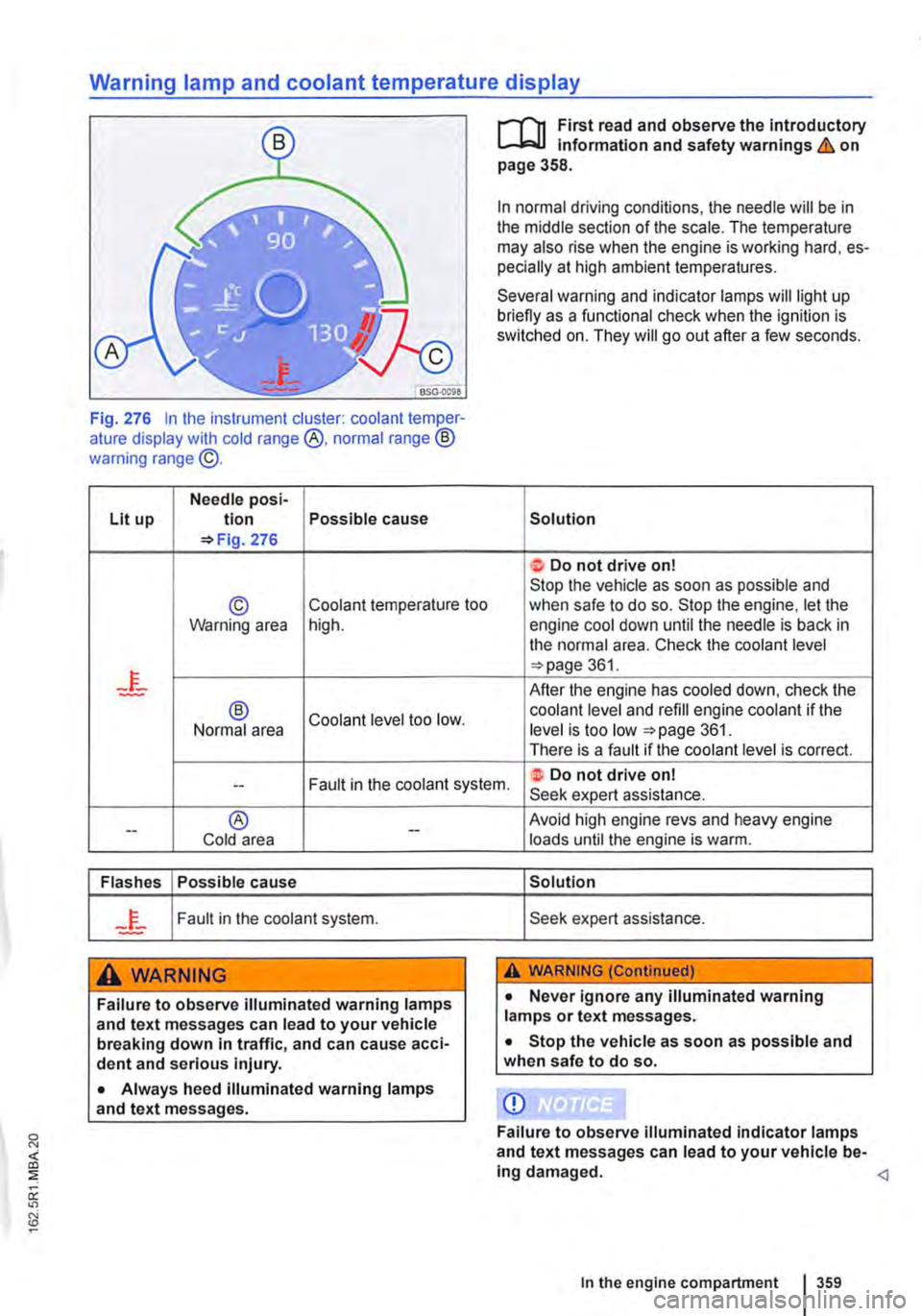
Warning lamp and coolant temperature display
Fig. 276 In the instrument cluster: coolant temper-ature display with cold range @, normal range ® warning range @.
Needle posi-Lit up tion Possible cause =>Fig. 276
© Coolant temperature too Warning area high.
® Coolant level too low. Normal area
r-f"n First read and observe the introductory L,....J.:.lJ Information and safety warnings & on page 358.
In normal driving conditions, the needle will be in the middle section of the scale. The temperature may also rise when the engine is working hard, es-pecially at high ambient temperatures.
Several warning and indicator lamps will light up briefly as a functional check when the ignition is switched on. They will go out after a few seconds.
Solution
t Do not drive on! Stop the vehicle as soon as possible and when safe to do so. Stop the engine, let the engine cool down until the needle is back in the normal area. Check the coolant level =>page 361.
After the engine has cooled down, check the coolant level and refill engine coolant if the level is too low =>page 361. There is a fault if the coolant level is correct.
Fault in the coolant system. ·t Do not drive on! --Seek expert assistance.
--® Cold area --
Flashes Possible cause
Fault in the coolant system.
A WARNING
Failure to observe illuminated warning lamps and text messages can lead to your vehicle breaking down In traffic, and can cause acci-dent and serious injury.
• Always heed illuminated warning lamps and text messages.
Avoid high engine revs and heavy engine loads until the engine is warm.
Solution
Seek expert assistance.
A WARNING (Continued)
• Never ignore any illuminated warning lamps or text messages.
• Stop the vehicle as soon as possible and when safe to do so.
CD
Failure to observe illuminated indicator lamps and text messages can lead to your vehicle be-ing damaged.
Page 379 of 486

Snow chains
r-"f"'n First read and observe the introductory L-J=.IJ information and safety warnings & on page 367.
Please heed legislation and also the permitted speed when driving your vehicle with snow chains.
In winter conditions, snow chains will not only im-prove acceleration, but also braking response.
Snow chains may only be fitted on the front wheels-even on four-wheel drive vehicles (4MOTION)-and only with the following wheel and tyre combinations:
Tyre size Wheel
205/65 R16 C 6 1/2 J x 16 offset 51 or61/2Jx16off-set 52
215/65 R16 C 6 112 J x 16 offset 51 or61/2 J x 16 off-set 52
215/60 R17 C 7 J x 17 offset 55 or 7 J x 17 offset 56
Volkswagen Commercial Vehicles recommends that you ask your Volkswagen Commercial Vehi-cles dealership for information about appropriate wheel, tyre and snow chain size.
If possible, use snow chains with fine-pitch links which do not protrude more than 15 mm, including the tensioner.
Remove wheel centre covers and trim rings before fitting snow chains For safety reasons cover caps must then be fitted over the wheel bolts. These are available from your Volkswagen Com-mercial Vehicles dealership.
A WARNING
The use of snow chains that are unsuitable for your vehicle or the incorrect installation of snow chains can cause accidents and seri-ous Injuries.
• Always use the correct snow chains.
• Follow the assembly instructions provided by the snow chain manufacturer.
• Never exceed the maximum speed permit-ted for the snow chains that are fitted.
Q)
• Remove the snow chains when driving on roads that are free of snow. The snow chains will otherwise impair handling, damage the tyres and wear out very quickly.
• Snow chains that are in direct contact with the wheel can scratch or damage it. Volkswa-gen Commercial Vehicles recommends using non-scratch snow chains.
m Snow chains are available in a range of sizes l!:.J for a vehicle type.
m When using snow chains on vehicles with a l!:.J tyre monitoring system, an incorrect display may be shown as the snow chains increase the tyre circumference 318.
Page 398 of 486

Retrofitting two-way radios
.--m First read and observe the introductory L-.lc.U information and safety warnings & on page 394.
You will need an external aerial to use a two-way radio in the vehicle.
Any retrofit installation of electrical or electronic equipment in the vehicle will affect its vehicle type approval. Under certain circumstances, this can negate the type approval for the vehicle.
Volkswagen Commercial Vehicles has approved the vehicle for use with two-way radios providing the following conditions are observed:
• Correct installation of external aerial.
• A maximum transmitting power of 10 watts.
The equipment can only operate at maximum range with an external aerial.
Check first with a qualified workshop if you wish to use a two-way radio with a transmitting power of over 10 watts. Qualified workshops are familiar with the technical options for retrofitting. Volkswa-gen Commercial Vehicles recommends using a Volkswagen Commercial Vehicles dealership for this purpose.
Information stored in the control units
.--m First read and observe the introductory L-.lc.U Information and safety warnings & on page 394.
Your vehicle is factory fitted with electronic control units which are responsible for engine and gearbox management. The control units also monitor the function of the exhaust system and the airbags.
These electronic control units continuously evalu-ate data relevant to the vehicle while the vehicle is being driven. Only these data will be stored if there are any faults recorded or any deviations from the specified values. This is generally displayed by the indicator lamps on the instrument cluster.
Special units are required to read and evaluate da-ta stored in the control units.
These data are stored so that specialist workshops can diagnose and solve problems. The following data may have been stored:
• Engine and gearbox-relevant data.
• Speed.
• Direction of travel.
398 Cleaning and maintenance
Please comply with relevant legislation and the in-structions and information given in the operating manuals for radio equipment.
A WARNING
If radio equipment is not secured or not prop-erly secured in the vehicle, it could be flung though the interior during a sudden driving or braking manoeuvre, or In the event of an accident. This can cause Injuries.
• While the vehicle is in motion, always se-cure radio equipment properly outside the airbag deployment zone or stow them away safely.
A CAUTION
If you use two-way radios in the car without an external aerial, electromagnetic radiation in the vehicle could exceed limit values. This also applies to external aerials which have not been correctly installed.
• Two-way radios should only be used In the vehicle If an external aerial Is properly connected.
• Braking power.
• Seat belt monitor.
The control units never record conversations that take place in the vehicle. it is neither possible nor permitted to use the stored data to create move-ment profiles.
When the vehicle is being used, situations may arise in which the stored data (alone or in conjunc-tion with other information such as accident re-ports, vehicle damage, witness statements etc.) can become assignable to a particular person, whereby consultation of an expert and use of the expert's information may be necessary.
In vehicles with an emergency call function via a mobile telephone or other units, the current loca-tion can be transmitted. In the event of an accident in which the control units register that an airbag has been triggered, the system can automatically send out a signal. This depends on your service provider. Transmission is possible only in areas