Page 62 of 314
622-4. Other settings
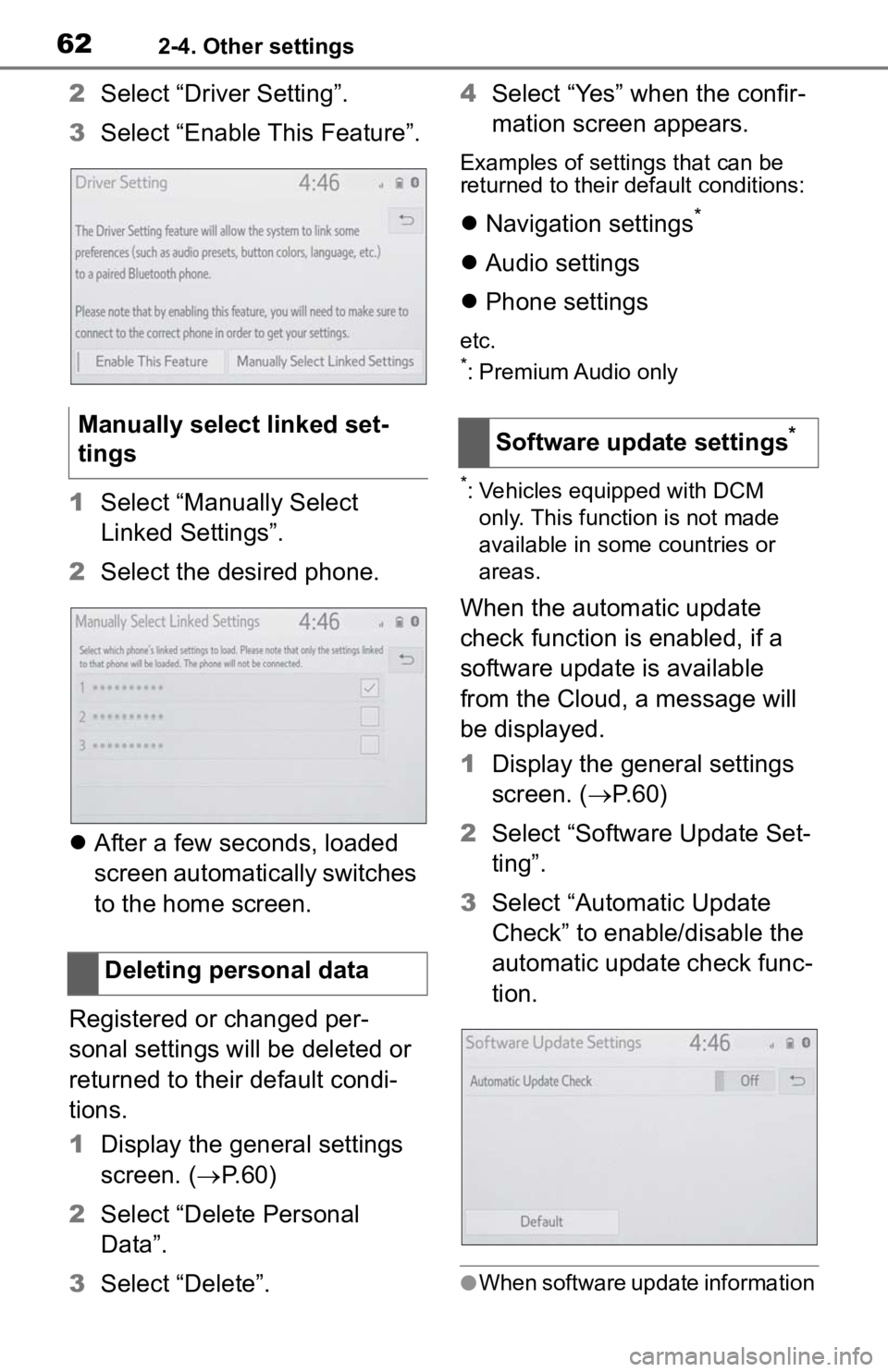
2Select “Driver Setting”.
3 Select “Enable This Feature”.
1 Select “Manually Select
Linked Settings”.
2 Select the desired phone.
After a few seconds, loaded
screen automatically switches
to the home screen.
Registered or changed per-
sonal settings will be deleted or
returned to their default condi-
tions.
1 Display the general settings
screen. ( P.60)
2 Select “Delete Personal
Data”.
3 Select “Delete”. 4
Select “Yes” when the confir-
mation screen appears.
Examples of settings that can be
returned to their default conditions:
Navigation settings*
Audio settings
Phone settings
etc.
*: Premium Audio only
*: Vehicles equipped with DCM
only. This function is not made
available in some countries or
areas.
When the automatic update
check function is enabled, if a
software update is available
from the Cloud, a message will
be displayed.
1 Display the general settings
screen. ( P. 6 0 )
2 Select “Software Update Set-
ting”.
3 Select “Automatic Update
Check” to enable/disable the
automatic update check func-
tion.
●When software update information
Manually select linked set-
tings
Deleting personal dataSoftware update settings*
Page 66 of 314

662-4. Other settings
Select to reset the conditions
which have expired.
3 Select “OK” after entering the
conditions.
●For scheduled maintenance infor-
mation, refer to “Scheduled Main-
tenance Guide” or “Owner’s
Manual Supplement”.
●Depending on driving or road con-
ditions, the actual date and dis-
tance that mainte nance should be
performed may differ from the
stored date and distance in the
system.
Dealer information can be regis-
tered in the system. With dealer
information registered, route
guidance to the dealer is avail-
able.
1 Select “Set Dealer”.
2 Select the desired item to
search for the location.
( P. 8 4 )
The editing dealer screen
appears after setting the loca-
tion.
3 Select the desired items to
be edited.
Select to enter the name of a dealer. (
P.67)
Select to enter the name of a
dealer member. ( P.67)
Select to set the location.
( P.67)
Select to enter the phone
number. ( P.68)
Select to delete the dealer
information displayed on the
screen.
Select to set the displayed
dealer as a destination.
( P.91)
1 Select “Dealer” or “Contact”.
2 Enter the name and select
“OK”.
1 Select “Location”.
2 Scroll the map to the desired
point ( P.75) and select
“Enter”.
1 Select “Phone #”.
2 Enter the phone number and
select “OK”.
The security system can be set
Dealer setting
D
A
(GLWLQJ�GHDOHU�RU�FRQWDFW�
QDPH
(GLWLQJ�WKH�ORFDWLRQ
(GLWLQJ�SKRQH�QXPEHU
6HWWLQJ�WKH�Y\
DOHW�PRGH
B
C
D
E
F
Page 67 of 314

672-4. Other settings
2
Basic function
to on by entering a security code
(4-digit number).
When set to on, the system will
become inoperative once the
electrical power source is dis-
connected until the security
code is entered.
1Display the vehicle settings
screen. ( P.65)
2 Select “Valet Mode”.
3 Enter the 4-digit personal
code and select “OK”.
4 Enter the same 4-digit per-
sonal code again and select
“OK”.
The system will request that
you input the security code
again to confirm that you
remember it correctly.
When valet mode activates,
the system stops and a secu-
rity code (4-digit number)
standby screen is displayed.
●If the 4-digit personal code is for-
gotten, please contact your Toyota
dealer.
1 Enter the 4-digit personal
code and select “OK”.
●If an incorrect security code (4-
digit number) is entered 6 times,
the system will not accept another
security code (4-digit number) for
10 minutes.
*: If equipped
Dealer information can be regis-
tered in the system. If the vehi-
cle alert screen is displayed,
selecting the call dealer button
on the screen will call the phone
number registered in the dealer
information.
1Display the vehicle settings
screen. ( P. 6 5 )
2 Select “Dealer Info”.
3 Select the desired items to
be edited.
Select to enter the name of a
dealer. ( P.69)
Select to enter the name of a
dealer member. ( P.69)
Select to enter the phone
number. ( P.69)
Select to delete the dealer
information displayed on the
screen.
If the valet mode has been
activated
Setting dealer informa-
tion*
A
B
C
D
Page 68 of 314
682-4. Other settings
1Select “Edit” next to “Dealer”
or “Contact”.
2 Enter the name and select
“OK”.
1 Select “Edit” next to “Phone
#”.
2 Enter the phone number and
select “OK”.Editing dealer or contact
name
Editing phone number
Page 82 of 314
843-2. Destination search
3-2.Destination search
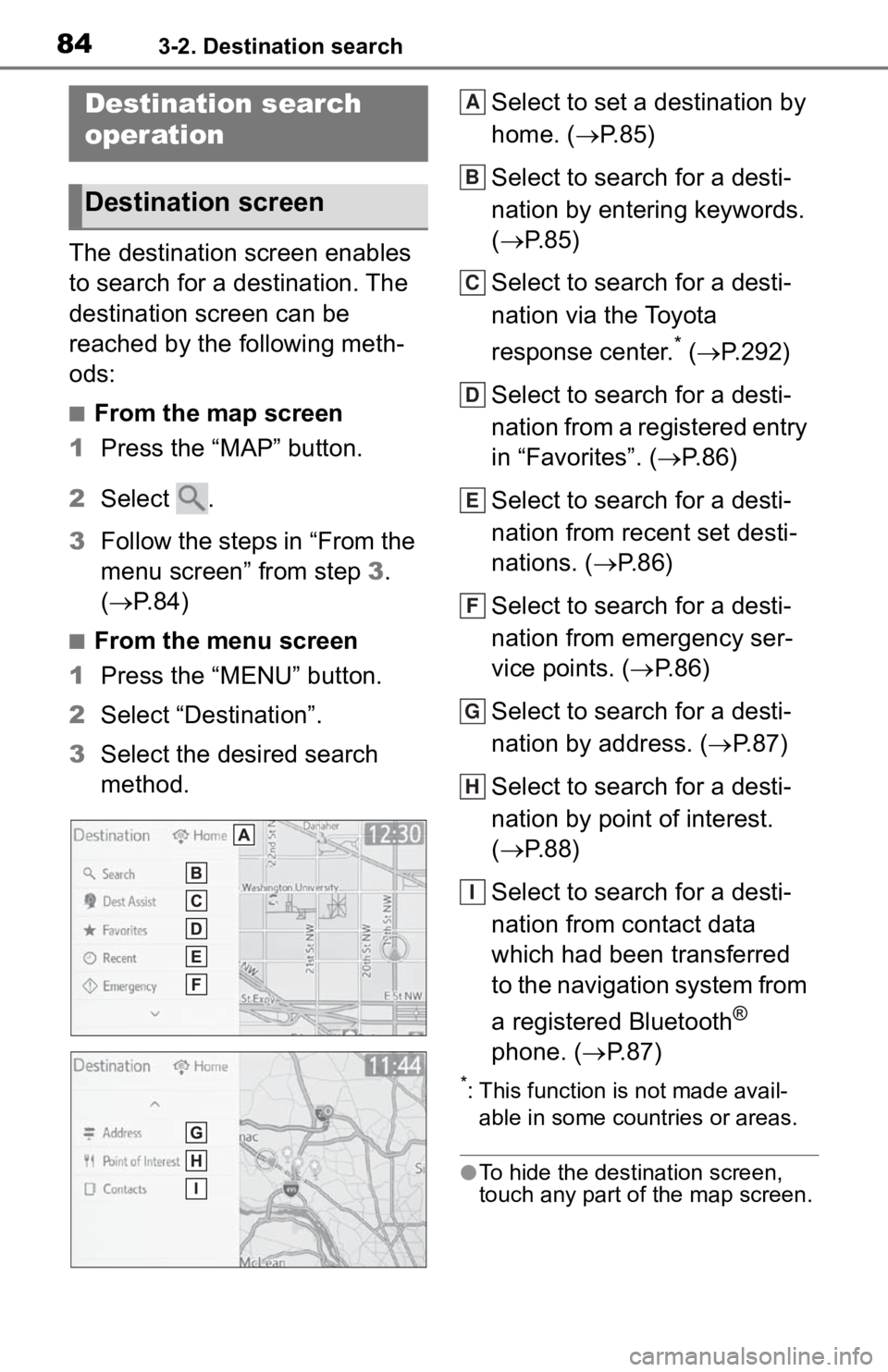
The destination screen enables
to search for a destination. The
destination screen can be
reached by the following meth-
ods:
■From the map screen
1 Press the “MAP” button.
2 Select .
3 Follow the steps in “From the
menu screen” from step 3.
( P. 8 4 )
■From the menu screen
1 Press the “MENU” button.
2 Select “Destination”.
3 Select the desired search
method. Select to set a destination by
home. (
P.85)
Select to search for a desti-
nation by entering keywords.
( P.85)
Select to search for a desti-
nation via the Toyota
response center.
* ( P.292)
Select to search for a desti-
nation from a registered entry
in “Favorites”. ( P. 8 6 )
Select to search for a desti-
nation from recent set desti-
nations. ( P. 8 6 )
Select to search for a desti-
nation from emergency ser-
vice points. ( P.86)
Select to search for a desti-
nation by address. ( P. 8 7 )
Select to search for a desti-
nation by point of interest.
( P.88)
Select to search for a desti-
nation from contact data
which had been transferred
to the navigation system from
a registered Bluetooth
®
phone. ( P.87)
*: This function is not made avail-
able in some countries or areas.
●To hide the destination screen,
touch any part of the map screen.
Destination search
operation
Destination screen
A
B
C
D
E
F
G
H
I
Page 85 of 314

873-2. Destination search
3
Navigation system
2Select “Emergency”.
3 Select the desired emer-
gency category.
4 Select the desired destina-
tion.
●The navigation system does not
guide in areas where route guid-
ance is unavailable. ( P. 1 1 4 )
To use this function, it is neces-
sary to have contact data which
had been transferred to the nav-
igation system from a registered
Bluetooth
® phone. ( P.254)
1 Display the destination
screen. ( P.84)
2 Select “Contacts”.
3 Select the desired contact.
4 Select “Addresses”.
5 Select the desired address. 6
Follow the steps in “Search-
ing by keyword” from step 4.
( P.85)
●This function may not be available
depending on the type of Blue-
tooth
® phone.
1Display the destination
screen. ( P. 8 4 )
2 Select “Address”.
3 Enter a house number and
select “Search”.
4 Enter a street name and
select “Search”.
5 Select the desired street
name.
6 Enter a city name and select
“Search”.
7 Select the desired city name.
If multiple locations with the
same address exist, the
address list screen will be dis-
played. Select the desired
address.
●A street name can be searched
using only the body part of its
name.
For example: S WESTERN AVE
Searching by contact
Searching by address
Page 86 of 314

883-2. Destination search
• A search can be performed by entering “S WESTERN AVE”,
“WESTERN AVE” or “WEST-
ERN”.
There are 3 methods to search
for a destination by Points of
Interest.
1 Display the destination
screen. ( P.84)
2 Select “Point of Interest”.
3 Select the desired search
method.
Select to change the search
area. ( P.85)
Select to search by name.
( P. 8 8 )
Select to search by category.
( P. 8 9 )
Select to search by phone
number. ( P.89)
1 Select “Name”.
2 Enter a POI name and select
“Search”. 3
Select the desired POI.
“Sort/Category/City”: Select to sort
(name, distance) the displayed
entries, change the POI category,
or enter a city name.
When entering the name of a
specific POI, and there are 2
or more sites with the same
name, the list screen will be
displayed. Select the desired
POI.
●To search for a facility name using
multiple search words, put a
space between each word.
1 Select “Sort/Category/City”.
2 Select “Enter a city name”.
3 Enter a city name and select
“Search”.
“Any City”: Select to cancel the city
setting.
4Select the desired city name.
5 Select the desired POI.
1 Select “Sort/Category/City”.
2 Select “Change POI cate-
gory”.
3 Select the desired category.
If there is more than 1 result
for the selected category, a
detailed list will be displayed.
“List All Categories”: Select to dis-
play all POI categories.
4 Select the desired POI.
Searching by point of
interest
Searching by name
A
B
C
D
6HOHFWLQJ�D�FLW\�WR�VHDUFK
6HOHFWLQJ�IURP�WKH�FDWHJR�
ULHV
Page 87 of 314

893-2. Destination search
3
Navigation system
1Select “Category”.
2 Select the desired search
point.
Select to search for POIs
near your current position.
Select to search for POIs
along the set route.
Select to search for POIs
near a specific city center.
( P. 8 9 )
Select to search for POIs
near a destination.
When more than 1 destina-
tion has been set, a list will
be displayed on the screen.
Select the desired destina-
tion.
3 Select the desired POI cate-
gory.
If there is more than 1 result
for the selected category, a
detailed list will be displayed.
Select “Other POIs” to select
other than default POI catego-
ries. The following button can
be displayed.
“List All Categories”: Select to dis- play all POI categories.
“Favorite POI Categories”: Select to
use the 6 POIs that have been pre-
viously set. (
P.107)
4 Select the desired POI.
●The names of POIs located within
approximately 200 miles (320 km)
from the selected search point can
be displayed. They are displayed
up to 200 names.
1Select “Near a City Center in
XX
*”.
2 Enter a city name and select
“Search”.
“Last 5 Cities”: Select the desired
city name from the list of the last 5
cities.
3Select the desired city name.
4 Select “OK” when the city
center map screen is dis-
played.
5 Follow the steps in “Search-
ing by category” from step 3.
( P.89)
*: XX represents the selected
search area name.
●If the navigation system has never
been used, selecting the city
name from “Last 5 Cities” will not
be available.
1 Select “Phone #”.
Searching by category
A
B
C
D
:KHQ�³1HDU�D�&LW\�&HQWHU�LQ�\
;;
´�LV�VHOHFWHG
6HDUFKLQJ�E\�SKRQH�QXP�
EHU
