2020 TOYOTA PROACE VERSO engine
[x] Cancel search: enginePage 326 of 418
326
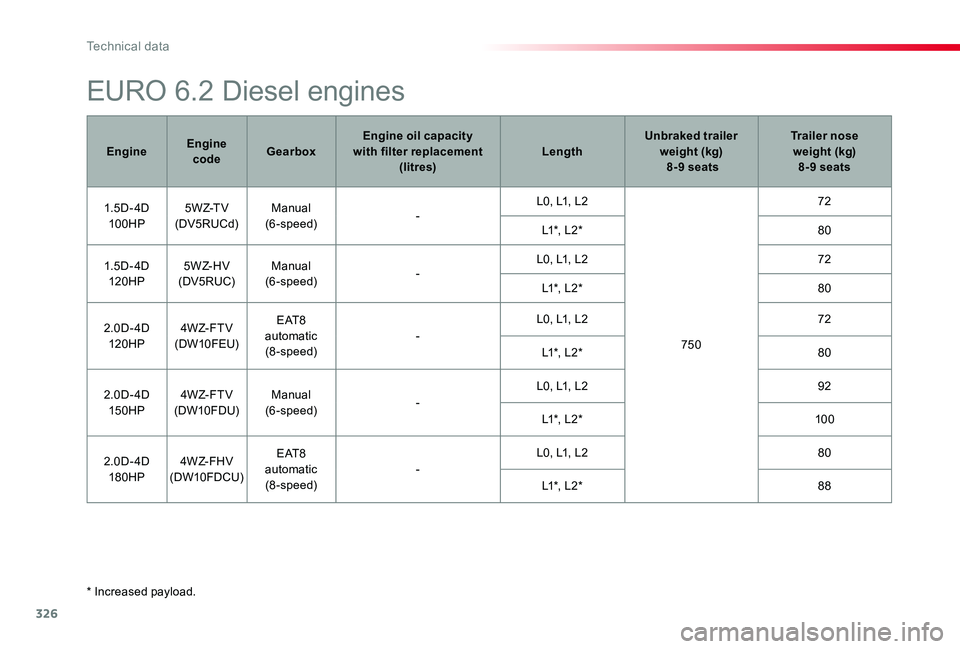
* Increased payload.
EURO 6.2 Diesel engines
EngineEngine codeGearboxEngine oil capacity with filter replacement (litres)LengthUnbraked trailer weight (kg) 8-9 seats
Trailer nose weight (kg) 8-9 seats
1. 5 D - 4D10 0HP5 W Z-T V(DV5RUCd)Manual(6-speed)-L0, L1, L2
750
72
L1*, L2*80
1. 5 D - 4D120 H P5 W Z- H V(DV5RUC)Manual(6-speed)-L0, L1, L272
L1*, L2*80
2.0D- 4D120 H P4W Z- F T V(DW10FEU)
E AT 8 automatic(8-speed)-
L0, L1, L272
L1*, L2*80
2.0D- 4D150HP4W Z- F T V(DW10FDU)Manual(6-speed)-
L0, L1, L292
L1*, L2*10 0
2.0D- 4D180HP4W Z- FH V(DW10FDCU)
E AT 8 automatic(8-speed)-
L0, L1, L280
L1*, L2*88
Technical data
Page 331 of 418

331
Toyota Pro Touch with
navigation system
GPS navigation -
Applications - Multimedia
audio system - Bluetooth®
telephone
The various functions and settings described differ according to the version and configuration of the vehicle.
For safety reasons and because they require continued attention on the part of the driver, the following operations must be carried out with the vehicle stationary and the ignition switched off:- Using a smartphone.- Pairing a Bluetooth mobile phone to the hands-free Bluetooth system of the audio system.- Smartphone connection operations for CarPlay®, MirrorLinkTM or Android Auto (certain applications interrupt their display when the vehicle starts to move again).- Watching a video (the video stops when the vehicle starts to move again).- The configuration of profiles.
The system is protected in such a way that it will only operate in the vehicle.The display of the message Energy Economy Mode signals that a change to standby is imminent.
First steps
With the engine running, a press mutes the sound.With the ignition off, a press turns the system on.
Increase or decrease the volume using the wheel or the "plus" or "minus" buttons (depending on the equipment).
Use the menu buttons on either side of or below the touch screen for access to the menus, then press the virtual buttons in the touch screen.
Depending on the model, use the "Source" or "Menu" buttons to access the rolling menus, then press the virtual buttons in the touch screen.
Display the rolling menus at any time by pressing the screen briefly with three fingers.
All of the touch areas of the screen are white.Press the back arrow to go back a level.Press "OK" to confirm.
ContentsFirst steps 331Steering mounted controls 332Menus 333Voice commands 334Navigation 342Connected navigation 344Applications 347Radio 350DAB (Digital Audio Broadcasting) radio 352Media 352Telephone 354Frequently asked questions 360
.
Toyota Pro Touch with navigation system
Page 346 of 418
346
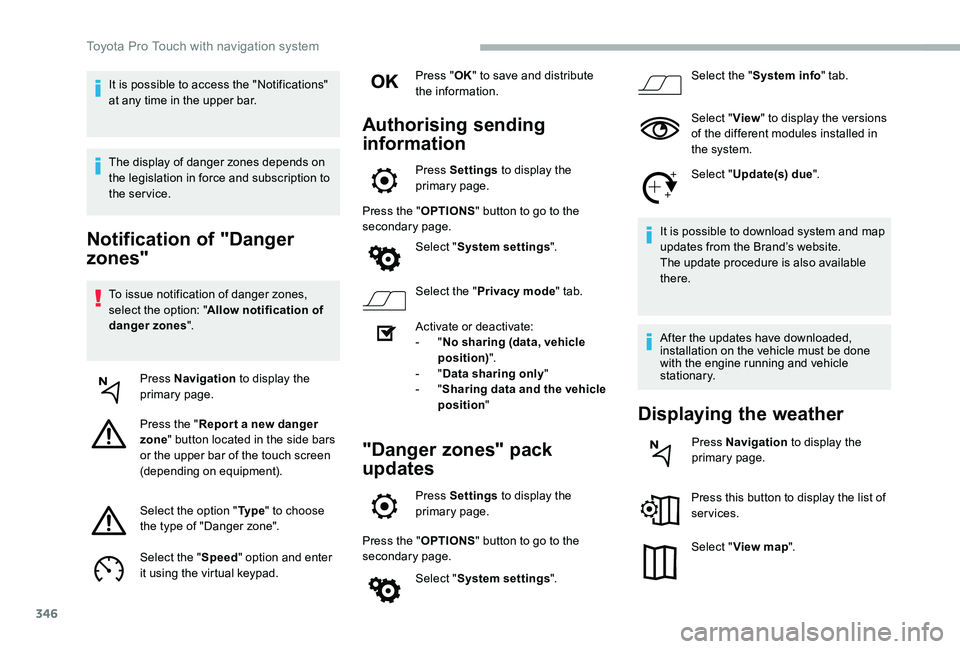
Notification of "Danger
zones"
To issue notification of danger zones, select the option: "Allow notification of danger zones".
Press Navigation to display the primary page.
Press the "Repor t a new danger zone" button located in the side bars or the upper bar of the touch screen (depending on equipment).
Select the option "Ty p e" to choose the type of "Danger zone".
Select the "Speed" option and enter it using the virtual keypad.
Press "OK" to save and distribute the information.
Authorising sending
information
Press Settings to display the primary page.
Press the "OPTIONS" button to go to the secondary page.
Select "System settings".
Select the "Privacy mode" tab.
Activate or deactivate:- "No sharing (data, vehicle position)".- "Data sharing only"- "Sharing data and the vehicle position"
"Danger zones" pack
updates
Press Settings to display the primary page.
Press the "OPTIONS" button to go to the secondary page.
Select "System settings".
Select the "System info" tab.
Select "View" to display the versions of the different modules installed in the system.
Select "Update(s) due".
It is possible to download system and map updates from the Brand’s website.The update procedure is also available there.
After the updates have downloaded, installation on the vehicle must be done with the engine running and vehicle stationary.
Displaying the weather
Press Navigation to display the primary page.
Press this button to display the list of services.
Select "View map".
It is possible to access the "Notifications" at any time in the upper bar.
The display of danger zones depends on the legislation in force and subscription to the service.
Toyota Pro Touch with navigation system
Page 366 of 418
366
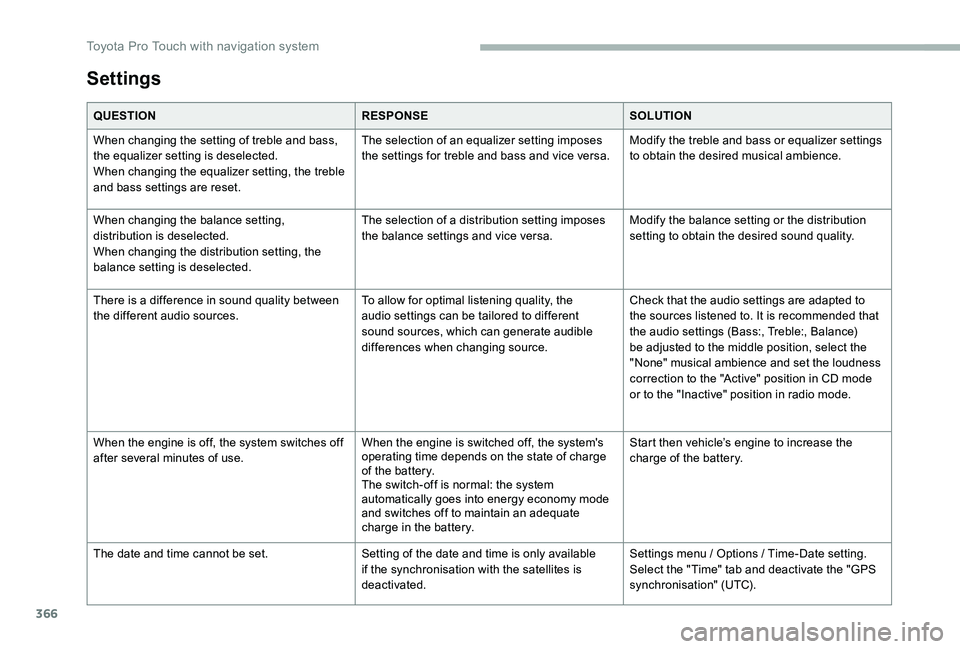
Settings
QUESTIONRESPONSESOLUTION
When changing the setting of treble and bass, the equalizer setting is deselected.When changing the equalizer setting, the treble and bass settings are reset.
The selection of an equalizer setting imposes the settings for treble and bass and vice versa.Modify the treble and bass or equalizer settings to obtain the desired musical ambience.
When changing the balance setting, distribution is deselected.When changing the distribution setting, the balance setting is deselected.
The selection of a distribution setting imposes the balance settings and vice versa.Modify the balance setting or the distribution setting to obtain the desired sound quality.
There is a difference in sound quality between the different audio sources.To allow for optimal listening quality, the audio settings can be tailored to different sound sources, which can generate audible differences when changing source.
Check that the audio settings are adapted to the sources listened to. It is recommended that the audio settings (Bass:, Treble:, Balance) be adjusted to the middle position, select the "None" musical ambience and set the loudness correction to the "Active" position in CD mode or to the "Inactive" position in radio mode.
When the engine is off, the system switches off after several minutes of use.When the engine is switched off, the system's operating time depends on the state of charge of the battery.The switch-off is normal: the system automatically goes into energy economy mode and switches off to maintain an adequate charge in the battery.
Start then vehicle’s engine to increase the charge of the battery.
The date and time cannot be set.Setting of the date and time is only available if the synchronisation with the satellites is deactivated.
Settings menu / Options / Time-Date setting. Select the "Time" tab and deactivate the "GPS synchronisation" (UTC).
Toyota Pro Touch with navigation system
Page 367 of 418
367
To y o t a P r o To u c h
Multimedia audio system -
Applications - Bluetooth®
telephone
The various functions and settings described differ according to the version and configuration of the vehicle.
For safety reasons and because they require continued attention on the part of the driver, the following operations must be carried out with the vehicle stationary and the ignition on:- Using a smartphone.- Pairing a Bluetooth mobile phone to the hands-free Bluetooth system of the car radio.- Smartphone connection operations for CarPlay®, MirrorLinkTM or Android Auto (certain applications interrupt their display when the vehicle starts to move again).- The configuration of profiles.
The system is protected in such a way that it will only operate in the vehicle.The display of the message Energy Economy Mode signals that a change to standby is imminent.
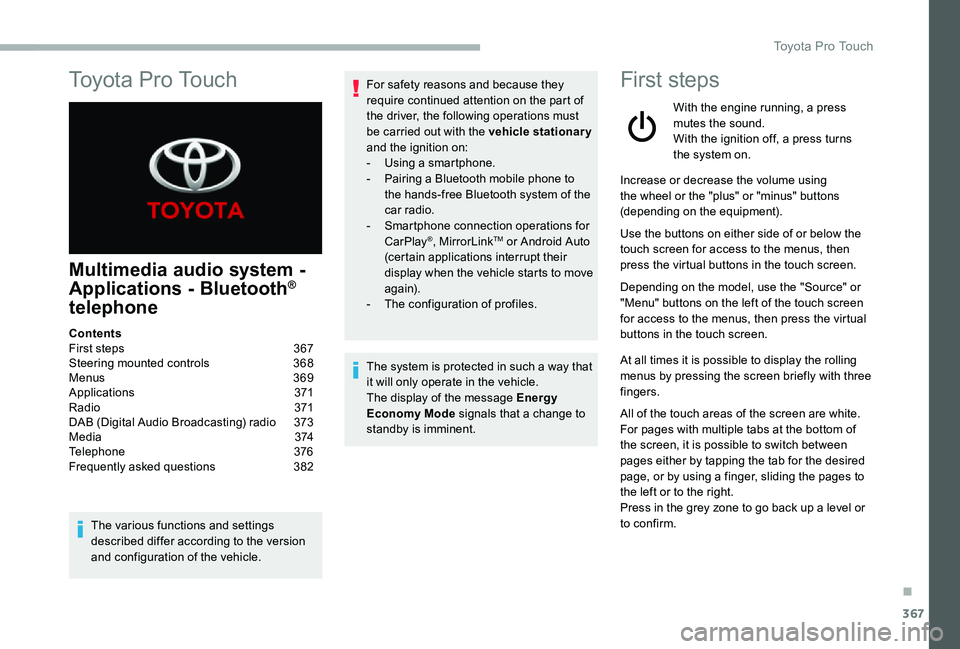
First steps
With the engine running, a press mutes the sound.With the ignition off, a press turns the system on.
Increase or decrease the volume using the wheel or the "plus" or "minus" buttons (depending on the equipment).
Use the buttons on either side of or below the touch screen for access to the menus, then press the virtual buttons in the touch screen.
Depending on the model, use the "Source" or "Menu" buttons on the left of the touch screen for access to the menus, then press the virtual buttons in the touch screen.
At all times it is possible to display the rolling menus by pressing the screen briefly with three fingers.
All of the touch areas of the screen are white.For pages with multiple tabs at the bottom of
the screen, it is possible to switch between pages either by tapping the tab for the desired page, or by using a finger, sliding the pages to the left or to the right.Press in the grey zone to go back up a level or to confirm.
ContentsFirst steps 367Steering mounted controls 368Menus 369Applications 371R adi o 371DAB (Digital Audio Broadcasting) radio 373M e d i a 3 74Telephone 376Frequently asked questions 382
.
Toyota Pro Touch
Page 386 of 418
386
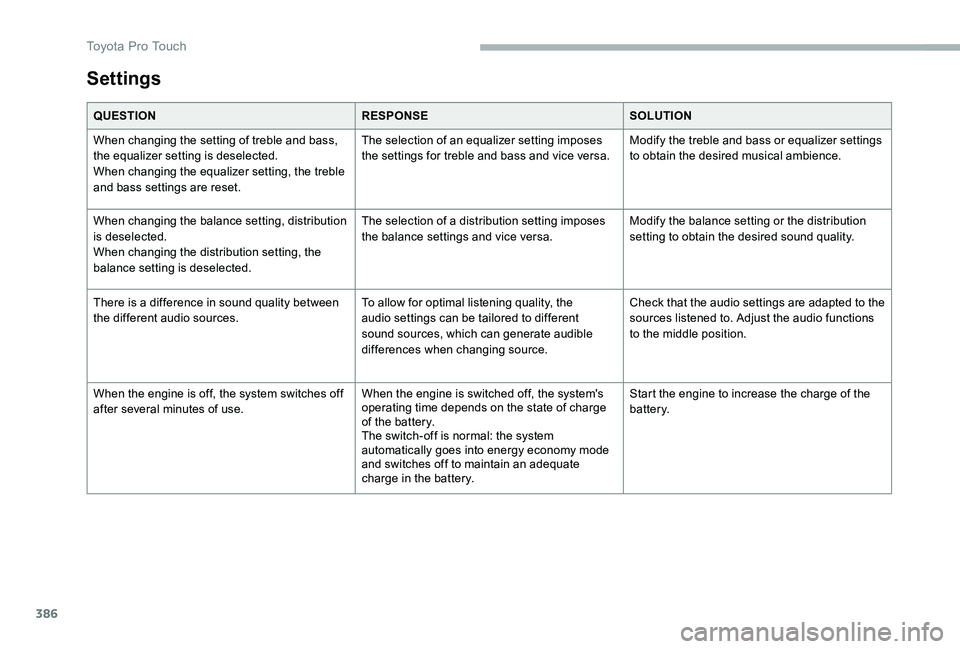
Settings
QUESTIONRESPONSESOLUTION
When changing the setting of treble and bass, the equalizer setting is deselected.When changing the equalizer setting, the treble and bass settings are reset.
The selection of an equalizer setting imposes the settings for treble and bass and vice versa.Modify the treble and bass or equalizer settings to obtain the desired musical ambience.
When changing the balance setting, distribution is deselected.When changing the distribution setting, the balance setting is deselected.
The selection of a distribution setting imposes the balance settings and vice versa.Modify the balance setting or the distribution setting to obtain the desired sound quality.
There is a difference in sound quality between the different audio sources.To allow for optimal listening quality, the audio settings can be tailored to different sound sources, which can generate audible differences when changing source.
Check that the audio settings are adapted to the sources listened to. Adjust the audio functions to the middle position.
When the engine is off, the system switches off after several minutes of use.When the engine is switched off, the system's operating time depends on the state of charge of the battery.The switch-off is normal: the system automatically goes into energy economy mode and switches off to maintain an adequate charge in the battery.
Start the engine to increase the charge of the battery.
Toyota Pro Touch
Page 387 of 418
387
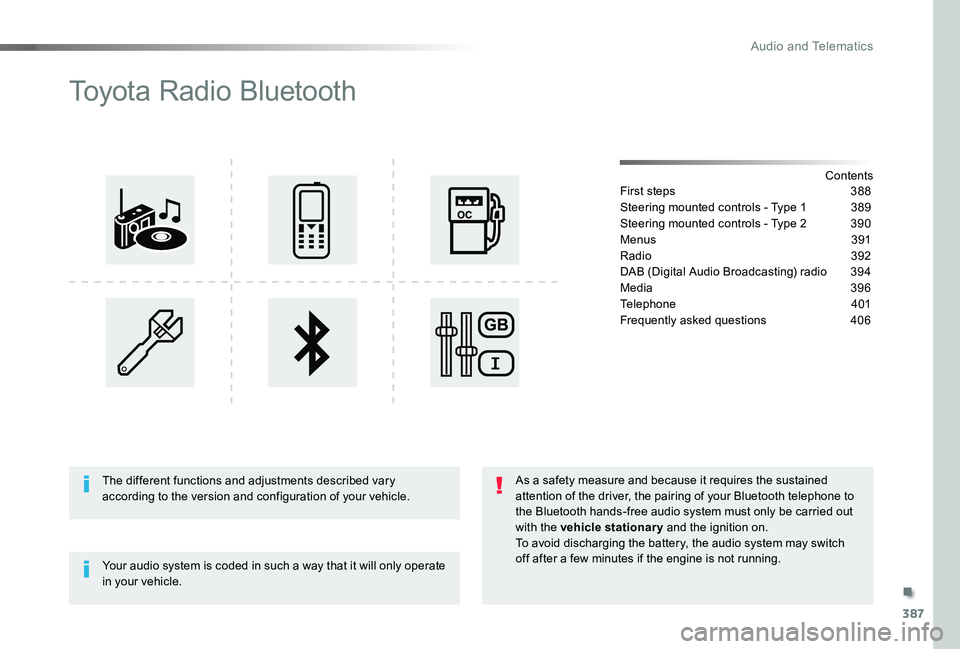
Toyota Radio Bluetooth
ContentsFirst steps 388
Steering mounted controls - Type 1 389
Steering mounted controls - Type 2 390
Menus 391
Radio 392
DAB (Digital Audio Broadcasting) radio 394
Media 396
Telephone 401
Frequently asked questions 406
Your audio system is coded in such a way that it will only operate in your vehicle.
The different functions and adjustments described vary according to the version and configuration of your vehicle.
As a safety measure and because it requires the sustained attention of the driver, the pairing of your Bluetooth telephone to the Bluetooth hands-free audio system must only be carried out with the vehicle stationary and the ignition on.To avoid discharging the battery, the audio system may switch off after a few minutes if the engine is not running.
.
Audio and Telematics
Page 406 of 418

406
The table below gives answers to the most frequently asked questions on your audio system.
QUESTIONANSWERSOLUTION
With the engine off, the audio system switches off after a few minutes of use.
When the engine is switched off, the audio system operating time depends on the state of charge of the battery.The switch-off is normal: the audio equipment switches to economy mode and switches off to prevent discharging of the vehicle's battery.
Start the vehicle's engine to increase the battery charge.
The message "the audio system is overheated" appears on the display.
In order to protect the installation if the surrounding temperature is too high, the audio system switches to an automatic thermal protection mode leading to a reduction in volume or CD play stopping.
Switch the audio system off for a few minutes to allow the system to cool.
Frequently asked questions
QUESTIONANSWERSOLUTION
There is a difference in sound quality between the different audio sources (radio, CD...).
For optimum sound quality, the audio settings (Volume, Bass, Treble, Ambience and Loudness) can be adapted to the different sound sources, which may result in audible differences when changing source (radio, CD...).
Check that the audio settings (Volume, Bass, Treble, Ambience and Loudness) are adapted to the sources listened to. It is advisable to set the audio functions (Bass, Treble, Front-Rear Balance and Left-Right Balance) to the middle position, select the musical ambience "None" and set the loudness correction to the "Active" position in CD mode or to the "Inactive" position in radio mode.
Radio
Audio and Telematics