2020 TOYOTA PRIUS PRIME schedule charging
[x] Cancel search: schedule chargingPage 114 of 792
114
PRIUS PRIME_OM_OM47C77U_(U)
2-2. Charging
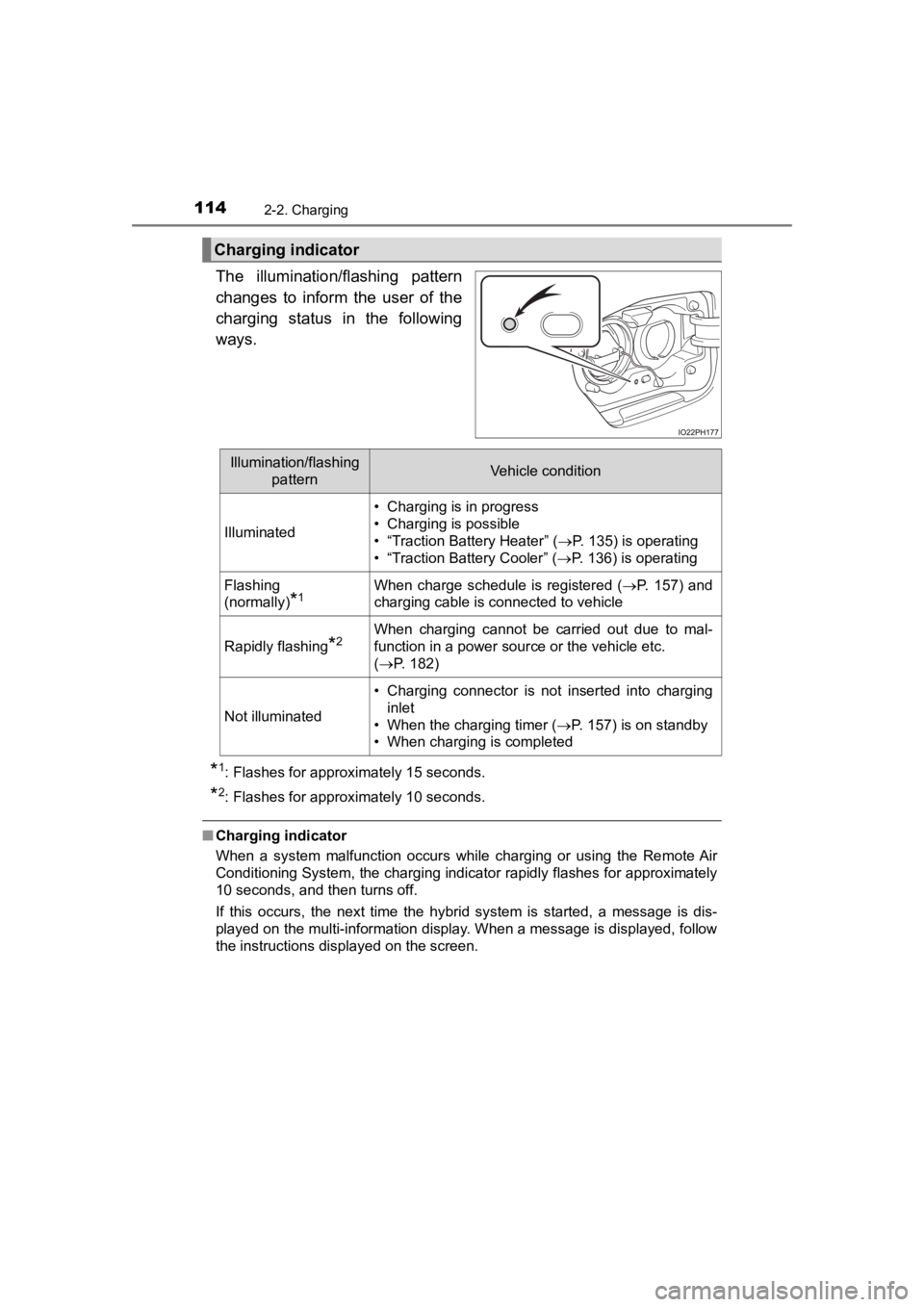
The illumination/flashing pattern
changes to inform the user of the
charging status in the following
ways.
*1: Flashes for approximately 15 seconds.
*2: Flashes for approximately 10 seconds.
■Charging indicator
When a system malfunction occurs while charging or using the Re mote Air
Conditioning System, the charging indicator rapidly flashes for approximately
10 seconds, and then turns off.
If this occurs, the next time the hybrid system is started, a m essage is dis-
played on the multi-information display. When a message is displayed, follow
the instructions displayed on the screen.
Charging indicator
Illumination/flashing
patternVehicle condition
Illuminated
• Charging is in progress
• Charging is possible
• “Traction Battery Heater” ( P. 135) is operating
• “Traction Battery Cooler” ( P. 136) is operating
Flashing
(normally)
*1When charge schedule is registered ( P. 157) and
charging cable is connected to vehicle
Rapidly flashing*2When charging cannot be carried out due to mal-
function in a power source or the vehicle etc.
( P. 182)
Not illuminated
• Charging connector is not inserted into charging
inlet
• When the charging timer ( P. 157) is on standby
• When charging is completed
Page 139 of 792
139
PRIUS PRIME_OM_OM47C77U_(U)
2-2. Charging
2
Plug-in hybrid system
Charging tips
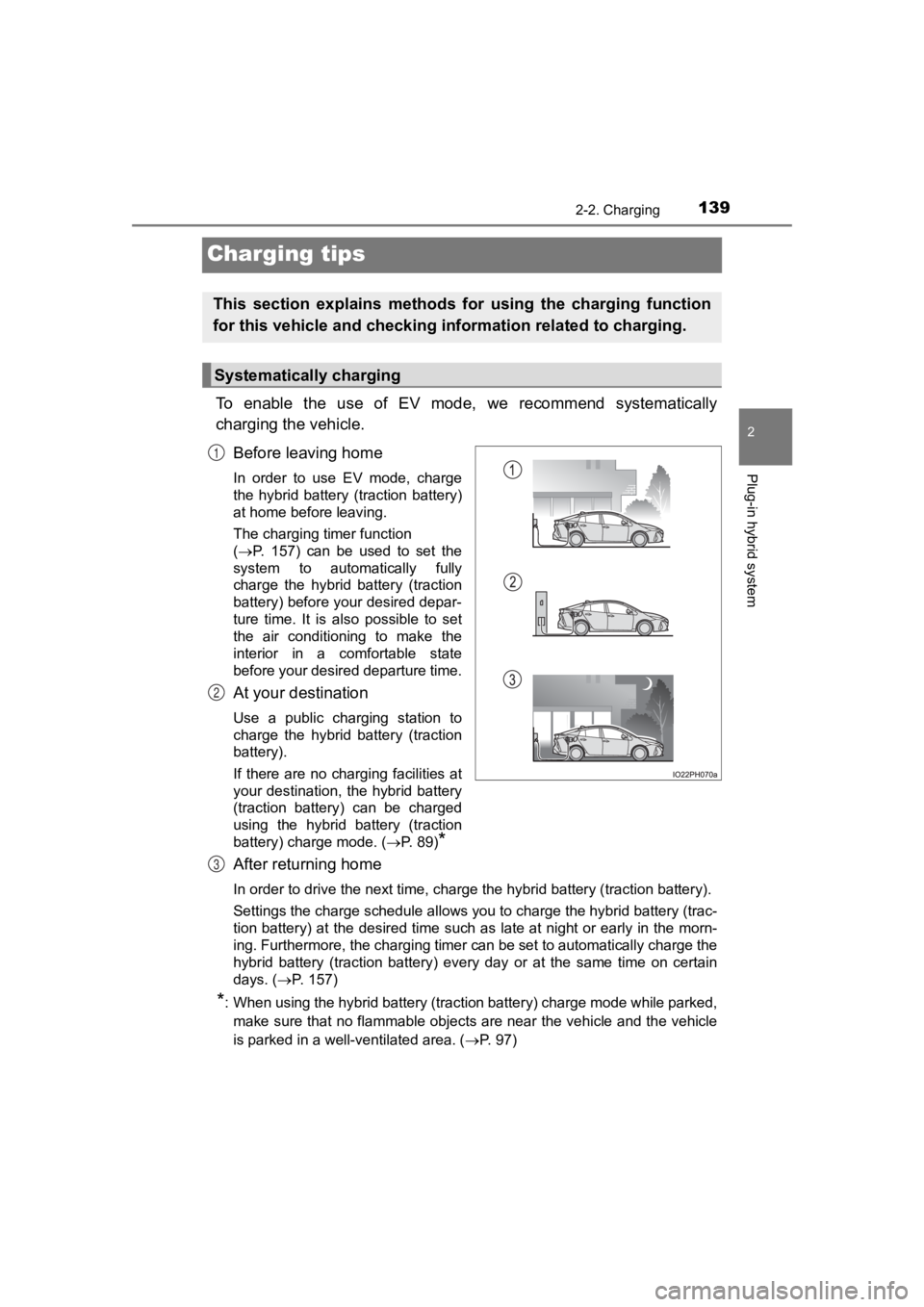
To enable the use of EV mode, we recommend systematically
charging the vehicle.Before leaving home
In order to use EV mode, charge
the hybrid battery (traction battery)
at home before leaving.
The charging timer function
(P. 157) can be used to set the
system to automatically fully
charge the hybrid battery (traction
battery) before your desired depar-
ture time. It is also possible to set
the air conditioning to make the
interior in a comfortable state
before your desired departure time.
At your destination
Use a public charging station to
charge the hybrid battery (traction
battery).
If there are no charging facilities at
your destination, the hybrid battery
(traction battery) can be charged
using the hybrid battery (traction
battery) charge mode. ( P. 89)
*
After returning home
In order to drive the next time, charge the hybrid battery (tra ction battery).
Settings the charge schedule allows you to charge the hybrid ba ttery (trac-
tion battery) at the desired time such as late at night or earl y in the morn-
ing. Furthermore, the charging timer can be set to automatically charge the
hybrid battery (traction battery) every day or at the same time on certain
days. ( P. 157)
*: When using the hybrid battery (traction battery) charge mode w hile parked,
make sure that no flammable objects are near the vehicle and th e vehicle
is parked in a well-ventilated area. ( P. 97)
This section explains methods for using the charging function
for this vehicle and checking in formation related to charging.
Systematically charging
1
2
3
Page 141 of 792
141
PRIUS PRIME_OM_OM47C77U_(U)
2-2. Charging
2
Plug-in hybrid system
Things to know before charging
This vehicle has been designed to allow charging from an external
power source using a charging cabl e for exclusive use with standard
household AC outlets.
However, the vehicle differs greatly from standard household el ectri-
cal goods in the following ways, and incorrect usage could caus e fire
or electric shock, pos sibly leading to death or serious injury.
● The charging operation is designed to operate at 12A continuous ly
for the charge duration (up to 5 hours 10 minutes). ( P. 134)
● Charging can be conducted outdoors.
To charge properly, follow the procedure after reading the expl anation
below. Charging is intended to be carried out by licensed drive rs only
who properly understand the charging procedure.
● Charging should not be carried out by children.
● When charging with a charging equipment, follow the procedures
for using each equipment.
● When charging using a public cha rging facility, check the setting of
the charging timer function. • When the charge schedule is registered, temporarily turn off t he
function or turn “ Charge Now” on. ( P. 164, 166, 174, 175)
• When the charge sche dule is set to ON, charging will not start
even if the charging cable is connected. Also, charging fee may
occur due to connection of the charging cable.
Make sure to read the following precautions before connecting
the charging cable to the vehicle and charging the hybrid batte ry
(traction battery).
Charging precautions
Page 146 of 792
146
PRIUS PRIME_OM_OM47C77U_(U)
2-2. Charging
How to charge
P. 1 4 2
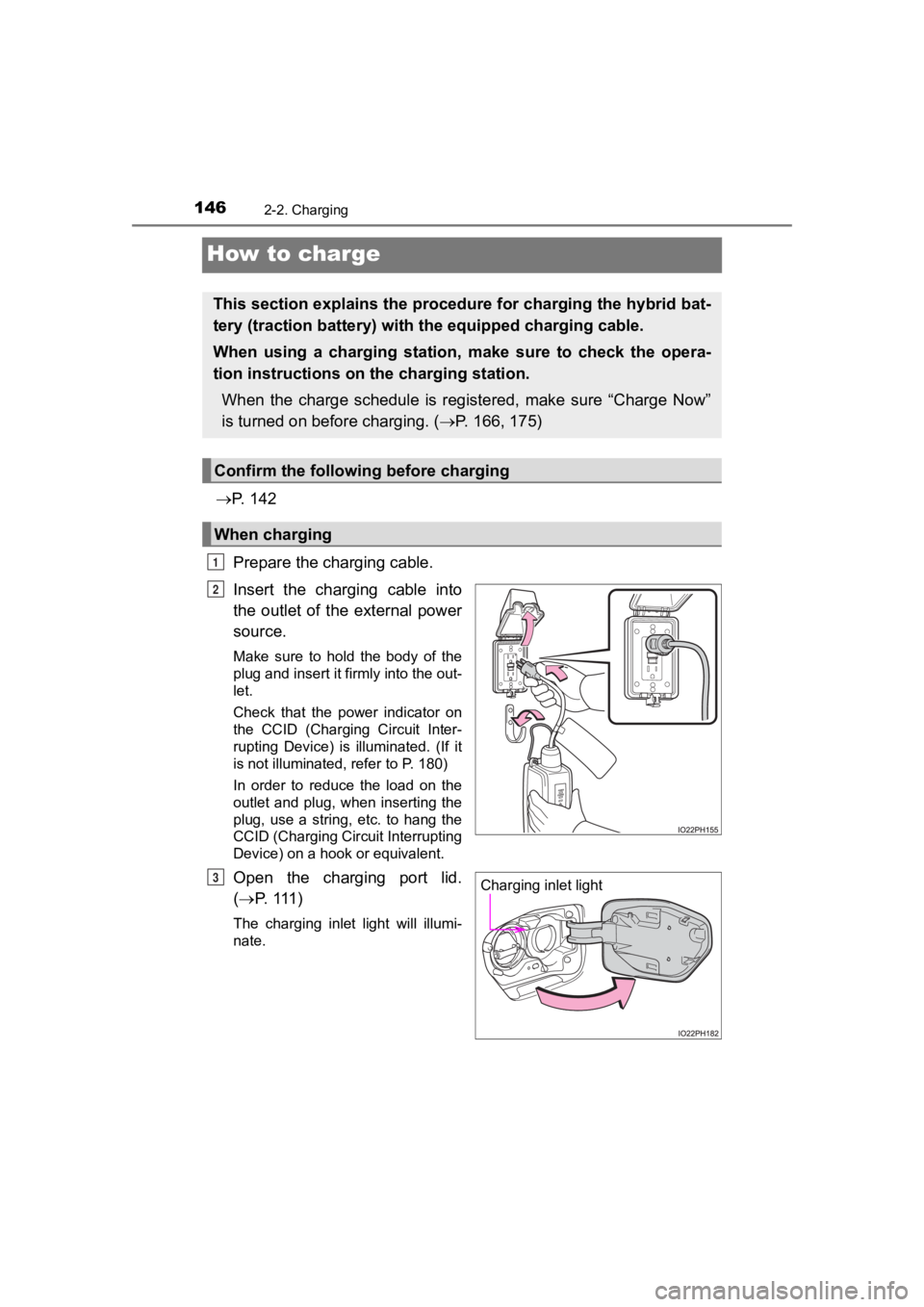
Prepare the charging cable.
Insert the charging cable into
the outlet of the external power
source.
Make sure to hold the body of the
plug and insert it firmly into the out-
let.
Check that the power indicator on
the CCID (Charging Circuit Inter-
rupting Device) is illuminated. (If it
is not illuminated, refer to P. 180)
In order to reduce the load on the
outlet and plug, when inserting the
plug, use a string, etc. to hang the
CCID (Charging Circuit Interrupting
Device) on a hook or equivalent.
Open the charging port lid.
( P. 111 )
The charging inlet light will illumi-
nate.
This section explains the proce dure for charging the hybrid bat -
tery (traction battery) with the equipped charging cable.
When using a charging station, make sure to check the opera-
tion instructions on the charging station.
When the charge schedule is registered, make sure “Charge Now”
is turned on before charging. ( P. 166, 175)
Confirm the following before charging
When charging
1
2
Charging inlet lightP
Page 148 of 792
148
PRIUS PRIME_OM_OM47C77U_(U)
2-2. Charging
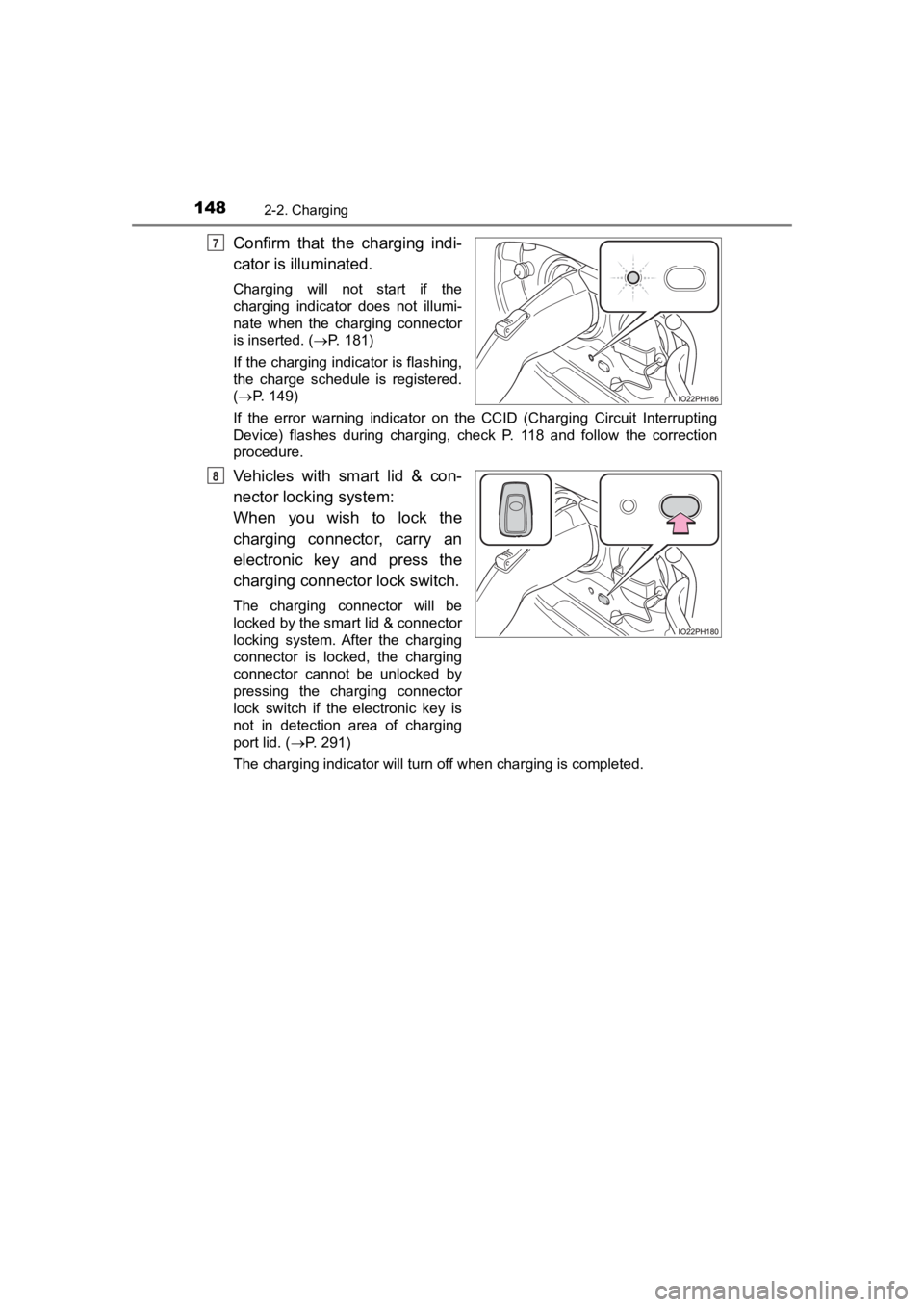
Confirm that the charging indi-
cator is illuminated.
Charging will not start if the
charging indicator does not illumi-
nate when the charging connector
is inserted. (P. 181)
If the charging indicator is flashing,
the charge schedule is registered.
( P. 149)
If the error warning indicator on the CCID (Charging Circuit In terrupting
Device) flashes during charging, check P. 118 and follow the co rrection
procedure.
Vehicles with smart lid & con-
nector locki ng system:
When you wish to lock the
charging connector, carry an
electronic key and press the
charging connector lock switch.
The charging connector will be
locked by the smart lid & connector
locking system. After the charging
connector is locked, the charging
connector cannot be unlocked by
pressing the charging connector
lock switch if the electronic key is
not in detection area of charging
port lid. ( P. 291)
The charging indicator will turn off when charging is completed .
7
8
Page 149 of 792
PRIUS PRIME_OM_OM47C77U_(U)
1492-2. Charging
2
Plug-in hybrid system
■During charging
●The surface of the CCID (Charging Circuit Interrupting Device) may become
hot, but this does not indicate a malfunction.
● Depending on radio wave conditions, interference may be heard o n the
radio.
● The current charging condition and the estimated time until cha rging will
complete can be checked on the multi-information display or 11. 6-inch dis-
play (if equipped). ( P. 140, 271)
● During charging, the hybrid battery (traction battery) status i ndicator illumi-
nates and flashes, and changes according to the charging amount .
( P. 112)
■ If the charging indicator flashes after connecting the charging cable
The charge schedule ( P. 157) is registered and charging cannot be per-
formed. To cancel charging using the timer and start charging, perform any of
the following procedures.
● Turn “Charge Now” on ( P. 166, 175)
● While the charging indicator is flashing, remove and reconnect the charging
connector within 5 seconds
■ When the charging connector cannot be inserted into the chargin g inlet
(vehicles with smart lid & connector locking system)
P. 127
Page 157 of 792
157
PRIUS PRIME_OM_OM47C77U_(U)
2-2. Charging
2
Plug-in hybrid system
Using the charging timer function
When registering the charge schedule, the following settings ca n be
changed.
■Select the charging mode
One of the two following c harging modes can be selected.
*1: Charging timer function is performed in accordance with the cl ock in the
instrument cluster. Before registering the charge schedule, che ck the clock
settings to the proper time.
*2: There might be a slight error in the timing when charging star ts due to the
state of the hybrid battery (traction battery).
■
Repeated setting
The periodic timer charging can be set by selecting your desire d
day of the week.
■Air conditioning-linked s etting (“Climate Prep”)
When the charging mode is set to “Departure”, the vehicle air c ondi-
tioning system ( P. 500, 511) can be set to automatically operate*
according to the set time.
By adjusting the cabin temperature in advance, passengers can e njoy a
pleasant interior immediately after entering the vehicle.
*: Operation starts approximately 10 minutes before the set depar ture time.
Charging can be carried out at the desired time by registering
the charge schedule. Also, it is possible to set the timer to one’s
preferences, such as having charging complete by a certain
departure time or be carried out at the same time on certain
days.
Settings of the char ging timer function
Charging modeOperation description
“Start”Starts charging at the set time*1 and finishes
charging when fully charged.
*2
“Departure”
Starts charging to finish at the set time.
When this setting is selected, the air conditioning-
linked function can be used.
Page 158 of 792
158
PRIUS PRIME_OM_OM47C77U_(U)
2-2. Charging
■Turning “Charge Now” on and off
If even one charge schedule is registered, charging does not start
until the set time, even if the charging cable is connected to the
vehicle. To start charging with out changing the charge schedule
setting, turn “Charge Now” on to temporarily cancel the charge
schedule and enable charging afte r connecting the charging cable.
■Changing “Next Charging Event”*1
It is possible to temporarily set the time of the next schedule d
charge without changing the r egistered repeated setting.
*2
*1: The “Next Charging Event” refers to the closest charge schedul e from the
current time among the registered charge schedules. Timer charging is
performed based on the “Next Charging Event”.
*2: When “Next Charging Event” is changed, the current charge sche dule will
be temporarily ignored and charging will not be carried out unt il the time
specified by “Next Charging Event”. (For example, when “Next Ch arging
Event” is set for 2 days later, even if items are registered on the charge
schedule, charging will not be carried out until the time speci fied by “Next
Charging Event”.)
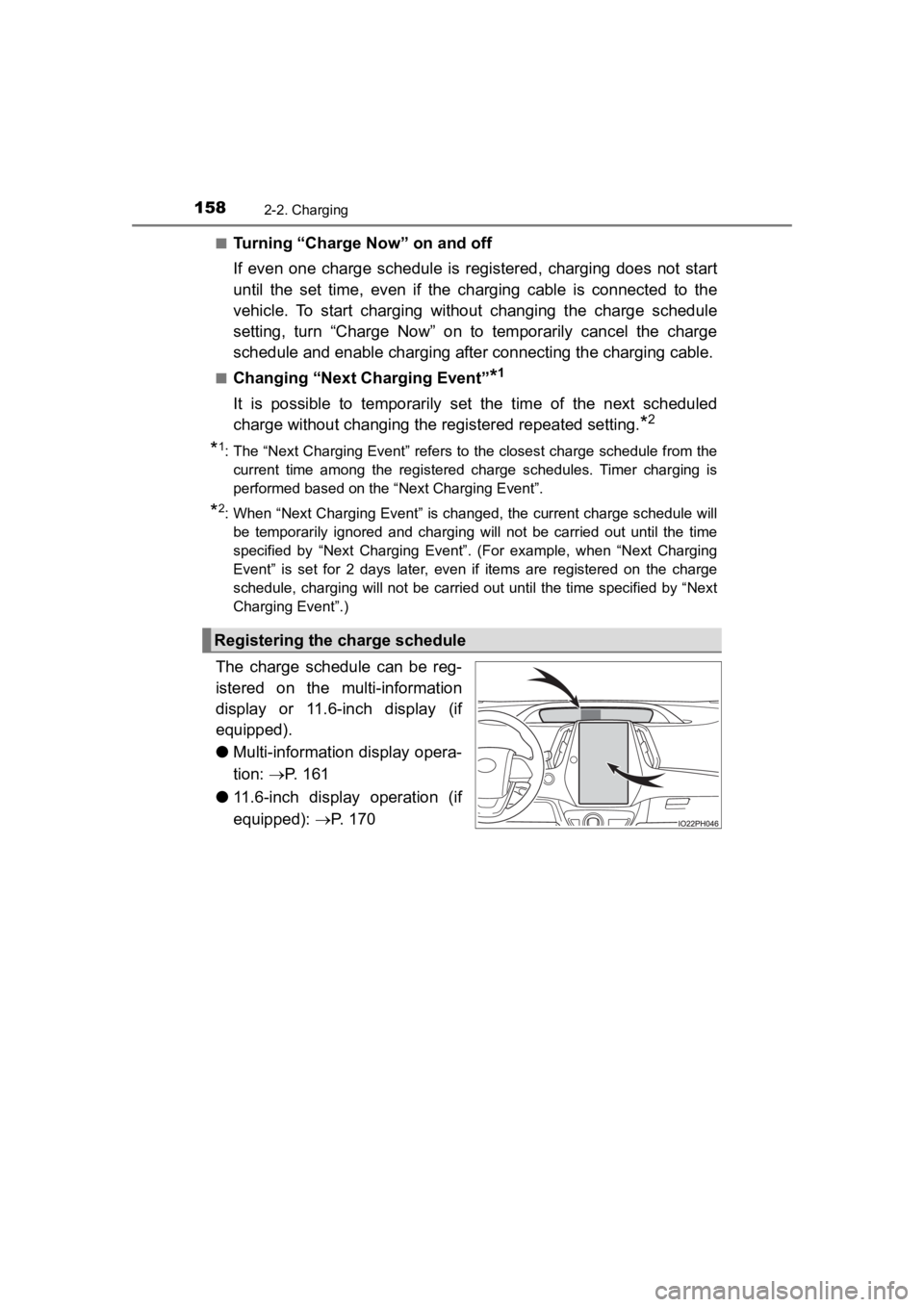
The charge schedule can be reg-
istered on the multi-information
display or 11.6-inch display (if
equipped).
● Multi-information display opera-
tion: P. 161
● 11.6-inch display operation (if
equipped): P. 170
Registering the charge schedule