Page 232 of 792
232
PRIUS PRIME_OM_OM47C77U_(U)
3. Instrument cluster
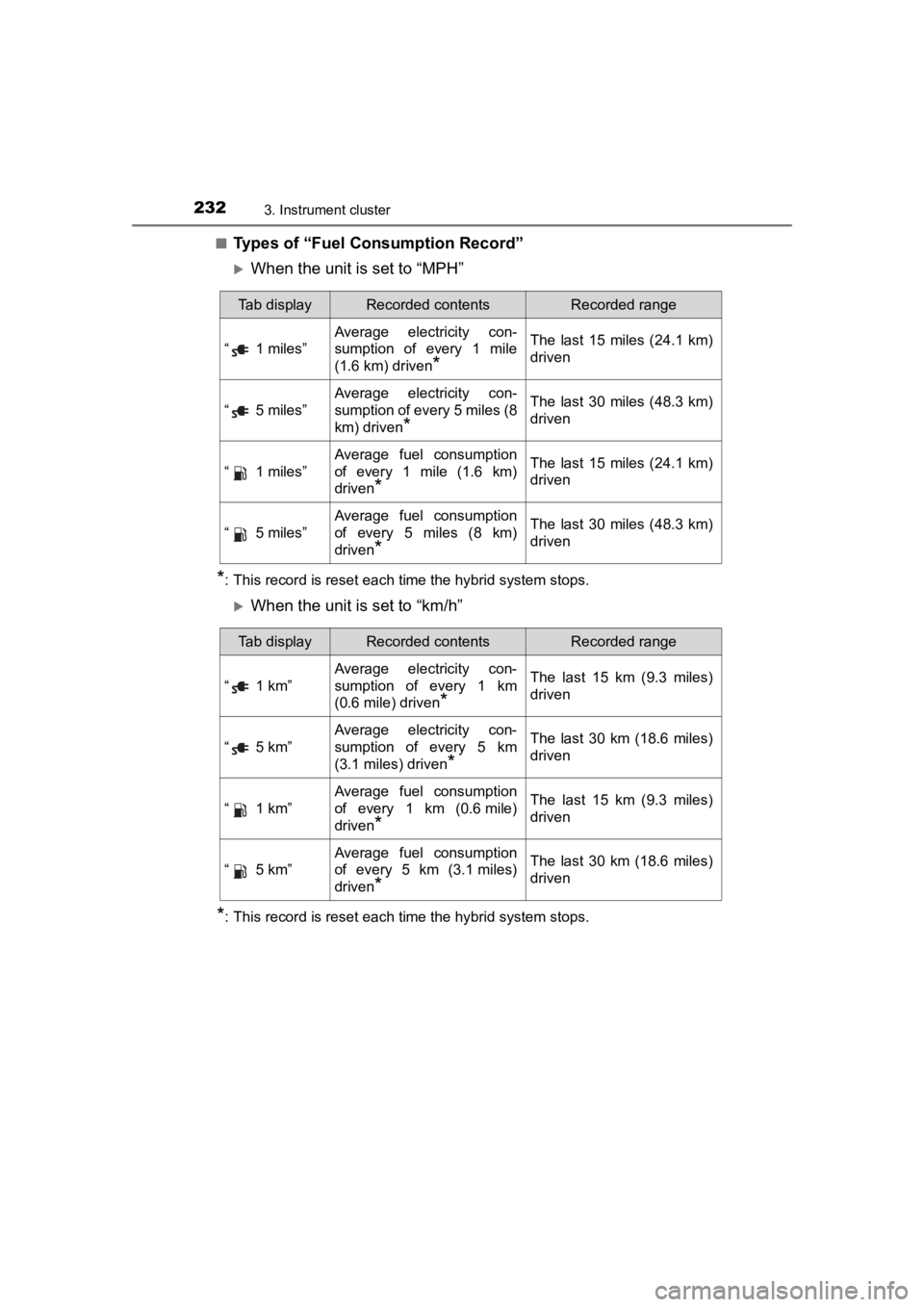
■Types of “Fuel Consumption Record”
When the unit is set to “MPH”
*: This record is reset each time the hybrid system stops.
When the unit is set to “km/h”
*: This record is reset each time the hybrid system stops.
Tab displayRecorded contentsRecorded range
“ 1 miles”
Average electricity con-
sumption of every 1 mile
(1.6 km) driven
*
The last 15 miles (24.1 km)
driven
“ 5 miles”
Average electricity con-
sumption of every 5 miles (8
km) driven
*
The last 30 miles (48.3 km)
driven
“ 1 miles”
Average fuel consumption
of every 1 mile (1.6 km)
driven
*
The last 15 miles (24.1 km)
driven
“ 5 miles”
Average fuel consumption
of every 5 miles (8 km)
driven
*
The last 30 miles (48.3 km)
driven
Tab displayRecorded contentsRecorded range
“ 1 km”
Average electricity con-
sumption of every 1 km
(0.6 mile) driven
*
The last 15 km (9.3 miles)
driven
“ 5 km”
Average electricity con-
sumption of every 5 km
(3.1 miles) driven
*
The last 30 km (18.6 miles)
driven
“ 1 km”
Average fuel consumption
of every 1 km (0.6mile)
driven
*
The last 15 km (9.3 miles)
driven
“ 5 km”
Average fuel consumption
of every 5 km (3.1 miles)
driven
*
The last 30 km (18.6 miles)
driven
Page 233 of 792
PRIUS PRIME_OM_OM47C77U_(U)
2333. Instrument cluster
3
Instrument cluster
■Switching the electricity and fuel consumption history screen
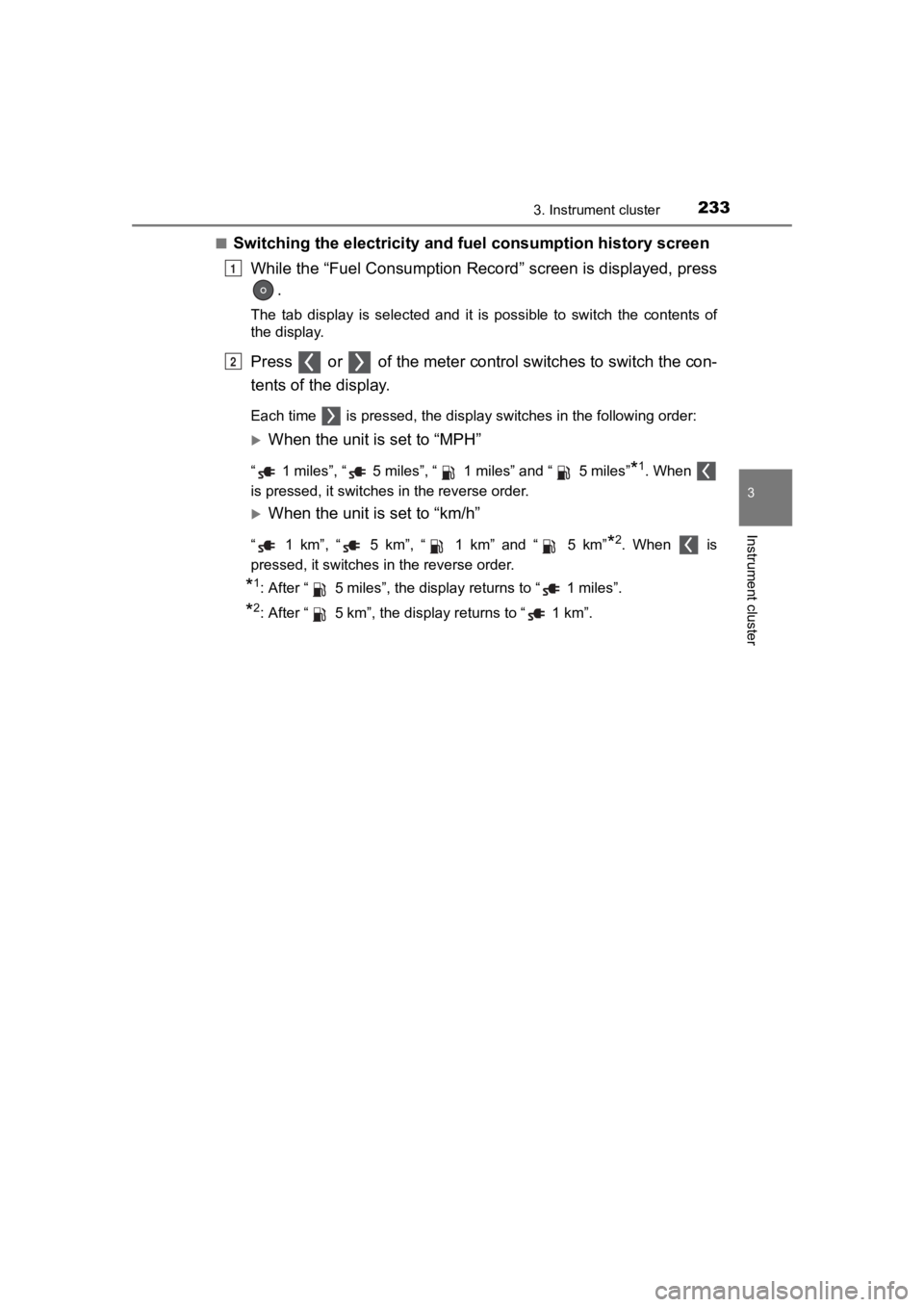
While the “Fuel Consumption Record” screen is displayed, press .
The tab display is selected and it is possible to switch the contents of
the display.
Press or of the meter contro l switches to switch the con-
tents of the display.
Each time is pressed, the display switches in the following or der:
When the unit is set to “MPH”
“ 1 miles”, “ 5 miles”, “ 1 miles” and “ 5 miles”*1. When
is pressed, it switches in the reverse order.
When the unit is set to “km/h”
“ 1 km”, “ 5 km”, “ 1 km” and “ 5 km”*2. When is
pressed, it switches in the reverse order.
*1: After “ 5 miles”, the display returns to “ 1 miles”.
*2: After “ 5 km”, the display returns to “ 1 km”.
1
2
Page 234 of 792
234
PRIUS PRIME_OM_OM47C77U_(U)
3. Instrument cluster
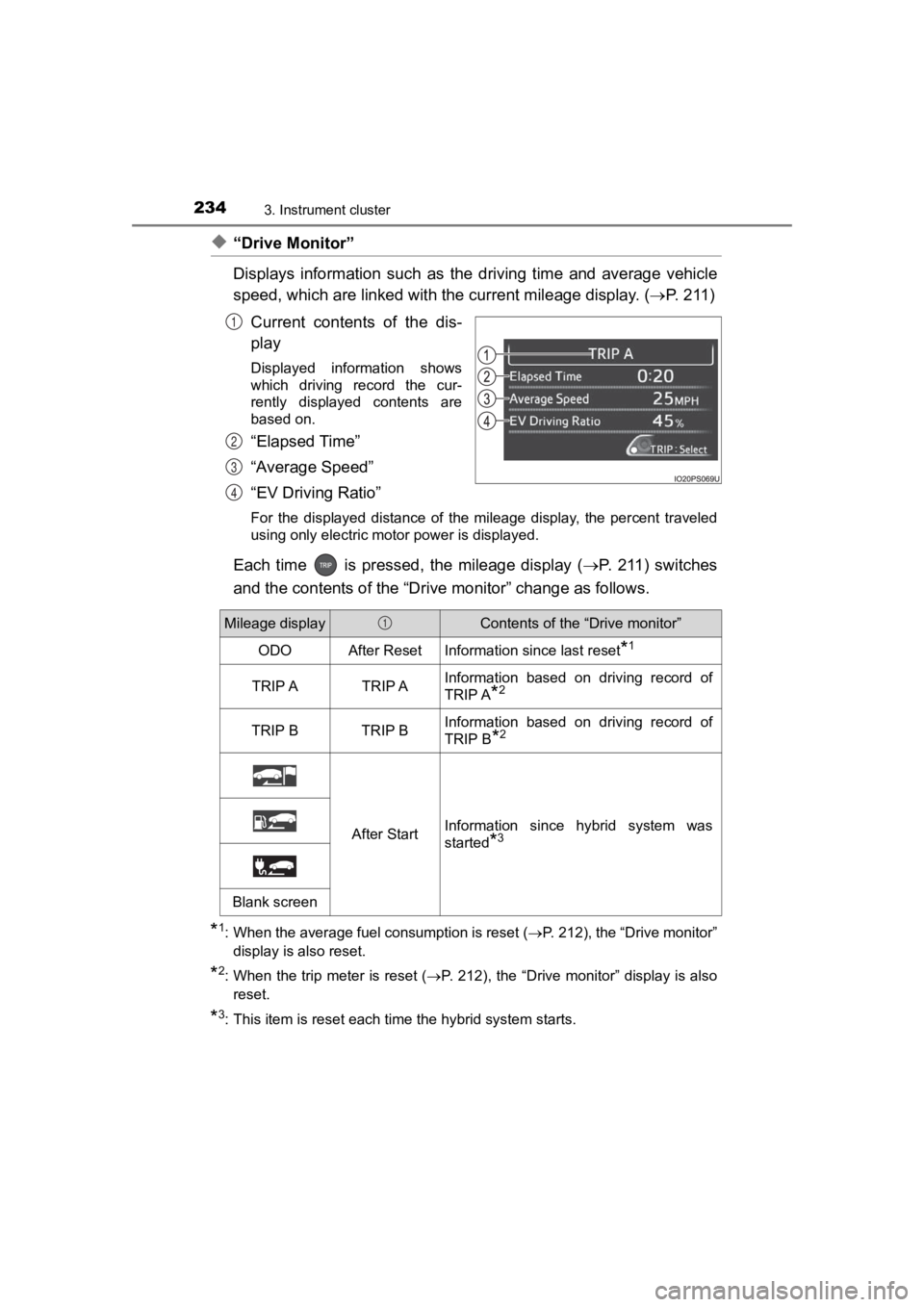
◆“Drive Monitor”
Displays information such as the driving time and average vehicle
speed, which are linked with the current mileage display. ( P. 2 1 1 )
Current contents of the dis-
play
Displayed information shows
which driving record the cur-
rently displayed contents are
based on.
“Elapsed Time”
“Average Speed”
“EV Driving Ratio”
For the displayed distance of the mileage display, the percent traveled
using only electric motor power is displayed.
Each time is pressed, the mileage display ( P. 2 11 ) s w i t c h e s
and the contents of the “Dri ve monitor” change as follows.
*1: When the average fuel consumption is reset ( P. 212), the “Drive monitor”
display is also reset.
*2: When the trip meter is reset ( P. 212), the “Drive monitor” display is also
reset.
*3: This item is reset each time the hybrid system starts.
1
2
3
4
Mileage displayContents of the “Drive monitor”
ODOAfter ResetInformation since last reset*1
TRIP ATRIP AInformation based on driving record of
TRIP A
*2
TRIP BTRIP BInformation based on driving record of
TRIP B
*2
After StartInformation since hybrid system was
started
*3
Blank screen
1
Page 236 of 792
236
PRIUS PRIME_OM_OM47C77U_(U)
3. Instrument cluster
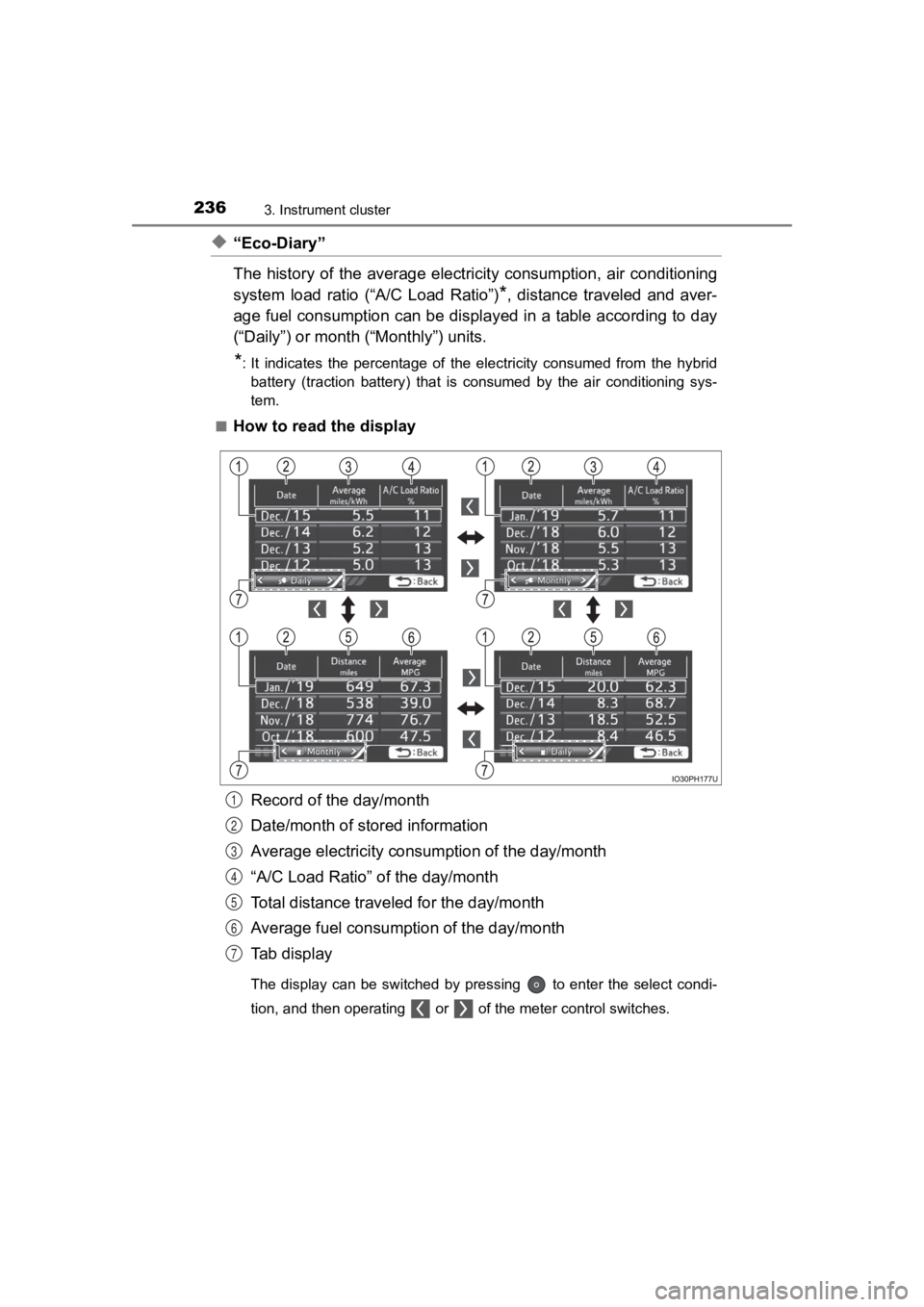
◆“Eco-Diary”
The history of the average electricity consumption, air conditioning
system load ratio (“A/C Load Ratio”)
*, distance traveled and aver-
age fuel consumption can be displ ayed in a table according to day
(“Daily”) or month (“Monthly”) units.
*: It indicates the percentage of the electricity consumed from the hybrid
battery (traction battery) that is consumed by the air conditioning sys-
tem.
■
How to read the display
Record of the day/month
Date/month of stored information
Average electricity consumption of the day/month
“A/C Load Ratio” of the day/month
Total distance traveled for the day/month
Average fuel consumption of the day/month
Tab display
The display can be switched by pressing to enter the select co ndi-
tion, and then operating or of the meter control switches.
1
2
3
4
5
6
7
Page 242 of 792
242
PRIUS PRIME_OM_OM47C77U_(U)
3. Instrument cluster
■Eco score (A/C score)
●The setting status of the following air conditioning system fun ctions are
reflected in the score.
• Temperature setting
• Fan speed setting
• Outside air and recirculated air modes
• “A/C” button
• S-FLOW mode
• “CLIMATE CONTROL”
● The Eco score (A/C score) is evaluated according to the ambient tempera-
ture and cabin temperature. Accordingly, even if the same setti ngs are
always used for the air conditioning system, the evaluation will change
according to such factors as the season and weather.
● When the air conditioning system is not being used or the airflow mode is
set to or , the Eco score (A/C score) is not evaluated. (While the
air conditioning system is not evaluated, its usage status is n ot reflected in
the total Eco score result.)
● The Eco score (A/C score) is a function that helps select an ai r conditioning
system setting which reduces electricity and fuel consumption, not a func-
tion that satisfies both comfortability and low fuel consumptio n.
Page 263 of 792
PRIUS PRIME_OM_OM47C77U_(U)
2633. Instrument cluster
3
Instrument cluster
■Trip information
If a screen other than “Trip information” is displayed, select “Trip
information”.
Fuel consumption in the past
15 minutes
Regenerated energy in the
past 15 minutes
One symbol indicates 30 Wh.
Up to 5 symbols are shown.
Current fuel consumption
Resetting the consumption
data
Average vehicle speed since the hybrid system was started
Elapsed time since the hybr id system was started
Cruising range
Average fuel consumption for the past 15 minutes is divided by
color into past averages and averages attained since the power
switch was last turned to ON mode. Use the displayed average fuel
consumption as a reference.
The image is an example only, and may vary slightly from actual
conditions.
Fuel consumption
1
2
3
4
5
6
7
Page 264 of 792
264
PRIUS PRIME_OM_OM47C77U_(U)
3. Instrument cluster
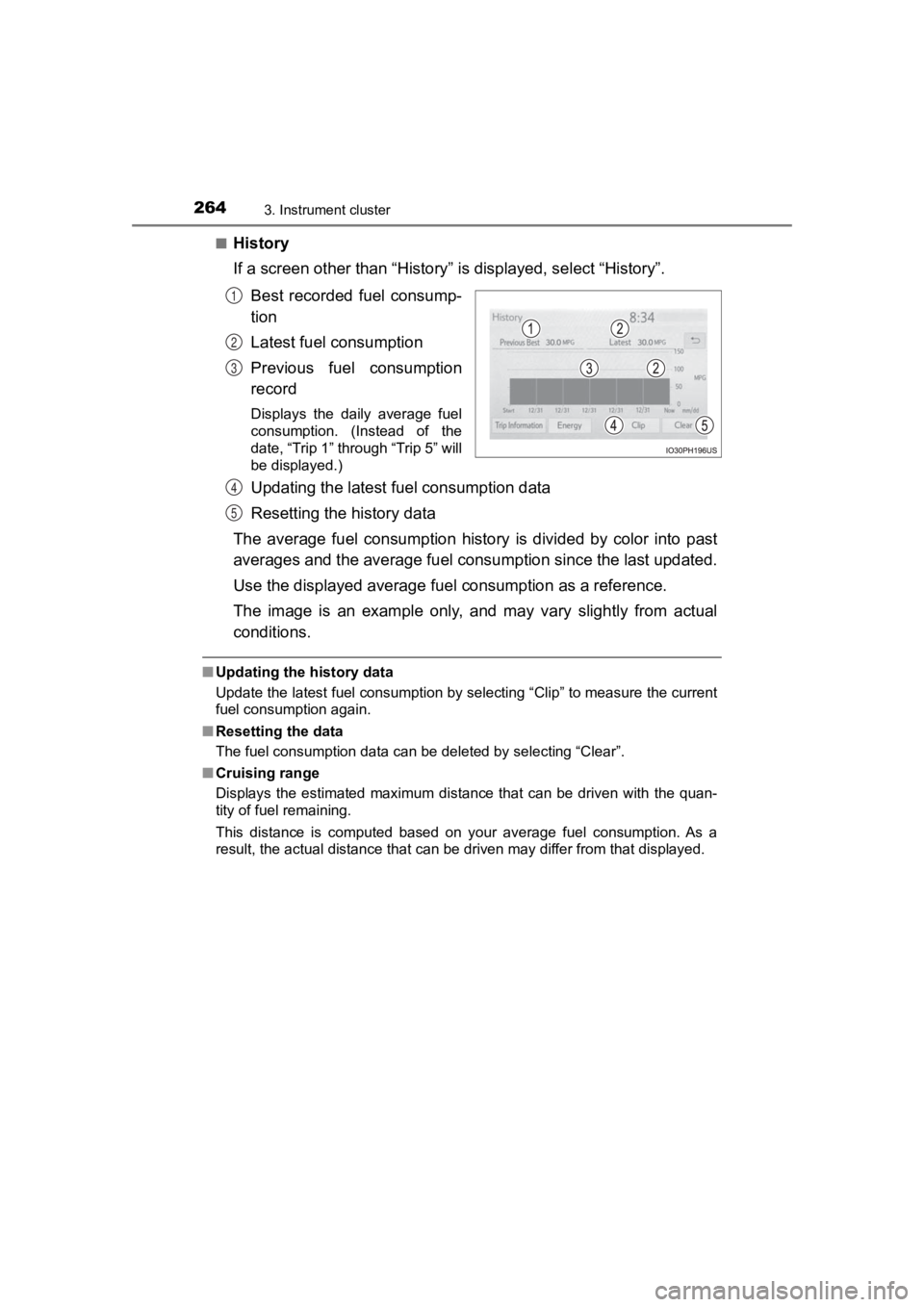
■History
If a screen other than “History” is displayed, select “History”.
Best recorded fuel consump-
tion
Latest fuel consumption
Previous fuel consumption
record
Displays the daily average fuel
consumption. (Instead of the
date, “Trip 1” through “Trip 5” will
be displayed.)
Updating the latest fuel consumption data
Resetting the history data
The average fuel consumption history is divided by color into p ast
averages and the average fuel con sumption since the last updated.
Use the displayed average fuel consumption as a reference.
The image is an example only, and may vary slightly from actual
conditions.
■ Updating the history data
Update the latest fuel consumption by selecting “Clip” to measure the current
fuel consumption again.
■ Resetting the data
The fuel consumption data can be deleted by selecting “Clear”.
■ Cruising range
Displays the estimated maximum distance that can be driven with the quan-
tity of fuel remaining.
This distance is computed based on your average fuel consumptio n. As a
result, the actual distance that can be driven may differ from that displayed.
1
2
3
4
5
Page 269 of 792
PRIUS PRIME_OM_OM47C77U_(U)
2693. Instrument cluster
3
Instrument cluster
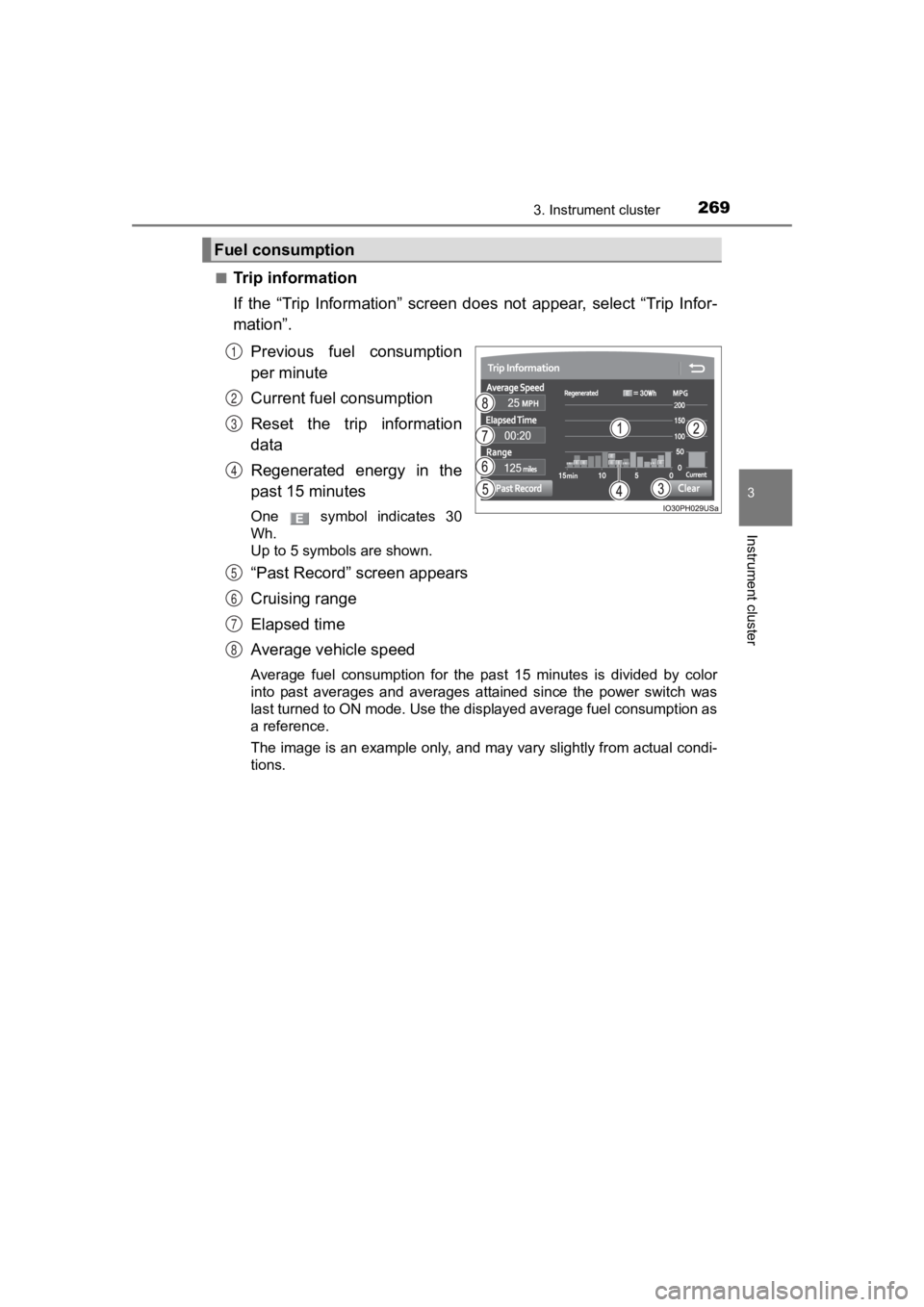
■Trip information
If the “Trip Information” screen does not appear, select “Trip Infor-
mation”.
Previous fuel consumption
per minute
Current fuel consumption
Reset the trip information
data
Regenerated energy in the
past 15 minutes
One symbol indicates 30
Wh.
Up to 5 symbols are shown.
“Past Record” screen appears
Cruising range
Elapsed time
Average vehicle speed
Average fuel consumption for the past 15 minutes is divided by color
into past averages and averages attained since the power switch was
last turned to ON mode. Use the displayed average fuel consumpt ion as
a reference.
The image is an example only, and may vary slightly from actual condi-
tions.
Fuel consumption
1
2
3
4
5
6
7
8