2020 NISSAN LEAF ECU
[x] Cancel search: ECUPage 268 of 596

When opening the hood:
1. Securely close the charge port door.
2. Pull the hood lock release handle
O1lo-
cated below the instrument panel. The
hood will then spring up slightly.
3. Locate the lever
O2in between the hood
and charge port lid, and push the lever
upward with your fingertips.
4. Raise the hood
O3.
5. Remove the support rod
O4from the
hood and insert it into the slot
O5. Hold the coated part
OAwhen removing
or resetting the support rod. Avoid direct
contact with the metal parts because
they may be hot immediately af ter the
EV system has been stopped.
When closing the hood:
1. Return the support rod to its original position.
2. Slowly move the hood down to latch the lock.
3. Push the hood down to lock the hood securely into place.
WARNING
• Always make sure that the rear hatch
has been closed securely to prevent
it from opening while driving.
• Do not drive with the rear hatch open.
• Make sure that all passengers have
their hands, etc. inside the vehicle
before closing the rear hatch.
LPD2691
REAR HATCH
Pre-driving checks and adjustments3-19
Page 271 of 596

When opening the charge port lid:
1. The charging status indicator lights flashand a chime sounds three times and the
charge port lid will then spring up slightly. 2. Put your hand into the underside of the
lid and open until it is in the fully open
position.
When closing the charge port lid:
1. Slowly move the lid down.
2. Lock it securely into place. If the charge port lid cannot be unlocked
1. Open the hood.
2. Move the lever behind the charge port
lid in the direction of the arrow using a
flat head screwdriver or suitable tool,
and the port is unlocked.
ButtonLPD2151LPD2706LPD2705
3-22Pre-driving checks and adjustments
Page 297 of 596

WARNING
Listed below are the system limitations
for Intelligent Around View Monitor.
Failure to operate the vehicle in accor-
dance with these system limitations
could result in serious injury or death.
• Do not use the Intelligent Around
View Monitor with the outside mir-
rors in the stored position, and make
sure that the rear hatch is securely
closed when operating the vehicle
using the Intelligent Around View
Monitor.
• The apparent distance between ob-
jects viewed on the Intelligent
Around View Monitor differs from the
actual distance.
• The cameras are installed on the
front grille, the outside mirrors and
above the rear license plate. Do not
put anything on the vehicle that cov-
ers the cameras.
• When washing the vehicle with high
pressure water, be sure not to spray it
around the cameras. Otherwise, wa-
ter may enter the camera unit caus-
ing water condensation on the lens, a
malfunction, fire or an electric shock. •
Do not strike the cameras. They are
precision instruments. Doing so
could cause a malfunction or cause
damage resulting in a fire or an elec-
tric shock.
There are some areas where the system
will not show objects and the system does
not warn of moving objects. When in the
front or rear view display, an object below
the bumper or on the ground may not be
viewed
O1. When in the bird’s-eye view, a
tall object near the seam
O2of the camera
viewing areas will not appear in the moni-
tor.
The following are operating limitations and
do not represent a system malfunction:
• There may be a delay when switching between views.
• When the temperature is extremely high or low, the screen may not display objects
clearly.
• When strong light directly shines on the camera, objects may not be displayed
clearly.
• The screen may flicker under fluorescent light.
• The colors of objects on the Intelligent Around View Monitor may differ some-
what from the actual color of objects. • Objects on the Intelligent Around View
Monitor may not be clear and the color of
the object may differ in a dark environ-
ment.
• There may be differences in sharpness between each camera view of the bird’s-
eye view.
• Do not use wax on the camera lens. Wipe off any wax with a clean cloth that has
been dampened with a diluted mild
cleaning agent, then wipe with a dry
cloth.
4-20Monitor, climate, audio, phone and voice recognition systems
Page 327 of 596

WARNING
• Do not leave children or adults who
would normally require the support
of others alone in your vehicle. Pets
should not be lef t alone either. They
could accidentally injure themselves
or others through inadvertent opera-
tion of the vehicle. Also, on hot, sunny
days, temperatures in a closed ve-
hicle could quickly become high
enough to cause severe or possibly
fatal injuries to people or animals.
• Properly secure all cargo with ropes
or straps to help prevent it from slid-
ing or shif ting. Do not place cargo
higher than the seatbacks. In a sud-
den stop or collision, unsecured
cargo could cause personal injury.
TIRE PRESSURE MONITORING
SYSTEM (TPMS)
Each tire, including the spare (if provided),
should be checked monthly when cold and
inflated to the inflation pressure recom-
mended by the vehicle manufacturer on
the vehicle placard or tire inflation pressure
label. (If your vehicle has tires of a different
size than the size indicated on the vehicle
placard or tire inflation pressure label, you should determine the proper tire inflation
pressure for those tires.)
As an added safety feature, your vehicle
has been equipped with a Tire Pressure
Monitoring System (TPMS) that illuminates
a low tire pressure telltale when one or
more of your tires is significantly under-
inflated. Accordingly, when the low tire
pressure telltale illuminates, you should
stop and check your tires as soon as pos-
sible, and inflate them to the proper pres-
sure. Driving on a significantly under-
inflated tire causes the tire to overheat and
can lead to tire failure. Under-inflation also
reduces power efficiency and tire tread life,
and may affect the vehicle’s handling and
stopping ability.
Please note that the TPMS is not a substi-
tute for proper tire maintenance, and it is
the driver’s responsibility to maintain cor-
rect tire pressure, even if under-inflation
has not reached the level to trigger illumi-
nation of the TPMS low tire pressure telltale.
Your vehicle has also been equipped with a
TPMS malfunction indicator to indicate
when the system is not operating properly.
The TPMS malfunction indicator is com-
bined with the low tire pressure telltale.
When the system detects a malfunction,
the telltale will flash for approximately oneminute and then remain continuously illu-
minated. This sequence will continue upon
subsequent vehicle start-ups as long as
the malfunction exists. When the malfunc-
tion indicator is illuminated, the system
may not be able to detect or signal low tire
pressure as intended. TPMS malfunctions
may occur for a variety of reasons, includ-
ing the installation of replacement or alter-
nate tires or wheels on the vehicle that
prevent the TPMS from functioning prop-
erly. Always check the TPMS malfunction
telltale af ter replacing one or more tires or
wheels on your vehicle to ensure that the
replacement or alternate tires and wheels
allow the TPMS to continue to function
properly.
Additional information
• When replacing a wheel without the
TPMS such as the spare tire, the TPMS
does not monitor the tire pressure of the
spare tire.
• The TPMS will activate only when the ve- hicle is driven at speeds above 16 mph (25
km/h). Also, this system may not detect a
sudden drop in tire pressure (for example,
a flat tire while driving).
PRECAUTIONS WHEN STARTING AND
DRIVING
5-4Starting and driving
Page 333 of 596
WARNING
• Do not operate the power switch
while driving the vehicle except in an
emergency. (The EV system shuts
down when the power switch is
pushed three consecutive times or
the power switch is pushed and held
for more than 2 seconds.) If the EV
system stops while the vehicle is be-
ing driven, this could lead to a crash
and serious injury.
• When turning off the power switch,
make sure to shif t the shif t lever to
the P (Park) position even if the ve-
hicle is maintaining a stop and hold
using the e-pedal. This will prevent
the vehicle from moving or rolling
unexpectedly, which could result in
serious personal injury or property
damage.
Before operating the power switch, make
sure the vehicle is in the P (Park) position.NISSAN INTELLIGENT KEY®
SYSTEM
The Intelligent Key system allows the driver
to start the EV system without taking the
key out of a pocket or purse. The operating
environment and/or conditions may affect
Intelligent Key system operation.
Some indicators and warnings for opera-
tion are displayed on the vehicle informa-
tion display. For additional information, re-
fer to “Vehicle information display” in the
“Instruments and controls” section of this
manual.
CAUTION
• Be sure to carry the Intelligent Key
with you when operating the vehicle.
• Never leave the Intelligent Key inside
the vehicle when you leave the
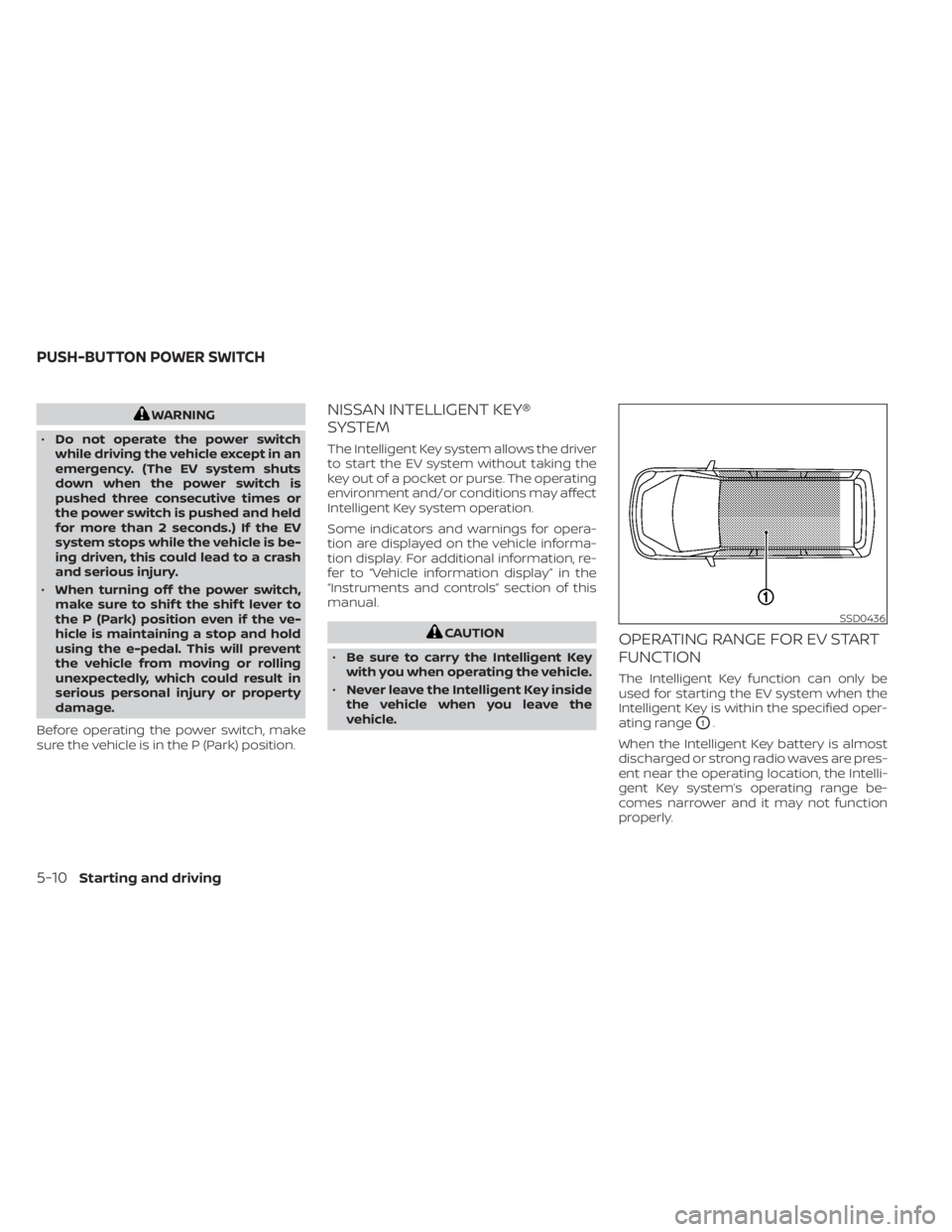
vehicle.OPERATING RANGE FOR EV START
FUNCTION
The Intelligent Key function can only be
used for starting the EV system when the
Intelligent Key is within the specified oper-
ating range
O1.
When the Intelligent Key battery is almost
discharged or strong radio waves are pres-
ent near the operating location, the Intelli-
gent Key system’s operating range be-
comes narrower and it may not function
properly.
SSD0436
PUSH-BUTTON POWER SWITCH
5-10Starting and driving
Page 336 of 596

POWER SWITCH POSITIONS
LOCK (Normal parking position)
The power switch can only be locked in this
position.
The power switch will be unlocked when it
is pushed to the ACC position while the
driver is carrying the Intelligent Key.
ACC (Accessories)
This position activates electrical accesso-
ries, such as the radio, when the EV system
is off.
ON
This position turns on the EV system and
electrical accessories.
READY (Normal operating
position)
This position turns on the EV system and
electrical accessories and the vehicle can
be driven.
OFF
This position turns off the EV system.The power switch cannot be placed in the
LOCK position until the vehicle is in the P
(Park) position.
CAUTION
Do not leave the vehicle with the power
switch in the ACC position for an ex-
tended period of time. This can dis-
charge the 12-volt battery.
NOTE:
If the power switch is pushed quickly or
is pushed twice quickly, the switch may
not function even if a chime sound is
heard. Push the switch again more
slowly.
EMERGENCY EV SHUT OFF
To shut off the EV system in an emergency
situation while driving, perform the follow-
ing procedure:
• Rapidly push the power switch three con- secutive times in less than 1.5 seconds, or
• Push and hold the power switch for more than 2 seconds.
NISSAN INTELLIGENT KEY®
BATTERY DISCHARGE
If the Intelligent Key battery is discharged
or environmental conditions interfere with
the Intelligent Key operation, start the EV
system in the READY to drive mode accord-
ing to the following procedure:
1. Push the P (Park) position switch on the shif t lever.
2. Firmly apply the foot brake.
3. Touch the power switch with the Intelli- gent Key as illustrated. (A chime will
sound.)
SSD0860
Starting and driving5-13
Page 343 of 596

PEDAL TYPE
To engage:Firmly depress the parking
brake.
To release:
1. Firmly apply the foot brake.
2. Move the shif t lever to the P (Park) position.
3. Firmly depress the parking brake pedal and it will release.
4. Before driving, be sure the brake warn- ing light goes out.
SWITCH TYPE (models with
electronic parking brake system)
The electronic parking brake can be ap-
plied or released automatically or by oper-
ating the electronic parking brake switch.
Automatic operation
The electronic parking brake is automati-
cally released as soon as the vehicle starts
and the accelerator pedal is depressed.
In order for the electronic parking brake to
disable when the driver pushes the accel-
erator, the driver’s seat belt must be fas-
tened.
WARNING
• The electronic parking brake will not
be automatically applied when the
EV system is stopped without using
the power switch (for example, by EV
system stalling). •
Before leaving the vehicle, move the
shif t lever to the P (Park) position and
check that the electronic parking
brake indicator light (
or PARK) is
illuminated to confirm that the elec-
tronic parking brake is applied. The
electronic parking brake indicator
light (
or PARK) will remain on for
a period of time af ter the driver’s
door is locked.
CAUTION
• When parking in an area where the
outside temperature is below 32°F
(0°C), the parking brake, if applied,
may freeze in place and may be diffi-
cult to release.
• For safe parking, it is recommended
that you place the shif t lever in the P
(Park) position and securely block
the wheels.
NOTE:
• If a malfunction occurs in the elec- tronic parking brake system (for ex-
ample, due to battery discharge), it is
recommended that you visit a NISSAN
certified LEAF dealer.
LSD0158
5-20Starting and driving
Page 348 of 596

•If the “Press brake pedal to prevent
rolling” warning message appears in
the vehicle information display, de-
press the brake pedal. The vehicle
may start moving.
• If the deceleration force provided by
the e-Pedal system is not sufficient,
depress the brake pedal.
• If the vehicle starts to move while it is
stopped by the e-Pedal system, de-
press the brake pedal immediately.
• Under the following conditions, place
the vehicle in the P (Park) position
and make sure the parking brake is
securely applied. The vehicle may
start moving suddenly.
– When getting in and out of the
vehicle
– When loading and unloading the
vehicle
– When stopping the vehicle for a
long period of time
• Under the following conditions, the
e-Pedal system may not decelerate
or stop the vehicle sufficiently. De-
press the brake pedal whenever
necessary.
– When excessively heavy baggage
is loaded in the vehicle –
When driving on steep downhill
roads
– When driving on icy roads
• On a slope, the e-Pedal system may
not stop the vehicle completely or
may not keep the vehicle stopped.
Depress the brake pedal whenever
necessary.
CAUTION
• Turn the e-Pedal system off and
place the vehicle in the N (Neutral)
position under the following
conditions:
– When the vehicle enters an auto-
matic car wash
– When the vehicle is towed
• Be careful not to operate the e-Pedal
switch mistakenly or unintentionally.
SYSTEM MALFUNCTION
If the e-Pedal system malfunctions, the “e-
Pedal system failure! Press brake pedal to
slow or stop” warning message appears in
the vehicle information display. When the
warning message appears, the e-Pedal
system will be turned off automatically.
Have the system checked as soon as pos-
sible. It is recommended that you visit a
NISSAN certified LEAF dealer for this
service.
Starting and driving5-25