2020 NISSAN ALTIMA fog light
[x] Cancel search: fog lightPage 146 of 559
Move the lever up or down until the
turn signal begins to flash, but the lever
does not latch, and release the lever.
The turn signal will automatically flash
three times.
Choose the appropriate method to signal
a lane change based on road and traffic
conditions.
NOTE:
The 3 flash pass feature may be disabled.
For additional information, refer to “Ve-
hicle information display ” in this section.
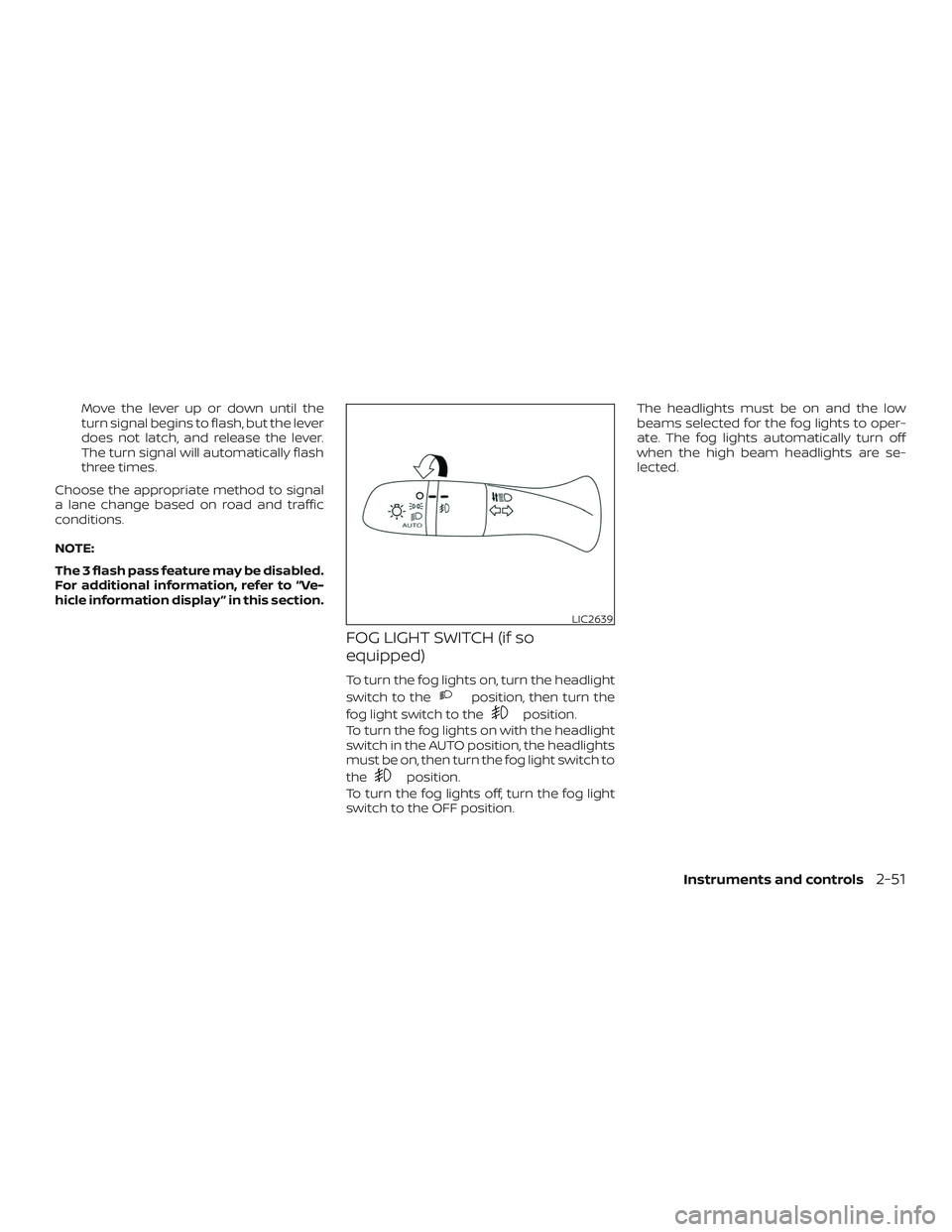
FOG LIGHT SWITCH (if so
equipped)
To turn the fog lights on, turn the headlight
switch to the
position, then turn the
fog light switch to the
position.
To turn the fog lights on with the headlight
switch in the AUTO position, the headlights
must be on, then turn the fog light switch to
the
position.
To turn the fog lights off, turn the fog light
switch to the OFF position. The headlights must be on and the low
beams selected for the fog lights to oper-
ate. The fog lights automatically turn off
when the high beam headlights are se-
lected.
LIC2639
Instruments and controls2-51
Page 235 of 559
∙ When theposition is selected, the
air conditioner automatically turns on if
the outside temperature is more than
36°F (2°C). This dehumidifies the air
which helps defog the windshield.
The
mode automatically turns off,
allowing outside air to be drawn into the
passenger compartment to further im-
prove the defogging performance.
Operating tips
Clear snow and ice from the wiper blades
and air inlet in front of the windshield.
This improves heater operation.
AIR CONDITIONER OPERATION
Start the engine, turn thefan speed
control dial to the desired position, and
press the
button to activate the air
conditioner. When the air conditioner is on,
cooling and dehumidif ying functions are
added to the heater operation.
The air conditioner cooling function op-
erates only when the engine is running.
Cooling
This mode is used to cool and dehumidif y
the air.
1. Press the
button to the off posi-
tion.
2. Press the
air flow control button.
3. Turn the
fan speed control dial to
the desired position.
4. Press the A/C button. The indicator light comes on.
5. Turn the temperature control dial to the desired position.
∙ For quick cooling when the outside temperature is high, press the
button to the ON position. Be sure to
return the
to the off position for
normal cooling. MAX A/C may be used
for quick cooling.
Dehumidified heating
This mode is used to heat and dehumidif y
the air.
1. Press the
button to the off posi-
tion.
2. Press the
air flow control button. 3. Turn the
fan speed control dial to
the desired position.
4. Press the A/C (air conditioner) button. The indicator light comes on.
5. Turn the temperature control dial to the desired position.
Dehumidified defogging
This mode is used to defog the windows
and dehumidif y the air.
1. Press the
air flow control button.
2. Turn the
fan speed control dial to
the desired position.
∙ When the
orare selected,
the air conditioner automatically turns
on if the outside temperature is more
than 36°F (2°C). This dehumidifies the air
which helps defog the windshield.
The
mode automatically turns off,
allowing outside air to be drawn into the
passenger compartment to further im-
prove the defogging performance.
3. Turn the temperature control dial to the desired position.
4-32Monitor, climate, audio, phone and voice recognition systems
Page 284 of 559
∙ Do not use the LDW system under thefollowing conditions as it may not
function properly:
– During bad weather (rain, fog, snow, etc.).
– When driving on slippery roads, such as on ice or snow.
– When driving on winding or un- even roads.
– When there is a lane closure due to road repairs.
– When driving in a makeshif t or temporary lane.
– When driving on roads where the lane width is too narrow.
– When driving without normal tire conditions (for example, tire wear,
low tire pressure, installation of
spare tire, tire chains, nonstandard
wheels).
– When the vehicle is equipped with non-original brake parts or sus-
pension parts.
– When you are towing a trailer or other vehicle. ∙ The system may not function prop-
erly under the following conditions:
– On roads where there are multiple parallel lane markers; lane mark-
ers that are faded or not painted
clearly; yellow painted lane mark-
ers; non-standard lane markers; or
lane markers covered with water,
dirt, snow, etc.
– On roads where the discontinued lane markers are still detectable.
– On roads where there are sharp curves.
– On roads where there are sharply contrasting objects, such as shad-
ows, snow, water, wheel ruts,
seams or lines remaining af ter
road repairs. (The LDW system
could detect these items as lane
markers.)
– On roads where the traveling lane merges or separates.
– When the vehicle’s traveling direc- tion does not align with the lane
marker. – When traveling close to the vehicle
in front of you, which obstructs the
lane camera unit detection range.
– When rain, snow, dirt or an object adheres to the windshield in front
of the lane camera unit.
– When the headlights are not bright due to dirt on the lens or if the aim-
ing is not adjusted properly.
– When strong light enters the lane camera unit. (For example, the light
directly shines on the front of the
vehicle at sunrise or sunset.)
– When a sudden change in bright- ness occurs. (For example, when
the vehicle enters or exits a tunnel
or under a bridge.)
SYSTEM TEMPORARILY
UNAVAILABLE
If the vehicle is parked in direct sunlight
under high temperature conditions (over
approximately 104°F [40°C]) and then
started, the LDW system may be deacti-
vated automatically and the following
message will appear in the vehicle infor-
mation display: “Unavailable: High Cabin
Temperature.”
Starting and driving5-37
Page 325 of 559

VEHICLE-TO-VEHICLE DISTANCE
CONTROL MODE LIMITATIONS
WARNING
Listed below are the system limitations
for the ICC system. Failure to operate
the vehicle in accordance with these
system limitations could result in seri-
ous injury or death.
∙ The ICC system is primarily intendedfor use on straight, dry, open roads
with light traffic. It is not advisable to
use the ICC system in city traffic or
congested areas.
∙ The ICC system will not adapt auto- matically to road conditions. This sys-
tem should be used in evenly flowing
traffic. Do not use the system on roads
with sharp curves, or on icy roads, in
heavy rain or in fog. ∙ As there is a performance limit to the
distance control function, never rely
solely on the ICC system. This system
does not correct careless, inattentive
or absentminded driving, or over-
come poor visibility in rain, fog, or
other bad weather. Decelerate the ve-
hicle speed by depressing the brake
pedal, depending on the distance to
the vehicle ahead and the surround-
ing circumstances in order to main-
tain a safe distance between vehicles.
∙ If the vehicle ahead comes to a stop, the vehicle decelerates to a standstill
within the limitations of the system.
The system will cancel once it judges
that the vehicle has come to a stand-
still and sound a warning chime. To
prevent the vehicle from moving, the
driver must depress the brake pedal.
∙ Always pay attention to the operation of the vehicle and be ready to manu-
ally control the proper following dis-
tance. The ICC system may not be able
to maintain the selected distance be-
tween vehicles (following distance) or
selected vehicle speed under some
circumstances. ∙ The system may not detect the ve-
hicle in front of you in certain road or
weather conditions. To avoid acci-
dents, never use the ICC system under
the following conditions:
– On roads where the traffic is heavy or there are sharp curves
– On slippery road surfaces such as on ice or snow, etc.
– During bad weather (rain, fog, snow, etc.)
– When rain, snow or dirt adhere to the bumper around the distance
sensor
– On steep downhill roads (the ve- hicle may go beyond the set ve-
hicle speed and frequent braking
may result in overheating the
brakes)
– On repeated uphill and downhill roads
– When traffic conditions make it dif- ficult to keep a proper distance be-
tween vehicles because of fre-
quent acceleration or deceleration
5-78Starting and driving
Page 354 of 559

Also, the sensor sensitivity can be af-
fected by vehicle operation (steering
maneuver or driving position in the lane)
or traffic or vehicle conditions (for ex-
ample, if a vehicle is being driven with
some damage).
Acceleration when passing
When the ICC system is engaged above
37 mph and following a slower vehicle (be-
low ICC set speed), and the turn signal is
activated to the lef t, the ICC system will
automatically start to accelerate the ve-
hicle to help initiate passing on the lef t and
will begin to reduce the distance to vehicle
directly ahead. Only the lef t side turn signal
operates this feature. As the driver steers
the vehicle and moves into the passing
lane, if no vehicle is detected ahead the ICC
system will continue to accelerate to the
ICC system set speed. If another vehicle is
detected ahead, then the vehicle will accel-
erate up to the following speed of that ve-
hicle. If the vehicle is not steered into the
lef t lane to pass, the acceleration will stop
af ter a short time and regain the set follow-
ing distance. Acceleration can be stopped
at any point by depressing the brake pedal
or the CANCEL switch on the steering
wheel.
WARNING
In order to reduce the risk of a collision
that may result in serious injury or
death, please be aware of the following:
∙ This function is only activated withthe lef t turn signal and will briefly ac-
celerate the vehicle even if a lane
change is not initiated. This can in-
clude non-passing situations such as
lef t side exits.
∙ Ensure that when passing another ve- hicle, the adjacent lane is clear before
initiating the pass. Sudden changes in
traffic may occur while passing- al-
ways manually steer or brake as
needed- never solely rely on the
system.
ICC system limitations
WARNING
Listed below are the system limitations
for the ICC system. Failure to operate
the vehicle in accordance with these
system limitations could result in seri-
ous injury or death: ∙ The ICC system is primarily intended
for use on straight, dry, open roads
with light traffic. It is not advisable to
use the ICC system in city traffic or
congested areas.
∙ The ICC system will not adapt auto- matically to road conditions. This sys-
tem should be used in evenly flowing
traffic. Do not use the system on roads
with sharp curves or on icy roads, in
heavy rain or in fog.
∙ As there is a performance limit to the distance control function, never rely
solely on the ICC system. This system
does not correct careless, inattentive
or absentminded driving or overcome
poor visibility in rain, fog, or other bad
weather. Decelerate the vehicle speed
by depressing the brake pedal, de-
pending on the distance to the vehicle
ahead and the surrounding circum-
stances in order to maintain a safe
distance between vehicles.
∙ When the ICC system automatically brings the car to a stop, your vehicle
can automatically accelerate if the ve-
hicle is stopped for less than approxi-
mately 3 seconds. Be prepared to stop
your vehicle if necessary.
Starting and driving5-107
Page 356 of 559
The detection zone of the radar sensor is
limited. A vehicle ahead must be in the de-
tection zone for the ICC system to maintain
the selected distance from the vehicle
ahead. A vehicle ahead may move outside
of the detection zone due to its position
within the same lane of travel. Motorcycles
may not be detected in the same lane
ahead if they are traveling offset from the
center line of the lane. A vehicle that is en-
tering the lane ahead may not be detected
until the vehicle has completely moved into
the lane.
If this occurs, the ICC system may warn you
by blinking the system indicator and
sounding the chime. The driver may have
to manually control the proper distance
away from the vehicle traveling ahead.
The ICC system (with ProPILOT Assist) uses
a multi-sensing front camera. The follow-
ing are some conditions in which the cam-
era may not properly detect a vehicle and
detection of a vehicle ahead may be de-
layed:∙ Poor visibility (conditions such as rain, snow, fog, dust storms, sandstorms,
and road spray from other vehicles) ∙ The camera area of the windshield is
fogged up or covered with dirt, water
drops, ice, snow, etc.
∙ Strong light (for example, sunlight or high beams from oncoming vehicles)
enters the front camera
∙ A sudden change in brightness occurs (for example, when the vehicle enters or
exits a tunnel or shaded area or light-
ning flashes)
Starting and driving5-109
Page 364 of 559
WARNING
Steering Assist is not a system for
hands-free driving. Always keep your
hands on the steering wheel and drive
your vehicle safely. Failure to do so
could cause a collision resulting in seri-
ous personal injury or death.
NOTE:
If the driver lightly touches (instead of
firmly grips) the steering wheel, the
steering torque sensor may not detect
the driver’s hand(s) on the wheel and a
sequence of warnings may occur. When
the driver holds and operates the steer-
ing wheel again, the warnings turn off.
Steering Assist limitations
WARNING
∙ In the following situations, the cam- era may not detect lane markers cor-
rectly or may detect lane markers in-
correctly and the Steering Assist may
not operate properly: – When driving on roads where there
are multiple parallel lane markers,
lane markers that are faded or not
painted clearly, nonstandard lane
markers, or lane markers covered
with water, dirt, snow, etc.
– When driving on roads with dis- continued lane markers
– When driving on roads with a wid- ening or narrowing lane width
– When driving on roads where there are multiple lanes or unclear lane
markers due to road construction
– When driving on roads where there are sharply contrasting objects,
such as shadows, snow, water,
wheel ruts, seams, or lines remain-
ing af ter road repairs (the Steering
Assist could detect these items as
lane markers)
– When driving on roads where the traveling lane merges or separates ∙ Do not use the Steering Assist under
the following conditions because the
system may not properly detect lane
markers. Doing so could cause a loss
of vehicle control and result in an
accident.
– During bad weather (rain, fog, snow, dust, etc.)
– When rain, snow, sand, etc., is thrown up by the wheels of other
vehicles
– When dirt, oil, ice, snow, water, or another object adheres to the
camera unit
– When the lens of the camera unit is foggy
– When strong light (for example, sunlight or high beams from on-
coming vehicles) shines on the
camera
– When the headlights are not bright due to dirt on the lens or the head-
lights are off in tunnels or darkness
– When a sudden change in bright- ness occurs (for example, when the
vehicle enters or exits a tunnel or is
under a bridge)
Starting and driving5-117
Page 375 of 559
– An ultrasonic wave source, such asanother vehicle’s sonar, is near the
vehicle.
∙ Once the automatic brake control op- erates, it does not operate again if the
vehicle approaches the same
obstacle.
∙ The automatic brake control can only operate for a short period of time.
Therefore, the driver must depress
the brake pedal.
∙ In the following situations, the RAB system may not operate properly or
may not function sufficiently:
– The vehicle is driven in bad weather (rain, fog, snow, etc.).
– The vehicle is driven on a steep hill.
– The vehicle’s posture is changed (e.g., when driving over a bump).
– The vehicle is driven on a slippery road.
– The vehicle is turned sharply by turning the steering wheel fully.
– Snow chains are used. – Wheels or tires other than NISSAN
recommended are used.
– The brakes are cold at low ambient temperatures or immediately af ter
driving has started.
– The braking force becomes poor due to wet brakes af ter driving
through a puddle or washing the
vehicle.
∙ Turn the RAB system off in the follow- ing conditions to prevent the occur-
rence of an unexpected accident re-
sulting from sudden system
operation:
– The vehicle is towed.
– The vehicle is carried on a flatbed truck.
– The vehicle is on the chassis dynamometer.
– The vehicle drives on an uneven road surface. – Suspension parts other than those
designated as Genuine NISSAN
parts are used. (If the vehicle
height or the vehicle body inclina-
tion is changed, the system may
not detect an obstacle correctly.)
∙ Excessive noise (e.g., audio system volume, an open vehicle window) will
interfere with the chime sound, and it
may not be heard.
SYSTEM MALFUNCTION
If the RAB system malfunctions, it will be
turned off automatically, the RAB system
warning light will illuminate, and the “Sys-
tem fault” warning message will appear in
the vehicle information display.
Action to take
If the warning light illuminates, park the ve-
hicle in a safe location, turn the engine off,
and restart the engine. If the warning light
continues to illuminate, have the RAB sys-
tem checked. It is recommended that you
visit a NISSAN dealer for this service.
5-128Starting and driving