2020 MERCEDES-BENZ S-CLASS service
[x] Cancel search: servicePage 33 of 602

Thir
dparty services
If it is possible touse onlines ervic es from other
pr ov ider s,these services aret he responsibili ty
of thep rovide rinq ues tion andsubjecttothat
pr ov ider's dataprotection conditions andterm s
of use. Themanuf acturerhas noinfluence on
th ec ontent exc hang ed.
Fo rthis reason ,please askthes ervice prov ider
fo ri nfor mation aboutthet ype, extent and pur‐
po se ofthec ollect ionand useofper sonal data
when services arep rovide dbythir dp arties . Mult
imed iasystem/M ercedes meconnect If
th ev ehicle iseq uipped withthe multimedia
sy stem orMer cedes meconnect ,additional data
about thev ehicle's operation, theu seofthe
ve hicle incer tain situat ions,and thel ocation of
th ev ehicle maybec om piled bythem ultimedia
sy stem orMer cedes meconnect .
Fo ra dditional information pleaserefert ot he
ch ap ter" Mu ltimed iasystem" and/or the
Mer cedes meconn ectTerm sa nd Conditions. Ev
ent data recor der s US
Ao nly:
This vehicle iseq uipped witha ne vent dat a
re cor der (EDR ).The mainpurpo se ofan EDRis
to recor d,incer tain crash ornear crash-lik esit‐
uation s,suc hasana irbag deployment orhitt ing
ar oad obstacle ,datat hat will assistinunde r‐
st andi nghowav ehicle's systems perform ed.
The EDRisd esigned torecor ddatar elat edto
ve hicle dynamics andsafetys ystems foras hort
per iod oftime, typica lly30 seconds orless.
The EDR inthis vehicle isdesigned torecor d
su ch dat aas:
R Howv arious systems inyour vehicle were
oper ating
R Whe ther or notthe driver and front
passeng erseat belts werebuc kled/f astened
R Howf ar(ifa ta ll)t he driver wa sd epr essing
th ea ccelera tora nd/or brak ep eda land
R Howf astthe vehicle wastrave ling
This datacan help prov ide abette ru nder stand‐
ing ofthec ircums tances inwh icha ccidents and
inju ries occur .NOTE:ED Rd atai sr ecor dedby yo
ur vehicle onlyifan on-trivial crash situation
occur s;no dat aisr ecor dedbytheE DR under
nor mal driving conditions andnoper sonal data
(e.g. name, gende r,ag ea nd acc iden tloc atio n)is
re cor ded .Howe ver,ot her parties, suchaslaw
enf orcement ,could combine EDRdataw itht he
type ofper sonally identifying dataroutinel y
acq uired dur ing acrash inve stigation .
To read dat arecor dedbyan EDR,spec ialequip‐
men tisr equir ed, and access tothev ehicle or
th eE DR isneeded. Inaddition tothev ehicle
manuf acturer,o ther par ties that have thes pecial
eq uipment, suchaslaw enforcemen t,can read
th ei nfor mation byacc essi ngthev ehicle orthe
EDR.
EDR data ma ybeu sed incivil andcrimina lmat‐
te rs as atool inaccident recons tructi on,acci ‐
dent claims and vehicle safety. Since theC rash
Dat aRetrieva l(CDR) tool that isused toextract
da ta from theE DR iscomm erciall yavailable,
Mer cedes-Ben zUSA,LLC ("MBUS A")expressl y
disclaims anya nd allliability arising from the
ex tracti onofthis inf ormatio nbyunaut horized
Mer cedes-Ben zperson nel. Gen
eral no tes 31
Page 166 of 602

Ov
ervie wo fclimat econtr olsystems No
teso nc limat econtr ol An
interior airfilt er incom binat ionwiththe pre‐
fi lt er inthee ngine compartmen tmusta lway sb e
used sothat thea ircon ditionin gsystem, pollu‐
tion leve lm onitor ing and thea irfiltration work
cor rectl y.Mak esuret hat thef ilter isins talled
cor rectl ya nd thef ilter housin gint he engine
com partment isclosed correctl yu sing thec ap
and alwayst ightl ysealed wheninoper ation. Use
fi lt er sr ecom mende dand approve dby
Mer cedes-Ben z.Alw aysh ave service workcar‐
ri ed out ataq ualif iedspec ialistworks hop. Ov
ervie wo fthe air con dition ingcontrol
panel Plu
g-in hybrid: obser vethen otes intheS upple‐
ment .Other wise, youm ayfailto recogni zedan‐
ge rs.
The indicat orlam pson theb uttons indicat ethat
th ec orresponding functionisactiv ated. 1
0058 Setsclimat econt roltoa utomat ic,
lef t(/ page165)
2 0082 Setsthet em per atur e,lef t
3 H Setsthea irflow ,lef t, or switc hesoff
climat econtrol
4 0072 Switchesair-recir culation modeon/off
(/ page167)
5 0064 Defrosts thew indshield
6 Calls
upthea ircon ditionin gmenu
7 006C Switchesther ear windo wheater
on/of f 8
0056 SwitchestheA /C func tion on/
of f(/ page165)
Switc hesresidua lheat on/of f(/pag e168)
9 H Setsthea irflow ,right, orswitc hesoff
climat econt rol
A 0082 Setsthet em per atur e,right
B 0058 Setsclimat econt roltoa utomat ic,right Ov
ervie wo fthe rear oper ating unit Ex
am ple:USA
1 Setsthet em per atur e,lef t
2 Setsthea irdis tribution, left 16
4
Climat econtrol
Page 176 of 602

#
Mak esuret hat mar keds pace 2isem pty. #
Remo veSmar tKey 1 from thek eyring. #
Place Sma rtKe y1 inmar keds pace 2.
The vehicle willstar ta fter as hor ttime.
If yo ur emo veSmar tKey 1 from mar ked
space 2thee ngine continues running .For
fur ther vehicle star ts howe ver,Smar tKey 1
mus tbelocat edinmar keds pace 2during
th ee ntirej our ney. #
Have Smar tKey 1 checkeda taq ualified
spec ialistworks hop.
If th ev ehic ledoe snotstar t: #
Lea veSmar tKey 1 inmar keds pace 2. #
Depr esstheb rake pedal andstar tt he vehi‐
cle using thes tart/s topb utton.
% Youc an also switchon thep owersuppl yor
th ei gnition withthe star t/ stop butt on. St
arting thev ehic levia Remo teOnline serv‐
ices Cooling
orheating thev ehic leint erior before
comme ncingyour jour ney
% This function isno ta vailable inall coun tries.
If yo us tart thev ehicle viayour smar tphon e,the
pr ev iousl yselec teda ircon dition ingadjus tment
is activ e.
En sur ethe follo wing befores tartin gt he engine:
R The legalstipulation sint he area wher eyour
ve hicle ispar keda llowe ngin estarting via
smar tphon e.
R Itis saf etos tart and runt he engine where
yo ur vehicle ispar ked.
R The fuel tank issu fficien tlyf illed.
R The star terb att eryi ss ufficie ntly charge d. %
Youc an also setthe temp eratur ewithy our
smar tphone. Information onMer cedes me
connec tand other services: https://
www .mercedes.me
This funct ionisno ta vailable fora llmodel s.
Char ging theb attery bef orec ommencing
yo ur jour ney
% This function isno ta vailable inall coun tries.
If th ev ehicle batteryi sd ischar ged, your eceiv ea
messa geon your smar tphon e.Youc an then
st ar tt he vehicle withthe smar tphone tocharge
th eb attery. The vehicle isaut omaticall y
switc hedoffa fter tenm inutes.
Ensur ethe follo wing befores tartin gt he engine:
R The legalstipulation sint he area wher eyour
ve hicle ispar keda llowe ngin estartin gv ia
smar tphon e.
R Itis saf etos tartand runt he engine where
yo ur vehicle ispar ked.
R The fuel tank issu fficien tlyf illed. 17
4
Driving and parking
Page 202 of 602

St
andb ymode (ext ens ion ofthe star terb at‐
te ry 's per iod out ofuse) St
andb ymode functi on
% This function isno ta vailable fora llmodel s.
If standb ymode isact ivat ed, energyl oss willbe
min imiz eddur inge xtende dperiods ofnon-op er‐
at ion.
St andb ymode isch aract erize db ythe follo wing:
R thes tarter batt eryi sp reser ved.
R them aximum non-opera tionaltime appear s
in them edia displa y.
R thec onnect iontoonline services isint erru p‐
te d.
R theA TA(anti-t heftalarm system) isno ta vail‐
able.
R thei nter ior motion sensor andtow- aw ay
alar mfunction sarenota vailable.
R thef unc tion ford etecti ngdamag eona
pa rked vehicle isno ta vailable. If
th ef ollo wing condition sarefulf illed, standb y
mode canbeact ivat ed ordeac tivated usin gthe
multimedia system:
R thee ngine isswitc hedoff.
R thei gnition isswitc hedon.
Ex ceeding thev ehicle's displayedn on-opera ‐
tion altime maycause incon venie nce, i.e.itc an‐
no tb eg uarant ee dt hat thes tarter batt eryw ill
re liably star tt he engine.
The star terb att erym ustb ec harg edfirs ti nt he
fo llo wing situat ions:
R The vehicle's non-oper ational timemustbe
ex tende d.
R The Batte ryCh arg eInsu fficie ntfor Stand by
Mod emes sage appear sint he media display.
% Standb ymode isaut omat icallydeac tivated
when thei gnition isswitc hedon.
Ac tiv atin g/deac tivatin gstan dbym ode
Mul timedi asystem:
4 Vehicle 5
î Vehicle Setting s
5 Standby Mode
% This function isno ta vailable fora llmodel s. #
Activate0073 ordeacti vate 0053 thef unc tion .
When youa ctivat et he function ,apromp t
appear s. #
Select Yes.
St andb ymode isact ivat ed. Dr
iving anddriving safetys ystems Dr
iving systems andyour responsibility Yo
ur vehicle iseq uipped withd riving systems
whic hassis tyou indriving, parking andmaneu‐
ve ring thev ehicle. Thedriving systems area ids
and donotrelie veyouo fyour responsibili typer‐
ta inin gtor oad trafficl aw .Pay attention tothe
tr af ficc ondi tions atallt ime sand interve ne
wh en nece ssary.B ea wareofthel imit ations
re ga rding thes afeu seofthese systems. Inf
ormat iononradar and ultrasonic senso rs Some
drivi ng and drivi ng safety systems use
ra dar orultr asonic sensorstom onit orthea rea
in front of,behind ornext to thev ehicle (depend‐
ing onthev ehicle's equipment). 200
Driving andparking
Page 267 of 602
and
trafficc ondi tions andoperate the
eq uipment withthe vehicle statio nary. Obser
vethel eg alrequ iremen tsfort he countr y
in whic hyou arec urrently drivi ng when operat‐
ing theo n-boar dcom put er.
% The on-boar dcom put erdispla yswill appear
on them ultifunc tiondispla y(/pag e267). The
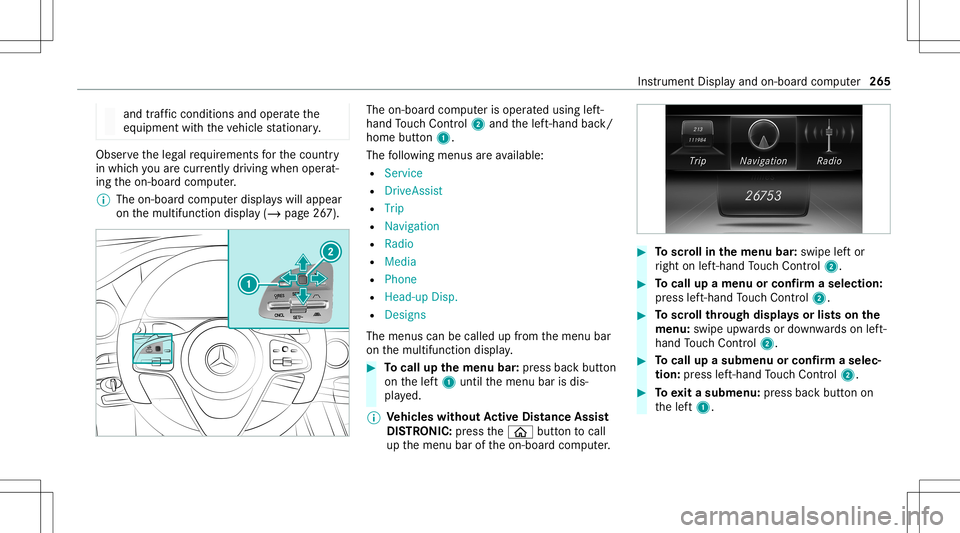
on-boar dcom put erisoper ated using left-
hand Touc hC ontrol 2 and thel eft-hand back/
home button1.
The follo wing menusarea vailable:
R Service
R DriveA ssist
R Trip
R Navi gation
R Radio
R Media
R Phon e
R Head -upDisp.
R Design s
The men uscan becalle dupfromt hemenu bar
on them ultifunc tiondispla y. #
Tocall upthem enu bar: press backbutton
on thel eft1 until them enu barisdis‐
pla yed.
% Ve
hicl eswithout Activ eD ista nce Assist
DI ST RO NIC :pr ess the00E2 buttontocal l
up them enu baroftheo n-boar dcom put er. #
Toscr ollinthem enu bar: swipe lefto r
ri ght onleft-hand Touc hC ontrol 2. #
Tocall upam enuo rconf irmas election:
pr ess left-han dTouc hControl 2. #
Toscr ollthrough displa ysorlists on the
menu :swipe upwards ordown wardso nleft-
hand Touc hC ontrol 2. #
Tocall upasubmen uorconf irmas elec‐
tion :pr ess left-han dTouc hControl 2. #
Toexitas ubm enu: press backbutton on
th el eft1. Ins
trument Displayand on- boar dcom put er 265
Page 270 of 602
Menus
andsubmenus Call
ingupfunctio nson theS ervice menu of
th eo n-boa rdcom puter On-boar
dcom put er:
4 Service #
Toselect thef un ction: swipeupwards or
do wn wardso nthe left-hand Touc hC ontrol. #
Press thel eft-hand Touc hC ontrol.
Fu nctio nson theServ icemenu:
R Messag ememor y(/pag e492)
R Tires :
- Chec kthe tirep ressur ewitht he tirep res‐
sur em onit or(/ page452)
- Restar tt he tirep ressur emonit or
(/ page453)
R ASSYST PLUS:c allup thes ervice duedate
(/ page407)
R Engine oilleve l Callin
gupthe ass istan tdisp lay On
-bo ardc om put er:
4 DriveA ssist
% When youh ave setthe stylet oClassi c,y ou
can viewt he assis tant displ aymenu con‐
te nts inthel eft-hand area oftheI nstrument
Displa y.
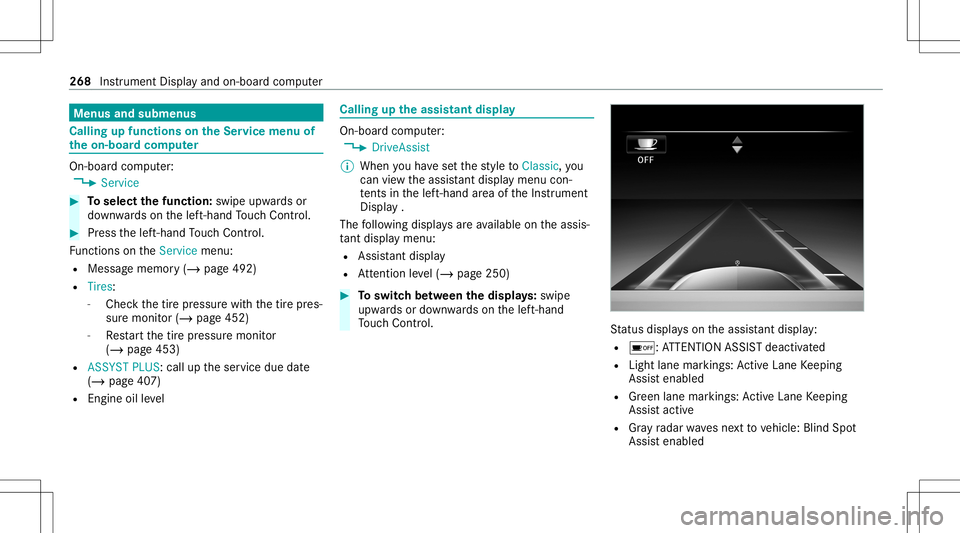
The follo wing displa ysarea vailable onthea ssis‐
ta nt displ aymenu:
R Assis tant displ ay
R Attentio nleve l(/ pag e250) #
Toswitc hbetwe en thed isplays :sw ipe
up wa rdso rdow nwards on thel eft-hand
To uc hC ontrol. St
atus displa yson thea ssis tant displ ay:
R 00D7 :ATTENTION ASSISTd eactiv ated
R Light lanemarkings: ActiveL aneK eeping
Assis tenabled
R Green lane markings :Activ eLaneK eeping
Assis tactiv e
R Gray radar wavesnext to vehicle: BlindSpot
Assis tenabled 268
Instrument Displayand on-boar dcom put er
Page 309 of 602

Se
tting thed istance unit Multi
media system:
4 System 5
% Units #
Select kmormi. #
Inthem ultifunc tiondispla yofthe Instrument
Displa y,switc hthe Additional Speedometer
displa yon0073 . Data
impor tand expor t Dat
aimp ort/e xpor tfunc tion
The follo wing functionsarepossible :
R Trans ferring datafromo nesystem orvehicle
to ano ther system orvehicle.
R Creating abacku pc opyo fyour personal data
and loadingitag ain.
R Protect ing your per son aldat aagains tunw an‐
te de xpo rtwit hP INprotect ion.
% Please note that theN TFS file system isno t
suppor ted. The FAT32 file system isrecom‐
mend ed. Im
por ting /expor tingdata
* NO
TELos sofdatad uetoprematur e
re mo val #
Donotremo vethed atas tora ge
medium whendataisb eing expor ted.
Mer cedes- Benzisn otliable fora ny loss of
dat a. Re
quirement s:
R The vehicle isstatio nary.
R The ignition isswitc hedonorthev ehicle has
been star ted.
R The SDcardisinser ted( /pag e369) orthe
USB device isconnec ted( / pag e370).
Mul timedi asystem:
4 System 5
System Backup #
Select Import DataorExport Data.
Im por ting #
Select adatas torage medium.
Ap romp tappear sasking whe ther your eall y
wish tooverwr itet he cur rent data.Ifd ata or
igin at es from another vehicle, this isrecog‐
nized during data readin g.
The mult imed iasystem isrestar tedo ncet he
dat ahasbeen impor ted.
% Current vehicle settin gscan beedit edafte r
th ei mp ort.
Expor ting
If PIN protect ion isactiv ated, your PIN isrequ es‐
te d. #
Entert he four -digit PIN. #
Select adatas torage medium.
The dataise xpo rted. The dataexpo rtma y
ta ke severalm inut es. Ac
tiv atin g/deac tivatin gPINprotection Re
quirement s
To unlo cktheP IN:
R Ther eisa nInter ne tc onnect ion.
R AM ercedes meaccoun texis tsat http://
ww w.me rcedes.me.
R The Person alization service isactiv e
(/ page309). Multimedia
system 30
7
Page 311 of 602

Cr
eat ing auser profile
Mult imedi asystem:
4 System 5
g Person alization
5 Create Profile #
Enteran ame. #
Select 0076.
The follo wing informatio niss aved intheu ser
pr ofile, fore xamp le:
R System settings
R Settings intheT Vtune r'schann ellist
R Navig ation andtraf fici nfor mati on
The settings differ depending onthev ehicle
eq uipment.
Im por ting/e xportingauser profile
Re quirement s:
R Ther eisa nInter ne tc onnec tion .
R AM ercedes meacco untexists at htt p:/ /
www .mercedes.me .
R The Person alization service isactiv e. Multimedia
system:
4 System 5
g Person alization
5 Manual Export/ Import
This function isno ta vailable inall coun tries.
On lyindi vidu alprofiles can beimpor tedo r
ex por ted.
The individual profiles area lway sc ollectiv ely
im por tedo rexpo rted. #
Toimpor t:select Import Profiles from
Server.
The Theprofile dataimport overwrites all
existing profiledata.Doyou want tocon-
tinue? messag eappea rs. #
Select Yes.
Use rprofile sa reimpor ted. #
Toexpor t:select Export Profiles tothe
Server.
User profiles aree xpo rted.
% Certain settings ,suc ha saddr ess book
ent ries orprev ious destination sfromt he
na vig ation system, aren otexpor ted. Se
tting user profile options
Multimedia system:
4 System 5
g Person alization #
Highlight aprofile. #
Select ¥option s.
The follo wing option sareavailable:
R Renam e
R Delete
R Reset
% The gues tprofile can notb ed eletedo r
re nam ed. So
ftwa reupdat e Inf
ormation onsof twareu pdat es
The multimedi asystemp rovide sam essage
when anupdat eisa vailable.
De pen dingo nthe sour ce,youc an per form vari‐
ous updat es: Multimedia
system 309