2020 MERCEDES-BENZ GLS SUV wiper blades
[x] Cancel search: wiper bladesPage 169 of 549
#
Switching intermittent wiping on/off:
press button 2.
Ve hicles with rain sensor: the wipe inter val
automatically adapts tothe driving condi‐
tions.
The è symbol will appear on the instru‐
ment clus ter when there ar wind owwiper is
swit ched on. Re
placing the windsc reen wiper blades &
WARNING Risk of becoming trapped if
th e windscreen wipers are switched on
while wiper blades are being replaced
If th e windscreen wipers begin tomo vewhile
yo u are changing the wiper blades, you can
be trapped bythe wiper arm. #
Alw ays switch off the windscreen wip‐
ers and ignition before changing the
wiper blades. Moving
the wiper arms into there placement
position #
Switch the ignition on and then off again
immediatel y. #
Within around 15seconds, press and hold
th eî button on the combination switch
fo r appro ximately thre e seconds
(/ page 165).
The wiper arms will mo veinto there place‐
ment position.
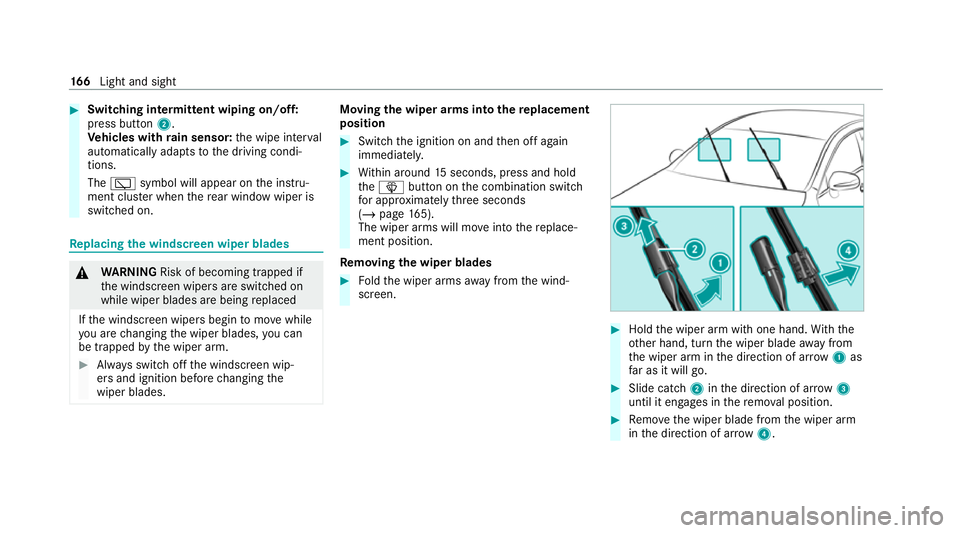
Re moving the wiper blades #
Foldthe wiper arms away from the wind‐
screen. #
Hold the wiper arm with one hand. With the
ot her hand, turn the wiper blade away from
th e wiper arm in the direction of ar row 1 as
fa r as it will go. #
Slide catch 2inthe direction of ar row 3
until it engages in there mo val position. #
Remo vethe wiper blade from the wiper arm
in the direction of ar row4. 16 6
Light and sight
Page 170 of 549
Fi
tting the wiper blades #
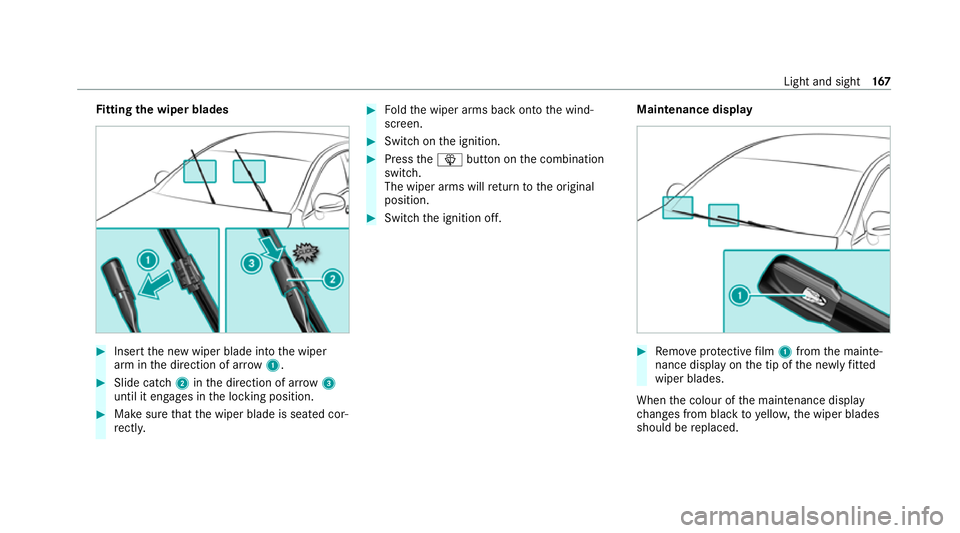
Inse rtthe new wiper blade into the wiper
arm in the direction of ar row1. #
Slide catch 2inthe direction of ar row 3
until it engages in the locking position. #
Make sure that the wiper blade is seated cor‐
re ctly. #
Foldthe wiper arms back onto the wind‐
screen. #
Switch on the ignition. #
Press theî button on the combination
switch.
The wiper arms will return tothe original
position. #
Switch the ignition off. Maintenance display #
Remo veprotective film 1 from the mainte‐
nance display on the tip of the newly fitted
wiper blades.
When the colour of the maintenance display
ch anges from black to yellow, the wiper blades
should be replaced. Light and sight
167
Page 171 of 549
%
The duration until the colour changes varies
depending on the usage conditions. Re
placing the windsc reen wiper blades
(MAGIC VISION CONT ROL) Moving
the wiper arms into there placement
position #
Switch the ignition off. #
Within around 15seconds, press theî
button on the combination switch
(/ page 165).
The wiper arms will mo veinto there place‐
ment position. Re
moving the wiper blades #
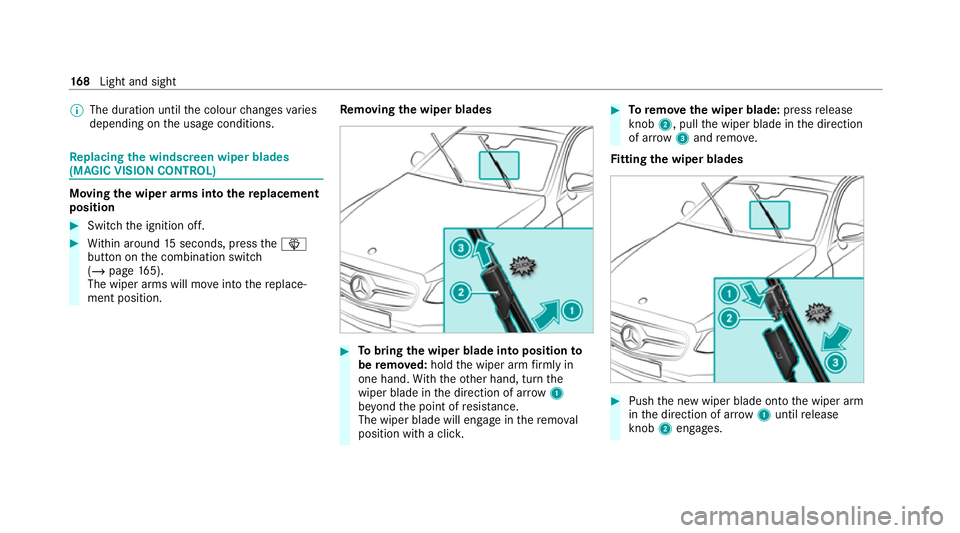
Tobring the wiper blade into position to
be remo ved: hold the wiper arm firm ly in
one hand. With th eot her hand, turn the
wiper blade in the direction of ar row1
be yond the point of resis tance.
The wiper blade will engage in there mo val
position with a clic k. #
Toremo vethe wiper blade: pressrelease
knob 2, pull the wiper blade in the direction
of ar row3and remo ve.
Fi tting the wiper blades #
Push the new wiper blade onto the wiper arm
in the direction of ar row1until release
knob 2engages. 16 8
Light and sight
Page 172 of 549
#
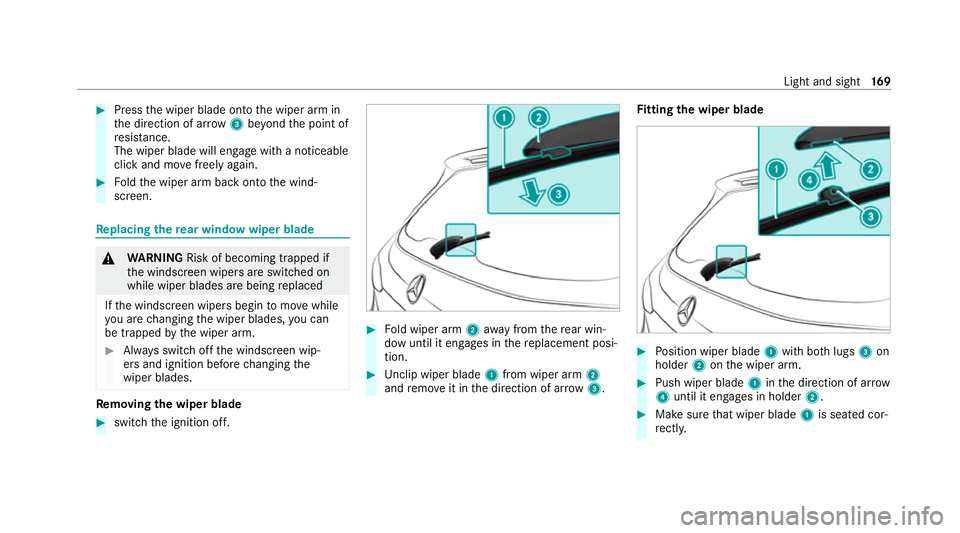
Press the wiper blade onto the wiper arm in
th e direction of ar row3beyond the point of
re sis tance.
The wiper blade will engage wi tha noticeable
click and mo vefreely again. #
Foldthe wiper arm back onto the wind‐
screen. Re
placing the rear window wiper blade &
WARNING Risk of becoming trapped if
th e windscreen wipers are switched on
while wiper blades are being replaced
If th e windscreen wipers begin tomo vewhile
yo u are changing the wiper blades, you can
be trapped bythe wiper arm. #
Alw ays switch off the windscreen wip‐
ers and ignition before changing the
wiper blades. Re
moving the wiper blade #
switch the ignition off. #
Fold wiper arm 2away from there ar win‐
dow until it engages in there placement posi‐
tion. #
Unclip wiper blade 1from wiper arm 2
and remo veit in the direction of ar row 3. Fi
tting the wiper blade #
Position wiper blade 1with bo thlugs 3on
holder 2onthe wiper arm. #
Push wiper blade 1inthe direction of ar row
4 until it en gage s in holder 2. #
Make sure that wiper blade 1is seated cor‐
re ctly. Light and sight
16 9
Page 372 of 549
Note
s on care of car parts &
WARNING Risk of entrapment if the
windscreen wipers are swit ched on while
th e windscreen is being cleaned
If th e windscreen wipers are set in motion
while you are cleaning the windscreen or
wiper blades, you can be trapped bythe
wiper arm. #
Alw ays switch off the windscreen wip‐
ers and the ignition before cleaning the
windscreen or wiper blades. &
WARNING Risk of bu rns from theta il‐
pipe and tailpipe trims
The exhaust tailpipe and tailpipe trims can
become very hot. If you come into contact
with these parts of theve hicle, you could
burn yourself. #
Alw ays be particular lycareful around
th eta ilpipe and theta ilpipe trims and
supervise children especially closely in
th is area. #
Allow vehicle parts tocool down before
to uching them. To
avo id damage totheve hicle, obser vethe
no tes on cleaning and care of thefo llowing vehi‐
cle parts:
Wheels and rims
R use wate r and acid-free alloy wheel cleaners.
R do not use acidic alloy wheel cleaners to
re mo vebrake dust. This could damage wheel
bolts and brake components.
R to av oid cor rosion of the brake discs and
brakepads, drive theve hicle for a few
minutes af ter cleaning before parking it. The
brake discs and brakepads warm up and dry
out.
Wi ndo ws
R clean the windo wsinside and outside with a
damp clo thand with a cleaning agent recom‐
mended for Mercedes-Benz.
R do not use dry clo ths or abrasive or solvent-
based cleaning agents toclean the inside of
windo ws. Wi
per blades
R movethe wiper arms into there placement
position (/ page166).
R with the wiper arms folded out, clean the
wiper blades with a damp clo th.
R do not clean the wiper blades too of ten.
Ex terior lighting
R clean the lenses with a wet sponge and mild
cleaning agent, e.g. car sha mpoo.
R only use cleaning agents or cleaning clo ths
th at are suitable for plast ic lenses.
Sensors
R clean the sensors in the front and rear bump‐
ers with a soft clo thand car shampoo
(/ page 224).
R when using a high-pressure cleaner, main tain
a minimum dis tance of 30 cm.
Ru nning boards
R use wate r and acid-free cleaning agents.
R do not clean the aluminium trim insert of the
ru nning board wi thalkaline or acidic cleaning
agents such as wheel cleaners. Do not use Main
tenance and care 369
Page 544 of 549
Ty
re pressure monitoring sy stem
(function)............................................... 396
Ty re pressure table................................ 395
Un usual handling characteristic s.......... 393
Wi -Fi
Setting................................................... 322
Wi ndow airbag............................................. 45
Wi ndo ws
see Side windo ws
Wi ndo ws(care)......................................... .369
Wi ndscreen
Demisting.............................................. 174
Infrared reflective..................................1 73
Ra dio wav es...........................................1 73
Re placing the wiper blades.................... 16 6
Re placing wiper blades (MAGIC
VISION CONTROL)................................. 16 8
Wi ndscreen
see Windsc reen
Wi ndscreen heating ..................................1 79
Wi ndscreen heating
see Windsc reen heating Wi
ndscreen washer fluid
No tes....................................................4 25
Wi ndscreen washer sy stem
To pping up............................................. 363
Wi ndscreen wipers
Re placing the wiper blades.................... 16 6
Re placing wiper blades (MAGIC
VISION CONTROL)................................. 16 8
Switching on/of f................................... 16 5
Wi nter operation
Snow chains.......................................... 393
Wi nter tyres
Setting the permanent speed limit........2 36
Wi per blades
Ca re...................................................... 369
Re placing...............................................1 66
Re placing (MAGIC VISION CONTROL).... 16 8
Wire lesscharging
Fu nction/no tes...................................... 151
Mobile phone........................................1 53
Mobile phone (rear)............................... 15 3
Wire lessvehicle comp onents
Declaration of con form ity....................... .26
Speci fic absor ption rate.......................... 26 Wo
rkout prog ram
Overview................................................1 21
Wo rkshop
see Qualified specialist workshop Index
541