2020 MERCEDES-BENZ GLS SUV navigation
[x] Cancel search: navigationPage 10 of 549
1
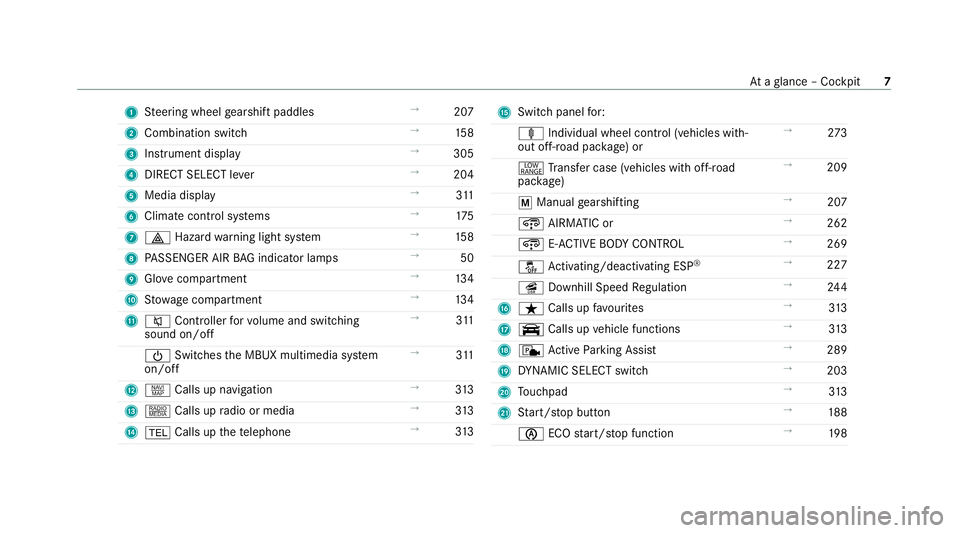
Steering wheel gearshift paddles →
207
2 Combination swit ch →
15 8
3 Instrument display →
305
4 DIRECT SELECT le ver →
204
5 Media display →
311
6 Climate cont rol sy stems →
175
7 £ Hazardwa rning light sy stem →
15 8
8 PASSENGER AIR BAG indicator lamps →
50
9 Glovecompa rtment →
13 4
A Stow age compartment →
13 4
B 8 Controller forvo lume and switching
sound on/off →
311
Ü Switches the MBUX multimedia sy stem
on/off →
311
C z Calls up navigation →
313
D | Calls up radio or media →
313
E % Calls up thete lephone →
313 F
Switch panel for:
ä Individual wheel control (vehicles with‐
out off-road pac kage ) or →
273
+ Trans fer case (vehicles with off-road
pac kage) →
209
p Manual gearshifting →
207
¿ AIRMATIC or →
262
¿ E-AC TIVE BODY CONTROL →
269
å Activating/deactivating ESP ®
→
227
î Downhill Speed Regulation →
24 4
G ß Calls up favo urites →
313
H y Calls up vehicle functions →
313
I c Active Parking Assist →
289
J DYNA MIC SELECT switch →
203
K Touchpad →
313
L Start/ stop button →
188
è ECOstart/ stop function →
19 8 At
aglance – Cockpit 7
Page 39 of 549
In cer
tain cases, it may be requ ired tostore data
th at wo uld ha veotherwise been used only tem‐
porarily. This may be the case if theve hicle has
de tected a malfunction, forex ample.
If yo u use services, such as repair services and
maintenance work,st ored operational data as
we ll as theve hicle identification number can be
re ad out and used. They can be read out by
service network emplo yees, such as workshops
and manufacturers or third parties, such as
breakdown services. The same is true in the
case of warranty claims and quality assurance
measures.
In general, there ad out is per form ed via the
legally prescribed port forth e diagnostics con‐
nection in theve hicle. The operational data that
are read out document tech nical states of the
ve hicle or of individual components and assist in
th e diagnosis of malfunctions, compliance with
wa rranty obligations and quality impr ovement.
To that end, these data, in particular information
about component loads, tech nical events, mal‐
functions and other faults may be transmit ted
along with theve hicle identification number to
th e manufacturer. Furthermore, the manufac‐ turer is subject
toproduct liability. Forth is rea‐
son the manufacturer also uses operational data
from theve hicle, forex ample, forre calls. These
da ta can also be used toexamine the cus tom‐
er's warranty and guarantee claims.
Fa ult memories in theve hicle can be reset by a
service outlet or at your requ est as part of repair
or maintenance work.
Con venience and inf otainment functions
Yo u can store con venience settings and individ‐
ual settings in theve hicle and change or reset
th em at any time.
Depending on theve hicle equipment, this
includes thefo llowing settings, forex ample:
R seat and steering wheel positions
R suspension and climate control settings
R individual settings, such as interior lighting
Depending on the selected equipment, you can
import data into vehicle inf otainment functions
yo urself. Depending on
theve hicle equipment, this
includes thefo llowing data, forex ample:
R multimedia data, such as music, films or pho‐
to sfo r playback in an integrated multimedia
sy stem
R address book data for use in connection with
an integrated hands-free sy stem or an inte‐
grated navigation sy stem
R entered navigation destinations
R data about the use of Internet services
These data for con venience and inf otainment
functions may be sa ved locally in theve hicle or
th ey may be located on a device which you ha ve
connected totheve hicle, such as a smartphone,
USB flash drive or MP3 pla yer.If yo u ha ve
entered these data yourself, you can dele tethem
at any time.
This data is transmit ted from theve hicle tothird
parties only at your requ est. This applies, in par‐
ticular, when you use online services in accord‐
ance with the settings that you ha veselected. 36
General no tes
Page 40 of 549
Smartphone integ
ration (e.g. Android Autoor
Apple CarPlay)
If yo ur vehicle is according lyequipped, you can
connect your smartphone or ano ther mobile end
device totheve hicle. You can then control them
by means of the control elements integrated in
th eve hicle. Images and audio from the smart‐
phone can be output via the multimedia sy stem.
Cer tain information is simultaneously transfer‐
re dto yo ur smartphone. Depending on the type
and integration, this includes position data, the
day/night mode and other general vehicle sta‐
tuses. For more information please consult the
Owner's Manual of theve hicle/inf otainment sys‐
te m.
This integration allow sth e use of selected
smartphone apps, such as navigation or music
pla yer apps. There is no fur ther interaction
between the smartphone and theve hicle; in par‐
ticular, vehicle data is not directly accessible.
The type of additional data processing is de ter‐
mined bythe pr ovider of the app being used.
Which settings you can make, if an y,depends on
th e specific app and the operating sy stem of
yo ur smartphone. Online services
Wire
less network connection
If yo ur vehicle has a wireless network connec‐
tion, it enables data tobe exc hanged between
yo ur vehicle and additional sy stems. The wire‐
less network connection is made possible bythe
ve hicle's own transmitter and recei ver or by a
mobile end device that you ha vebrought into the
ve hicle, forex ample, a smartphone. Online func‐
tions can be used via the wireless network con‐
nection. This includes online services and appli‐
cations/apps pr ovided to yo uby the manufac‐
turer or by other pr oviders.
Manu factu rer's se rvices
Re garding the manufacturer's online services,
th e individual functions are described bythe
manufacturer in a suita ble place,forex ample, in
th e Owner's Manual or on the manufacturer's
we bsite, where there leva nt da taprotection
information is also given. Personal data may be
used forth e pr ovision of online services. Data
are exchanged via a secure connection, such as
th e manufacturer's designated IT sy stems. Any
personal data which are collected, processed and used,
other than forth e pr ovision of serv‐
ices, is done so exclusively on the basis of legal
permission. This is the case, forex ample, for a
legally prescribed emergency call sy stem, a con‐
tractual agreement or when consent has been
given.
Yo u can ha veservices and functions, some of
which are subject toafe e, activated or deactiva‐
te d. This excludes legally prescribed functions
and services, such as an emer gency call sy stem.
Third party services
If yo u use online services from other pr oviders
(third parties), these services are there sponsi‐
bility of the pr ovider in question and subject to
th at pr ovider's data pr otection conditions and
te rm s of use. As a general rule, the manufac‐
turer has no influence on the conte nt
exc hanged.
Fo rth is reason, when services are pr ovided by
th ird parties, please ask the service pr ovider in
qu estion for information about the type, extent
and pu rpose of the collection and use of per‐
sonal data. General no
tes37
Page 50 of 549
passenger seat should be mo
ved as far back
as possible.
When doing so, alw ays obser vethe informa‐
tion on the cor rect driver's seat position
(/ page 105).
R Only hold thesteering wheel bythesteering
wheel rim. This allows the airbag tobe fully
deplo yed.
R Alw ays lean against the seat backrest when
th eve hicle is in motion. Do not lean forw ards
or against the door or side windo w.You may
ot herwise be in the deployment area of the
airbags.
R The occupants must alw ayske ep their feet
on thefloor. Do not put your feet on the
cockpit, forex ample. Your feet may other‐
wise be in the deployment area of the airbag.
R Ifch ildren are tra velling in theve hicle,
obser vethe additional no tes (/ page 56).
R Alw aysstow and secure objects cor rectly. Objects in
theve hicle interior may pr event an
airbag from functioning cor rectly. Each vehicle
occupant must alw ays make sure of thefo llow‐
ing in particular:
R There are no people, animals or objects
between theve hicle occupants and an air‐
bag.
R There are no objects between the seat, door
and door pillar (B-pillar).
R There are no hard objects, e.g. coat hangers,
hanging on the grab handles or coat hooks.
R There are no accessory parts, such as mobile
navigation devices, mobile phones or cup
holders, within the deployment area of an air‐
bag, e.g. on the cockpit, on the door, on the
side window or on the side trim.
In addition, no connecting cables, tensioning
st ra ps or retaining stra ps must be routed or
attached totheve hicle within the deploy‐
ment area of an airbag. Alw ays comply with
th e accessory manufacturer's ins tallation
instructions and, in particular, the no tes on
suitable places for ins tallation. R
There are no heavy, sharp-edged or fragile
objects in the poc kets of your clo thing. Store
such objects in a suitable place. Limited pr
otection pr ovided byairbags &
WARNING Risk of inju rydue tomodifi‐
cations tothe co ver of an airbag
If yo u modify the co ver of an airbag or af fix
objects such as sticke rs to it,the airbag may
no longer function cor rectly. #
Never modify the co ver of an airbag and
do not af fix objects toit. The ins
tallation location of an airbag is identified
by the AIRB AGsymbol (/ page 45). &
WARNING Risk of inju ryor death due to
th e use of unsuitable seat co vers
Due tounsuitable seat co vers,th e airbags
cann otprotect vehicle occupants as inten‐
ded. Occupant saf
ety47
Page 204 of 549
If
th e sy stem does not inter vene du ring the
eve nt ahead, no thing will be displa yed. The sys‐
te m will be passive.
ECO Assist is active only in drive programs ;
and A.
Sy stem limits
ECO Assist can function even more precisely if
th ero ute is adhered towhen route guidance is
active. The basic function is also available with‐
out active route guidance. Notall information
and traf fic situations can be fore seen. The qual‐
ity depends on the map data.
ECO Assist is only an aid. The driver is responsi‐
ble forke eping a safe dis tance from theve hicle
in front, forve hicle speed and for braking in
good time. The driver must be ready tobrake at
all times ir respective of whe ther the sy stem
inter venes.
The sy stem may be impaired or may not function
in thefo llowing situations:
R If visibility is poor, e.g. due toinsuf ficient illu‐
mination of thero ad, high lyvariable shade
conditions, rain, sno w,fog or heavy spr ay.R
Ifth ere is glare, e.g. from oncoming traf fic,
di re ct sunlight or reflections.
R Ifth ere is dirt on the windscreen in the area
of the multifunction camera or the camera is
mis ted up, damaged or obscured.
R If traf fic signs are ha rdtodiscern, e.g. due to
dirt, snow or insuf ficient lighting, or because
th ey are obscured.
R Ifth e information on the navigation sy stem's
digital map is incor rect or out of da te.
R If signs are ambiguous, e.g. traf fic signs in
ro adwor ksor in adjacent lanes. DY
NA MIC SELECT switch Fu
nction of theDY NA MIC SELECT switch *
NO
TEMercedes-AMG vehicles #
Obser vethe no tes in the Supplement.
Yo u could otherwise failto recognise
dangers. %
Depending on the engine and equipment,
th eve hicle has dif fere nt drive programs. Use
theDY NA MIC SELECT switch tochange
between thefo llowing drive programs.
The drive prog ram selected appears in the multi‐
function display of the on-board computer.
= Individual
R individual settings
B Sport+
R particularly sporty driving
R emphasises theve hicle's ownove rste ering
and under steering characteristics for a more
active driving style
R only suitable for good road conditions, a dry
ro ad sur face and a clear stre tch of road
C Sport
R continues toofferst ability but with a sporty
setup
R allows th e sporty driver a more active driving
st yle
R only suitable for good road conditions, a dry
ro ad sur face and a clear stre tch of road Driving and parking
201
Page 258 of 549
Tr
af fic Sign Assist Fu
nction of Traf fic Sign Assist
Tr af fic Sign Assi stdetects traf fic signs wi th the
multifunction camera (/ page 224). It assists
yo uby displaying de tected speed limits and
ove rtaking restrictions in the instrument clus ter.
Obser vethe no tes on driving sy stems and your
re sponsibility; you may otherwise failto recog‐
nise dangers (/ page 224).
Since Traf fic Sign Assi stalso uses the data
st ored in the navigation sy stem, it can update
th e display in thefo llowing situations without
de tecting traf fic signs.
If th e sy stem de tects that you are driving on to a
section of road in the wrong direction of tr avel, it
triggers a warning.
The camera also de tects traf fic signs wi th a
re striction indicated byan additional sign (e.g.
when wet). These are only displa yed if a restric‐
tion applies or if the sy stem cann otclearly de ter‐
mine whe ther there striction applies. Wa
rning when the maximum permissible
speed is exceeded
The sy stem can warnyou if you unin tentionally
exc eed the maximum permissible speed. Todo
th is, you can specify in the multimedia sy stem
by how much the maximum permissible speed
can be exceeded before a warning is issued. Yo u
can specify whe ther thewa rning is tobe just a
visual warning or an acoustic one as well. Display in
the Instrument Display In
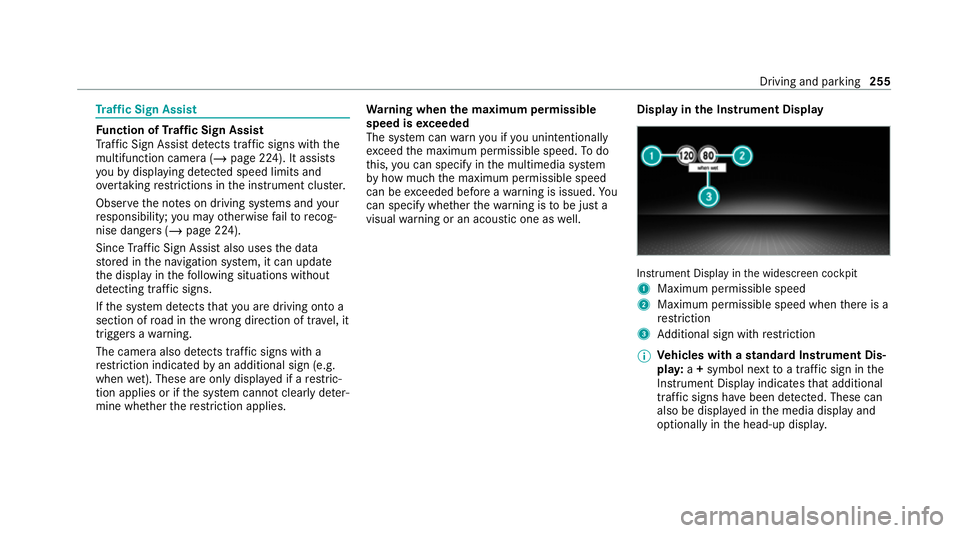
stru ment Display in the widescreen cockpit
1 Maximum permissible speed
2 Maximum permissible speed when there is a
re striction
3 Additional sign with restriction
% Ve
hicles with a standard Instrument Dis‐
pla y:a+ symbol next toa traf fic sign in the
Instrument Display indicates that additional
traf fic signs ha vebeen de tected. These can
also be displ ayed in the media display and
optionally in the head-up displa y. Driving and pa
rking 255
Page 259 of 549
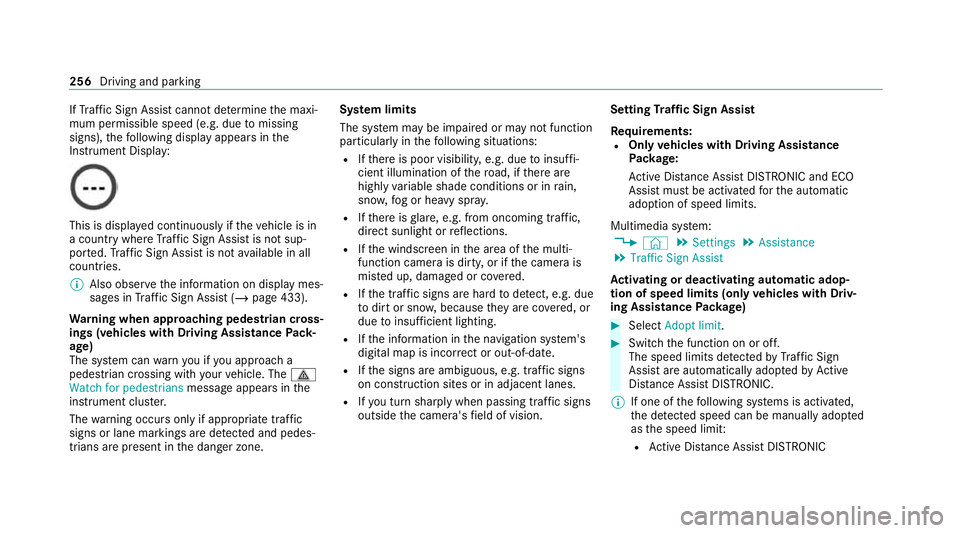
If
Traf fic Sign Assi stcannot de term ine the maxi‐
mum permissible speed (e.g. due tomissing
signs), thefo llowing display appears in the
Instrument Display: This is display
ed continuously if theve hicle is in
a country where Traf fic Sign Assi stis not sup‐
por ted. Traf fic Sign Assi stis not available in all
countries.
% Also obse rveth e information on display mes‐
sages in Traf fic Sign Assi st (/ page 433).
Wa rning when app roaching pedestrian cross‐
ings (vehicles with Driving AssistancePack‐
age)
The sy stem can warnyou if you approach a
pedestrian crossing with your vehicle. The ¯
Watch for pedestrians message appearsinthe
instrument clus ter.
The warning occurs only if appropriate traf fic
signs or lane markings are de tected and pedes‐
trians are present in the danger zone. Sy
stem limits
The sy stem may be impaired or may not function
particular lyin thefo llowing situations:
R Ifth ere is poor visibility, e.g. due toinsuf fi‐
cient illumination of thero ad, if there are
highly variable shade conditions or in rain,
sno w,fog or heavy spr ay.
R Ifth ere is glare, e.g. from oncoming traf fic,
di re ct sunlight or reflections.
R Ifth e windscreen in the area of the multi‐
function camera is dirty, or if the camera is
mis ted up, damaged or co vered.
R Ifth e tra ffic signs are hard todetect, e.g. due
to dirt or sno w,because they are co vered, or
due toinsuf ficient lighting.
R Ifth e information in the navigation sy stem's
digital map is incor rect or out-of-da te.
R Ifth e signs are ambiguous, e.g. tra ffic signs
on con stru ction sites or in adjacent lanes.
R Ifyo u turn sharply when passing traf fic signs
outside the camera's field of vision. Setting
Traf fic Sign Assist
Requ irements:
R Only vehicles with Driving Assistance
Pa ckage:
Ac tive Dis tance Assi stDISTRONIC and ECO
Assi stmust be activated forth e automatic
adoption of speed limits.
Multimedia sy stem:
4 © 5
Settings 5
Assistance
5 Traffic Sign Assist
Ac tivating or deactivating automatic adop‐
tion of speed limits (only vehicles with Driv‐
ing Assistance Package) #
Select Adopt limit. #
Switch the function on or off.
The speed limits de tected byTraf fic Sign
Assi stare automatically adop tedby Active
Dis tance Assi stDISTRONIC.
% If one of thefo llowing sy stems is activated,
th e de tected speed can be manually adop ted
as the speed limit:
R Active Dis tance Assi stDISTRONIC 256
Driving and pa rking
Page 308 of 549
Instrument display
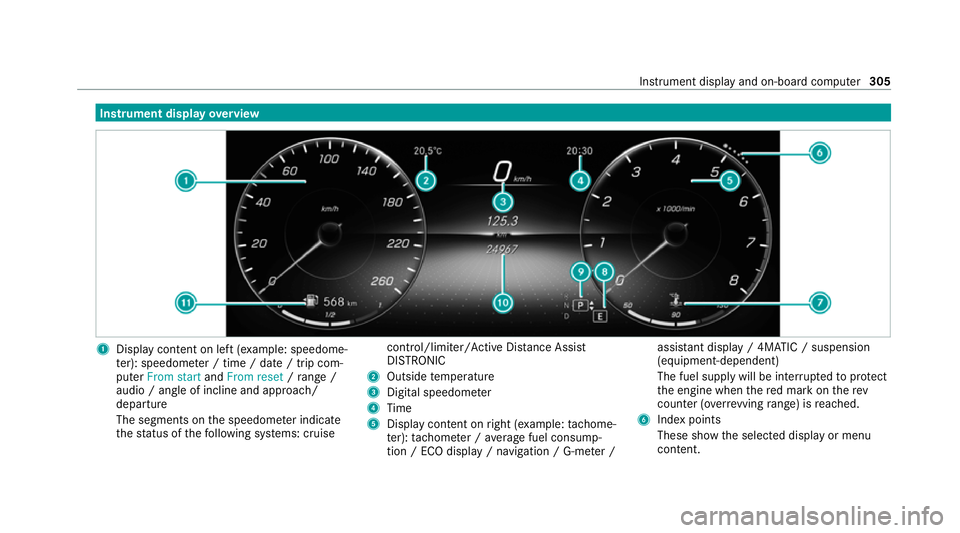
overview 1
Display con tent on le ft(exa mp le: speedome‐
te r): speedome ter / time / date / trip com‐
puter From start andFrom reset /range /
audio / angle of incline and approa ch/
departure
The segments on the speedome ter indica te
th est atus of thefo llowing sy stems: cruise control/limiter/Active Dis
tance Assi st
DISTRONIC
2 Outside temp erature
3 Digital speedome ter
4 Time
5 Display content on right (e xamp le:tac home‐
te r): tach ome ter / average fuel consump‐
tion / ECO display / navigation / G-me ter / assi
stant display / 4MATIC / suspension
(equipment-dependent)
The fuel supply will be inter rupted toprotect
th e engine when there d mark on therev
counter (o verrev ving range) is reached.
6 Index points
These show the selected display or menu
conte nt. Instrument displ
ayand on-board computer 305