1
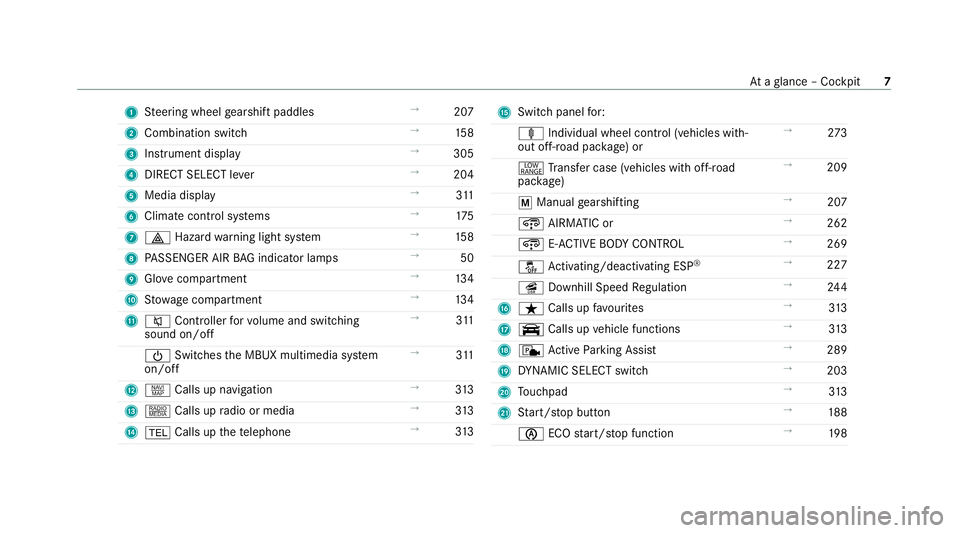
Steering wheel gearshift paddles →
207
2 Combination swit ch →
15 8
3 Instrument display →
305
4 DIRECT SELECT le ver →
204
5 Media display →
311
6 Climate cont rol sy stems →
175
7 £ Hazardwa rning light sy stem →
15 8
8 PASSENGER AIR BAG indicator lamps →
50
9 Glovecompa rtment →
13 4
A Stow age compartment →
13 4
B 8 Controller forvo lume and switching
sound on/off →
311
Ü Switches the MBUX multimedia sy stem
on/off →
311
C z Calls up navigation →
313
D | Calls up radio or media →
313
E % Calls up thete lephone →
313 F
Switch panel for:
ä Individual wheel control (vehicles with‐
out off-road pac kage ) or →
273
+ Trans fer case (vehicles with off-road
pac kage) →
209
p Manual gearshifting →
207
¿ AIRMATIC or →
262
¿ E-AC TIVE BODY CONTROL →
269
å Activating/deactivating ESP ®
→
227
î Downhill Speed Regulation →
24 4
G ß Calls up favo urites →
313
H y Calls up vehicle functions →
313
I c Active Parking Assist →
289
J DYNA MIC SELECT switch →
203
K Touchpad →
313
L Start/ stop button →
188
è ECOstart/ stop function →
19 8 At
aglance – Cockpit 7
7
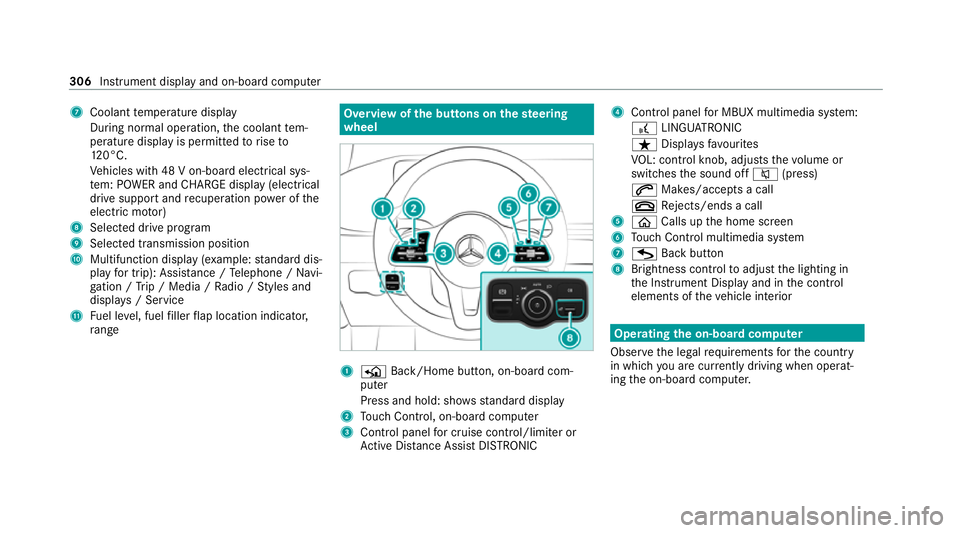
Coolant temp erature display
During normal operation, the coolant tem‐
perature display is permitted torise to
12 0°C.
Ve hicles with 48 V on-board electrical sys‐
te m: POWER and CHARGE displ ay(elect rical
drive suppo rtand recuperation po wer of the
electric mo tor)
8 Selected drive program
9 Selected transmission position
A Multifunction display (e xamp le:standard dis‐
play for trip): Assis tance / Telephone / Navi‐
ga tion / Trip / Media / Radio / Styles and
displa ys/ Service
B Fuel le vel, fuel filler flap location indicator,
ra nge Overvi
ewofthe but tons on thest eering
wheel 1
P Back/Home button, on-board com‐
puter
Press and hold: sho wsstandard display
2 Touch Control, on-board co mputer
3 Control panel for cruise control/limiter or
Ac tive Dis tance Assi stDISTRONIC 4
Control panel for MBUX multimedia sy stem:
£ LINGU ATRO NIC
ß Displa ysfavo urites
VO L: control knob, adjusts thevo lume or
switches the sound off 8(press)
6 Makes/accepts a call
~ Rejects/ends a call
5 ò Calls up the home screen
6 Touch Control multimedia sy stem
7 G Back button
8 Brightness control toadjust the lighting in
th e Instrument Display and in the control
elements of theve hicle interior Operating
the on-boa rdcompu ter
Obser vethe legal requ irements forth e count ry
in which you are cur rently driving when operat‐
ing the on-board computer. 306
Instrument display and on-board computer