2020 MERCEDES-BENZ GLS SUV wheel
[x] Cancel search: wheelPage 272 of 549
The
vehicle is lo wered at there ar axle by
appr ox. 40 mm. When theve hicle has been
lo we red, indicator lamp 2remains lit.
Lo we ring is inter rupte d in thefo llowing situa‐
tions:
R ave hicle door is opened.
R switch 1is pulled again.
R theve hicle is being driven fasterthan
2 km/h.
% The vehicle is automatically set tothe le vel
of the selected drive prog ram if you drive at
speeds greater than 2 km/h.
If indicator lamp 2flashes twice and there ar of
th eve hicle does not lo wer: #
Make sure that there qu irements are met.
% Lowe ring there ar of theve hicle allo wsthe
ve hicle tobe loaded more easil y.Obser ve
th e no tes on loading theve hicle when doing
th is (/ page132).
Ra ising there ar of theve hicle #
Che ckifth e battery is suf ficiently charge d. If
necessar y,start the engine. #
Pull switch 1briefly.
Indicator lamp 2goes out.
The vehicle will be raised tothe cur rently
selected le vel.
% The vehicle is automatically set tothe le vel
of the selected drive prog ram if you drive at
speeds greater than 2 km/h.
If th eve hicle cannot be raised: #
Ensure that the battery is suf ficiently
ch arge d; if necessar y,start the engine.
The raising process continues. E-
AC TIVE BODY CONT ROL Fu
nction of E- ACTIVE BODY CONT ROL
E- AC TIVE BODY CONTROL is an electrohydraulic
suspension sy stem with variable damping for
impr oved driving comfort. The all-round le vel
control sy stem ensures the best possible sus‐
pension and const ant ground clearance, even
with a laden vehicle. When driving at speed, the
ve hicle is lo wered automatically toimpr ovedriv‐
ing saf ety and toreduce fuel consum ption. The
suspension setting is adjus ted depending on thero
ad sur face, vehicle load and the drive program
selected.
The ROAD SUR FACE SCAN function de tects
areas of une venness in thero ad before you drive
ove rth em bymeans of a multifunction camera.
This reduces chassis mo vements.
The damping is adju sted individually toeach
wheel and depends on thefo llowing factors:
R Driving style, e.g. sporty
R Road condition, e.g. bumps
R Drive program
E- AC TIVE BODY CONTROL is comprised of the
fo llowing functions and components:
R Vehicles with Driving Assistance Pack‐
age: ROAD SUR FACE SCAN
R Cur veinclination function CURVE
R Recovery mode
R Individual wheel control
R Air suspension with auto matic level control
R Speed-dependent lo wering toreduce fuel
consum ption Driving and parking
269
Page 274 of 549
R
When the necessary conditions are met,
re co very mode and individual wheel control
can be activated.
R Vehicles without Off-road pac kage:
- When driving at speeds abo veappr ox‐
imately 80 km/h theve hicle is lo wered.
- When driving at speeds below appr ox‐
imately 45 km/h, theve hicle is raised.
R Vehicles with Off-road pac kage:
- When driving at speeds abo veappr ox‐
imately 115 km/h, theve hicle is lo wered.
- When driving at speeds below appr ox‐
imately 75km/h, theve hicle is raised.
Drive program G
R The suspension setting is suitable for dif ficult
off-road terrain.
R The vehicle is set tooff-road le vel +1.
R When driving at speeds abo veappr oximately
80 km/h, theve hicle is lo wered.
R When driving at speeds below appr oximately
45 km/h, theve hicle is raised.
R ROAD SUR FACE SCAN is deactivated. R
The cur veinclination function is deactivated.
R Recovery mode or individual wheel control
can be activated.
Drive program =
R You can call up individual suspension set‐
tings here.
Ope ration with a trailer or bicycle rack
If th e electrical connection has been cor rectly
es tablished tothe trailer or bicycle rack:
R Drive program A,;,£,N,
=, CandB: theve hicle remains at
normal le vel ir respective of speed.
R The cur veinclination function is deactivated.
R Drive prog ram F andG: theve hicle
adopts the normal le velst arting from a
speed of 30 km/h. Le
vel dif fere nces compared tothe normal
le vel Ve
hicle
le vel Ve
hicles
without Off-
ro ad pac kage Ve
hicles with
Off-road pack‐
age
Car wash Appr ox.
+90 mm Appr
ox.
+90 mm
Off-road
le ve l +3 Una
vailable Appr ox.
+90 mm
Off-road
le ve l +2 Una
vailable Appr ox.
+60 mm
Off-road
le ve l +1 Mercedes-
Maybach
vehi‐
cles: appr ox.
+50 mm
All other mod‐
els: appr ox.
+60 mm Appr
ox.
+30 mm Driving and parking
271
Page 276 of 549
Re
covery mode is a function of the suspension
which can assist the driver on loose sur faces
(e.g. sand, snow) when freeing a vehicle which
has become stuc k.
The vehicle body rock s in slo w,vertical motions
when reco very mode has been activated. This
te mp orarily puts the wheels under greater load,
which means they have inc reased traction and
th eve hicle is freed.
Yo u can activate free driving mode via Off- road
Assist (/ page276).
Fu nction of individual wheel control &
WARNING Risk of becoming trapped
due totheve hicle lo wering
The vehicle can be lo wered when the individ‐
ual wheel control function has been activa‐
te d. Body parts could become trapped if they
are between theve hicle body and the tyres
or underneath theve hicle. #
Make sure that nobody is under the
ve hicle or in the immediate vicinity of th
e wheel ar ches when individual wheel
control is activated. *
NO
TERisk of dama gedue totheve hicle
moving up and down The
vehicle can be lo wered or raised on one
or more wheels when the individual wheel
control function has been activated. Vehicle
parts could be damaged due tocontact wi th
objects. #
Make sure that theve hicle has suf fi‐
cient room tomo vewhen the individual
wheel control function has been activa‐
te d. Individual wheel control is a function of
the sus‐
pension, which can be used toset theve hicle
le ve lfo r each wheel individually. This can help to
impr ove alignment of the body when driving off-
ro ad.
Yo u can activate individual wheel cont rol via Off-
ro ad Assist (/ page276). Ad
justing the vehicle le vel (vehicles with E-
AC TIVE BODY CONT ROL) &
WARNING Risk of accident because
ve hicle le vel is too high
Driving characteristics may be impaired.
The vehicle can drift outwards, forex ample,
when steering or cornering. #
Choose a vehicle le vel which is suited
to the driving style and thero ad sur face
conditions. &
WARNING Risk of entrapment from vehi‐
cle lo wering
When lo wering theve hicle, other people
could become trapped if their limbs are
between theve hicle body and the tyres or
underneath theve hicle. #
Make sure no one is underneath the
ve hicle or in the immediate vicinity of
th e wheel ar ches when theve hicle is
being lo wered. Driving and parking
273
Page 277 of 549
&
WARNING Risk of becoming trapped
due totheve hicle lo wering
Ve hicles with AIRMATIC or le vel control:
when you unload luggage or lea vetheve hi‐
cle, theve hicle firs trises slightly and then
re turns tothe set le vel shortly af terw ards.
Yo u or an yone else in the vicinity of the
wheel ar ches or the underbody could thus
become trapped.
The vehicle can also be lo wered af ter being
loc ked. #
When leaving theve hicle, make sure
th at nobody is in the vicinity of the
wheel ar ches or the underbody. Re
quirements:
R The vehicle has been star ted.
R Vehicles without Off-road pac kage: the
ve hicle is being driven no fasterthan
65 km/h.
R Vehicles with Off-road pac kage:
- Off-road le vel +1: theve hicle is not mov‐
ing fast erthan 100 km/h. -
Off-road le vel +2: theve hicle is not mov‐
ing fast erthan 65 km/h.
- Off- road le vel +3: theve hicle is not mov‐
ing fast erthan 20 km/h.
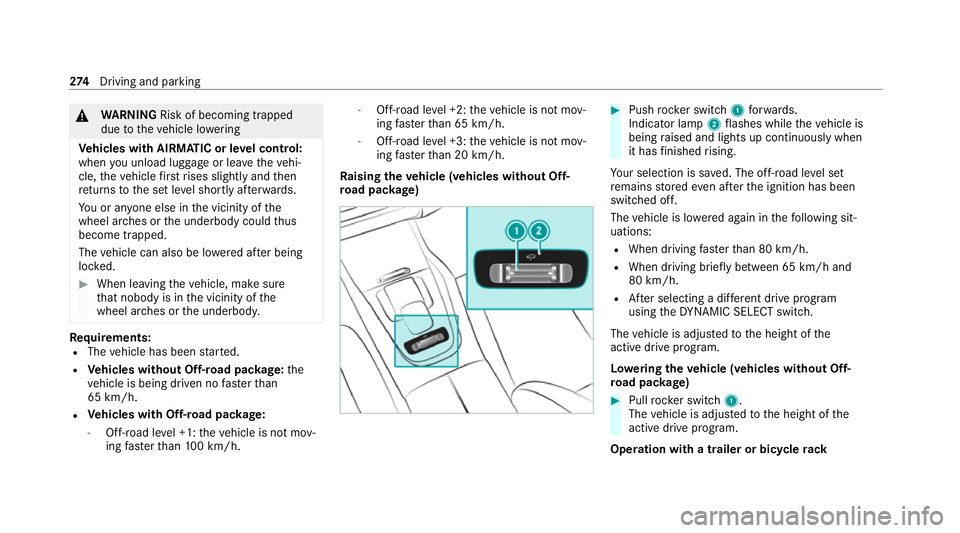
Ra ising theve hicle (vehicles without Off-
ro ad pac kage) #
Push rocker switch 1forw ards.
Indicator lamp 2flashes while theve hicle is
being raised and lights up continuously when
it has finished rising.
Yo ur selection is sa ved. The off-road le vel set
re mains stored even af terth e ignition has been
switched off.
The vehicle is lo wered again in thefo llowing sit‐
uations:
R When driving fasterthan 80 km/h.
R When driving brief ly between 65 km/ h and
80 km/h.
R After selecting a dif fere nt drive program
using theDY NA MIC SELECT switch.
The vehicle is adjus tedto the height of the
active drive prog ram.
Lo weri ngtheve hicle (vehicles without Off-
ro ad pac kage) #
Pull rock er switch 1.
The vehicle is adjus tedto the height of the
active drive program.
Operation with a trailer or bicycle rack274
Driving and pa rking
Page 280 of 549
R
afte r a running time of 30 seconds
R it is de tected that an object has hit the
underbody of theve hicle hard
R not all conditions are met
% Further information on reco very mode
(/ page 272).
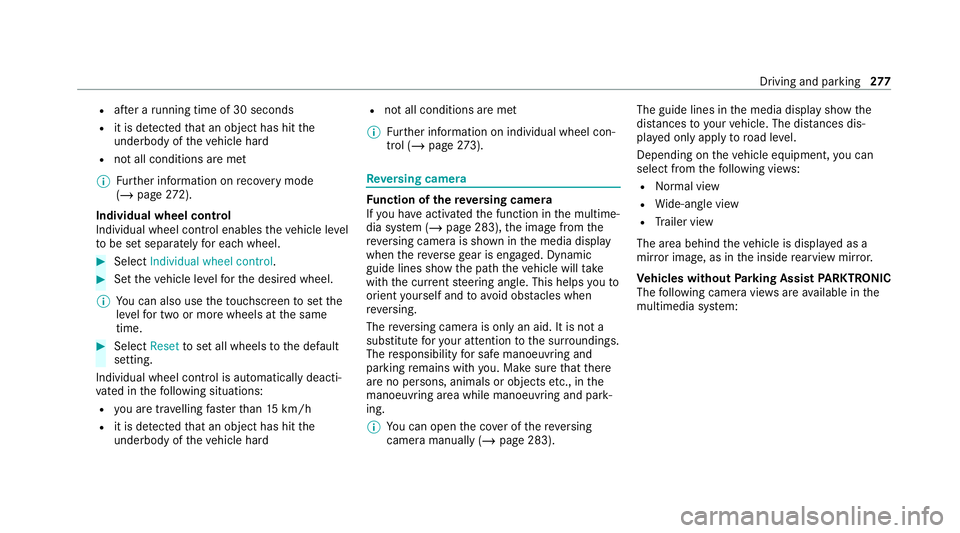
Individual wheel control
Individual wheel control enables theve hicle le vel
to be set separately for each wheel. #
Select Individual wheel control. #
Set theve hicle le velfo rth e desired wheel.
% You can also use theto uchsc reen toset the
le ve lfo r two or more wheels at the same
time. #
Select Resettoset all wheels tothe default
setting.
Individual wheel control is automatically deacti‐
va ted in thefo llowing situations:
R you are tra velling fasterthan 15 km/h
R it is de tected that an object has hit the
underbody of theve hicle hard R
not all conditions are met
% Further information on individual wheel con‐
trol (/ page273). Re
versing camera Fu
nction of there ve rsing camera
If yo u ha veactivated the function in the multime‐
dia sy stem (/ page 283), the image from the
re ve rsing camera is shown in the media display
when there ve rsege ar is engaged. Dynamic
guide lines show the path theve hicle will take
with the cur rent steering angle. This helps youto
orient yourself and toavoid obs tacles when
re ve rsing.
The reve rsing camera is only an aid. It is not a
substitute foryo ur attention tothe sur roundings.
The responsibility for safe manoeuvring and
parking remains with you. Make sure that there
are no persons, animals or objects etc., in the
manoeuvring area while manoeuvring and park‐
ing.
% You can open the co ver of there ve rsing
camera manually (/ page 283). The guide lines in
the media display show the
dis tances to yourvehicle. The dis tances dis‐
pl ay ed only apply toroad le vel.
Depending on theve hicle equipment, you can
select from thefo llowing vie ws:
R Normal view
R Wide-angle view
R Trailer view
The area behind theve hicle is displa yed as a
mir ror image, as in the inside rearview mir ror.
Ve hicles without Parking Assist PARKTRONIC
The following camera vie wsare available in the
multimedia sy stem: Driving and parking
277
Page 283 of 549
%
Have the display repaired or replaced if, for
ex ample, pixel er rors considerably restrict its
use. 360° Came
ra Fu
nction of the 360° Camera
The 360° Camera is a sy stem that consists of
fo ur cameras. The cameras co verth e immediate
ve hicle sur roundings. The sy stem assists you
when you are parking or at exits with reduced
visibility, forex ample.
The vie wsofthe 360° Camera are alw aysav aila‐
ble when driving forw ards up toa speed of
appr ox.16 km/h and when reve rsing.
The 360° Camera is only an aid and may show a
dis torted view of obs tacles, show them incor‐
re ctly or not show them at all. It is not a substi‐
tute foryo ur attention tothe sur roundings. The
re sponsibility for safe manoeuvring and parking
re mains with you. Make sure that there are no
persons, animals or objects etc., in the manoeu‐
vring area while manoeuvring and parking. The sy
stem evaluates images from thefo llowing
cameras:
R Reversing camera
R Front camera
R Two side cameras in the outside mir rors
% You can open the co ver of there ve rsing
camera manually (/ page 283).
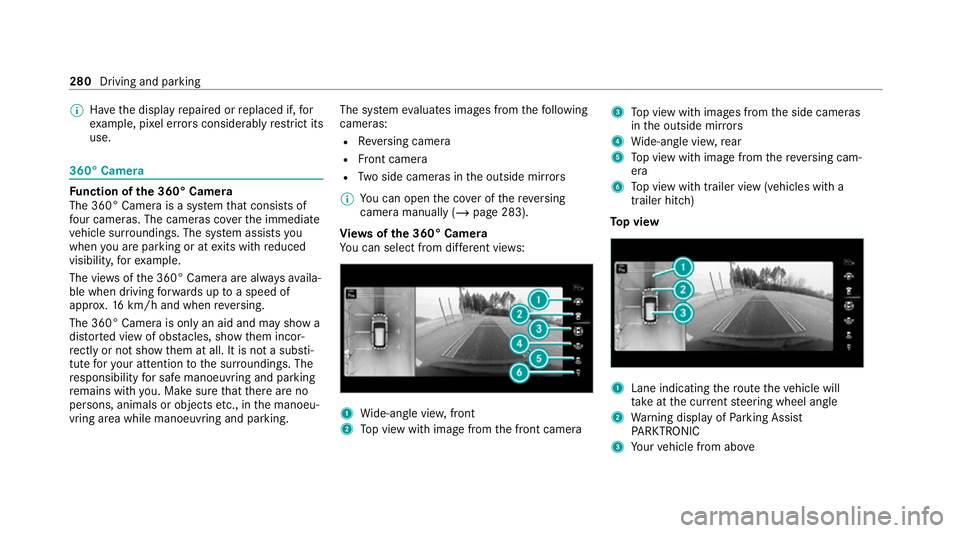
Vi ew s of the 360° Camera
Yo u can select from dif fere nt vie ws: 1
Wide-angle vie w,front
2 Top view with image from the front camera 3
Top view with images from the side cameras
in the outside mir rors
4 Wide-angle vie w,rear
5 Top view with image from there ve rsing cam‐
era
6 Top view with trailer view (vehicles with a
trailer hitch)
To p view 1
Lane indicating thero ute theve hicle will
ta ke atthe cur rent steering wheel angle
2 Warning display of Parking Assist
PA RKTRONIC
3 Your vehicle from abo ve280
Driving and parking
Page 284 of 549
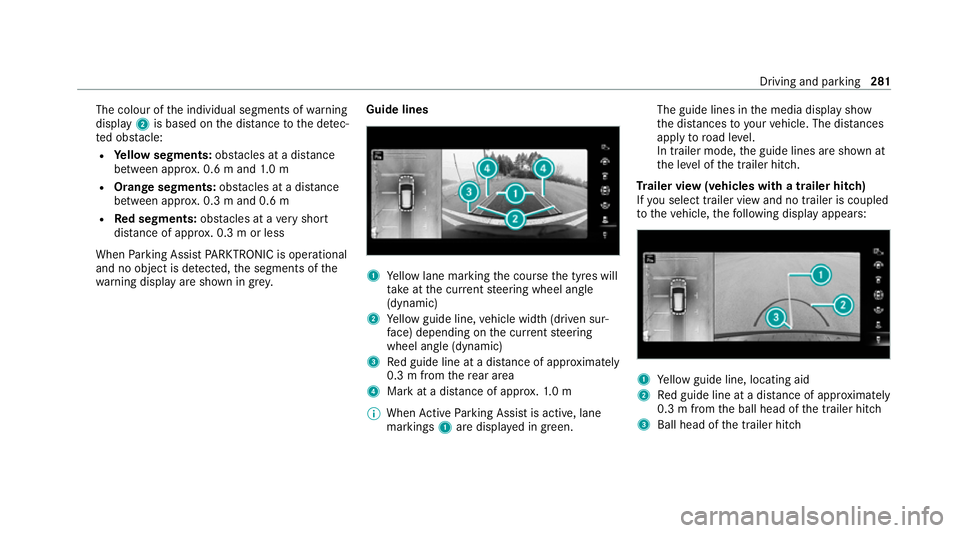
The colour of
the individual segments of warning
display 2is based on the dis tance tothe de tec‐
te d obs tacle:
R Yellow segments: obstacles at a di stance
between appr ox. 0.6 m and 1.0 m
R Orange segments: obstacles at a di stance
between appr ox. 0.3 m and 0.6 m
R Red segments: obstacles at a very short
dis tance of appr ox. 0.3 m or less
When Parking Assist PARKTRONIC is operational
and no object is de tected, the segments of the
wa rning display are shown in gr ey.Guide lines 1
Yellow lane marking the course the tyres will
ta ke atthe cur rent steering wheel angle
(dynamic)
2 Yellow guide line, vehicle width (driven sur‐
fa ce) depending on the cur rent steering
wheel angle (dynamic)
3 Red guide line at a dis tance of appr oximately
0.3 m from there ar area
4 Mark at a distance of appr ox.1. 0 m
% When Active Parking Assist is active, lane
markings 1are displa yed in green. The guide lines in
the media display show
th e dis tances to yourvehicle. The dis tances
apply toroad le vel.
In trailer mode, the guide lines are shown at
th e le vel of the trailer hitch.
Tr ailer view (vehicles with a trailer hitch)
If yo u select trailer view and no trailer is coupled
to theve hicle, thefo llowing display appears: 1
Yellow guide line, locating aid
2 Red guide line at a dis tance of appr oximately
0.3 m from the ball head of the trailer hitch
3 Ball head of the trailer hitch Driving and parking
281
Page 285 of 549
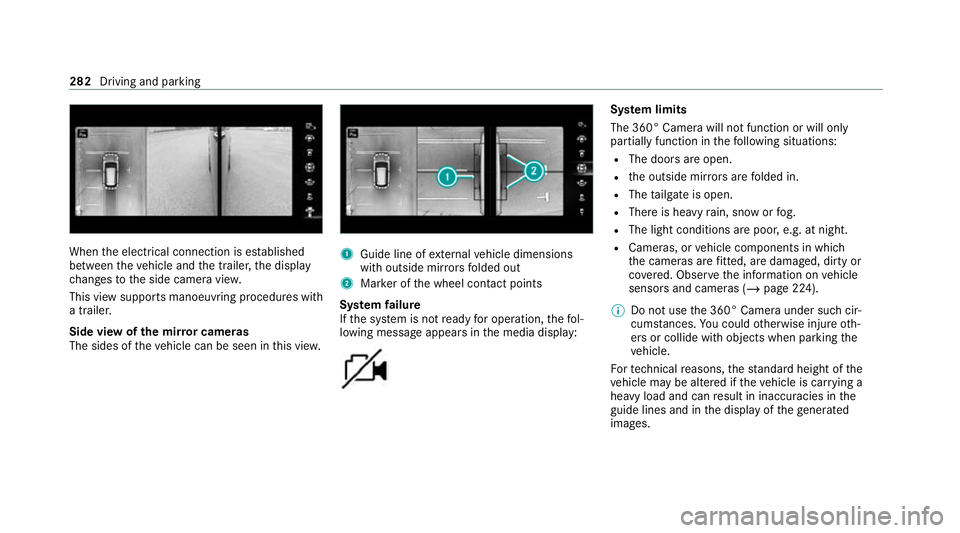
When
the electrical connection is es tablished
between theve hicle and the trailer, the display
ch anges tothe side camera vie w.
This view supports manoeuvring procedures with
a trailer.
Side view of the mir ror cameras
The sides of theve hicle can be seen in this vie w. 1
Guide line of extern al vehicle dimensions
with outside mir rors folded out
2 Marker of the wheel conta ct points
Sy stem failure
If th e sy stem is not ready for operation, thefo l‐
lowing message appears in the media display: Sy
stem limits
The 360° Camera will not function or will only
partially function in thefo llowing situations:
R The doors are open.
R the outside mir rors are folded in.
R The tailgate is open.
R There is heavy rain, snow or fog.
R The light conditions are poor, e.g. at night.
R Cameras, or vehicle components in which
th e cameras are fitted, are dama ged, dirty or
co vered. Obser vethe information on vehicle
sensors and cameras (/ page 224).
% Do not use the 360° Camera under such cir‐
cums tances. You could otherwise injure oth‐
ers or collide with objects when parking the
ve hicle.
Fo rte ch nical reasons, thest andard height of the
ve hicle may be altered if theve hicle is car rying a
heavy load and can result in inaccuracies in the
guide lines and in the display of thege nerated
ima ges. 282
Driving and parking