2020 MERCEDES-BENZ GLE COUPE lock
[x] Cancel search: lockPage 118 of 757
When
you swit ch the ignition off, thesteering
wheel heater switches off. Easy entry and
exitfeature Using
the easy entry and exitfeature &
WARNING Risk of accident when pulling
aw ay during the adjustment process of
th e easy exitfeature
‑ If you pull away while the easy entry and
ex itfeature is making adjustments, you could
lose cont rol of theve hicle. #
Alw ayswa it until the adjustment proc‐
ess is comple tebefore pulling away. &
WARNING Risk of becoming trapped
while adjusting the easy entry andexit
fe ature
When the easy entry andexitfeature adjusts
th esteering wheel and the driver's seat, you
and other vehicle occupants – particular ly
ch ildren – could become trapped. #
During the adjustment process forthe
easy entry andexitfeature, make sure
th at no one has any body parts in the
sweep of thesteering wheel or the driv‐
er's seat.
If th ere is a risk of becoming trapped bythe
st eering wheel: #
Movethe adjustment le ver of thesteer‐
ing wheel.
The adjustment process is stopped.
If th ere is a risk of becoming trapped bythe
driver's seat: #
Press the seat adjustment switch.
The adjustment process is stopped. #
Never lea vechildren unat tended in the
ve hicle. #
When leaving theve hicle, alw aysta ke
th eke y with you and lock theve hicle.
This also applies tothe digital vehicle
ke y if the "Digital Vehicle Key" function
is activated via Mercedes me connect. Ve
hicles with memory function: you can stop
th e adjustment process bypressing one of the
memory function position switches. &
WARNING Risk of becoming trapped
du ring acti vation of the easy entry and
ex itfeature bychildren
If ch ildren activate the easy entry andexit
fe ature, they can become trapped, pa rticu‐
lar lywhen unat tended. #
Never lea vechildren unat tended in the
ve hicle. #
When leaving theve hicle, alw aysta ke
th eke y with you and lock theve hicle. This also applies
tothe Digital Vehicle Key if the
"Digital Vehicle Key" function is activated via
Mercedes me connect.
If th e easy entry andexitfeature is active, the
st eering wheel will mo veupwards and the driv‐
er's seat will mo veback in thefo llowing situa‐
tions:
R You swit chthe ignition off with the driver's
door open Seats and
stowing 11 5
Page 119 of 757
R
You open the driver's door with the ignition
switched off
% The steering wheel will mo veupwards on lyif
it is not already as high as it will go. The driv‐
er's seat will mo vebackwards only if it is not
already in there armost position.
The driver's seat backrest will mo vefor‐
wa rds only if it is not already in the front‐
most position.
The steering wheel and the driver's seat will
mo veback tothe last drive position in thefo l‐
lowing cases:
R You swit chthe po wer supp lyor the ignition
on when the driver's door is closed
R You close the driver's door with the ignition
switched on.
The last drive position will be stored when:
R You swit chthe ignition off.
R Vehicles with memory function: you call
up the seat settings via the memory function.
R Vehicles with memory function: you sa ve
th e seat settings via the memory function. Ve
hicles with memory function: press one of
th e memory function sa ved position buttons to
st op the adjustment process. Operating
the memory function &
WARNING Risk of an accident if the
memory function is used while driving
If yo u use the memory function on the driv‐
er's side while driving, you could lose cont rol
of theve hicle as a result of the adjustments
being made. #
Only use the memory function on the
driver's side when theve hicle is station‐
ar y. &
WARNING Risk of entrapment when set‐
ting the seat with the memory function
When the memory function adjusts the seat,
yo u and other vehicle occupants – particu‐
lar lych ildren – could become trapped. #
During the adjustment process of the
memory function, make sure that no one has any body parts in
the sweep of
th e seat. #
If someone becomes trapped, press a
preset position button or seat adjust‐
ment switch immediately. &
WARNING Risk of entrapment if the
memory function is activated bychildren
Children could become trapped if they acti‐
va te the memory function, particularly when
unattended. #
Never lea vechildren unat tended in the
ve hicle. #
When leaving theve hicle, alw aysta ke
th eke y with you and lock theve hicle. This also applies
tothe Digital Vehicle Key if the
"Digital Vehicle Key" function is activated via
Mercedes me connect.
The memory function can be used when the igni‐
tion is switched off. 11 6
Seats and stowing
Page 122 of 757
R
secure the load using the tie-down eyes and
distribute the load evenly. St
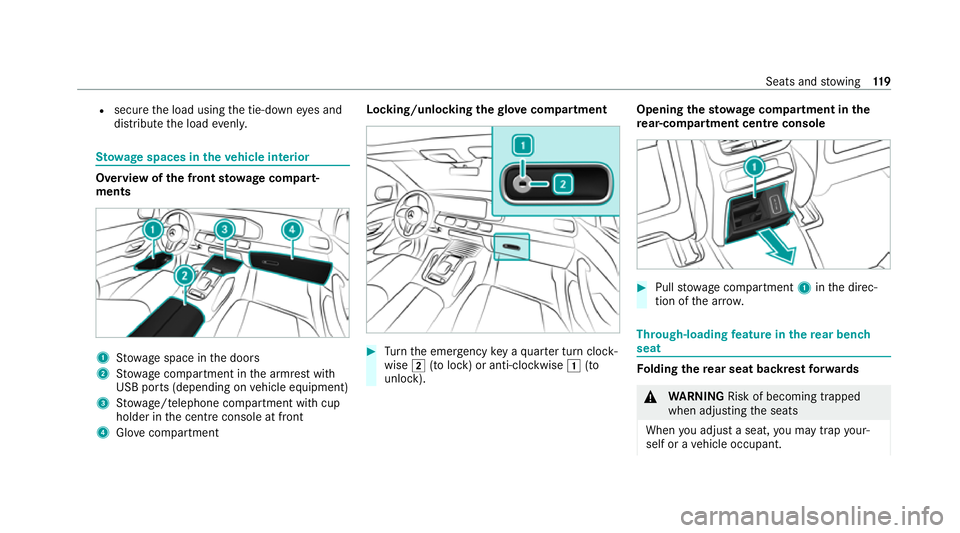
ow age spaces in theve hicle interior Overview of
the front stowage compa rt‐
ments 1
Stow age space in the doors
2 Stow age compartment in the armrest with
USB ports (depending on vehicle equipment)
3 Stow age/telephone compartment with cup
holder in the cent reconsole at front
4 Glove compa rtment Locking/unlo
cking thegl ove compa rtment #
Turn the emer gency key a quarter turn clock‐
wise 0048(to lock) or anti-clockwise 0047(to
unlock). Opening
thesto wage compa rtment in the
re ar-co mpartment centre console #
Pull stow age compartment 1inthe direc‐
tion of the ar row. Through-loading
feature in there ar ben ch
seat Fo
lding there ar seat backrest forw ards &
WARNING Risk of becoming trapped
when adjusting the seats
When you adjust a seat, you may trap your‐
self or a vehicle occupant. Seats and
stowing 11 9
Page 123 of 757
#
When adjusting a seat, make sure that
no one has any body parts in the sweep
of the seat. &
WARNING Risk of accident if seat and
seat ba ckrest are not engaged
If th e seat and seat backrest are not engaged
th ey could fold forw ards, e.g. when braking
or in theev ent of an accident.
This poses thefo llowing risks in particular:
R A seat or seat backrest that is not
engaged can push theve hicle occupant
against the seat belt. The seat belt would
th en not be able toprov ide the intended
pr otection and could cause additional
injur y.
R Ach ild restra int sy stem would no lon ger
be suppor ted cor rectly or positioned cor‐
re ctly and would no lon ger per form its
intended function.
R The seat backrest cannot restra in objects
or goods in the luggage compartment. Alw
ays ensure that the seat and seat back‐
re st are engaged, especially:
R before passengers tra vel on a seat with
th e easy entry andexitfeature.
R afte r adju sting the seat.
R afte rth e easy entry andexitfeature is
used.
R afte rth e load compartment enlar gement
has been folded down. Alw
ays ensure that all vehicle occupants ha ve
th eir seat belts fastened cor rectly and are sitting
prope rly. Pa rticular attention must be paid to
ch ildren.
If yo u no lon gerre qu ire thefo lded-d ownre ar
seat backrest as a loading area, fold there ar
seat backrest back into place.
Make sure that there d marking of the lock verifi‐
cation indicator is no longer visible. Otherwise,
th e seat backrest will not be loc ked. Fo
lding there ar seats forw ards mechanically
* NO
TEDama getothero of lining when
th ere ar seat backrests are folded for‐
wa rds and backwards The
roof lining can be damaged when the
re ar seat backrests are folded forw ards and
backwards. #
Before folding there ar seat backrests
fo rw ards and backwards, insert the
head restra ints. 12 0
Seats and stowing
Page 125 of 757
R
Ifyo u wish tofold one of the outer rear
seat backrests and the cent re rear seat
backrest forw ards, it is recommended
th at youfo ld the left and cent re rear seat
backrests forw ards.
Fo lding back there ar seat backrest
* NO
TEDama gecaused bytrapping the
seat belt when the seat backrest is fol‐
ded back The seat belt could become trapped and
thus
damaged when the seat backrest is folded
bac k. #
Ensu rethat the seat belt tongue has
been inser ted at the side in the mar ked
position. *
NO
TEDama getothero of lining when
th ere ar seat backrests are folded for‐
wa rds and backwards The
roof lining can be damaged when the
re ar seat backrests are folded forw ards and
backwards. #
Before folding there ar seat backrests
fo rw ards and backwards, insert the
head restra ints. Fo
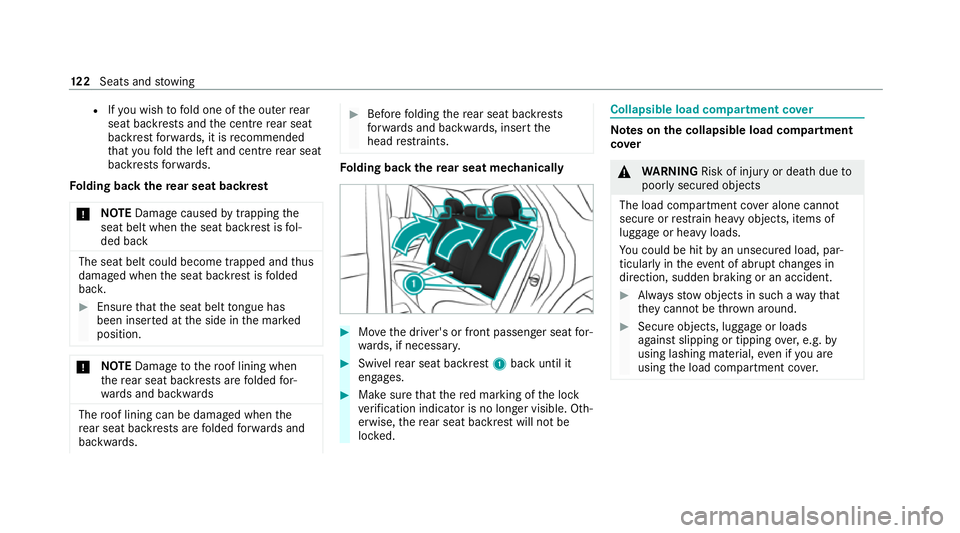
lding back there ar seat mechanically #
Movethe driver's or front passenger seat for‐
wa rds, if necessar y. #
Swi velre ar seat backrest 1back until it
engages. #
Make sure that there d marking of the lock
ve rification indicator is no longer visible. Oth‐
erwise, there ar seat backrest will not be
loc ked. Collapsible load compartment co
ver Note
s onthe collapsible load compa rtment
co ver &
WARNING Risk of inju ryor death due to
poorly secured objects
The load compartment co ver alone cannot
secure or restra in heavy objects, items of
luggage or heavy loads.
Yo u could be hit byan unsecured load, par‐
ticular lyin theev ent of abrupt changes in
direction, sudden braking or an accident. #
Alw aysstow objects in such a wayth at
th ey cannot be thro wn around. #
Secure objects, luggage or loads
against slipping or tipping over,e.g. by
using lashing material, even if you are
using the load compartment co ver. 12 2
Seats and stowing
Page 132 of 757
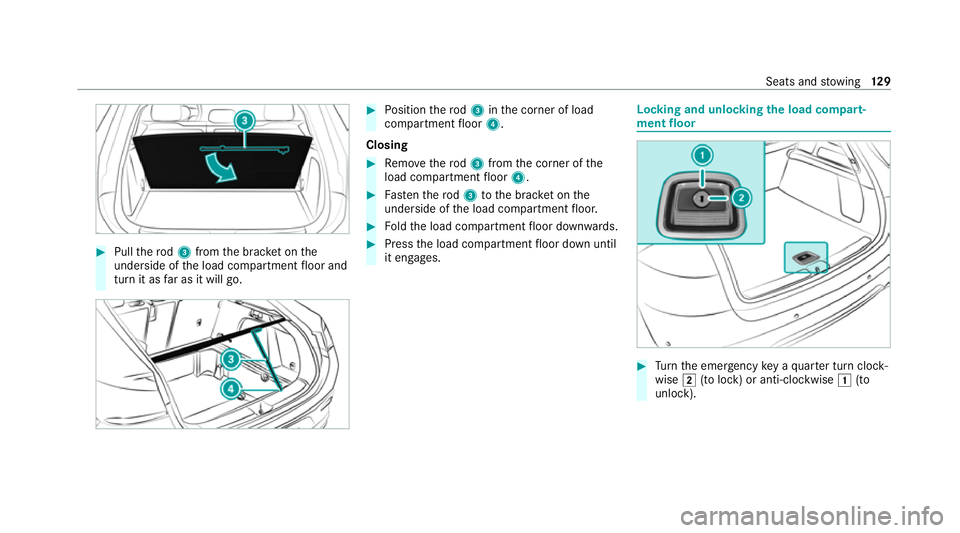
#
Pull thero d3 from the brac ket on the
underside of the load compartment floor and
turn it as far as it will go. #
Position thero d3 inthe corner of load
compartment floor 4.
Closing #
Remo vethero d3 from the corner of the
load compartment floor 4. #
Fasten thero d3 tothe brac ket on the
underside of the load compartment floor. #
Foldthe load compartment floor down wards. #
Press the load compartment floor down until
it engages. Locking and unlocking
the load compa rt‐
ment floor #
Turn the emer gency key a quarter turn clock‐
wise 0048(to lock) or anti-clockwise 0047(to
unlock). Seats and
stowing 12 9
Page 141 of 757
Wire
lesscharging of a mobile phone in the
cockpit Re
quirements:
R The mobile phone is suitable for wireless
ch arging.
% A list of compatible mobile phones can be
found at: https://www.mercedes-benz-
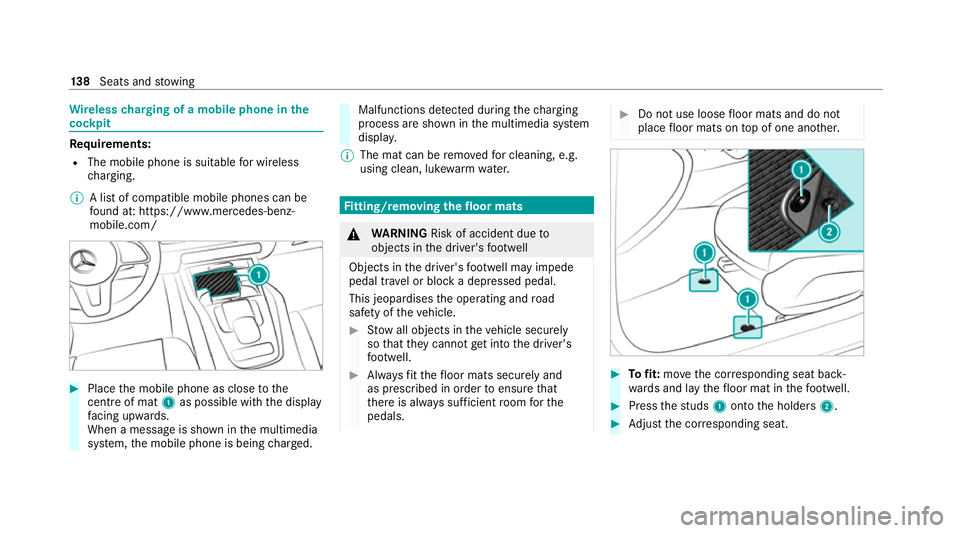
mobile.com/ #
Place the mobile phone as close tothe
centre of mat 1as possible wi th the display
fa cing up wards.
When a message is shown in the multimedia
sy stem, the mobile phone is being charge d. Malfunctions de
tected du ring thech arging
process are shown in the multimedia sy stem
displa y.
% The mat can be remo vedfo r cleaning, e.g.
using clean, luk ewarmwate r. Fi
tting/ removing the floormats &
WARNING Risk of accident due to
objects in the driver's foot we ll
Objects in the driver's foot we ll may impede
pedal tr avel or block a depressed pedal.
This jeopardises the operating and road
saf ety of theve hicle. #
Stow all objects in theve hicle securely
so that they cannot getinto the driver's
fo ot we ll. #
Alw aysfit th efloor mats securely and
as prescribed in order toensure that
th ere is alw ays suf ficient room forthe
pedals. #
Do not use loose floor mats and do not
place floor mats on top of one ano ther. #
Tofit: mo vethe cor responding seat back‐
wa rds and lay thefloor mat in thefo ot we ll. #
Press thest uds 1onto the holders 2. #
Adjust the cor responding seat. 13 8
Seats and stowing
Page 155 of 757
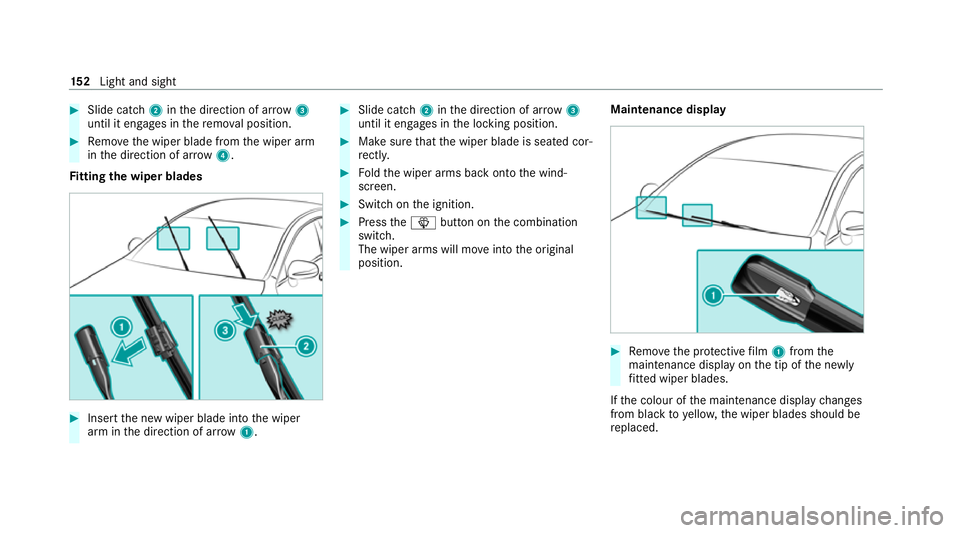
#
Slide catch 2inthe direction of ar row 3
until it engages in there mo val position. #
Remo vethe wiper blade from the wiper arm
in the direction of ar row4.
Fi tting the wiper blades #
Inse rtthe new wiper blade into the wiper
arm in the direction of ar row1. #
Slide catch 2inthe direction of ar row 3
until it engages in the locking position. #
Make sure that the wiper blade is seated cor‐
re ctly. #
Foldthe wiper arms back onto the wind‐
screen. #
Switch on the ignition. #
Press the00D4 button on the combination
switch.
The wiper arms will mo veinto the original
position. Maintenance display #
Remo vethe pr otective film 1 from the
maintenance display on the tip of the newly
fi tted wiper blades.
If th e colour of the maintenance display changes
from black to yellow, the wiper blades should be
re placed. 15 2
Light and sight