Page 228 of 550
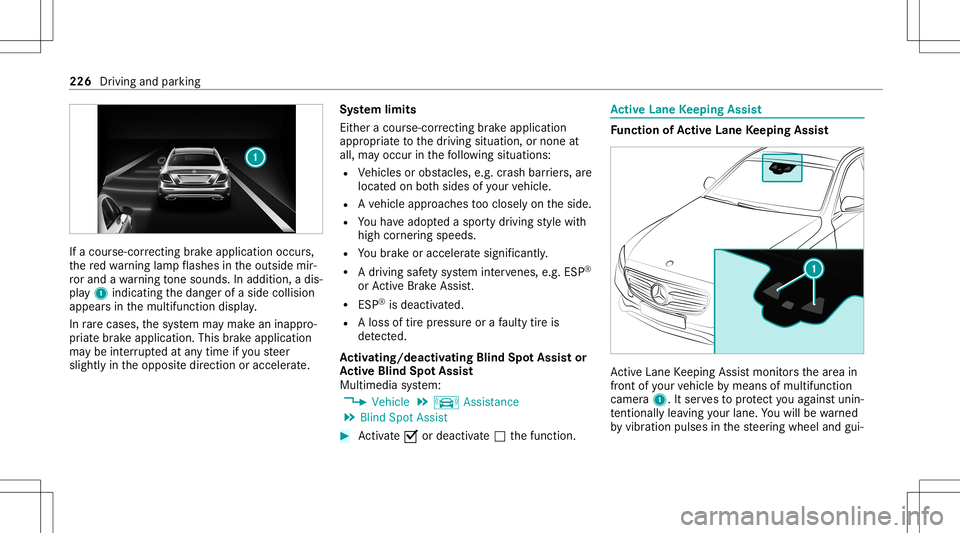
If
acour se-cor recting brak eap plica tion occu rs,
th ere dwa rning lam pflashes intheoutside mir‐
ro rand awa rning tone sou nds. Inadditio n,adi s‐
pl ay 1 indic atingth edang erofaside collision
appear sin themultifunc tiondispla y.
In rare case s,thesy stem maymak ean inappr o‐
pr iat ebr ak eapplication. Thisbrak eapplication
ma ybe interru pte dat anytime ifyo usteer
slightl yin theopposit edir ect ion oraccelera te. Sy
stem limit s
Eit her acour se-cor recting brak eap plica tion
ap propr iate to thedr iving situation ,or non eat
all, mayoccur inthefo llo wing situat ions:
R Vehicles orobs tacle s,e.g. crash barrier s,are
locat edon both sides ofyour vehicle.
R Ave hicle approaches tooclosely ontheside.
R Youha ve adop tedaspor tydriving style wit h
high corner ing speeds.
R Youbr ak eor acc elerat esign ifican tly.
R Adr ivi ng safety system interve nes, e.g.ESP ®
or ActiveBr ak eAssi st.
R ESP ®
is de acti vated.
R Aloss oftirepr essur eor afa ulty tireis
de tected.
Ac tiv atin g/deac tivatin gBli nd Spo tAs sist or
Ac tiv eBli nd Spo tAs sist
Multimedia system:
4 Vehicle 5
k Assist ance
5 Blind SpotAssist #
Activate0073 ordeacti vate 0053 thefunc tion. Ac
tiv eLan eKe eping Assist Fu
nction ofActiv eLan eKe eping Assist Ac
tiveLa ne Keeping Assistmonit orsth ear ea in
fr ont ofyour vehicle bymeans ofmultifu nction
camer a1. Itser vesto protect youag ains tunin ‐
te ntio nallylea vingyo ur lane .Yo uwill bewarned
by vibr ation pulses inthesteer ing wheel andgui‐ 226
Driving andparking
Page 230 of 550

highly
variable shade condition sor inrain,
sno w,fogor hea vyspr ay.
R Ifth er eis glar e, e.g .fr om oncom ingtraffic,
th esun orreflect ions.
R Ifth ewindshield inthear ea ofthemultifunc ‐
tion camer ais dir ty,or ifth ecamer ais fog‐
ge dup, damag edorcovered.
R Ifth er ear eno lane marking s,or several
unc lear lane markingsarepr esen tfo rone
lane, e.g.around roadw orks .
R Ifth elane marking sar ewo rn,dar kor cov‐
er ed.
R Ifth edis tance totheve hicle infront istoo
shor tand thus thelane marking scann otbe
de tected.
R Ifth elane marking sch ang equ ickl y, e.g.
lanes branc hof f,cr oss one another or
mer ge.
R Ifth ero adw ayisvery nar row and wind ing.
Ve hicl eswithout Drivin gAss istanc ePa ck‐
ag eor Drivi ng Ass istan cePlus Packag e:
Ac tiveLa ne Keeping Assistuses radar sensor s
to monit orseveralar eas around theve hicle. If th
era dar sensor sin there ar bum peraredir tyor
co veredwit hsno w,thesy stem maybe impair ed
or ma yno tfunc tion.If an obs tacle inthelane in
whic hyo uar edr ivin ghas been detected, no
la ne-cor recting brak eap plica tion occu rs.
Ac tiv atin g/deac tivatin gAc tiv eLan eKe eping
Assis t(v ehicles withPa rking Assis t
PA RK TRONI C) &
WARNIN GRisk ofacci dent despite
Ac tiveLa ne Keeping Assistwa rning
A lane- correcting brak eap plica tion canno t
al wa ys bring theve hicle backint oth eor igi‐
nal lane. #
Alw aysst eer ,br ak eor accelera teyour‐
self ,espe ciallyif Ac tiveLa ne Keeping
Assis twa rnsyo uor mak esalane -cor‐
re cting brak eap plica tion. &
WARNIN GRisk ofacci dent despite inter‐
ve ntio nof ActiveLa ne Keeping Assist
Ac tiveLa ne Keeping Assistdoes notde tect
tr af fic condi tions orroad user s.In very rare case
s,thesy stem maymak ean inappr opri‐
at ebr ak eapplication, e.g.afte rint entional ly
dr iving overa soli dlane marking.
The brak eapp lication canbeinterru pte dat
an ytime ifyo usteer slightl yin theopposit e
dir ect ion. #
Alw aysmak esur eth at ther eis suf fi‐
cie ntdist anc eto theside forot her traf‐
fi c or obs tacle s. &
WARNIN GRisk ofacci dent despite Lane
Ke eping Assist
Lane Keeping Assistcann otalw aysclear ly
de tect lane mar kings .
In such case s,Lane Keeping Assistcan:
R givean unnec essarywa rning
R notgiv eawa rning #
Alw ayspa ypar ticular attention tothe
tr af fic situ ation and keep within the
lane, espec iallyif Ac tiveLa ne Keeping
Assis taler tsyou. 228
Drivin gand parking
Page 231 of 550
Be
sureto obser vethesy stem limit ations of
Ac tiveLa ne Keeping Assist. #
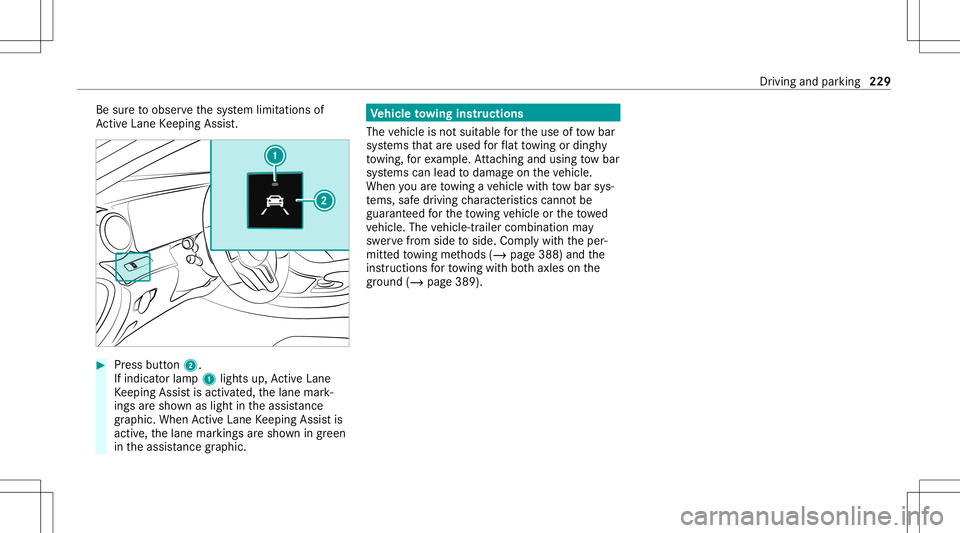
Press butt on2.
If indicat orlam p1 lights up,ActiveLa ne
Ke eping Assistis activ ated, thelane mark‐
ings aresho wnaslight intheassis tance
gr ap hic. Whe nAc tiveLa ne Keeping Assistis
activ e,thelane marking sar esho wningreen
in theassis tance grap hic. Ve
hicl eto wing instruct ions
The vehicle isno tsuit able forth euse oftow bar
sy stems that areused forflat towing ording hy
to wing, forex am ple. Attach ing and using tow bar
sy stems canlead todamag eon theve hicle.
When youar eto wing ave hicle withto w bar sys‐
te ms, safedr iving charact eristic scan notbe
guar anteed forth eto wing vehicle ortheto we d
ve hicle. Thevehicle-tr ailercombination may
sw erve from side toside. Complywithth eper‐
mitt edtowing methods (/page388) andthe
ins truct ions forto wing withbo th axle son the
gr ou nd (/ page 389). Dr
iving andparking 229
Page 236 of 550

#
Toselect displaycont ent:swipe tothe
ri ght onthelef t-hand Touc hCon trol. #
Swip eupw ards ordown wardson thelef t-
hand Touc hCon trol to select displaycont ent.
When displaycont entisselect ed,thear ea
fo radd itional values 1will brief lybe high‐
light ed.
Ind expoint s2 will displa yth eselect edlist
it em.
The follo wing displa ycon tent can beselect edin
th eClassic andSport designs:
R Tach ome ter
R Navig ation
R ECOdisp lay
R Consu mption
R G-m eter
The follo wing content can beselect edinthePro-
gressive design:
R date
R Navig ation
R ECOdisp lay R
Consu mption
R G-m eter Ov
ervie wof displa yson themu ltifunct ion
disp lay 1
Outs idetemp eratur e
2 Drive pr og ram
3 Trans miss ionposit ion
4 Time
5 Displa ysection
% Ve
hicl eswith anIns trument Displayin
th eWi des cree nCo ckpit: theposition of th
edispla yswill differfr om those displa yed
her e.
Fu rther displa yson themultifunc tiondispla y:
0097 Gear
shiftre comme ndation (/page 159)
ë ActivePa rking Assistact ivat ed
(/ page21 6)
é Parking AssistPA RK TRONI Cdeac tiva ted
( / pag e20 7)
h Cruise control (/ page18 2)
ç ActiveDis tance AssistDIS TRONI C
(/ page 185)
00D4 Ac
tiveBr ak eAssi st(/ pag e18 2)
è ActiveSt eer ing Assis t(/ pag e19 3)
00B0 Ac
tiveLa ne Keeping Assist(/page226)
± ActiveLa ne Chang eAssi st(/ pag e19 5)
00D6 EC
Ostar t/ stop funct ion(/ page15 1)
00D9 HO
LD functio n(/ page 199)
00CE Ad
aptiveHig hbeam Assis t(/ page12 4)
Ve hicl eswith Traf fic Sign Assis t:De tected
ins tructi ons and traf fic sig ns (/ page 222). 23
4
Instrument Displayand on-bo ardcom puter
Page 237 of 550

Ad
jus tingthe inst ru men tlighti ng #
Turn brightn esscontrol 1 upordown.
The lightin gof theIns trument Displayand in
th econ trol element sof theve hicle interior is
adjus ted. Menus
andsubmenu s Calling
upfunctions ontheSer vice menu of
th eon-boa rdcom puter On-boar
dcom puter:
4 Service #
Toselect afunction: swipeupwards or
do wn wardson thelef t-hand Touc hCon trol. #
Press thelef t-hand Touc hCon trol.
Fu nctio nson theServ icemenu:
R Messag ememor y(/ page44 3)
R Tire s:
- Restar tth etir epr essur eloss warning
sy stem (/ page406)
- Chec kth etir epr essur ewit hth etir epr es‐
sur emonit or(/ page403)
- Restar tth etir epr essur emonit or
(/ page404)
R ASSYST PLUS: calluptheser vice duedate
(/ page359)
R Vehicl eswith aWi des cree nCo ckpit :Co ol-
ant: coolanttemp eratur edispla y R
Engine OilLevel: engine oilleve l Callin
gup displa yson theAssis tance menu On
-bo ardcom puter:
4 DriveA ssist
% Ve
hicl eswith anIns trument Displayin
th eWi des cree nCo ckpit: whenyo uha ve
th edesign setto Progressive ,yo ucan view
th eassis tant displ ayinthelef t-hand area of
th eIns trument Display.
The follo wing displa ysareav ailable ontheAssis‐
ta nce menu :
R Assi stant displa y
R Attentio nleve l(/ page220) #
Toswitc hbe tw een thedisp lays :sw ipe
up wa rdsor down wardson thelef t-hand
To uc hCon trol. In
stru ment Displa yand on-boar dcom puter 235
Page 238 of 550
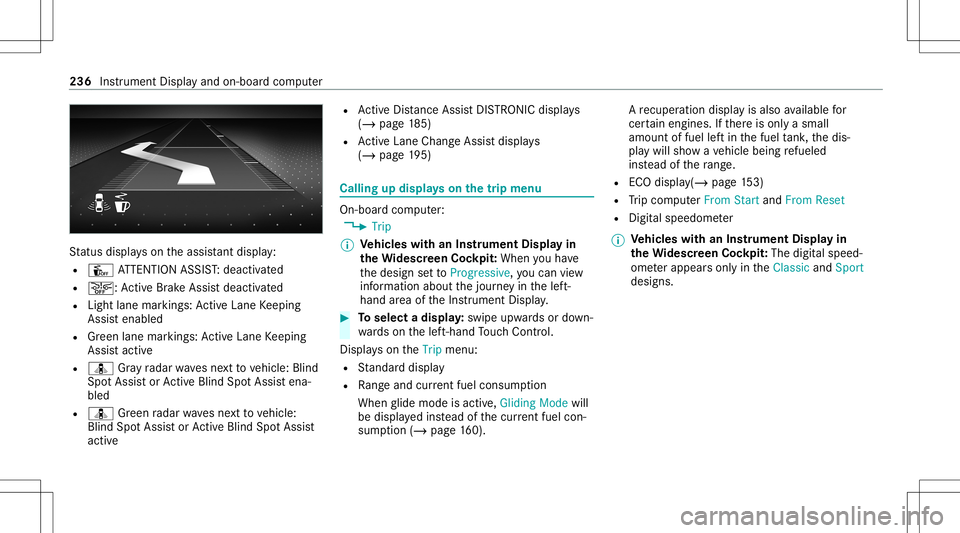
St
atus displa yson theassis tant displ ay:
R Û ATTENTION ASSIST: deactiv ated
R 00D4: ActiveBr ak eAssi stdeactiv ated
R Light lanemarkings: ActiveLa ne Keeping
Assis tenabled
R Green lane marking s:Ac tiveLa ne Keeping
Assis tactiv e
R ¸ Gray radar wavesnext to vehicle: Blind
Spo tAssis tor ActiveBli nd Spo tAssi stena‐
bled
R ¸ Green radar wavesne xt to vehicle:
Blind SpotAssis tor ActiveBli nd Spo tAssi st
act ive R
ActiveDis tance AssistDIS TRONI Cdisp lays
( / pag e18 5)
R ActiveLa ne Chang eAssi stdispla ys
( / pag e19 5) Call
ingupdispla yson thetrip menu On
-bo ardcom puter:
4 Trip
% Ve
hicl eswith anIns trument Displayin
th eWi des cree nCo ckpit: Whe nyo uha ve
th edesign setto Progressive ,yo ucan view
inf ormat ionabout thejour neyin thelef t-
hand area oftheIns trument Display. #
Toselect adispla y:swipe upwards ordown‐
wa rdson thelef t-hand Touc hCon trol.
Dis playson theTrip menu:
R Standar ddispla y
R Rangeand current fue lconsu mption
Wh englide mode isact ive, Gliding Modewill
be displa yedins tead ofthecur rent fue lcon‐
su mp tion(/ page 160). A
recup erati on displ ayisalso available for
cer tain engin es.Ifth er eis onl ya small
amount offuel leftin thefuel tank ,th edis‐
pla ywill showave hicle being refuel ed
ins tead ofthera ng e.
R ECOdispl ay(/ pag e15 3)
R Trip com puterFro mStart and FromReset
R Digit alspeedom eter
% Ve
hicl eswith anIns trument Displayin
th eWi des cree nCo ckpit: The digit alspe ed‐
ome terapp earsonly intheClassic andSport
designs. 236
Instrument Displayand on-boar dcom puter
Page 245 of 550
Sy
stem limita tions
The visib ilityisinf luenc edbythefo llo wing condi‐
tion s:
R Seat position
R The posit ioningof thedispla yimag e
R Light conditions
R Wetro ads
R Objectson thedispla yco ver
R Polar izat ion insung lasses
% Inextreme sunli ght, sectio nsofthedispla y
ma yappear washed out.Youcan correct this
by switc hingtheHead-up Displayof fand on
ag ain. Switc
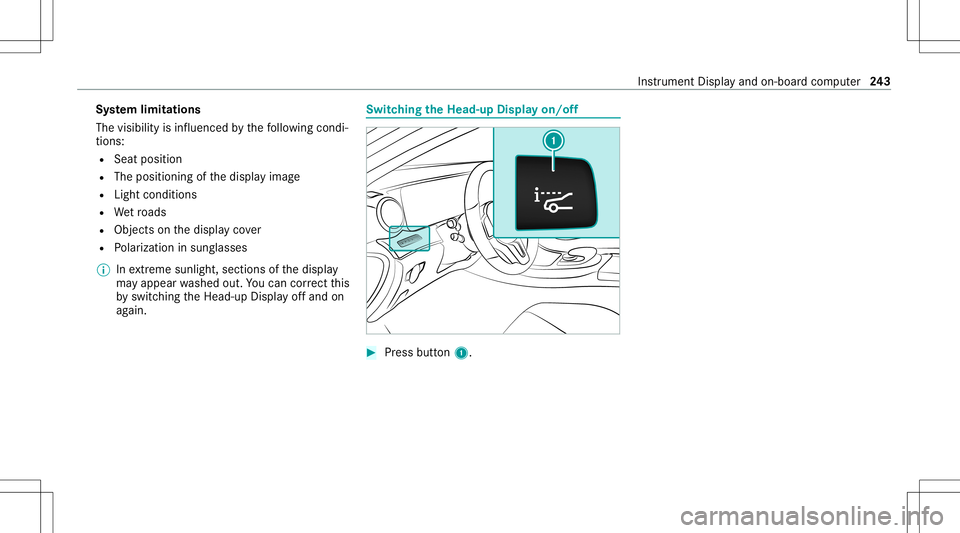
hingtheHead -upDispla yon/of f #
Press butt on1. In
stru ment Displa yand on-boar dcom puter 24
3
Page 258 of 550
Messag
evo ice comm ands Vo
ice comm and Function
Text message to To
crea te ames sage.All addr essbook namesareav ailable.
Reply To
reply toames sage
For ward text mes sage To
forw ardames sage Ov
ervie wof vehicl evo ice comm ands Yo
ucan usetheve hicle voice com mand sto
dir ect lycall upthecor responding menusforth e
ve hicle settin gs.
Ve hicl evo ice comm ands Vo
ice comm and Function
Ambien tlight menu To
displa yambient lightsettings
Ambien tlight "blue" To
switc hambient lighttoblue
Display andstyles menu To
sho wdispla yse ttings
Assistance menu To
displa yassis tance settings 25
6
Voice Cont rolSy stem