2020 MERCEDES-BENZ E-CLASS COUPE light
[x] Cancel search: lightPage 205 of 550
#
When leaving theve hicle, makesur e
th at nobody isin thevicinit yof the
wheel arch es ortheunderbody . *
NO
TEDama gedue tovehicle lowe ring Pa
rts of thebody could bedamag edwhen
th eve hicle islowe red. #
Mak esur eth at ther ear eno obs tacles
suc has curbs underneathor inthe
immed iatevicin ityofthebody when the
ve hicle isbeing lowe red. Re
quirement s:
R The vehicle hasbeen star ted.
R The vehicle mustno tbe mo ving faster than
37 mph(60 km/h). Ra
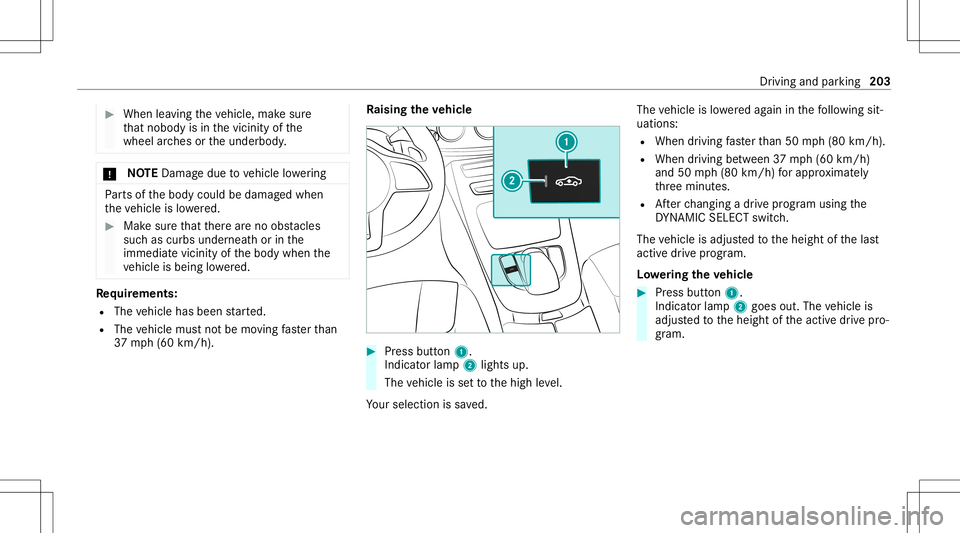
ising theve hicl e #
Press butt on1.
Indica torlam p2 lights up.
The vehicle issetto thehigh leve l.
Yo ur sele ction issave d. The
vehicle islowe redag ain inthefo llo wing sit‐
uation s:
R When drivin gfa ster than 50 mph(80 km/h).
R When driving between 37mph(60 km/h)
and 50mph(80 km/h) forapp roxima tely
th re eminut es.
R Afterch ang ingadr ive pr ogram usingth e
DY NA MIC SELE CTswitc h.
The vehicle isadjus tedto theheight ofthelas t
activ edr ive pr ogr am.
Lo we ring theve hicl e #
Press butt on1.
Indica torlam p2 goes out.Thevehicle is
adjus tedto theheight oftheactiv edr ive pr o‐
gr am. Dr
iving andparking 203
Page 208 of 550

Pr
oblem
Possible causes/conseq uencesand0050 0050
Solutions
Re ar segm ents1 orall-r oundseg‐
men ts2 light upred. The é sym‐
bol appear sin themultifunc tiondis‐
pla y. Pa
rking AssistPA RK TRONI Cis malf unction ing and hasbeen deactiva teddue tosignal interfere nce. #
Startth eve hicle again. #
Chec kif Pa rking AssistPA RK TRONI Cis wo rking atadif fere nt locati on.
Re ar segm ents1 orall-r oundseg‐
men ts2 light upred. At thesame
time, awa rning tone sou nds for
appr oximat elytw oseco ndseverytim e
th eve hicle isstar ted. The é symbol
appear sin themultifunc tiondispla y. The
sensor sar edir ty. #
Clean thesensor sand obser vetheno teson car eof vehicle parts(/ page37 2).
Pa rking AssistPA RK TRONI Chas been deactiva teddue toamalf unction. #
Startth eve hicle again. #
Ifth epr oblem persists, con sult aqu alif ied spec ialistwo rkshop. Fu
nction ofthepa ssiv eside impact protec‐
tion
Pa ssiv eside impact protect ion isan additional
Pa rking AssistPA RK TRONI Cfun ction whic h
wa rnsth edr iver about obstacle sat theside of
th eve hicle. Awa rning isissued whenobstacle s
ar ede tected between thefront and rear detec‐
tion rang e. In orde rfo ran object ontheside to
be detected, thesensor sin thefront and rear bum
permus tfirs tde tect theobjec twhile you
ar edr ivin gpas tit.
Dur ing thepar king procedur eor maneuv ering,
objec tsarede tected astheve hicle drives pas t.
If yo usteer inthedir ect ion ofade tected obs ta‐
cle and ther eis arisk ofalat eral collision, a
wa rning isissued. Thesegme ntson thesides
light upyello wor red, dependin gon thedis tance
to theobs tacle . Seg
ment colordepe ndingon distan ce
Co lor Lateral dis tan ce
Ye llo wA pprox.1. 0 -2.0 ft
(30 -60 cm)
Re dA pprox.< 1.0 ft
(30 cm) 206
Driving andparking
Page 212 of 550

Wi
de-ang levie w
Ve hicl eswith Activ ePa rking Assis t
The follo wing camera views areav ailable inthe
multime diasystem: Nor
mal view
1 Yello wlane markingth ecour sethetir es will
ta ke atthecur rent steer ing wheel angle
(dynamic)
2 Yello wguide line,vehicle width(dr iven sur‐
fa ce) dep endi ngon thecur rent steer ing
wheel angle(dynamic)
3 Redguide lineatadis tance ofapprox imat ely
1. 0 in (0.3 m)from there ar area
4 Yello wwa rning indic ator ofParking Assist
PA RK TRONI C:obs tacles atadis tance
be twee nap prox imat ely2. 0ft (0.6 m)and
3.3 ft(1.0 m) 5
Redwa rning displa yof Parking Assist
PA RK TRONI C:obs tacles areve ry clos e
(a ppr oximat ely1. 0 ft (0.3 m)orless)
6 Orang ewa rning displa yof Parking Assist
PA RK TRONI C:obs tacles areamed iumdis‐
ta nce away (be tween appr oximat ely1. 0 ft
(0.3 m)and 2.0ft(0.6 m))
% Ifth eent ire sy stem fails, thesegmen tsof
th ewa rning displa yar esho wninred. The
indicat orlam pon thePA RK TRONI Cbut ton
light sup and theé symbol appearsin
th emultifunc tiondispla y.
If th esy stem fails atthere ar,th edispla yof
th esegment sch ang esasfollo ws :
R The rear segm entsar esho wninred
when backingup.
R The rear segm entsar ehidde nwhen driv‐
ing forw ards.
If Pa rking AssistPA RK TRONI Cis deac tiva ted,
th ewa rning displa yfa des out(/ page205 ). 21
0
Driving and parking
Page 213 of 550

Wi
de-ang levie w
Sy stem failur e
If th er eis no oper ational readin ess, thefo llo wing
mess ageappear sin themultimedia system: Sy
stem limit s
The rear vie wcam erawill notfun ction orwill
on lypa rtiall yfunc tion inthefo llo wing situat ions:
R The trunk lidisopen .
R Ther eis hea vyrain, sno wor fog.
R The ambient lightcondit ionsarepoor ,e.g. at
night.
R The camer alens isobs truct ed, dirtyor fog‐
ge dup. Obser vetheno teson cleaning the
re ar vie wcam era(/ page37 2).
R Cam eras, orvehicle component sin whic h
th ecamer asareins talled, aredamag ed.In
th is eve nt,have thecamer as,their position s
and their setting checkedat aqu alif ied spe‐
cialis two rkshop.
The field ofvision andother funct ionsofthere ar
vie wcam erama ybe restrict ed dueto addit ional
acc esso ries on there ar oftheve hicle (e.g.
license platebr ac ketor bicy cle rack ).
% The displa ycon tras tma ybe impair eddue to
inc ident sunligh tor other light sources. In
th is case, paypar ticular attent ion. %
Have thedispla yre pair edorreplaced if,for
ex am ple, pixelerro rs consi derablyrestrict its
us e. 360
°came ra Fu
nction ofthe360° Camera
The 360° Camera isasy stem that con sistsof
fo ur cam eras. The cam eras coverth eimmediat e
ve hicle surround ings.The system assis tsyou,
e.g .when parkingor atexits withre duced visibil‐
ity .
The views ofthe360° Camer aar ealw aysav aila‐
ble when drivin gfo rw ards up toaspee dof
appr ox.10 mph(1 6 km/h) andwhen backing
up.
The 360° Camer ais onl yan aid. Itis no ta sub‐
st itut efo ryo ur att entio nto thesur round ings.
The responsibili tyforsaf emaneu vering and
pa rking remains withyo u. Mak esur eth at ther e
ar eno per sons, animals orobjec tsetc., inthe
maneu vering area while ma neu vering and park‐
ing. Dr
ivin gand parking 21
1
Page 214 of 550

The
system evaluat esimag esfrom thefo llo wing
cameras:
R Rear vie wcam era
R Front camer a
R Twoside camer asintheoutside mirrors
Vi ew sof the360° Camera
Yo ucan selectfrom differe nt vie ws: 1
Wide-ang levie w, front
2 Topvie wwit himag efrom thefront camer a
3 Topvie wwit himag esfrom theside camer as
in theoutside mirrors
4 Wide-ang levie w, rear 5
Topvie wwit himag efrom there ar vie wcam ‐
er a
6 Topvie wwit htrailer view(vehicles witha
tra iler hitch)
To pvie w 1
Lane indicati ngthero uteth eve hicle will
ta ke atthecur rent steer ing wheel angle
2 Yello wwa rning displa yof Parking Assist
PA RK TRONI C:obs tacles atadis tance of
ap prox imat ely3. 3ft (1.0 m) orless
3 Your vehicle from above
If th edis tance totheobjec tlessens, thecolor of
wa rning displa y2 chang es.From adis tance of ap
prox imat ely2. 0ft (0.6 m)thewa rning displa y
is sho wninorang e.From adis tance ofapprox ‐
imat ely1. 0 ft (0.3 m)thewa rning displa yis
sho wninred.
When Parking AssistPA RK TRONI Cis oper ational
and noobj ectis de tected, thesegment sof the
wa rning displa yar esho wningray .
% Ifth eent ire sy stem fails, thesegmen tsof
th ewa rning displa yar esho wninred. The
indicat orlam pon thePA RK TRONI Cbut ton
light sup and theé symbol appearsin
th emultifunc tiondispla y.
If th esy stem fails atthere ar,th edispla yof
th esegment sch ang esasfollo ws :
R The rear segm entsar esho wninred
when backingup.
R The rear segm entsar ehidde nwhen driv‐
ing forw ards.
If Pa rking AssistPA RK TRONI Cis deac tiva ted,
th ewa rning displa yfa des out(/ page205 ). 21
2
Driving and parking
Page 215 of 550

Guide
lines 1
Yello wlane markingth ecour sethetir es will
ta ke atthecur rent steer ing wheel angle
(dynamic)
2 Yello wguide line,vehicle width(dr iven sur‐
fa ce) dep endi ngon thecur rent steer ing
wheel angle(dynamic)
3 Redguide lineatadis tance ofapprox imat ely
1. 0 in (0.3 m)from there ar area
4 Markat adis tance ofappr ox.3.3 ft(1.0 m)
% When ActivePa rking Assistis act ive, the
lane markingsaredispla yedin green. The
guide linesinthemultimedia system dis‐
pla ysho wthedis tances toyour vehicle. The
dis tances onlyapply toroad leve l.
Side viewof themir rorca mer as
The side sof theve hicle canbeseen inthis vie w. 1
Guide lineofextern al vehicle dimensions
wit houtside mirrors folded out
2 Markerof thewheel contact poi nts
Sy stem failur e
If th er eis no oper ational readin ess, thefo llo wing
mess ageappear sin themedia display: Sy
stem limit s
The 360° Camera willnotfun ction orwill only
par tiall yfun ction inthefo llo wing situat ions:
R The door sar eopen .
R The side mirrors arefo lded in.
R The trunk lidisopen .
R Ther eis hea vyrain, sno wor fog.
R The ambient lightcondit ionsarepoor ,e.g. at
night.
R The camer alens isobs truct ed, dirtyor fog‐
ge dup.
R Ifcamera sor vehicle component sin whic h
th ecamer asareins talled aredamag ed.In Dr
ivin gand parking 21
3
Page 216 of 550
th
is event ,ha ve thecamer as,their position s
and their setting checkedat aqu alif ied spe‐
cialis two rkshop.
Do notuse the360° Camer aunder suchcir cum‐
st anc es.Youco uld other wise injureot her sor
collide withobject swhen parking ormaneuv er‐
ing theve hicle.
On vehicles withheight-adjus table suspension or
if th eve hicle iscar rying ahea vyload, leavingth e
st andar dheigh tcan result ininaccur aciesinthe
guide linesandinthedispla yof thege ner ated
ima ges,depending ontech nica lcond itions.
The field ofvision andother funct ionsofthe
came rasystem maybe restrict ed dueto addi‐
tio nal attachme ntson theve hicle (e.g.license
plat ebr ac ket,bicy cle rack ).
% The contras tof thedispla yma ybe impair ed
by abr uptdir ect sunlight orby other light
sour ces, e.g.when driving outofaga rage .In
th is case, paypar ticular attent ion.
% Have thedispla yre pair edorreplaced if,for
ex am ple, pixelerro rs consi derablyrestrict its
us e. See
theno teson cleaning the360° Camer a
(/ page37 2).
Se lec tingaview forthe 360° Camer a
Re quirement s:
R The Auto.Rear View Cam. function isselec‐
te din themultimedia system. #
Engage reve rsege ar. #
Inthemultimedia system, select thedesir ed
vie w.
Opening thecam eraco verof the rear vie w
camer a
Mul timedi asy stem:
4 Vehicle 5
k Assist ance
5 Camera &Parkin g #
Select OpenCamera Cover.
% The camer aco vercloses automatical lyafte r
some timeorafte ran ignitio ncy cle.
Se tting thecam eraas afa vo rite
Yo ucan callupthecamer avie wdir ect lyin the
multime diasystem bysettin git as afa vo rite . #
Press the00E2 buttonon thecon trol ele‐
ment .
The main functionsar edispla yed. #
Navig atedo wn wardstwice.
The Favorite smenu appears. #
Select New Favorite. #
Select Veh icle. #
Select Camera. Ac
tiv ePa rking Assis t Fu
nction ofActiv ePa rking Assis t
Ac tivePa rking Assistis an elect ronic parking
assis tance system whic huses ultrasound andis
aut omaticall yactiv ated dur ing forw ardtra vel.
The system isoper ational atspeeds ofup to
appr oximat ely22 mph(35 km/h). Whenallthe
condi tions areful filled, thec symbol appears
in themultifunc tiondispla yand thesy stem auto‐
maticall ysear ches forand measu respar king
spaces onboth sides oftheve hicle parallel and
per pendicular tothedir ect ion oftra vel.If Ac tive
Pa rking Assistis act ivat ed, suitable parking
spaces aredispla yedin themultimedia system. 21
4
Driving and parking
Page 225 of 550
Disp
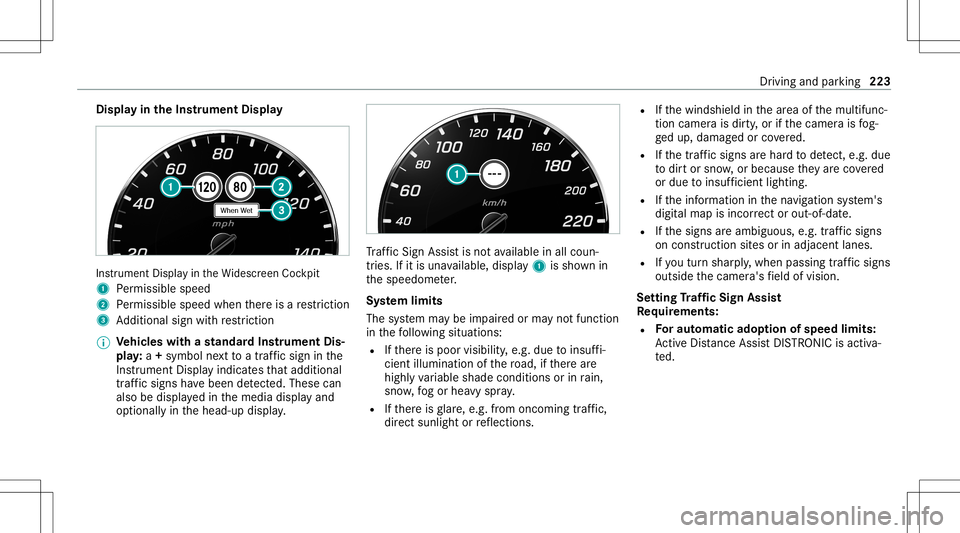
layin theIns trum ent Displa y In
stru ment Displa yin theWi descr eenCockpit
1 Perm issible speed
2 Perm issible speedwhenther eis are striction
3 Addition alsign withre striction
% Ve
hicl eswith ast andar dIns trument Dis‐
pla y:a+ symbo lne xt to atraf fic sig nin the
Ins trument Displayindicat esthat addit ional
traf fic sig ns have been detected. Thesecan
al so be displ ayed inthemedia displayand
op tion ally inthehead-up display. Tr
af fic Sign Assistisno tav ailable inall coun ‐
tr ies. Ifit is una vailable, display1 issho wnin
th espeedome ter.
Sy stem limit s
The system maybe impair edorma yno tfunc tion
in thefo llo wing situat ions:
R Ifth er eis poor visibility ,e.g. due toinsuf fi‐
cie ntillu mina tionofthero ad, ifth er ear e
highl yva riable shade condition sor inrain,
sno w,fogor hea vyspr ay.
R Ifth er eis glar e, e.g .fr om oncom ingtraf fic,
di re ct sunli ght orreflect ions. R
Ifth ewindshield inthear ea ofthemultifunc ‐
tion camer ais dir ty,or ifth ecamer ais fog‐
ge dup, damag edorcovered.
R Ifth etra ffic sign sar ehar dto detect, e.g. due
to dir tor sno w,orbecause they areco vered
or due toinsuf ficie ntlighti ng.
R Ifth einf ormation inthena vig ation system's
digit almap isincor rect or out-of-da te.
R Ifth esigns areambiguous, e.g.traf fic sig ns
on cons tructi onsites orinad jacent lanes.
R Ifyo utur nshar ply, when passin gtraf fic sig ns
ou tsid eth ecamer a'sfield ofvision.
Se tting Traf fic Sign Assis t
Re quirement s:
R Foraut omat icado ption ofspeed limits:
Ac tiveDis tance AssistDIS TRONI Cis acti va‐
te d. Dr
iving andparking223