2020 LINCOLN NAUTILUS brake light
[x] Cancel search: brake lightPage 12 of 596
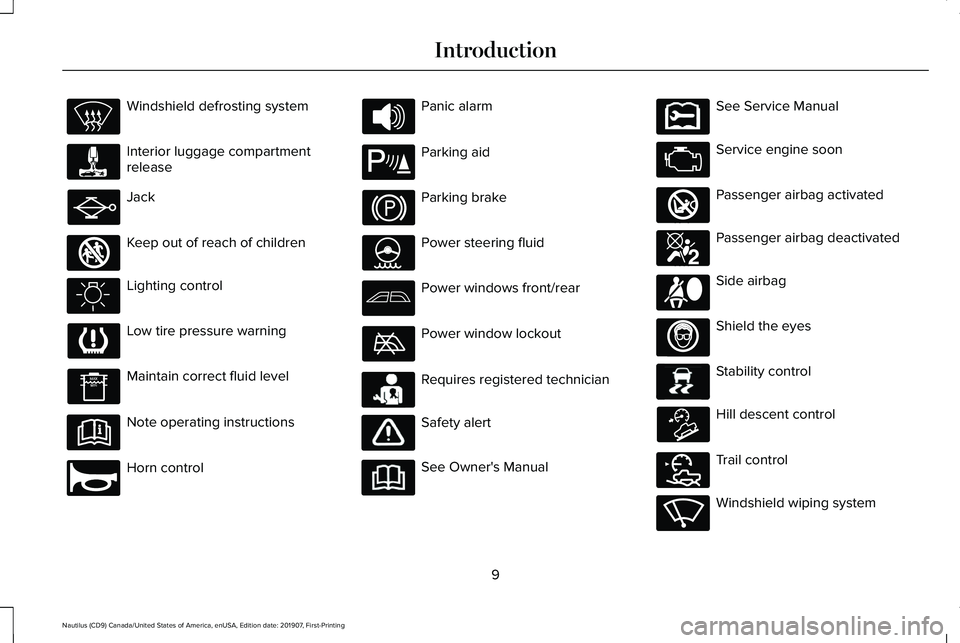
Windshield defrosting system
Interior luggage compartment
release
Jack
Keep out of reach of children
Lighting control
Low tire pressure warning
Maintain correct fluid level
Note operating instructions
Horn control Panic alarm
Parking aid
Parking brake
Power steering fluid
Power windows front/rear
Power window lockout
Requires registered technician
Safety alert
See Owner's Manual See Service Manual
Service engine soon
Passenger airbag activated
Passenger airbag deactivated
Side airbag
Shield the eyes
Stability control
Hill descent control
Trail control
Windshield wiping system
9
Nautilus (CD9) Canada/United States of America, enUSA, Edition date: 201907, First-Printing Introduction E161353 E270945 E139213 E231159 E231158 E270849 E270850 E167012 E138639 E163957 E272858 E270969
Page 23 of 596

Direction indicators. See Direction Indicators (page 98).
A
Audio control.
See Audio Control (page 86). Voice control. See Voice Control (page 87).
B
Instrument cluster.
See Gauges (page 109). See Warning Lamps and Indicators (page 111).
C
Information display control.
See Information Display Control (page 88).
D
Wiper lever.
See Wipers and Washers (page 90).
E
Automatic transmission.
See Automatic Transmission (page 192).
F
Information and entertainment display.
See General Information (page 429).
G
Hazard flashers.
See Hazard Flashers (page 289).
H
Climate control.
See Climate Control (page 142).
I
Audio unit.
See Audio Unit (page 419).
J
Start button.
See Keyless Starting (page 172).
K
Information display control.
See Information Display Control (page 88).
L
Horn.M
Cruise control.
See What Is Cruise Control (page 234).
N
Steering wheel adjustment.
See Adjusting the Steering Wheel (page 85).
O
Liftgate control.
See Power Liftgate (page 78).
P
Parking brake.
See Electric Parking Brake (page 205).
Q
Lighting control.
See Lighting Control (page 94). Instrument lighting dimmer. See Instrument Lighting Dimmer (page 96).
R
20
Nautilus (CD9) Canada/United States of America, enUSA, Edition date: 201907, First-Printing At a Glance
Page 99 of 596

Note:
If you switch the autolamps and the
autowipers on, the headlamps turn on when
the windshield wipers continuously operate.
INSTRUMENT LIGHTING DIMMER
The instrument lighting dimmer buttons are
on the lighting control. Repeatedly press one of the
buttons to adjust the brightness.
HEADLAMP EXIT DELAY
After you switch the ignition off, you can
switch the headlamps on by pulling the
direction indicator lever toward you. You will
hear a short tone. The headlamps will switch
off automatically after three minutes with any
door open or 30 seconds after the last door
has been closed. You can cancel this feature
by pulling the direction indicator toward you
again or switching the ignition on. DAYTIME RUNNING LAMPS -
VEHICLES WITH: DAYTIME
RUNNING LAMPS (DRL) WARNING: The daytime running
lamps system does not activate the rear
lamps and may not provide adequate
lighting during low visibility driving
conditions. Make sure you switch the
headlamps on, as appropriate, during all
low visibility conditions. Failure to do so
may result in a crash.
The system turns the lamps on in daylight
conditions.
To switch the system on, switch the lighting
control to any position except headlamps. DAYTIME RUNNING LAMPS -
VEHICLES WITH: CONFIGURABLE
DAYTIME RUNNING LAMPS WARNING: The daytime running
lamps system does not activate the rear
lamps and may not provide adequate
lighting during low visibility driving
conditions. Make sure you switch the
headlamps on, as appropriate, during all
low visibility conditions. Failure to do so
may result in a crash.
Switch the daytime running lamps on or off
using the information display.
See General
Information (page 116).
The daytime running lamps turn on when:
1. The lamps are on in the information display.
2. You switch the ignition on.
3. The transmission is not in park (P) for vehicles with automatic transmissions or
you release the parking brake for
vehicles with manual transmissions.
96
Nautilus (CD9) Canada/United States of America, enUSA, Edition date: 201907, First-Printing LightingE291299 E291298
Page 176 of 596

•
Without applying the brake pedal, press
and release the button once when the
ignition is in the on mode, or when the
engine is running but the vehicle is not
moving.
On: All electrical circuits are operational and
the warning lamps and indicators illuminate.
• Without applying the brake pedal, press
and release the button once.
Note: You may have to press the push
button ignition switch twice to switch the
ignition on.
Start:
Starts the engine.
• Press the brake pedal, and then press
the button for any length of time. An
indicator light on the button illuminates
when then ignition is on and when the
engine starts. STARTING A GASOLINE ENGINE
When you start the engine, the idle speed
increases. This helps to warm up the
engine. If the engine idle speed does not
slow down automatically, have your vehicle
checked by an authorized dealer.
Note:
You can crank the engine for a total
of 60 seconds without the engine starting
before the starting system temporarily
disables. The 60 seconds does not have to
be all at once. For example, if you crank the
engine three times for 20 seconds each time,
without the engine starting, you reached the
60-second time limit. A message appears
in the information display alerting you that
you exceeded the cranking time. You
cannot attempt to start the engine for at
least 15 minutes. After 15 minutes, you are
limited to a 15-second engine cranking time.
You need to wait 60 minutes before you can
crank the engine for 60 seconds again. Before starting the engine check the
following:
•
Make sure all occupants have fastened
their seatbelts.
• Make sure the headlamps and electrical
accessories are off.
• Make sure the parking brake is on.
• Make sure the transmission is in park (P)
or neutral (N).
Keyless Starting
Note: Do not touch the accelerator pedal.
Note: A valid passive key must be located
inside your vehicle to switch the power on
and start your vehicle.
1. Fully depress the brake pedal.
2. Briefly press the push button ignition switch.
The system does not function if:
• The passive key frequencies are jammed.
• The key battery has no charge.
If you are unable to start the engine, do the
following:
173
Nautilus (CD9) Canada/United States of America, enUSA, Edition date: 201907, First-Printing Starting and Stopping the Engine
Page 182 of 596

•
The engine coolant is at operating
temperature.
• Elevation is below about 10,000 ft
(3,048 m).
• Ambient temperature is moderate. The green Auto-Start-Stop
indicator light on the instrument
cluster will illuminate to indicate
when the automatic engine stop occurs. If the instrument cluster is
equipped with a grey
Auto-Start-Stop indicator light, it is
illuminated when automatic engine stop is
not available due to one of the above noted
conditions not being met.
Automatic Engine Restart
Any of the following conditions will result in
an automatic restart of the engine:
• You have removed your foot from the
brake pedal in drive (D) unless AutoHold
has been engaged.
• You press the accelerator pedal. •
The driver safety belt becomes
unfastened or the driver door is ajar.
• You have moved the transmission from
drive (D).
• Your vehicle is moving.
• The interior compartment does not meet
customer climate control comfort settings
when air conditioning or heat is on.
• Fogging of the windows could occur and
the air conditioning is on.
• The battery is not within optimal
operating conditions.
• You have exceeded the maximum engine
off time.
• When you press the Auto-Start-Stop
button while the engine is stopped.
• Either the front or rear defroster is turned
on.
Any of the following conditions may result in
an automatic restart of the engine:
• The blower fan speed is increased or the
climate control temperature is changed.
• You have an electrical accessory turned
on or plugged in. Disabling Auto-Start-Stop
Note:
If the system detects a malfunction, it
turns off. If this remains inactive after an
ignition cycle, have your vehicle checked by
an authorized dealer.
Note: For vehicles with Auto-Start-Stop, the
battery requirement is different. Replace it
with one of exactly the same specification
as the original.
179
Nautilus (CD9) Canada/United States of America, enUSA, Edition date: 201907, First-Printing Unique Driving Characteristics E146361 E183186
Page 183 of 596

Press the Auto-Start-Stop button located on
the center stack to switch the system off. The
button will illuminate. This will only deactivate
the system for the current ignition cycle.
Press the button again to restore
Auto-Start-Stop function.
Note:
If the Shift to P, Restart Engine
message appears and the amber
Auto-Start-Stop indicator light is flashing,
automatic restart is not available. You must
restart the vehicle manually. See
Information Displays (page 116).
If the vehicle is in an engine off
Auto-Start-Stop state and the transmission
is changed to reverse (R) while the brake
pedal is not pressed, the message
Auto-Start-Stop Press Brake to Start Engine
will appear.
180
Nautilus (CD9) Canada/United States of America, enUSA, Edition date: 201907, First-Printing Unique Driving Characteristics
Page 189 of 596

4. Hold the fuel pump nozzle in position B
when refueling. Holding the fuel pump
nozzle in position A can affect the flow
of fuel and shut off the fuel pump nozzle
before the fuel tank is full. 5.
Operate the fuel pump nozzle within the
area shown. 6. When you finish refueling slightly raise
the fuel pump nozzle and slowly remove
it.
7. Fully close the fuel filler door.
Do not attempt to start the engine if you have
filled the fuel tank with incorrect fuel.
Incorrect fuel use could cause damage not
covered by the vehicle Warranty. Have your
vehicle immediately checked.
Refueling System Warning (If Equipped)
If the fuel tank filler valve does not fully close,
a message could appear in the information
display. Message
Check Fuel Fill Inlet
If the message appears, do the following:
1. Stop your vehicle as soon as it is safe to
do so and switch the engine off.
2. Shift into park (P) or neutral (N).
3. Apply the parking brake.
4. Fully open the fuel filler door.
5. Check the fuel tank filler valve for any debris that may be restricting its
movement.
6. Remove any debris from the fuel tank filler valve.
7. Fully insert a fuel pump nozzle or the fuel
filler funnel provided with your vehicle
into the fuel filler pipe.
See Fuel Filler
Funnel Location (page 182). This action
should dislodge any debris that may be
preventing the fuel tank filler valve from
fully closing.
8. Remove the fuel pump nozzle or fuel filler
funnel from the fuel filler pipe.
186
Nautilus (CD9) Canada/United States of America, enUSA, Edition date: 201907, First-Printing Fuel and RefuelingE139203
A
B E206912
AB E119081
Page 203 of 596

If Your Vehicle Goes Off the Edge of the
Pavement
•
If your vehicle goes off the edge of the
pavement, slow down, but avoid severe
brake application, ease the vehicle back
onto the pavement only after reducing
your speed. Do not turn the steering
wheel too sharply when returning to the
road surface.
• It may be safer to stay on the apron or
shoulder of the road and slow down
gradually before returning to the
pavement. You may lose control if you
do not slow down or if you turn the
steering wheel too sharply or abruptly.
• It often may be less risky to strike small
objects, such as highway reflectors, with
minor damage to your vehicle rather than
attempt a sudden return to the pavement
which could cause the vehicle to slide
sideways out of control or rollover.
Remember, your safety and the safety of
others should be your primary concern. If Your Vehicle Gets Stuck WARNING: Always set the parking
brake fully and make sure you shift the
gearshift lever to first gear. Switch the
ignition off and remove the key whenever
you leave your vehicle. WARNING:
If the parking brake is
fully released, but the brake warning lamp
remains illuminated, the brakes may not
be working properly. Have your vehicle
checked as soon as possible. WARNING:
Do not spin the wheels
at over 34 mph (55 km/h). The tires may
fail and injure a passenger or bystander.
Note: Do not rock the vehicle if the engine
is not at normal operating temperature or
damage to the transmission may occur.
Note: Do not rock the vehicle for more than
a few minutes or damage to the transmission
and tires may occur or the engine may
overheat. If your vehicle gets stuck in mud or snow,
you can rock it out by shifting between
forward and reverse gears, stopping
between shifts, in a steady pattern. Press
lightly on the accelerator in each gear.
If your vehicle has AdvanceTrac
™ with Roll
Stability Control™, it may be beneficial to
disengage the AdvanceTrac with Roll
Stability Control system when attempting to
rock the vehicle.
Emergency Maneuvers
• In an unavoidable emergency situation
where a sudden sharp turn must be
made, remember to avoid "over-driving"
your vehicle, for example, turn the
steering wheel only as rapidly and as far
as required to avoid the emergency.
Excessive steering results in less vehicle
control, not more. Additionally, use
smooth variations of the accelerator and
brake pedal pressure if changes in
vehicle speed are necessary. Avoid
200
Nautilus (CD9) Canada/United States of America, enUSA, Edition date: 201907, First-Printing All-Wheel Drive
(If Equipped)