Page 150 of 516

Features of your vehicle
70
4
Service Mode
Service in
It calculates and displays (in mileage
or days) when you need a scheduled
maintenance service.
If the remaining mileage or time
reaches 1,500 km (900 mi.) or 30
days, a “Service in” message is dis-
played for several seconds each time
you set the ignition switch or Engine
Start/Stop Button to the ON position.
Service required
If you do not have your vehicle serv-
iced according to the already inputted
service interval, a “Service required”
message is displayed for several sec-
onds each time you set the ignition
switch or Engine Start/Stop Button to
the ON position.
To reset the service interval to the
mileage and days you inputted before:
Press the RESET button for more
than 1 second. (for Type A cluster)
Press the OK button (Reset) for more than 1 second. (for Type B
cluster)
✽ ✽ NOTICE
If any of the following conditions
occurs, the mileage and days may be
incorrect.
- The battery cable is disconnected.
- The fuse switch is turned off.
- The battery is discharged.
User Settings Mode
(for type B cluster)
On this mode, you can change set-
ting of the doors, lamps, and so on.
WARNING
Do not adjust the User Settings
while driving. You may lose
steering control and/or cause
an accident or serious personal
injury or death.
SC CAN (ENG) 4.QXP 12/12/2019 5:11 PM Page 70
Page 155 of 516

475
Features of your vehicle
Sunroof Open (if equipped)
This warning is displayed if youturn off the engine when the sun-
roof is open. Engine has overheated
This warning message illuminates
when the engine coolant tempera-
ture is above 120°C (248°F). This
means that the engine is overheated
and may be damaged.
❈
If your vehicle is overheated, refer
to “Overheating” in chapter 7.
Shift to P (for smart key system and
intelligent variable transmission)
This warning message illuminates if you try to turn off the engine without
the shift lever in P (Park) position.
At this time, the Engine Start/Stop Button turns to the ACC position (If
you press the Engine Start/Stop
Button once more, it will turn to the
ON position). Low Key Battery
(for smart key system)
This warning message illuminates
if the battery of the smart key is
discharged when the Engine
Start/Stop Button changes to the
OFF position.
Press START button while turn steer-
ing (for smart key system)
This warning message illuminates if the steering wheel does not
unlock normally when the Engine
Start/Stop Button is pressed.
It means that you should press the Engine Start/Stop Button while
turning the steering wheel right
and left.
OYB046134
SC CAN (ENG) 4.QXP 12/12/2019 5:11 PM Page 75
Page 168 of 516

Features of your vehicle
88
4
Immobilizer Indicator
Light (Without Smart Key)
This indicator light illuminates:
When the vehicle detects the immobilizer in your key while the
ignition switch is ON.
- At this time, you can start theengine.
- The indicator light goes off after starting the engine.
This indicator light blinks:
When there is a malfunction with the immobilizer system.
In this case, have your vehicle
inspected by an authorized Kia
dealer.
Immobilizer Indicator
Light (With Smart Key)
This indicator light illuminates for up
to 30 seconds:
When the vehicle detects the smart key in the vehicle properly
while the Engine Start/Stop Button
is ACC or ON.
- At this time, you can start theengine.
- The indicator light goes off after starting the engine.
This indicator light blinks for about
10 seconds:
When the smart key is not in the vehicle.
- At this time, you cannot start theengine. This indicator light illuminates for 2
seconds and goes off:
When the vehicle can not detect
the smart key which is in the vehi-
cle while the Engine Start/Stop
Button is ON.
In this case, have your vehicle
inspected by an authorized Kia
dealer.
This indicator light blinks:
When the battery of the smart key is weak.
- At this time, you can not start theengine. However, you can start
the engine if you press the Engine
Start/Stop Button with the smart
key. (For more details, refer to
“Starting the Engine” in section 6).
When there is a malfunction with the immobilizer system.
In this case, have your vehicle
inspected by an authorized Kia
dealer.
SC CAN (ENG) 4.QXP 12/12/2019 5:12 PM Page 88
Page 172 of 516

Features of your vehicle
92
4
Battery saver function
The purpose of this feature is to
prevent the battery from being dis-
charged. The system automatically
turns off the parking lights when
the driver removes the ignition key
and opens the driver-side door.
With this feature, the parking lights will turn off automatically if the driv-
er parks on the side of the road at
night.
If necessary, to keep the lights on
when the ignition key is removed,
perform the following:
1) Open the driver-side door.
2) Turn the parking lights OFF and ON again using the light switch
on the steering column.
Headlight escort function
(if equipped)
The headlights (and/or taillights) will
remain on for approximately 5 min-
utes after the ignition key is removed
or turned to the ACC or LOCK posi-
tion. However, if the driver’s door is
opened and closed, the headlights
are turned off after 15 seconds.
The headlights can be turned off by
pressing the lock button on the trans-
mitter (or smart key) twice or turning
off the light switch from the headlight
or Auto light position.
If the driver gets out of the vehicle
through other doors (except driver's
door), the battery saver function
does not operate and the headlight
escort function does not turn off
automatically. Therefore, It causes
the battery to be discharged. In this
case, make sure to turn off the lamp
before getting out of the vehicle.
If the headlights are not working
properly have your vehicle inspected
by an authorized Kia dealer.
Don't attempt to inspect or replace
the wiring yourself to prevent mal-
function.
Headlight welcome function
(if equipped)
When the headlight switch is in the
ON or AUTO position and all doors
(and liftgate) are closed and locked,
if you press the door unlock button
on the transmitter (or smart key), the
headlights will come on for about 15
seconds.
If the headlight switch is in the AUTO
position, the function can only oper-
ate at night.
At this time, if you press the door
unlock button again or door lock but-
ton on the transmitter (or smart key),
the headlights will turn off immedi-
ately.
LIGHTING
SC CAN (ENG) 4.QXP 12/12/2019 5:12 PM Page 92
Page 175 of 516

495
Features of your vehicle
High beam operation
To turn on the high beam headlights,
push the lever away from you. Pull it
back for normal (low beam) position.
The high beam indicator light will illu-
minate when the headlight high
beams are switched on.To prevent the battery from being
discharged, do not leave the lights
on for a prolonged time while the
engine is not running.
WARNING - High beams
Do not use high beam when
there are other vehicles. Using
high beam could obstruct the
other driver's vision.
OSC047418N
OSC047404N
■ Type A
■ Type B
CAUTION
Never place anything over the sensor (1) located on the instru-ment panel. This will ensure bet-ter auto-light system control.
Do not clean the sensor using awindow cleaner, the cleaner mayleave a light film which couldinterfere with sensor operation.
If your vehicle has window tintor other types of metallic coat-ing on the front windshield, theAuto light system may not workproperly.
SC CAN (ENG) 4.QXP 12/12/2019 5:12 PM Page 95
Page 187 of 516
4107
Features of your vehicle
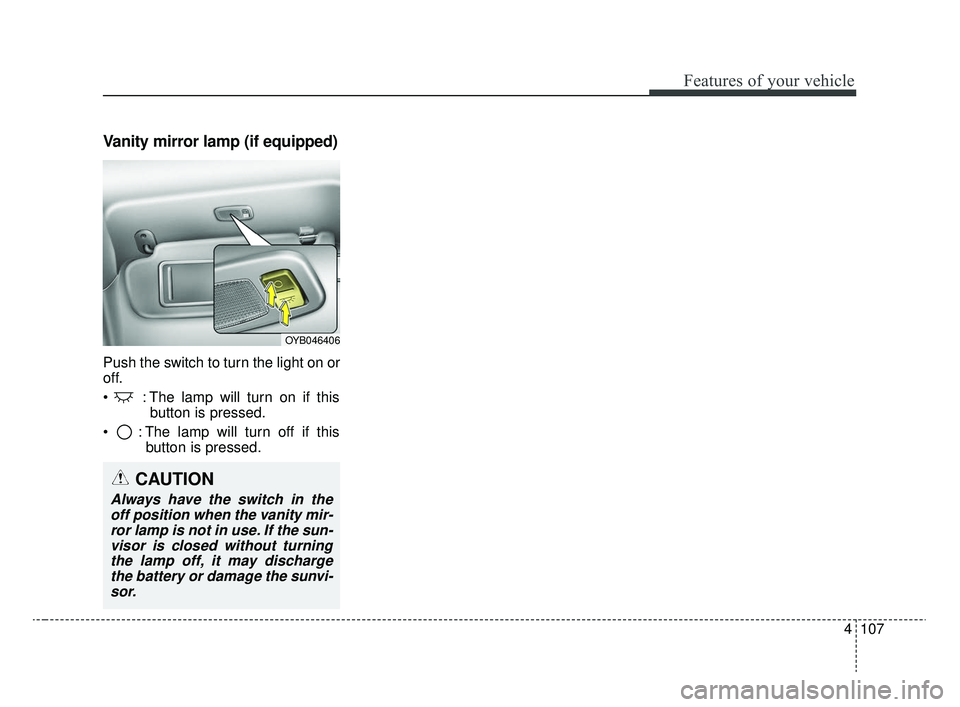
Vanity mirror lamp (if equipped)
Push the switch to turn the light on or
off.
: The lamp will turn on if thisbutton is pressed.
: The lamp will turn off if this button is pressed.
OYB046406
CAUTION
Always have the switch in theoff position when the vanity mir-ror lamp is not in use. If the sun-visor is closed without turningthe lamp off, it may dischargethe battery or damage the sunvi-sor.
SC CAN (ENG) 4.QXP 12/12/2019 5:13 PM Page 107
Page 200 of 516
Features of your vehicle
120
4
AUTOMATIC CLIMATE CONTROL SYSTEM (IF EQUIPPED)
OYB046300
1. Temperature control knob
2. AUTO (automatic control) button
3. Climate control display
4. Fan speed control knob
5. OFF button
6. Front windshield defroster button
7. Rear window defroster button
8. Mode selection button
9. Air conditioning button (if equipped)
10. Air intake control button
CAUTION
Operating the blower when the
ignition switch is in the ON posi-tion could cause the battery todischarge. It is best to operate theblower when the engine is run-ning.
SC CAN (ENG) 4.QXP 12/12/2019 5:14 PM Page 120
Page 213 of 516
4133
Features of your vehicle
Defogging Logic
To reduce the probability of fogging
up inside of the windshield, the air
intake or air conditioning are con-
trolled automatically according to
certain conditions such as or
position. Logic can be disabled and
enabled by doing following :
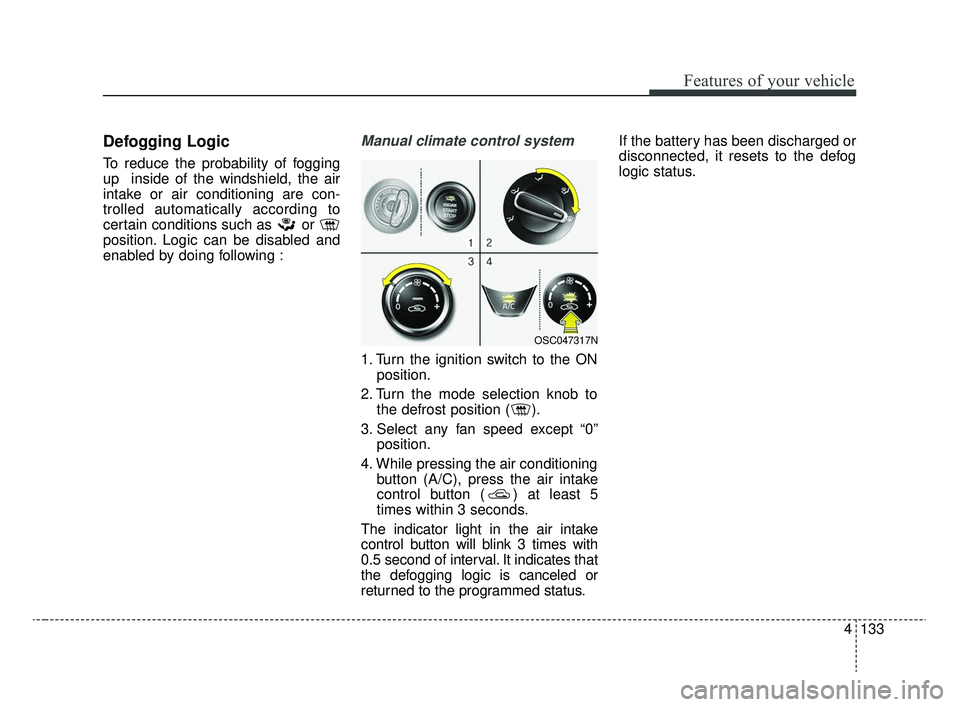
Manual climate control system
1. Turn the ignition switch to the ONposition.
2. Turn the mode selection knob to the defrost position ( ).
3. Select any fan speed except “0” position.
4. While pressing the air conditioning button (A/C), press the air intake
control button ( ) at least 5
times within 3 seconds.
The indicator light in the air intake
control button will blink 3 times with
0.5 second of interval. It indicates that
the defogging logic is canceled or
returned to the programmed status. If the battery has been discharged or
disconnected, it resets to the defog
logic status.
OSC047317N
SC CAN (ENG) 4.QXP 12/12/2019 5:15 PM Page 133