Page 201 of 480
3-67
Convenient features of your vehicle
3
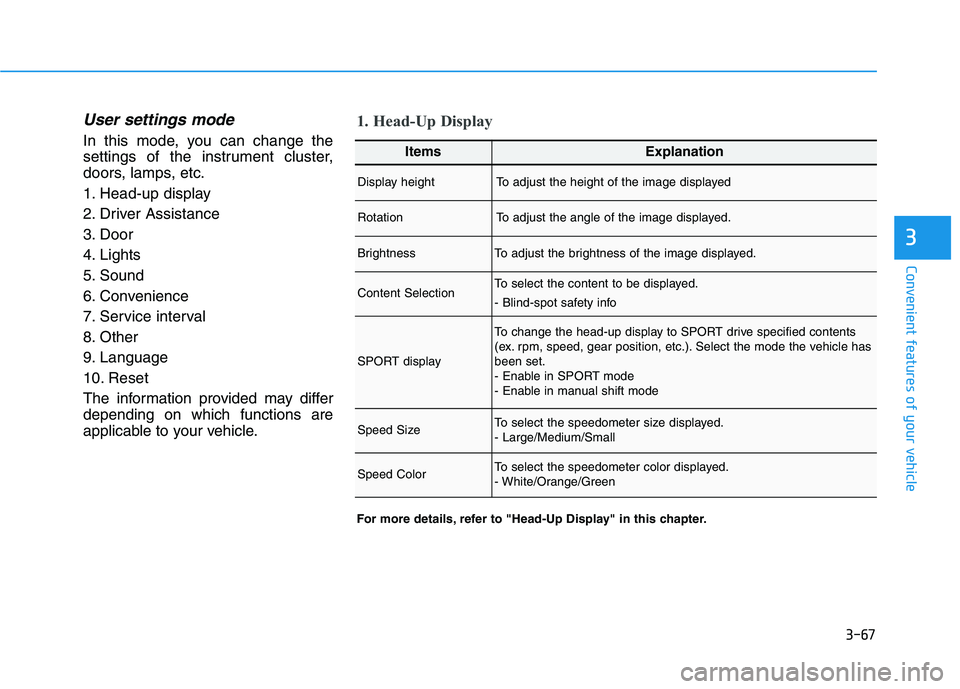
User settings mode
In this mode, you can change the
settings of the instrument cluster,
doors, lamps, etc.
1. Head-up display
2. Driver Assistance
3. Door
4. Lights
5. Sound
6. Convenience
7. Service interval
8. Other
9. Language
10. Reset
The information provided may differ
depending on which functions are
applicable to your vehicle.
1. Head-Up Display
For more details, refer to "Head-Up Display" in this chapter.
ItemsExplanation
Display heightTo adjust the height of the image displayed
RotationTo adjust the angle of the image displayed.
BrightnessTo adjust the brightness of the image displayed.
Content SelectionTo select the content to be displayed.
- Blind-spot safety info
SPORT display
To change the head-up display to SPORT drive specified contents
(ex. rpm, speed, gear position, etc.). Select the mode the vehicle has
been set.
- Enable in SPORT mode
- Enable in manual shift mode
Speed SizeTo select the speedometer size displayed.
- Large/Medium/Small
Speed ColorTo select the speedometer color displayed.
- White/Orange/Green
Page 204 of 480
3-70
Convenient features of your vehicle
ItemsExplanation
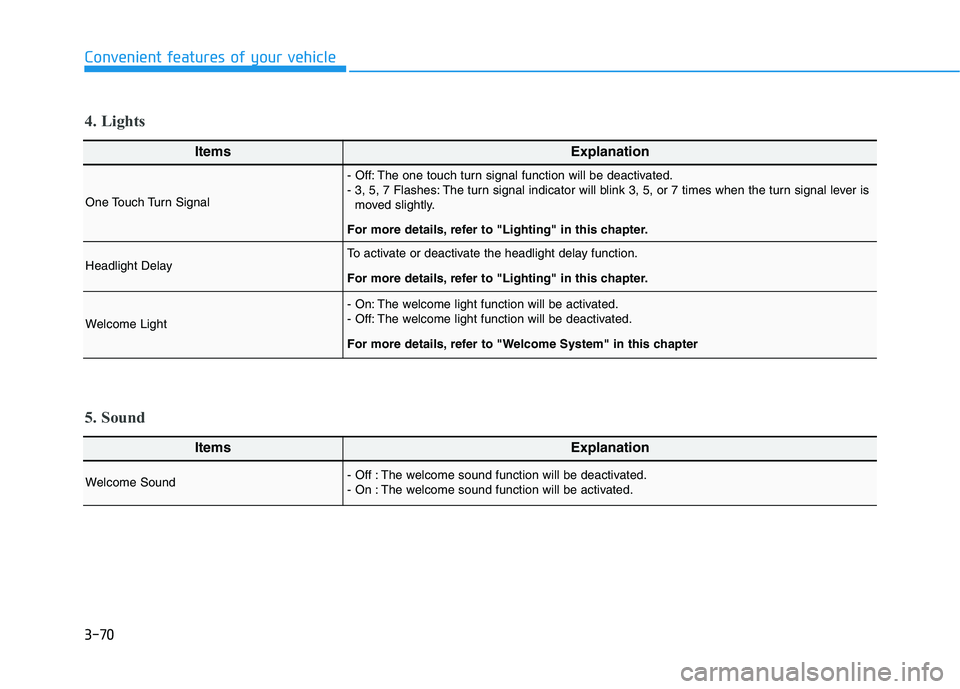
One Touch Turn Signal
- Off: The one touch turn signal function will be deactivated.
- 3, 5, 7 Flashes: The turn signal indicator will blink 3, 5, or 7 times when the turn signal lever is
moved slightly.
For more details, refer to "Lighting" in this chapter.
Headlight DelayTo activate or deactivate the headlight delay function.
For more details, refer to "Lighting" in this chapter.
Welcome Light
- On: The welcome light function will be activated.
- Off: The welcome light function will be deactivated.
For more details, refer to "Welcome System" in this chapter
4. Lights
ItemsExplanation
Welcome Sound - Off : The welcome sound function will be deactivated.
- On : The welcome sound function will be activated.
5. Sound
Page 205 of 480
3-71
Convenient features of your vehicle
3
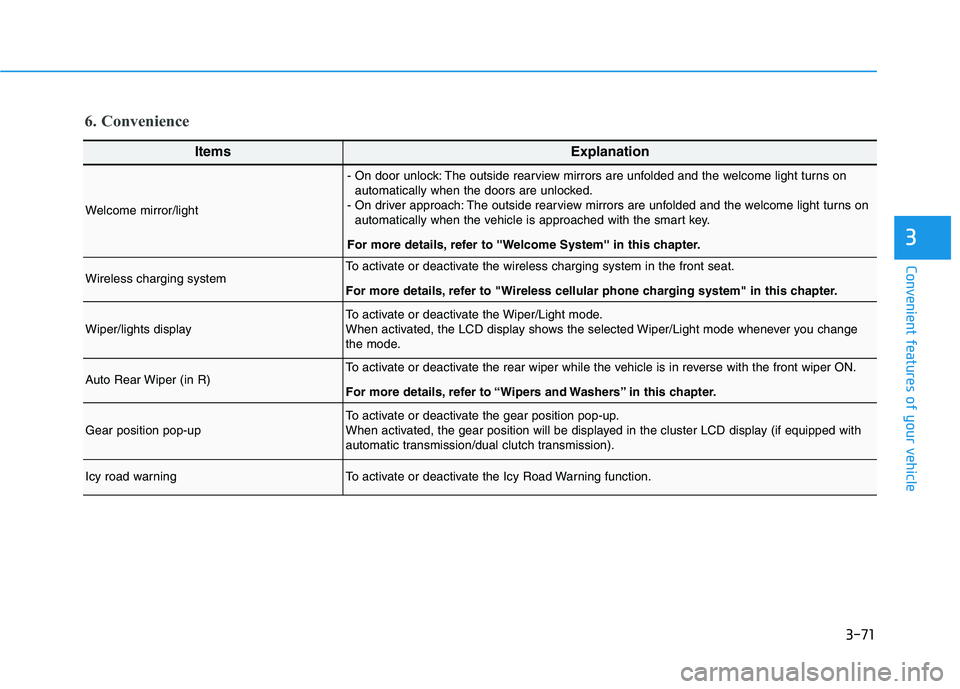
6. Convenience
ItemsExplanation
Welcome mirror/light
- On door unlock: The outside rearview mirrors are unfolded and the welcome light turns on
automatically when the doors are unlocked.
- On driver approach: The outside rearview mirrors are unfolded and the welcome light turns on
automatically when the vehicle is approached with the smart key.
For more details, refer to ''Welcome System'' in this chapter.
Wireless charging systemTo activate or deactivate the wireless charging system in the front seat.
For more details, refer to "Wireless cellular phone charging system" in this chapter.
Wiper/lights displayTo activate or deactivate the Wiper/Light mode.
When activated, the LCD display shows the selected Wiper/Light mode whenever you change
the mode.
Auto Rear Wiper (in R)To activate or deactivate the rear wiper while the vehicle is in reverse with the front wiper ON.
For more details, refer to “Wipers and Washers” in this chapter.
Gear position pop-upTo activate or deactivate the gear position pop-up.
When activated, the gear position will be displayed in the cluster LCD display (if equipped with
automatic transmission/dual clutch transmission).
Icy road warningTo activate or deactivate the Icy Road Warning function.
Page 214 of 480
3-80
Convenient features of your vehicle
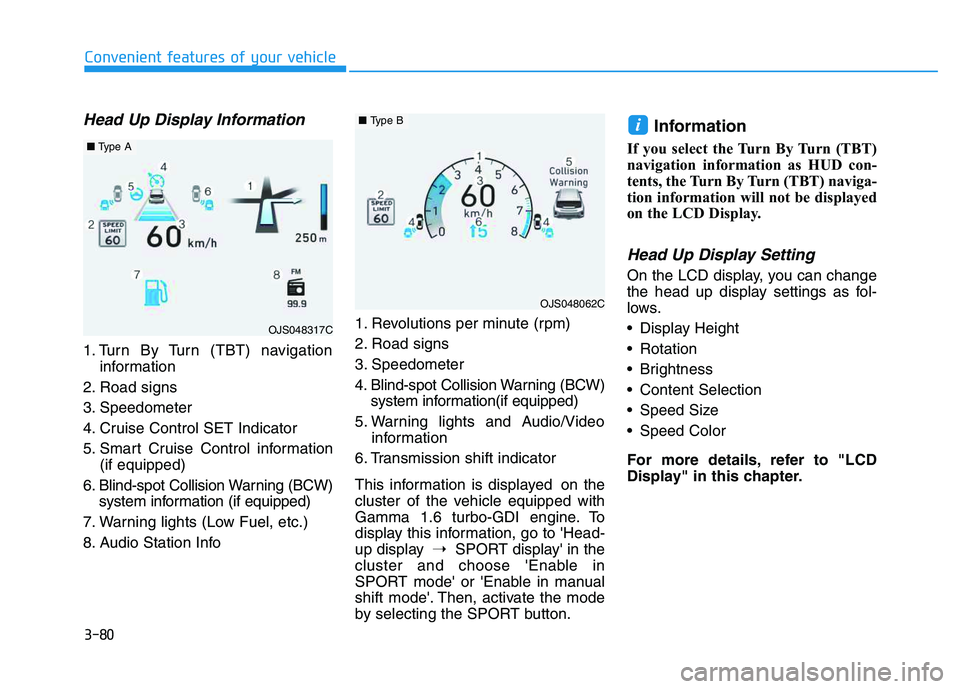
Head Up Display Information
1. Turn By Turn (TBT) navigation
information
2. Road signs
3. Speedometer
4. Cruise Control SET Indicator
5. Smart Cruise Control information
(if equipped)
6. Blind-spot Collision Warning (BCW)
system information (if equipped)
7. Warning lights (Low Fuel, etc.)
8. Audio Station Info1. Revolutions per minute (rpm)
2. Road signs
3. Speedometer
4. Blind-spot Collision Warning (BCW)
system information(if equipped)
5. Warning lights and Audio/Video
information
6. Transmission shift indicator
This information is displayed on the
cluster of the vehicle equipped with
Gamma 1.6 turbo-GDI engine. To
display this information, go to 'Head-
up display➝SPORT display' in the
cluster and choose 'Enable in
SPORT mode' or 'Enable in manual
shift mode'. Then, activate the mode
by selecting the SPORT button.
Information
If you select the Turn By Turn (TBT)
navigation information as HUD con-
tents, the Turn By Turn (TBT) naviga-
tion information will not be displayed
on the LCD Display.
Head Up Display Setting
On the LCD display, you can change
the head up display settings as fol-
lows.
Display Height
Rotation
Brightness
Content Selection
Speed Size
Speed Color
For more details, refer to "LCD
Display" in this chapter.
i
OJS048317C
■Type A
OJS048062C
■Type B
Page 222 of 480
5-4
Driving your vehicle
Before Entering the Vehicle
• Be sure all windows, outside mir-
ror(s), and outside lights are clean
and unobstructed.
Remove frost, snow, or ice.
Visually check the tires for uneven
wear and damage.
Check under the vehicle for any
sign of leaks.
Be sure there are no obstacles
behind you if you intend to back up.
Before Starting
Make sure the hood, the tailgate,
and the doors are securely closed
and locked.
Adjust the position of the seat and
steering wheel.
Adjust the inside and outside
rearview mirrors.
Verify all the lights work.
Fasten your seatbelt. Check that all
passengers have fastened their
seatbelts.
Check the gauges and indicators in
the instrument panel and the mes-
sages on the instrument display
when the ignition switch is in the
ON position.
Check that any items you are car-
rying are stored properly or fas-
tened down securely.
B BE
EF
FO
OR
RE
E
D
DR
RI
IV
VI
IN
NG
G
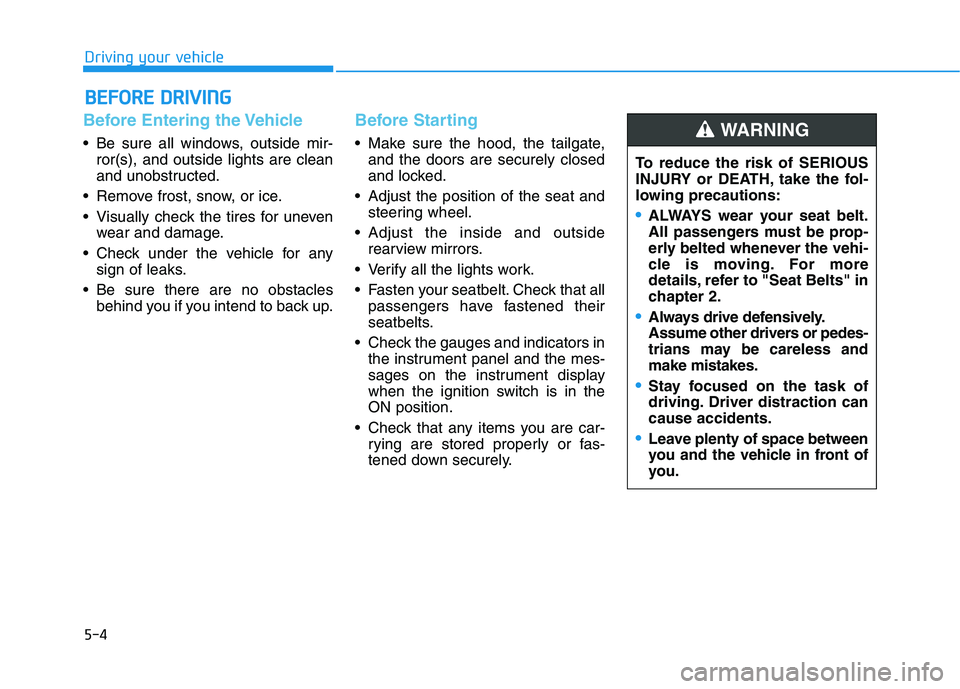
To reduce the risk of SERIOUS
INJURY or DEATH, take the fol-
lowing precautions:
•ALWAYS wear your seat belt.
All passengers must be prop-
erly belted whenever the vehi-
cle is moving. For more
details, refer to "Seat Belts" in
chapter 2.
Always drive defensively.
Assume other drivers or pedes-
trians may be careless and
make mistakes.
Stay focused on the task of
driving. Driver distraction can
cause accidents.
Leave plenty of space between
you and the vehicle in front of
you.
WARNING
Page 225 of 480
5-7
Driving your vehicle
5
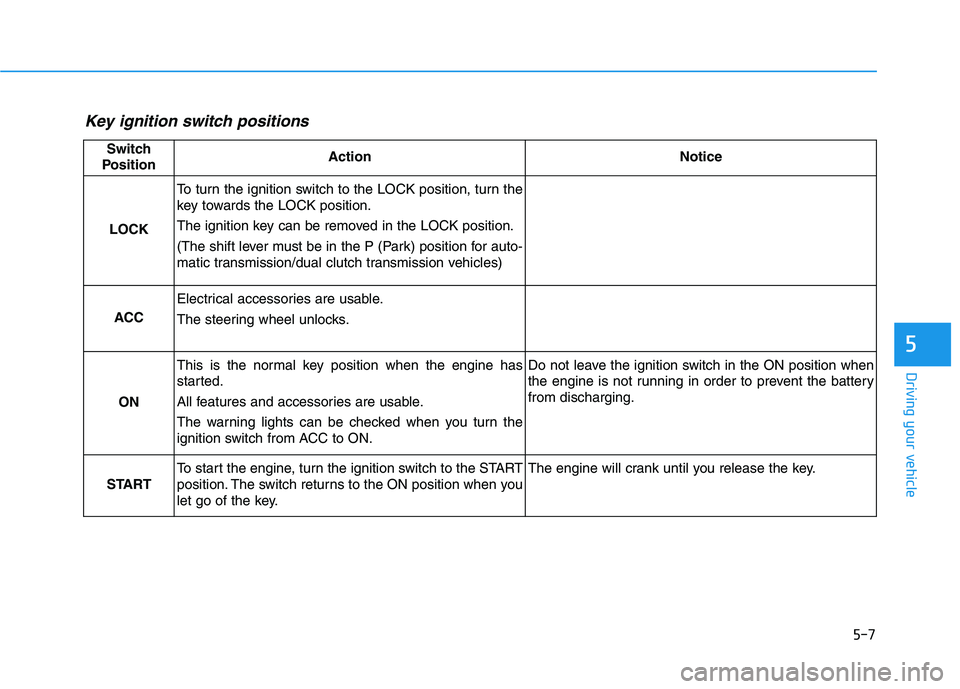
Key ignition switch positions
Switch
PositionActionNotice
LOCK
To turn the ignition switch to the LOCK position, turn the
key towards the LOCK position.
The ignition key can be removed in the LOCK position.
(The shift lever must be in the P (Park) position for auto-
matic transmission/dual clutch transmission vehicles)
ACC
Electrical accessories are usable.
The steering wheel unlocks.
ON
This is the normal key position when the engine has
started.
All features and accessories are usable.
The warning lights can be checked when you turn the
ignition switch from ACC to ON.Do not leave the ignition switch in the ON position when
the engine is not running in order to prevent the battery
from discharging.
START
To start the engine, turn the ignition switch to the START
position. The switch returns to the ON position when you
let go of the key.The engine will crank until you release the key.
Page 230 of 480
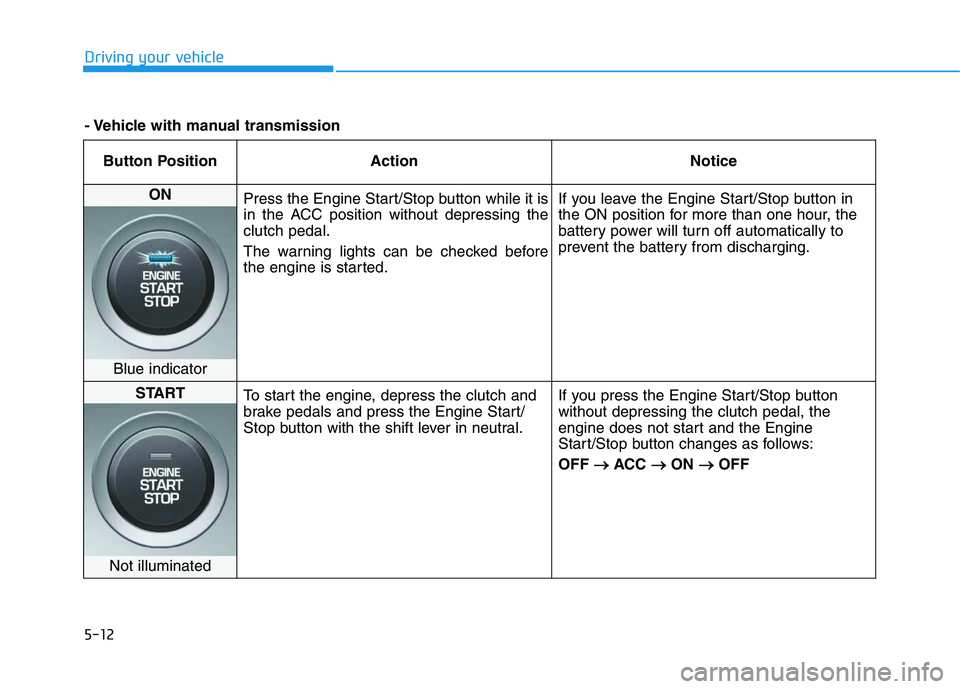
5-12
Driving your vehicle
Button Position Action Notice
ON
Press the Engine Start/Stop button while it is
in the ACC position without depressing the
clutch pedal.
The warning lights can be checked before
the engine is started.If you leave the Engine Start/Stop button in
the ON position for more than one hour, the
battery power will turn off automatically to
prevent the battery from discharging.
Blue indicator
START
To start the engine, depress the clutch and
brake pedals and press the Engine Start/
Stop button with the shift lever in neutral.If you press the Engine Start/Stop button
without depressing the clutch pedal, the
engine does not start and the Engine
Start/Stop button changes as follows:
OFF → →
ACC → →
ON → →
OFF
Not illuminated
- Vehicle with manual transmission
Page 232 of 480
5-14
Driving your vehicle
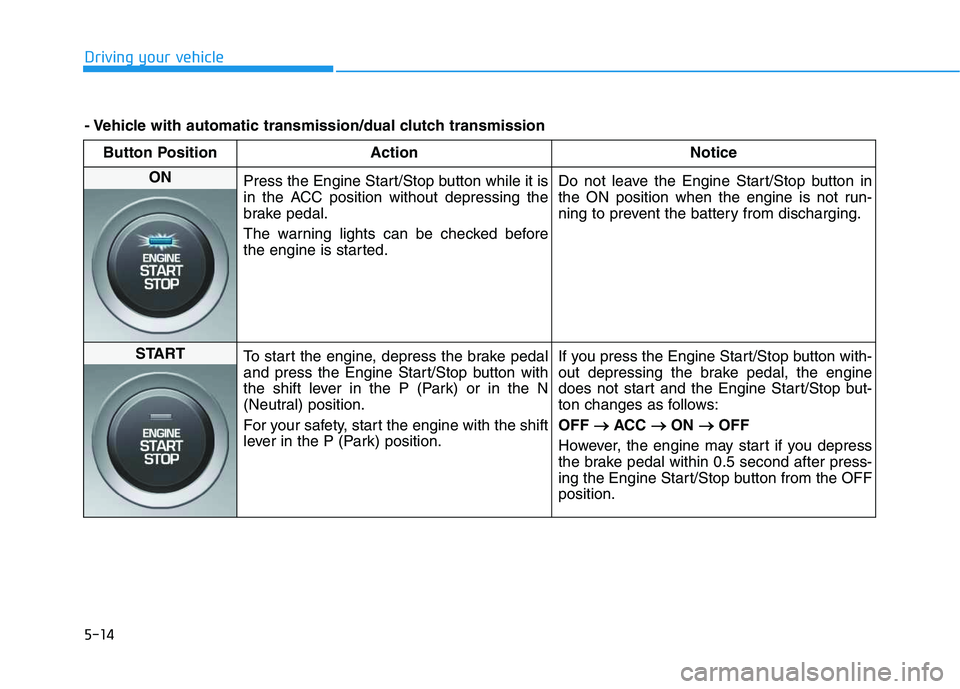
Button Position Action Notice
ON
Press the Engine Start/Stop button while it is
in the ACC position without depressing the
brake pedal.
The warning lights can be checked before
the engine is started.Do not leave the Engine Start/Stop button in
the ON position when the engine is not run-
ning to prevent the battery from discharging.
START
To start the engine, depress the brake pedal
and press the Engine Start/Stop button with
the shift lever in the P (Park) or in the N
(Neutral) position.
For your safety, start the engine with the shift
lever in the P (Park) position.If you press the Engine Start/Stop button with-
out depressing the brake pedal, the engine
does not start and the Engine Start/Stop but-
ton changes as follows:
OFF → →
ACC → →
ON → →
OFF
However, the engine may start if you depress
the brake pedal within 0.5 second after press-
ing the Engine Start/Stop button from the OFF
position.
- Vehicle with automatic transmission/dual clutch transmission