2020 Hyundai Tucson check engine
[x] Cancel search: check enginePage 183 of 637
3-97
Convenient features of your vehicle
3
- Engine Oil Pressure
Warning Light
If the engine does not stop
immediately after the Engine Oil
Pressure Warning Light is illumi-
nated, severe damage could
result.
If the warning light stays on
whilst the engine is running, it
indicates that there may be seri-
ous engine damage or malfunc-
tion. In this case,
1. Stop the vehicle as soon as it
is safe to do so.
2. Turn off the engine and check
the oil level. If the oil level is
low, fill the engine oil to the
proper level.
3. Start the engine again. If the
warning light stays on after
the engine is started, turn the
engine off immediately. In this
case, we recommend that you
have the vehicle inspected by
an authorised HYUNDAI deal-
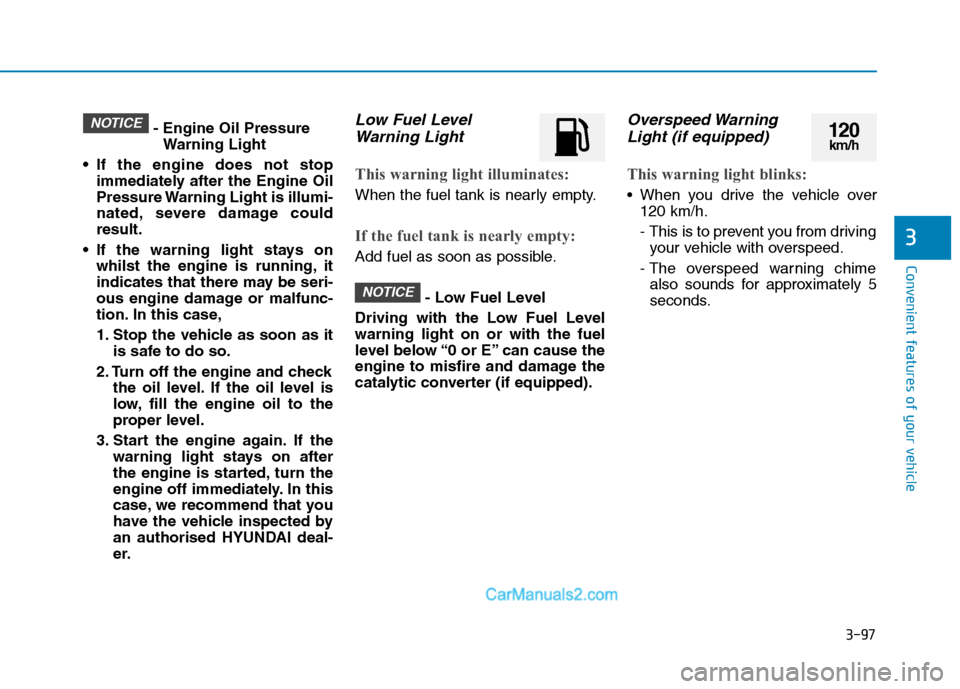
er.Low Fuel Level
Warning Light
This warning light illuminates:
When the fuel tank is nearly empty.
If the fuel tank is nearly empty:
Add fuel as soon as possible.
- Low Fuel Level
Driving with the Low Fuel Level
warning light on or with the fuel
level below “0 or E” can cause the
engine to misfire and damage the
catalytic converter (if equipped).
Overspeed Warning
Light (if equipped)
This warning light blinks:
When you drive the vehicle over
120 km/h.
- This is to prevent you from driving
your vehicle with overspeed.
- The overspeed warning chime
also sounds for approximately 5
seconds.
NOTICE
NOTICE120km/h
Page 187 of 637
3-101
Convenient features of your vehicle
3
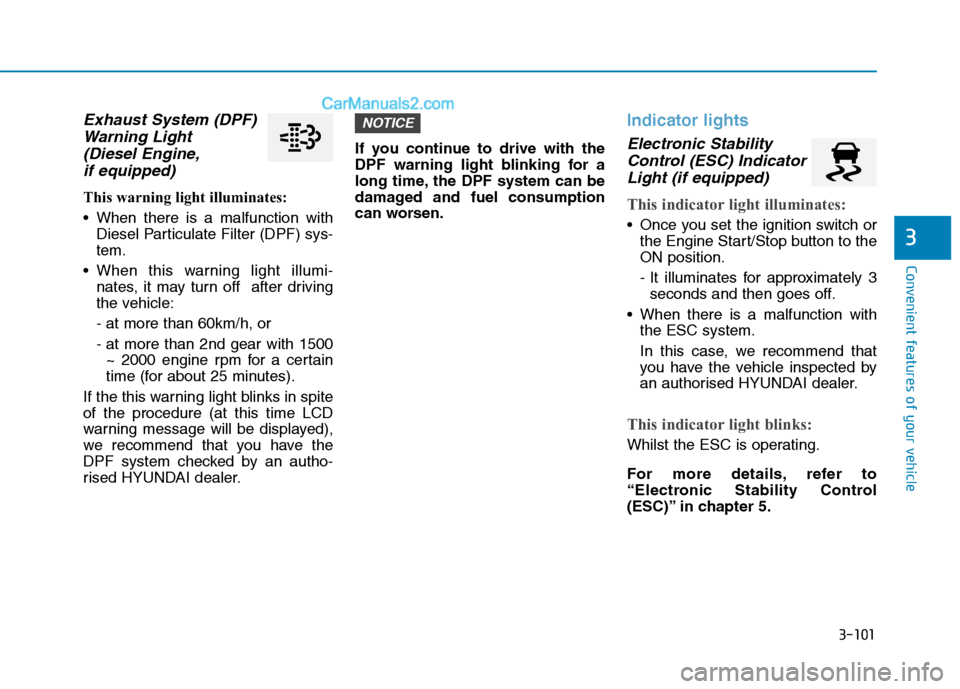
Exhaust System (DPF)
Warning Light
(Diesel Engine,
if equipped)
This warning light illuminates:
When there is a malfunction with
Diesel Particulate Filter (DPF) sys-
tem.
When this warning light illumi-
nates, it may turn off after driving
the vehicle:
- at more than 60km/h, or
- at more than 2nd gear with 1500
~ 2000 engine rpm for a certain
time (for about 25 minutes).
If the this warning light blinks in spite
of the procedure (at this time LCD
warning message will be displayed),
we recommend that you have the
DPF system checked by an autho-
rised HYUNDAI dealer.If you continue to drive with the
DPF warning light blinking for a
long time, the DPF system can be
damaged and fuel consumption
can worsen.
Indicator lights
Electronic Stability
Control (ESC) Indicator
Light (if equipped)
This indicator light illuminates:
Once you set the ignition switch or
the Engine Start/Stop button to the
ON position.
- It illuminates for approximately 3
seconds and then goes off.
When there is a malfunction with
the ESC system.
In this case, we recommend that
you have the vehicle inspected by
an authorised HYUNDAI dealer.
This indicator light blinks:
Whilst the ESC is operating.
For more details, refer to
“Electronic Stability Control
(ESC)” in chapter 5.
NOTICE
Page 211 of 637
3-125
Convenient features of your vehicle
3
Information
If there is a heavy accumulation of
snow or ice on the windscreen, defrost
the windscreen for about 10 minutes,
or until the snow and/or ice is
removed before using the windscreen
wipers, to ensure proper operation.
If you do not remove the snow and/or
ice before using the wiper and washer,
it may damage the wiper and washer
system.
AUTO (Automatic) control
(if equipped)
The rain sensor located on the upper
end of the windscreen glass, senses
the amount of rainfall and controls
the wiping cycle for a set interval.
The more it rains, the faster the wiper
operates.
When the rain stops, the wipers stop.
To vary the speed setting, turn the
speed control knob.
If the wiper switch is set in AUTO
mode when the ignition switch is in
the ON position, the wipers will oper-
ate once to perform a self-check of
the system. Set the wipers to the
OFF position when the wipers are
not in use.
i
To avoid personal injury from
the windscreen wipers, when
the engine is running and the
windscreen wiper switch is
placed in the AUTO mode:
Do not touch the upper end of
the windscreen glass facing
the rain sensor.
Do not wipe the upper end of
the windscreen glass with a
damp or wet cloth.
Do not put pressure on the
windscreen glass.
WARNING
Page 216 of 637
3-130
Convenient features of your vehicle
Operating conditions
When the Engine Start/Stop button
is in the ON position
When the transmission is in D, N or
R
When vehicle speed is under
15km/h
Information
• When vehicle speed is over 15km/h,
the system will turn off. The system
will not automatically turn on again,
even though vehicle speed gets
below 15 km/h. Push the button (1,
indicator ON) again, to turn on the
system.
• When the vehicle is reversing, the
system will turn ON regardless of
vehicle speed or button status.
However, if vehicle speed is over 15
km/h when driving forward, the
SVM system will turn off. • A warning appears on the system
when:
- The tailgate is opened
- The driver's door is opened
- The passenger's door is opened
- The outside rearview mirrors are
folded
• If the system is not operating nor-
mally, we recommend that you take
your vehicle to an authorised
HYUNDAI dealer and have the sys-
tem checked.For more details, refer to the sep-
arately supplied manual with your
vehicle.
Always keep the camera lens
clean. The camera may not work
normally if the lens is covered
with foreign material.
NOTICE
i
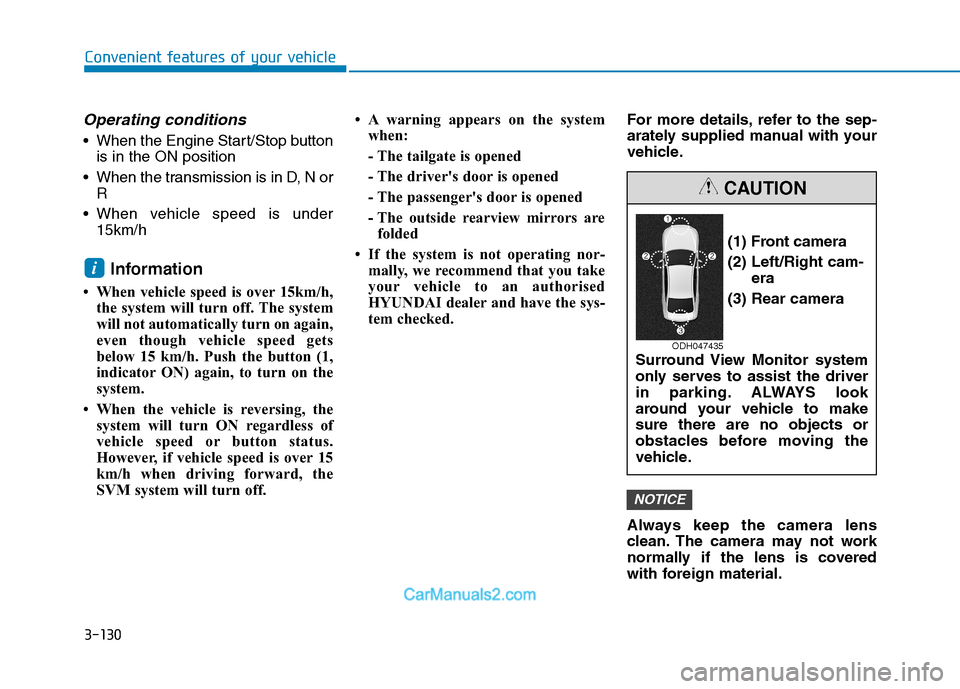
(1) Front camera
(2) Left/Right cam-
era
(3) Rear camera
Surround View Monitor system
only serves to assist the driver
in parking. ALWAYS look
around your vehicle to make
sure there are no objects or
obstacles before moving the
vehicle.
CAUTION
ODH047435
Page 222 of 637
3-136
Convenient features of your vehicle
Operating condition
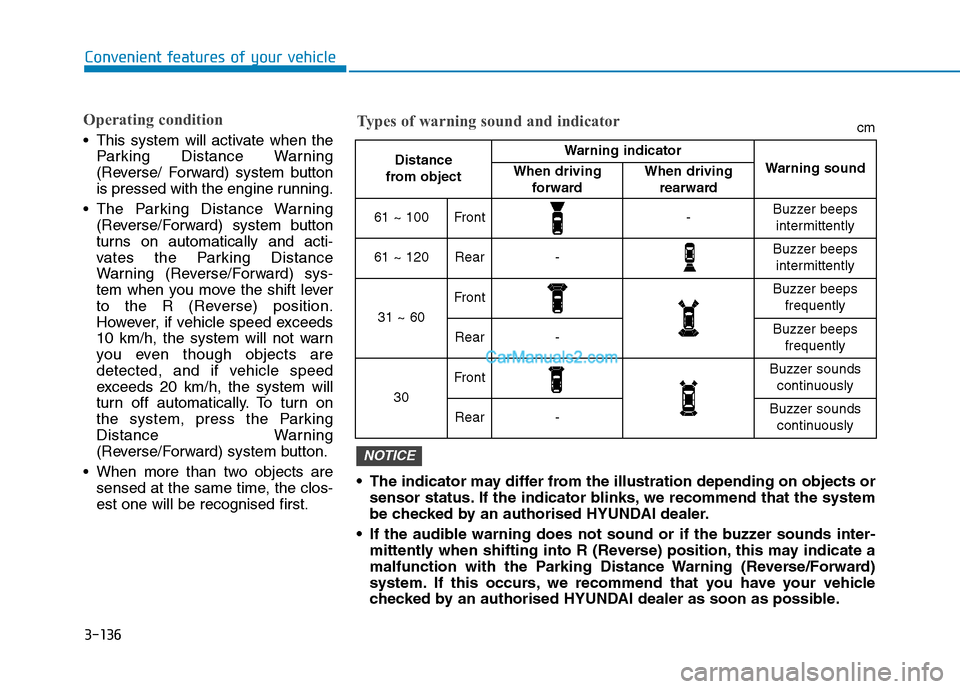
This system will activate when the
Parking Distance Warning
(Reverse/ Forward) system button
is pressed with the engine running.
The Parking Distance Warning
(Reverse/Forward) system button
turns on automatically and acti-
vates the Parking Distance
Warning (Reverse/Forward) sys-
tem when you move the shift lever
to the R (Reverse) position.
However, if vehicle speed exceeds
10 km/h, the system will not warn
you even though objects are
detected, and if vehicle speed
exceeds 20 km/h, the system will
turn off automatically. To turn on
the system, press the Parking
Distance Warning
(Reverse/Forward) system button.
When more than two objects are
sensed at the same time, the clos-
est one will be recognised first. The indicator may differ from the illustration depending on objects or
sensor status. If the indicator blinks, we recommend that the system
be checked by an authorised HYUNDAI dealer.
If the audible warning does not sound or if the buzzer sounds inter-
mittently when shifting into R (Reverse) position, this may indicate a
malfunction with the Parking Distance Warning (Reverse/Forward)
system. If this occurs, we recommend that you have your vehicle
checked by an authorised HYUNDAI dealer as soon as possible.
NOTICE
Distance
from object Warning indicator
Warning soundWhen driving
forwardWhen driving
rearward
61 ~ 100Front-Buzzer beeps
intermittently
61 ~ 120Rear-Buzzer beeps
intermittently
31 ~ 60
FrontBuzzer beeps
frequently
Rear-Buzzer beeps
frequently
30
FrontBuzzer sounds
continuously
Rear-Buzzer sounds
continuously
Types of warning sound and indicatorcm
Page 266 of 637
3-180
To charge a mobile phone
The wireless mobile phone charging
system charges only the Qi-enabled
mobile phones ( ). Read the label
on the mobile phone accessory
cover or visit your mobile phone
manufacturer’s website to check
whether your mobile phone supports
the Qi technology.
The wireless charging process starts
when you put a Qi-enabled mobile
phone on the wireless charging unit.
1. Remove other items, including the
smart key, from the wireless
charging unit. If not, the wireless
charging process may be inter-
rupted. Place the mobile phone
on the centre of charging pad.
2. The indicator light is orange when
the mobile phone is charging. The
indicator light turns green when
phone charging is complete.
3. You can turn ON or OFF the wire-
less charging function in the User
Settings Mode on the instrument
cluster. For further information,
refer to the “LCD Display Modes”
in this chapter.If your mobile phone is not charging:
- Slightly change the position of the
mobile phone on the charging pad.
- Make sure the indicator light is
orange.
The indicator light will blink orange
for 10 seconds if there is a malfunc-
tion in the wireless charging system.
In this case, temporarily stop the
charging process, and re-attempt to
wirelessly charge your mobile phone
again.
The system warns you with a mes-
sage on the LCD display if the mobile
phone is still on the wireless charg-
ing unit after the engine is turned
OFF and the front door is opened.
For certain mobile phones, the mes-
sage may not be displayed.
(This is due to the characteristic of
the certain mobile phone and the
wireless mobile phone charging sys-
tem is normal.)Information
For some manufacturers' mobile
phones, the system may not warn you
even though the mobile phone is left
on the wireless charging unit. This is
due to the particular characteristic of
the mobile phone and not a malfunc-
tion of the wireless charging.
i
Convenient features of your vehicle
Page 320 of 637
5-3
Driving your vehicle
5
Carbon monoxide (CO) gas is toxic. Breathing CO can cause unconsciousness and death.
Engine exhaust emissions contain carbon monoxide which cannot be seen or smelled.
Do not inhale engine exhaust.
If at any time you smell engine exhaust emissions inside the vehicle, open the windows immediately. Exposure to CO
can cause unconsciousness and death by asphyxiation.
Be sure the exhaust system does not leak.
The exhaust system should be checked whenever the vehicle is raised to change the oil or for any other purpose. If
you hear a change in the sound of the exhaust or if you drive over something that strikes the underneath side of the
vehicle, we recommend that the exhaust system be checked as soon as possible by an authorised HYUNDAI dealer.
Do not run the engine in an enclosed area.
Letting the engine idle in your garage, even with the garage door open, is a hazardous practice. Run the engine only
long enough to start the engine and move the vehicle out of the garage.
Avoid idling the engine for prolonged periods with people inside the vehicle.
If it is necessary to idle the engine for a prolonged period with people inside the vehicle , be sure to do so only in an
open area with the air intake set at "Fresh" and fan control set to high so fresh air is drawn into the interior.
Keep the air intakes clear.
To assure proper operation of the ventilation system, keep the ventilation air intakes located in front of the windscreen
clear of snow, ice, leaves, or other obstructions.
If you must drive with the tailgate open:
Close all windows.
Open instrument panel air vents.
Set the air intake control at "Fresh", the air flow control at "Floor" or "Face", and the fan control set to high.
WARNING
Page 324 of 637
5-7
Driving your vehicle
5
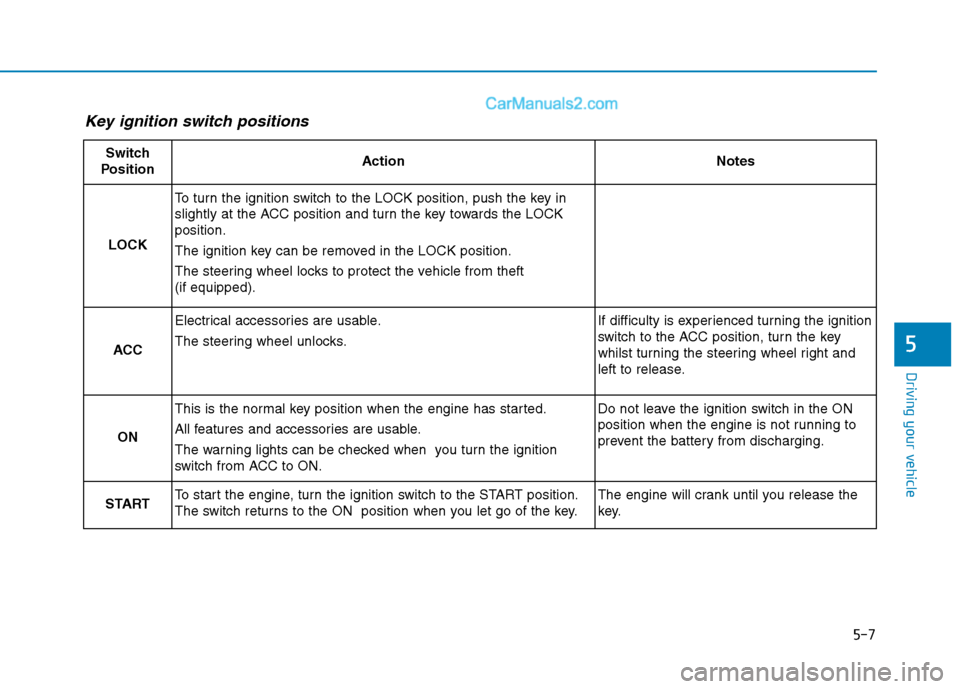
Key ignition switch positions
Switch
PositionActionNotes
LOCK
To turn the ignition switch to the LOCK position, push the key in
slightly at the ACC position and turn the key towards the LOCK
position.
The ignition key can be removed in the LOCK position.
The steering wheel locks to protect the vehicle from theft
(if equipped).
ACC
Electrical accessories are usable.
The steering wheel unlocks.If difficulty is experienced turning the ignition
switch to the ACC position, turn the key
whilst turning the steering wheel right and
left to release.
ON
This is the normal key position when the engine has started.
All features and accessories are usable.
The warning lights can be checked when you turn the ignition
switch from ACC to ON.Do not leave the ignition switch in the ON
position when the engine is not running to
prevent the battery from discharging.
STARTTo start the engine, turn the ignition switch to the START position.
The switch returns to the ON position when you let go of the key.The engine will crank until you release the
key.