2020 Hyundai Sonata switch
[x] Cancel search: switchPage 215 of 537

05
5-85
Information
If the wiper switch is set in AUTO mode
when Engine Start/Stop button is in the
ON position, the wiper will operate once to
perform a self-check of the system. Set the
wiper to the OFF position when the wiper
is not in use.
WARNING
To avoid personal injury from the
windshield wipers, when the engine
is running and the windshield wiper
switch is placed in the AUTO mode:
• Do not touch the upper end of the windshield glass facing the rain
sensor.
• Do not wipe the upper end of the windshield glass with a damp or wet
cloth.
• Do not put pressure on the windshield glass.
Windshield Washers
ODN8059209KODN8059209K
In the OFF position, pull the lever gently
toward you to spray washer fluid on the
windshield and to run the wipers 1-3
cycles. The spray and wiper operation
will continue until you release the lever. If
the washer does not work, you may need
to add washer fluid to the washer fluid
reservoir.
WARNING
When the outside temperature is below
freezing, ALWAYS warm the windshield
using the defroster to help prevent
the washer fluid from freezing on the
windshield and obscuring your vision
which could result in an accident and
serious injury or death.
NOTICE
• To prevent possible damage to the
washer pump, do not operate the
washer when the fluid reservoir is
empty.
• To prevent possible damage to the
wipers or windshield, do not operate
the wipers when the windshield is
dry.
• To prevent damage to the wiper
arms and other components, do
not attempt to move the wipers
manually.
• To prevent possible damage to the
wipers and washer system, use anti-
freezing washer fluids in the winter
season or cold weather.
Page 216 of 537
Convenient Features5-86
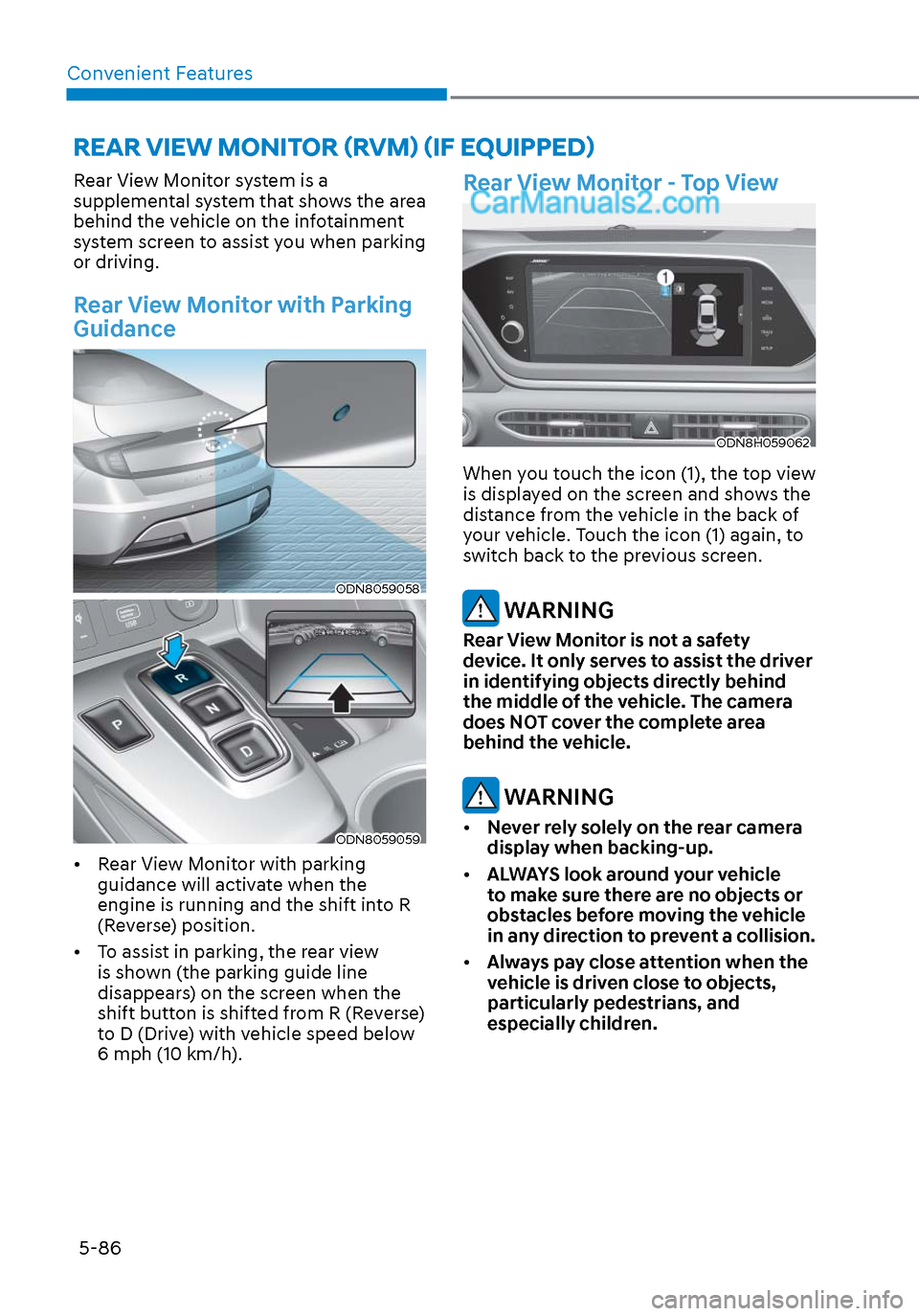
Rear View Monitor system is a
supplemental system that shows the area
behind the vehicle on the infotainment
system screen to assist you when parking
or driving.
Rear View Monitor with Parking
Guidance
ODN8059058ODN8059058
ODN8059059ODN8059059
• Rear View Monitor with parking guidance will activate when the
engine is running and the shift into R
(Reverse) position.
• To assist in parking, the rear view is shown (the parking guide line
disappears) on the screen when the
shift button is shifted from R (Reverse)
to D (Drive) with vehicle speed below
6 mph (10 km/h).
Rear View Monitor - Top View
ODN8H059062ODN8H059062
When you touch the icon (1), the top view
is displayed on the screen and shows the
distance from the vehicle in the back of
your vehicle. Touch the icon (1) again, to
switch back to the previous screen.
WARNING
Rear View Monitor is not a safety
device. It only serves to assist the driver
in identifying objects directly behind
the middle of the vehicle. The camera
does NOT cover the complete area
behind the vehicle.
WARNING
• Never rely solely on the rear camera
display when backing-up.
• ALWAYS look around your vehicle
to make sure there are no objects or
obstacles before moving the vehicle
in any direction to prevent a collision.
• Always pay close attention when the
vehicle is driven close to objects,
particularly pedestrians, and
especially children.
REAR VIEW MONITOR (RVM) (IF EQUIPPED)
Page 225 of 537
![Hyundai Sonata 2020 Owners Manual 05
5-95
(IF EQUIPPED)
ODN8A059056ODN8A059056[A] : Rear Sensor
Reverse Parking Distance Warning
system assists the driver during reverse
movement of the vehicle by chiming if an
object is sensed wit](/manual-img/35/16773/w960_16773-224.png "Hyundai Sonata 2020 Owners Manual 05
5-95
(IF EQUIPPED)
ODN8A059056ODN8A059056[A] : Rear Sensor
Reverse Parking Distance Warning
system assists the driver during reverse
movement of the vehicle by chiming if an
object is sensed wit")
05
5-95
(IF EQUIPPED)
ODN8A059056ODN8A059056[A] : Rear Sensor
Reverse Parking Distance Warning
system assists the driver during reverse
movement of the vehicle by chiming if an
object is sensed within the distance of 48
in (120 cm) behind the vehicle.
This system is a supplemental system
that senses objects within the range and
location of the sensors, it cannot detect
objects in other areas where sensors are
not installed.
WARNING
• ALWAYS look around your vehicle to
make sure there are not any objects
or obstacles before moving the
vehicle in any direction to prevent a
collision.
• Always pay close attention when the
vehicle is driven close to objects,
particularly pedestrians, and
especially children.
• Be aware that some objects may
not be visible on the screen or be
detected by the sensors, due to the
objects distance, size or material, all
of which can limit the effectiveness
of the sensor.
Operation of Reverse Parking
Distance Warning System
Operating condition
• This system will activate when
backing up with the ignition switch in
the ON position. However, if vehicle
speed exceeds 3 mph (5 km/h), the
system may not detect objects.
• If vehicle speed exceeds 6 mph (10 km/h), the system will not warn you
even though objects are detected.
• When more than two objects are sensed at the same time, the closest
one will be recognized first.
REVERSE PARKING DISTANCE WARNING (PDW)
Page 245 of 537
05
5-115
Link with other systems
Activation of other systems may
be restricted according to the
circumstances while Remote Smart
Parking Assist system is in activation.
The systems linked to the Remote Smart
Parking Assist system are as follows:
1. Idle Stop & Go
(1) While Remote Smart Parking Assist system is operating, ISG is
deactivated.
(2) If Remote Smart Parking Assist system is completed or cancelled,
ISG can be activated.
2. Auto Hold
(1) The activated Auto Hold is switched to deactivation status
when Remote Smart Parking Assist
system starts.
(2) The Auto Hold button will not respond while Remote Smart
Parking Assist system is in
activation.
(3) After Remote Smart Parking Assist system is completed or
deactivated, the Auto Hold will
return to the status before Remote
Smart Parking Assist system was
activated.
3. Electronic Stability Control (ESC)
(1) Electronic Stability Control (ESC) system switches from OFF to
activation status (ESC OFF button
turns off) when Remote Smart
Parking Assist system is activated.
(2) The ESC OFF button will not respond while Remote Smart
Parking Assist system is in
activation.
(3) The ABS/TCS/ESC system activates while Remote Smart Parking Assist
system is in activation.
(4) After Remote Smart Parking Assist system is completed or
deactivated, the ESC maintains the
ON status.
How the Remote Moving
Forward/Backward System
Works
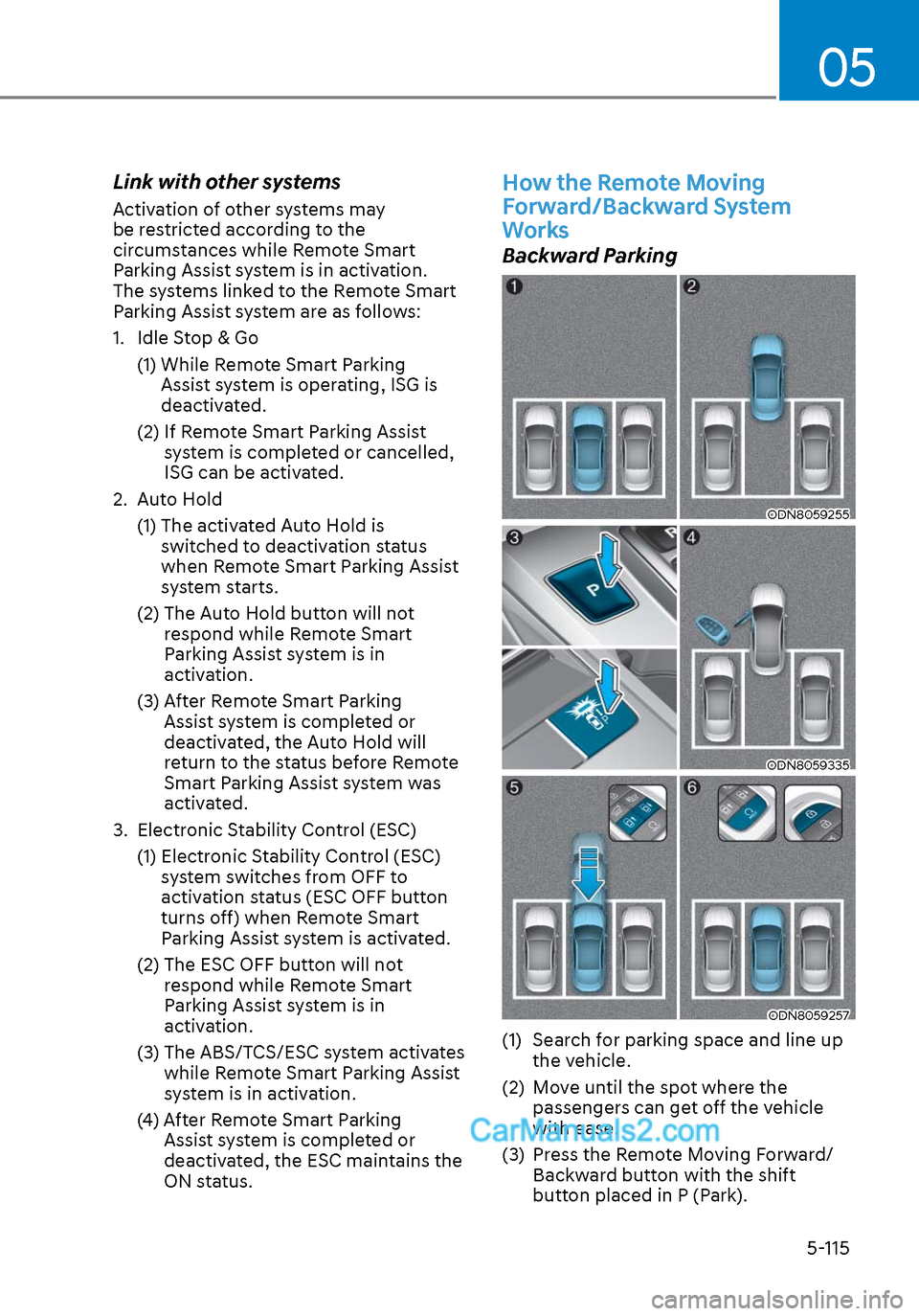
Backward Parking
ODN8059255ODN8059255
ODN8059335ODN8059335
ODN8059257ODN8059257
(1) Search for parking space and line up the vehicle.
(2) Move until the spot where the passengers can get off the vehicle
with ease.
(3) Press the Remote Moving Forward/ Backward button with the shift
button placed in P (Park).
Page 253 of 537
05
5-123
Information
Using the system primarily in Fresh mode
and Recirculation mode only when needed
is recommended for best results.
Prolonged operation of the heater in
Recirculation mode and without the A/C
ON can cause fogging of the windshield.
In addition, prolonged use of the A/C
ON in Recirculation mode may result in
excessively dry, dehumidified air in the
cabin.
WARNING
• Continued use of the climate control
system operation in Recirculation
mode for a prolonged period of
time may cause drowsiness to the
occupants in the cabin. This may lead
to loss of vehicle control which may
lead to an accident.
• Continued use of the climate control
system operation in Recirculation
mode with the A/C OFF may allow
humidity to increase inside the
cabin. This may cause condensation
to accumulate on the windshield and
obscure visibility.
• Do not sleep in your vehicle or
remain parked in your vehicle with
the windows up and either the
heater or the air conditioning ON for
prolonged periods of time. Doing so
may increase the levels of carbon
dioxide in the cabin which may lead
to serious injury or death.
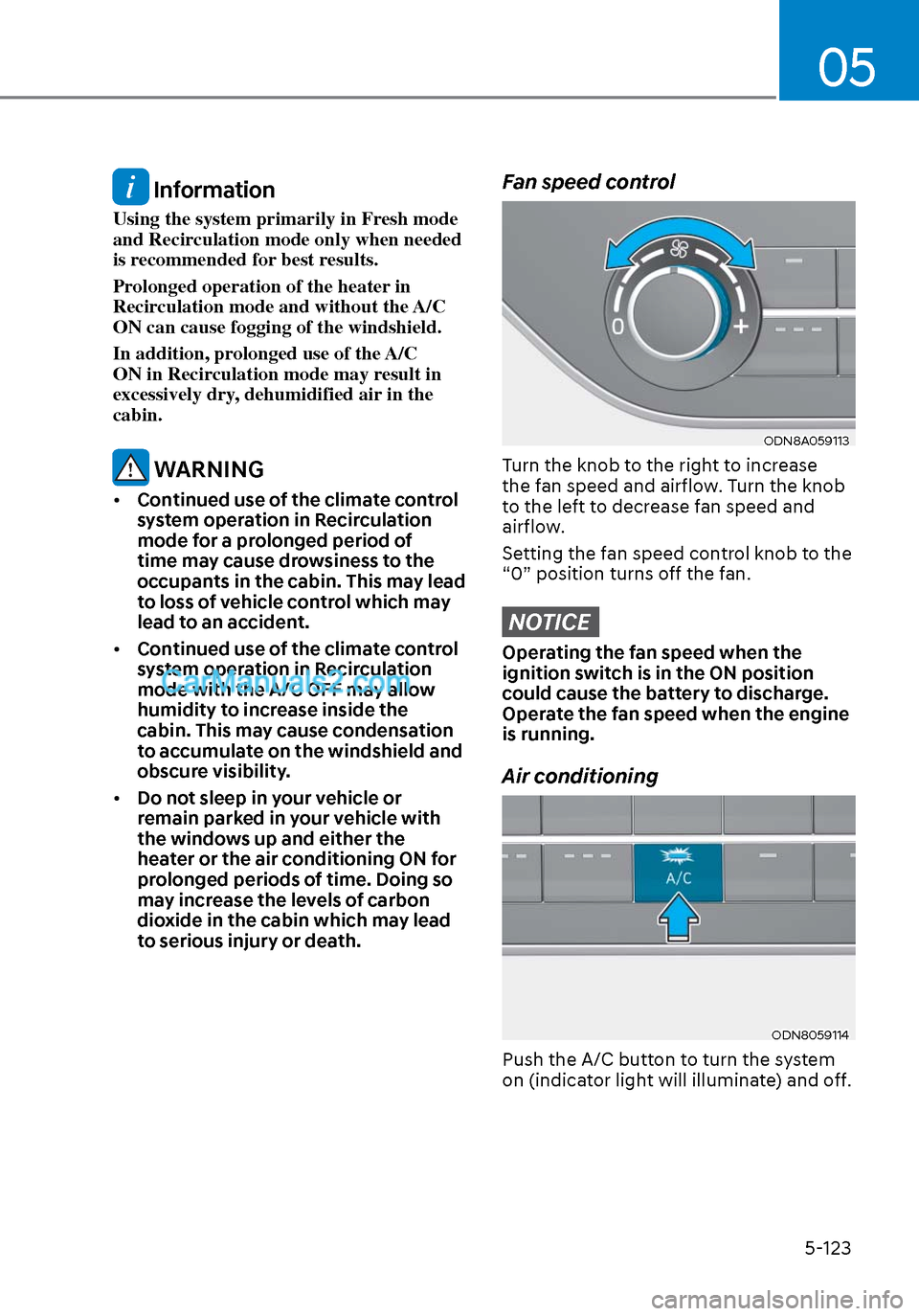
Fan speed control
ODN8A059113ODN8A059113
Turn the knob to the right to increase
the fan speed and airflow. Turn the knob
to the left to decrease fan speed and
airflow.
Setting the fan speed control knob to the
“0” position turns off the fan.
NOTICE
Operating the fan speed when the
ignition switch is in the ON position
could cause the battery to discharge.
Operate the fan speed when the engine
is running.
Air conditioning
ODN8059114ODN8059114
Push the A/C button to turn the system
on (indicator light will illuminate) and off.
Page 255 of 537
05
5-125
Air conditioning system operation tips
• If the vehicle has been parked in dir
ect sunlight during hot weather,
open the windows for a short time
to let the hot air inside the vehicle
escape.
• After sufficient cooling has been achieved, switch back from the
recirculated air to the fresh outside air
position.
• To help reduce moisture inside of the windows on rainy or humid
days, decrease the humidity inside
the vehicle by operating the air
conditioning system with the windows
and sunroof closed.
• Use the air conditioning system every month only for a few minutes
to ensure maximum system
performance.
• If you operate air conditioner excessively, the difference between
the temperature of the outside air and
that of the windshield could cause
the outer surface of the windshield
to fog up, causing loss of visibility. In
this case, set the mode selection knob
or button to the
position and fan
speed control to the lower speed.
System Maintenance
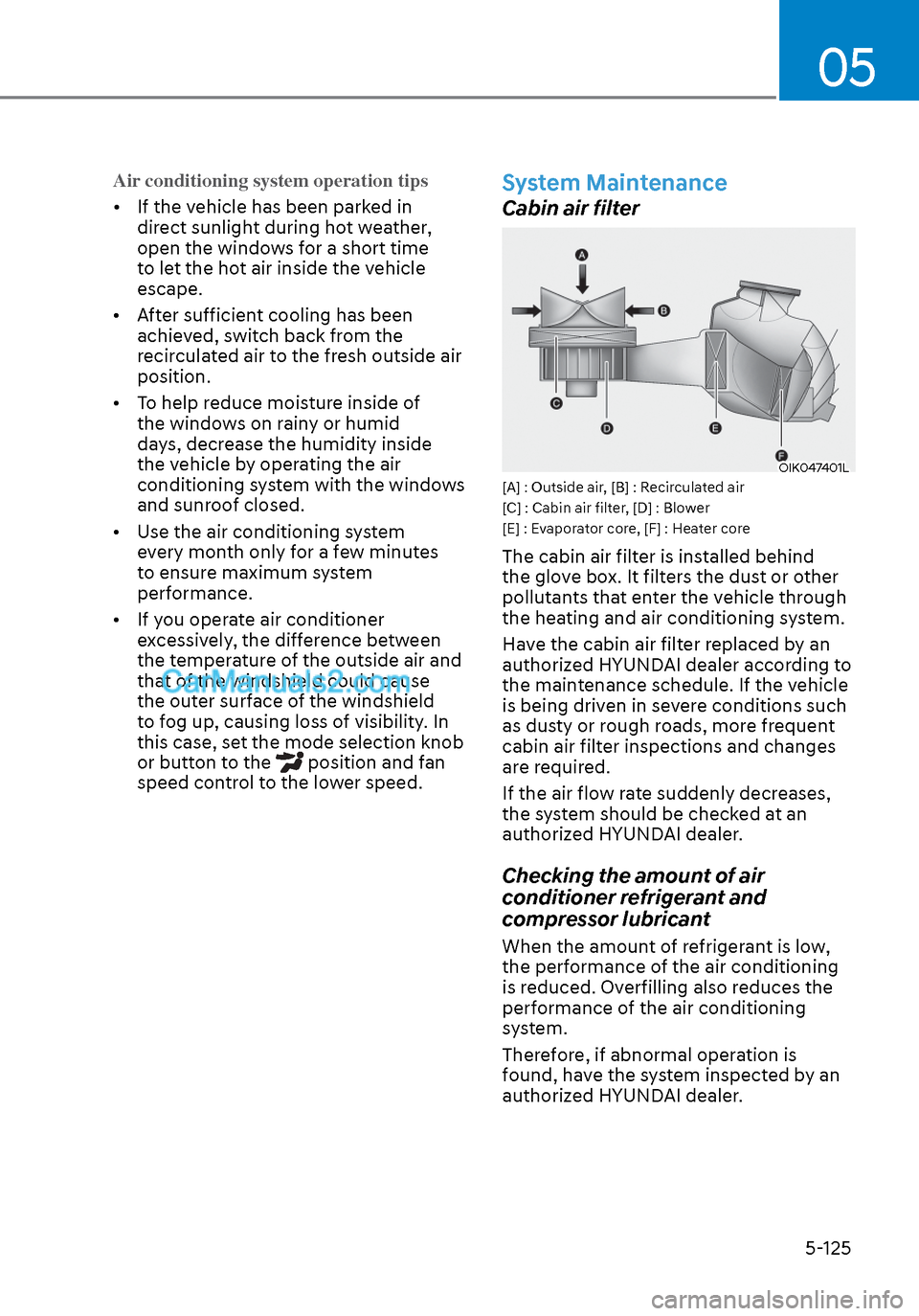
Cabin air filter
OIK047401LOIK047401L[A] : Outside air, [B] : Recirculated air
[C] : Cabin air filter, [D] : Blower
[E] : Evaporator core, [F] : Heater core
The cabin air filter is installed behind
the glove box. It filters the dust or other
pollutants that enter the vehicle through
the heating and air conditioning system.
Have the cabin air filter replaced by an
authorized HYUNDAI dealer according to
the maintenance schedule. If the vehicle
is being driven in severe conditions such
as dusty or rough roads, more frequent
cabin air filter inspections and changes
are required.
If the air flow rate suddenly decreases,
the system should be checked at an
authorized HYUNDAI dealer.
Checking the amount of air
conditioner refrigerant and
compressor lubricant
When the amount of refrigerant is low,
the performance of the air conditioning
is reduced. Overfilling also reduces the
performance of the air conditioning
system.
Therefore, if abnormal operation is
found, have the system inspected by an
authorized HYUNDAI dealer.
Page 257 of 537
5-127
05
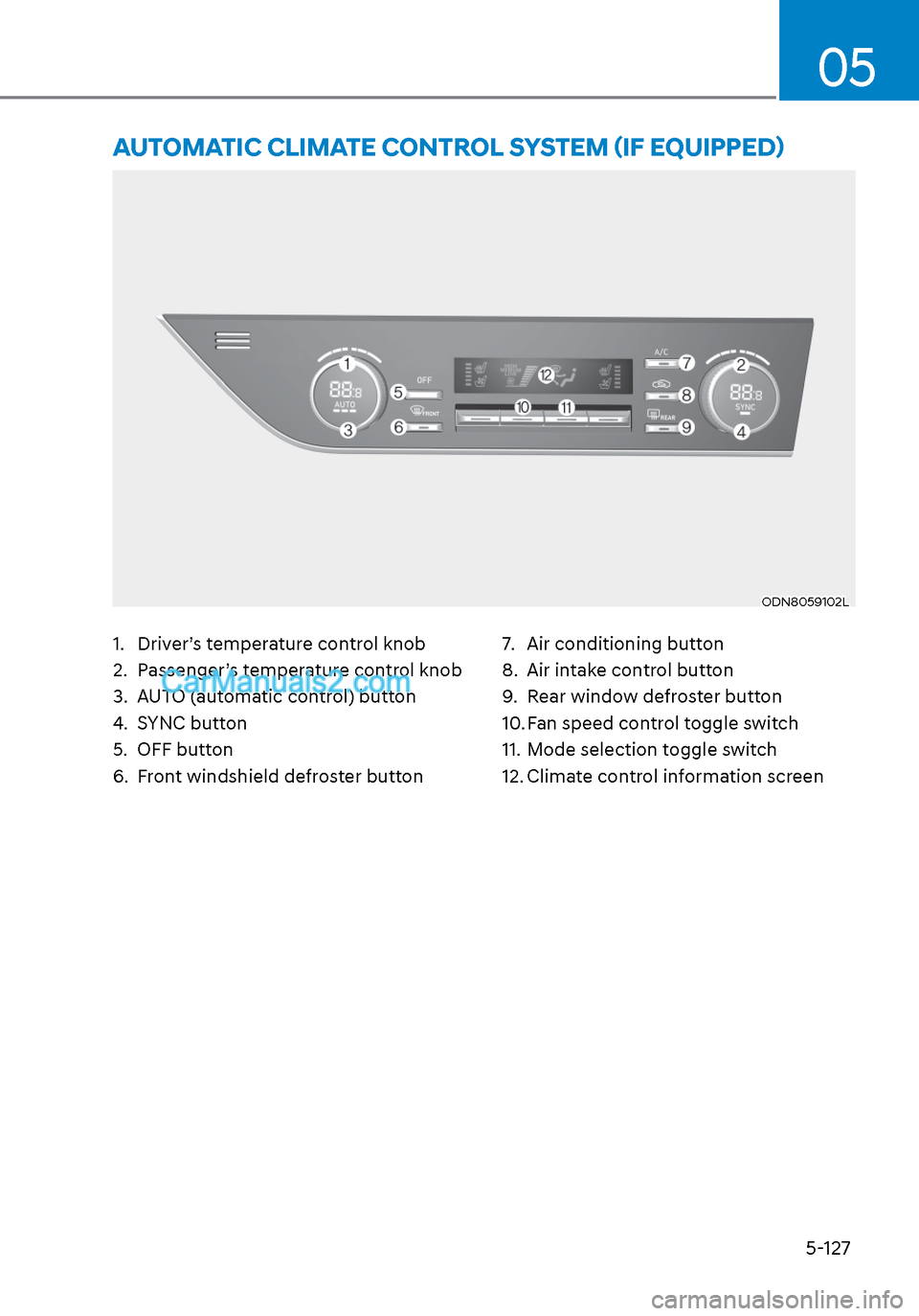
1. Driver’s temperature control knob
2. Passenger’s temperature control knob
3. AUTO (automatic control) button
4. SYNC button
5. OFF button
6. Front windshield defroster button7. Air conditioning button
8. Air intake control button
9. Rear window defroster button
10. Fan speed control toggle switch
11. Mode selection toggle switch
12. Climate control information screen
AUTOMATIC CLIMATE CONTROL SYSTEM (IF EQUIPPED)
ODN8059102LODN8059102L
Page 258 of 537
Convenient Features5-128
Automatic Heating and Air
Conditioning
ODN8059115ODN8059115
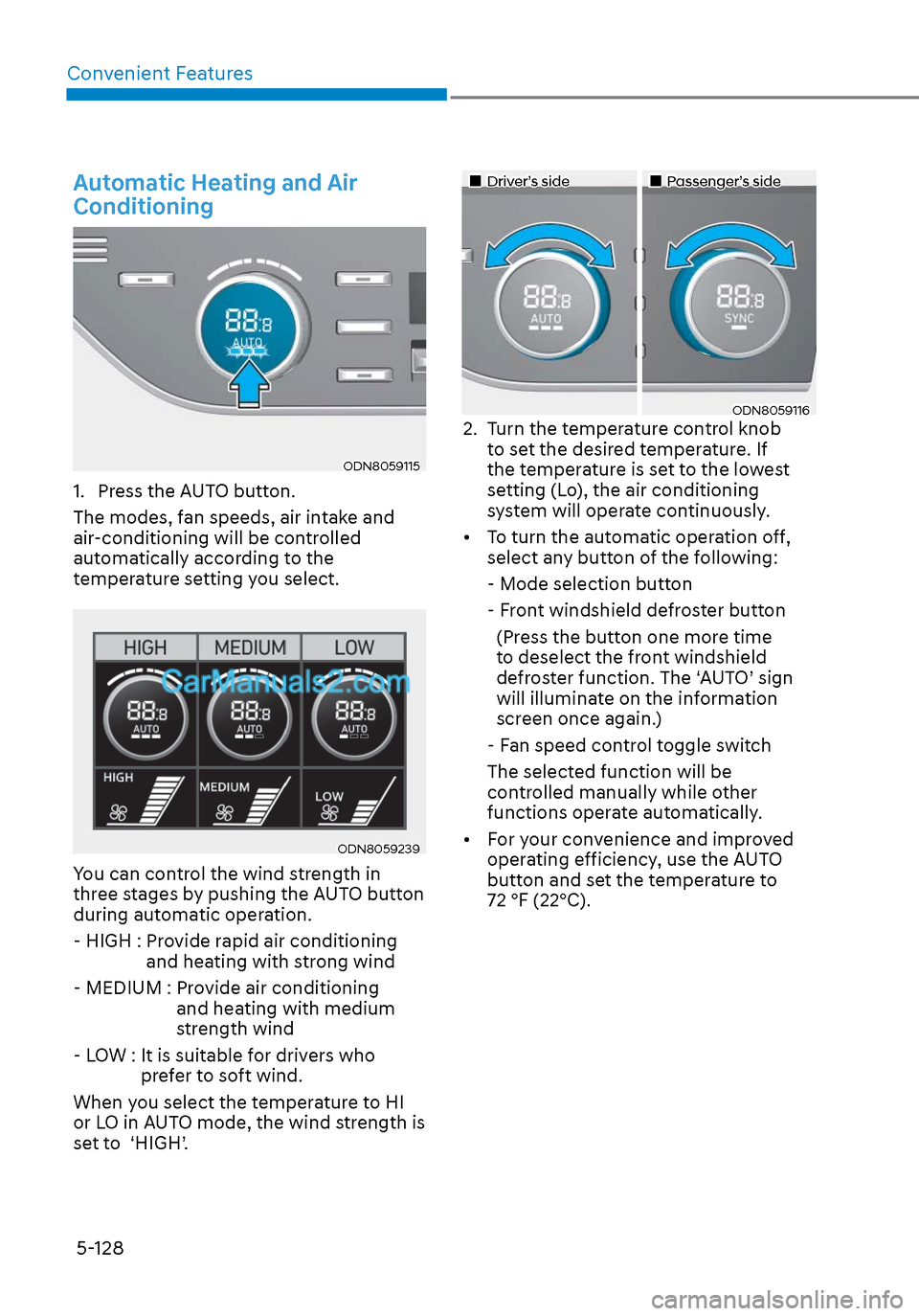
1. Press the AUTO button.
The modes, fan speeds, air intake and
air-conditioning will be controlled
automatically according to the
temperature setting you select.
ODN8059239ODN8059239
You can control the wind strength in
three stages by pushing the AUTO button
during automatic operation.
- HIGH : Provide rapid air conditioning and heating with strong wind
- MEDIUM : Provide air conditioning and heating with medium
strength wind
- LOW : It is suitable for drivers who prefer to soft wind.
When you select the temperature to HI
or LO in AUTO mode, the wind strength is
set to ‘HIGH’.
Driver’s sideDriver’s sidePassenger’s sidePassenger’s side
ODN8059116ODN80591162. Turn the temperature control knob to set the desired temperature. If
the temperature is set to the lowest
setting (Lo), the air conditioning
system will operate continuously.
• To turn the automatic operation off, select any button of the following:
- Mode selection button
- Front windshield defroster button
(Press the button one more time to deselect the front windshield
defroster function. The ‘AUTO’ sign
will illuminate on the information
screen once again.)
- Fan speed control toggle switch
The selected function will be controlled manually while other
functions operate automatically.
• For your convenience and improved operating efficiency, use the AUTO
button and set the temperature to
72 °F (22°C).