2020 Hyundai Sonata switch
[x] Cancel search: switchPage 283 of 537
05
5-153
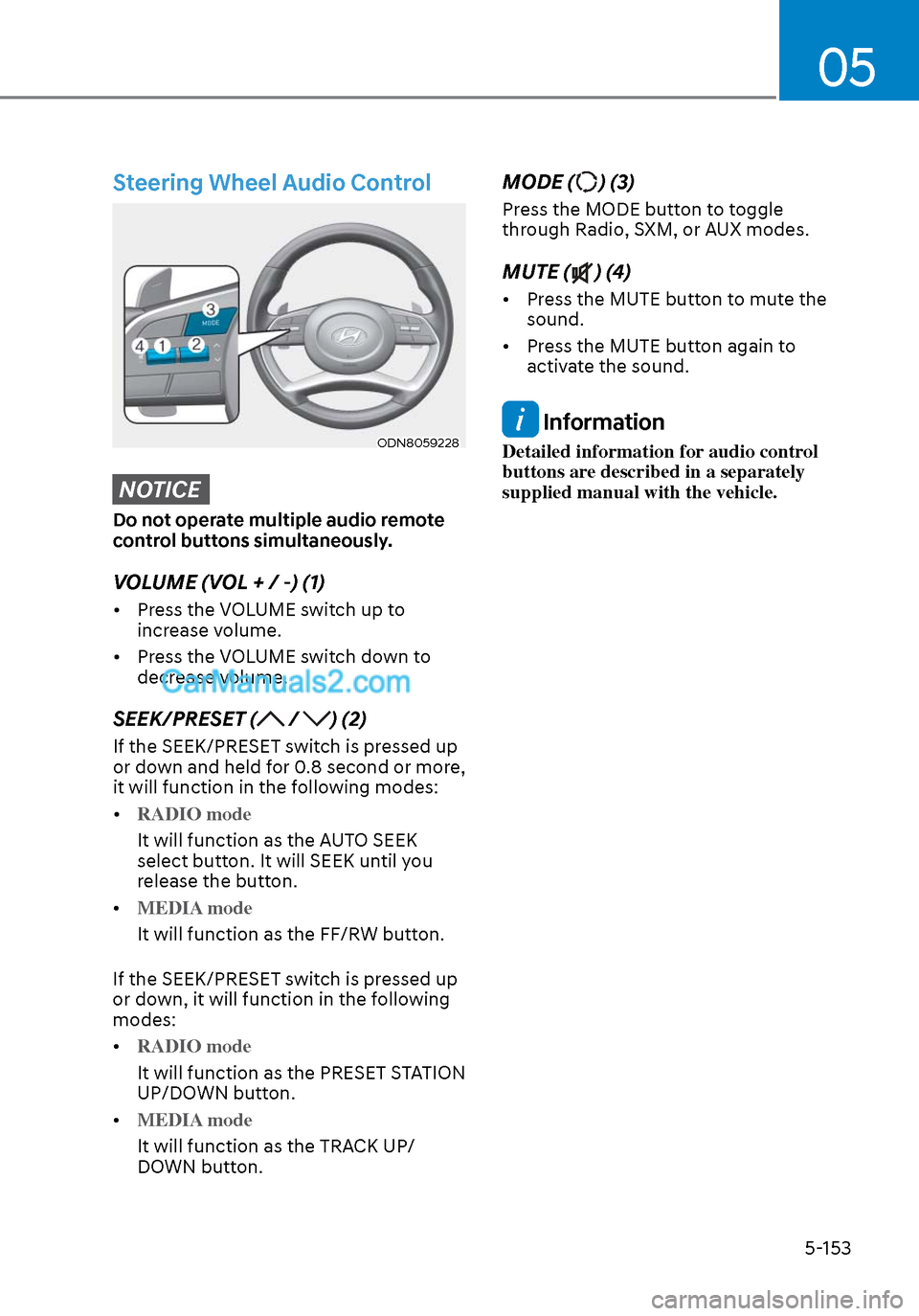
Steering Wheel Audio Control
ODN8059228ODN8059228
NOTICE
Do not operate multiple audio remote
control buttons simultaneously.
VOLUME (VOL + / -) (1)
• Press the VOLUME switch up to increase volume.
• Press the VOLUME switch down to decrease volume.
SEEK/PRESET ( / ) (2)
If the SEEK/PRESET switch is pressed up
or down and held for 0.8 second or more,
it will function in the following modes:
• RADIO mode
It will function as the AUTO SEEK
select butt
on. It will SEEK until you
release the button.
• MEDIA mode
It will function as the FF/RW button.
If the SEEK/PRESET s
witch is pressed up
or down, it will function in the following
modes:
• RADIO mode
It will function as the PRESET STATION
UP/DOWN butt
on.
• MEDIA mode
It will function as the TRACK UP/
DOWN butt
on.
MODE () (3)
Press the MODE button to toggle
through Radio, SXM, or AUX modes.
MUTE () (4)
• Press the MUTE button to mute the sound.
• Press the MUTE button again to activate the sound.
Information
Detailed information for audio control
buttons are described in a separately
supplied manual with the vehicle.
Page 285 of 537

6
6. While Driving
Before Driving ........................................................................\
........................ 6-5Before Entering the Vehicle ........................................................................\
............. 6-5
Before Starting ........................................................................\
................................. 6-5
Ignition Switch ........................................................................\
.......................6-6Key Ignition Switch ........................................................................\
........................... 6-6
Engine Start/Stop Button ........................................................................\
................ 6-9
Remote Start ........................................................................\
.................................... 6-12
Automatic Transmission ........................................................................\
.......6-13Automatic Transmission Operation ........................................................................\
6-13
Parking .................................................................\
....................................................6-16
LCD Display Message ........................................................................\
...................... 6-17
Good Driving Practices ........................................................................\
..................6-18
Paddle Shifter (Manual Shift Mode) ......................................................................6-\
19
Brake System ........................................................................\
........................ 6-20Power Brakes ........................................................................\
.................................. 6-20
Disc Brakes Wear Indicator......................................................................\
.............. 6-20
Electronic Parking Brake (EPB) ........................................................................\
....... 6-21
Auto Hold ........................................................................\
........................................ 6-24
Anti-lock Brake System (ABS) ..................................................................... 6-27Electronic Stability Control (ESC) ........................................................................\
. 6-29
Vehicle Stability Management (VSM) ....................................................................6-31
Hill-Start Assist Control (HAC) ........................................................................\
....... 6-32
Good Braking Practices ................................................................\
......................... 6-32
ISG (Idle Stop and Go) system..................................................................... 6-33To Activate the ISG System ........................................................................\
............ 6-33
To Deactivate the ISG System ........................................................................\
....... 6-35
ISG System Malfunction ........................................................................\
................ 6-35
Battery Sensor Deactivation ........................................................................\
.......... 6-36
Drive Mode Integrated Control System ...................................................... 6-37Drive Mode ........................................................................\
..................................... 6-37
Page 286 of 537
 - Sensor Fusion .................. 6-40System Setting and Activation ........................................................................\
..... 6-40
F")
Forward Collision – Avoidance Assist (FCA) - Sensor Fusion .................. 6-40System Setting and Activation ........................................................................\
..... 6-40
FCA Warning Message and Brake Control ............................................................ 6-42
FCA Sensor ........................................................................\
..................................... 6-45
System Malfunction ........................................................................\
....................... 6-47
Limitations of the System ........................................................................\
..............6-48
Forward Collision-Avoidance Assist - Junction Turning ...................................... 6-55
Lane Keeping Assist (LKA) ........................................................................\
...6-59LKA Operation ........................................................................\
................................ 6-61
LKA System Function Change ........................................................................\
....... 6-61
Warning Light and Message ........................................................................\
..........6-64
Limitations of the System ........................................................................\
.............. 6-65
Blind-Spot Collision Warning (BCW) /
Blind-Spot Collision-Avoidance Assist (BCA) ............................................. 6-67
System Description ........................................................................\
........................ 6-67
System Setting and Activation ........................................................................\
......6-68
Warning and System Control ........................................................................\
......... 6-70
Detecting Sensors (Front view camera and Rear corner radar) .......................... 6-72
Limitations of the System ........................................................................\
.............. 6-75
Driver Attention Warning (DAW) ................................................................ 6-79System Setting and Operation ........................................................................\
...... 6-79
Resetting the System ........................................................................\
..................... 6-81
System Standby ........................................................................\
.............................. 6-82
System Malfunction ........................................................................\
....................... 6-82
Leading Vehicle Departure Alert ........................................................................\
...6-84
Blind-Spot View Monitor (BVM) .................................................................. 6-87
Smart cruise control (SCC) ........................................................................\
6-88
Smart Cruise Control Switch ........................................................................\
.........6-89
To Convert to Cruise Control Mode ......................................................................6-\
89
Smart Cruise Control Speed ........................................................................\
......... 6-90
Smart Cruise Control Vehicle-to-Vehicle Distance ..............................................6-96
Limitations of the System ........................................................................\
............. 6-101
6
Page 289 of 537
06
6-5
Before Entering the Vehicle
• Be sure all windows, outside mirror(s), and outside lights are clean and
unobstructed.
• Remove frost, snow, or ice.
• Visually check the tires for uneven wear and damage.
• Check under the vehicle for any sign of leaks.
• Be sure there are no obstacles behind you if you intend to back up.
Before Starting
• Make sure the hood, the trunk, and the doors are securely closed and
locked.
• Adjust the position of the seat and steering wheel.
• Adjust the inside and side view mirrors.
• Verify all the lights work.
• Fasten your seatbelt. Check that all passengers have fastened their
seatbelts.
• Check the gauges and indicators in the instrument panel and the
messages on the instrument display
when the ignition switch is in the ON
position.
• Check that any items you are carrying are stored properly or fastened down
securely.
WARNING
To reduce the risk of SERIOUS INJURY or
DEATH, take the following precautions:
• ALWAYS wear your seat belt. All
passengers must be properly belted
whenever the vehicle is moving.
For more information, refer to "Seat
Belts" in chapter 3.
• Always drive defensively. Assume
other drivers or pedestrians may be
careless and make mistakes.
• Stay focused on the task of driving.
Driver distraction can cause
accidents.
• Leave plenty of space between you
and the vehicle in front of you.
WARNING
NEVER drink alcohol or take drugs and
drive.
Drinking alcohol or taking drugs and
driving is dangerous and may result in
an accident and SERIOUS INJURY or
DEATH.
Drunk driving is the number one
contributor to the highway death
toll each year. Even a small amount
of alcohol will affect your reflexes,
perceptions and judgment. Just
one drink can reduce your ability to
respond to changing conditions and
emergencies and your reaction time
gets worse with each additional drink.
Driving while under the influence
of drugs is as dangerous or more
dangerous than driving under the
influence of alcohol.
You are much more likely to have a
serious accident if you drink or take
drugs and drive. If you are drinking or
taking drugs, don't drive. Do not ride
with a driver who has been drinking
or taking drugs. Choose a designated
driver or call a taxi.
BEFORE DRIVING
Page 290 of 537

While Driving6-6
Key Ignition Switch (if equipped)
WARNING
To reduce the risk of SERIOUS INJURY or
DEATH, take the following precautions:
• NEVER allow children or any person
who is unfamiliar with the vehicle to
touch the ignition switch or related
parts. Unexpected and sudden
vehicle movement can occur.
• NEVER reach through the steering
wheel for the ignition switch, or any
other control, while the vehicle is in
motion. The presence of your hand
or arm in this area may cause a loss
of vehicle control resulting in an
accident.
OAE056172LOAE056172L
Whenever the front door is opened, the
ignition switch will illuminate, provided
the ignition switch is not in the ON
position. The light will go off immediately
when the ignition switch is turned on or
go off after about 30 seconds when the
door is closed. (if equipped)
WARNING
NEVER turn the ignition switch to the
LOCK or ACC position while the vehicle
is in motion except in an emergency.
This will result in the engine turning
off and loss of power assist for the
steering and brake systems. This may
lead to loss of directional control and
braking function, which could cause an
accident.
Before leaving the driver's seat, always
make sure the shift button is in P (Park)
position, apply the parking brake,
and turn ignition switch to the LOCK
position.
Unexpected vehicle movement may
occur if these precautions are not
followed.
IGNITION SWITCH
LOCK ACC
ON
START
Page 291 of 537
06
6-7
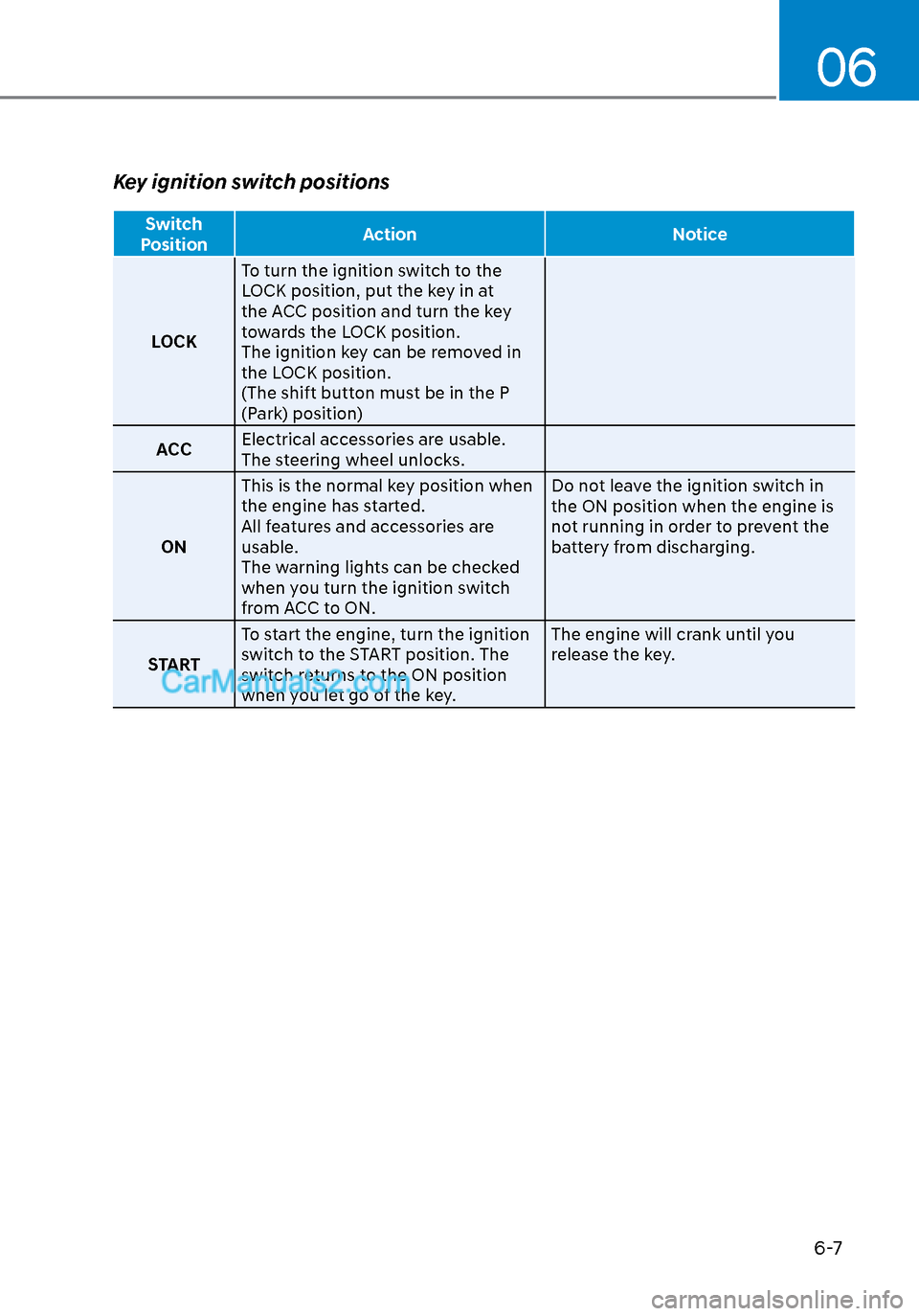
Key ignition switch positions
Switch
Position Action Notice
LOCK T
o turn the ignition switch to the
LOCK position, put the key in at
the ACC position and turn the key
towards the LOCK position.
The ignition key can be removed in
the LOCK position.
(The shift button must be in the P
(Park) position)
ACC Electrical accessories are usable.
The steering wheel unlocks.
ON This is the normal key position when
the engine has started.
All features and accessories are
usable.
The warning lights can be checked
when you turn the ignition switch
from ACC to ON. Do not leave the ignition switch in
the ON position when the engine is
not running in order to prevent the
battery from discharging.
START To start the engine, turn the ignition
switch to the START position. The
switch returns to the ON position
when you let go of the key. The engine will crank until you
release the key.
Page 292 of 537
While Driving6-8
Starting the engine
WARNING
Always wear appropriate shoes when
operating your vehicle.
Unsuitable shoes, such as high heels,
ski boots, sandals, flip-flops, etc., may
interfere with your ability to use the
brake and accelerator pedals.
1. Make sure the parking brake is applied.
2. Make sure the gear is in P (Park).
3. Depress the brake pedal.
4. Turn the ignition switch to the START position. Hold the key (maximum of
10 seconds) until the engine starts and
release it.
Information
• It is best to maintain a moderate engine
speed until the vehicle engine comes
up to normal operating temperature.
Avoid harsh or abrupt acceleration or
deceleration while the engine is still
cold.
• Whether the engine is cold or warm,
always start the vehicle with your foot
on the brake pedal. Do not depress the
accelerator while starting the vehicle.
Do not rev the engine while warming
it up.
NOTICE
To prevent damage to the vehicle:
• Do not hold the ignition key in the
START position for more than 10
seconds. Wait 5 to 10 seconds before
trying again.
• Do not push or tow your vehicle to
start the engine.
Turning off the engine
1. Stop the vehicle and depress the
brake pedal fully.
2. Shift the gear to P (Park).
3. Turn the ignition switch to the off position and apply the parking brake.
Page 296 of 537
While Driving6-12
NOTICE
To prevent damage to the vehicle:
When the stop lamp switch fuse is
blown, you can't start the engine
normally. Replace the fuse with a new
one. If you are not able to replace
the fuse, you can start the engine by
pressing and holding the Engine Start/
Stop button for 10 seconds with the
Engine Start/Stop button in the ACC
position.
Do not press the Engine Start/Stop
button for more than 10 seconds except
when the stop lamp switch fuse is
blown.
For your safety always depress the
brake pedal before starting the engine.
ODN8069002ODN8069002
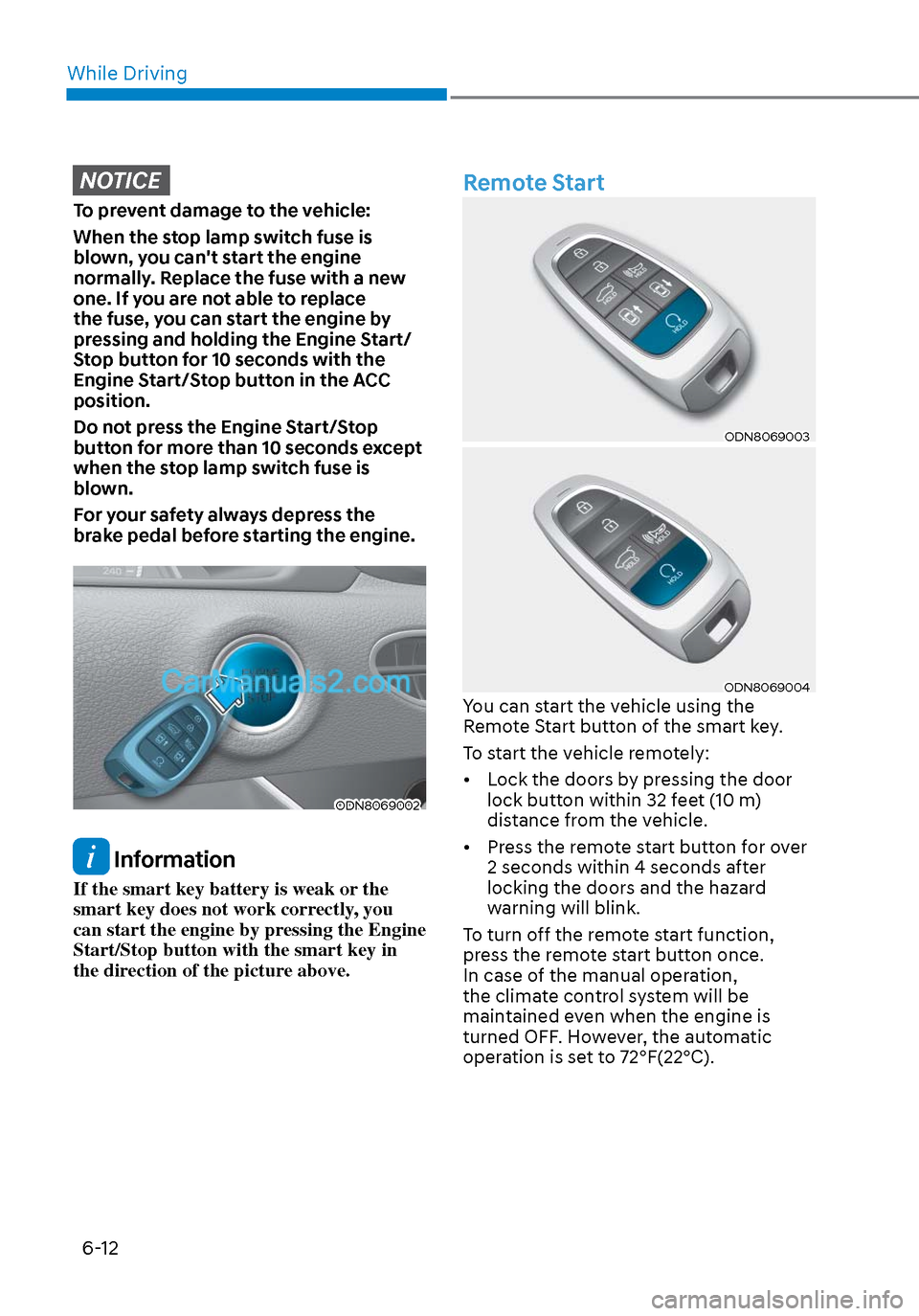
Information
If the smart key battery is weak or the
smart key does not work correctly, you
can start the engine by pressing the Engine
Start/Stop button with the smart key in
the direction of the picture above.
Remote Start
ODN8069003ODN8069003
ODN8069004ODN8069004You can start the vehicle using the
Remote Start button of the smart key.
To start the vehicle remotely:
• Lock the doors by pressing the door lock button within 32 feet (10 m)
distance from the vehicle.
• Press the remote start button for over 2 seconds within 4 seconds after
locking the doors and the hazard
warning will blink.
To turn off the remote start function,
press the remote start button once.
In case of the manual operation,
the climate control system will be
maintained even when the engine is
turned OFF. However, the automatic
operation is set to 72°F(22°C).