Page 428 of 599
uuWhen Driving uShifting
426
Driving
Come on to inform you that upshifting or
downshifting is necessary to prevent the
engine from over revving or stalling.
The shift up indicator:
Comes on when upshifting is recommended.
The shift down indicator:
Comes on when downshifting is
recommended.
■Shift Up/Down Indicators*1Shift Up/Down Indicators*
This indicator will not prom pt you to downshift to
increase engine br aking. It is up to you to downshift
to increase engine brak ing when driving downhill.
Always shift down at the appropriate vehicle speed.
Ambient meter color may change if you do not
change gears when a shif t indicator illuminates.
Road and traffic c onditions may require you to shift
at times other than those indicated.
* Not available on all models
20 FIT-31T5A6500.book 426 ページ 2019年9月26日 木曜日 午後4時41分
Page 430 of 599

428
uuWhen Driving uCruise Control*
Driving
Cruise Control*
Maintains a constant vehicle speed without having to keep your foot on the
accelerator. Use cruise control on freeways or open roads where you can travel at a
constant speed with little acceleration or deceleration.1Cruise Control*
It may not be possible to maintain a constant speed
when driving uphill or downhill.
When not using cruise control:
Turn off cruise control by pressing the CRUISE
button.
While in ECON mode, it may take relatively more time
to accelerate to maintain the set speed.
When the engine speed slows down, try to
downshift.
You can maintain the set sp eed if you change gear
within five seconds.
3WARNING
Improper use of the cruise control can lead
to a crash.
Use the cruise control only when traveling
on open highways in good weather.
Models with ECON system
Manual transmission models
■Shift positions for cruise control:
In ( D or (S
When to use
Always keep sufficient distance
between you and the vehicle in
front of you.
Continuously variable transmission models
■Vehicle speed for cruise control:
Desired speed in a range above
roughly 25 mph (40 km/h) ~
How to use CRUISE MAIN is on in the
instrument panel.
Cruise control is ready to use.
■Press the CRUISE
button on the
steering wheel.
* Not available on all models
20 FIT-31T5A6500.book 428 ページ 2019年9月26日 木曜日 午後4時41分
Page 443 of 599
441
uuWhen Driving uAdaptive Cruise Control (ACC)*
Continued
Driving
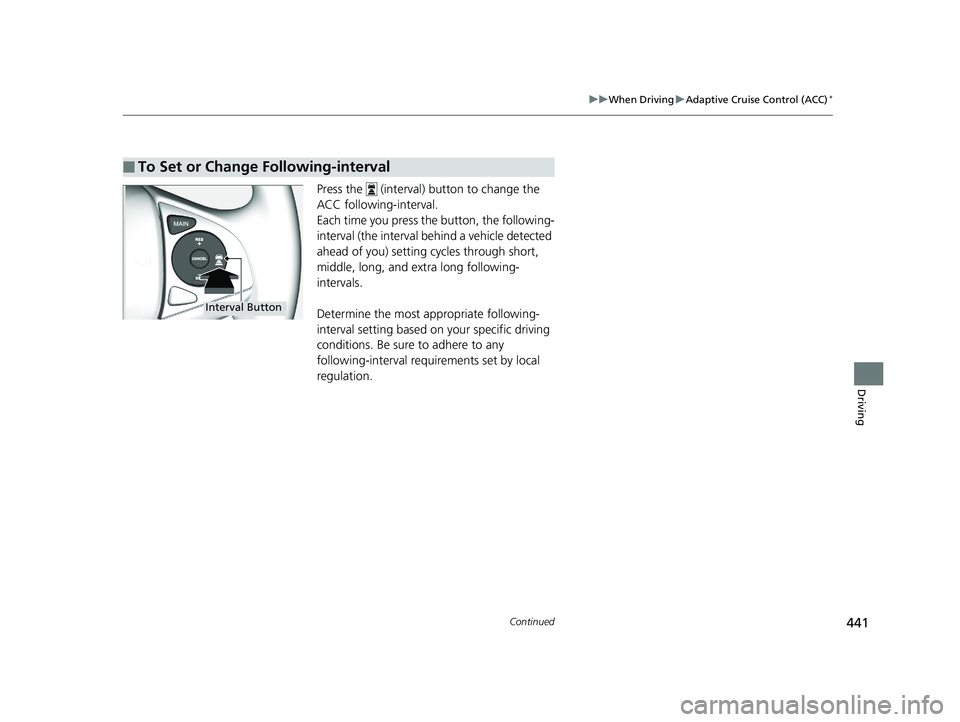
Press the (interval) button to change the
ACC following-interval.
Each time you press th e button, the following-
interval (the interval behind a vehicle detected
ahead of you) setting cycles through short,
middle, long, and extra long following-
intervals.
Determine the most appropriate following-
interval setting based on your specific driving
conditions. Be sure to adhere to any
following-interval requirements set by local
regulation.
■To Set or Change Following-interval
Interval Button
20 FIT-31T5A6500.book 441 ページ 2019年9月26日 木曜日 午後4時41分
Page 457 of 599
Continued455
uuWhen Driving uLane Keeping Assist System (LKAS)*
Driving
3. Keep your vehicle near the center of the
lane while driving.
u The dotted outer lines change to solid
ones once the system starts operating
after detecting the left and right lane
markings.
To cancel the LKAS:
Press the MAIN or LKAS button.
The LKAS is turned off every time you stop the
engine, even if you turned it on the last time
you drove the vehicle.
■To Cancel1 To Cancel
Pressing the MAIN button also turns ACC on and off.
MAIN Button
LKAS Button
20 FIT-31T5A6500.book 455 ページ 2019年9月26日 木曜日 午後4時41分
Page 464 of 599

uuWhen Driving uLaneWatchTM*
462
Driving
■Customizing the LaneWatch settings
You can customize the following items using the audio/information screen.
• Show with Turn Signal: Selects whether LaneWatch monitor comes on when
you operate the turn signal lever.
• Display Time after Turn Signal Off: Changes the remaining Lane Watch
display time after you pull the turn signal lever back.
• Reference Line: Selects whether the reference lin es appear on the LaneWatch
monitor.
• Display: Adjusts display settings.
2Customized Features P. 328
■Reference Lines
Three lines that appear on the screen can give
an idea of how far the vehicles or objects on
the screen are from your vehicle, respectively.
If an object is near line 1 (in red), it indicates
that it is close to your vehicle whereas an
object near line 3 is farther away.
1 LaneWatchTM*
The LaneWatch camera view is restricted. Its unique
lens makes objects on the screen slightly look
different from what they are.
LaneWatch display does not come on when the shift
lever is in
( R.
For proper LaneWatch operation:
•The camera is located in the passenger side door
mirror. Always keep this area clean. If the camera
lens is covered with dirt or moisture, use a soft,
moist cloth to keep the lens clean and free of
debris.
•Do not cover the camera lens with labels or stickers
of any kind.
•Do not touch the camera lens.
1 Reference Lines
The area around the reference li ne 1 (red) is very close
to your vehicle. As always, make sure to visually
confirm the safety of a la ne change before changing
lanes.
The distance betwee n your vehicle and lines 1, 2 and
3 on the screen vary depending on road conditions
and vehicle loading. For ex ample, the reference lines
on the screen may seem to appear closer than the
actual distances when the rear of your vehicle is more
heavily loaded.
Consult a dealer if:
•The passenger side door mirr or, or area around it is
severely impacted, resulting in changing the
camera angle.
•The LaneWatch display doe s not come on at all.
* Not available on all models
20 FIT-31T5A6500.book 462 ページ 2019年9月26日 木曜日 午後4時41分
Page 485 of 599

483
uuMulti-View Rear Camera uAbout Your Multi-View Rear Camera
Driving
You can view three different camera an gles on the audio/information screen.
Press the LIST/SELECT (selector) knob to switch the angle.
Touch the appropriate icon to switch the angle. : Wide view
: Normal view
: Top down view
• If the last used viewing mode was Wide or Normal, the same mode is selected the
next time you put the transmission into
(R.
• If Top down view was last used before you turned off the engine, Wide View
mode is selected next time you turn the ignition switch to ON
(w*1 and put the
transmission into
(R.
• If Top down view was last used more than 10 seconds after you put the
transmission out of
(R, Wide View mode is selected the next time you put the
transmission into
(R.
*1 : Models with the smart entry system have an ENGINE START/STOP button instead of an ignition switch.
1About Your Multi-View Rear Camera
When you select MENU on the rear camera screen,
you can change the Display adjustment
*2.
*2: In order to comply with motor vehicle safety regulations,
the system has been programmed to keep the setting for
Contrast and Black Level consta nt, regardless of any manual
adjustments made.
Canadian models Models with display audio systemModels with color audio system
Models with display audio system
All models
20 FIT-31T5A6500.book 483 ページ 2019年9月26日 木曜日 午後4時41分
Page 495 of 599

493Continued
Maintenance
Maintenance MinderTM
If the engine oil life is less than 15%, you will see the Maintenance Minder messages
appear on the information display or the multi-information display every time you
turn the ignition switch to ON
(w*1. The messages notify you when to change the
engine oil, or when to bring your vehi cle to a dealer for indicated maintenance
services.
To Use Maintenance MinderTM
1. Turn the ignition switch to ON (w.
2. Press the (select/reset) knob repeatedly
until the engine oil life appears on the
information display.
The Maintenance Minder indicator ( ) stays
on in the instrument panel after the engine oil
life becomes 0% . Have the indicated
maintenance done by a dealer immediately.
*1 : Models with the smart entry system have an ENGINE START/STOP button instead of an ignition switch.
■Displaying the Maintenance Minder Information
Models without multi-information display
1Displaying the Maintena nce Minder Information
Based on the engine ope rating conditions, the
remaining engine oi l life is calculated and displayed
as a percentage.
Displayed Engine Oil Life (%)Calculated Engine Oil Life (%)
100 100 to 91
9090 to 81
80 80 to 71
7070 to 61
60 60 to 51
5050 to 41
40 40 to 31
3030 to 21
20 20 to 16
1515 to 11
10 10 to 6
55 to 1
0 0
20 FIT-31T5A6500.book 493 ページ 2019年9月26日 木曜日 午後4時41分
Page 558 of 599

556
uuEngine Does Not Start uEmergency Engine Stop
Handling the Unexpected
Emergency Engine Stop
The ENGINE START/STOP button may be used to stop the engine due to an
emergency situation even while driving. If you must stop the engine, do either of the
following operations:
• Press and hold the ENGINE START/STOP button for about two seconds.
• Firmly press the ENGINE START/STOP button three times.
The steering wheel will not lock. However, because turning off the engine disables
the power assist the engine provides to the steering and braking systems, it will
require significantly more physical effort an d time to steer and slow the vehicle. Use
both feet on the brake pedal to slow down the vehicle and stop immediately in a
safe place. With manual transmission models you can also downshift the
transmission to utilize engine braking.
The power mode is in ACCESSORY when the engine is stopped.
To change the mode to VEHICLE OFF, put the transmission into
(P after the vehicle
comes to a complete stop.
Then press the ENGINE START/STOP button twice without depressing the brake
pedal.
The power mode changes to VEHICLE OFF.
Models with smart entry system
1 Emergency Engine Stop
Do not press the ENGINE START/STOP button while
driving unless it is absolute ly necessary for the engine
to be turned off.
If you press the ENGINE START/STOP button while
driving, the beeper sounds.
Continuously variable transmission models
Canadian continuously variable transmission models
Manual transmission models
20 FIT-31T5A6500.book 556 ページ 2019年9月26日 木曜日 午後4時41分