Page 279 of 671
Continued277
uuAudio System Basic Operation uAudio/Information Screen
Features
■To move icons on the home screen
You can change location on the home screen. 1.Select and hold an icon.
u The screen switches to the customization
screen.
2. Drag and drop the icon to where you want
it to be.
3. Select OK.
u The screen will return to the home
screen.1To move icons on the home screen
You can also move the Phone, Info, Audio ,
Settings , Navigation
*, HondaLink , Smartphone
Connection , App List ( ), and Instrument Panel
icons in the same manner.
Select and hold.
Drag and drop.
* Not available on all models
20 CR-V PET ELP_MAP_HMIN_HCM_J-31TLA6310.book 277 ページ 2019年10月3日 木曜日 午後4時55分
Page 280 of 671
uuAudio System Basic Operation uAudio/Information Screen
278
Features
■To remove icons on the home screen
You can delete the icons on the home screen. 1.Select and hold an icon.
u The screen switches to the customization
screen.
2. Drag and drop the icon you want to remove
to the trash icon.
u The icon is removed from the home
screen.
3. Select OK.
u The screen will return to the home
screen.1To remove icons on the home screen
You cannot delete the Phone, Info, Audio ,
Settings , Navigation
*, HondaLink , Smartphone
Connection , App List ( ), and Instrument Panel
icons.
Apps or widgets will not be deleted by deleting the
icon on the home screen.
Select and hold.
Drag and drop to
trash icon.
* Not available on all models
20 CR-V PET ELP_MAP_HMIN_HCM_J-31TLA6310.book 278 ページ 2019年10月3日 木曜日 午後4時55分
Page 283 of 671
Continued281
uuAudio System Basic Operation uAudio/Information Screen
Features
You can change menu icons on the right side of Audio, Phone , and Info screen.
1. Select any of the three icons ( Audio/
Phone /Info ) on the screen, then select and
hold the menu icon.
u Selecting the or icon, you can
change Audio, Phone , or Info on the
Menu Customize screen.
2. Select and hold the menu icon you want to
change, then drag and drop the icon to the
bottom.
3. Select and hold the menu icon you want to
add, then drag and drop the icon above.
4. Select OK.
■Menu Customize1Menu Customize
You can also use the method below to change the
menu icon:
Select Settings System Home tab
Menu Icon Position
Select and hold
Menu Icons
To change Menu Icon
To add
Drag and drop
Drag and drop
20 CR-V PET ELP_MAP_HMIN_HCM_J-31TLA6310.book 281 ページ 2019年10月3日 木曜日 午後4時55分
Page 288 of 671

286
uuAudio System Basic Operation uVoice Control Operation
Features
Voice Control Operation
Your vehicle has a voice control system that allows hands-free operation.
The voice control system uses the ( Talk) and (hang-up/back) buttons on
the steering wheel and a microphone near the map lights on the ceiling.
To achieve optimum voice recognition when using the voice control system:
• Make sure the correct screen is displa yed for the voice command that you are
using.
The system recognizes only certain commands.
Available voice commands.
2 Voice Portal Screen P. 287
•Close the windows and moonroof*.
• Adjust the dashboard and side vents so air does not blow onto the microphone
on the ceiling.
• Speak clearly in a natural speaking vo ice without pausing between words.
• Reduce any background noise if possible. The system may misinterpret your
command if more than one person is speaking at the same time.
■Voice Recognition
1Voice Control Operation
When you press the button, a helpful prompt asks
what you would like to do. Press and release the
button again to bypass this prompt and give a
command.
1 Voice Recognition
The voice control system can only be used from the
driver’s seat because the microphone unit removes
noises from the front passenger’s side.
* Not available on all models
20 CR-V PET ELP_MAP_HMIN_HCM_J-31TLA6310.book 286 ページ 2019年10月3日 木曜日 午後4時55分
Page 289 of 671

287
uuAudio System Basic Operation uVoice Control Operation
Continued
FeaturesWhen the (Talk) button is pressed,
available voice comma nds appear on the
screen.
For a complete list of commands, say “ Voice
Help ” after the beep or select Voice Help.
You can see the list of commands in Voice
Info on the Info Menu screen. Select Info,
then select MENU.
The system only recognizes the commands
on the following pages, at certain screens.
Free form voice commands are not
recognized.
*1: Models with navigation system
■Voice Portal Screen■Phone Call
This can be only used when the phone is
connected. When the sy stem recognizes the
Phone call command, the screen will
change to the voice re cognition screen for
phone commands.
• Dial by number
• Call history
• Redial
• Call
• Call
• Call Police
• Call 911
Phone Call commands are not available if
using Apple CarPlay
TM.
■Music Search
This can be only used when the iPod or USB
device is connected.
■Climate Control*1
When the system recognizes the Climate
Control command, the screen will change
the dedicated screen to the climate control
voice recognition screen.
2 Climate Control Commands*1 P. 289
■Audio*1
When the system recognizes the Audio
command, the screen will change to the
audio voice recognition screen.
• Audio On/Off
• Radio FM/AM/SXM
*
•PANDORA*
•iPod
• USB
• Other Sources
Pandora ®
* cannot be used while Android
AutoTM is active.
■Navigation*1
The screen changes to the navigation
screen.
2 Refer to the Navigation System Manual
■HondaLink
This can be only used when the phone is
connected.
■Voice Setting
The screen changes to the Voice Recog.
tab on the System Settings screen.
* Not available on all models
20 CR-V PET ELP_MAP_HMIN_HCM_J-31TLA6310.book 287 ページ 2019年10月3日 木曜日 午後4時55分
Page 290 of 671

288
uuAudio System Basic Operation uVoice Control Operation
Features
■Voice Help
You can see a list of the available
commands on the screen.
• Useful Commands
• Phone Commands
• Audio Commands
• Climate Control Commands
• General Commands
• Music Search Commands
• On Screen Commands
The system accepts th ese commands on the
voice portal top screen.
• Call
• Call
• What time is it?
• What is today’s date?
*1: Models with navigation system
■Useful Commands
The system accepts these commands on the
dedicated screen for the voice recognition
of the phone.
• Call by number
• Call by name
• Call
• Call
The system accepts these commands on the
dedicated screen for the voice recognition
of the audio.
■Radio FM Commands
• Radio tune to <87.7-107.9> FM
• Radio tune to <87.7 -107.9> HD <1-8>
FM
• Radio FM preset # (#:1-12)
■Radio AM Commands
• Radio tune to <530-1710> AM
• Radio AM preset # (#:1-6)
■Radio SXM Commands*
•SXM channel <1-999>
■Phone Commands
■Audio Commands*1
•SXM channel
name, traffic and weather city name,
sports team name>
• Radio SXM preset <1-12>
■Pandora ® Commands*
• PANDORA play
■iPod Commands
• iPod play
• iPod play track # (#:1-30)
• Music Search
• What album is this?
• What am I listening to?
■USB Commands
• USB play
• USB play track # (#:1-30)
• Music Search
• What album is this?
• What am I listening to?
■Bluetooth ® audio Commands
• Bluetooth audio play
NOTE:
Bluetooth® Audio commands may not work
on some phones or Bluetooth ® Audio
devices.
* Not available on all models
20 CR-V PET ELP_MAP_HMIN_HCM_J-31TLA6310.book 288 ページ 2019年10月3日 木曜日 午後4時55分
Page 304 of 671
uuAudio System Basic Operation uPlaying an iPod
302
Features
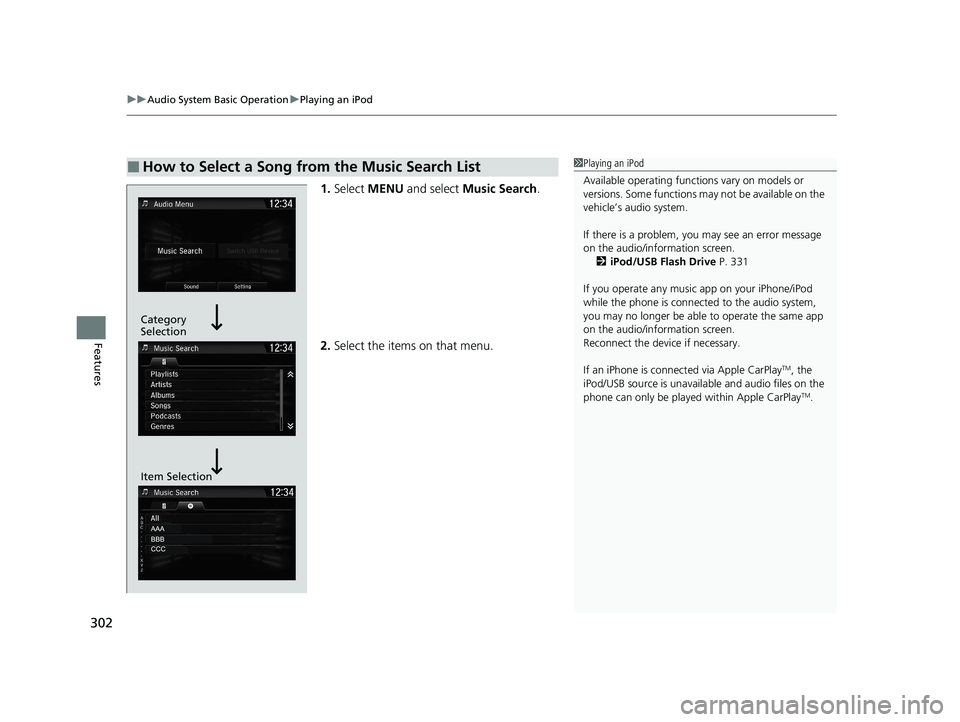
1. Select MENU and select Music Search .
2. Select the items on that menu.
■How to Select a Song from the Music Search List1Playing an iPod
Available operating functi ons vary on models or
versions. Some functions ma y not be available on the
vehicle’s audio system.
If there is a problem, you may see an error message
on the audio/information screen. 2 iPod/USB Flash Drive P. 331
If you operate any musi c app on your iPhone/iPod
while the phone is connected to the audio system,
you may no longer be able to operate the same app
on the audio/information screen.
Reconnect the devi ce if necessary.
If an iPhone is connect ed via Apple CarPlay
TM, the
iPod/USB source is unavailab le and audio files on the
phone can only be played within Apple CarPlay
TM.
Category
Selection
Item Selection
20 CR-V PET ELP_MAP_HMIN_HCM_J-31TLA6310.book 302 ページ 2019年10月3日 木曜日 午後4時55分
Page 307 of 671

Continued305
uuAudio System Basic Operation uSong By VoiceTM (SBV)
Features
■Searching for music using SBV
1.Set the Song by Voice setting to On.
2. Press the (Talk) button and say “ Music
Search ” to activate the SBV feature for the
USB flash drive and iPod.
3. Then, say a next command.
u Example 1: Say “ (List)‘Artist A’” to view a
list of songs by that artist. Select the
desired song to start playing.
u Example 2: Say “ Play ‘Artist A’” to start
playing songs by that artist.
4. To cancel SBV, press the (hang-up/
back) button on the steering wheel. The
selected song continues playing.
Once you have canceled this mode, you need
to press the button and say “ Music
Search ” again to re-activate this mode.1Searching for music using SBV
Song By Voice
TM Commands List
2 Song By Voice Commands P. 289
NOTE:
Song By Voice
TM commands are available for tracks
stored on the USB flash drive or iPod.
You can add phonetic modi fications of difficult
words so that it is easier for SBV to recognize artists,
songs, albums, and composers in voice commands. 2 Phonetic Modification P. 306
SBV is not available wh en using Apple CarPlay
TM. Use
Siri ® Eyes Free instead.
20 CR-V PET ELP_MAP_HMIN_HCM_J-31TLA6310.book 305 ページ 2019年10月3日 木曜日 午後4時55分