Page 186 of 704

184
uuOperating the Switches Around the Steering Wheel uRear Defogger/Heated Door Mirror* Button
Controls
Rear Defogger/Heated Door Mirror* Button
Press the rear defogger and heated door mirror button to defog the rear window
and mirrors when the ignition switch is in ON
(w*1.
The rear defogger and heated door mirrors
automatically switch off after 10-30 minutes
depending on the outside temperature.
However, if the outside temperature is 32°F
(0°C) or below, it does not automatically
switch off.
*1: Models with the smart entry system have an ENGINE START/STOP button instead of an
ignition switch.
1 Rear Defogger/Heated Door Mirror* Button
This system consumes a lot of power, so turn it off
when the window has been defogged.
Also, do not use the system for a long time while the
engine is idling. This may weaken the battery, making
it difficult to start the engine.
When the ignition switch is turned to ON
( w*1 and
the outside temperature is below 41°F (5°C), the
heated door mirror may automatically activate for 10
minutes.
Models with color audio system
Models with Display Audio
* Not available on all models
20 CIVIC 5D HUM (KA KC KL)-31TGG6310.book 184 ページ 2019年11月11日 月曜日 午後2時50分
Page 215 of 704

213Continued
Controls
Climate Control System
Using Automatic Climate Control
The automatic climate control system maintains the interior temperature you select.
The system also selects the proper mix of heat ed or cooled air that raises or lowers
the interior temperature to your pr eference as quickly as possible.
Use the system when the engine is running.
1. Press the AUTO button.
2. Adjust the interior temperature us ing the temperature control dial.
3. Press the (ON/OFF) button to cancel.1Using Automatic Climate Control
If any buttons/icons
* are pressed while using the
climate control system in auto, the function of the
button/icon
* that was pressed wi ll take priority.
The AUTO indicator will go off, but functions
unrelated to the button/icon
* that was pressed will
be controlled automatically.
To prevent cold air from bl owing in from outside, the
fan may not start i mmediately when the AUTO
button is pressed.
If the interior is very warm, you can cool it down
more rapidly by partial ly opening the windows,
turning the system on auto, and setting the
temperature to low. Change the fresh air mode to
recirculation mode until the temperature cools down.
When you set the temperature to the lower or upper
limit, Lo or Hi is displayed.
Models with color audio system
AUTO Button
Temperature
Control Dial
(Recirculation) Button (ON/OFF) Button
Fan Control
Dial
A/C (Air
Conditioning)
Button
Dashboard
vents Dashboard
and floor
vents Floor vents Floor and
defroster
vents
* Not available on all models
20 CIVIC 5D HUM (KA KC KL)-31TGG6310.book 213 ページ 2019年11月11日 月曜日 午後2時50分
Page 216 of 704
uuClimate Control System uUsing Automatic Climate Control
214
Controls
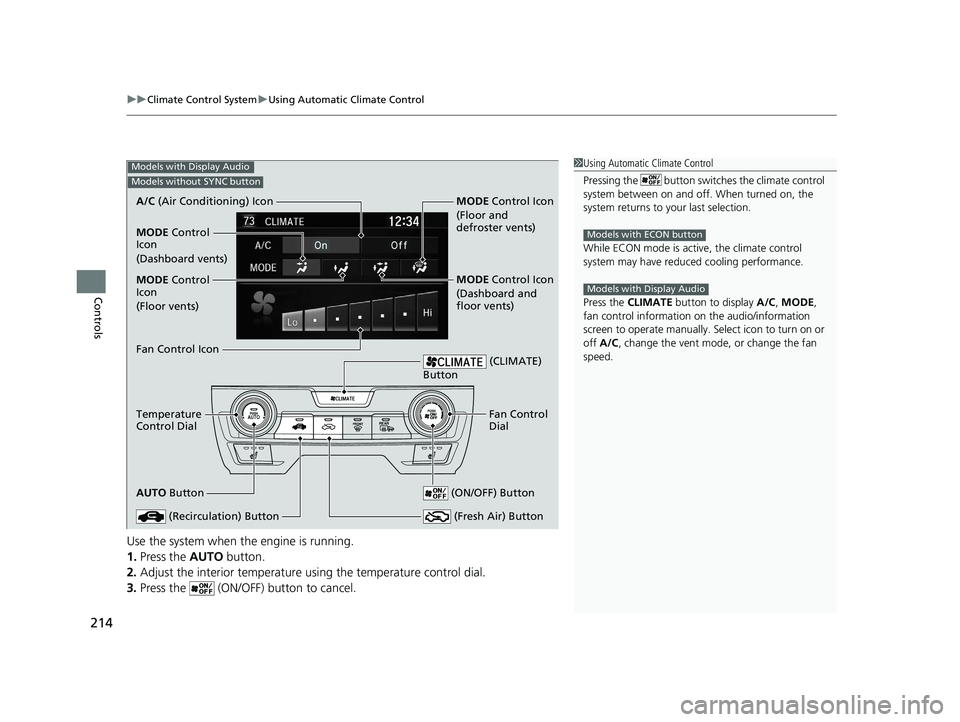
Use the system when the engine is running.
1. Press the AUTO button.
2. Adjust the interior temperature us ing the temperature control dial.
3. Press the (ON/OFF) button to cancel.
1Using Automatic Climate Control
Pressing the button switches the climate control
system between on and off. When turned on, the
system returns to your last selection.
While ECON mode is active, the climate control
system may have reduced cooling performance.
Press the CLIMATE button to display A/C, MODE,
fan control information on the audio/information
screen to operate manually. Select ic on to turn on or
off A/C , change the vent mode , or change the fan
speed.
Models with ECON button
Models with Display Audio
Models with Display Audio
Models without SYNC button
A/C (Air Conditioning) Icon
Fan Control Icon
Temperature
Control Dial
AUTO Button
(Recirculation) Button
(CLIMATE)
Button
Fan Control
Dial
(ON/OFF) Button
(Fresh Air) Button
MODE Control
Icon
(Floor vents)
MODE Control
Icon
(Dashboard vents) MODE Control Icon
(Floor and
defroster vents)
MODE Control Icon
(Dashboard and
floor vents)
20 CIVIC 5D HUM (KA KC KL)-31TGG6310.book 214 ページ 2019年11月11日
月曜日 午後2時50分
Page 217 of 704
215
uuClimate Control System uUsing Automatic Climate Control
Continued
Controls
Use the system when the engine is running.
1. Press the AUTO button.
2. Adjust the interior temperature using the driver’s side or passenger’s side
temperature control dial.
3. Press the (ON/OFF) button to cancel.
Models with Display Audio
Models with SYNC button
A/C (Air Conditioning) Icon
MODE Control
Icon
(Floor vents)
Fan Control Icon
Driver’s Side
Temperature
Control Dial
AUTO Button
(Recirculation) Button
CLIMATE
Button
Passenger’s
Side
Temperature
Control Dial
(ON/OFF) Button
SYNC (Synchronization) Button
MODE Control
Icon
(Dashboard vents) MODE
Control Icon
(Floor and
defroster vents)
MODE Control Icon
(Dashboard and
floor vents)
/ (Fan Control)
Buttons
20 CIVIC 5D HUM (KA KC KL)-31TGG6310.book 215 ページ 2019年11月11日 月曜日 午後2時50分
Page 223 of 704

221
Features
This chapter describes how to operate technology features.
Audio SystemAbout Your Audio System ................ 222
USB Port(s) ....................................... 223
Audio System Theft Protection ......... 225
Audio Remote Controls .................... 226
Audio System Basic Operation ........ 229
Audio/Information Screen ................ 230
Adjusting the Sound ........................ 234
Display Setup ................................... 235
Playing the AM/FM Radio ................. 236
Playing an iPod ................................ 238
Playing a USB Flash Drive ................. 241
Models with color audio system
Playing Bluetooth ® Audio................. 244
Audio System Basic Operation ........ 247
Audio/Information Screen ................ 248
Adjusting the Sound ........................ 269
Display Setup ................................... 270
Voice Control Operation .................. 272
Playing AM/FM Radio ....................... 276
Playing SiriusXM ® Radio
*................. 279
Playing an iPod ................................ 287
Song By Voice
TM (SBV) ...................... 290
Playing Pandora ®*1........................... 294
Playing a USB Flash Drive ................. 296
Models with Display AudioPlaying Bluetooth ® Audio ................ 299
HondaLink ®..................................... 301
Wi-Fi Connection ............................. 306
Siri Eyes Free .................................... 308
Apple CarPlay .................................. 309
Android Auto .................................. 312
Audio Error Messages ...................... 316
General Information on the Audio System..320
Customized Features................ 339, 346
HomeLink ® Universal Transceiver*.. 376
Bluetooth ® HandsFreeLink® ..... 379, 406
*1: Available only on U.S. models.
* Not available on all models
20 CIVIC 5D HUM (KA KC KL)-31TGG6310.book 221 ページ 2019年11月11日 月曜日 午後2時50分
Page 224 of 704

222
Features
Audio System
About Your Audio System
The audio system features AM/FM radio and SiriusXM ® Radio service*. It can also
play USB flash drives, and iPod, iPhone and Bluetooth® devices.
You can operate the audio system from the buttons and switches on the panel, the
remote controls on the steering wheel, or the icons on the touchscreen interface
*.
1About Your Audio System
SiriusXM ® Radio
* is available on a subscription basis
only. For more information on SiriusXM ® Radio*,
contact a dealer.
2 General Information on the Audio System
P. 320
SiriusXM ® Radio
* is available in the United States and
Canada, except Ha waii, Alaska, and Puerto Rico.
SiriusXM ®
* is a registered tra demark of SiriusXM
Radio, Inc.
iPod, iPhone and iTunes are trademarks of Apple Inc.
State or local laws may pr ohibit the operation of
handheld electronic devi ces while operating a
vehicle.
Remote Controls iPod
USB Flash Drive
* Not available on all models
20 CIVIC 5D HUM (KA KC KL)-31TGG6310.book 222 ページ 2019年11月11日 月曜日 午後2時50分
Page 225 of 704

223
uuAudio System uUSB Port(s)
Continued
Features
USB Port(s)
u The USB port (1.0A) is for playing audio
files on a USB flash drive and connecting
a cellular phone and charging device.
u The USB port (1.5A) is for charging
devices, playing audio files and
connecting compatib le phones with
Apple CarPlay or Android Auto.
u To prevent any potenti al issues, be sure
to use an Apple MFi Certified Lightning
Connector for Apple CarPlay, and for
Android Auto, the USB cables should be
certified by USB-IF to be compliant with
USB 2.0 Standard.
Your vehicle comes supplied with a USB
extension cable that runs from the USB port
up through to the front console.
*1: Models with the smart entry system have an ENGINE START/STOP button instead of an
ignition switch.
*2: Pre-installed on U.S. models only.
1USB Port(s)
•Do not leave the iPod or USB flash drive in the
vehicle. Direct sunlight and high temperatures may
damage it.
•We recommend that you us e a USB cable if you are
attaching a USB flash drive to the USB port.
•You may also use your own USB cable.
•Do not connect the iPod or USB flash drive using a
hub.
•Do not use a device such as a card reader or hard
disk drive, as the device or your files may be
damaged.
•We recommend backing up yo ur data before using
the device in your vehicle.
•Displayed messages may vary depending on the
device model and software version.
The USB port can supply up to 1.5A of power. It does
not output 1.5A unless requested by the device.
For amperage details, read the operating manual of
the device that ne eds to be charged.
Under certain condi tions, a device connected to the
port may generate noise in the radio you are listening
to.
USB charge
Models with
color audio
systemModels with
Display
Audio
USB Extension Cable*2Models with color audio system
Models with Display Audio
U.S. models
20 CIVIC 5D HUM (KA KC KL)-31TGG6310.book 223 ページ 2019年11月11日 月曜日 午後2時50分
Page 226 of 704
224
uuAudio System uUSB Port(s)
Features
■In the console compartment*
The USB port (1.0A) is for playing audio files
on the USB flash drive and connecting a
cellular phone and charging device.
u Move the removable beverage holder
tray rearward.
In the console compartment
* Not available on all models
20 CIVIC 5D HUM (KA KC KL)-31TGG6310.book 224 ページ 2019年11月11日 月曜日 午後2時50分

