2020 FORD TRANSIT CONNECT battery
[x] Cancel search: batteryPage 141 of 509

Note:
If you use the socket when the engine
is not running, the battery may run out of
charge.
Note: When you switch the ignition on, you
can use the socket to power 12 volt
appliances with a maximum current rating
of 15 amps.
WIRELESS ACCESSORY
CHARGING WARNING: Wireless charging
devices can affect the operation of
implanted medical devices, including
cardiac pacemakers. If you have any
implanted medical devices, we
recommend that you consult with your
physician.
The system supports one wireless charging
compatible device on the charging area.
Note: Devices without built-in Qi standards
for wireless charging require an additional
Qi receiver or sleeve.
Note: Software and firmware updates to
your device could affect the charging
operation.
Make sure the charging area is clean and
free from obstruction before charging a
device to allow the device to lay flat on the
charging area.
Do not place items with a magnetic strip,
for example passports, parking tickets or
credit cards near the charging area when
charging a device. This could damage the
magnetic strip.
Do not place metal objects, for example
remote controls, coins or keys on or near
the charging area when charging a device.
Metal objects may heat up and degrade
the charging performance. The charging area is below the
audio unit.
Place the device with the charging side
down to begin charging. The charging
stops after your device reaches a full
charge.
Note:
Charging time and temperature are
dependent on the device used. The system
stops charging the device if it reaches a high
temperature.
137
2020 Transit Connect (CHC) Canada/United States of America, CG3739en enUSA, Edition date: 201903, First-Printing Auxiliary Power Points E270527
Page 143 of 509

GENERAL INFORMATION
WARNING: Extended idling at high
engine speeds can produce very high
temperatures in the engine and exhaust
system, creating the risk of fire or other
damage. WARNING: Do not park, idle or
drive your vehicle on dry grass or other
dry ground cover. The emission system
heats up the engine compartment and
exhaust system, creating the risk of fire. WARNING: Do not start the engine
in a closed garage or in other enclosed
areas. Exhaust fumes can be toxic.
Always open the garage door before you
start the engine. WARNING:
Exhaust leaks may
result in entry of harmful and potentially
lethal fumes into the passenger
compartment. If you smell exhaust
fumes inside your vehicle, have your
vehicle inspected immediately. Do not
drive if you smell exhaust fumes.
If you disconnect the battery, your vehicle
may exhibit some unusual driving
characteristics for approximately
5 mi
(8 km) after you reconnect it. This is
because the engine management system
must realign itself with the engine. You
can disregard any unusual driving
characteristics during this period.
The powertrain control system meets all
Canadian interference-causing equipment
standard requirements regulating the
impulse electrical field or radio noise. When you start the engine, avoid pressing
the accelerator pedal before and during
operation. Only use the accelerator pedal
when you have difficulty starting the
engine.
IGNITION SWITCH
Note:
Make sure the key is clean before
inserting it into any lock cylinder.
Note: Do not leave the key in the ignition
for an extended period of time when the
engine is not running. This is to prevent the
vehicle battery from losing charge.
Switching the Ignition Off
Turn the key to position
0.
Switching the Ignition to
Accessory Mode
Turn the key to position
I. Electrical
accessories, for example the radio, operate
without the engine running.
139
2020 Transit Connect (CHC) Canada/United States of America, CG3739en enUSA, Edition date: 201903, First-Printing Starting and Stopping the EngineE247596
Page 144 of 509

Switching the Ignition On
Turn the key to position II. All electrical
circuits and accessories are operational
and the warning lamps and indicators
illuminate.
Starting the Engine
Turn the key to position
III. Release the
key when the engine starts.
PUSH BUTTON IGNITION
SWITCH
Switching the Ignition On to
Accessory Mode Press the push button ignition switch once
without your foot on the brake or clutch
pedal. It is on the instrument panel near
the steering wheel. All electrical circuits
and accessories are operational and the
warning lamps and indicators illuminate.
Press the push button ignition switch again
without your foot on the brake or clutch
pedal to switch the ignition off.
Note:
The system may not function if the
passive key is close to metal objects or
electronic devices, for example keys or a cell
phone. Note:
The ignition turns off if you leave your
vehicle unattended. This is to prevent the
vehicle battery from losing charge.
Note: A valid passive key must be inside
your vehicle to switch the ignition on and
start the engine.
Starting The Engine - Vehicles with
Manual Transmission (If Equipped)
1. Fully press the clutch pedal.
2. Press the push button ignition switch.
Note: If you release the clutch pedal during
engine starting, the engine stops cranking.
Starting The Engine - Vehicles with
Automatic Transmission
(If Equipped)
1. Fully press the brake pedal.
2. Shift into park (P).
3. Press the push button ignition switch.
Note: If you release the brake pedal during
engine starting, the engine stops cranking.
Vehicles with a Diesel Engine
(If
Equipped)
Note: The engine does not crank until the
glow plug indicator turns off. This may take
several seconds in extremely cold
conditions.
Failure to Start - Vehicles with
Manual Transmission
(If Equipped)
The system does not function if:
• The passive key frequencies are
jammed.
• The key battery has no charge.
If you are unable to start the engine, do the
following:
1. Insert the passive key into the backup position. See
Passive Key Backup
Position (page 58).
140
2020 Transit Connect (CHC) Canada/United States of America, CG3739en enUSA, Edition date: 201903, First-Printing Starting and Stopping the EngineE144447
Page 147 of 509

Note:
You can only attempt to start the
engine for a limited amount of time before
the starting system temporarily disables. If
you exceed the starting time limit, a
message may appear and you cannot
attempt to start the engine for at least 15
minutes.
Before starting your vehicle, check the
following:
• Make sure the headlamps and
electrical accessories are off.
• Make sure the parking brake is on.
• Make sure the transmission is in park
(P).
Vehicles with an Ignition Key
1. Fully press the brake pedal.
Note: Do not touch the accelerator pedal.
2. Turn the key to position III.
Note: The engine may continue cranking
for up to 15 seconds or until it starts.
Note: The engine takes longer to start at
lower temperatures. It may crank for several
seconds when very cold.
Vehicles with a Push Button
Ignition Switch
See
Push Button Ignition Switch (page
140).
Failure to Start
If you cannot start the engine after 3
attempts, wait 10 seconds and do the
following:
Vehicles with an Ignition Key
1. Fully press the brake pedal. 2. Apply the parking brake.
3. Shift into park (P).
4. Fully press the accelerator pedal and
hold it there.
5. Turn the key to position
III and wait
until the engine stops.
6. Release the accelerator pedal.
7. Start the engine.
Vehicles with a Push Button Ignition
Switch
See
Push Button Ignition Switch (page
140).
Automatic Engine Shutdown
For vehicles with a push button ignition
switch, the engine shuts down if it has been
idling for an extended period. The ignition
also turns off to save battery power.
Before your vehicle shuts down, a message
appears in the information display showing
a timer counting down. If you do not
intervene within 30 seconds, your vehicle
shuts down. Another message appears in
the information display to inform you that
your vehicle has shut down to save fuel.
Start your vehicle as normal.
Automatic Engine Shutdown Override
You can stop the shutdown, or reset the
timer, at any point before the 30-second
countdown has expired by doing any of the
following:
• Pressing the brake or accelerator pedal.
• Switching off the automatic engine
shutdown in the information display.
• Pressing the
OK or RESET button
during the 30-second countdown.
143
2020 Transit Connect (CHC) Canada/United States of America, CG3739en enUSA, Edition date: 201903, First-Printing Starting and Stopping the Engine
Page 150 of 509

STARTING A FLEX FUEL
ENGINE
Flex Fuel Engine Start System
The speed at which the engine idles
immediately after starting is optimized to
minimize vehicle emissions and maximize
cabin comfort and fuel economy.
Note:
You can only attempt to start the
engine for a limited amount of time before
the starting system temporarily disables. If
you exceed the starting time limit, a
message may appear and you cannot
attempt to start the engine for at least 15
minutes.
Before starting your vehicle, check the
following:
• Make sure the headlamps and
electrical accessories are off.
• Make sure the parking brake is on.
• Make sure the transmission is in park
(P).
Vehicles with an Ignition Key
1. Fully press the brake pedal.
Note: Do not touch the accelerator pedal.
2. Turn the key to position III.
If you have difficulty starting the engine
when the temperature is below
-13°F
(-25°C) press the accelerator pedal to the
midway point of its travel and try again.
Note: The engine may continue cranking
for up to 15 seconds or until it starts.
Note: The engine takes longer to start at
lower temperatures. It may crank for several
seconds when very cold.
Vehicles with Keyless Start
See
Push Button Ignition Switch (page
140). Failure to Start
Vehicles with an Ignition Key
If the engine does not crank when the
ignition key is turned to position III:
1. Fully press the brake pedal.
2. Turn the key to position III until the
engine has started.
Note: The total cranking time without
engine start is limited to prevent the starter
motor overheating. That limit is a function
of number of crank attempts and duration.
Once the limit is exceded, further cranking
is inhibited until after a period of time, for
example 15 to 30 minutes.
Vehicles with Keyless Start
See
Push Button Ignition Switch (page
140).
Automatic Shutdown
This feature automatically shuts down
your vehicle if it has been idling for an
extended period. The ignition also turns
off in order to save battery power. Before
your vehicle shuts down, a message
appears in the information display showing
a timer counting down from 30 seconds.
If you do not intervene within 30 seconds,
your vehicle shuts down. Another message
appears in the information display to
inform you that your vehicle has shut down
in order to save fuel. Start your vehicle as
you normally do.
Automatic Shutdown Override
Note: You cannot permanently switch off
the automatic shutdown feature. If you
switch it off, it turns on each time you switch
the ignition on.
146
2020 Transit Connect (CHC) Canada/United States of America, CG3739en enUSA, Edition date: 201903, First-Printing Starting and Stopping the Engine
Page 156 of 509

AUTO-START-STOP
WARNING: Apply the parking
brake, shift into park (P), switch the
ignition off and remove the key before
you leave your vehicle. Failure to follow
this instruction could result in personal
injury or death. WARNING:
Apply the parking
brake, shift into park (P), switch the
ignition off and remove the key before
you open the hood or have any service
or repair work completed. If you do not
switch the ignition off, the engine could
restart at any time. Failure to follow this
instruction could result in personal injury
or death.
Principle of Operation
The system is designed to help reduce fuel
consumption and CO 2 emissions by
stopping the engine when it is idling, for
example at traffic lights. Your vehicle has
an enhanced starter motor that is designed
for an increased number of engine starts.
The system does not stop the engine under
certain conditions, for example:
• If you have opened the driver door.
• If you have unfastened the driver
seatbelt.
• If your vehicle is at high altitude.
• If you have switched the heated
windshield on.
• If you have shifted into manual (M).
• If your vehicle is on a steep grade.
• If the engine is warming up.
• If the outside temperature is too low
or too high. •
If the battery charge is low or the
battery temperature is outside the
optimal operating range.
• To maintain the interior climate or
reduce fogging.
• If you have turned the steering more
than 270 degrees.
The system restarts the engine under
certain conditions, for example:
• If you have opened the driver door.
• If you have unfastened the driver
seatbelt.
• If you switch the heated windshield on.
• If you switch maximum defrost on.
• If you turn the steering wheel.
• If your vehicle starts to roll downhill in
neutral.
• To maintain adequate brake
assistance.
• To maintain the interior climate or
reduce fogging.
Note: The blower motor speed could
change when the system restarts the engine.
Using Auto-Start-Stop
Stopping the Engine
Stop your vehicle and keep your foot on
the brake pedal and the transmission in
drive (D).
Note: The engine stops if you shift into park
(P) or neutral (N) regardless of whether you
have your foot on the brake pedal or not.
Note: Power assist steering turns off when
the engine is off.
Restarting the Engine
• Release the brake pedal.
• Press the accelerator pedal.
• Shift into drive (D), reverse (R) or
manual (M).
152
2020 Transit Connect (CHC) Canada/United States of America, CG3739en enUSA, Edition date: 201903, First-Printing Unique Driving Characteristics
Page 157 of 509

Switching the System On and Off
The system turns on when you switch the
ignition on.
Press the switch to switch the
system off.
Note: OFF illuminates in the switch.
Press the switch again to switch the
system back on. WARNING:
The system may
require the engine to automatically
restart when the auto-start-stop
indicator illuminates green or flashes
amber. Failure to follow this instruction
could result in personal injury. The auto-start-stop indicator illuminates
green when the engine stops. It flashes
amber and a message appears when you
need to take an action. The auto-start stop indicator
illuminates grey with a strike out
when the system is not available.
Note: The system turns off when it detects
a malfunction. If it remains off, have your
vehicle checked as soon as possible.
Information Messages Action
Condition
Message
Press the brake pedal to
restart the engine.
The system needs to restart
the engine but requires your
confirmation.
Auto StartStop Press Brake
to Start Engine
Shift into park (P) and
restart the engine yourself.
The system is not func-
tioning.
Auto StartStop Shift to P,
then Restart Engine
Replacing the Battery
Replace the battery with one of exactly
the same specification for the system to
function correctly.
153
2020 Transit Connect (CHC) Canada/United States of America, CG3739en enUSA, Edition date: 201903, First-Printing Unique Driving Characteristics E146361
Page 181 of 509
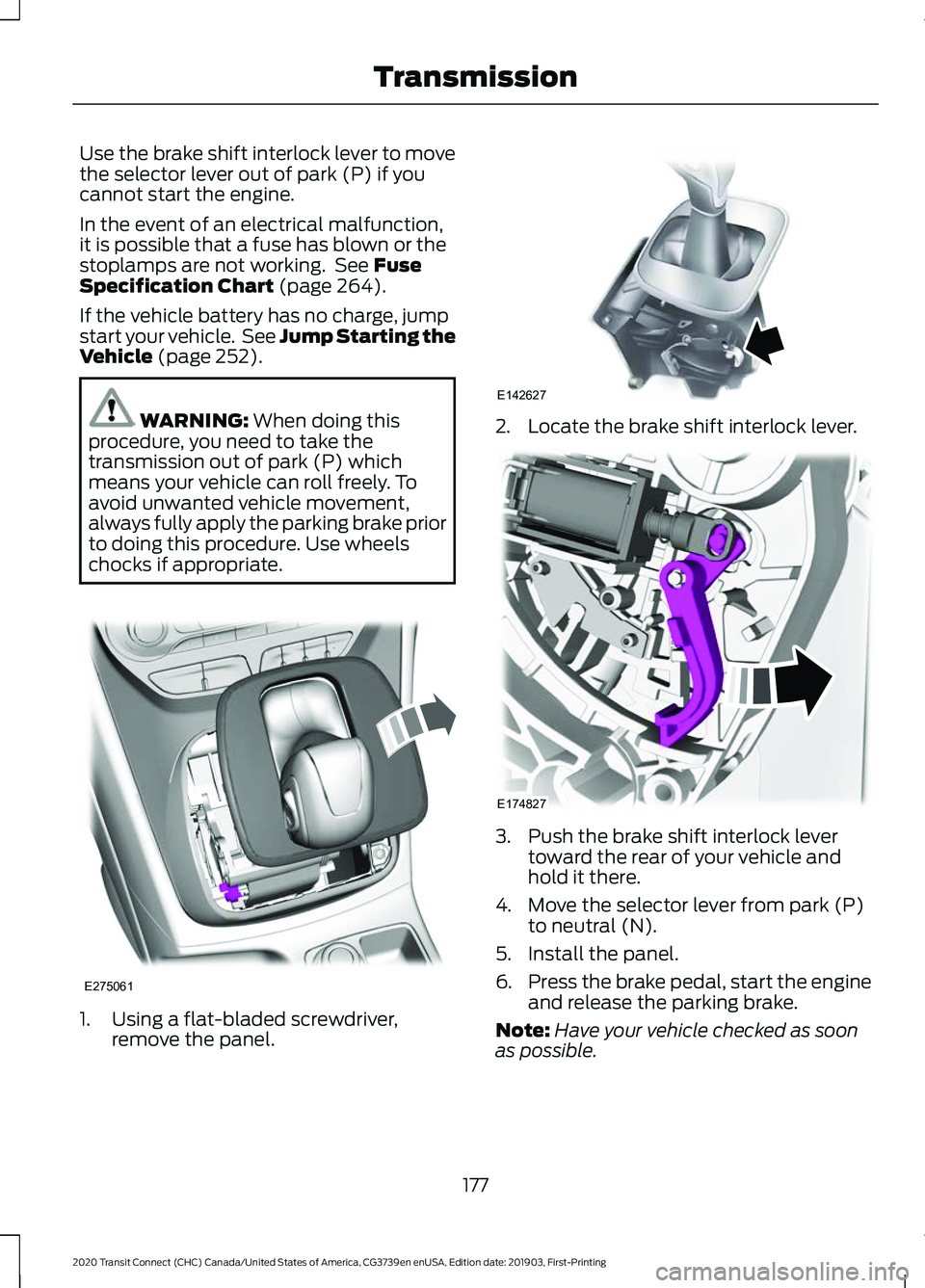
Use the brake shift interlock lever to move
the selector lever out of park (P) if you
cannot start the engine.
In the event of an electrical malfunction,
it is possible that a fuse has blown or the
stoplamps are not working. See Fuse
Specification Chart (page 264).
If the vehicle battery has no charge, jump
start your vehicle. See Jump Starting the
Vehicle
(page 252). WARNING:
When doing this
procedure, you need to take the
transmission out of park (P) which
means your vehicle can roll freely. To
avoid unwanted vehicle movement,
always fully apply the parking brake prior
to doing this procedure. Use wheels
chocks if appropriate. 1. Using a flat-bladed screwdriver,
remove the panel. 2. Locate the brake shift interlock lever.
3. Push the brake shift interlock lever
toward the rear of your vehicle and
hold it there.
4. Move the selector lever from park (P) to neutral (N).
5. Install the panel.
6. Press the brake pedal, start the engine
and release the parking brake.
Note: Have your vehicle checked as soon
as possible.
177
2020 Transit Connect (CHC) Canada/United States of America, CG3739en enUSA, Edition date: 201903, First-Printing TransmissionE275061 E142627 E174827