Page 91 of 464

It also illuminates momentarily when you
switch the ignition on to confirm the lamp
is functional. If it does not illuminate when
you switch the ignition on, or begins to
flash at any time, have the system checked
by your authorized dealer.
Low Washer Fluid Level Warning
Lamp
Illuminates when the washer
fluid is low.
Oil Pressure Warning Lamp Illuminates when you switch the
ignition on.
If it illuminates when the engine
is running this indicates a malfunction.
Stop your vehicle as soon as it is safe to
do so and switch the engine off. Check the
engine oil level. If the oil level is sufficient,
this indicates a system malfunction. Have
your vehicle checked as soon as possible.
See Engine Oil Check (page 237).
Parking Lamps Illuminate when you switch the
parking lamps on.
Powertrain Fault Illuminates when the system
detects a powertrain fault.
Contact an authorized dealer as
soon as possible.
Service Engine Soon If it illuminates when the engine
is running this indicates a
malfunction. The On Board
Diagnostics system has detected a
malfunction of the vehicle emission control
system. If it flashes, engine misfire may be
occurring. Increased exhaust gas
temperatures could damage the catalytic
converter or other vehicle components.
Drive in a moderate fashion (avoid heavy
acceleration and deceleration) and have
your vehicle immediately serviced.
It illuminates when you switch the ignition
on prior to engine start to check the bulb
and to indicate whether your vehicle is
ready for Inspection and Maintenance
(I/M) testing.
Normally, it illuminates until the engine is
cranked and automatically turns off if no
malfunctions are present. However, if after
15 seconds it flashes eight times, this
indicates that your vehicle is not ready for
Inspection and Maintenance (I/M) testing.
See
Catalytic Converter (page 144).
Shift Indicator
(If Equipped) Illuminates to inform you that
shifting to a higher gear as
indicated may give better fuel
economy and lower CO2
emissions. It will not illuminate during
periods of high acceleration, braking or
when you press the clutch pedal.
Stability Control and Traction
Control Indicator Flashes during operation.
If it does not illuminate when you
switch the ignition on, or remains
on when the engine is running, this
indicates a malfunction. Have your vehicle
checked as soon as possible.
Note: The system automatically turns off
if there is a malfunction.
See
Using Stability Control (page 159).
See Using Traction Control (page 157).
88
Mustang (CZG) Canada/United States of America, Vehicles Built From: 15-07-2019, enUSA, Edition date: 201906, Second-Printing Instrument ClusterE132353 E138639
Page 94 of 464
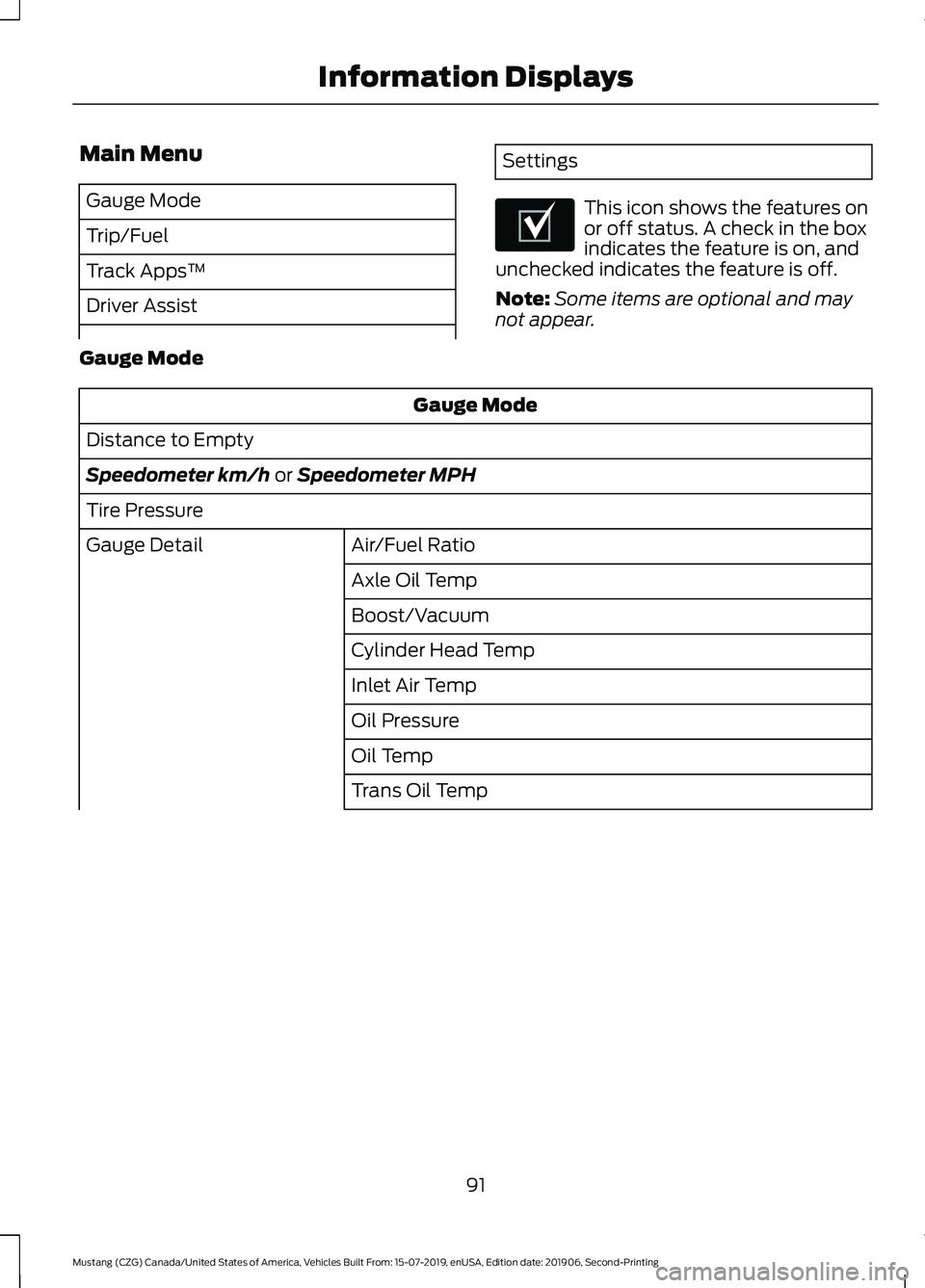
Main Menu
Gauge Mode
Trip/Fuel
Track Apps
™
Driver Assist Settings
This icon shows the features on
or off status. A check in the box
indicates the feature is on, and
unchecked indicates the feature is off.
Note: Some items are optional and may
not appear.
Gauge Mode Gauge Mode
Distance to Empty
Speedometer km/h or Speedometer MPH
Tire Pressure Air/Fuel Ratio
Gauge Detail
Axle Oil Temp
Boost/Vacuum
Cylinder Head Temp
Inlet Air Temp
Oil Pressure
Oil Temp
Trans Oil Temp
91
Mustang (CZG) Canada/United States of America, Vehicles Built From: 15-07-2019, enUSA, Edition date: 201906, Second-Printing Information DisplaysE204495
Page 95 of 464
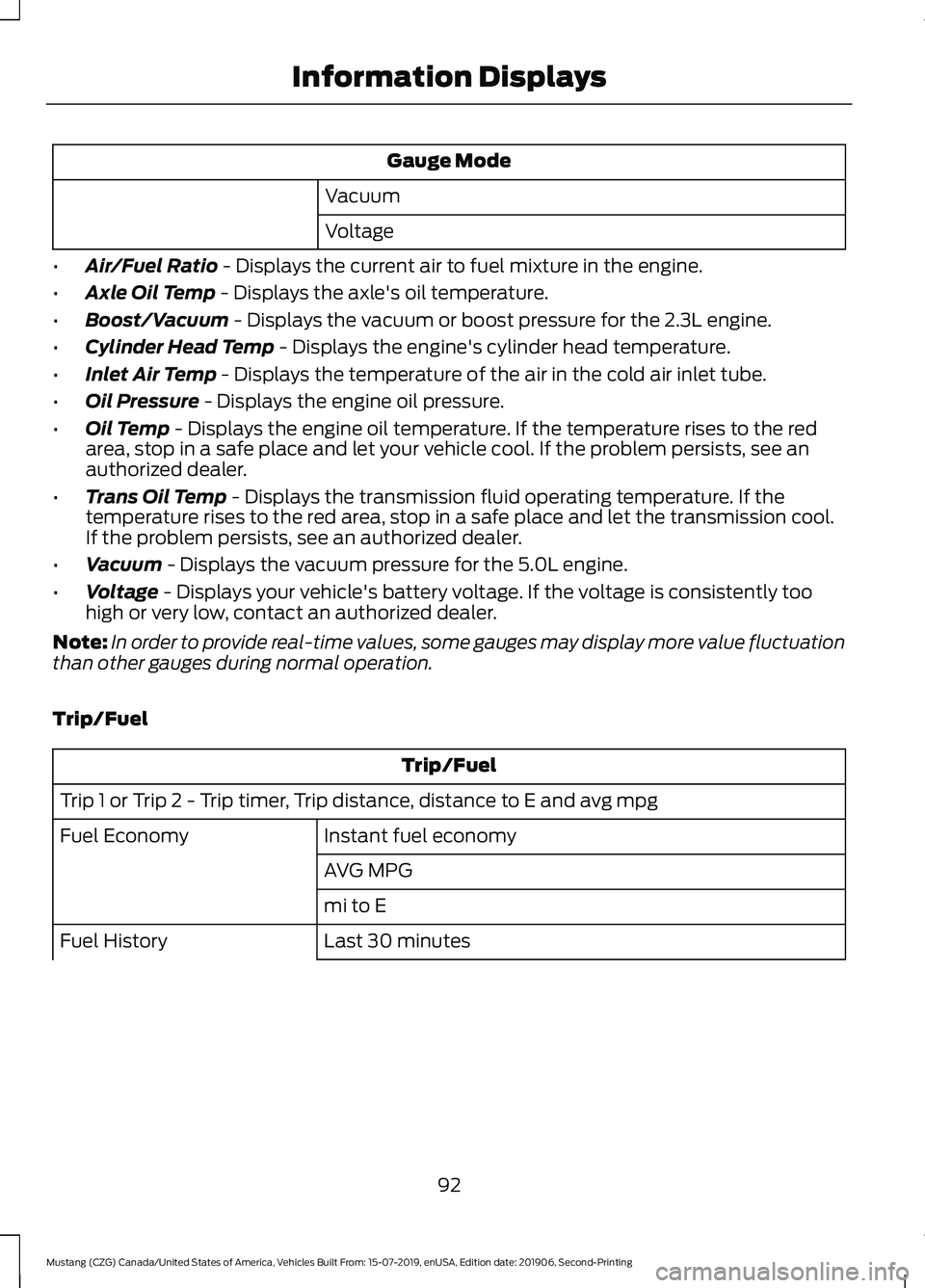
Gauge Mode
Vacuum
Voltage
• Air/Fuel Ratio - Displays the current air to fuel mixture in the engine.
• Axle Oil Temp
- Displays the axle's oil temperature.
• Boost/Vacuum
- Displays the vacuum or boost pressure for the 2.3L engine.
• Cylinder Head Temp
- Displays the engine's cylinder head temperature.
• Inlet Air Temp
- Displays the temperature of the air in the cold air inlet tube.
• Oil Pressure
- Displays the engine oil pressure.
• Oil Temp
- Displays the engine oil temperature. If the temperature rises to the red
area, stop in a safe place and let your vehicle cool. If the problem persists, see an
authorized dealer.
• Trans Oil Temp
- Displays the transmission fluid operating temperature. If the
temperature rises to the red area, stop in a safe place and let the transmission cool.
If the problem persists, see an authorized dealer.
• Vacuum
- Displays the vacuum pressure for the 5.0L engine.
• Voltage
- Displays your vehicle's battery voltage. If the voltage is consistently too
high or very low, contact an authorized dealer.
Note: In order to provide real-time values, some gauges may display more value fluctuation
than other gauges during normal operation.
Trip/Fuel Trip/Fuel
Trip 1 or Trip 2 - Trip timer, Trip distance, distance to E and avg mpg Instant fuel economy
Fuel Economy
AVG MPG
mi to E
Last 30 minutes
Fuel History
92
Mustang (CZG) Canada/United States of America, Vehicles Built From: 15-07-2019, enUSA, Edition date: 201906, Second-Printing Information Displays
Page 96 of 464

Trip/Fuel
AVG MPG
mi to E
• Trip Timer - Registers the time of individual journeys.
• Trip Distance - Registers the distance of individual journeys.
• Distance to E - Shows the approximate distance your vehicle can travel before running
out of fuel.
• Avg MPG - Shows the average fuel usage based on time.
• Instant fuel economy - Shows your instantaneous fuel usage.
• Fuel History - Shows fuel usage as a bar graph based on time. The graph is updated
each minute with the fuel economy that you achieved during 30 minutes of driving.
Note: Press and hold OK to reset the currently displayed information.
Track Apps ™ WARNING:
Track Apps™
is for
track use only. Remember that even
advanced technology cannot defy the
laws of physics. It is always possible to
lose control of a vehicle due to
inappropriate driver input for the
conditions. Aggressive driving on any
road condition can cause you to lose
control of your vehicle increasing the risk
of personal injury or property damage. Track Apps
™
provides a suite of options
to record and optimize your track
performances. See Track Use (page 252). Track Apps
™
Status Screen Virtual gauge shown
Accelerometer
Select your speed, distance and start
settings
Acceleration Timer
Choose your applicable setting.
Brake Performance
Choose your applicable setting.
Exhaust Mode
Quiet Start
Line Lock
93
Mustang (CZG) Canada/United States of America, Vehicles Built From: 15-07-2019, enUSA, Edition date: 201906, Second-Printing Information Displays
Page 98 of 464
Driver Assist
Mode
Lane Keeping Assist
Intensity
Hold OK to Reset
Tire Monitor
Settings Settings
Choose your applicable setting.
Alarm
Vehicle
Easy Entry/Exit Choose your applicable setting.
Lighting
Locks
Percent Oil Life XXX%
Oil Life Reset
Hold OK to Reset
Park Lock Control Choose your applicable setting.
Remote Start
Tire Mobility Kit
Windows
Wipers
Choose your applicable setting.
Gauge Color
MyColor
Halo
Ambient Light
Set MyColor Displays the status of MyKeys,
Admin Keys and MyKey distance.
MyKey Status
MyKey
Hold OK to Create MyKey
Create MyKey
Choose your applicable setting.
911 Assist
AdvanceTrac
Do Not Disturb
95
Mustang (CZG) Canada/United States of America, Vehicles Built From: 15-07-2019, enUSA, Edition date: 201906, Second-Printing Information Displays
Page 99 of 464
Settings
Max Speed
Speed Minder
Volume Limiter Hold OK to Clear All MyKeys
Clear MyKeys
Choose your applicable setting.
Distance
Display Setup
Temperature
Tire Pressure
Language
1 See Track Use (page 252).
Note: Quiet Start allows you to schedule when the Exhaust Mode turns on the Quiet
setting. The time window can be from 1 to 24 hours.
Information Display Controls -
Type 2
You can control various systems on your
vehicle using the information display
controls on the steering wheel. The
information display shows the
corresponding information.
96
Mustang (CZG) Canada/United States of America, Vehicles Built From: 15-07-2019, enUSA, Edition date: 201906, Second-Printing Information Displays
Page 101 of 464
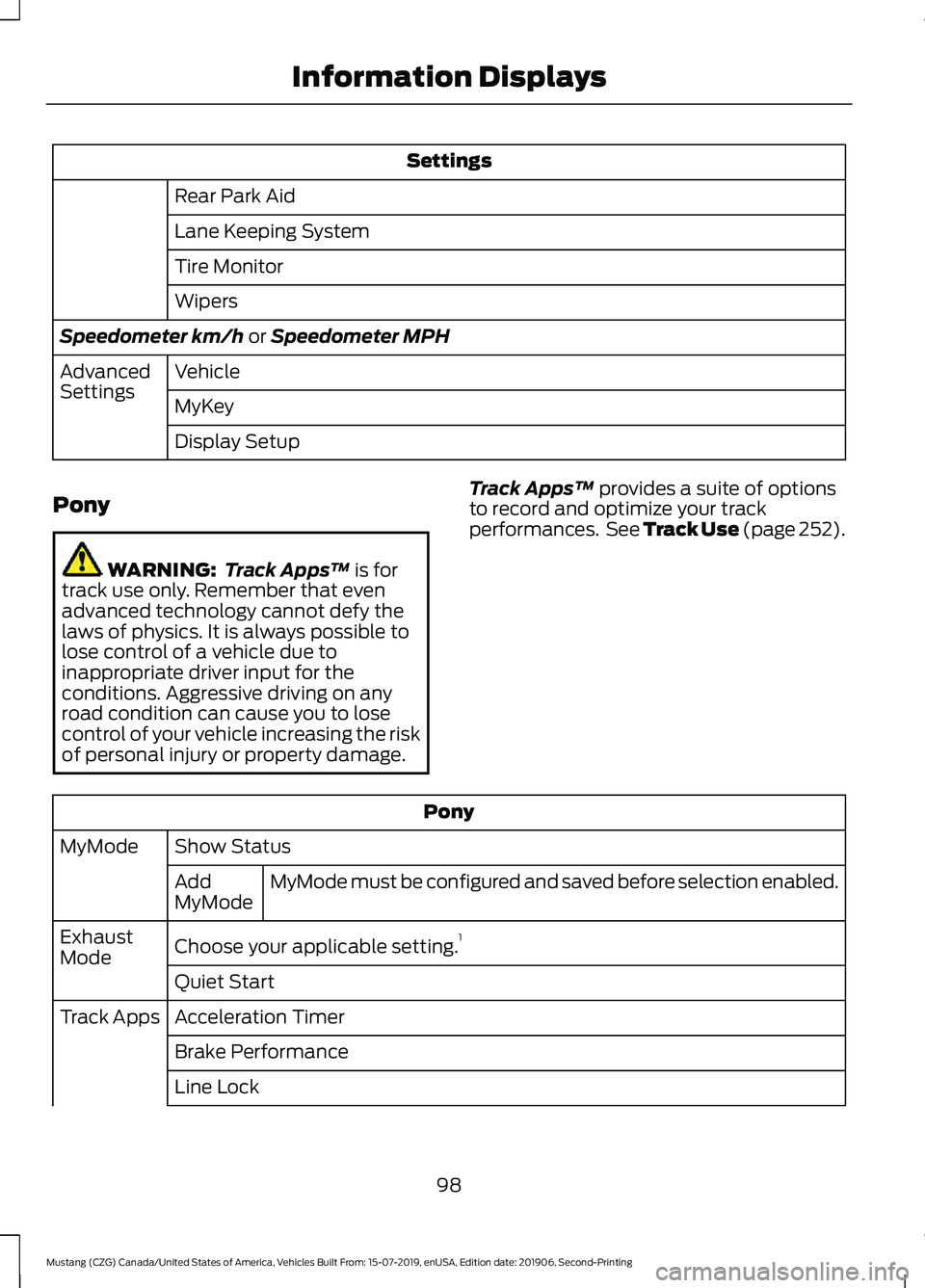
Settings
Rear Park Aid
Lane Keeping System
Tire Monitor
Wipers
Speedometer km/h or Speedometer MPH
Vehicle
Advanced
Settings
MyKey
Display Setup
Pony WARNING:
Track Apps™
is for
track use only. Remember that even
advanced technology cannot defy the
laws of physics. It is always possible to
lose control of a vehicle due to
inappropriate driver input for the
conditions. Aggressive driving on any
road condition can cause you to lose
control of your vehicle increasing the risk
of personal injury or property damage. Track Apps
™
provides a suite of options
to record and optimize your track
performances. See Track Use (page 252). Pony
Show Status
MyMode
MyMode must be configured and saved before selection enabled.
Add
MyMode
Choose your applicable setting. 1
Exhaust
Mode
Quiet Start
Acceleration Timer
Track Apps
Brake Performance
Line Lock
98
Mustang (CZG) Canada/United States of America, Vehicles Built From: 15-07-2019, enUSA, Edition date: 201906, Second-Printing Information Displays
Page 102 of 464

Pony
Lap Timer
Start Option
Shift Point
Perform-
ance Shift
Indicator Shift Tone
Shift Light Mode
Launch Control
Launch
Control
RPM
Rev Match Show Gauges
Gauges
Configure MyGauges
Primary Color
MyColor
Secondary Color
Ambient Light
Create MyColor
Change with Drive Mode
Cluster
Appear-
ance Normal
Sport
Track
1 See Track Use (page 252).
Note: Quiet Start allows you to schedule when the Exhaust Mode turns on the Quiet
setting. The time window can be from 1 to 24 hours.
Note: Depending on your vehicle
configuration, some features such as
Exhaust Mode and Line Lock may be if
equipped.
Note: The menu options for Performance
Shift Indicator, Launch Control, and Rev
Match are for manual transmissions only.
Phone
See
General Information (page 351). Audio
See
General Information (page 351).
Navigation
(If Equipped)
See
General Information (page 351).
99
Mustang (CZG) Canada/United States of America, Vehicles Built From: 15-07-2019, enUSA, Edition date: 201906, Second-Printing Information Displays