2020 FORD GT instrument panel
[x] Cancel search: instrument panelPage 161 of 316

1.
Inside the vehicle, pull the hood release
handle located on the left side panel
left of the pedals.
2. Slightly lift the hood. 3. Release the hood latch by pulling up
on the secondary release lever. 4.
Open the hood and support it with the
prop rod.
Closing the Front Hood
1. Remove the hood prop rod from the under hood slot and securely place it
back in its holder.
2. Lower the hood and lightly press down
until closed.
Note: If you do not close the front hood
correctly, an indicator lamp displays in the
instrument cluster. See Warning Lamps
and Indicators (page 69).
Opening the Rear Hatch
You can open the rear hatch by three
different methods:
• A button on your remote control. See
Remote Control
(page 46).
• In the case of a dead battery or other
electrical concerns, use the key blade
in your remote control. See
Remote
Control (page 46).
• A button on the lighting control switch.
After you release the rear hatch latch, lift
the rear hatch into the open position.
A hydraulic cylinder holds the rear hatch
open.
Closing the Rear Hatch
1. Pull down the rear hatch.
2. Lightly press the hatch into position so
the latch fully engages.
158
Ford GT (CGX) Canada/United States of America, enUSA, Edition date: 201908, First-Printing MaintenanceE233210 E233828
Page 181 of 316

CLEANING THE WINDOWS AND
WIPER BLADES
Dirty windshield and wipers will result in
poor windshield wiper operation. Keep the
windshield and wiper blades clean to
maintain windshield wiper performance.
To clean exterior glass surfaces and wiper
blades:
•
Clean the exterior surface of the
windshield with a non-abrasive glass
cleaner.
• For windshields contaminated with
tree sap, chemicals, wax or bugs, clean
the outside surface of the windshield
with Motorcraft Bug and Tar Remover.
• Clean the wiper blades with isopropyl
rubbing alcohol or windshield washer
concentrate.
The interior glass surface of the windshield
and engine cover glass, and both the inner
and outer surface of the bulkhead glass,
have a laminate coating that requires
special care.
To clean interior glass surfaces:
• When cleaning the inside of the
windshield, avoid getting any glass
cleaner on the instrument panel or door
panels. Wipe any excess cleaner off
these surfaces immediately.
• Use a microfiber towel and plain water,
or a mixture of one-half water and
one-half white vinegar, to clean the
interior glass surfaces.
Note: Never use alcohol or ammonia based
cleaners, aerosol sprays or abrasive
compounds to clean the interior glass
surfaces of your vehicle. Using improper
cleaning products can cause damage to
your vehicle. CLEANING THE INTERIOR WARNING: Do not use cleaning
solvents, bleach or dye on the vehicle's
seatbelts, as these actions may weaken
the belt webbing.
Clean safety belts with water applied with
a soft sponge. Let them dry naturally, away
from artificial heat.
Wipe carbon fiber surfaces with a clean,
damp and soft cloth to remove dust. Then
use a clean, dry and soft cloth to dry these
areas.
Cleaning Alcantara Microfiber
Cloth
Note: Some models have Alcantara
microfiber cloth fabric on the seats,
headliner, instrument panel and door panels.
Use a soft brush, a clean, dry cloth or
vacuum cleaner to remove dust and loose
dirt from Alcantara cloth surfaces. Gently
wipe the cloth surfaces with a clean, damp
cotton cloth.
Note: Alcantara microfiber cloth fabric are
made of polyester microfiber with
micro-porous polyurethane. Using
commercially available fabric cleaners can
cause permanent damage.
Note: Do not use commercially available
leather and vinyl cleaning products on
Alcantara cloth fabric.
Depending on the type of stain, use water,
lemon juice or pure ethyl alcohol when
cleaning. For cleaning Alcantara microfiber
cloth, refer to the following chart:
178
Ford GT (CGX) Canada/United States of America, enUSA, Edition date: 201908, First-Printing Vehicle Care
Page 182 of 316
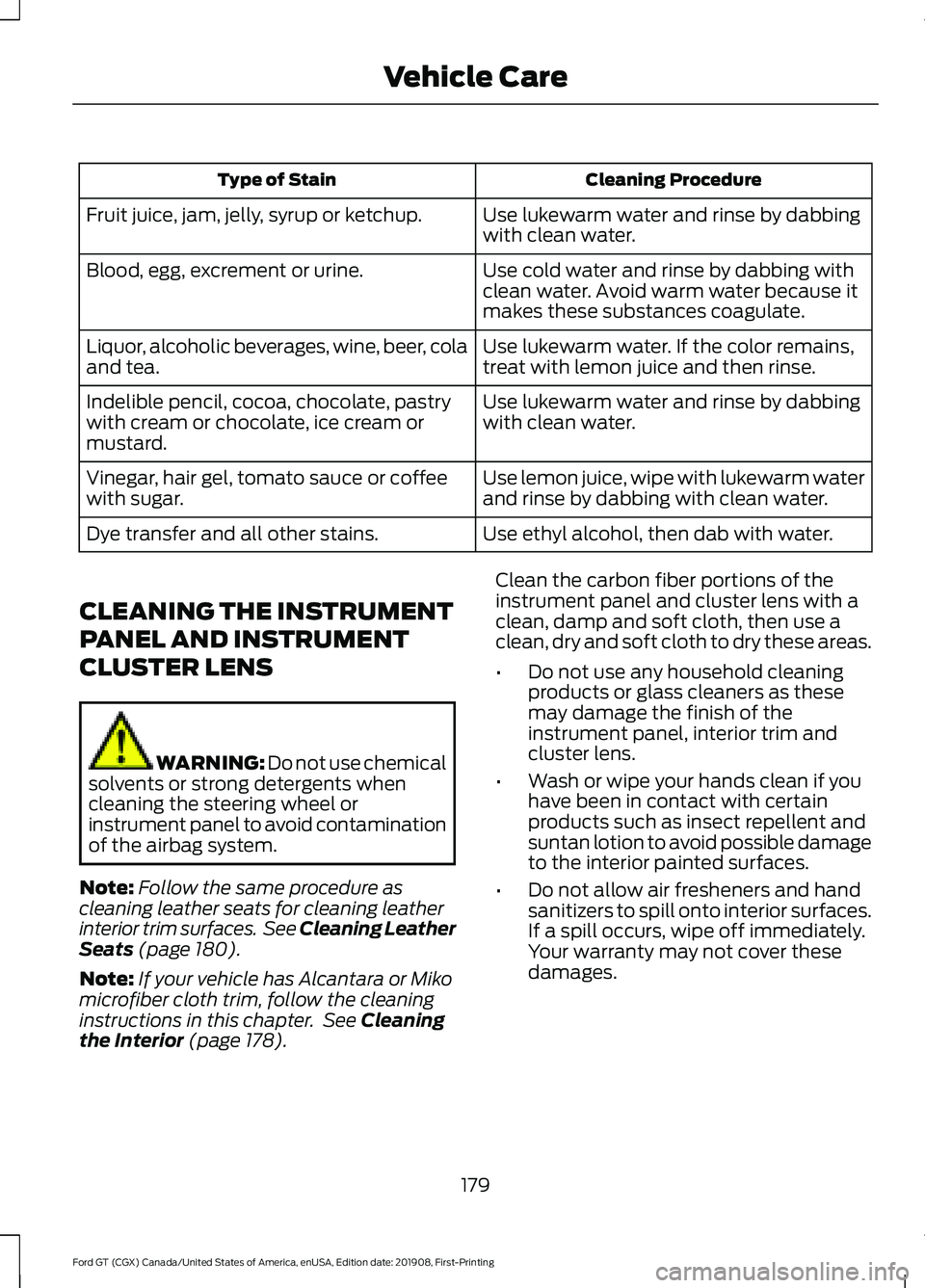
Cleaning Procedure
Type of Stain
Use lukewarm water and rinse by dabbing
with clean water.
Fruit juice, jam, jelly, syrup or ketchup.
Use cold water and rinse by dabbing with
clean water. Avoid warm water because it
makes these substances coagulate.
Blood, egg, excrement or urine.
Use lukewarm water. If the color remains,
treat with lemon juice and then rinse.
Liquor, alcoholic beverages, wine, beer, cola
and tea.
Use lukewarm water and rinse by dabbing
with clean water.
Indelible pencil, cocoa, chocolate, pastry
with cream or chocolate, ice cream or
mustard.
Use lemon juice, wipe with lukewarm water
and rinse by dabbing with clean water.
Vinegar, hair gel, tomato sauce or coffee
with sugar.
Use ethyl alcohol, then dab with water.
Dye transfer and all other stains.
CLEANING THE INSTRUMENT
PANEL AND INSTRUMENT
CLUSTER LENS WARNING: Do not use chemical
solvents or strong detergents when
cleaning the steering wheel or
instrument panel to avoid contamination
of the airbag system.
Note: Follow the same procedure as
cleaning leather seats for cleaning leather
interior trim surfaces. See Cleaning Leather
Seats (page 180).
Note: If your vehicle has Alcantara or Miko
microfiber cloth trim, follow the cleaning
instructions in this chapter. See
Cleaning
the Interior (page 178). Clean the carbon fiber portions of the
instrument panel and cluster lens with a
clean, damp and soft cloth, then use a
clean, dry and soft cloth to dry these areas.
•
Do not use any household cleaning
products or glass cleaners as these
may damage the finish of the
instrument panel, interior trim and
cluster lens.
• Wash or wipe your hands clean if you
have been in contact with certain
products such as insect repellent and
suntan lotion to avoid possible damage
to the interior painted surfaces.
• Do not allow air fresheners and hand
sanitizers to spill onto interior surfaces.
If a spill occurs, wipe off immediately.
Your warranty may not cover these
damages.
179
Ford GT (CGX) Canada/United States of America, enUSA, Edition date: 201908, First-Printing Vehicle Care
Page 189 of 316

5. Remove the warning sticker found on
the casing/housing and place it on the
top of the instrument panel or the
center of the dash.
6. Start the vehicle and leave the engine running so the compressor does not
drain the vehicle ’s battery. 7. Turn dial (A) clockwise to the sealant
position. Switch the kit on by pressing
the on/off button (B).
8. Inflate the tire to the pressure listed on
the tire label located on the driver's
door or the door jamb area. The initial
air pressure gauge reading may indicate
a value higher than the label pressure
while you pump the sealing compound
into the tire. This is normal and should
be no reason for concern. The pressure gauge reading will indicate the tire
inflation pressure after about 30
seconds of operation. You should
check the final tire pressure with the
compressor turned OFF in order to get
an accurate pressure reading.
9. When the tire reaches the
recommended tire pressure, switch off
the kit, unplug the power cable, and
disconnect the hose from the tire valve.
Re-install the valve cap on the tire
valve and return the kit to the stowage
area.
10. Immediately and cautiously, drive the
vehicle 4 mi (6 km) to distribute the
sealant evenly inside the tire. Do not
exceed
50 mph (80 km/h).
11. After 4 mi (6 km), stop and check the
tire pressure. See Second Stage:
Checking Tire Pressure.
186
Ford GT (CGX) Canada/United States of America, enUSA, Edition date: 201908, First-Printing Wheels and TiresE175981 E175982
Page 213 of 316

VEHICLE IDENTIFICATION
NUMBER
You can find the vehicle identification
number at the following locations.
On the vehicle certification label inside the
driver's door opening.
On the left-hand side of the instrument
panel.
Please note that in the graphic, XXXX is
representative of your vehicle identification
number. The Vehicle Identification Number contains
the following information:
World manufacturer identifier
A
Brake system, Gross Vehicle
Weight Rating, Restraint Devices
and their locations
B
Make, vehicle line, series, body
type
C
Engine type
D
Check digit
E
Model year
F
Assembly plant
G
Production sequence number
H
210
Ford GT (CGX) Canada/United States of America, enUSA, Edition date: 201908, First-Printing Capacities and SpecificationsE227109 E252123 E142477
Page 221 of 316

AUDIO UNIT
WARNING: Driving while
distracted can result in loss of vehicle
control, crash and injury. We strongly
recommend that you use extreme
caution when using any device that may
take your focus off the road. Your
primary responsibility is the safe
operation of your vehicle. We
recommend against the use of any
hand-held device while driving and
encourage the use of voice-operated
systems when possible. Make sure you
are aware of all applicable local laws
that may affect the use of electronic
devices while driving.
You can access your audio features with
the touchscreen and steering wheel
controls. See your SYNC information.
The power button is to the left of the
display screen.
USB PORT
The USB port is on the bottom of the
instrument panel.
The USB port allows you to plug in media
playing devices, memory sticks and charge
devices (if supported). See your SYNC
information.
218
Ford GT (CGX) Canada/United States of America, enUSA, Edition date: 201908, First-Printing Audio System
Page 240 of 316

Function
Button
Playlists
Artist
Albums
Songs
Genres
Podcasts
Audio books
Composers
This button allows you to choose a specific
letter to view within the category you are
browsing.
A-Z Jump
If available, this allows you to browse the
folders and files on your USB device.
Explore Device
USB Ports The USB ports are in the center console or
behind a small access door in the
instrument panel.
This feature allows you to plug in USB
media devices, memory sticks, flash drives
or thumb drives, and charge devices if they
support this feature. Select this option to play audio from your
USB device.
Apps
The system supports the use of certain
audio apps such as iHeartRadio through a
USB or Bluetooth enabled device.
Each app gives you different on-screen
options depending on the app's content.
See Apps (page 245).
Supported Media Players, Formats
and Metadata Information
The system is capable of hosting nearly
any digital media player, including iPod,
iPhone, and most USB drives.
Supported audio formats include MP3,
WMA, WAV, AAC, and FLAC.
Supported audio file extensions include
MP3, WMA, WAV, M4A, M4B, AAC, and
FLAC.
237
Ford GT (CGX) Canada/United States of America, enUSA, Edition date: 201908, First-Printing SYNC™ 3E211463
Page 309 of 316

Engine Oil...............................................................
214
Fuel Tank................................................................ 215
Grease..................................................................... 215
Hydraulic Brake System................................... 216
Hydraulic Power Steering, Active Suspension, and Active Aero
System............................................................... 216
Locks........................................................................\
215
Transmission Gear.............................................. 212
Transmission Wet Clutch................................. 213
Washer Reservoir................................................. 217
Car Wash See: Cleaning the Exterior................................ 175
Catalytic Converter......................................102 On-Board Diagnostics (OBD-II)................... 103
Readiness for Inspection and Maintenance (I/M) Testing................................................... 104
Changing a Bulb.............................................171 LED Lamps............................................................. 171
Changing a Fuse...........................................155
Fuses....................................................................... 155
Changing a Road Wheel...........................205 Important Information for Lifting or
Jacking.............................................................. 205
Changing the 12V Battery..........................167 Battery Charger and Maintainer................... 168
Battery Management System....................... 169
Changing the Engine Air Filter...................171
Changing the Wiper Blades......................170
Checking the Wiper Blades......................169
Child Restraint and Seatbelt Maintenance.................................................33
Child Restraint Positioning
.........................26
Child Safety.......................................................19
General Information............................................. 19
Cleaning Leather Seats..............................180
Cleaning Products........................................175 Materials................................................................. 175
Cleaning the Engine......................................177
Cleaning the Exterior...................................175 Exterior Plastic Parts.......................................... 177
Matte Paint Finish............................................... 176
Raising the Rear Wing........................................ 177
Standard Paint Finish........................................ 176
Under Hood........................................................... 177
Cleaning the Instrument Panel and Instrument Cluster Lens..........................179 Cleaning the Interior....................................178
Cleaning Alcantara Microfiber Cloth...........178
Cleaning the Wheels...................................180
Cleaning the Windows and Wiper Blades............................................................178
Climate Control
..............................................84
Coolant Check See: Engine Coolant Check.............................. 161
Crash Sensors and Airbag Indicator
.........41
Cruise Control..................................................57
Principle of Operation....................................... 120
Cruise control See: Using Cruise Control................................ 120
Cup Holders
.....................................................90
Customer Assistance..................................139
D
Data Recording
..................................................7
Comfort, Convenience and Entertainment
Data........................................................................\
9
Event Data................................................................. 8
Service Data.............................................................. 7
Services That Third Parties Provide.................9
Services That We Provide.................................... 9
Vehicles With a Modem....................................... 9
Vehicles With an Emergency Call System................................................................. 10
Vehicles With SYNC............................................. 10
Daytime Running Lamps.............................63
Declaration of Conformity
.......................302
Declaration of Conformity - Vehicles With: SYNC 3
..............................................302
Radio Frequency Statement......................... 302
Direction Indicators
.......................................64
Doors and Locks.............................................50
Drive Mode Control.......................................58 Active Aerodynamics ........................................ 125
Damper Comfort Mode.................................... 125
Drive Mode Selection......................................... 121
Front Lift................................................................. 125
Driver and Passenger Airbags....................37 Children and Airbags........................................... 37
Proper Driver and Front Passenger Seating Adjustment........................................................ 37
Driver and Passenger Knee Airbags
.........41
Driving Aids.......................................................121
306
Ford GT (CGX) Canada/United States of America, enUSA, Edition date: 201908, First-Printing Index