2020 FORD EXPLORER airbag
[x] Cancel search: airbagPage 181 of 555

could be required to steer your vehicle.
When you switch the ignition off, some
electrical circuits, for example airbags,
also turn off. If you unintentionally switch
the ignition off, shift into neutral (N) and
restart the engine.
1. Put the transmission into neutral (N) and use the brakes to bring your vehicle
to a safe stop.
2. When your vehicle has stopped, put the transmission in park (P).
3. Press and hold the push button ignition
switch for one second, or press it three
times within two seconds.
4. Apply the parking brake.
Guarding Against Exhaust Fumes WARNING: Exhaust leaks may
result in entry of harmful and potentially
lethal fumes into the passenger
compartment. If you smell exhaust
fumes inside your vehicle, have your
vehicle inspected immediately. Do not
drive if you smell exhaust fumes.
Important Ventilating Information
If you stop your vehicle and then leave the
engine idling for long periods of time, we
recommend that you do one of the
following:
• Open the windows at least 1 in (3 cm).
• Set your climate control to outside air. ENGINE BLOCK HEATER
(IF
EQUIPPED) WARNING:
Failure to follow engine
block heater instructions could result in
property damage or serious personal
injury. WARNING: Do not use your heater
with ungrounded electrical systems or
two-pronged adapters. There is a risk of
electrical shock. WARNING:
Do not fully close the
hood, or allow it to drop under its own
weight when using the engine block
heater. This could damage the power
cable and may cause an electrical short
resulting in fire, injury and property
damage.
Note: The heater is most effective when
outdoor temperatures are below
0°F
(-18°C).
The heater acts as a starting aid by
warming the engine coolant. This allows
the climate control system to respond
quickly. The equipment includes a heater
element, installed in the engine block and
a wire harness. You can connect the
system to a grounded 120-volt AC
electrical source.
We recommend that you do the following
for a safe and correct operation:
• Use a 16-gauge outdoor extension cord
that is product certified by
Underwriter ’s Laboratory (UL) or
Canadian Standards Association
(CSA). This extension cord must be
suitable for use outdoors, in cold
178
Explorer (CTW) Canada/United States of America, enUSA, Edition date: 201902, Third-Printing- Starting and Stopping the Engine
Page 307 of 555
•
As with any vehicle fire, do not inhale
smoke, vapors or gas from the vehicle,
as they may be hazardous.
• Stay out of the roadway and stay out
of the way of any oncoming traffic
while awaiting the arrival of emergency
responders.
Post-Incident
• Do not store a severely damaged
vehicle with a lithium-ion battery inside
a structure or within 49 ft (15 m) of any
structure or vehicle.
• Make sure that passenger and luggage
compartments remain ventilated.
• Call emergency assistance if you
observe leaking fluids, sparks, smoke
or flames, or hear gurgling or bubbling
from the high-voltage battery.
POST-CRASH ALERT SYSTEM
The system flashes the direction indicators
and sounds the horn (intermittently) in the
event of a serious impact that deploys an
airbag (front, side, side curtain or Safety
Canopy) or the seatbelt pretensioners.
The horn and indicators turn off when:
• You press the hazard control button.
• You press the panic button on the
remote entry transmitter (if equipped).
• Your vehicle runs out of power.
• Sounding of the horn is only enabled
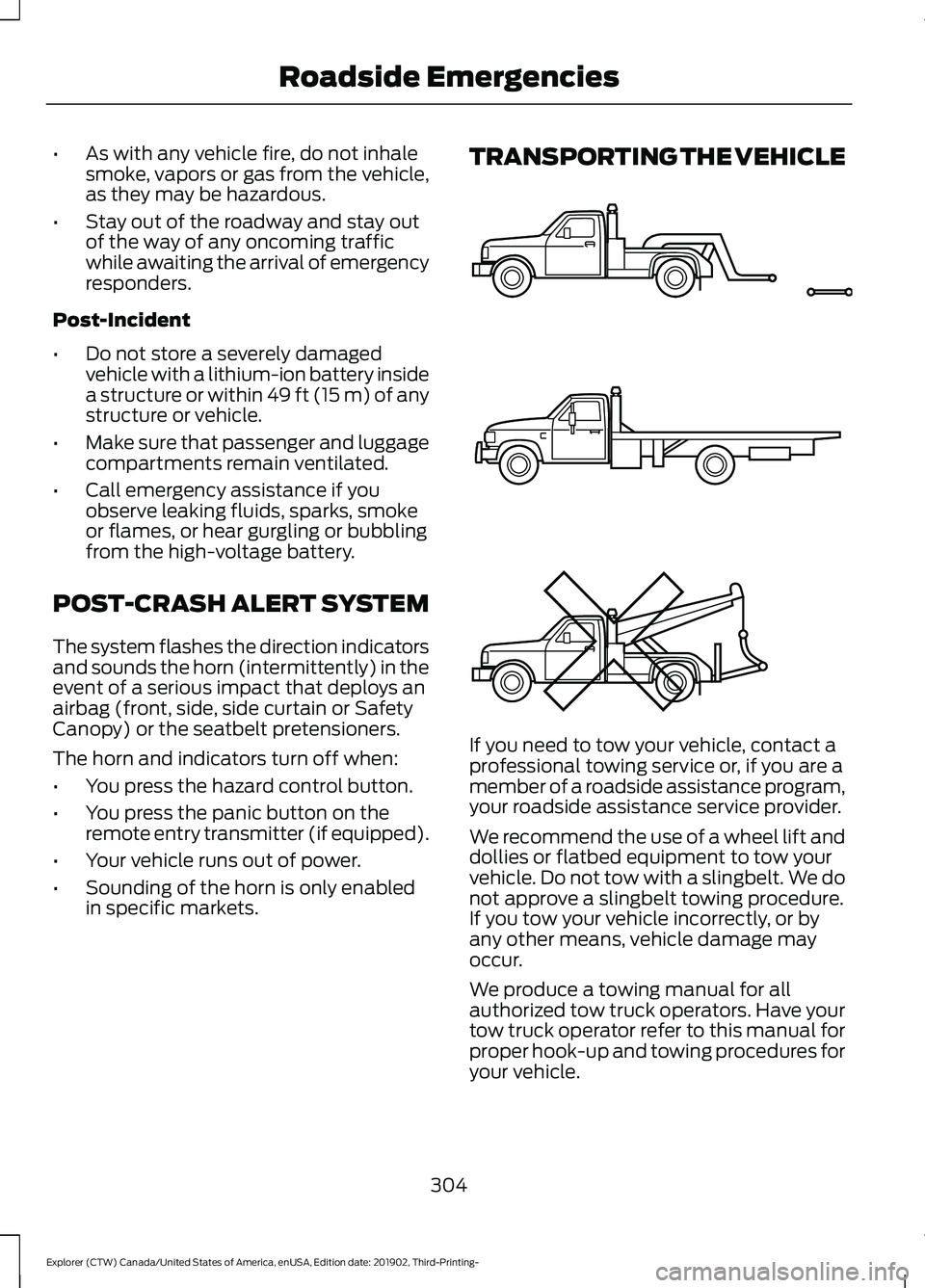
in specific markets. TRANSPORTING THE VEHICLE
If you need to tow your vehicle, contact a
professional towing service or, if you are a
member of a roadside assistance program,
your roadside assistance service provider.
We recommend the use of a wheel lift and
dollies or flatbed equipment to tow your
vehicle. Do not tow with a slingbelt. We do
not approve a slingbelt towing procedure.
If you tow your vehicle incorrectly, or by
any other means, vehicle damage may
occur.
We produce a towing manual for all
authorized tow truck operators. Have your
tow truck operator refer to this manual for
proper hook-up and towing procedures for
your vehicle.
304
Explorer (CTW) Canada/United States of America, enUSA, Edition date: 201902, Third-Printing- Roadside EmergenciesE143886
Page 351 of 555
To clean the windshield and wiper blades:
•
Clean the windshield with a
non-abrasive glass cleaner. When
cleaning the interior of the windshield,
avoid getting any glass cleaner on the
instrument panel or door panels. Wipe
any glass cleaner off these surfaces
immediately.
• For windshields contaminated with
tree sap, chemicals, wax or bugs, clean
the entire windshield using steel wool
(no greater than 0000 grade) in a
circular motion and rinse with water.
• Clean the wiper blades with isopropyl
rubbing alcohol or windshield washer
concentrate.
Note: Do not use razor blades or other
sharp objects to clean or remove decals
from the inside of the heated rear window.
The vehicle warranty does not cover
damage caused to the heated rear window
grid lines.
CLEANING THE INTERIOR WARNING: Do not use cleaning
solvents, bleach or dye on the vehicle's
seatbelts, as these actions may weaken
the belt webbing. WARNING:
On vehicles equipped
with seat-mounted airbags, do not use
chemical solvents or strong detergents.
Such products could contaminate the
side airbag system and affect
performance of the side airbag in a crash.
For fabric, carpets, cloth seats and seats
equipped with side airbags:
• Remove dust and loose dirt with a
vacuum cleaner.
• Remove light stains and soil with
Motorcraft Professional Strength
Carpet & Upholstery Cleaner. •
If grease or tar is present on the
material, spot-clean the area first with
Motorcraft Spot and Stain Remover. In
Canada, use Motorcraft Multi-Purpose
Cleaner.
• If a ring forms on the fabric after spot
cleaning, clean the entire area
immediately (but do not oversaturate)
or the ring will set.
• Do not use household cleaning
products or glass cleaners, which can
stain and discolor the fabric and affect
the flame retardant abilities of the seat
materials.
Mirrors
Do not clean the housing or glass of any
mirror with harsh abrasives, fuel or other
petroleum or ammonia-based cleaning
products.
CLEANING THE INSTRUMENT
PANEL AND INSTRUMENT
CLUSTER LENS WARNING:
Do not use chemical
solvents or strong detergents when
cleaning the steering wheel or
instrument panel to avoid contamination
of the airbag system.
Note: Follow the same procedure as
cleaning leather seats for cleaning leather
instrument panels and leather interior trim
surfaces. See
Cleaning Leather Seats
(page 349).
Clean the instrument panel and cluster
lens with a clean, damp and soft cloth,
then use a clean, dry and soft cloth to dry
these areas.
348
Explorer (CTW) Canada/United States of America, enUSA, Edition date: 201902, Third-Printing- Vehicle Care
Page 492 of 555
Check Every Month
Engine oil level.
Function of all interior and exterior lights.
Tires (including spare) for wear and proper pressure. Windshield washer fluid level.
Holes and slots in the tail pipe to make sure they are functional and clear of debris. Check Every Six Months
Battery connections. Clean if necessary.
Body and door drain holes for obstructions. Clean if necessary. Cooling system fluid level and coolant strength.
Door weatherstrips for wear. Lubricate if necessary.
Hinges, latches and outside locks for proper operation. Lubricate if necessary. Parking brake for proper operation.
Seatbelts and seat latches for wear and function.
Safety warning lamps (brake, ABS, airbag and seatbelt) for operation.
Washer spray and wiper operation. Clean or replace blades as necessary.
Multi-Point Inspection
In order to keep your vehicle running right,
it is important to have the systems on your
vehicle checked regularly. This can help
identify potential issues and prevent major
problems. We recommend having the
following multi-point inspection performed
at every scheduled maintenance interval
to help make sure your vehicle keeps
running great.
489
Explorer (CTW) Canada/United States of America, enUSA, Edition date: 201902, Third-Printing- Scheduled Maintenance
Page 509 of 555

ELECTROMAGNETIC
COMPATIBILITY
WARNING: Do not place objects
or mount equipment on or near the
airbag cover, on the side of the front or
rear seatbacks, or in areas that may
come into contact with a deploying
airbag. Failure to follow these
instructions may increase the risk of
personal injury in the event of a crash. WARNING: Do not fasten antenna
cables to vehicle wiring, fuel pipes and
brake pipes. WARNING:
Keep antenna and
power cables at least 4 in (10 cm) from
any electronic modules and airbags. Note:
We test and certify your vehicle to
meet electromagnetic compatibility
legislation. It is your responsibility to make
sure that any equipment an authorized
dealer installs on your vehicle complies with
applicable local legislation and other
requirements. Installation of some
aftermarket electronic devices could
degrade the performance of vehicle
functions, which use radio frequency signals
such as broadcast radio receiver, tire
pressure monitoring system, push button
start, Bluetooth connectivity or satellite
navigation.
Note: Any radio frequency transmitter
equipment in your vehicle (such as cellular
telephones and amateur radio transmitters)
must keep to the parameters in the
following illustrations and table. We do not
provide any other special provisions or
conditions for installations or use.
Car 506
Explorer (CTW) Canada/United States of America, enUSA, Edition date: 201902, Third-Printing- AppendicesE239120
Page 520 of 555
1. Safe and Lawful Use
You acknowledge that devoting attention
to the TeleNav Software may pose a risk
of injury or death to you and others in
situations that otherwise require your
undivided attention, and you therefore
agree to comply with the following when
using the TeleNav Software:
(a) observe all traffic laws and otherwise
drive safely;
(b) use your own personal judgment while
driving. If you feel that a route suggested
by the TeleNav Software instructs you to
perform an unsafe or illegal maneuver,
places you in an unsafe situation, or directs
you into an area that you consider to be
unsafe, do not follow such instructions;
(c) do not input destinations, or otherwise
manipulate the TeleNav Software, unless
your vehicle is stationary and parked;
(d) do not use the TeleNav Software for
any illegal, unauthorized, unintended,
unsafe, hazardous, or unlawful purposes,
or in any manner inconsistent with this
Agreement;
(e) arrange all GPS and wireless devices
and cables necessary for use of the
TeleNav Software in a secure manner in
your vehicle so that they will not interfere
with your driving and will not prevent the
operation of any safety device (such as an
airbag).
You agree to indemnify and hold TeleNav
harmless against all claims resulting from
any dangerous or otherwise inappropriate
use of the TeleNav Software in any moving
vehicle, including as a result of your failure
to comply with the directions above.
2. Account Information
You agree: (a) when registering the
TeleNav Software, to provide TeleNav with
true, accurate, current, and complete
information about yourself, and (b) to
inform TeleNav promptly of any changes
to such information, and to keep it true,
accurate, current and complete.
3. Software License
•
Subject to your compliance with the
terms of this Agreement, TeleNav
hereby grants to you a personal,
non-exclusive, non-transferable license
(except as expressly permitted below
in connection with your permanent
transfer of the TeleNav Software
license), without the right to
sublicense, to use the TeleNav
Software (in object code form only) in
order to access and use the TeleNav
Software. This license shall terminate
upon any termination or expiration of
this Agreement. You agree that you will
use the TeleNav Software only for your
personal business or leisure purposes,
and not to provide commercial
navigation services to other parties.
3.1 License Limitations
• (a) reverse engineer, decompile,
disassemble, translate, modify, alter
or otherwise change the TeleNav
Software or any part thereof;
(b)
attempt to derive the source code,
audio library or structure of the
TeleNav Software without the prior
express written consent of TeleNav;
(c)
remove from the TeleNav
Software, or alter, any of TeleNav's or
its suppliers' trademarks, trade names,
logos, patent or copyright notices, or
other notices or markings;
(d)
517
Explorer (CTW) Canada/United States of America, enUSA, Edition date: 201902, Third-Printing- Appendices
Page 540 of 555

3
360 Degree Camera....................................241
Front Camera...................................................... 242
Side Camera........................................................ 243
Using the System............................................... 242
4
4WD See: Four-Wheel Drive.................................... 208
9
911 Assist...........................................................55
A
A/C See: Climate Control.......................................... 137
About This Manual...........................................9
ABS See: Brakes............................................................ 214
ABS driving hints See: Hints on Driving With Anti-Lock
Brakes................................................................. 215
Accessories...................................................484
Accessories See: Replacement Parts
Recommendation............................................ 16
Active Park Assist........................................235 Using Active Park Assist.................................. 236
Adaptive Cruise Control
............................246
Adaptive Cruise Control –
Troubleshooting............................................ 256
Adaptive Cruise Control Indicators - Vehicles With: Adaptive Cruise Control
With Lane Centering
................................253
Adaptive Cruise Control Indicators - Vehicles With: Adaptive Cruise Control
With Stop and Go
.....................................253
Adaptive Cruise Control Indicators - Vehicles With: Intelligent Adaptive
Cruise Control
.............................................253
System Warnings............................................... 253
Adaptive Cruise Control Limitations - Vehicles With: Adaptive Cruise Control
With Lane Centering................................247 Adaptive Cruise Control Limitations -
Vehicles With: Adaptive Cruise Control
With Stop and Go
.....................................248
Sensor Limitations............................................ 248
Adaptive Cruise Control Precautions - Vehicles With: Adaptive Cruise Control
With Lane Centering
...............................246
Adaptive Cruise Control Precautions - Vehicles With: Adaptive Cruise Control
With Stop and Go.....................................246
Hilly Condition Usage....................................... 247
When Following a Vehicle............................... 247
Adaptive Cruise Control – Troubleshooting........................................256
Adaptive Cruise Control – Information Messages......................................................... 256
Adaptive Headlamps
.....................................91
System Check......................................................... 91
Adjusting the Headlamps
........................340
Vertical Aim Adjustment................................ 340
Adjusting the Set Speed Tolerance.....................................................255
Adjusting the Steering Wheel - Vehicles With: Manual Adjustable Steering
Column...........................................................80
Adjusting the Steering Wheel - Vehicles With: Power Adjustable Steering
Column...........................................................80
End of Travel Position.......................................... 81
Memory Feature.................................................... 81
AFS See: Adaptive Headlamps................................. 91
Airbag Disposal
...............................................53
Air Conditioning See: Climate Control.......................................... 137
Air Filter See: Changing the Engine Air Filter - 2.3L
EcoBoost™..................................................... 329
See: Changing the Engine Air Filter - 3.0L.................................................................... 330
See: Changing the Engine Air Filter - 3.3L...................................................................... 331
Alarm See: Anti-Theft Alarm........................................ 78
Ambient Lighting - Vehicles With: 10.1 Inch Information and Entertainment
Display Screen
..............................................93
Adjusting the Brightness................................... 94
537
Explorer (CTW) Canada/United States of America, enUSA, Edition date: 201902, Third-Printing- Index
Page 544 of 555

Switching the Ventilated Seats On and
Off...................................................................... 458
Climate Control..............................................137
Climate Controlled Seats..........................158
Automatic Climate Controlled Seats..........158
Heated Seats....................................................... 158
Ventilated Seats................................................. 158
Cold Weather Precautions.......................297
Collision, Damage or Fire Event.............303 Guidance for Ford Motor Company Electric
and Hybrid-Electric Vehicles Equipped
With High Voltage Batteries..................... 303
Connecting the Vehicle to a Mobile Network........................................................426
Enabling the Modem Using FordPass.......................................................... 426
Enabling the Modem Using the Touchscreen................................................... 426
What Is the Modem.......................................... 426
Coolant Check See: Engine Coolant Check............................ 332
Crash Sensors and Airbag Indicator
........52
Creating a MyKey...........................................65
Programming and Changing Configurable
Settings.............................................................. 66
Creating a Vehicle Wi-Fi Hotspot..........429 Connecting a Device to the Wi-Fi
Hotspot............................................................ 429
Finding the Wi-Fi Hotspot Name and Password......................................................... 429
Cross Traffic Alert........................................268 Cross Traffic Alert Behavior When Trailer
is Attached........................................................ 271
Cross Traffic Alert Indicator............................. 271
Cross Traffic Alert Information Messages........................................................... 271
Cross Traffic Alert System Limitations ....................................................... 270
Cross Traffic Alert System Sensors.............270
Switching the System On and Off................271
Using Cross Traffic Alert................................. 269
Cruise Control
...............................................244
Cruise Control Indicators..........................245
Cruise Control - Vehicles With: Adaptive Cruise Control With Lane
Centering........................................................82
Cruise Control - Vehicles With: Adaptive Cruise Control With Stop and Go.........83 Cruise Control - Vehicles With: Cruise
Control
............................................................83
Cup Holders......................................................171
Customer Assistance................................306
D
Data Recording
..................................................11
Comfort, Convenience and Entertainment
Data....................................................................... 13
Event Data................................................................ 13
Service Data............................................................ 12
Services That Third Parties Provide...............14
Services That We Provide.................................. 14
Vehicles With a Modem...................................... 14
Vehicles With an Emergency Call System.................................................................. 15
Vehicles With SYNC............................................. 14
Daytime Running Lamps - Vehicles With: Configurable Daytime Running
Lamps.............................................................90
Daytime Running Lamps - Vehicles With: Daytime Running Lamps (DRL)............90
Declaration of Conformity
.......................534
Declaration of Conformity - Vehicles With: SYNC 3..............................................534
Radio Frequency Statement......................... 534
Digital Radio...................................................431 HD Radio Reception and Station
Troubleshooting............................................ 432
Direction Indicators
........................................91
Direction Indicator................................................ 92
Switching the Direction Indicators On and Off........................................................................\
.. 91
Doors and Locks.............................................69
Drive Mode Control.....................................279 Drive Modes......................................................... 279
Drive Modes
...................................................279
Deep Snow/Sand.............................................. 279
Eco........................................................................\
.. 280
Normal.................................................................. 280
Slippery................................................................. 280
Sport...................................................................... 280
Tow/Haul.............................................................. 280
Trail........................................................................\
. 280
Driver Alert.....................................................259 PRINCIPLE OF OPERATION.......................... 259
USING DRIVER ALERT.................................... 259
541
Explorer (CTW) Canada/United States of America, enUSA, Edition date: 201902, Third-Printing- Index