2020 FORD EXPLORER lane assist
[x] Cancel search: lane assistPage 265 of 555
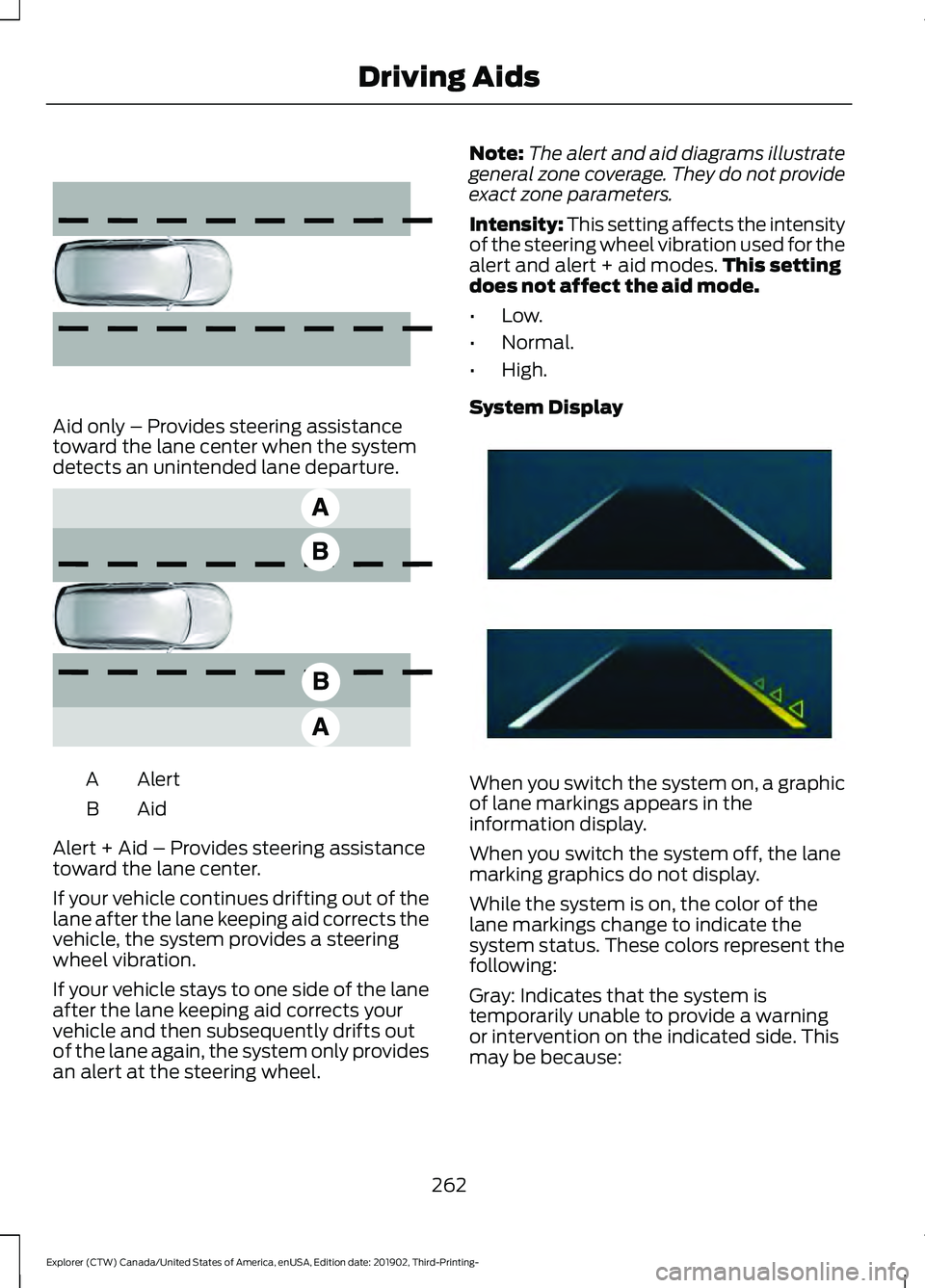
Aid only – Provides steering assistance
toward the lane center when the system
detects an unintended lane departure.
Alert
A
AidB
Alert + Aid – Provides steering assistance
toward the lane center.
If your vehicle continues drifting out of the
lane after the lane keeping aid corrects the
vehicle, the system provides a steering
wheel vibration.
If your vehicle stays to one side of the lane
after the lane keeping aid corrects your
vehicle and then subsequently drifts out
of the lane again, the system only provides
an alert at the steering wheel. Note:
The alert and aid diagrams illustrate
general zone coverage. They do not provide
exact zone parameters.
Intensity: This setting affects the intensity
of the steering wheel vibration used for the
alert and alert + aid modes. This setting
does not affect the aid mode.
• Low.
• Normal.
• High.
System Display When you switch the system on, a graphic
of lane markings appears in the
information display.
When you switch the system off, the lane
marking graphics do not display.
While the system is on, the color of the
lane markings change to indicate the
system status. These colors represent the
following:
Gray: Indicates that the system is
temporarily unable to provide a warning
or intervention on the indicated side. This
may be because:
262
Explorer (CTW) Canada/United States of America, enUSA, Edition date: 201902, Third-Printing- Driving Aids E165516 E165517 E294544
Page 266 of 555

•
Your vehicle is under the activation
speed.
• The direction indicator is active.
• Your vehicle is in a dynamic maneuver.
• The road has no or poor lane markings
in the camera field-of-view.
• The camera is obscured or unable to
detect the lane markings due to
environmental, traffic or vehicle
conditions. For example, significant sun
angles, shadows, snow, heavy rain or
fog, following a large vehicle that is
blocking or shadowing the lane or poor
headlamp illumination.
See Troubleshooting for additional
information.
White: Indicates that the system is
available or ready to provide a warning or
intervention on the indicated side. Note:
If your vehicle has lane centering
assist and the system is active, the walls
appear green instead of white.
Yellow: Indicates that the system is
providing or has just provided a lane
keeping aid intervention.
Red: Indicates that the system is providing
or has just provided a lane keeping alert
warning.
The system can be temporarily suppressed
at any time by the following:
• Quick braking.
• Fast acceleration.
• Using the direction indicator.
• Evasive steering maneuver.
• Driving too close to the lane markings.
Troubleshooting Why is the feature not available (line markings are gray) when I can see the lane markings
on the road?
Your vehicle speed is outside the operational range of the feature.
The sun is shining directly into the camera lens.
A quick intentional lane change has occurred.
Your vehicle stays too close to the lane markings.
Driving at high speeds in curves.
The last alert warning or aid intervention occurred a short time ago.
Ambiguous lane markings, for example in construction zones.
Rapid transition from light to dark, or from dark to light.
Sudden offset in lane markings.
ABS or AdvanceTrac ™ is active.
There is a camera blockage due to dirt, grime, fog, frost or water on the windshield.
You are driving too close to the vehicle in front of you.
263
Explorer (CTW) Canada/United States of America, enUSA, Edition date: 201902, Third-Printing- Driving Aids
Page 279 of 555
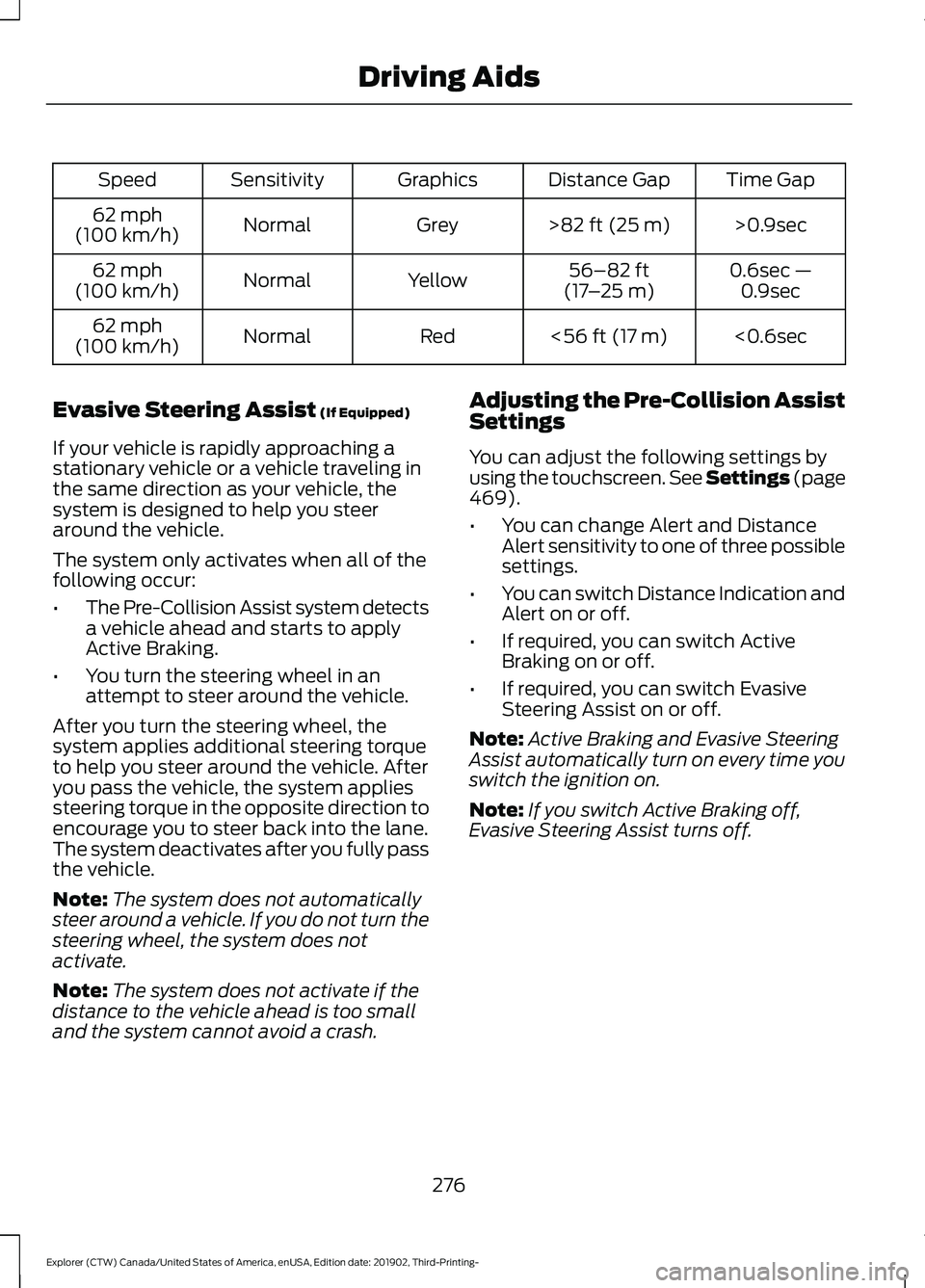
Time Gap
Distance Gap
Graphics
Sensitivity
Speed
>0.9sec
>82 ft (25 m)
Grey
Normal
62 mph
(100 km/h)
0.6sec —0.9sec
56–82 ft
(17 –25 m)
Yellow
Normal
62 mph
(100 km/h)
<0.6sec
<
56 ft (17 m)
Red
Normal
62 mph
(100 km/h)
Evasive Steering Assist
(If Equipped)
If your vehicle is rapidly approaching a
stationary vehicle or a vehicle traveling in
the same direction as your vehicle, the
system is designed to help you steer
around the vehicle.
The system only activates when all of the
following occur:
• The Pre-Collision Assist system detects
a vehicle ahead and starts to apply
Active Braking.
• You turn the steering wheel in an
attempt to steer around the vehicle.
After you turn the steering wheel, the
system applies additional steering torque
to help you steer around the vehicle. After
you pass the vehicle, the system applies
steering torque in the opposite direction to
encourage you to steer back into the lane.
The system deactivates after you fully pass
the vehicle.
Note: The system does not automatically
steer around a vehicle. If you do not turn the
steering wheel, the system does not
activate.
Note: The system does not activate if the
distance to the vehicle ahead is too small
and the system cannot avoid a crash. Adjusting the Pre-Collision Assist
Settings
You can adjust the following settings by
using the touchscreen. See Settings (page
469
).
• You can change Alert and Distance
Alert sensitivity to one of three possible
settings.
• You can switch Distance Indication and
Alert on or off.
• If required, you can switch Active
Braking on or off.
• If required, you can switch Evasive
Steering Assist on or off.
Note: Active Braking and Evasive Steering
Assist automatically turn on every time you
switch the ignition on.
Note: If you switch Active Braking off,
Evasive Steering Assist turns off.
276
Explorer (CTW) Canada/United States of America, enUSA, Edition date: 201902, Third-Printing- Driving Aids
Page 472 of 555

Action and Description
Menu Item
Select to choose from a listing of
weather locations.
Area
Touch this button to view scores and schedules from a variety
of sports. You can also save up to 10 favorite teams for easier
access. The score automatically refreshes when a game is in
progress.
Sports Info
Touch this button to view ski conditions for a specific area.
Ski Conditions
SETTINGS Press the button to enter the
settings menu.
Once you select a tile, press the
button next to a menu item to
view an explanation of the
feature or setting.
Sound
Select this tile to adjust the sound settings.
Clock
Select this tile to adjust the clock settings.
Bluetooth
Select this tile to switch Bluetooth on and
off and adjust the settings.
Phone
Select this tile to connect, disconnect, and
manage the connected device settings.
Audio
Select this tile to adjust the audio settings. Driver Assist (If Equipped)
Select this tile to adjust Driver Assist
features like Parking Aids, Lane Keeping
System, Pedestrian Detection, and
Auto-Start-Stop.
Vehicle
Select this tile to adjust vehicle settings
like windows, alarm, lighting, and MyKey
settings.
FordPass
Select this tile to adjust the FordPass
settings
General
Select this tile to adjust settings like
language, measurement units, or to reset
the system.
911 Assist
(If Equipped)
Select this tile to switch 911 Assist on and
off.
Automatic Updates
Select this tile to adjust the automatic
update settings.
Mobile Apps
Select this tile to adjust permissions,
enable, disable, and update mobile apps.
469
Explorer (CTW) Canada/United States of America, enUSA, Edition date: 201902, Third-Printing- SYNC™ 3E280315 E268570
Page 540 of 555

3
360 Degree Camera....................................241
Front Camera...................................................... 242
Side Camera........................................................ 243
Using the System............................................... 242
4
4WD See: Four-Wheel Drive.................................... 208
9
911 Assist...........................................................55
A
A/C See: Climate Control.......................................... 137
About This Manual...........................................9
ABS See: Brakes............................................................ 214
ABS driving hints See: Hints on Driving With Anti-Lock
Brakes................................................................. 215
Accessories...................................................484
Accessories See: Replacement Parts
Recommendation............................................ 16
Active Park Assist........................................235 Using Active Park Assist.................................. 236
Adaptive Cruise Control
............................246
Adaptive Cruise Control –
Troubleshooting............................................ 256
Adaptive Cruise Control Indicators - Vehicles With: Adaptive Cruise Control
With Lane Centering
................................253
Adaptive Cruise Control Indicators - Vehicles With: Adaptive Cruise Control
With Stop and Go
.....................................253
Adaptive Cruise Control Indicators - Vehicles With: Intelligent Adaptive
Cruise Control
.............................................253
System Warnings............................................... 253
Adaptive Cruise Control Limitations - Vehicles With: Adaptive Cruise Control
With Lane Centering................................247 Adaptive Cruise Control Limitations -
Vehicles With: Adaptive Cruise Control
With Stop and Go
.....................................248
Sensor Limitations............................................ 248
Adaptive Cruise Control Precautions - Vehicles With: Adaptive Cruise Control
With Lane Centering
...............................246
Adaptive Cruise Control Precautions - Vehicles With: Adaptive Cruise Control
With Stop and Go.....................................246
Hilly Condition Usage....................................... 247
When Following a Vehicle............................... 247
Adaptive Cruise Control – Troubleshooting........................................256
Adaptive Cruise Control – Information Messages......................................................... 256
Adaptive Headlamps
.....................................91
System Check......................................................... 91
Adjusting the Headlamps
........................340
Vertical Aim Adjustment................................ 340
Adjusting the Set Speed Tolerance.....................................................255
Adjusting the Steering Wheel - Vehicles With: Manual Adjustable Steering
Column...........................................................80
Adjusting the Steering Wheel - Vehicles With: Power Adjustable Steering
Column...........................................................80
End of Travel Position.......................................... 81
Memory Feature.................................................... 81
AFS See: Adaptive Headlamps................................. 91
Airbag Disposal
...............................................53
Air Conditioning See: Climate Control.......................................... 137
Air Filter See: Changing the Engine Air Filter - 2.3L
EcoBoost™..................................................... 329
See: Changing the Engine Air Filter - 3.0L.................................................................... 330
See: Changing the Engine Air Filter - 3.3L...................................................................... 331
Alarm See: Anti-Theft Alarm........................................ 78
Ambient Lighting - Vehicles With: 10.1 Inch Information and Entertainment
Display Screen
..............................................93
Adjusting the Brightness................................... 94
537
Explorer (CTW) Canada/United States of America, enUSA, Edition date: 201902, Third-Printing- Index
Page 544 of 555

Switching the Ventilated Seats On and
Off...................................................................... 458
Climate Control..............................................137
Climate Controlled Seats..........................158
Automatic Climate Controlled Seats..........158
Heated Seats....................................................... 158
Ventilated Seats................................................. 158
Cold Weather Precautions.......................297
Collision, Damage or Fire Event.............303 Guidance for Ford Motor Company Electric
and Hybrid-Electric Vehicles Equipped
With High Voltage Batteries..................... 303
Connecting the Vehicle to a Mobile Network........................................................426
Enabling the Modem Using FordPass.......................................................... 426
Enabling the Modem Using the Touchscreen................................................... 426
What Is the Modem.......................................... 426
Coolant Check See: Engine Coolant Check............................ 332
Crash Sensors and Airbag Indicator
........52
Creating a MyKey...........................................65
Programming and Changing Configurable
Settings.............................................................. 66
Creating a Vehicle Wi-Fi Hotspot..........429 Connecting a Device to the Wi-Fi
Hotspot............................................................ 429
Finding the Wi-Fi Hotspot Name and Password......................................................... 429
Cross Traffic Alert........................................268 Cross Traffic Alert Behavior When Trailer
is Attached........................................................ 271
Cross Traffic Alert Indicator............................. 271
Cross Traffic Alert Information Messages........................................................... 271
Cross Traffic Alert System Limitations ....................................................... 270
Cross Traffic Alert System Sensors.............270
Switching the System On and Off................271
Using Cross Traffic Alert................................. 269
Cruise Control
...............................................244
Cruise Control Indicators..........................245
Cruise Control - Vehicles With: Adaptive Cruise Control With Lane
Centering........................................................82
Cruise Control - Vehicles With: Adaptive Cruise Control With Stop and Go.........83 Cruise Control - Vehicles With: Cruise
Control
............................................................83
Cup Holders......................................................171
Customer Assistance................................306
D
Data Recording
..................................................11
Comfort, Convenience and Entertainment
Data....................................................................... 13
Event Data................................................................ 13
Service Data............................................................ 12
Services That Third Parties Provide...............14
Services That We Provide.................................. 14
Vehicles With a Modem...................................... 14
Vehicles With an Emergency Call System.................................................................. 15
Vehicles With SYNC............................................. 14
Daytime Running Lamps - Vehicles With: Configurable Daytime Running
Lamps.............................................................90
Daytime Running Lamps - Vehicles With: Daytime Running Lamps (DRL)............90
Declaration of Conformity
.......................534
Declaration of Conformity - Vehicles With: SYNC 3..............................................534
Radio Frequency Statement......................... 534
Digital Radio...................................................431 HD Radio Reception and Station
Troubleshooting............................................ 432
Direction Indicators
........................................91
Direction Indicator................................................ 92
Switching the Direction Indicators On and Off........................................................................\
.. 91
Doors and Locks.............................................69
Drive Mode Control.....................................279 Drive Modes......................................................... 279
Drive Modes
...................................................279
Deep Snow/Sand.............................................. 279
Eco........................................................................\
.. 280
Normal.................................................................. 280
Slippery................................................................. 280
Sport...................................................................... 280
Tow/Haul.............................................................. 280
Trail........................................................................\
. 280
Driver Alert.....................................................259 PRINCIPLE OF OPERATION.......................... 259
USING DRIVER ALERT.................................... 259
541
Explorer (CTW) Canada/United States of America, enUSA, Edition date: 201902, Third-Printing- Index
Page 548 of 555
Lane Keeping System.......................................
128
Maintenance......................................................... 128
MyKey...................................................................... 129
Park Aid.................................................................. 130
Park Brake............................................................... 131
Power Steering..................................................... 132
Pre-Collision Assist............................................ 132
Remote Start........................................................ 132
Seats........................................................................\
133
Starting System................................................... 133
Tire Pressure Monitoring System.................. 133
Trailer....................................................................... 134
Transmission........................................................ 134
Installing Child Restraints...........................25
Child Seats.............................................................. 25
Using Lap and Shoulder Belts......................... 25
Using Lower Anchors and Tethers for CHildren (LATCH)........................................... 28
Using Tether Straps............................................. 29
Instrument Cluster.......................................104
Instrument Lighting Dimmer
.....................89
Instrument Panel.............................................21
Interior Air Quality.........................................143
Interior Lamps
.................................................92
Front Interior Lamp.............................................. 92
Rear Interior Lamps............................................. 92
Interior Mirror
...................................................101
Automatic Dimming Mirror.............................. 101
Manual Dimming Mirror.................................... 101
Introduction........................................................9
J
Jump Starting the Vehicle.........................301 Connecting the Jumper Cables..................... 301
Jump Starting...................................................... 302
Locating the Jump Starting Connection Points................................................................. 301
Preparing Your Vehicle..................................... 301
Removing the Jumper Cables....................... 302
K
Keyless Entry
....................................................72
SECURICODE™ Keyless Entry Keypad........72
Keyless Starting
.............................................172
Ignition Modes...................................................... 173
Keys and Remote Controls.........................57 L
Lane Keeping System
................................260
Switching the System On and Off...............261
Liftgate...............................................................74
Lighting Control
..............................................88
Flashing High Beam Headlamps................... 89
Lighting Control Selections............................. 88
Switching High Beam Headlamps On and Off........................................................................\
. 88
Lighting..............................................................88 General Information........................................... 88
Load Carriers See: Roof Racks and Load Carriers.............282
Load Carrying.................................................281
Load Limit.......................................................283 Special Loading Instructions for Owners of
Pick-up Trucks and Utility-type
Vehicles............................................................. 287
Vehicle Loading - with and without a Trailer................................................................. 283
Locating the Cabin Air Filter.....................143
Locking and Unlocking................................69 Activating Intelligent Access............................ 70
Autolock.................................................................... 71
Battery Saver.......................................................... 72
Illuminated Entry.................................................... 71
Illuminated Exit...................................................... 72
Locking and Unlocking the Doors with the Key Blade........................................................... 69
Power Door Locks................................................ 69
Remote Control.................................................... 69
Smart Unlocks for Integrated Keyhead Remote Control................................................ 70
Smart Unlocks for Intelligent Access Keys........................................................................\
71
Luggage Covers
............................................282
Lug Nuts See: Changing a Road Wheel........................ 376
M
Maintenance..................................................323 General Information.......................................... 323
Manual Seats
..................................................147
Adjusting the Seat Backrest........................... 147
Moving the Seat Backward and Forward.............................................................. 147
545
Explorer (CTW) Canada/United States of America, enUSA, Edition date: 201902, Third-Printing- Index
Page 553 of 555
Switching Lane Centering On and
Off..................................................................254
Activating Lane Centering.............................. 254
System Alerts and Automatic Cancellation.................................................... 254
Switching Rear Occupant Alert System On and Off
...................................................160
Switching Reverse Braking Assist On and Off
....................................................................221
Symbols Glossary.............................................9
SYNC™ 3........................................................438
General Information......................................... 438
SYNC™ 3 Troubleshooting.......................471 Additional Information and
Assistance....................................................... 483
Apps........................................................................\
478
Navigation............................................................. 477
Personal Profiles................................................. 481
Phone..................................................................... 475
Resetting the System...................................... 483
USB and Bluetooth Audio............................... 472
Voice Recognition............................................... 471
Wi-Fi Connectivity............................................ 480
T
Technical Specifications See: Capacities and Specifications............384
The Better Business Bureau (BBB) Auto Line Program (U.S. Only)
......................308
Tire Care..........................................................355
Glossary of Tire Terminology........................ 356
Information About Uniform Tire Quality Grading............................................................. 355
Information Contained on the Tire Sidewall............................................................ 357
Temperature A B C............................................ 356
Traction AA A B C............................................... 355
Treadwear............................................................. 355
Tire Pressure Monitoring System
...........370
Changing Tires With a Tire Pressure
Monitoring System......................................... 371
Understanding Your Tire Pressure Monitoring System ....................................... 372
Tires See: Wheels and Tires..................................... 353
Towing a Trailer............................................289 Load Placement................................................ 289Towing the Vehicle on Four
Wheels..........................................................295
Emergency Towing............................................ 295
Recreational Towing - All-Wheel and Four-Wheel Drive Vehicles........................ 295
Recreational Towing - Front-Wheel Drive Vehicles............................................................ 295
Recreational Towing - Rear-Wheel Drive Vehicles............................................................ 295
Towing.............................................................289
Traction Control............................................224 Principle of Operation...................................... 224
Traffic Sign Recognition.............................272 Principle of Operation....................................... 272
Using Traffic Sign Recognition...................... 272
Trailer Sway Control...................................290
Transmission Code Designation............394
Transmission Specifications - ST.........388
Transmission.................................................202
Transporting the Vehicle
..........................304
U
Under Hood Overview - 2.3L EcoBoost™.................................................324
Under Hood Overview - 3.0L...................325
Under Hood Overview - 3.3L...................326
Unique Driving Characteristics...............180
Universal Garage Door Opener...............162 HomeLink Wireless Control System............162
USB Port.........................................................436 Locating the USB Ports................................... 437
Using Four-Wheel Drive...........................208 Driving in Special Conditions With
Four-Wheel drive (4WD)............................ 210
How Your Vehicle Differs from Other Vehicles............................................................ 209
Operating Four-Wheel drive (4WD) Vehicles with Mismatched Tires.............209
Operating Four-Wheel Drive (4WD) Vehicles With Spare Tires......................... 208
Using MyKey With Remote Start Systems...........................................................67
Using Snow Chains
....................................368
Using Stability Control...............................226 Electronic Stability Control - Base
Model................................................................ 226
550
Explorer (CTW) Canada/United States of America, enUSA, Edition date: 201902, Third-Printing- Index