2020 FORD EXPEDITION lock
[x] Cancel search: lockPage 132 of 542
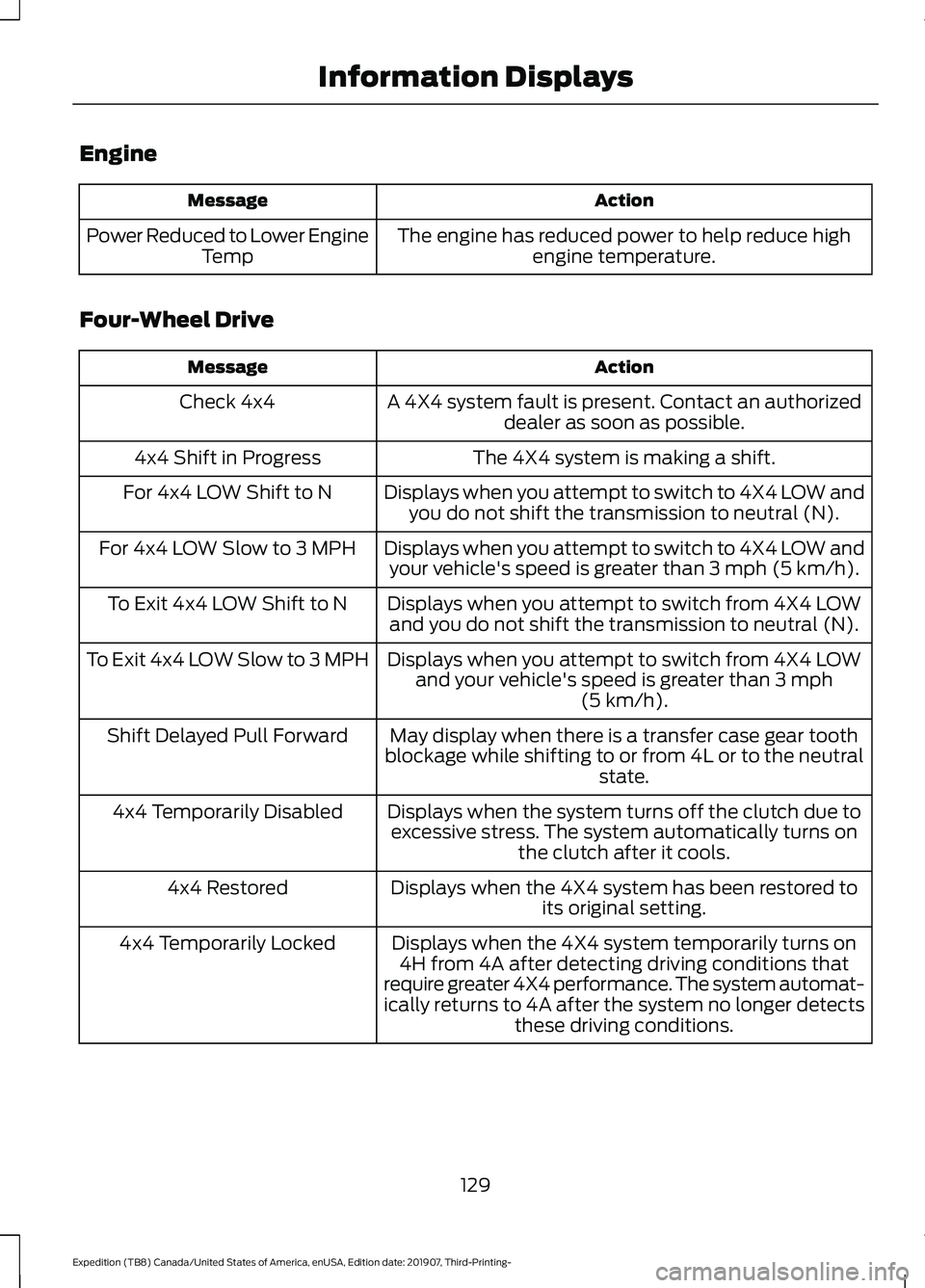
Engine
Action
Message
The engine has reduced power to help reduce highengine temperature.
Power Reduced to Lower Engine
Temp
Four-Wheel Drive Action
Message
A 4X4 system fault is present. Contact an authorizeddealer as soon as possible.
Check 4x4
The 4X4 system is making a shift.
4x4 Shift in Progress
Displays when you attempt to switch to 4X4 LOW andyou do not shift the transmission to neutral (N).
For 4x4 LOW Shift to N
Displays when you attempt to switch to 4X4 LOW andyour vehicle's speed is greater than 3 mph (5 km/h).
For 4x4 LOW Slow to 3 MPH
Displays when you attempt to switch from 4X4 LOWand you do not shift the transmission to neutral (N).
To Exit 4x4 LOW Shift to N
Displays when you attempt to switch from 4X4 LOWand your vehicle's speed is greater than
3 mph
(5 km/h).
To Exit 4x4 LOW Slow to 3 MPH
May display when there is a transfer case gear tooth
blockage while shifting to or from 4L or to the neutral state.
Shift Delayed Pull Forward
Displays when the system turns off the clutch due toexcessive stress. The system automatically turns on the clutch after it cools.
4x4 Temporarily Disabled
Displays when the 4X4 system has been restored toits original setting.
4x4 Restored
Displays when the 4X4 system temporarily turns on4H from 4A after detecting driving conditions that
require greater 4X4 performance. The system automat-
ically returns to 4A after the system no longer detects these driving conditions.
4x4 Temporarily Locked
129
Expedition (TB8) Canada/United States of America, enUSA, Edition date: 201907, Third-Printing- Information Displays
Page 136 of 542

Action
Message
Hill descent control mode is deactivated and you mustresume control.
Hill Descent Driver Resume
Control
A hill descent system fault is present.
Hill Descent Control Fault
The hill descent system is cooling due to overuse.
Hill Descent Control Off System
Cooling
The hill descent control system is ready.
Hill Descent Control Ready
Park Aid Action
Message
The system has detected a condition that requires service.
Contact an authorized dealer. See Front Parking Aid (page
220).
Check Front Park Aid
The system has detected a condition that requires service.
Contact an authorized dealer. See
Rear Parking Aid (page
219).
Check Rear Park Aid
Displays the park aid status.
Front Park Aid On Off
Displays the park aid status.
Rear Park Aid On Off
Displays if the front park aid sensor is blocked.
Front Park Aid Not Avail-
able Sensor Blocked See
Manual
Displays if the rear park aid sensor is blocked.
Rear Park Aid Not Avail-
able Sensor Blocked See Manual
Displays if the park aid sensor is blocked.
Park Aid Not Available
Sensor Blocked See Manual
133
Expedition (TB8) Canada/United States of America, enUSA, Edition date: 201907, Third-Printing- Information Displays
Page 137 of 542
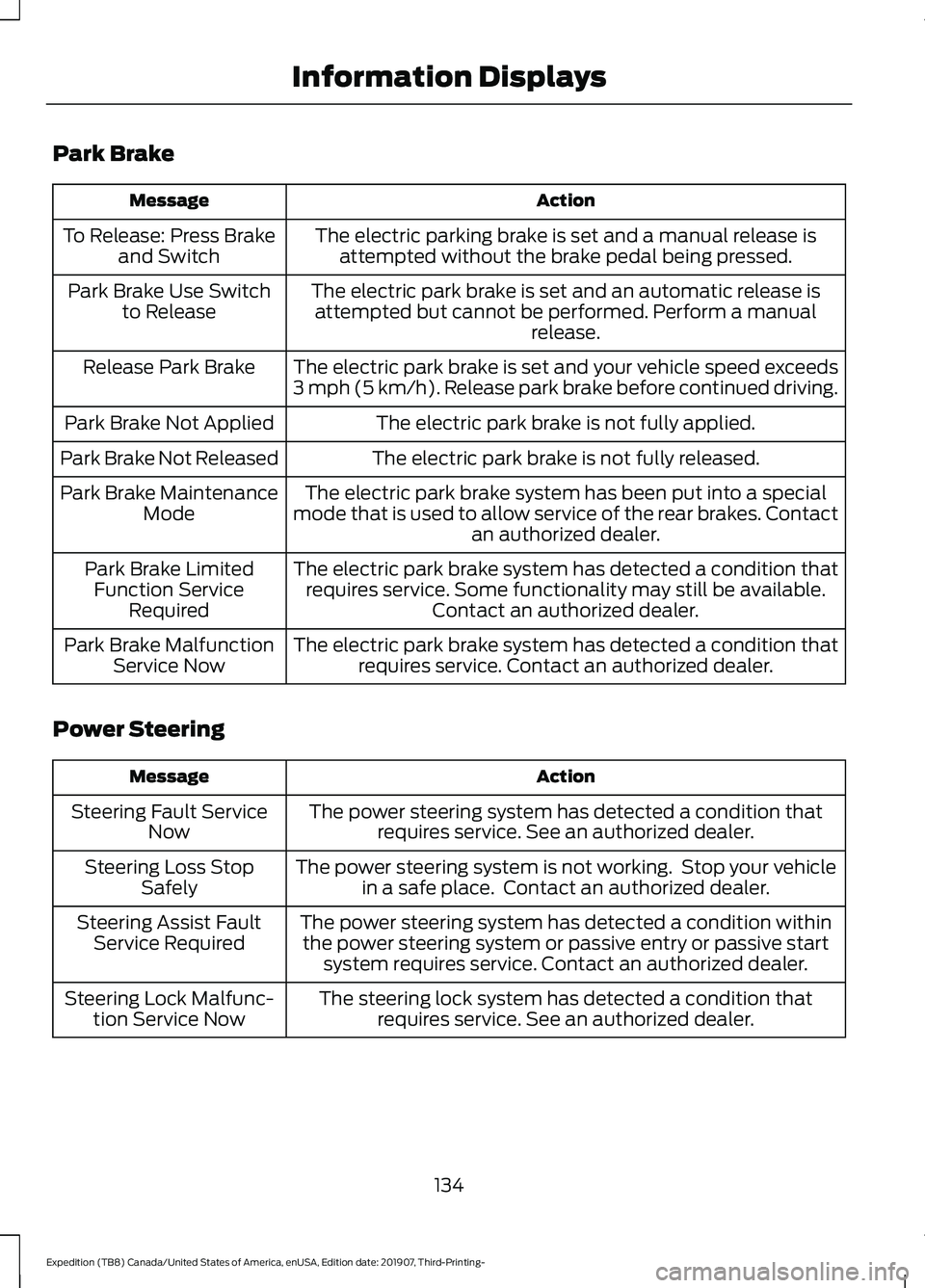
Park Brake
Action
Message
The electric parking brake is set and a manual release isattempted without the brake pedal being pressed.
To Release: Press Brake
and Switch
The electric park brake is set and an automatic release isattempted but cannot be performed. Perform a manual release.
Park Brake Use Switch
to Release
The electric park brake is set and your vehicle speed exceeds
3 mph (5 km/h). Release park brake before continued driving.
Release Park Brake
The electric park brake is not fully applied.
Park Brake Not Applied
The electric park brake is not fully released.
Park Brake Not Released
The electric park brake system has been put into a special
mode that is used to allow service of the rear brakes. Contact an authorized dealer.
Park Brake Maintenance
Mode
The electric park brake system has detected a condition thatrequires service. Some functionality may still be available. Contact an authorized dealer.
Park Brake Limited
Function Service Required
The electric park brake system has detected a condition thatrequires service. Contact an authorized dealer.
Park Brake Malfunction
Service Now
Power Steering Action
Message
The power steering system has detected a condition thatrequires service. See an authorized dealer.
Steering Fault Service
Now
The power steering system is not working. Stop your vehiclein a safe place. Contact an authorized dealer.
Steering Loss Stop
Safely
The power steering system has detected a condition withinthe power steering system or passive entry or passive start system requires service. Contact an authorized dealer.
Steering Assist Fault
Service Required
The steering lock system has detected a condition thatrequires service. See an authorized dealer.
Steering Lock Malfunc-
tion Service Now
134
Expedition (TB8) Canada/United States of America, enUSA, Edition date: 201907, Third-Printing- Information Displays
Page 138 of 542
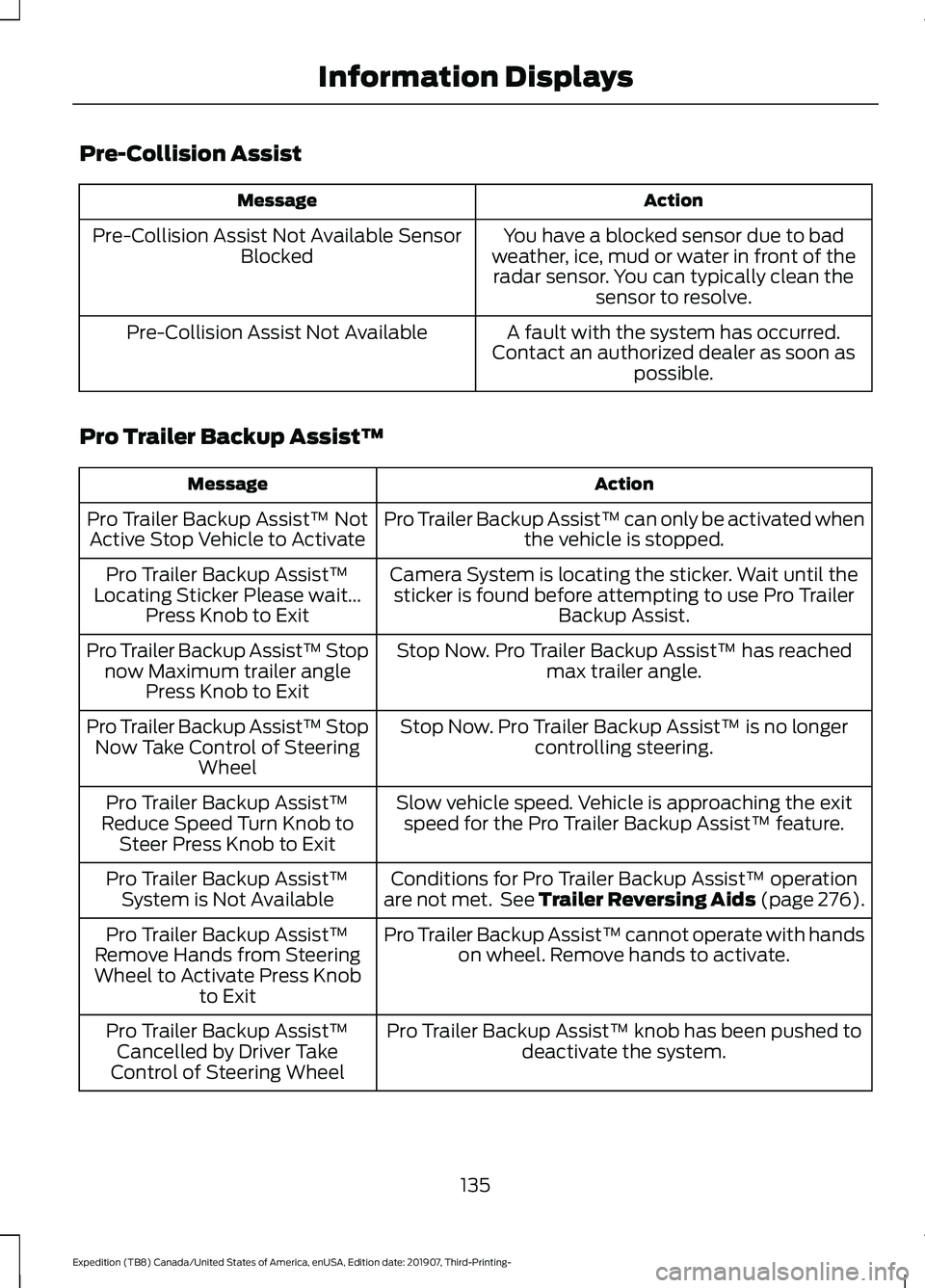
Pre-Collision Assist
Action
Message
You have a blocked sensor due to bad
weather, ice, mud or water in front of the radar sensor. You can typically clean the sensor to resolve.
Pre-Collision Assist Not Available Sensor
Blocked
A fault with the system has occurred.
Contact an authorized dealer as soon as possible.
Pre-Collision Assist Not Available
Pro Trailer Backup Assist™ Action
Message
Pro Trailer Backup Assist™ can only be activated whenthe vehicle is stopped.
Pro Trailer Backup Assist™ Not
Active Stop Vehicle to Activate
Camera System is locating the sticker. Wait until thesticker is found before attempting to use Pro Trailer Backup Assist.
Pro Trailer Backup Assist™
Locating Sticker Please wait... Press Knob to Exit
Stop Now. Pro Trailer Backup Assist™ has reachedmax trailer angle.
Pro Trailer Backup Assist™ Stop
now Maximum trailer angle Press Knob to Exit
Stop Now. Pro Trailer Backup Assist™ is no longercontrolling steering.
Pro Trailer Backup Assist™ Stop
Now Take Control of Steering Wheel
Slow vehicle speed. Vehicle is approaching the exitspeed for the Pro Trailer Backup Assist™ feature.
Pro Trailer Backup Assist™
Reduce Speed Turn Knob to Steer Press Knob to Exit
Conditions for Pro Trailer Backup Assist™ operation
are not met. See Trailer Reversing Aids (page 276).
Pro Trailer Backup Assist™
System is Not Available
Pro Trailer Backup Assist™ cannot operate with handson wheel. Remove hands to activate.
Pro Trailer Backup Assist™
Remove Hands from Steering
Wheel to Activate Press Knob to Exit
Pro Trailer Backup Assist™ knob has been pushed todeactivate the system.
Pro Trailer Backup Assist™
Cancelled by Driver Take
Control of Steering Wheel
135
Expedition (TB8) Canada/United States of America, enUSA, Edition date: 201907, Third-Printing- Information Displays
Page 143 of 542

Use air conditioning with recirculated air
to improve cooling performance and
efficiency.
Note:
In certain conditions (for example,
maximum defrost) the air conditioning
compressor may continue to operate even
though you switch off the air conditioning.
Switching the Climate Control On
and Off Press and release the button.
Switching Maximum Air
Conditioning On and Off Turn the temperature control
counterclockwise to the lowest
setting for maximum cooling.
Recirculated air flows through the
instrument panel air vents, air conditioning
turns on and the blower motor adjusts to
the highest speed.
Switching Maximum Defrost On
and Off Turn the temperature control
clockwise to the highest setting
for maximum defrosting.
Air flows through the windshield air vents,
and the blower motor adjusts to the
highest speed.
Note: Depending on your region, air
conditioning turns on.
You can also use this setting to defog and
clear the windshield of a thin covering of
ice.
Note: To prevent window fogging, you
cannot select recirculated air when
maximum defrost is on.
Note: The heated rear window also turns
on when you select maximum defrost. Switching Recirculated Air On and
Off Press and release the button to
switch between outside air and
recirculated air.
The air currently in the passenger
compartment recirculates. This may
reduce the time needed to cool the interior,
when used with A/C, and reduce unwanted
odors from entering your vehicle.
Note: Recirculated air may turn off, or
prevent you from switching on, in all air flow
modes except MAX A/C to reduce the risk
of fogging. Recirculation may also turn on
and off in various air distribution control
combinations during hot weather to improve
cooling efficiency.
Locking the Rear Climate Control Press and release the button.
When illuminated, you can only operate
the rear passenger settings through the
front controls.
Setting the Rear Blower Motor
Speed Press and release + or - to adjust
the volume of air circulated in
the rear passenger
compartment.
Setting the Rear Temperature Press and release
+ or - to set
the temperature in the rear
passenger compartment.
Switching the Rear Climate
Control On and Off Press and release the button.
140
Expedition (TB8) Canada/United States of America, enUSA, Edition date: 201907, Third-Printing- Climate Control E266664 E265400
Page 148 of 542
Recommended Settings for
Heating
1. Adjust the blower motor speed to the
center setting.
2. Adjust the temperature control to the midway point of the hot settings.
3. Direct air to the footwell air vents.
Quickly Cooling the Interior
1. Select MAX A/C.
2. Drive with the windows open for a short
period of time.
Recommended Settings for
Cooling
1. Adjust the blower motor speed to the center setting.
2. Adjust the temperature control to the midway point of the cold settings.
3. Direct air to the instrument panel air vents.
Vehicle Stationary for Extended
Periods During Extreme High
Ambient Temperatures
1. Apply the parking brake.
2. Place your vehicle in park (P) or neutral.
3. Select
MAX A/C.
4. Adjust the blower motor speed to the lowest speed setting.
Defogging the Side Windows in
Cold Weather
1. Direct air to the instrument panel and windshield air vents.
2. Press and release
A/C.
3. Adjust the temperature control to the setting you prefer.
4. Adjust the blower motor speed to the highest setting. 5. Direct air toward the side windows.
6. Close the instrument panel air vents.
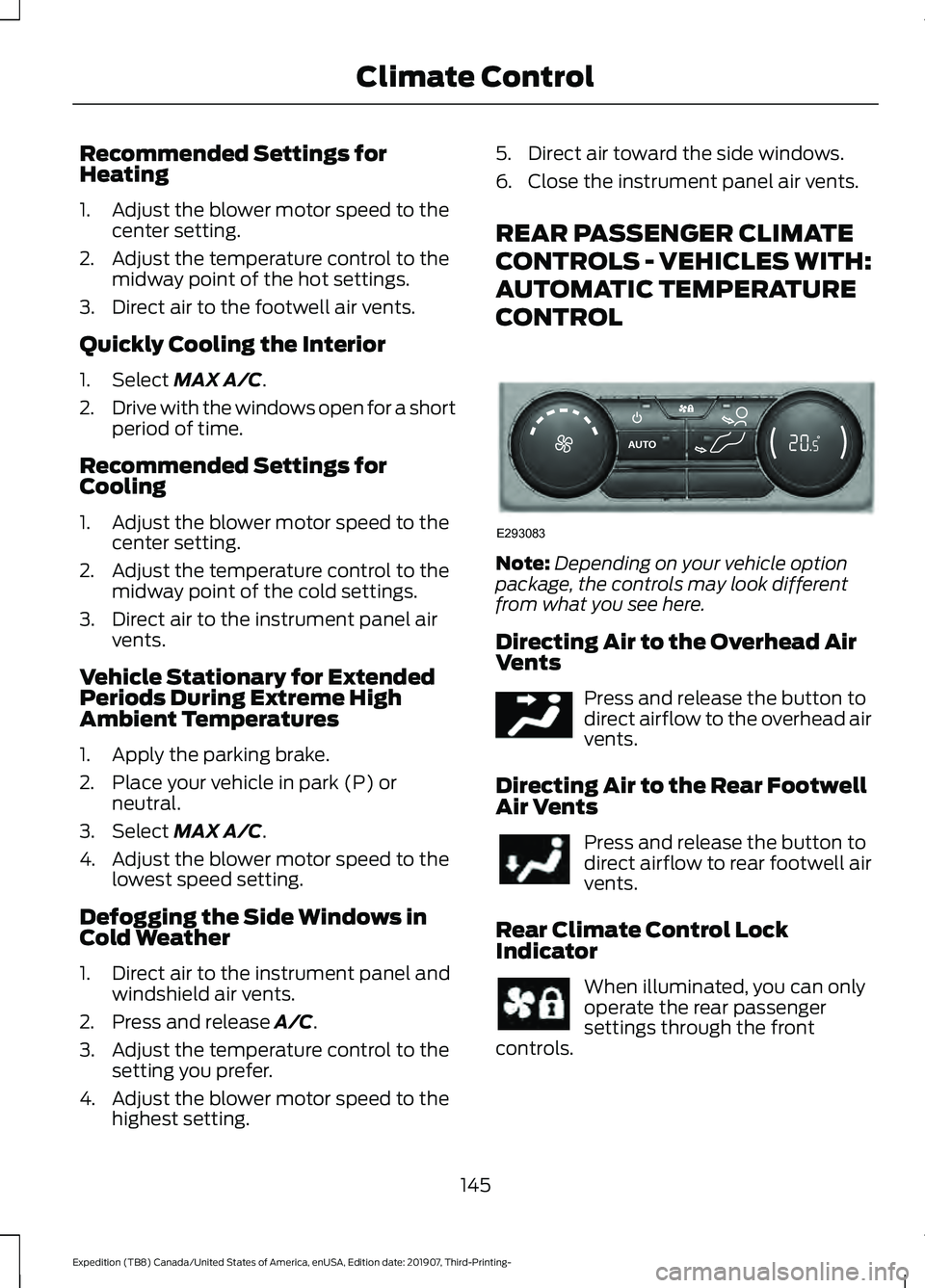
REAR PASSENGER CLIMATE
CONTROLS - VEHICLES WITH:
AUTOMATIC TEMPERATURE
CONTROL
Note:
Depending on your vehicle option
package, the controls may look different
from what you see here.
Directing Air to the Overhead Air
Vents Press and release the button to
direct airflow to the overhead air
vents.
Directing Air to the Rear Footwell
Air Vents Press and release the button to
direct airflow to rear footwell air
vents.
Rear Climate Control Lock
Indicator When illuminated, you can only
operate the rear passenger
settings through the front
controls.
145
Expedition (TB8) Canada/United States of America, enUSA, Edition date: 201907, Third-Printing- Climate ControlE293083 E244097
Page 150 of 542

Directing Air to the Rear Footwell
Air Vents
Press and release the button to
direct airflow to rear footwell air
vents.
Rear Climate Control Lock
Indicator When illuminated, you can only
operate the rear passenger
settings through the front
controls.
Setting the Rear Blower Motor
Speed Turn the control to adjust the volume of
air circulated in the rear passenger
compartment. Setting the Rear Temperature
Turn the control to set the temperature in
the rear passenger compartment.
Switching the Rear Climate
Control On and Off
Press and release the button.
Switching the Rear Heated Seats
On and Off (If Equipped) See
Climate Controlled Seats
(page 163).
HEATED WINDSHIELD
(IF
EQUIPPED)
Windshield Wiper De-Icer
The windshield wiper de-icer turns on in
low temperatures.
147
Expedition (TB8) Canada/United States of America, enUSA, Edition date: 201907, Third-Printing- Climate Control E265389 E265862
Page 154 of 542
WARNING: The head restraint is a
safety device. Whenever possible it
should be installed and properly
adjusted when the seat is occupied.
Failure to adjust the head restraint
properly could reduce its effectiveness
during certain impacts.
Note: Adjust the seat backrest to an upright
driving position before adjusting the head
restraint. Adjust the head restraint so that
the top of it is level with the top of your head
and as far forward as possible. Make sure
that you remain comfortable. If you are
extremely tall, adjust the head restraint to
its highest position.
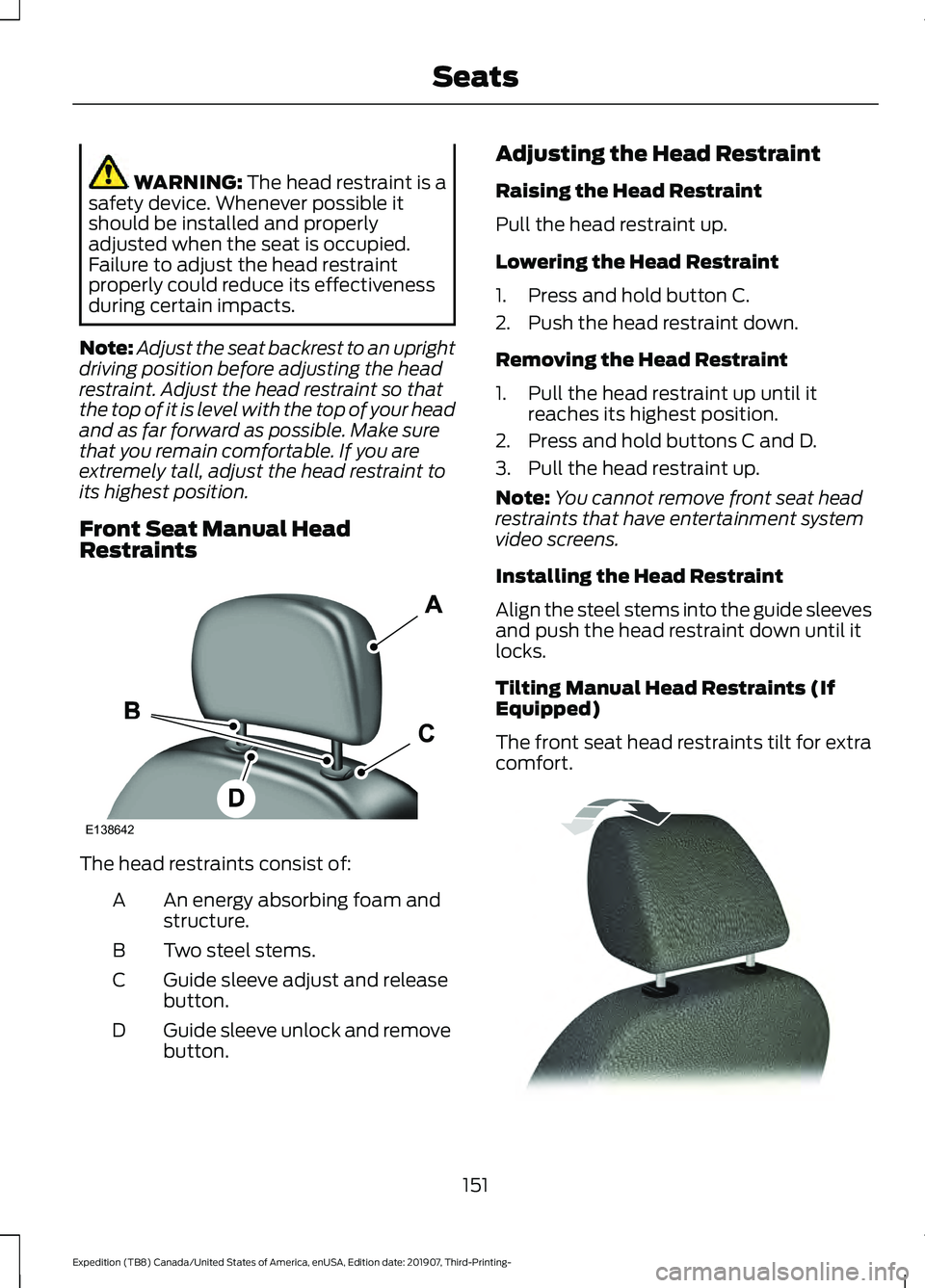
Front Seat Manual Head
Restraints The head restraints consist of:
An energy absorbing foam and
structure.
A
Two steel stems.
B
Guide sleeve adjust and release
button.
C
Guide sleeve unlock and remove
button.
D Adjusting the Head Restraint
Raising the Head Restraint
Pull the head restraint up.
Lowering the Head Restraint
1. Press and hold button C.
2. Push the head restraint down.
Removing the Head Restraint
1. Pull the head restraint up until it
reaches its highest position.
2. Press and hold buttons C and D.
3. Pull the head restraint up.
Note: You cannot remove front seat head
restraints that have entertainment system
video screens.
Installing the Head Restraint
Align the steel stems into the guide sleeves
and push the head restraint down until it
locks.
Tilting Manual Head Restraints (If
Equipped)
The front seat head restraints tilt for extra
comfort. 151
Expedition (TB8) Canada/United States of America, enUSA, Edition date: 201907, Third-Printing- SeatsE138642 E144727