2020 FORD ESCAPE steering wheel
[x] Cancel search: steering wheelPage 138 of 553

Action
Menu Item
Press the OK button.
Adjustment
1. Press the
OK button.
2. Use the up and down toggle buttons to adjust the vertical position of the blue frame.
•Make sure that you can see all of the blue frame.
• Do not physically move the screen. This can cause
damage not covered by the vehicle Warranty.
Position
1. Press the
OK button.
2. Use the up and down toggle buttons to adjust the brightness of the display screen.
•The system adjusts the brightness based on how
dark it is. If you set the brightness to a high level,
the system reduces the brightness at night.
Brightness
1. Press the
OK button.
2. Use the up and down toggle buttons to adjust the vertical size of the display screen.
•A small vertical size could be more suitable if you
sit in a high position.
Vertical Size
Selecting Which Information the
System Displays
Start the engine and switch the system on.
Note: Press the button on the steering
wheel if you do not see the head up display
menu in the information display. Note:
For your safety, some features are
speed-dependent. The system limits their
use to when your vehicle is not moving.
Use the information display controls on
the steering wheel to select which
information the system displays.
135
Escape (CTC) Canada/United States of America, Vehicles Built From: 17-06-2019, enUSA, Edition date: 201906, Third-Printing- Information Displays
Page 139 of 553

Action
Menu Item
Press the OK button.
Content
Press the
OK button.
Distance Indication
Eco Advice
Incoming Calls
Lane Keeping System
Navigation
Speed Assistance
Speed Sign Recognition
Head Up Display Indicator Note:
The head up display indicator could
illuminate to supplement an information
message.
Head Up Display Information Messages Action
Message
The system is malfunctioning or something is obstructing the display.
Make sure that the head up display is free from obstruction. If the
message continues to appear, have your vehicle checked as soon as
possible.
Head Up
Display System
Fault See
Manual
Press the button on the steering wheel. The head up display menu
appears in the information display.
Make sure the blue frame is fully visible. Do not manually move the
screen. This can cause damage not covered by the vehicle Warranty.
Head Up
Display To Posi-
tion Use the
Information
Display
Note: Information messages only appear in the information display.
136
Escape (CTC) Canada/United States of America, Vehicles Built From: 17-06-2019, enUSA, Edition date: 201906, Third-Printing- Information DisplaysE265900
Page 150 of 553

REMOTE START (IF EQUIPPED)
The climate control system adjusts the
interior temperature during remote start.
You can switch this feature on or off and
adjust the settings using the touchscreen.
See
Settings (page 468).
You cannot adjust the climate control
setting during remote start operation.
Switch the ignition on to make
adjustments.
Based on your remote start settings, the
following vehicle-dependent features may
or may not remain on after remote starting
your vehicle:
• Climate controlled seats.
• Heated steering wheel.
• Heated mirrors.
• Heated rear window.
• Windshield wiper de-icer.
Note: For dual zone climate controlled
seats, the passenger seat setting defaults
to match the driver seat during remote start.
Automatic Settings
If
Auto is on, the system sets the interior
temperature to 72°F (22°C) and heats or
cools the vehicle interior as required to
achieve comfort.
Note: In cold weather, the heated rear
window and heated mirrors turn on.
Last Settings
If
Last Settings is on, the system uses the
settings last selected before you turned
off the vehicle.
Heated and Cooled Features
In Auto mode, certain heated features may
switch on during cold weather, and cooled
features during hot weather.
147
Escape (CTC) Canada/United States of America, Vehicles Built From: 17-06-2019, enUSA, Edition date: 201906, Third-Printing- Climate Control
Page 151 of 553
SITTING IN THE CORRECT
POSITION
WARNING: Sitting improperly, out
of position or with the seatback reclined
too far can take weight off the seat
cushion and affect the decision of the
passenger sensing system, resulting in
serious injury or death in the event of a
crash. Always sit upright against your
seat back, with your feet on the floor. WARNING: Do not recline the seat
backrest too far as this can cause the
occupant to slide under the seatbelt,
resulting in personal injury in the event
of a crash. WARNING:
Do not place objects
higher than the top of the seat backrest.
Failure to follow this instruction could
result in personal injury or death in the
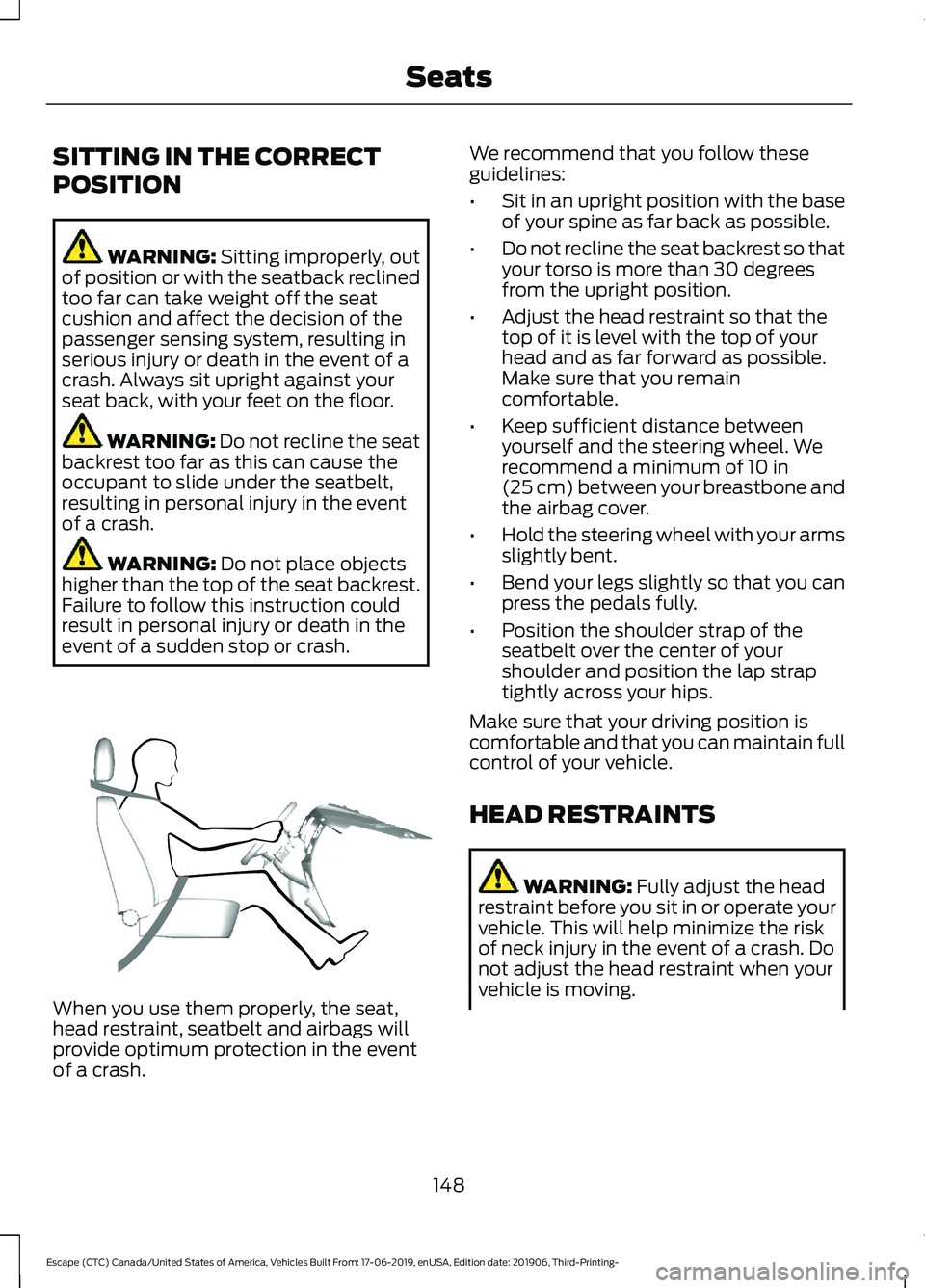
event of a sudden stop or crash. When you use them properly, the seat,
head restraint, seatbelt and airbags will
provide optimum protection in the event
of a crash. We recommend that you follow these
guidelines:
•
Sit in an upright position with the base
of your spine as far back as possible.
• Do not recline the seat backrest so that
your torso is more than 30 degrees
from the upright position.
• Adjust the head restraint so that the
top of it is level with the top of your
head and as far forward as possible.
Make sure that you remain
comfortable.
• Keep sufficient distance between
yourself and the steering wheel. We
recommend a minimum of
10 in
(25 cm) between your breastbone and
the airbag cover.
• Hold the steering wheel with your arms
slightly bent.
• Bend your legs slightly so that you can
press the pedals fully.
• Position the shoulder strap of the
seatbelt over the center of your
shoulder and position the lap strap
tightly across your hips.
Make sure that your driving position is
comfortable and that you can maintain full
control of your vehicle.
HEAD RESTRAINTS WARNING:
Fully adjust the head
restraint before you sit in or operate your
vehicle. This will help minimize the risk
of neck injury in the event of a crash. Do
not adjust the head restraint when your
vehicle is moving.
148
Escape (CTC) Canada/United States of America, Vehicles Built From: 17-06-2019, enUSA, Edition date: 201906, Third-Printing- SeatsE68595
Page 178 of 553

AUTO-START-STOP (IF EQUIPPED)
The system helps reduce fuel consumption
by automatically shutting off and restarting
the engine while your vehicle is stopped.
The engine will restart automatically when
you release the brake pedal. In some
situations, your vehicle may restart
automatically, for example:
• To maintain interior comfort
• To recharge the battery
Note: Power assist steering is turned off
when the engine is off. WARNING:
Always fully apply the
parking brake and make sure you shift
into park (P). Failure to follow this
instruction could result in personal injury
or death. WARNING:
Apply the parking
brake, shift into park (P), switch the
ignition off and remove the key before
you open the hood or have any service
or repair work completed. If you do not
switch the ignition off, the engine could
restart at any time. Failure to follow this
instruction could result in personal injury
or death. WARNING:
The system may
require the engine to automatically
restart when the auto-start-stop
indicator illuminates green or flashes
amber. Failure to follow this instruction
could result in personal injury.
The Auto-Start-Stop system status is
available at a glance within the information
display. See Information Displays (page
110
). Enabling Auto-Start-Stop
The system is automatically enabled every
time you start your vehicle if the following
conditions are met:
•
The Auto-Start-Stop button is not
pressed (button is not illuminated).
• Your vehicle exceeds an initial speed
of
3 mph (5 km/h) after the vehicle has
been initially started.
• Your vehicle is stopped.
• Your foot is on the brake pedal.
• The transmission is in drive (D).
• The driver's door is closed.
• There is adequate brake vacuum.
• The interior compartment has been
cooled or warmed to an acceptable
level.
• The front windshield defroster is off.
• The steering wheel is not being turned.
• The vehicle is not on a steep road
grade.
• The battery is within optimal operating
conditions (battery state of charge and
temperature in range).
• The engine coolant is at operating
temperature.
• Vehicle is not being driven at a high
altitude.
• Ambient temperature is moderate. The green Auto-Start-Stop
indicator light on the instrument
cluster will illuminate to indicate
when the automatic engine stop occurs. If the instrument cluster is
equipped with a grey
Auto-Start-Stop indicator light,
it is illuminated when automatic engine
stop is not available due to one of the
above noted conditions not being met.
175
Escape (CTC) Canada/United States of America, Vehicles Built From: 17-06-2019, enUSA, Edition date: 201906, Third-Printing- Unique Driving Characteristics E146361
Page 182 of 553

EV Now
This mode provides an electric
only driving experience. Do not
use EV Now when towing a
trailer. The electric drive system is not
designed for towing. An EV Now
information on demand screen appears.
This screen allows you to enable your
engine while in EV Now mode.
Your vehicle could accelerate slower and
the top speed could be lower than when
in Auto EV mode.
You can enable your engine at any time by
using one of the following methods:
• Press the OK button on the steering
wheel while viewing the EV Now
information on demand screen. Your
vehicle enables the engine as needed
and returns to EV Now mode when no
longer needed.
• Fully press the accelerator pedal. A
pop-up message appears. Press the
OK button on the steering wheel to
enable the engine. When the engine is
no longer needed, your vehicle returns
to EV Now. The message disappears if
you release the accelerator pedal.
• Press the EV button. This exits EV Now
mode and permits engine operation.
To return to EV Now mode, select it
again using the EV button.
Your vehicle could enter Engine Enabled
mode if system conditions require it. A
message displays if this occurs. This is a
normal function of the system and your
vehicle returns to EV Now mode when
possible.
When you enable EV Now mode, a blue EV
Now icon appears in the information
display. If your vehicle is in Engine Enabled
mode, the EV Now icon is amber. EV Now
exits when your available electric range
reaches zero. EV Later In EV Later, your vehicle runs on
the engine as needed and saves
most of the available electric
range for later use in Auto EV or EV Now
mode.
For example, your initial drive is at high
speeds on open roads, but later your drive
is at low speeds in an urban area where
electric only driving is most efficient. In this
case, you can select EV Later for the higher
speed portion of your trip and then select
Auto EV or EV Now for the urban portion.
When you enable EV Later, a white EV
Later icon appears in the information
display. EV Later resets to Auto EV when
you switch off your vehicle. You may select
EV Later again using the EV button during
your next drive.
When you select EV Later with the vehicle
fully charged or near fully charged, the
battery uses some electric-only driving
range to discharge the battery, and allows
for full operation of the regenerative
braking system.
EV Charge This mode uses your vehicle's
engine to charge the high voltage
battery versus plugging the
vehicle into a utility grid.
The electric range gained through EV
Charge allows you to switch to Auto EV or
EV Now for full electric operation later in
your drive. The battery cannot completely
charge to 100% when in EV Charge mode.
This is to allow for full operation of the
regenerative braking system. When the
battery reaches its EV Charge limit, the
vehicle remains in EV Charge mode and
maintains that charge level, until you select
another EV Mode, or until you switch the
vehicle off.
179
Escape (CTC) Canada/United States of America, Vehicles Built From: 17-06-2019, enUSA, Edition date: 201906, Third-Printing- Unique Driving CharacteristicsE287826 E287824 E287822
Page 215 of 553

USING ALL-WHEEL DRIVE
Note:
When a system malfunction is
present, a warning message will be
displayed in the information display. See
Information Messages (page 117). This
means the system is not functioning
correctly and has defaulted to front-wheel
drive only. Have your vehicle checked by an
authorized dealer.
Note: A message will be displayed in the
information display when the system
overheats and switches to front-wheel drive.
This condition may occur if you operate your
vehicle in extreme high-load conditions or
with excessive wheel slip, (i.e. deep sand).
To resume all-wheel drive function as soon
as possible, stop your vehicle in a safe
location and switch the ignition off. After
the system cools and normal all-wheel drive
functionality resumes, a message displays
for approximately five seconds.
Note: If a warning message appears in the
information display when using the spare
tire, it should turn off after reinstalling the
repaired or replaced road tire and you switch
the ignition on.
Note: It is recommended that you reinstall
the repaired tire or replace the tire as soon
as possible. Major dissimilar tire sizes
between the front and rear axles could
cause system damage or default the system
to front-wheel drive.
Your all-wheel drive vehicle is not intended
for off-road use. The all-wheel drive
feature gives your vehicle some limited
off-road capabilities in which driving
surfaces are relatively level,
obstruction-free and otherwise similar to
normal on-road driving conditions.
Operating your vehicle in other than those
conditions could subject the vehicle to
excessive stress which might result in
damage which is not covered by your
warranty. A graphic will be displayed in the
information display to advise you of the
power distribution between the front and
rear wheels. The more the area is filled the
more power is being distributed to that
wheel.
Driving in Special Conditions With
All-Wheel Drive
All-wheel drive has operating
characteristics that are somewhat
different from two-wheel drive, both on
and off the freeway.
Note:
It may be useful to switch traction
control off. This allows for more wheel spin
and engine torque in certain conditions or if
your vehicle becomes stuck.
When driving at slow speeds under
high-load conditions, use a low gear when
possible. Low gear operation will maximize
the engine and transmission cooling
capability.
Under severe operating conditions, the air
conditioning may cycle on and off to
prevent the engine from overheating.
Basic Operating Principles
• Drive slower in strong crosswinds which
can affect the normal steering
characteristics of your vehicle.
• When driving your vehicle on surfaces
made slippery by loose sand, water,
gravel, snow or ice, proceed with care.
212
Escape (CTC) Canada/United States of America, Vehicles Built From: 17-06-2019, enUSA, Edition date: 201906, Third-Printing- All-Wheel Drive
(If Equipped)E142669
Page 216 of 553

If Your Vehicle leaves the Road
If your vehicle leaves the road, reduce your
vehicle speed and avoid severe braking.
When your vehicle speed has been
reduced, ease your vehicle back onto the
road. Do not turn the steering wheel
sharply while returning your vehicle to the
road.
It may be safer to stay on the shoulder of
the road and slow down gradually before
returning to the road. You may lose control
if you do not slow down or if you turn the
steering wheel too sharply or abruptly.
It may be less risky to strike small objects,
such as freeway reflectors, with minor
damage to your vehicle rather than
attempt a sudden return to the road which
could cause your vehicle to slide sideways
out of control or roll over. Remember, your
safety and the safety of others should be
your primary concern.
Emergency Maneuvers
In an unavoidable emergency situation
where a sudden sharp turn must be made,
remember to avoid over-driving your
vehicle (i.e. turn the steering wheel only as
rapidly and as far as required to avoid the
emergency). Excessive steering can result
in loss of vehicle control. Apply smooth
pressure to the accelerator pedal or brake
pedal when changes in vehicle speed are
required. Avoid abrupt steering,
acceleration and braking. This could result
in an increased risk of vehicle roll over, loss
of vehicle control and personal injury. Use
all available road surface to bring your
vehicle to a safe direction of travel.
In the event of an emergency stop, avoid
skidding the tires and do not attempt any
sharp steering wheel movements.
If your vehicle goes from one type of
surface to another (i.e. from concrete to
gravel) there will be a change in the way
your vehicle responds to a maneuver (i.e.
steering, acceleration or braking).
Sand
When driving over sand, try to keep all four
wheels on the most solid area of the trail.
Avoid reducing the tire pressure. Shift to a
lower gear and drive steadily through the
terrain. Apply the accelerator slowly and
avoid excessive wheel slip.
Do not drive your vehicle in deep sand for
an extended period of time. This will cause
the system to overheat. A message
appears in the information display. See
Information Messages (page 117).
To resume operation, switch the ignition
off and allow the system to cool down for
a minimum of 15 minutes. After the system
has cooled down, a message appears
briefly in the information display. See
Information Messages
(page 117).
When driving at slow speeds in deep sand
under high outside temperatures, use a low
gear when possible. Low gear operation
will maximize the engine and transmission
cooling capability.
Avoid driving at excessive speeds, this
causes vehicle momentum to work against
you and your vehicle could become stuck
to the point that assistance may be
required from another vehicle. Remember,
you may be able to back out the way you
came if you proceed with caution.
213
Escape (CTC) Canada/United States of America, Vehicles Built From: 17-06-2019, enUSA, Edition date: 201906, Third-Printing- All-Wheel Drive
(If Equipped)