2020 FORD ECOSPORT light
[x] Cancel search: lightPage 90 of 448
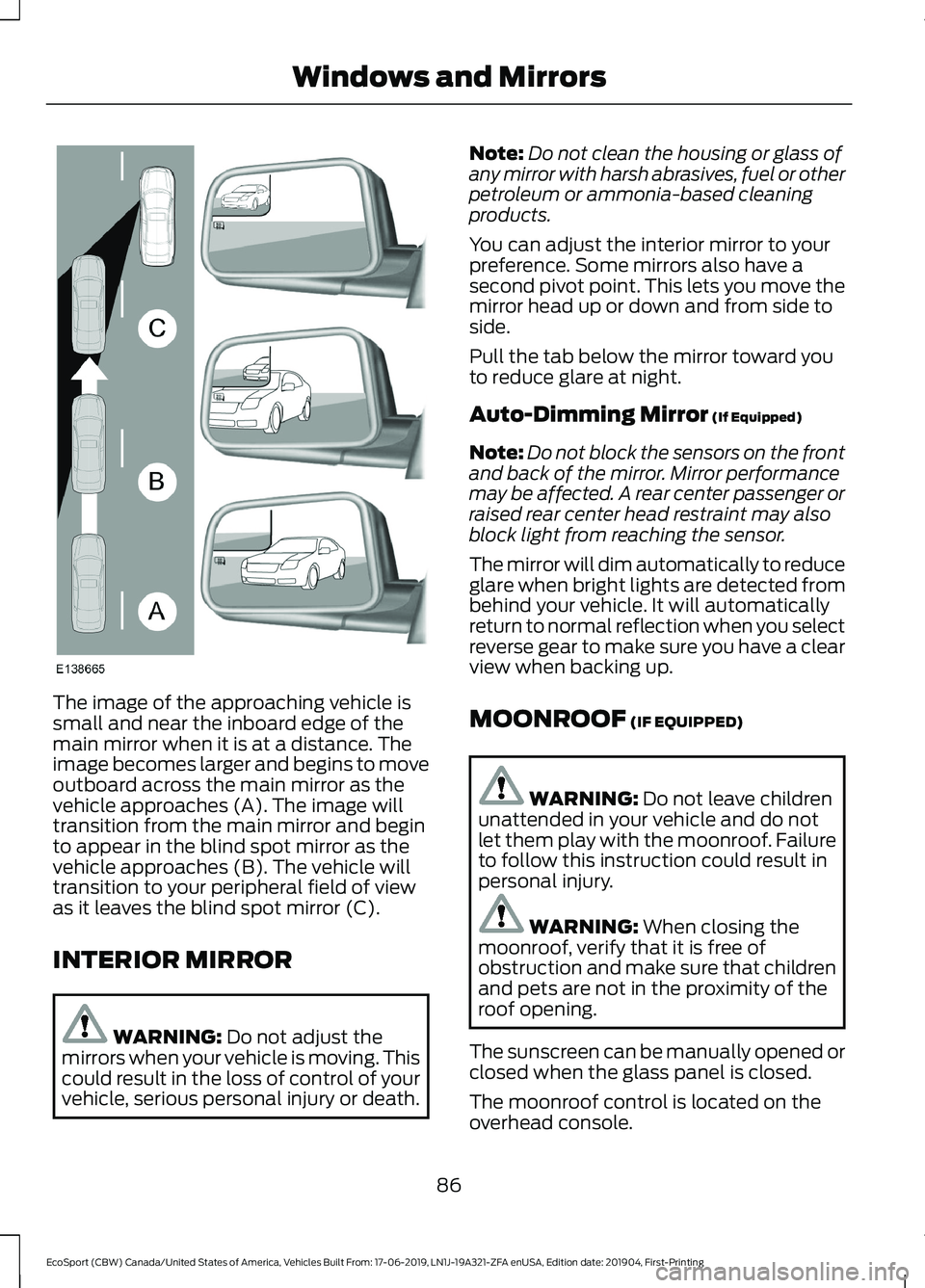
The image of the approaching vehicle issmall and near the inboard edge of themain mirror when it is at a distance. Theimage becomes larger and begins to moveoutboard across the main mirror as thevehicle approaches (A). The image willtransition from the main mirror and beginto appear in the blind spot mirror as thevehicle approaches (B). The vehicle willtransition to your peripheral field of viewas it leaves the blind spot mirror (C).
INTERIOR MIRROR
WARNING: Do not adjust themirrors when your vehicle is moving. Thiscould result in the loss of control of yourvehicle, serious personal injury or death.
Note:Do not clean the housing or glass ofany mirror with harsh abrasives, fuel or otherpetroleum or ammonia-based cleaningproducts.
You can adjust the interior mirror to yourpreference. Some mirrors also have asecond pivot point. This lets you move themirror head up or down and from side toside.
Pull the tab below the mirror toward youto reduce glare at night.
Auto-Dimming Mirror (If Equipped)
Note:Do not block the sensors on the frontand back of the mirror. Mirror performancemay be affected. A rear center passenger orraised rear center head restraint may alsoblock light from reaching the sensor.
The mirror will dim automatically to reduceglare when bright lights are detected frombehind your vehicle. It will automaticallyreturn to normal reflection when you selectreverse gear to make sure you have a clearview when backing up.
MOONROOF (IF EQUIPPED)
WARNING: Do not leave childrenunattended in your vehicle and do notlet them play with the moonroof. Failureto follow this instruction could result inpersonal injury.
WARNING: When closing themoonroof, verify that it is free ofobstruction and make sure that childrenand pets are not in the proximity of theroof opening.
The sunscreen can be manually opened orclosed when the glass panel is closed.
The moonroof control is located on theoverhead console.
86
EcoSport (CBW) Canada/United States of America, Vehicles Built From: 17-06-2019, LN1J-19A321-ZFA enUSA, Edition date: 201904, First-PrintingWindows and Mirrors
Page 93 of 448

Vehicle Settings and Personalization
See General Information (page 93).
Engine Coolant TemperatureGauge
WARNING: Do not remove thecoolant reservoir cap when the engine ison or the cooling system is hot. Wait 10minutes for the cooling system to cooldown. Cover the coolant reservoir capwith a thick cloth to prevent thepossibility of scalding and slowly removethe cap. Failure to follow this instructioncould result in personal injury.
At normal operating temperature theindicator will remain in the center section.
If the needle enters the red section, theengine is overheating. Stop the engine,switch the ignition off and determine thecause once the engine has cooled down.See Engine Coolant Check (page 217).
Note:Do not restart the engine until thecause of overheating has been determinedand resolved.
Fuel Gauge
Switch the ignition on. The fuel gauge willindicate approximately how much fuel isleft in the fuel tank. The fuel gauge mayvary slightly when your vehicle is movingor on a gradient.
The arrow adjacent to the fuel pumpsymbol indicates on which side of yourvehicle the fuel filler door is located.
The fuel filler door is on theleft-hand side of your vehicle.A
The fuel filler door is on theright-hand side of your vehicle.B
WARNING LAMPS AND
INDICATORS
The following warning lamps andindicators alert you to a vehicle conditionthat may become serious. Some lampsilluminate when you start your vehicle tomake sure they work. If any lamps remainon after starting your vehicle, refer to therespective system warning lamp for furtherinformation.
Note:Some warning indicators appear inthe information display and operate thesame as a warning lamp but do notilluminate when you start your vehicle.
Airbag Warning Lamp
If it does not illuminate when youswitch the ignition on, continuesto flash or remains on when theengine is running, this indicates amalfunction. Have your vehicle checkedas soon as possible.
89
EcoSport (CBW) Canada/United States of America, Vehicles Built From: 17-06-2019, LN1J-19A321-ZFA enUSA, Edition date: 201904, First-PrintingInstrument Cluster
Page 97 of 448

GENERAL INFORMATION
WARNING: Driving whiledistracted can result in loss of vehiclecontrol, crash and injury. We stronglyrecommend that you use extremecaution when using any device that maytake your focus off the road. Yourprimary responsibility is the safeoperation of your vehicle. Werecommend against the use of anyhand-held device while driving andencourage the use of voice-operatedsystems when possible. Make sure youare aware of all applicable local lawsthat may affect the use of electronicdevices while driving.
You can control various systems on yourvehicle using the information displaycontrols on the steering wheel.
The information display shows thecorresponding information.
Information Display Controls
•Press the up and down arrow buttonsto scroll through and highlight theoptions within a menu.
•Press the right button to enter asubmenu.
•Press the left button to exit a submenu.
•Press the OK button to choose andconfirm settings or messages.
Menu Structure - InformationDisplay
You can access the menu using theinformation display control.
Note:It may describe options not fitted tothe vehicle you have purchased.
Trip computer 1 and 2
Trip 1
Trip 2
Reset AllReset Individual Values
Reset Trip Odometer
Reset Trip Timer
Reset Average Fuel
93
EcoSport (CBW) Canada/United States of America, Vehicles Built From: 17-06-2019, LN1J-19A321-ZFA enUSA, Edition date: 201904, First-PrintingInformation Displays
Page 99 of 448

Settings
Intelligent 4WDInformation
MyKey Info
Tire Pressure
Auto StartStop
LanguageDisplay
L/100 kmDistance Unit
km/L
Miles & Gallons
Celsius (°C)Temperature Unit
Fahrenheit (°F)
psiTire Pressure
kPa
bar
Blind SpotDriver Assistance
Cross Traffic Alert
Rear Parking Aid
All SensorsAlarm SettingsAlarm systemVehicle Settings
Perimeter Sensing
Ask on Exit
30min Max Idle
InformationChimes
OffAutolamp DelayLighting
10 Seconds
20 Seconds
120 Seconds
Daytime Running Lights
95
EcoSport (CBW) Canada/United States of America, Vehicles Built From: 17-06-2019, LN1J-19A321-ZFA enUSA, Edition date: 201904, First-PrintingInformation Displays
Page 104 of 448

Keyless Vehicle
ActionMessage
Displayed if the key is not detected by the system. SeePush Button Ignition Switch (page 131).No Key Detected
Displayed as a reminder to turn off the vehicle. SeePush Button Ignition Switch (page 131).Switch ignition off.
Displayed as a reminder to press the brake whilestarting the vehicle.To START Press Brake
Displayed when a valid key is not detected within thevehicle. See Push Button Ignition Switch (page 131).Key Not Inside vehicle
Displays when the key battery is low. Change thebattery as soon as possible. See Remote Control(page 51).
Key Battery low Replace soon
Lighting
ActionMessage
Displays if an electrical malfunction occurs with theheadlamp system. Have your vehicle checked as soonas possible.
Check Headlamp System Seemanual
Maintenance
ActionMessage
Indicates the brake fluid level is low and the brakesystem should be inspected immediately. See BrakeFluid Check (page 221).
Brake fluid level low Servicenow
Indicates that the vehicle sold date has beensuccessful updated. If this date has not been set,contact your authorized dealer.
Maintenance Set initial date
Displays when the date and time are not set.Maintenance Set date
100
EcoSport (CBW) Canada/United States of America, Vehicles Built From: 17-06-2019, LN1J-19A321-ZFA enUSA, Edition date: 201904, First-PrintingInformation Displays
Page 111 of 448

MANUAL CLIMATE CONTROL
- VEHICLES WITH:
ELECTRONIC MANUAL
TEMPERATURE CONTROL
(EMTC)
Switching Climate Control On andOff
Switching Recirculated Air On andOff
Recirculates air to reduceunwanted odors from enteringthe vehicle.
Switching Air Conditioning On andOff
Switching Maximum Defrost Onand Off
Turn the temperature controlclockwise to the full heatposition to maximize defrosting.
Note:When you switch maximum defrostoff, theWindshield Wiper De-icer and heatedrear window remain on.
Switching Maximum Cooling Onand Off
Turn the temperature controlcounterclockwise to the lowestsetting to maximize cooling.
Note:When you switch maximum coolingoff, air conditioning remains on.
Adjusting the Blower Motor Speed
Lights on the control illuminateto indicate the fan speed.
Changing the Direction of Airflow
Directs air through thewindshield air vents.
Directs air through theinstrument panel air vents.
Directs air through the footwellair vents.
Adjusting the Temperature
You can adjust the temperature in smallincrements.
107
EcoSport (CBW) Canada/United States of America, Vehicles Built From: 17-06-2019, LN1J-19A321-ZFA enUSA, Edition date: 201904, First-PrintingClimate Control
Page 112 of 448

AUTOMATIC CLIMATE
CONTROL - VEHICLES WITH:
ELECTRONIC AUTOMATIC
TEMPERATURE CONTROL
(EATC)
Switching the Climate Control Onand Off
Switching the Recirculated Air Onand Off
Note:The air currently in the passengercompartment recirculates.
Note:Recirculated air could turn off or beprevented from turning on in all air flowmodes except maximum cooling to reducethe risk of the windows fogging up. It couldalso turn on and off when you direct air tothe instrument panel or footwell air ventsduring hot weather to improve coolingefficiency.
Switching the Air Conditioning Onand Off
Note:Under certain conditions, the airconditioning compressor could continue tooperate after you switch air conditioning off.
Switching Maximum Defrost Onand Off
Note:When you switch maximum defrostoff, the Windshield Wiper De-icer andheated rear window remain on.
Switching Maximum Cooling Onand Off
Note:When you switch maximum coolingoff, air conditioning remains on.
Swtiching Auto Mode On and Off
Press the button to switch automode on. Repeatedly press thebutton to adjust auto mode.
Note:When you switch auto mode on,lights on the blower motor control do notilluminate to indicate the blower motorspeed.
Adjust the blower motor control or airdistribution control to switch auto modeoff.
108
EcoSport (CBW) Canada/United States of America, Vehicles Built From: 17-06-2019, LN1J-19A321-ZFA enUSA, Edition date: 201904, First-PrintingClimate Control
Page 113 of 448

Auto Mode Indicator Status
DescriptionAuto Mode IndicatorStatus
One indicator illumin-ated.•The blower motor speed is reduced.
•Use this setting to minimize the amount of noise fromthe blower motor.
•This setting increases the time taken to cool theinterior.
Two indicators illumin-ated.•The blower motor speed is moderate.
Three indicators illumin-ated.•The blower motor speed is increased.
•Use this setting to reduce the time taken to cool theinterior.
•This setting increases the amout of noise from theblower motor.
Setting the Blower Motor Speed
Note:Lights on the control illuminate toindicate the blower motor speed.
Directing Air to the Windshield AirVents
Directing Air to the InstrumentPanel Air Vents
Directing Air to the Footwell AirVents
Setting the Temperature
Turn the temperature controlcounterclockwise for cooler temperaturesettings.
Turn the temperature control clockwisefor warmer temperature settings.
109
EcoSport (CBW) Canada/United States of America, Vehicles Built From: 17-06-2019, LN1J-19A321-ZFA enUSA, Edition date: 201904, First-PrintingClimate Control