2020 DODGE JOURNEY ad blue
[x] Cancel search: ad bluePage 5 of 396

3
CLIMATE CONTROLS ...........................................47
Manual Climate Control Overview .. ............ 47
Automatic Climate Controls Overview . . ...... 58
Climate Control Functions . . ......................... 70
Automatic Temperature Control (ATC) — If
Equipped . ..................................................... 70
O
perating Tips . . ........................................... 71
WINDOWS . . ..........................................................72
Power Windows .. ......................................... 72
Wind Buffeting . . .......................................... 74
POWER SUNROOF — IF EQUIPPED. . ...................74
Opening Sunroof .. ........................................ 75
Closing Sunroof . . .......................................... 75
Wind Buffeting . . ........................................... 75
Sunshade Operation. . .................................. 75
Anti Pinch Protect Feature . . ........................ 75
Sunroof Maintenance . . ................................ 75
Ignition Off Operation . . ................................ 76
HOOD. .....................................................................76
O pening ........................................................ 76
C losing . ......................................................... 76
L
IFTGATE . ...............................................................77
O pening ........................................................ 77
C argo Area Features . . ................................. 78
GARAGE DOOR OPENER — IF EQUIPPED . . ........80
Before You Begin Programming
HomeLink® . .
................................................ 80
Canadian/Gate Operator Programming . . ... 82Using HomeLink®.
.
...................................... 83
Security. ........................................................ 83
T roubleshooting Tips . . ................................. 83
General Information . . .................................. 84
INTERNAL EQUIPMENT . . ...................................... 84
Storage ......................................................... 84
C upholders . . ................................................ 86
Power Outlets. . ............................................. 87
Power Inverter — If Equipped . . ................... 89
Sunglasses Storage . . .................................. 90
ROOF LUGGAGE RACK — IF EQUIPPED . . .......... 91
GETTING TO KNOW YOUR
INSTRUMENT PANEL
INSTRUMENT CLUSTER ....................................... 93
Instrument Cluster Descriptions .. ............... 94
INSTRUMENT CLUSTER DISPLAY. . ..................... 95
Instrument Cluster Display Location And
Controls . ....................................................... 95
O
il Change Due . . ......................................... 96
Instrument Cluster Display Selectable
Menu Items . .
................................................ 96
Battery Saver On/Battery Saver Mode
Message — Electrical Load Reduction
Actions — If Equipped . .
............................... 99 WARNING LIGHTS AND MESSAGES .
.
............. 100
Red Warning Lights .. ................................. 100
Yellow Warning Lights . . ............................. 103
Green Indicator Lights . . ............................. 106
White Indicator Lights . . ............................. 106
Blue Indicator Lights . . ............................... 106
ONBOARD DIAGNOSTIC SYSTEM — OBD II . . . 107
Onboard Diagnostic System (OBD II)
Cybersecurity . .
........................................... 107
EMISSIONS INSPECTION AND MAINTENANCE
PROGRAMS . .
...................................................... 108
SAFETY
SAFETY FEATURES ............................................ 109
Anti-Lock Brake System (ABS) .. ............... 109
Electronic Brake Control (EBC) System. . .. 110
AUXILIARY DRIVING SYSTEMS . . ...................... 116
Tire Pressure Monitoring System
(TPMS) . ....................................................... 116
O
CCUPANT RESTRAINT SYSTEMS . . ............... 120
Occupant Restraint Systems Features .. .. 120
Important Safety Precautions . . ................. 121
Seat Belt Systems . . .................................. 121
Supplemental Restraint
Systems (SRS) . .
......................................... 130
Child Restraints . . ....................................... 139
Transporting Pets . . ................................... 154
Page 51 of 396

GETTING TO KNOW YOUR VEHICLE 49
Manual Climate Control Descriptions
Icon Description
MAX A/C Button
Press and release the MAX A/C button on the touchscreen to change the current setting to the coldest output of air. The
MA
X A/C indicator illuminates when MAX A/C is on. Pressing the button again will cause the MAX A/C operation to exit.
NOTE:
The MAX A/C button is only available on the touchscreen.
Faceplate Knob
Touchscreen Buttons Blower Control
Blower Control regulates the amount of air forced through the climate system. There are seven blower speeds available.
T
h
e speeds can be selected using either the blower control knob on the faceplate or the buttons on the touchscreen.
Faceplate:
The blower speed increases as you turn the blower control knob clockwise from the lowest blower setting. The blower
s p
eed decreases as you turn the blower control knob counterclockwise.
Touchscreen:
For Radio 4.3: use the circle around the blower icon by pressing on the circle spot where you want the blower setting to
be. To increase blower, the circle bar will go clockwise. To decrease the blower, the circle bar will move counter-clockwise.
For Uconnect 3/3 NAV: Use the small blower icon to reduce the blower setting and the large blower icon to increase the
blo
wer setting. The blower can also be selected by pressing the blower bar area between the icons.
Temperature Control
Provides the driver and passenger with independent temperature control. Push the red button on the faceplate or
t o
uchscreen or press and slide the temperature bar towards the red arrow button on the touchscreen for warmer
temperature settings. Push the blue button on the faceplate or touchscreen or press and slide the temperature bar towards
the blue arrow button on the touchscreen for cooler temperature settings.
2
Page 63 of 396

GETTING TO KNOW YOUR VEHICLE 61
Front Defrost Button
Press and release the Front Defrost button on the touchscreen, or push and release the button on the faceplate, to change
th
e current airflow setting to Defrost mode. The Front Defrost indicator illuminates when Front Defrost is on. Air comes from
the windshield and side window demist outlets. When the defrost button is selected, the blower level may increase. Use
Defrost mode with maximum temperature settings for best windshield and side window defrosting and defogging. When
toggling the front defrost mode button, the climate system will return to the previous setting.
Rear Defrost Button
Press and release the Rear Defrost button on the touchscreen, or push and release the button on the faceplate, to turn on
th
e rear window defroster and the heated outside mirrors (if equipped). The Rear Defrost indicator illuminates when the
rear window defroster is on. The rear window defroster automatically turns off after 15 minutes.
Rear Climate Control Button
Press and release this button on the touchscreen to access the rear climate controls. The rear climate indicator illuminates
w h
en the rear climate controls are on.
NOTE:
The REAR CLIMATE button is only available on the touchscreen.
Driver And Passenger Temperature Up And Down Buttons
Provides the driver and passenger with independent temperature control. Push the red button on the faceplate or
t o
uchscreen or press and slide the temperature bar towards the red arrow button on the touchscreen for warmer
temperature settings. Push the blue button on the faceplate or touchscreen or press and slide the temperature bar towards
the blue arrow button on the touchscreen for cooler temperature settings.
Icon Description
2
Page 108 of 396

106 GETTING TO KNOW YOUR INSTRUMENT PANEL
Low Washer Fluid Warning Light — If
Equipped
This warning light will illuminate when
the windshield washer fluid is low.
Refer to “Engine Compartment” in “Servicing
A n
d Maintenance” for further information.
GREEN INDICATOR LIGHTS
Park/Headlight On Indicator Light
This indicator light will illuminate
when the park lights or headlights are
tu
rned on.
Refer to “Exterior Lights” in “Getting To Know
Y o
ur Vehicle” for further information.
Front Fog Indicator Light — If Equipped
This indicator light will illuminate
when the front fog lights are on.
Refer to “Exterior Lights” in “Getting To Know
Y o
ur Vehicle” for further information.
Turn Signal Indicator Lights
When the left or right turn signal is
activated, the turn signal indicator
will flash independently and the
c o
rresponding exterior turn signal
lamps will flash. Turn signals can be activated
when the multifunction lever is moved down
(left) or up (right).
NOTE:
A continuous chime will sound if the vehicle is
driven more than 1 mile (1.6 km) with either
t u
rn signal on.
Check for an inoperative outside light bulb if
either indicator flashes at a rapid rate.
Cruise Control Set Indicator Light — If
Equipped
This indicator light will illuminate
when the cruise control is set to the
d e
sired speed. Refer to “Speed
Control” in “Starting And Operating”
for further information.
WHITE INDICATOR LIGHTS
Cruise Control Ready Indicator
This indicator light will illuminate when
the cruise control is ready, but not set.
R e
fer to “Speed Control” in “Starting
And Operating” for further information.
BLUE INDICATOR LIGHTS
High Beam Indicator Light
This indicator light will illuminate to
indicate that the high beam
h e
adlights are on. With the low beams
activated, push the multifunction
lever forward (toward the front of the vehicle) to
turn on the high beams. Pull the multifunction
lever rearward (toward the rear of the vehicle) to
turn off the high beams. If the high beams are
off, pull the lever toward you for a temporary
high beam on, "flash to pass" scenario.
Page 196 of 396

194 IN CASE OF EMERGENCY
Cavity Cartridge Fuse Mini-Fuse Description
F10030 Amp Pink –110 Volt AC Inverter – If Equipped
F101 –10 Amp RedInterior Lights
F102 –20 Amp Yellow Cigar Lighter in Instrument Panel/Left Rear Power Outlet
F103 –20 Amp Yellow Power Outlet in Console Bin/Power Outlet in Rear of Console
F105 –20 Amp Yellow Heated Seats – If Equipped
F106 –20 Amp Yellow Rear Power Outlet
F107 –10 Amp RedRear Camera – If Equipped
F108 –15 Amp BlueInstrument Panel
F109 –10 Amp RedClimate Control/HVAC
F110 –10 Amp RedOccupant Restraint Controller
F112 –10 Amp RedSpare
F114 –20 Amp Yellow Rear HVAC Blower/Motor
F115 –20 Amp Yellow Rear Wiper Motor
F116 30 Amp Pink –Rear Defroster (EBL)
F117 –10 Amp RedHeated Mirrors
F118 –10 Amp RedOccupant Restraint Controller
Page 197 of 396

IN CASE OF EMERGENCY 195
F119 –10 Amp RedSteering Column Control Module
F120 –10 Amp RedAll Wheel Drive – If Equipped
F121 –15 Amp BlueWireless Ignition Node
F122 –25 Amp ClearDriver Door Module
F123 –25 Amp ClearPassenger Door Module
F124 –10 Amp RedMirrors
F125 –10 Amp RedSteering Column Control Module
F126 –25 Amp ClearAudio Amplifier
F127 –20 Amp Yellow Trailer Tow – If Equipped
F128 –15 Amp BlueRadio
F129 –15 Amp BlueVideo/DVD – If Equipped
F130 –15 Amp BlueClimate Control/Instrument Panel
F131 –10 Amp RedPassenger Assistance/Hands Free System – If Equipped
F132 –10 Amp RedTire Pressure Module
F133 –10 Amp RedCyber Security Gateway
Cavity Cartridge Fuse Mini-FuseDescription
6
Page 199 of 396
IN CASE OF EMERGENCY 197
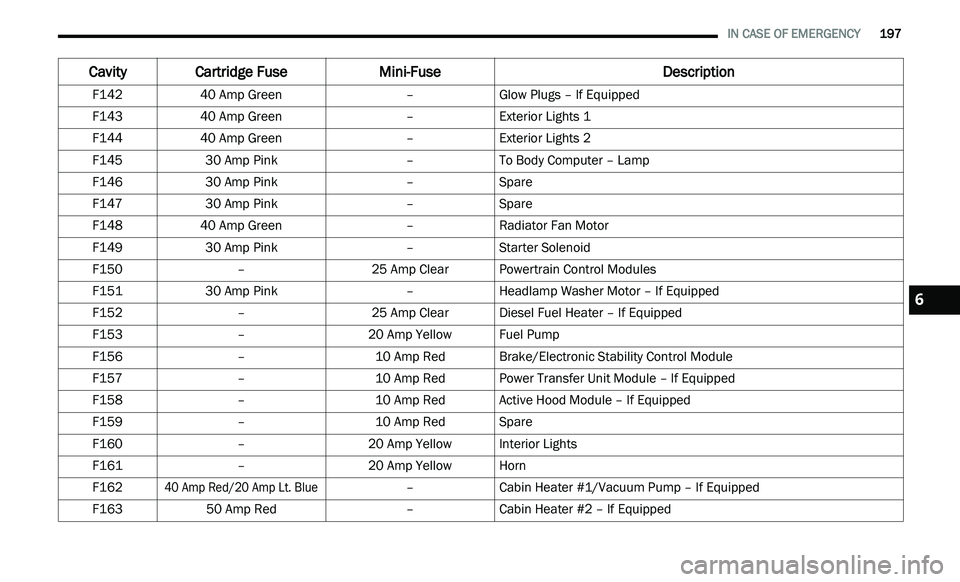
F142 40 Amp Green –Glow Plugs – If Equipped
F143 40 Amp Green –Exterior Lights 1
F144 40 Amp Green –Exterior Lights 2
F145 30 Amp Pink –To Body Computer – Lamp
F146 30 Amp Pink –Spare
F147 30 Amp Pink –Spare
F148 40 Amp Green –Radiator Fan Motor
F149 30 Amp Pink –Starter Solenoid
F150 –25 Amp ClearPowertrain Control Modules
F151 30 Amp Pink –Headlamp Washer Motor – If Equipped
F152 –25 Amp ClearDiesel Fuel Heater – If Equipped
F153 –20 Amp Yellow Fuel Pump
F156 –10 Amp RedBrake/Electronic Stability Control Module
F157 –10 Amp RedPower Transfer Unit Module – If Equipped
F158 –10 Amp RedActive Hood Module – If Equipped
F159 –10 Amp RedSpare
F160 –20 Amp Yellow Interior Lights
F161 –20 Amp Yellow Horn
F162
40 Amp Red/20 Amp Lt. Blue
–Cabin Heater #1/Vacuum Pump – If Equipped
F163 50 Amp Red –Cabin Heater #2 – If Equipped
Cavity Cartridge Fuse Mini-FuseDescription
6
Page 200 of 396
198 IN CASE OF EMERGENCY
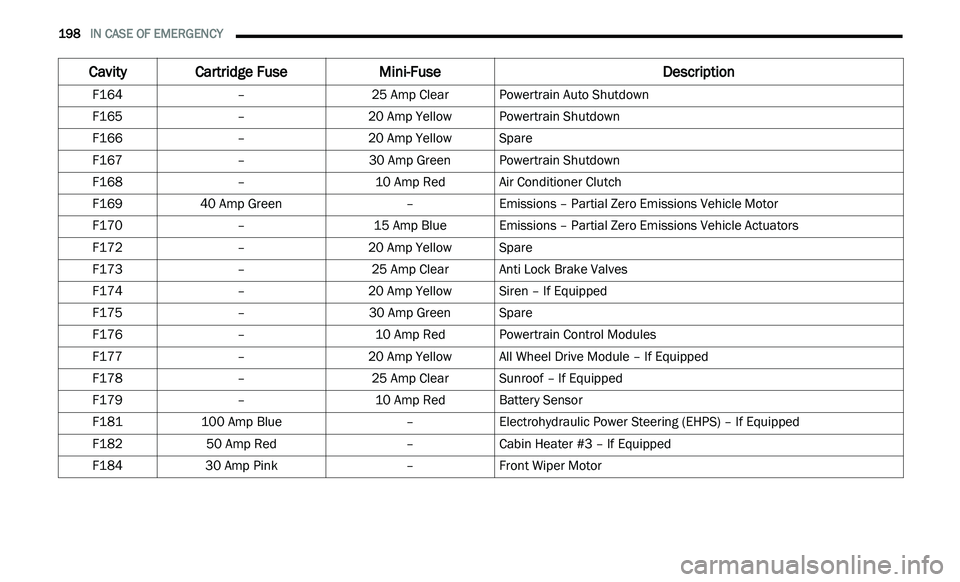
F164 –25 Amp ClearPowertrain Auto Shutdown
F165 –20 Amp Yellow Powertrain Shutdown
F166 –20 Amp Yellow Spare
F167 –30 Amp GreenPowertrain Shutdown
F168 –10 Amp RedAir Conditioner Clutch
F169 40 Amp Green –Emissions – Partial Zero Emissions Vehicle Motor
F170 –15 Amp BlueEmissions – Partial Zero Emissions Vehicle Actuators
F172 –20 Amp Yellow Spare
F173 –25 Amp ClearAnti Lock Brake Valves
F174 –20 Amp Yellow Siren – If Equipped
F175 –30 Amp GreenSpare
F176 –10 Amp RedPowertrain Control Modules
F177 –20 Amp Yellow All Wheel Drive Module – If Equipped
F178 –25 Amp ClearSunroof – If Equipped
F179 –10 Amp RedBattery Sensor
F181 100 Amp Blue –Electrohydraulic Power Steering (EHPS) – If Equipped
F182 50 Amp Red –Cabin Heater #3 – If Equipped
F184 30 Amp Pink –Front Wiper Motor
Cavity Cartridge Fuse Mini-FuseDescription