2020 DODGE JOURNEY ECU
[x] Cancel search: ECUPage 76 of 396
74 GETTING TO KNOW YOUR VEHICLE
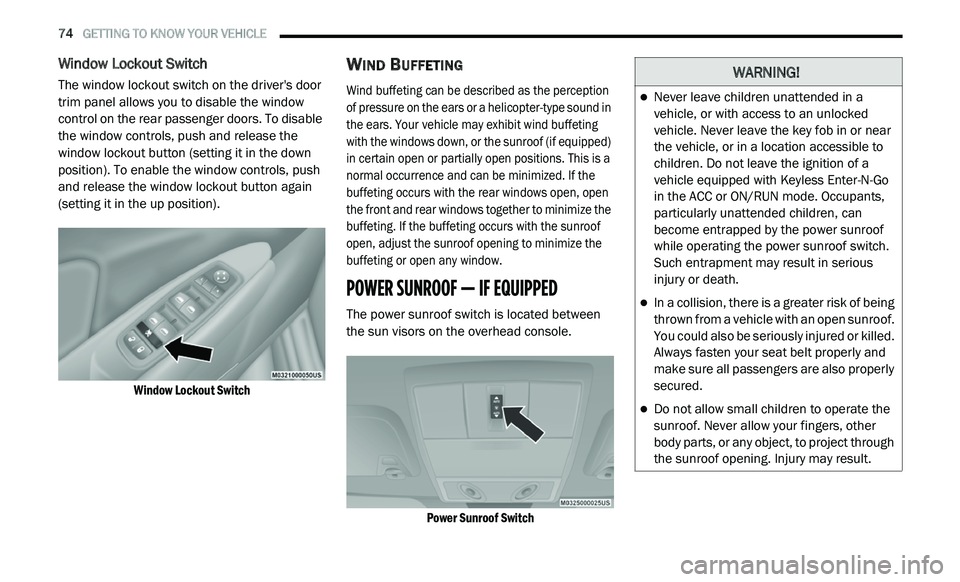
Window Lockout Switch
The window lockout switch on the driver's door
trim panel allows you to disable the window
control on the rear passenger doors. To disable
the window controls, push and release the
window lockout button (setting it in the down
position). To enable the window controls, push
and release the window lockout button again
(setting it in the up position).
Window Lockout Switch
WIND BUFFETING
Wind buffeting can be described as the perception
of pressure on the ears or a helicopter-type sound in
the ears. Your vehicle may exhibit wind buffeting
with the windows down, or the sunroof (if equipped)
in certain open or partially open positions. This is a
normal occurrence and can be minimized. If the
buffeting occurs with the rear windows open, open
the front and rear windows together to minimize the
buffeting. If the buffeting occurs with the sunroof
open, adjust the sunroof opening to minimize the
buffeting or open any window.
POWER SUNROOF — IF EQUIPPED
The power sunroof switch is located between
the sun visors on the overhead console.
Power Sunroof Switch
WARNING!
Never leave children unattended in a
vehicle, or with access to an unlocked
vehicle. Never leave the key fob in or near
the vehicle, or in a location accessible to
children. Do not leave the ignition of a
vehicle equipped with Keyless Enter-N-Go
in the ACC or ON/RUN mode. Occupants,
particularly unattended children, can
become entrapped by the power sunroof
while operating the power sunroof switch.
Such entrapment may result in serious
injury or death.
In a collision, there is a greater risk of being
thrown from a vehicle with an open sunroof.
You could also be seriously injured or killed.
Always fasten your seat belt properly and
make sure all passengers are also properly
secured.
Do not allow small children to operate the
sunroof. Never allow your fingers, other
body parts, or any object, to project through
the sunroof opening. Injury may result.
Page 78 of 396

76 GETTING TO KNOW YOUR VEHICLE
IGNITION OFF OPERATION
The power sunroof switch will remain active for
up to approximately ten minutes after the
ignition is placed in the OFF position. Opening
either front door will cancel this feature.
NOTE:
Ignition Off time is programmable through the
U c
onnect System. Refer to “Uconnect Settings/
Customer Programmable Features” in “Multi -
media” for further information.
HOOD
OPENING
Two latches must be released to open the hood.
1. P ull the hood release lever located under
t
he left side of the instrument panel.
Hood Release
2. Outside of the vehicle, locate the safety l
atch lever near the center of the grille
between the grille and hood opening. Push
the safety latch lever to the left and raise
the hood.
Underhood Safety Latch
3. U
se the hood prop rod to secure the hood in
t
he open position. Place the upper end of
the prop rod in the hole on the underside of
the hood.
Hood Prop Rod
CLOSING
WARNING!
Be sure the hood is fully latched before
driving your vehicle. If the hood is not fully
latched, it could open when the vehicle is in
motion and block your vision. Failure to follow
this warning could result in serious injury or
death.
Page 80 of 396

78 GETTING TO KNOW YOUR VEHICLE
CARGO AREA FEATURES
Cargo Management System
Five Passenger System Features
A raised load floor that sits on top of a large
built-in storage bin.
A tri-fold door built into the load floor that
allows easy access to items in the built-in
storage bin.
60/40 split second-row passenger seats with
fold flat feature, which allows for extended
cargo space. Refer to “Seats” in this chapter
for further information.
An optional front passenger seat with fold flat
feature, which extends cargo space even
further. Refer to “Seats” in this chapter for
further information.
Cargo tie-downs.
A retractable cargo area cover (if equipped).
Seven Passenger System Features
A large built-in storage bin with a hinged hard -
cover located in the floor behind the third-row
p a
ssenger seats.
60/40 split second-row passenger seats with
fold flat feature, which allows for extended
cargo space. Refer to “Seats” in this chapter
for further information.
50/50 split third-row passenger seats with
fold flat feature, which allows for extended
cargo space. Refer to “Seats” in this chapter
for further information.
An optional front passenger seat with fold flat
feature, which extends cargo space even
further. Refer to “Seats” in this chapter for
further information.
Cargo tie-downs.
Retractable Cargo Area Cover (Five
Passenger Models) — If Equipped
NOTE:
The purpose of this cover is for privacy, not to
s e
cure loads. It will not prevent cargo from
shifting or protect passengers from loose cargo.
The removable retractable cargo area cover
m o
unts in the cargo area behind the top of the
rear seats. The cover, when extended, covers the cargo
a
r
ea to keep items out of sight. Notches in the
trim panels near the liftgate opening secure the
extended cover in place.
The cover rolls away neatly inside its housing
w h
en not in use. You can also remove the cover
from the vehicle to make more room in the
cargo area.
To Install The Cover:
1. P osition the cover in the vehicle so that the
f
lat side of the housing faces upward.
2. I nsert either the left or the right
s
pring-loaded post (located on the ends of
the cover housing) into the left attachment
point or the right attachment point (shown).
Installing Retractable Cargo Area Cover
Page 81 of 396

GETTING TO KNOW YOUR VEHICLE 79
(Continued)
3. Insert the spring-loaded post on the opposite end of the cover housing into the
attachment point on the opposite side of
the vehicle.
4. Grab the cover handle and pull it toward y
ou. As the cover nears the liftgate opening,
guide the rear attachment posts (on both
ends of the cover) into the notches in the
trim panels. Lower the cover to position the
posts into the bottom of the notches and
release the handle.
Positioning Retractable Cargo Area Cover
Cargo Tie-Downs
Cargo tie-downs are located on both rear trim
panels. These tie-downs should be used to
secure loads safely when the vehicle is moving.
Cargo Tie-Downs
WARNING!
In a collision, a loose cargo cover in the
vehicle could cause injury. It could fly around
in a sudden stop and strike someone in the
vehicle. Do not store the cargo cover on the
cargo floor or in the passenger compartment.
Remove the cover from the vehicle when
taken from its mounting. Do not store it in the
vehicle.
WARNING!
Cargo tie-downs are not safe anchors for a
child seat tether strap. In a sudden stop or
collision, a tie-down could pull loose and
allow the child seat to come loose. A child
could be badly injured. Use only the anchors
provided for child seat tethers.
WARNING!
The weight and position of cargo and
passengers can change the vehicle center of
gravity and vehicle handling. To avoid loss of
control resulting in personal injury, follow
these guidelines for loading your vehicle:
Do not carry loads that exceed the load
limits described on the label attached to
the left door or left door center pillar.
Always place cargo evenly on the cargo
floor. Put heavier objects as low and as far
forward as possible.
2
Page 82 of 396

80 GETTING TO KNOW YOUR VEHICLE
GARAGE DOOR OPENER — IF EQUIPPED
HomeLink® replaces up to three remote controls
(hand-held transmitters) that operate devices
such as garage door openers, motorized gates,
lighting or home security systems. The
HomeLink® unit operates off your vehicle’s
battery.
The HomeLink® buttons, located on either the
ov
erhead console, headliner or sunvisor, designate the three different HomeLink®
channels. The HomeLink® indicator is located
above the center button.
HomeLink® Buttons/Overhead Consoles
HomeLink® Buttons/Sunvisor/Headliner
NOTE:
HomeLink® is disabled when the vehicle secu -
rity alarm is active.
BEFORE YOU BEGIN PROGRAMMING
H
OMELINK®
Be sure that your vehicle is parked outside of
the garage before you begin programming.
For more efficient programming and accurate
t r
ansmission of the Radio Frequency (RF) signal
it is recommended that a new battery be placed
in the hand-held transmitter of the device that is
being programmed to the HomeLink® system.
To erase the channels, place the ignition in the
ON
/RUN position, and push and hold the two
outside HomeLink® buttons (I and III) for up to
20 seconds or until the orange indicator
flashes.
NOTE:
Erasing all channels should only be
performed when programming HomeLink®
for the first time. Do not erase channels when
programming additional buttons.
If you have any problems, or require assis -
tance, please call toll-free 1 -
800-355-3515
or, on the Internet at HomeLink.com for infor-
mation or assistance.
Place as much cargo as possible in front of
the rear axle. Too much weight or improp -
erly placed weight over or behind the rear
a x
le can cause the vehicle to sway.
Do not pile luggage or cargo higher than the
top of the seatback. This could impair visi-
bility or become a dangerous projectile in a
su
dden stop or collision.
To help protect against personal injury,
passengers should not be seated in the
rear cargo area. The rear cargo space is
intended for load carrying purposes only,
not for passengers, who should sit in seats
and use seat belts.
WARNING! (Continued)
Page 85 of 396

GETTING TO KNOW YOUR VEHICLE 83
(Continued)
4. Watch for the HomeLink® indicator to change flash rates. When it changes, it is
programmed. It may take up to 30 seconds
or longer in rare cases. The garage door
may open and close while you are
programming.
5. P ush and hold the programmed
H
omeLink® button and observe the
indicator light.
NOTE:
If the indicator light stays on constantly,
programming is complete and the garage
door/device should activate when the
HomeLink® button is pushed.
To program the two remaining HomeLink®
buttons, repeat each step for each remaining
button. DO NOT erase the channels.
If you unplugged the garage door opener/
de
vice for programming, plug it back in at this
time.
USING HOMELINK®
To operate, push and release the programmed
HomeLink® button. Activation will now occur for
the programmed device (i.e. garage door opener,
gate operator, security system, entry door lock,
home/office lighting, etc.) The hand-held
transmitter of the device may also be used at any
time.
SECURITY
It is advised to erase all channels before you sell
or turn in your vehicle.
To do this, push and hold the two outside
b u
ttons for 20 seconds until the red indicator
flashes.
NOTE:
All channels will be erased. Individual channels
ca
nnot be erased.
The HomeLink® Universal Transceiver is disabled
w h
en the vehicle security alarm is active.
TROUBLESHOOTING TIPS
If you are having trouble programming
HomeLink®, here are some of the most
common solutions:
Replace the battery in the garage door
opener hand-held transmitter.
Push the LEARN button on the garage door
opener to complete the training for a Rolling
Code.
Did you unplug the device for programming
and remember to plug it back in?
If you have any problems, or require assistance,
p l
ease call toll-free 1-800-355-3515 or, on the
Internet at HomeLink.com for information or
assistance.
WARNING!
Vehicle exhaust contains carbon monoxide,
a dangerous gas. Do not run your vehicle in
the garage while programming the trans -
ceiver. Exhaust gas can cause serious
i n
jury or death.
2
Page 93 of 396

GETTING TO KNOW YOUR VEHICLE 91
ROOF LUGGAGE RACK — IF EQUIPPED
The roof rack cross rails and side rails are
designed to carry cargo weight. The load must
not exceed 150 lbs (68 kg), and it should be
distributed uniformly over the cross rails. In
addition, the roof rack does not increase the
total load carrying capacity of the vehicle.
Be sure the total load of cargo inside the vehicle
p l
us that on the roof rack does not exceed the
maximum vehicle load capacity.
NOTE:
The roof rack side rails on your vehicle are NOT
de
signed to carry a load without the addition of
crossbars.
Metal crossbars are offered by Mopar accesso -
ries to provide a functional roof rack system.
Se
e an authorized dealer. To Move The Crossbars
1. L
oosen the knobs on top of each crossbar
a
pproximately six turns to disengage the
clamp tooth from the side rail.
Crossbar Knobs
2. R elocate the crossbars, aligning the crossbar
s
tanchions (end pieces) with one of the
vertical marks on the outboard surface of the
side rail for proper positioning. There are four
frontward marks for the front crossbar and
four rearward marks for the rear crossbar.
Make sure the crossbars remain equally
spaced or parallel at any position for proper
function.
3. T
ighten the knobs on each crossbar to lock
i
t in position. As you tighten the knob, make
sure the clamp tooth engages completely
into the side rail slot.
4. Attempt to move the crossbar to ensure that i
t is locked in position.
NOTE:
To help control wind noise when installing the
crossbars, make sure the arrows marked on
the underside of the crossbars face the front
of the vehicle.
To help reduce the amount of wind noise
when the crossbars are not in use, fasten the
front crossbar in the fourth position from the
front and the rear crossbar in the eighth posi -
tion. The tie down holes on the crossbar ends
s h
ould always be used to tie down the load.
Check the straps frequently to be sure that
the load remains securely attached.
2
Page 94 of 396

92 GETTING TO KNOW YOUR VEHICLE
(Continued)
(Continued)
WARNING!
Cargo must be securely tied down before
driving your vehicle. Improperly secured loads
can fly off the vehicle, particularly at high
speeds, resulting in personal injury or property
damage. Follow the roof rack cautions when
carrying cargo on your roof rack.
CAUTION!
To prevent damage to the roof of your
vehicle, DO NOT carry any loads on the roof
rack without the crossbars installed. The
load should be secured and placed on top
of the crossbars, not directly on the roof. If
it is necessary to place the load on the roof,
place a blanket or other protective layer
between the load and the roof surface.
Crossbars should remain equally spaced or
parallel at any roof rack position for proper
function. Noncompliance could result in
damage to the roof rack, cargo, and
vehicle.
To avoid damage to the roof rack and
vehicle, do not exceed the maximum roof
rack load capacity of 150 lb (68 kg). Always
distribute heavy loads as evenly as possible
and secure the load appropriately.
Long loads, which extend over the wind -
shield, such as wood panels or surfboards,
s h
ould be secured to both the front and
rear of the vehicle.
CAUTION! (Continued)
Travel at reduced speeds and turn corners
carefully when carrying large or heavy loads
on the roof rack. Wind forces, due to
natural causes or nearby truck traffic, can
add sudden upward lift. This is especially
true on large flat loads and may result in
damage to the cargo or your vehicle.
CAUTION! (Continued)