2020 DODGE GRAND CARAVAN buttons
[x] Cancel search: buttonsPage 175 of 380

STARTING AND OPERATING173
Power Steering Fluid Check
Checking the power steering fluid level at a
defined service interval is not required. The fluid
should only be checked if a leak is suspected,
abnormal noises are apparent, and/or the
system is not functioning as anticipated.
Coordinate inspection efforts through an
authorized dealer. If necessary, add fluid to restore to the proper
indicated level. With a clean cloth, wipe any
spilled fluid from all surfaces. Refer to “Fluids
And Lubricants” in “Technical Specifications”
for the correct fluid type.
SPEED CONTROL — IF EQUIPPED
When engaged, the Speed Control takes over
accelerator operations at speeds greater than
25 mph (40 km/h).
The Speed Control buttons are located on the
right side of the steering wheel.
Speed Control Buttons
NOTE:
In order to ensure proper operation, the Speed
Control System has been designed to shut down
if multiple Speed Control functions are operated
at the same time. If this occurs, the Speed
Control System can be reactivated by pushing
the Speed Control on/off button and resetting
the desired vehicle set speed.
WARNING!
Fluid level should be checked on a level
surface and with the engine off to prevent
injury from moving parts and to ensure
accurate fluid level reading. Do not overfill.
Use only manufacturer's recommended
power steering fluid.
CAUTION!
Do not use chemical flushes in your power
steering system as the chemicals can
damage your power steering components.
Such damage is not covered by the New
Vehicle Limited Warranty.
1 — On/Off
2 — RES (+)
3 — SET (-)
4 — CANCEL
WARNING!
Speed Control can be dangerous where the
system cannot maintain a constant speed.
Your vehicle could go too fast for the
conditions, and you could lose control and
have an accident. Do not use Speed Control
in heavy traffic or on roads that are winding,
icy, snow-covered or slippery.
5
20_RT_OM_EN_USC_t.book Page 173
Page 281 of 380

MULTIMEDIA279
Audio Control Menu
Push the Audio button located on the faceplate
on the right side of the radio.
Use either of the Arrow buttons or the cross-hair
on the screen to change the Balance and Fade.
The Center button resets the settings. Push the
Equalizer button to change tone settings. Use either the Arrow buttons or the sliders on
the screen to adjust Bass, Mid, and/or Treble.
Getting Started
Change The Language
The radio will conform to the vehicle language
set in the instrument cluster display.
If you change the language in the radio, the
vehicle will change the language for all display
information.
To change the language with the radio:
1. Push the Menu button on the right side of
the radio.
2. Then press the System Setup button to get to the System Setup menu.
3. Press the Language Setup button and select a language.
4. Press the Save button to activate the new language selection.
Set The Time — Radio 430
1. Press the Time Display button in the lower left corner of the screen.
2. Adjust the hours and minutes using the Up and Down buttons.
3. Press the Set Time Zone button to change to the desired time zone.
4. Press the Daylight Savings button to switch Daylight Savings on or off.
9
20_RT_OM_EN_USC_t.book Page 279
Page 282 of 380

280MULTIMEDIA
Set The Time — Radio 430 NAV
1. Press the Time Display button in the lower
left corner of the screen.
The time is automatically set by the GPS sys-
tem for the time zone selected. The radio
default is GPS time, where the vehicle time
is automatically set by the GPS system. If
the vehicle is not able to receive the GPS
signals, the vehicle time is only updated
when the GPS satellite signals are being re -
ceived (which requires the vehicle to be out -
side with a clear view to the sky).
2. It is possible to set the time manually (ahead or behind actual GPS time), by
pressing the User Time button. 3. Press the Daylight Savings button to switch
Daylight Savings on or off.
Store Radio Presets
1. Push the Radio button to display AM, FM, or SAT.
2. Select the radio band by pressing either the
AM, FM, or SAT buttons.
3. Either press the Seek Up/Down buttons or press the Scan button, Direct Tune button
or the Left/Right arrows to change the
currently playing station.
4. Press and hold one of the Presets buttons in the list to the right until you hear a confir -
mation beep (approximately two seconds).
You can use the Page button to scroll
through the list of presets.
NOTE:
If the preset list is not displayed, press the
Presets button located in the bottom line of the
screen.
You can use the Full Screen button to toggle
between full and split-screen mode. Long preset
names are displayed in full-screen mode.
20_RT_OM_EN_USC_t.book Page 280
Page 283 of 380

MULTIMEDIA281
Radio Mode
Overview
The radio is equipped with three different
tuners:
FM 87.7 MHz - 107.9 MHz (RBDS capable)
AM 530 kHz - 1710 kHz
SiriusXM® Satellite Radio (if equipped)
Push the Radio button. The different tuner
modes can be selected by pressing the tabs on
the radio touchscreen.
SiriusXM® Satellite Radio
With over 130 channels, SiriusXM® Satellite
Radio brings you more of what you love. Get 69
channels of 100% commercial-free music, plus
all of your favorite sports, news, talk and
entertainment. Hear every NFL® game, every
NASCAR® race, college sports and more. The
biggest and most compelling names in talk with
Howard Stern and Martha Stewart,
laugh-out-loud comedy, plus kids' programming,
wold-class news, local traffic and weather. All of
this with crystal clear, coast-to-coast coverage.
Everything worth listening to is now on SiriusXM®. A one-year SiriusXM® Satellite
Radio subscription is included.
SiriusXM® and all related marks and logos are
trademarks of SiriusXM® Radio Inc. and its
subsidiaries. SiriusXM® Radio requires a
subscription, sold separately after trial
subscription included with vehicle purchase.
Prices and programming are provided by
SiriusXM® and are subject to change.
Subscriptions governed by Terms & Conditions
available at
www.siriusxm.com . SiriusXM®
Radio US service only available to those at least
18 years of age in the 48 contiguous United
States, D.C., and PR. Service available in
Canada; see www.siriusxm.ca .
To receive satellite radio, the vehicle needs to
be outside with a clear view to the sky. If the
screen shows Acquiring Signal, you might have
to change the vehicle position to receive a
signal. In most cases, the satellite radio does
not receive a signal in underground parking
garages or tunnels.
Station Presets
There are 12 station presets available for
storing the radio stations in each tuner range.
To store the desired station, press and hold one
of the station Presets buttons for two seconds
and you will see the highlighted button change
from green to beige. You will also see the radio
station stored in the highlighted button and you
will hear a confirmation beep when the station
is saved. Pressing the Presets buttons in SAT
mode changes the information shown in the list
between the Channel Name, name of the Artist
currently playing on the channel and name of
the Song currently playing on the channel.
9
20_RT_OM_EN_USC_t.book Page 281
Page 292 of 380

290MULTIMEDIA
3. Press a button with a folder symbol to open
a folder.
4. Press the Folder Up button to close a folder.
Playing A Video DVD
NOTE:
Viewing a DVD video on the radio screen is not
available in all states, the vehicle must be
stopped and the shifter must be in the PARK
position for vehicles with an automatic
transmission. In vehicles with a manual
transmission the parking brake must be
engaged.
First insert a video DVD.
The playback starts automatically after the DVD
video is recognized by the disc drive. Press the Chapters button to display a list of
available chapters or tracks. Press a Chapter or
Track button in the list to start playback from
the selected section.
Press the View Video button to view the video on
the screen.
DVD MENU Controls
If you insert a DVD video disc that contains a top
menu, a menu may appear.
Press the Cursor Arrow buttons to select the title
you want to view, then press the Enter button to
start playback.
Press the DVD Move button to move
the controls to the right part of the
screen. Press the Close button to close the
DVD MENU Controls.
DVD Playback Controls
In video playback mode, press anywhere on the
touchscreen to show the DVD Playback
Controls.
To pause playback, press the Pause button.
To stop playback, press the Stop button.
Press the Fast Reverse (double left arrows)
button during playback to fast reverse playback.
Press the Fast Forward (double right arrows)
button during playback to fast forward
playback.
Press the Next button to locate succeeding
chapters or tracks.
20_RT_OM_EN_USC_t.book Page 290
Page 293 of 380

MULTIMEDIA291
Press the PREV button to start playback from
the beginning of the current chapter or track.
When you press the button twice in quick
succession, playback starts from the beginning
of the preceding chapter or track.
DISC Menu
While in Disc Mode, with inserted video DVD,
press the Menu button to access the Disc
Menu.
Press the Disc Setup button to access the Disc
Setup menu. In the Disc Setup menu, you may select Menu
Language, Audio Language, Subtitle, Camera
Angle, Aspect Ratio, and Brightness settings by
pressing the corresponding button. Some of the
buttons are disabled if the inserted disc does
not support the functionality.
Disc Skipping
Skipping is typically caused by a damaged
(scratched) disc. This will result in a 10-second
jump forward until the damaged area is passed.
Temperature Protection
If the temperature of the disc reader during
operation becomes too high, a pop-up message
informs the user of an over temperature
situation. The unit switches to radio mode until
the disc reader temperature has dropped to a
normal level.Hard Disk Drive Mode (HDD)
The HDD mode gives you access to the audio
files on the internal hard disk drive. It functions
similar to a CD player, with the exception that
the internal HDD can hold more tracks. It can
hold approximately 6,700 four-minute
CD-quality songs (depending on the file size of
the encoded files).
Before using the HDD mode, you will need to
copy tracks to the internal hard drive.
The files will be stored on the internal hard disk
drive and can be used in the HDD mode.
Copy Audio Disc To Hard-Drive
Copy an audio disc to the Hard Disk Drive using
the following procedure:
1. Insert a disc.
2. Press the Copy button to copy music tracks
of the inserted disc to the Hard Disk
Drive.
9
20_RT_OM_EN_USC_t.book Page 291
Page 298 of 380
296MULTIMEDIA
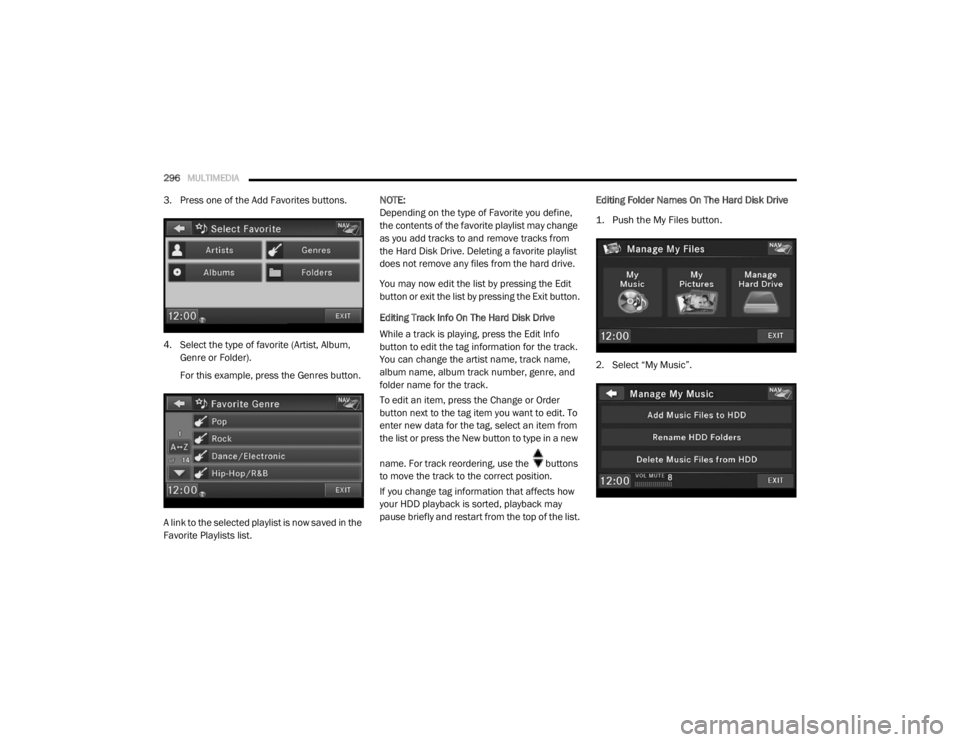
3. Press one of the Add Favorites buttons.
4. Select the type of favorite (Artist, Album,
Genre or Folder).
For this example, press the Genres button.
A link to the selected playlist is now saved in the
Favorite Playlists list. NOTE:
Depending on the type of Favorite you define,
the contents of the favorite playlist may change
as you add tracks to and remove tracks from
the Hard Disk Drive. Deleting a favorite playlist
does not remove any files from the hard drive.
You may now edit the list by pressing the Edit
button or exit the list by pressing the Exit button.
Editing Track Info On The Hard Disk Drive
While a track is playing, press the Edit Info
button to edit the tag information for the track.
You can change the artist name, track name,
album name, album track number, genre, and
folder name for the track.
To edit an item, press the Change or Order
button next to the tag item you want to edit. To
enter new data for the tag, select an item from
the list or press the New button to type in a new
name. For track reordering, use the buttons
to move the track to the correct position.
If you change tag information that affects how
your HDD playback is sorted, playback may
pause briefly and restart from the top of the list.
Editing Folder Names On The Hard Disk Drive
1. Push the My Files button.
2. Select “My Music”.
20_RT_OM_EN_USC_t.book Page 296
Page 300 of 380

298MULTIMEDIA
Importing Pictures
It is possible to import display pictures to the
internal Hard Disk Drive. The pictures can be
displayed on the right half of the radio screen.
In the default mode, the vehicle brand logo is
displayed in the right half of the screen. Push
the Menu button on the right side of the radio to
access one of the setting menus.
It is recommended to change the picture
dimensions on a PC or Digital Camera to 240 by
158 pixels before the import.
NOTE:
USB devices (e.g., camera memory USB
adaptors, etc.) must comply with the MSD
(Mass Storage Device) standard. This USB terminal can provide power to the inserted
device. The device's current limitation must be
less or equal to 500mA.
1. Push the My Files button located on the
faceplate to go to the Manage My Files
screen.
2. Insert either a CD or a USB Stick containing your pictures.
3. Press the My Pictures button to get an overview of the images currently stored on
the Hard Disk Drive.
The radio can store 23 user pictures.
4. Press the Add button to view the pictures stored on the CD or USB memory stick. NOTE:
Depending on the file size of each picture on the
CD or USB memory stick, loading the images in
the screen may take time.
5. Select the type of media inserted.
6. Use the Page Up or Down buttons to page
through a list of pictures and press the
picture you would like to import.
7. Select which pictures you want to copy. The red check mark indicates a picture file to
copy.
The imported picture is now available in the
Manage My Pictures screen.
20_RT_OM_EN_USC_t.book Page 298