2020 DODGE GRAND CARAVAN center console
[x] Cancel search: center consolePage 205 of 380
IN CASE OF EMERGENCY203
Jack Location
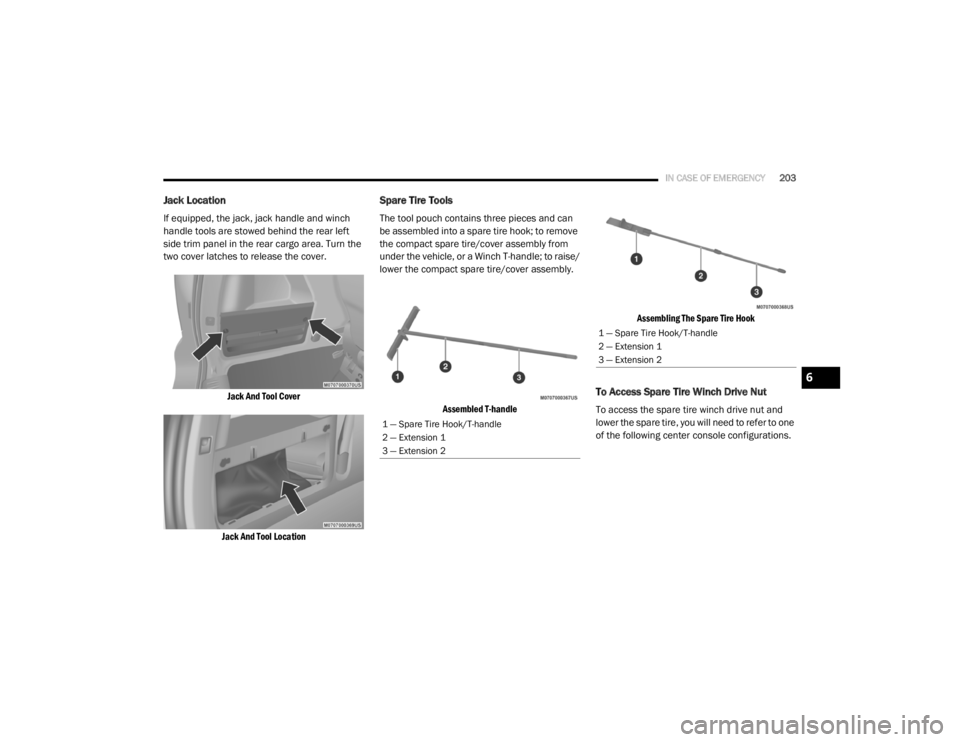
If equipped, the jack, jack handle and winch
handle tools are stowed behind the rear left
side trim panel in the rear cargo area. Turn the
two cover latches to release the cover.
Jack And Tool Cover
Jack And Tool Location
Spare Tire Tools
The tool pouch contains three pieces and can
be assembled into a spare tire hook; to remove
the compact spare tire/cover assembly from
under the vehicle, or a Winch T-handle; to raise/
lower the compact spare tire/cover assembly.
Assembled T-handle Assembling The Spare Tire Hook
To Access Spare Tire Winch Drive Nut
To access the spare tire winch drive nut and
lower the spare tire, you will need to refer to one
of the following center console configurations.
1 — Spare Tire Hook/T-handle
2 — Extension 1
3 — Extension 2
1 — Spare Tire Hook/T-handle
2 — Extension 1
3 — Extension 2
6
20_RT_OM_EN_USC_t.book Page 203
Page 206 of 380
204IN CASE OF EMERGENCY
Super Console — If Equipped
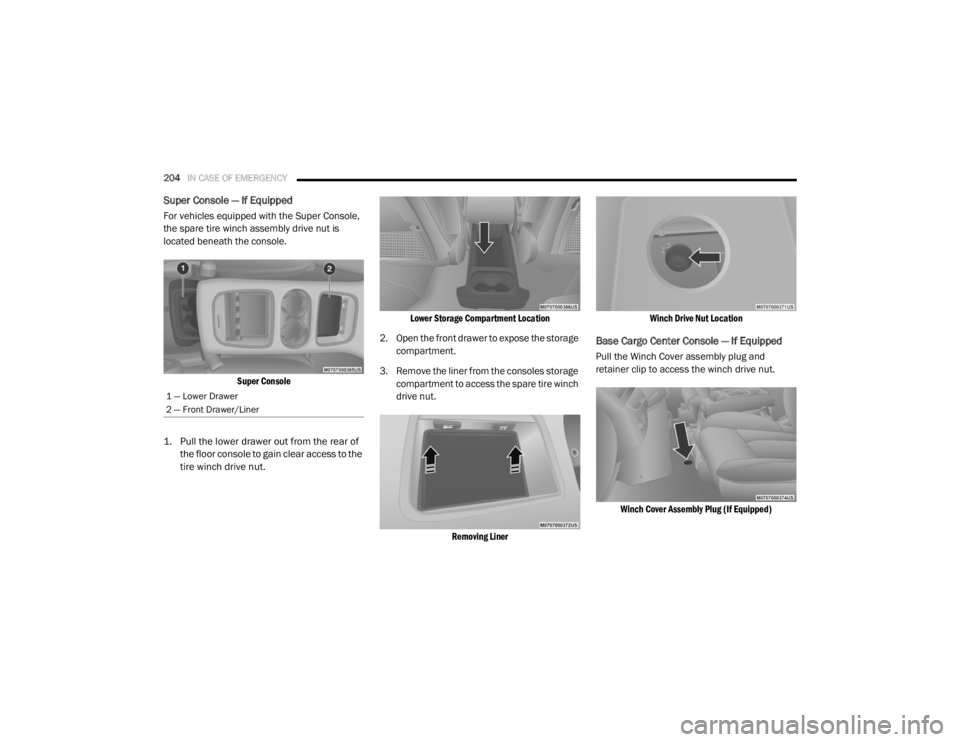
For vehicles equipped with the Super Console,
the spare tire winch assembly drive nut is
located beneath the console.
Super Console
1. Pull the lower drawer out from the rear of the floor console to gain clear access to the
tire winch drive nut.
Lower Storage Compartment Location
2. Open the front drawer to expose the storage compartment.
3. Remove the liner from the consoles storage compartment to access the spare tire winch
drive nut.
Removing Liner Winch Drive Nut Location
Base Cargo Center Console — If Equipped
Pull the Winch Cover assembly plug and
retainer clip to access the winch drive nut.
Winch Cover Assembly Plug (If Equipped)
1 — Lower Drawer
2 — Front Drawer/Liner
20_RT_OM_EN_USC_t.book Page 204
Page 207 of 380
IN CASE OF EMERGENCY205
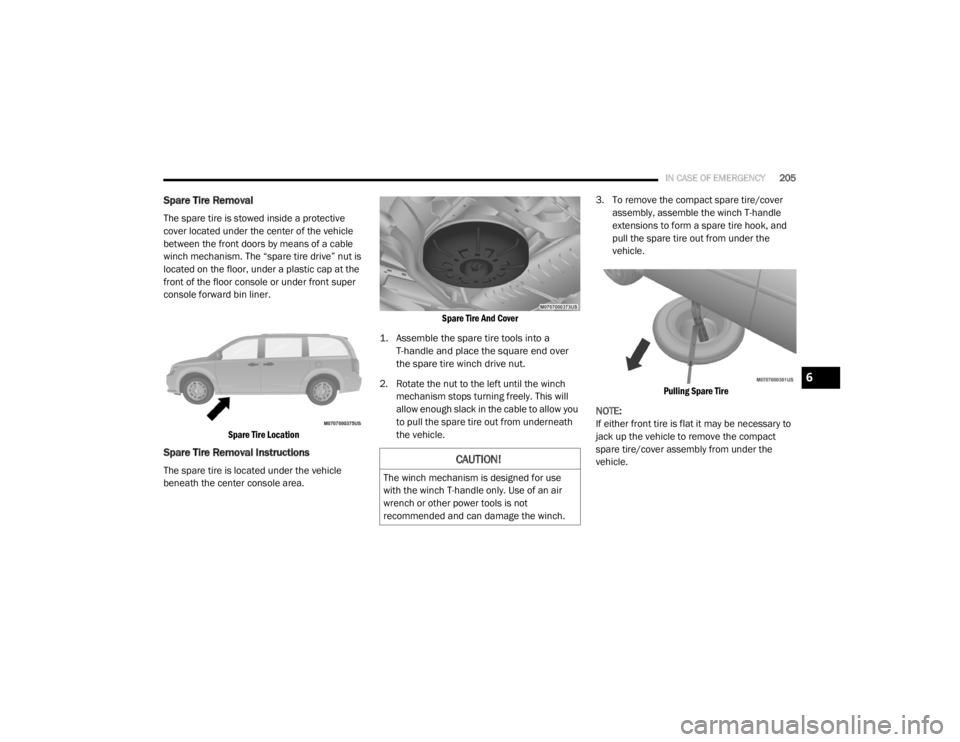
Spare Tire Removal
The spare tire is stowed inside a protective
cover located under the center of the vehicle
between the front doors by means of a cable
winch mechanism. The “spare tire drive” nut is
located on the floor, under a plastic cap at the
front of the floor console or under front super
console forward bin liner.
Spare Tire Location
Spare Tire Removal Instructions
The spare tire is located under the vehicle
beneath the center console area.
Spare Tire And Cover
1. Assemble the spare tire tools into a T-handle and place the square end over
the spare tire winch drive nut.
2. Rotate the nut to the left until the winch mechanism stops turning freely. This will
allow enough slack in the cable to allow you
to pull the spare tire out from underneath
the vehicle. 3. To remove the compact spare tire/cover
assembly, assemble the winch T-handle
extensions to form a spare tire hook, and
pull the spare tire out from under the
vehicle.
Pulling Spare Tire
NOTE:
If either front tire is flat it may be necessary to
jack up the vehicle to remove the compact
spare tire/cover assembly from under the
vehicle.CAUTION!
The winch mechanism is designed for use
with the winch T-handle only. Use of an air
wrench or other power tools is not
recommended and can damage the winch.
6
20_RT_OM_EN_USC_t.book Page 205
Page 303 of 380

MULTIMEDIA301
2. Insert the top hooks (1) into the frame first.
3. Then push on the bottom of the flap to
secure in place.
Audio Jack (AUX) Mode
The Audio Jack connector allows you to connect
the headset output of an audio device (e.g.,
MP3 player) to the radio. The audio of the
connected device will then be played through
the radio sound system. Connect a 3.5 mm stereo mini-jack cable as
shown above (not provided with the radio) to the
Audio Jack connector on the radio and to the
earphone connector of your audio device.
The display will switch automatically to the AUX
mode when a 3.5 mm stereo mini-jack cable
has been connected. The radio screen will
revert back to the last tuner mode when the
cable is unplugged.
To change radio modes while the cable is
connected to the unit, push the Media button
located on the faceplate to display the AUX tab.
Press the AUX tab to return to the AUX mode.
Adjust the volume with the On/Off Volume
rotary knob or with the volume of the attached
device.The control of the external device (e.g.,
selecting playlists, play, fast forward, etc.)
cannot be provided by the radio; use the device
controls instead.
NOTE:
Inserting of a mono jack will result in improper
audio playback.
USB Port — If Equipped
The USB Port in the center console or upper
glove box (depending on the vehicle) gives you
access to the audio files on the external USB
device through the AUX Mode. It functions as a
remote control for the currently connected
audio devices mobile digital device, and you can
play audio from the audio device through the
vehicle's speaker system.
Before using the AUX mode, you will need to
connect your audio device to the USB port.
NOTE:The files will not be stored on the internal
hard disk drive and cannot be used in the
HDD mode.
It is recommended you use the latest avail
-
able software for your iPod®/iPhone® and
iTunes®.
CAUTION!
Never force any connector into the ports of
your radio. Make sure your connectors are
the identical shape and size before you
connect.
9
20_RT_OM_EN_USC_t.book Page 301
Page 371 of 380

369
Brake System
...................................... 242, 266Anti-Lock (ABS).......................................... 266Fluid Check..................................... 243, 274Parking...................................................... 164Warning Light.............................................. 94Brake/Transmission Interlock....................... 166Bulb Replacement......................................... 194Bulbs, Light.......................................... 161, 194
C
Calibration Compass
..................................................... 89Camera, Rear................................................ 179Capacities, Fluid............................................ 271Caps, FillerOil (Engine)................................................ 231Power Steering.......................................... 173Radiator (Coolant Pressure)...................... 241Car Washes................................................... 263Carbon Monoxide Warning.................. 159, 270CargoVehicle Loading........................................... 63Cargo Area Cover............................................. 63Cargo Compartment........................................ 63Luggage Carrier........................................... 79Cellular Phone..................................... 304, 359Center High Mounted Stop Light...................197Certification Label......................................... 182Chains, Tire.................................................... 260Change Oil Indicator........................................ 87
Changing A Flat Tire............................. 202, 244Chart, Tire Sizing........................................... 246Check Engine Light
(Malfunction Indicator Light)......................... 102Checking Your Vehicle For Safety................. 159Checks, Safety.............................................. 159Child Restraint.............................................. 141Child RestraintsBooster Seats........................................... 144Child Seat Installation..................... 153, 155How To Stow An unused ALR Seat Belt.... 152Infant And Child Restraints....................... 142Locating The LATCH Anchorages.............. 149Lower Anchors And Tethers For Children.. 146Older Children And Child Restraints......... 143Seating Positions...................................... 145Using The Top Tether Anchorage.............. 157Clean Air Gasoline......................................... 268CleaningWheels..................................................... 259Climate Control................................................ 42Automatic.................................................... 48Manual........................................................ 42Coat Hook........................................................ 73Cold Weather Operation............................... 163Compact Spare Tire...................................... 257Compass.......................................................... 88Calibration................................................... 89Variance...................................................... 89Computer, Trip/Travel............................... 87, 93
Console............................................................69Floor............................................................69Console, Overhead...........................................71Contract, Service........................................... 365Cooling Pressure Cap (Radiator Cap)............ 241Cooling System............................................. 239Adding Coolant (Antifreeze)...................... 240Cooling Capacity....................................... 271Disposal Of Used Coolant......................... 242Drain, Flush, And Refill............................. 240Inspection................................................. 240Points To Remember................................ 242Pressure Cap............................................ 241Radiator Cap............................................. 241Selection Of Coolant
(Antifreeze).............................240, 271, 272Corrosion Protection..................................... 262Cruise Light................................................... 100Cupholders............................................. 73, 265Customer Assistance.................................... 364Cybersecurity................................................ 275
D
Daytime Brightness, Interior Lights..................41Daytime Running Lights............................37, 38Dealer Service............................................... 233Defroster, Windshield................................... 160Delay (Intermittent) Wipers..............................42Diagnostic System, Onboard......................... 101
11
20_RT_OM_EN_USC_t.book Page 369
Page 375 of 380

373
Mini-Trip Computer
................................... 87, 93Mirrors...................................................... 34, 36Automatic Dimming..................................... 34Electric Remote........................................... 36Exterior Folding........................................... 36Heated................................................. 34, 37Outside................................................. 34, 35Rearview.............................................. 34, 35Vanity.......................................................... 37Modifications/Alterations Vehicle.......................................................... 8Monitor, Tire Pressure System....................... 115Mopar Parts................................................... 366MP3 Control.................................................. 340Multi-Function Control Lever............................ 37
N
New Vehicle Break-In Period.......................... 163
O
Occupant Restraints...................................... 119Octane Rating, Gasoline (Fuel)............ 267, 272Oil Change IndicatorReset........................................................... 87Oil Filter, Change........................................... 234Oil Filter, Selection......................................... 234Oil Pressure Light............................................ 96Oil, Engine........................................... 233, 272Capacity.................................................... 271Change Interval......................................... 233
Checking................................................... 232Disposal................................................... 234Filter................................................ 234, 272Filter Disposal........................................... 234Identification Logo.................................... 234Materials Added To.................................. 234Pressure Warning Light............................... 96Recommendation............................ 233, 271Synthetic.................................................. 234Viscosity.......................................... 234, 271Onboard Diagnostic System.......................... 101Operating Precautions.................................. 101Operator ManualOwner's Manual.................................... 8, 367Outside Rearview Mirrors......................... 34, 35Overhead Console........................................... 71Overhead Travel Information Center................ 71Overheating, Engine...................................... 221Owner’s Manual (Operator Manual)................... 8
P
Paint Care..................................................... 262Parking Brake............................................... 164ParkSense System, Rear.............................. 175Personal Settings............................................. 90Pets.............................................................. 159Phone, Hands-Free (Uconnect)..................... 304Placard, Tire And Loading Information.......... 249
PowerBrakes...................................................... 266Door Locks...................................................17Inverter........................................................77Mirrors.........................................................36Outlet (Auxiliary Electrical Outlet).................75Seats...........................................................27Steering........................................... 172, 173Vent Windows..............................................59Power SeatsDown...........................................................28Forward.......................................................28Rearward.....................................................28Up................................................................28Pregnant Women And Seat Belts.................. 127Preparation For Jacking................................ 206PretensionersSeat Belts................................................. 127Programmable Electronic Features..................90
R
Radial Ply Tires.............................................. 254Radiator Cap (Coolant Pressure Cap)............ 241Radio Operation............................................ 359Radio Remote Controls................................. 340Rear Air Conditioning.......................................45Rear Camera................................................. 179Rear Cross Path............................................ 113Rear ParkSense System................................ 175Reclining Rear Seats........................................21
11
20_RT_OM_EN_USC_t.book Page 373