2020 CITROEN RELAY Switch dash
[x] Cancel search: Switch dashPage 22 of 196
20
Access
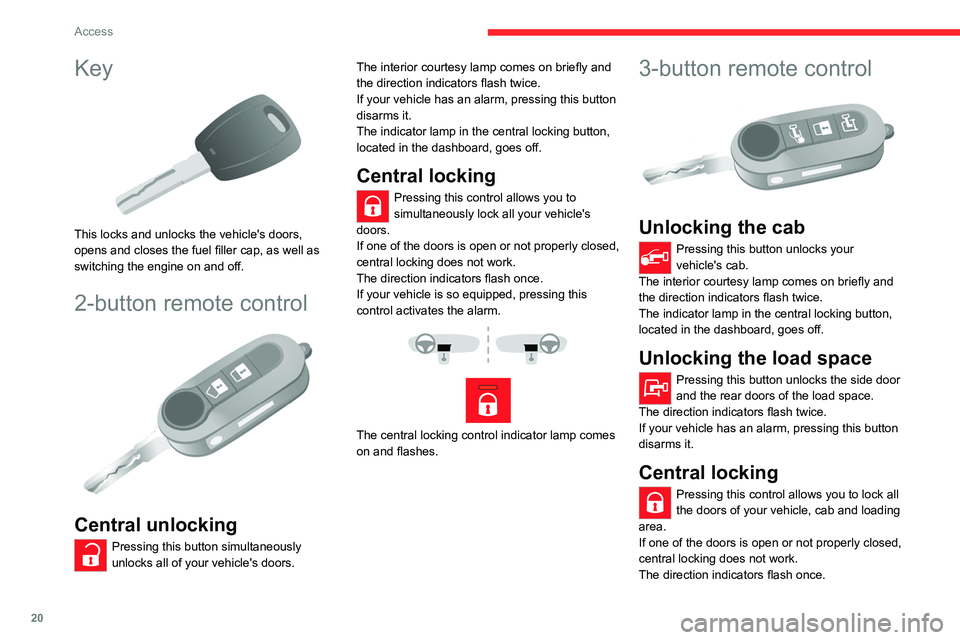
Key
This locks and unlocks the vehicle's doors,
opens and closes the fuel filler cap, as well as
switching the engine on and off.
2-button remote control
Central unlocking
Pressing this button simultaneously
unlocks all of your vehicle's doors. The interior courtesy lamp comes on briefly and
the direction indicators flash twice.
If your vehicle has an alarm, pressing this button
disarms it.
The indicator lamp in the central locking button,
located in the dashboard, goes off.
Central locking
Pressing this control allows you to
simultaneously lock all your vehicle's
doors.
If one of the doors is open or not properly closed,
central locking does not work.
The direction indicators flash once.
If your vehicle is so equipped, pressing this
control activates the alarm.
The central locking control indicator lamp comes
on and flashes.
3-button remote control
Unlocking the cab
Pressing this button unlocks your
vehicle's cab.
The interior courtesy lamp comes on briefly and
the direction indicators flash twice.
The indicator lamp in the central locking button,
located in the dashboard, goes off.
Unlocking the load space
Pressing this button unlocks the side door
and the rear doors of the load space.
The direction indicators flash twice.
If your vehicle has an alarm, pressing this button
disarms it.
Central locking
Pressing this control allows you to lock all
the doors of your vehicle, cab and loading
area.
If one of the doors is open or not properly closed,
central locking does not work.
The direction indicators flash once.
If your vehicle is so equipped, pressing this
control activates the alarm.
The central locking control indicator lamp comes
on and flashes.
Folding / Unfolding the
key
► Press this button to unfold / fold the
key.
If you do not press the button, you risk
damaging the mechanism.
Summary of the main functions of the key
Type of key Unlocking the cabLocking the doorsUnlocking the rear doors
Basic key Turn anti-clockwise (driver’s side).Turn clockwise (driver’s side).-
Remote control key
Signalling
Page 24 of 196
22
Access
Type of keyUnlocking the cabLocking the doorsUnlocking the rear doors
Direction indicators 2 flashes.1 flash.2 flashes.
Central locking control indicator
lamp on the dashboard Off.
Fixed for approximately 3
seconds, then flashing. Flashing.
Using the key in the driver's door lock does not activate/deactivate the alarm.
Locking/Unlocking from
inside
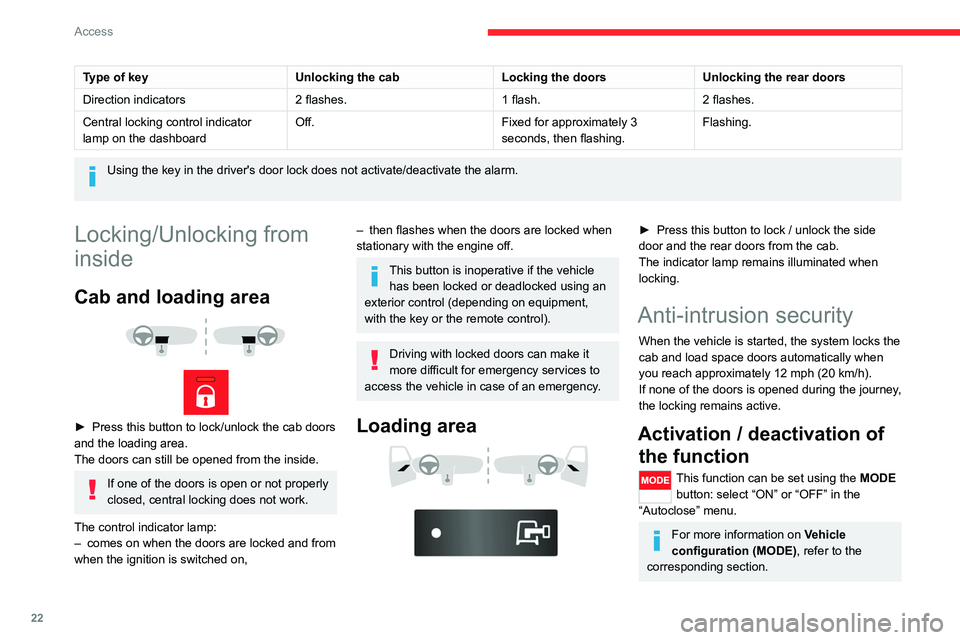
Cab and loading area
► Press this button to lock/unlock the cab doors
and the loading area.
The doors can still be opened from the inside.
If one of the doors is open or not properly
closed, central locking does not work.
The control indicator lamp:
– comes on when the doors are locked and from
when the ignition is switched on,
– then flashes when the doors are locked when
stationary with the engine off.
This button is inoperative if the vehicle has been locked or deadlocked using an
exterior control (depending on equipment,
with the key or the remote control).
Driving with locked doors can make it
more difficult for emergency services to
access the vehicle in case of an emergency.
Loading area
► Press this button to lock / unlock the side
door and the rear doors from the cab.
The indicator lamp remains illuminated when
locking.
Anti-intrusion security
When the vehicle is started, the system locks the
cab and load space doors automatically when
you reach approximately 12 mph (20 km/h).
If none of the doors is opened during the journey,
the locking remains active.
Activation / deactivation of the function
This function can be set using the MODE
button: select “ON” or “OFF” in the
“Autoclose” menu.
For more information on Vehicle
configuration (MODE) , refer to the
corresponding section.
Front doors
► Use the corresponding button on the remote
control or use the key in the driver's door lock to
unlock.
► Pull the handle towards you.
Sliding side door
Take care not to block the guide space
on the floor to allow the door to slide
correctly.
Opening
From outside
► Pull the handle towards you and then towards
the rear.
Page 44 of 196

42
Ease of use and comfort
Support for stowing rail
Supports for securing a stowing rail are available
above the trims, on each side of the vehicle.
Maximum load: 200 kg.
Side trim
The interior sections of the side walls are fitted
with loading protection trims.
12 volt socket
Maximum power: 180 W.
Reading lamps
They are controlled by the switches.
The driver's switch controls both lamps together.
The passenger's switch controls either the
driver's lamp or the passenger's lamp.
Controls, located at the bottom of the
dashboard on the driver's side, allow the
driver to activate/deactivate the passenger's
lamp.
Courtesy lamp
It can be activated by:
– the switches located on the courtesy lamp,
with the ignition on - MAR - ON position,
– the opening or closing of one of the front
doors,
– the locking/unlocking of the vehicle.
It turns off automatically:
– if the switch is not pressed to the right or to
the left,
– in any case after 15 minutes, if the doors
remain open,
– or when the ignition is switched on.
Rear fittings
Stowing rings
Stowing rings are installed on the floor to fix and
secure loads: 8, for vehicles of L1 and L2 length;
10, for vehicles of L3 and L4 length.
Two additional rings are installed on the partition
behind the cab.
Maximum load: 500 kg.
As a safety precaution in case of sharp braking, you are advised to place heavy
objects as far forwards towards the cab as
possible.
Page 49 of 196

47
Lighting and visibility
4Automatic illumination of headlamps
If your vehicle is fitted with this function, the
dipped beam headlamps are switched on
automatically if the light is poor.
In fog or snow, the sunshine sensor may
detect sufficient light. In this case, the
lighting will not come on automatically. If
necessary, you must switch on the dipped
beam headlamps manually.
They are switched off when the light returns
to a sufficient level.
Do not cover the sunshine sensor at the top
centre of the windscreen.
You can adjust the sensitivity of the sunshine sensor.
For more information on Vehicle
configuration , refer to the corresponding
section.
Activation
► Turn the ring to this position.
The lamps go out automatically when the ignition
is switched off.
Guide-me-home lighting
If your vehicle is equipped: when you leave your
vehicle, the dipped beam headlamps remain on
for the selected period of time (e.g. leaving a car
park).
With the ignition off or the
key in the STOP position
► Within 2 minutes of switching off the engine,
turn the ignition key to the STOP position or
remove the key.
► Pull the lighting control stalk towards the
steering wheel.
This indicator lamp lights up on the
dashboard.
Each action on the lighting control stalk, pulled
towards the steering wheel, extends the
guide-me-home lighting by 30 seconds up to
approximately 3 minutes. Once this time has
elapsed, the lamps go out automatically.
Deactivate this control by holding the control
stalk pulled towards the steering wheel for more
than 2 seconds.
Automatic headlamps
System which automatically changes to main
beam according to the ambient light level and
the driving conditions, using a camera located at
the top of the windscreen.
This system is a driving aid. The driver remains responsible for
the vehicle's lighting, its correct use for the
prevailing conditions of light, visibility and
traffic, and observation of driving regulations.
Activation
► Turn the lighting control stalk ring to
this position.
► Set the function by pressing the
MODE button: select "ON" in the
"Automatic main beam" menu.
For more information on Vehicle
configuration , refer to the corresponding
section.
► Flash the headlamps (going beyond the point
of resistance) to activate the function.
Operation
Page 79 of 196

77
Driving
6Selecting the function
► Turn ring 1 all the way down. The speed
limiter is selected, but is not yet active.
The display indicates OFF and the last
programmed speed.
Programming a speed
A speed can be programmed without activating
the speed limiter but with the engine running.
To memorise a speed higher than the previous
one:
► Move the control upwards (+).
A short press increases the setting by 1 mph
(km/h).
Pressing and holding increases the setting in
steps of 5 mph (km/h).
To memorise a speed lower than the previous
one:
► Move the control downwards (-).
A short press decreases the setting by 1 mph
(km/h).
Pressing and holding decreases the setting in
steps of 5 mph (km/h).
Activation/Deactivation
► Press button 2 to activate the speed limiter.
OFF disappears from the display and a message
appears confirming activation.
Pressing again deactivates it, OFF is displayed
again and a message appears confirming
deactivation.
Exceeding the programmed
speed
► Press firmly on the accelerator pedal, going
beyond the point of resistance, to exceed the
programmed limit speed.
The speed limiter is deactivated temporarily and
the programmed speed flashes.
To return to the speed limiter function, reduce
your speed below the programmed speed.
On a steep descent or in the event of
sharp acceleration, the speed limiter will
not be able to prevent the vehicle from
exceeding the programmed speed.
Switching the function off
► Place the ring in the central position O or
switch the ignition off to stop the system.
The last programmed speed remains in the
memory.
Malfunction
The programmed speed is cleared, then
replaced by dashes.
Have the system checked by a CITROËN dealer
or a qualified workshop.
Fixed speed limiter
If your vehicle is equipped with it, the speed of
your vehicle can be limited in a fixed way to 56
mph (90 km/h) or 62 mph (100 km/h).
A label located in the passenger compartment
indicates this maximum speed.
The fixed speed limiter is not a cruise control
type function. It cannot be activated or
deactivated by the driver during the trip.
Page 106 of 196

104
In the event of a breakdown
Temporary puncture repair kit
This temporary puncture repair kit is stored in a
bag, placed in one of the front doors.
It includes:
– a cartridge A, containing the sealant, equipped
with: • a filling pipe B,
• a sticker C indicating "50 mph (80 km/h)
max.", which the driver must apply within
their field of vision (on the dashboard) after
having repaired the tyre,
– a quick user guide for the repair kit,
– a compressor D equipped with a pressure
gauge and connections,
– adapters, for the inflation of various
components.
Repairing a tyre
► Apply the parking brake.
► Unscrew the cap of the tyre valve, remove
filling hose B and screw ring E onto the valve.
► Make sure compressor switch F is in
position 0 (off).
► Start the engine.
► Insert plug G into the nearest socket on the
vehicle.
► Operate the compressor by setting switch F
to position I (on).
► Inflate the tyre to a pressure of 5 bar.
To obtain a more accurate reading, it is
recommended to check the pressure value on
pressure gauge H, with the compressor off.
► If a pressure of at least 3 bar is not reached
within 5 minutes, disconnect the compressor
from the valve and the power socket, then move
the vehicle forwards by approximately 10 metres,
to disperse the sealant inside the tyre.
► Then repeat the inflation procedure:
• if a pressure of at least 3 bar is not reached
within 10 minutes, stop your vehicle: the tyre
is too damaged and could not be repaired.
Contact a CITROËN dealer or a qualified
workshop.
• if the tyre pressure has reached 5 bar,
restart immediately.
► After driving for approximately 10 minutes,
stop and check the tyre pressure again.
► Restore the correct pressure in accordance
with the label on the driver's side pillar and
contact a CITROËN dealer or a qualified
workshop as soon as possible.
This puncture repair kit and the replacement cartridges are available
from a CITROËN dealer.
Checking and restoring
pressure
The compressor can only be used to check and
restore pressure.
► Disconnect hose I and directly connect it
to the tyre valve; the cartridge will thereby be
connected to the compressor and the sealant will
not be injected.
If the tyre needs to be deflated, connect hose
I to the tyre valve and press the yellow button
located in the centre of the compressor switch.
Replacing the cartridge
To replace the sealant cartridge, proceed as
follows:
► Disconnect the hose I.
► Turn the cartridge to be replaced anti-
clockwise and lift it.
► Insert the new cartridge and turn it clockwise,
► Reconnect the hose I and connect pipe B to
its location.
The cartridge contains ethylene glycol, which is harmful if swallowed and irritates
the eyes.
It must be kept out of the reach of children.