2020 CHEVROLET SILVERADO rear brakes
[x] Cancel search: rear brakesPage 183 of 495

Chevrolet Silverado Owner Manual (GMNA-Localizing-U.S./Canada/Mexico-
13337620) - 2020 - CTC - 1/27/20
182 Driving and Operating
Driving and
Operating
Driving Information
Driving for Better FuelEconomy . . . . . . . . . . . . . . . . . . . . 183
Distracted Driving . . . . . . . . . . . . 184
Defensive Driving . . . . . . . . . . . . . 184
Drunk Driving . . . . . . . . . . . . . . . . . 185
Control of a Vehicle . . . . . . . . . . . 185
Braking . . . . . . . . . . . . . . . . . . . . . . . 185
Steering . . . . . . . . . . . . . . . . . . . . . . 185
Off-Road Recovery . . . . . . . . . . . 187
Loss of Control . . . . . . . . . . . . . . . 187
Off-Road Driving . . . . . . . . . . . . . 188
Driving on Wet Roads . . . . . . . . 193
Hill and Mountain Roads . . . . . 194
Winter Driving . . . . . . . . . . . . . . . . 194
If the Vehicle Is Stuck . . . . . . . . 196
Vehicle Load Limits . . . . . . . . . . . 197
Truck-Camper Loading Information . . . . . . . . . . . . . . . . . . 202
Starting and Operating
New Vehicle Break-In . . . . . . . . . 204
Ignition Positions (KeylessAccess) . . . . . . . . . . . . . . . . . . . . . 205 Ignition Positions (Key
Access) . . . . . . . . . . . . . . . . . . . . . 207
Starting the Engine . . . . . . . . . . . 209
Stop/Start System . . . . . . . . . . . . 210
Engine Heater . . . . . . . . . . . . . . . . 211
Retained Accessory Power (RAP) . . . . . . . . . . . . . . . . 213
Shifting Into Park . . . . . . . . . . . . . 213
Shifting out of Park . . . . . . . . . . . 215
Parking over Things That Burn . . . . . . . . . . . . . . . . . . . 215
Active Fuel Management . . . . . 215
Extended Parking . . . . . . . . . . . . 216
Engine Exhaust
Engine Exhaust . . . . . . . . . . . . . . 216
Running the Vehicle While Parked . . . . . . . . . . . . . . . . . . . . . . 217
Automatic Transmission
Automatic Transmission . . . . . . 217
Manual Mode . . . . . . . . . . . . . . . . . 220
Tow/Haul Mode . . . . . . . . . . . . . . . 223
Drive Systems
Four-Wheel Drive . . . . . . . . . . . . . 223
Brakes
Electric Brake Boost . . . . . . . . . . 228
Antilock BrakeSystem (ABS) . . . . . . . . . . . . . . . 228
Electric Parking Brake . . . . . . . . 229 Brake Assist . . . . . . . . . . . . . . . . . . 230
Hill Start Assist (HSA) . . . . . . . . 231
Ride Control Systems
Traction Control/Electronic
Stability Control . . . . . . . . . . . . . 231
Hill Descent Control (HDC) . . . 233
Driver Mode Control . . . . . . . . . . 234
Limited-Slip Differential . . . . . . . 239
Locking Rear Axle . . . . . . . . . . . . 239
Cruise Control
Cruise Control . . . . . . . . . . . . . . . . 239
Adaptive Cruise Control (1500 Series) . . . . . . . . . . . . . . . . . . . . . . 242
Driver Assistance Systems
Driver Assistance Systems . . . 252
Assistance Systems forParking or Backing . . . . . . . . . . 253
Assistance Systems for Driving . . . . . . . . . . . . . . . . . . . . . . 264
Forward Collision Alert (FCA) System . . . . . . . . . . . . . . . . . . . . . . 264
Automatic Emergency Braking (AEB) . . . . . . . . . . . . . . . 266
Front Pedestrian Braking (FPB) System (1500
Series) . . . . . . . . . . . . . . . . . . . . . . 268
Side Blind Zone Alert (SBZA) . . . . . . . . . . . . . . . . 270
Page 229 of 495

Chevrolet Silverado Owner Manual (GMNA-Localizing-U.S./Canada/Mexico-
13337620) - 2020 - CTC - 1/27/20
228 Driving and Operating
cannot complete a shift request, it
will go back to its last chosen
setting.
The settings are:
2
m(Two-Wheel Drive High) :Use
for driving on most streets and
highways. The front axle is not
engaged. This setting provides the
best fuel economy.
4
m(Four-Wheel Drive High) : Use
this setting when extra traction is
needed, such as when driving on
snowy or icy roads, when
off-roading, or when plowing snow.
AUTO (Automatic Four-Wheel
Drive)
Use when road surface conditions
are variable. When driving in AUTO,
the front axle is engaged, and the
vehicle's power is sent to the front
and rear wheels automatically
based on driving conditions. This
setting provides slightly lower fuel
economy than 2
m. Shifts between 2
m, 4m, and AUTO
Any of these shifts can be made at
normal driving speed.
The actual 4x4 shift request is only
made after the button is released.
The 4x4 graphic will remain flashing
until the shift request has
completed. A DIC message
displays.
Once the 4x4 shift has completed,
the DIC message disappears, the
4x4 graphic stops flashing, and the
current setting is indicated.
The actual 4x4 shift request is only
made after the button is released.
The 4x4 graphic will remain flashing
until the shift request has
completed.
A DIC message displays. Once the
4x4 shift has completed, the DIC
message disappears, the 4x4
graphic stops flashing, and the
current setting is indicated.Brakes
Electric Brake Boost
Vehicles equipped with electric
brake boost have hydraulic brake
circuits that are electronically
controlled when the brake pedal is
applied during normal operation.
The system performs routine tests
and turns off within a few minutes
after the vehicle is shutdown. Noise
may be heard during this time. If the
brake pedal is pressed during the
tests or when the electric brake
boost system is off, a noticeable
change in pedal force and travel
may be felt. This is normal.
Antilock Brake
System (ABS)
The Antilock Brake System (ABS)
helps prevent a braking skid and
maintain steering while
braking hard.
Page 248 of 495

Chevrolet Silverado Owner Manual (GMNA-Localizing-U.S./Canada/Mexico-
13337620) - 2020 - CTC - 1/27/20
Driving and Operating 247
The vehicle ahead indicator is in the
instrument cluster. It only displays
when a vehicle is detected in your
vehicle’s path moving in the same
direction. If this symbol is not
displaying, ACC will not respond to
or brake for vehicles ahead.
ACC automatically slows the vehicle
down and adjusts vehicle speed to
follow a detected vehicle ahead at
the selected following gap. The
vehicle speed increases or
decreases to follow a detected
vehicle in front of your vehicle when
that vehicle is traveling slower than
your vehicle set speed. It may apply
limited braking, if necessary. When
braking is active, the brake lamps
will come on. The automatic braking
may feel or sound different than if
the brakes were applied manually.
This is normal.Stationary or Very Slow-Moving
Objects
{Warning
ACC may not detect and react to
stopped or slow-moving vehicles
ahead of you. For example, the
system may not brake for a
vehicle it has never detected
moving. This can occur in
stop-and-go traffic or when a
vehicle suddenly appears due to
a vehicle ahead changing lanes.
Your vehicle may not stop and
could cause a crash. Use caution
when using ACC. Your complete
attention is always required while
driving and you should be ready
to take action and apply the
brakes.
Irregular Objects Affecting ACC
ACC may have difficulty detecting
the following objects:
. Vehicles in front of your vehicle
that have a rear aspect that is
low, small, or irregular .
An empty truck or trailer that has
no cargo in the cargo bed
. Vehicles with cargo extending
from the back end
. Non-standard shaped vehicles,
such as vehicle transport,
vehicles with a side car fitted,
or horse carriages
. Vehicles that are low to the road
surface
. Objects that are close to the
front of your vehicle
. Vehicles on which extremely
heavy cargo is loaded in the
cargo area or rear seat
Page 265 of 495
Chevrolet Silverado Owner Manual (GMNA-Localizing-U.S./Canada/Mexico-
13337620) - 2020 - CTC - 1/27/20
264 Driving and Operating
to the button comes on when the
features are on and turns off when
the features have been disabled.
Front and Rear Park Assist can be
turned Off, On, or On with Towbar.
See“Park Assist” underVehicle
Personalization 0153. If Park Assist
is turned off through vehicle
personalization, the Park Assist
button will be disabled. To turn Park
Assist on again, select On in vehicle
personalization. The On with Towbar
setting allows Park Assist to work
properly with a trailer hitch. Some
larger trailer hitches may not be
compatible.
Turn off Park Assist when towing a
trailer.
To turn the RPA symbols on or off,
see “Rear Camera Park Assist
Symbols” underVehicle
Personalization 0153.
Assistance Systems for
Driving
If equipped, when driving the
vehicle in a forward gear, Forward
Collision Alert (FCA), Lane Departure Warning (LDW), Lane
Keep Assist (LKA), Side Blind Zone
Alert (SBZA), Lane Change Alert
(LCA), Automatic Emergency
Braking (AEB), and/or the Front
Pedestrian Braking (FPB) System
can help to avoid a crash or reduce
crash damage.
Forward Collision Alert
(FCA) System
If equipped, the FCA system may
help to avoid or reduce the harm
caused by front-end crashes. When
approaching a vehicle ahead too
quickly, FCA provides a red flashing
alert on the windshield and rapidly
beeps or pulses the driver seat.
FCA also lights an amber visual
alert if following another vehicle
much too closely.
FCA detects vehicles within a
distance of approximately 60 m
(197 ft) and operates at speeds
above 8 km/h (5 mph).
{Warning
FCA is a warning system and
does not apply the brakes. When
approaching a slower-moving or
stopped vehicle ahead too rapidly,
or when following a vehicle too
closely, FCA may not provide a
warning with enough time to help
avoid a crash. It also may not
provide any warning at all. FCA
does not warn of pedestrians,
animals, signs, guardrails,
bridges, construction barrels,
or other objects. Be ready to take
action and apply the brakes. See
Defensive Driving
0184.
FCA can be disabled through
vehicle personalization. See
“Collision/Detection Systems” under
Vehicle Personalization 0153.
Page 285 of 495
Chevrolet Silverado Owner Manual (GMNA-Localizing-U.S./Canada/Mexico-
13337620) - 2020 - CTC - 1/27/20
284 Driving and Operating
.Vehicles can tow in D (Drive).
Tow/Haul Mode is recommended
for heavier trailers. See Tow/
Haul Mode 0223. If the
transmission downshifts too
often, a lower gear may be
selected using Manual Mode.
See Manual Mode 0220.
If equipped, the following driver
assistance features should be
turned off when towing a trailer:
. Adaptive Cruise Control (ACC)
. Super Cruise Control
. Lane Keep Assist (LKA)
. Park Assist
. Automatic Parking Assist (APA)
. Reverse Automatic
Braking (RAB)
If equipped, the following driver
assistance features should be
turned to alert or off when towing a
trailer:
. Automatic Emergency
Braking (AEB)
. Intelligent Brake Assist (IBA)
. Front Pedestrian Braking (FPB) If equipped with Lane Change Alert
(LCA), the LCA detection zones that
extend back from the side of the
vehicle do not move further back
when a trailer is towed. Use caution
while changing lanes when towing a
trailer.
If equipped with Rear Cross Traffic
Alert (RCTA), use caution while
backing up when towing a trailer, as
the RCTA detection zones that
extend out from the back of the
vehicle do not move further back
when a trailer is towed.
{Warning
To prevent serious injury or death
from carbon monoxide (CO),
when towing a trailer:
. Do not drive with the
liftgate, trunk/hatch,
or rear-most window open.
. Fully open the air outlets on
or under the instrument
panel.
(Continued)
Warning (Continued)
.Adjust the climate control
system to a setting that
brings in only outside air.
See “Climate Control
Systems” in the Index.
For more information about
carbon monoxide, see Engine
Exhaust 0216.
Towing a trailer requires experience.
The combination of the vehicle and
trailer is longer and not as
responsive as the vehicle itself. Get
used to the handling and braking of
the combination by driving on a
level road surface before driving on
public roads.
The trailer structure, the tires, and
the brakes must all be rated to carry
the intended cargo. Inadequate
trailer equipment can cause the
combination to operate in an
unexpected or unsafe manner.
Before driving, inspect all trailer
hitch parts and attachments, safety
chains, electrical connectors, lamps,
Page 290 of 495
Chevrolet Silverado Owner Manual (GMNA-Localizing-U.S./Canada/Mexico-
13337620) - 2020 - CTC - 1/27/20
Driving and Operating 289
must be below all of the maximum
weight ratings for the vehicle,
including:
.GCWR: Gross Combined Weight
Rating
. GVWR: Gross Vehicle Weight
Rating
. Maximum Trailer Weight Rating
. GAWR-RR: Gross Axle Weight
Rating-Rear
. Maximum Trailer Tongue Weight
Rating
See “Weight-Distributing Hitch and
Adjustment” underTowing
Equipment 0292 to determine if
equalizer bars are required to obtain
the maximum trailer weight rating.
See “Trailer Brakes” underTowing
Equipment 0292 to determine if
brakes are required based on your
trailer's weight.
The only way to be sure the weight
is not exceeding any of these
ratings is to weigh the tow vehicle
and trailer combination, fully loaded
for the trip, getting individual
weights for each of these items. A trailering information label on the
B-pillar shows tow rating information
for the vehicle.
{Warning
You and others could be seriously
injured or killed if the trailer is too
heavy or the trailer brakes are
inadequate for the load. The
vehicle may be damaged, and the
repairs would not be covered by
the vehicle warranty.
Only tow a trailer if all the steps in
this section have been followed.
Ask your dealer for advice and
information about towing a trailer.
Gross Combined Weight
Rating (GCWR)
GCWR is the total allowable weight
of the completely loaded vehicle
and trailer including any fuel,
passengers, cargo, equipment, and
accessories. Do not exceed the
GCWR for your vehicle. The GCWR
for the vehicle is on the Trailering
Information Label.
To check that the weight of the
vehicle and trailer are within the
GCWR for the vehicle, follow these
steps:
1. Start with the "curb weight" from the Trailering Information
Label.
2. Add the weight of the trailer loaded with cargo and ready
for the trip.
3. Add the weight of all passengers.
4. Add the weight of all cargo in the vehicle.
5. Add the weight of hitch hardware such as a draw bar,
ball, load equalizer bars,
or sway bars.
6. Add the weight of any accessories or aftermarket
equipment added to the
vehicle.
The resulting weight cannot exceed
the GCWR value on the Trailering
Information Label.
Page 298 of 495
Chevrolet Silverado Owner Manual (GMNA-Localizing-U.S./Canada/Mexico-
13337620) - 2020 - CTC - 1/27/20
Driving and Operating 297
attaching points on the bumper;
otherwise, safety chains should be
attached to holes on the trailer hitch.
Cross the safety chains under the
tongue of the trailer to help prevent
the tongue from contacting the road
if it becomes separated from the
hitch. Always leave enough slack in
the safety chains to allow the
combination to turn. Never allow
safety chains to drag on the ground.
Trailer Brakes
Loaded trailers over 900 kg
(2,000 lb) must be equipped with
brake systems and with brakes for
each axle. Trailer braking equipment
conforming to Canadian Standards
Association (CSA) requirement
CAN3-D313, or its equivalent, is
recommended.
State or local regulations may
require trailers to have their own
braking system if the loaded weight
of the trailer exceeds certain
minimums that can vary from state
to state. Read and follow the
instructions for the trailer brakes so
they are installed, adjusted, andmaintained properly. Never attempt
to tap into your vehicle's hydraulic
brake system. If you do, both the
vehicle antilock brakes and the
trailer brakes may not function,
which could result in a crash.
Auxiliary Battery
If equipped, the vehicle's auxiliary
battery can be used to supply
electrical power to additional
equipment that may be added, such
as a slide-in camper.
Locate the auxiliary battery
connector under the hood on the
driver side of the vehicle, next to the
engine compartment fuse block.
Follow the proper installation
instructions included with any
electrical equipment that is installed.
Caution
To prevent draining the auxiliary
battery, always turn off electrical
equipment when not in use and
do not use any equipment that
(Continued)
Caution (Continued)
may exceed the
maximum amperage rating of
30 amps.
Trailer Wiring Harness
Basic Trailer Wiring
If the vehicle is not equipped with a
trailer connector on the rear bumper,
a 7-wire trailering harness is tied to
the vehicles frame. The harness
requires the installation of a trailer
connector, which is available
through your dealer.
Use only a round, seven-wire
connector with flat blade terminals
meeting SAE J2863 specifications
for proper electrical connectivity.
The seven-wire harness contains
the following trailer circuits:
Stop/Turn
Signal Left Yellow/Blue
Stop/Turn
Signal Right Green/Violet
Page 299 of 495
Chevrolet Silverado Owner Manual (GMNA-Localizing-U.S./Canada/Mexico-
13337620) - 2020 - CTC - 1/27/20
298 Driving and Operating
Tail/Parking
LampsGray/Brown
Reverse Lamps White/Green
Battery Feed Red/Green
Ground White
Electric Trailer
Brake Blue
Heavy-Duty Trailer Wiring Harness
Package
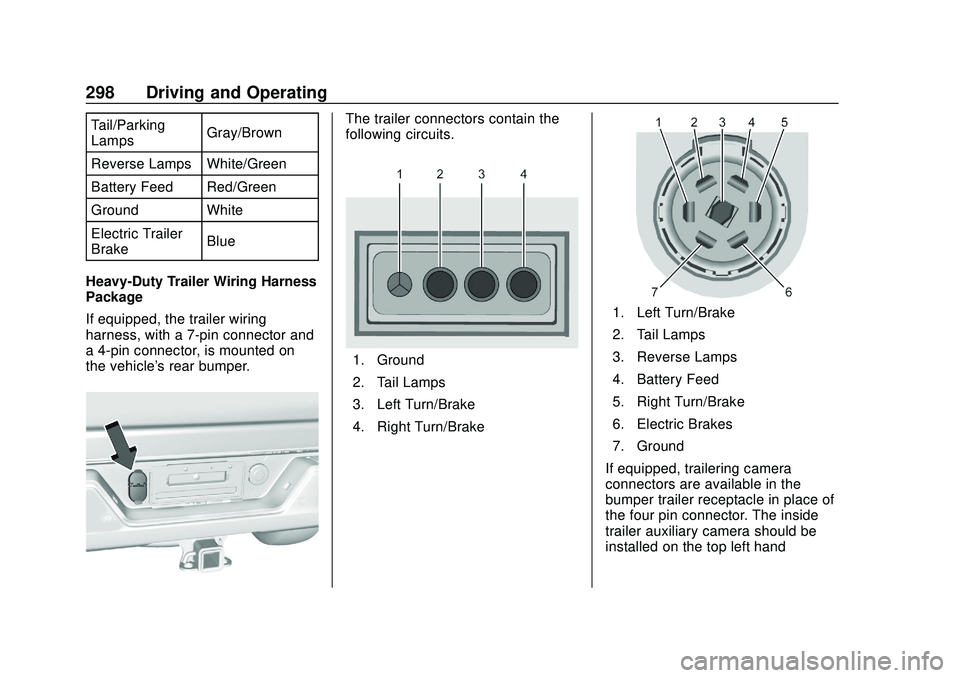
If equipped, the trailer wiring
harness, with a 7-pin connector and
a 4-pin connector, is mounted on
the vehicle's rear bumper.The trailer connectors contain the
following circuits.
1. Ground
2. Tail Lamps
3. Left Turn/Brake
4. Right Turn/Brake
1. Left Turn/Brake
2. Tail Lamps
3. Reverse Lamps
4. Battery Feed
5. Right Turn/Brake
6. Electric Brakes
7. Ground
If equipped, trailering camera
connectors are available in the
bumper trailer receptacle in place of
the four pin connector. The inside
trailer auxiliary camera should be
installed on the top left hand