2020 CHEVROLET SILVERADO 2500 lights
[x] Cancel search: lightsPage 210 of 500
Chevrolet Silverado Owner Manual (GMNA-Localizing-U.S./Canada/Mexico-
13337620) - 2020 - CRC - 4/11/19
Driving and Operating 209
Remote Keyless Entry (RKE)
System Operation (Keyless Access)
015.
To shift out of P (Park), the ignition
must be on or in Service Mode, and
the brake pedal must be applied.
{Warning
Turning off the vehicle while
moving may cause loss of power
assist in the brake and steering
systems and disable the airbags.
While driving, only shut the
vehicle off in an emergency.
Stopping the Engine/LOCK/
OFF (No Indicator Lights) : When
the vehicle is stopped, press
ENGINE START/STOP once to turn
the engine off.
If the vehicle is in P (Park), the
ignition will turn off, and Retained
Accessory Power (RAP) will remain
active. See Retained Accessory
Power (RAP) 0216. If the vehicle is not in P (Park), the
ignition will return to ACC/
ACCESSORY and display the
message SHIFT TO PARK in the
Driver Information Center (DIC).
When the vehicle is shifted into
P (Park), the ignition system will
turn off.
The vehicle may have an electric
steering column lock. The lock is
activated when the ignition is turned
off and driver door is opened.
A sound may be heard as the lock
actuates or releases. The steering
column lock may not release with
the wheels turned off center. If this
happens, the vehicle may not start.
Move the steering wheel from left to
right while attempting to start the
vehicle. If this does not work, the
vehicle needs service.
Unless an emergency exists, do not
turn the engine off when the vehicle
is moving. This will cause a loss of
power assist in the brake and
steering systems and disable the
airbags.
If the vehicle must be shut off in an
emergency: 1. If the vehicle cannot be pulled
over, and must be shut off
while driving, press and hold
ENGINE START/STOP button
for longer than two seconds,
or press twice in five seconds.
2. Brake using a firm and steady pressure. Do not pump the
brakes repeatedly. This may
deplete power assist, requiring
increased brake pedal force.
3. Shift the vehicle to N (Neutral). This can be done while the
vehicle is moving. After shifting
to N (Neutral), firmly apply the
brakes and steer the vehicle to
a safe location.
4. Come to a complete stop, shift to P (Park) with an automatic
transmission, or Neutral with a
manual transmission, and
make sure engine is off. On
vehicles with an automatic
transmission, the shift lever
must be in P (Park) to turn the
ignition off.
5. Set the parking brake. See Electric Parking Brake 0233.
Page 213 of 500
Chevrolet Silverado Owner Manual (GMNA-Localizing-U.S./Canada/Mexico-
13337620) - 2020 - CRC - 4/11/19
212 Driving and Operating
5. Shift to P (Park) with anautomatic transmission, or stay
in Neutral with a manual
transmission.
6. Push the key all the way in toward the steering column (1),
then turn the ignition to
LOCK/OFF (2).
7. Set the parking brake. See Electric Parking Brake 0233.
8. Remove the key.
9. Release the brake pedal.
Caution
Use the correct key, make sure it
is all the way in —or pushed all
the way in toward the steering
column when turning off the
vehicle —and turn it only with
your hand.
1 (ACC/ACCESSORY) : This
position allows features such as the
infotainment system to operate
while the vehicle is off. It also
unlocks the steering column, if equipped with a locking steering
column. Use this position if the
vehicle must be pushed or towed.
See
Retained Accessory Power
(RAP) 0216.
From ON/RUN, push the key all the
way in toward the steering column,
then turn the key to ACC/
ACCESSORY.
If the key is left in ACC/
ACCESSORY with the engine off,
the battery could drain and the
vehicle may not start.
A warning chime will sound when
the driver door is opened and the
key is in the ignition.
2 (ON/RUN) : This position can be
used to operate the electrical
accessories and to display some
instrument cluster warning and
indicator lights. This position can
also be used for service and
diagnostics, and to verify the proper
operation of the malfunction
indicator lamp as may be required
for emission inspection purposes.
The switch stays in this position when the engine is running. The
transmission is also unlocked in this
position.
If the key is left in ON/RUN with the
engine off, the battery could drain
and the vehicle may not start.
3 (START) :
This is the position that
starts the engine. When the engine
starts, release the key. The ignition
returns to ON/RUN for driving.
Starting the Engine
If the vehicle has a diesel engine,
see the Duramax diesel
supplement.
Caution
If you add electrical parts or
accessories, you could change
the way the engine operates. Any
resulting damage would not be
covered by the vehicle warranty.
See Add-On Electrical Equipment
0 322.
Page 251 of 500
Chevrolet Silverado Owner Manual (GMNA-Localizing-U.S./Canada/Mexico-
13337620) - 2020 - CRC - 4/11/19
250 Driving and Operating
.To decrease the vehicle speed in
larger increments, hold SET−.
While holding SET−, the vehicle
speed decreases to the next
5 km/h (5 mph) step, then
continues to decrease by 5 km/h
(5 mph) at a time.
The set speed can also be
decreased while the vehicle is
stopped.
. If stopped with the brake
applied, press or hold SET− until
the desired set speed is
displayed.
Selecting the Follow Distance Gap
When a slower moving vehicle is
detected ahead within the selected
following gap, ACC will adjust the
vehicle's speed and attempt to
maintain the follow distance gap
selected.
Press
[on the steering wheel to
adjust the following gap. Each press
cycles the gap button through three
settings: Far, Medium, or Near. When pressed, the current gap
setting displays briefly on the
instrument cluster. The gap setting
will be maintained until it is
changed.
Since each gap setting corresponds
to a following time (Far, Medium,
or Near), the following distance will
vary based on vehicle speed. The
faster the vehicle speed, the further
back your vehicle will follow a
vehicle detected ahead. Consider
traffic and weather conditions when
selecting the following gap. The
range of selectable gaps may not be
appropriate for all drivers and
driving conditions.
Changing the gap setting
automatically changes the alert
timing sensitivity (Far, Medium,
or Near) for the Forward Collision
Alert (FCA) feature. See
Forward
Collision Alert (FCA) System 0268. Alerting the Driver
With Head-Up Display
Without Head-Up Display
If ACC is engaged, driver action
may be required when ACC cannot
apply sufficient braking because of
approaching a vehicle too rapidly.
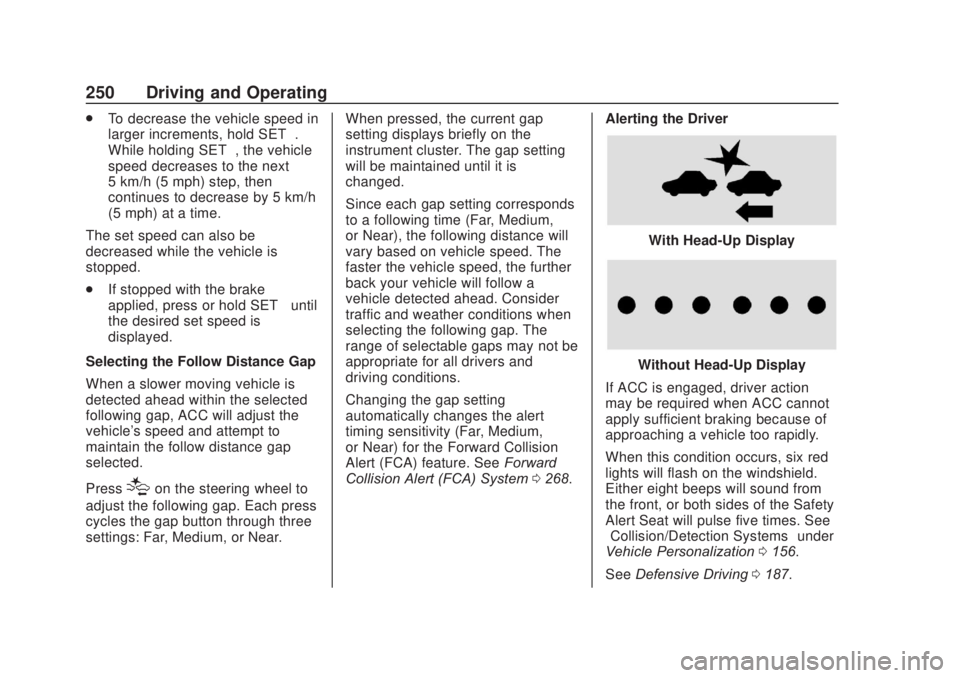
When this condition occurs, six red
lights will flash on the windshield.
Either eight beeps will sound from
the front, or both sides of the Safety
Alert Seat will pulse five times. See
“Collision/Detection Systems” under
Vehicle Personalization 0156.
See Defensive Driving 0187.
Page 269 of 500
Chevrolet Silverado Owner Manual (GMNA-Localizing-U.S./Canada/Mexico-
13337620) - 2020 - CRC - 4/11/19
268 Driving and Operating
beeps sound from the left or right or
three Safety Alert Seat pulses occur
on the left or right side, depending
on the direction of the detected
vehicle.
Use caution while backing up when
towing a trailer, as the RCTA
detection zones that extend out
from the back of the vehicle do not
move further back when a trailer is
towed.
RCTA is disabled when the trailer
connection status is displayed.
RCTA can be turned off. See
“Collision/Detection Systems”under
Vehicle Personalization 0156.
Turning the Features On or Off
PressXon the center stack to
turn on or off the Front and Rear
Park Assist. The indicator light next to the button comes on when the
features are on and turns off when
the features have been disabled.
Front and Rear Park Assist can be
turned Off, On, or On with Towbar.
See
“Park Assist” underVehicle
Personalization 0156. If Park Assist
is turned off through vehicle
personalization, the Park Assist
button will be disabled. To turn Park
Assist on again, select On in vehicle
personalization. The On with Towbar
setting allows Park Assist to work
properly with a trailer hitch. Some
larger trailer hitches may not be
compatible.
Turn off Park Assist when towing a
trailer.
To turn the RPA symbols on or off,
see “Rear Camera Park Assist
Symbols” underVehicle
Personalization 0156.
Assistance Systems for
Driving
If equipped, when driving the
vehicle in a forward gear, Forward
Collision Alert (FCA), Lane Departure Warning (LDW), Lane
Keep Assist (LKA), Side Blind Zone
Alert (SBZA), Lane Change Alert
(LCA), Automatic Emergency
Braking (AEB), and/or the Front
Pedestrian Braking (FPB) System
can help to avoid a crash or reduce
crash damage.
Forward Collision Alert
(FCA) System
If equipped, the FCA system may
help to avoid or reduce the harm
caused by front-end crashes. When
approaching a vehicle ahead too
quickly, FCA provides a red flashing
alert on the windshield and rapidly
beeps or pulses the driver seat.
FCA also lights an amber visual
alert if following another vehicle
much too closely.
FCA detects vehicles within a
distance of approximately 60 m
(197 ft) and operates at speeds
above 8 km/h (5 mph).
Page 276 of 500
Chevrolet Silverado Owner Manual (GMNA-Localizing-U.S./Canada/Mexico-
13337620) - 2020 - CRC - 4/11/19
Driving and Operating 275
and a vehicle is also detected on
the same side, the display will flash
as an extra warning not to change
lanes. Since this system is part of
the Lane Change Alert (LCA)
system, read the entire LCA section
before using this feature.
Lane Change Alert (LCA)
(1500 Series)
If equipped, the LCA system is a
lane-changing aid that assists
drivers with avoiding lane change
crashes that occur with moving
vehicles in the side blind zone (or
spot) areas or with vehicles rapidly
approaching these areas from
behind. The LCA warning display
will light up in the corresponding
outside side mirror and will flash if
the turn signal is on.
{Warning
LCA does not alert the driver to
vehicles outside of the system
detection zones, pedestrians,(Continued)
Warning (Continued)
bicyclists, or animals. It may not
provide alerts when changing
lanes under all driving conditions.
Failure to use proper care when
changing lanes may result in
injury, death, or vehicle damage.
Before making a lane change,
always check mirrors, glance over
your shoulder, and use the turn
signals.
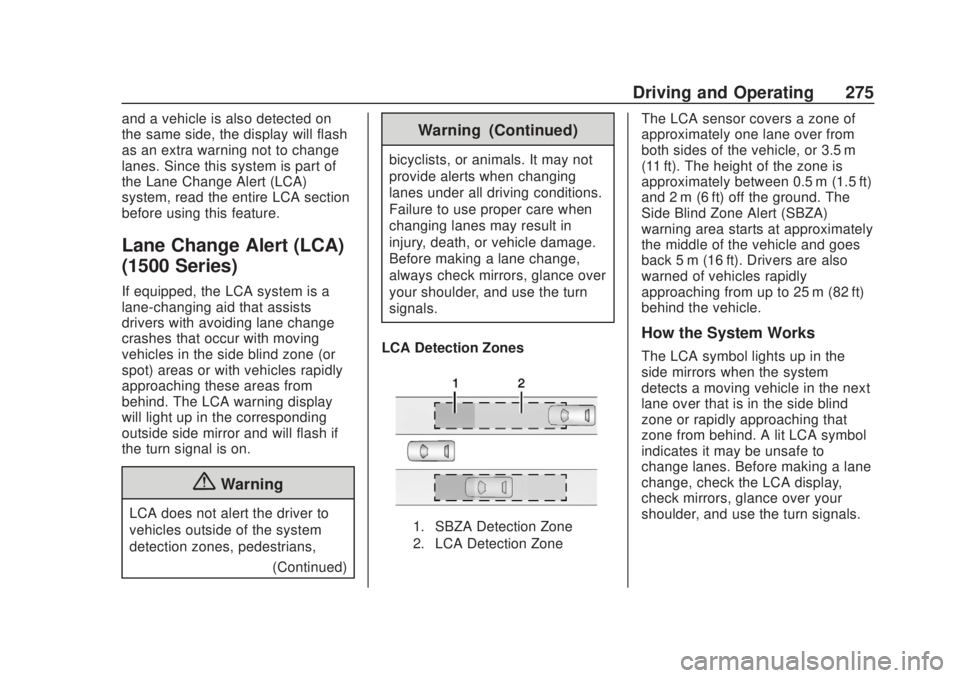
LCA Detection Zones
1. SBZA Detection Zone
2. LCA Detection Zone
The LCA sensor covers a zone of
approximately one lane over from
both sides of the vehicle, or 3.5 m
(11 ft). The height of the zone is
approximately between 0.5 m (1.5 ft)
and 2 m (6 ft) off the ground. The
Side Blind Zone Alert (SBZA)
warning area starts at approximately
the middle of the vehicle and goes
back 5 m (16 ft). Drivers are also
warned of vehicles rapidly
approaching from up to 25 m (82 ft)
behind the vehicle.
How the System Works
The LCA symbol lights up in the
side mirrors when the system
detects a moving vehicle in the next
lane over that is in the side blind
zone or rapidly approaching that
zone from behind. A lit LCA symbol
indicates it may be unsafe to
change lanes. Before making a lane
change, check the LCA display,
check mirrors, glance over your
shoulder, and use the turn signals.
Page 311 of 500
Chevrolet Silverado Owner Manual (GMNA-Localizing-U.S./Canada/Mexico-
13337620) - 2020 - CRC - 4/11/19
310 Driving and Operating
Trailer Tires
Special Trailer (ST) tires differ from
vehicle tires. Trailer tires are
designed with stiff sidewalls to help
prevent sway and to support heavy
loads. These features can make it
difficult to determine if the trailer tire
pressures are low only based on a
visual inspection.
Always check all trailer tire
pressures before each trip when the
tires are cool. Low trailer tire
pressure is a leading cause of trailer
tire blow-outs.
If the vehicle is equipped with a
trailer tire pressure monitoring
system, see the trailer tire pressure
monitoring system description and
the trailering app.
Trailer tires deteriorate over time.
The trailer tire sidewall will show the
week and year the tire was
manufactured. Many trailer tire
manufacturers recommend
replacing tires more than six
years old.Overloading is another leading
cause of trailer tire blow-outs. Never
load your trailer with more weight
than the tires are designed to
support. The load rating is located
on the trailer tire sidewall.
Always know the maximum speed
rating for the trailer tires before
driving. This may be significantly
lower than the vehicle tire speed
rating. The speed rating may be on
the trailer tire sidewall. If the speed
rating is not shown, the default
trailer tire speed rating is 105 km/h
(65 mph).
Trailering App
Trailer Light App
If equipped, the Trailer Lights App is
on the Home Page of the
infotainment display.
Touch Start to cycle the trailer lamps
on and off to determine if they are
working. The test follows this
sequence:
1. The running lights turn on first
and remain on throughout the
sequence.
2. The brake lights turn on for about two seconds.
3. The left turn signal light flashes three times.
4. The right turn signal light flashes three times.
5. The reverse lights turn on for about two seconds.
6. Steps 2–5 repeat for approximately one minute and
45 seconds, or until the test
deactivates.
Touch Stop to stop the test. The test
will automatically end after
one minute and 45 seconds.
The sequence also deactivates
when any of the following occur:
. The ignition is turned off.
. The transmission is shifted out
of P (Park).
. The brake pedal is pressed.
. The turn signal is activated.
Page 312 of 500
Chevrolet Silverado Owner Manual (GMNA-Localizing-U.S./Canada/Mexico-
13337620) - 2020 - CRC - 4/11/19
Driving and Operating 311
.The hazard warning lights are
activated.
Trailering App
If equipped, the Trailering App is on
the Home Page of the infotainment
display.
If equipped this feature allows
profiles for connected trailers to be
created to view status, to store and
track trailer usage information, and
to set up towing assistance
features.
The Trailering App Preview will
appear when the Trailering App is
opened for the first time from the
Home Page. Touch GET STARTED
in the Trailering App to go into
the app.
When a trailer is electrically
connected, there will be an option to
create a profile, use a guest profile,
or cancel. After Cancel is selected a
third time, Don’t Remind Me will
display and touching that will turn off
the trailer detection pop-up. To turn
the Trailer Detection Alert on, select
ON in the Settings tab. When a trailer is electrically
connected and after a Trailer Profile
has been created, the trailer
detection pop-up will appear with a
list of all of the custom Trailer
Profiles made on the vehicle. To
load an existing Trailer Profile,
select one of the Trailer Profiles
listed, or load the Guest Trailer
Profile by selecting GUEST
TRAILER. Touching Cancel,
Accessory/No trailer, or shifting the
vehicle from P (Park), will select
Accessory/No trailer as the active
Trailer Profile and will dismiss the
pop- up.
Create a Trailer Profile
1. Touch Create Profile on the pop-up or touch + Add Trailer
in the Trailering App.
2. Create a name for the trailer.
3. Select the hitch type. A checklist profile will be
created based on the type
selected.
4. Select the trailer type. A pop-up will indicate the setup is
complete. Touch DONE to complete
the process or touch TRAILER
FEATURE SETUP to set up the
Tow/Haul Mode reminder, Trailer
Tire Pressure Monitoring System,
if equipped, maintenance reminders,
or towing assistance, if equipped.
Import a Trailer Profile
A trailer profile saved to an OnStar
account can be imported to the
vehicle.
1. Touch Import Profile on the pop-up.
2. Select a trailer profile from the list.
3. Touch IMPORT.
A pop-up will indicate the import
was successful. Touch OK to return
to the trailer list and select the trailer
profile. The Tow/Haul Mode
reminder, Brake Gain Setting and
Trailer Tire Pressure sensor
learning, if equipped, do not import.
Page 313 of 500

Chevrolet Silverado Owner Manual (GMNA-Localizing-U.S./Canada/Mexico-
13337620) - 2020 - CRC - 4/11/19
312 Driving and Operating
Trailer Feature Setup
Tow/Haul Mode Reminder
To turn the Tow/Haul Mode
Reminder setting on, touch Yes. To
turn it off, touch No.
Trailer Tire Pressure Setup
If the Trailer Tire Pressure
Monitoring System (TTPMS) is
detected, touch the Tire Pressure
Monitoring icon to set up tire
pressure monitoring.Touch Yes to
set up the sensors or touch No to
return to the previous screen.
A trailer must be electrically
connected to the vehicle before
starting the sensor-to-vehicle learn
process.
After selecting Start from the Learn
Sensors screen, use the Tool
Method or the Manual Method
(described below) to learn each tire
sensor, during which the current tire
number will be highlighted.
Each sensor has a minimum of
two minutes to learn, shown by a
timer. After a sensor is learned, a
checkmark appears next to the tire,the vehicle horn will sound, the
vehicle’s brake lamps will flash, and
all working trailer lamps will flash.
It then moves to the next sensor.
To cancel the process touch Stop.
The recommended tire pressure
must be entered for the trailer tires.
This allows the vehicle to alert when
the tire pressure is high or low.
TTPMS must learn the location of
the installed tire sensors to show
correct air pressure and
temperature for each tire. To set up,
use one of the following options or
see a tire or trailer dealer for
service. The learning process must
be repeated when the trailer tires
are rotated or replaced. See
“Editing
a Trailer Profile” later in this section
for tire pressure sensor relearn
information.
Tool Method: A TTPMS activation
tool can be purchased separately to
learn the sensor locations.
Manual Method: Without the tool,
the air pressure can be increased or
decreased in each tire for
10 seconds. Do not exceed the maximum inflation pressure found
on the tire sidewalls. Make sure to
re-adjust tire pressure to the
recommended level when the
process is complete.
Sensor Learning Steps
To complete the sensor-to-vehicle
learn process:
1. Touch Start on the Learn Sensors screen. The horn
chirps twice and the Learning
Active screen appears on the
infotainment display.
2. Start with the driver side front trailer tire.
3. Activate the tool near the valve stem or adjust the air pressure
of this tire until the horn chirps
and all working vehicle and
trailer lights flash.
The process stops without
saving the sensor locations if
this step takes more than
two minutes.