2020 CHEVROLET CORVETTE four wheel drive
[x] Cancel search: four wheel drivePage 96 of 336
Chevrolet Corvette Owner Manual (GMNA-Localizing-U.S./Canada/Mexico-
12470550) - 2020 - CRC - 4/23/20
Instruments and Controls 95
Cluster Menu
There is an interactive display area
in the center of the instrument
cluster.
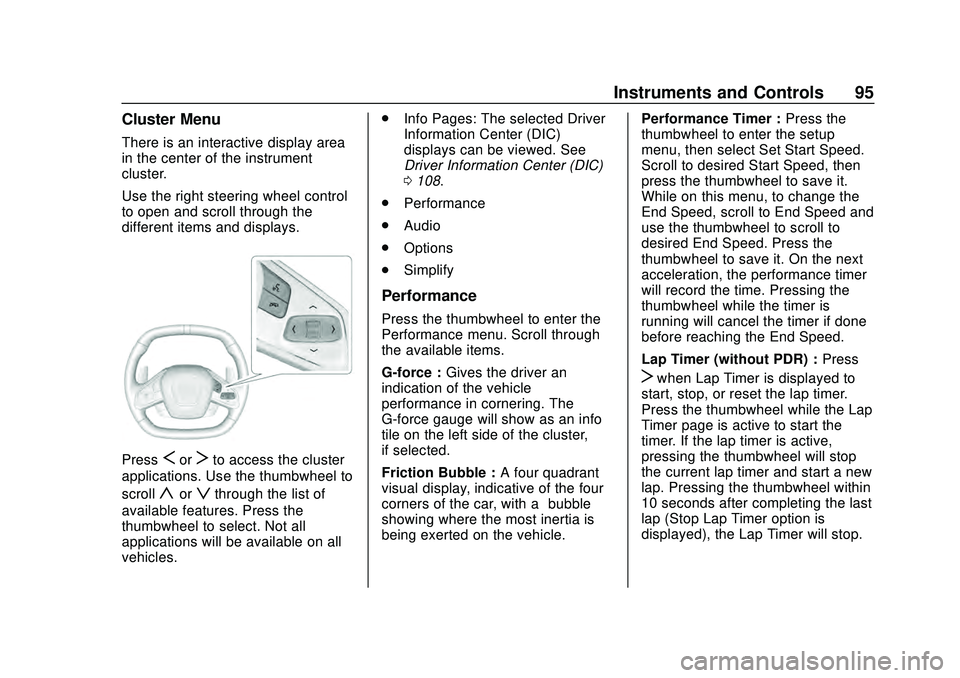
Use the right steering wheel control
to open and scroll through the
different items and displays.
PressSorTto access the cluster
applications. Use the thumbwheel to
scroll
yorzthrough the list of
available features. Press the
thumbwheel to select. Not all
applications will be available on all
vehicles. .
Info Pages: The selected Driver
Information Center (DIC)
displays can be viewed. See
Driver Information Center (DIC)
0108.
. Performance
. Audio
. Options
. Simplify
Performance
Press the thumbwheel to enter the
Performance menu. Scroll through
the available items.
G-force : Gives the driver an
indication of the vehicle
performance in cornering. The
G-force gauge will show as an info
tile on the left side of the cluster,
if selected.
Friction Bubble : A four quadrant
visual display, indicative of the four
corners of the car, with a “bubble”
showing where the most inertia is
being exerted on the vehicle. Performance Timer :
Press the
thumbwheel to enter the setup
menu, then select Set Start Speed.
Scroll to desired Start Speed, then
press the thumbwheel to save it.
While on this menu, to change the
End Speed, scroll to End Speed and
use the thumbwheel to scroll to
desired End Speed. Press the
thumbwheel to save it. On the next
acceleration, the performance timer
will record the time. Pressing the
thumbwheel while the timer is
running will cancel the timer if done
before reaching the End Speed.
Lap Timer (without PDR) : Press
Twhen Lap Timer is displayed to
start, stop, or reset the lap timer.
Press the thumbwheel while the Lap
Timer page is active to start the
timer. If the lap timer is active,
pressing the thumbwheel will stop
the current lap timer and start a new
lap. Pressing the thumbwheel within
10 seconds after completing the last
lap (Stop Lap Timer option is
displayed), the Lap Timer will stop.
Page 99 of 336

Chevrolet Corvette Owner Manual (GMNA-Localizing-U.S./Canada/Mexico-
12470550) - 2020 - CRC - 4/23/20
98 Instruments and Controls
Scroll to the desired features with
the thumbwheel, and press to toggle
them on or off.
Using the thumbwheel, except to
acknowledge an alert, will exit
Simplify mode.
The selected features will stay
hidden even after starting and
restarting the vehicle, unless
Simplify mode is manually canceled.
Speedometer
The speedometer shows the
vehicle's speed in either kilometers
per hour (km/h) or miles per
hour (mph).
Odometer
The odometer shows how far the
vehicle has been driven, in either
kilometers or miles.
Trip Odometer
The trip odometer shows how far
the vehicle has been driven since
the trip odometer was last reset.The trip odometer is accessed and
reset through the Driver Information
Center (DIC). See
Driver
Information Center (DIC) 0108.
Tachometer
The tachometer displays the engine
speed in revolutions per
minute (rpm).
Shift lights will not appear until the
engine is warm.
Caution
If the engine is operated with the
rpm’s in the warning area at the
high end of the tachometer, the
vehicle could be damaged, and
the damage would not be covered
by the vehicle warranty. Do not
operate the engine with the rpm’s
in the warning area.
Fuel Gauge
When the ignition is on, the fuel
gauge indicates about how much
fuel is left in the tank.
When the indicator nears empty, the
low fuel light comes on. There is still
a little fuel left, but the fuel tank
should be filled soon.
Here are four things that some
owners ask about. None of these
show a problem with the fuel gauge:
.
At the service station, the fuel
pump shuts off before the gauge
reads full.
. It takes a little more or less fuel
to fill up than the gauge
indicated. For example, the
gauge indicated the tank was
half full, but it actually took a
little more or less than half the
tank's capacity to fill the tank.
Page 121 of 336

Chevrolet Corvette Owner Manual (GMNA-Localizing-U.S./Canada/Mexico-
12470550) - 2020 - CRC - 4/23/20
120 Instruments and Controls
Remote Left in Vehicle Alert
This feature sounds an alert when
the remote key is left in the vehicle.
Touch Off or On.
Remote Removed from Vehicle
Alert
This feature beeps the horn 3 times
when exiting a running vehicle with
the remote key.
Touch Off or On.
Ride Height
Touch and the following may
display:
Location Based Auto Lift
This setting enables the Front Lift to
automatically raise or lower when
the vehicle is near GPS stored
locations. SeeFront Lift System
0 191.
Touch Off or On.
Seating Position
Touch and the following may
display:
. Seat Entry Memory
. Seat Exit Memory
Seat Entry Memory
This feature automatically recalls
the previously stored 1 or 2 button
positions when the ignition is
changed from off to on. See
Memory Seats 050.
Touch Off or On.
Seat Exit Memory
This feature automatically recalls
the previously stored exit button
positions when the ignition is
changed from on to off if the driver
door is open or opened. See
Memory Seats 050.
Touch Off or On.
Teen Driver
See “Teen Driver” under“Settings”
in the infotainment manual.
Valet Mode
This will lock the infotainment
system and steering wheel controls.
It may also limit access to vehicle
storage locations, if equipped.
To enable valet mode:
1. Enter a four-digit code on the keypad.
2. Touch Enter to go to the confirmation screen.
3. Re-enter the four-digit code.
Touch Lock or Unlock to lock or
unlock the system. Touch Back to
go back to the previous menu.
To configure the Performance Data
Recorder (PDR) to automatically
record in Valet mode, see “Settings”
in Performance Data Recorder
(PDR) 0132.
Page 157 of 336

Chevrolet Corvette Owner Manual (GMNA-Localizing-U.S./Canada/Mexico-
12470550) - 2020 - CRC - 4/23/20
156 Driving and Operating
5. Thread the lower lock nut (2)back on to the center support
tube and torque it against the
spring seat (1) to 25 Y
(18.4 lb ft).
Load Limit
Limit vehicle load to the driver only,
with no other cargo. Inflate the front
tires to 159 kPa (23 psi) and the rear
tires to 165 kPa (24 psi). Drive at a
maximum speed of 296 km/h
(184 mph).
Road Course target hot pressures of
220–240 kPa (32–35 psi). Value will
vary based on driving style, track,
temperature, and weather
conditions.
Wheel Alignment
Caution
Using these wheel alignment
settings may cause excessive tire
wear. Only use these wheel
alignment settings for racing or (Continued)
Caution (Continued)
competitive driving. Excessive tire
wear is not covered under the
vehicle warranty.
The racing and competitive driving
wheel alignment settings should be
set as described here.
To achieve the track alignment
specified settings: 1. The upper control arm to body washers on all four corners will
need to be moved from
between the body and the
control arm and relocated
between the head of the bolt
and the control arm.
2. Adjust the lower control arm cam bolt position to achieve
the following specifications.
Front (per corner)
. Caster: +8.0 degrees
. Camber: -3.0 degrees
. Toe (total): 0.1 degrees toe in Rear (per corner)
.
Caster: 0 degrees
. Camber: -2.5 degrees
. Toe (total): 0.1 degrees toe in
. Thrust Angle: 0 degrees
After track use, reinstall washers
between the body and the control
arms. Reset to factory alignment
settings.
General Information
If reduced performance is
experienced during track events or
competitive driving, turning off the
A/C will help to improve engine
performance.
Maintain a mixture of 40%
DEX-COOL coolant and 60% clean,
drinkable water to optimize engine
performance.
Driving on Wet Roads
Rain and wet roads can reduce
vehicle traction and affect your
ability to stop and accelerate.
Always drive slower in these types
Page 225 of 336

Chevrolet Corvette Owner Manual (GMNA-Localizing-U.S./Canada/Mexico-
12470550) - 2020 - CRC - 4/23/20
224 Vehicle Care
Engine Air Filter Life
System
When to Change Engine Air
Filter
If equipped, this feature provides an
indication of when to change the
engine air filter. It is based on
driving conditions, which can cause
when to change to vary greatly. It is
possible an air filter change may not
be indicated for up to four years.
When the "Replace at Next Oil
Change" message displays, the
engine air filter should be replaced
at the time of the next engine oil
change. When the "Replace Engine
Air Filter Now" message displays,
the engine air filter should be
replaced as soon as possible. Reset
the engine air filter life system after
the engine air filter is replaced. See
your dealer for service and to reset
the system.
How to Reset Engine Air Filter
Life System
Reset the system whenever the
engine air filter is replaced so that
the system can calculate the next
engine air filter change.
To reset:1. Place the vehicle in P (Park).
2. Select Air Filter Life under the Maintenance DIC menu. See
Driver Information Center (DIC)
0108.
3. Press the thumbwheel under the Air Filter Life page to move
to the Reset/Disable area.
Select Reset Air Filter Life with
the thumbwheel scroll and then
press the thumbwheel. Then
press Yes to confirm the reset.
4. When the Engine Air Filter Life System is successfully reset,
100% Air Filter Life will be
displayed.
Engine Air Cleaner/Filter
See Engine Compartment Overview
0 215 for the location of the engine
air cleaner/filter.
Caution
If water is sprayed and enters the
engine air cleaner/filter intake and
housing, the engine could be
damaged. The repairs would not
be covered by the vehicle
warranty.
When to Inspect the Engine Air
Cleaner/Filter
For intervals on changing and
inspecting the engine air cleaner/
filter, see Maintenance Schedule
0 286.
How to Inspect/Replace the
Engine Air Cleaner/Filter
Do not start the engine or have the
engine running with the engine air
cleaner/filter housing open. Before
removing the engine air cleaner/
filter, make sure that the engine air
Page 248 of 336

Chevrolet Corvette Owner Manual (GMNA-Localizing-U.S./Canada/Mexico-
12470550) - 2020 - CRC - 4/23/20
Vehicle Care 247
Winter Tires
This vehicle was not originally
equipped with winter tires. Winter
tires are designed for increased
traction on snow and ice-covered
roads. Consider installing winter
tires on the vehicle if frequent
driving on ice or snow covered
roads is expected. See your dealer
for details regarding winter tire
availability and proper tire selection.
Also, seeBuying New Tires 0261.
With winter tires, there may be
decreased dry road traction,
increased road noise, and shorter
tread life. After changing to winter
tires, be alert for changes in vehicle
handling and braking.
If using winter tires:
. Use tires of the same brand and
tread type on all four wheel
positions.
. Use only radial ply tires of the
same size, load range, and
speed rating as the original
equipment tires. Winter tires with the same speed
rating as the original equipment tires
may not be available for H, V, W, Y,
and ZR speed rated tires. If winter
tires with a lower speed rating are
chosen, never exceed the tire's
maximum speed capability.
Run-Flat Tires
This vehicle, when new, had run-flat
tires. There is no spare tire, no tire
changing equipment, and no place
to store a tire in the vehicle.
The vehicle also has a Tire
Pressure Monitor System (TPMS)
that indicates a loss of tire pressure
in any of the tires.
{Warning
If the low tire warning light
displays on the instrument cluster,
the handling capabilities will be
reduced during severe
maneuvers. Driving too fast could
cause loss of control and you or
others could be injured. Do not
(Continued)
Warning (Continued)
drive over 80 km/h (50 mph) when
the low tire warning light is
displayed. Drive cautiously and
check the tire pressures as soon
as possible.
Run-flat tires can be driven on with
no air pressure. There is no need to
stop on the side of the road to
change the tire. Continue driving;
however, do not drive too far or too
fast. Driving on the tire may not be
possible if there is permanent
damage. To prevent permanent
damage, the tire can be driven with
no air pressure for up to 80 km
(50 mi) at speeds slower than
80 km/h (50 mph) when carrying a
load of driver plus one passenger.
When carrying a heavier load, total
distance driven without air should
be reduced. As soon as possible,
contact the nearest authorized GM
or run-flat servicing facility for
inspection and repair or
replacement.