2020 AUDI TT COUPE ECU
[x] Cancel search: ECUPage 69 of 280

8S1012721BB
Stowing and using
Se as
Fig. 73 Luggage compartment: location of the tie-downs
There are tie-downs in the luggage compartment
to secure pieces of luggage and objects.
Follow the safety precautions > page 64.
» Use the tie-downs to secure the cargo.
Fig. 75 Luggage compartment: foam piece
Follow the safety precautions > page 64.
> Remove the cargo floor > page 241.
> Remove the plastic floor panel > fig. 74.
> Turn the handle counter-clockwise to remove
and remove the foam piece.
>» Remove the spare tire.
> Reinsert the foam piece and turn the handle
clockwise to tighten.
> Now reinsert the cargo floor.
Z\ WARNING
Please note that you are no longer mobile in
the event of a flat tire. Please note the legal
regulations before removing the spare tire.
Roof rack
Applies to: vehicles with roof rack mount
BFV-0078
Fig. 76 Mounting locations for roof rack
If luggage or cargo is to be carried on the roof,
you must observe the following:
— The roof rack must only be secured in the posi-
tioning bolt area.
— These roof racks are the basis for a complete
roof rack system. Only roof racks that are suita-
ble for your vehicle may be used. Roof racks and
attachments from the Audi Genuine Accesso-
ries program are recommended.
— When installing the roof rack, make sure that it
is mounted only at the designated points on
the roof > fig. 76.
— Note the permitted axle load, permitted total
weight, and permitted roof load of your vehicle
=> page 263. The roof load is the total of the
weight of the roof rack, the attachments and
the cargo you are carrying. However, you must
also note the permitted load of the carrier sys-
tem being used.
Z\ WARNING
The risk of an accident increases when using a
roof rack system, because it changes the
67
>
Page 70 of 280

Stowing and using
driving characteristics by shifting the center
of gravity and/or the increasing the surface
area exposed to wind. You may need to adapt
your driving style and speed to the current
conditions.
Make sure the luggage compartment lid does
not hit the cargo on the roof rack when you
open it.
Energy usage will increase because of the in-
creased wind resistance. Remove the roof rack
when you are no longer using it.
Installing the roof rack
Applies to: vehicles with roof rack mount
When installing the support feet, make sure they
are only placed in the positioning bolt area be-
tween the side wall frame and the roof frame
trim > page 67, fig. 76. The positioning bolt is
visible as soon as you push the sealing lip back
from the room frame trim using the designated
tool.
Follow the installation instructions provided
with the roof rack system. If you do not secure
the roof rack system and objects on the roof
correctly, they could come loose from the ve-
hicle and cause an accident.
68
Page 75 of 280

851012721BB
Warm and cold
Flammable refrigerant
Se
Make sure all components are dis-
posed of correctly and never install
q components in the vehicle that have
been removed from old vehicles or
taken from recycling.
Lubricant in the A/C system
The exact specification and amount of lubricant
in the A/C system can be obtained from an au-
thorized Audi dealer or authorized Audi Service
Facility or at https://erwin.audiusa.com/erwin.
To ensure secure and safe operation, the A/C
system must only be serviced by qualified
technicians.
— Never repair the A/C system evaporator with
components from old vehicles or from recy-
cling.
— New replacement evaporators for portable
A/C systems must be certified and labeled
as such, so that they comply with the SAE
standard J2842 HFO-1234yf and R744.
73
Page 80 of 280

Driving
> Place the selector lever in the “P” position.
> Turn the engine off > A\.
> Turn the steering wheel when parking on in-
clines so that the wheels will roll into the curb
if the vehicle starts moving.
ZA WARNING
— If the parking brake is set, it can release au-
tomatically when the accelerator pedal is
pressed. To reduce the risk of an accident,
do not inadvertently press the accelerator
pedal and always shift into “P” when the ve-
hicle is stopped.
— Emergency braking should only be used in
an emergency, when the when the standard
brake pedal is malfunctioning or obstructed.
During emergency braking, your vehicle will
brake similar to heavy braking. ESC and the
associated components (ABS, ASR, EDL) can-
not overcome the laws of physics. In corners
and when road or weather conditions are
bad, a full brake application can cause the
vehicle to skid or the rear end to swerve,
which increases the risk of an accident.
— If the power supply fails, you cannot set the
parking brake once it is released. In this
case, park the vehicle on level ground and
secure it by placing the selector lever in the
P position. See an authorized Audi dealer or
authorized Audi Service Facility for assis-
tance.
— If you leave the vehicle, switch the ignition
off and take the vehicle key with you. This
applies particularly when children remain in
the vehicle. Otherwise children could start
the
engine, release the parking brake or op-
erate electrical equipment such as power
windows, which increases the risk of an acci-
dent.
— No one should remain in the vehicle when it
is locked - especially children. Locked doors
make it more difficult for emergency work-
ers to get into the vehicle, which puts lives
at risk.
78
@) Note
Do not leave your vehicle unattended while
the engine is running, because this increases
the risk of an accident.
@) Tips
— Noises when the parking brake is set and re-
leased are normal and are not a cause for
concern.
— The parking brake goes through a self-test
cycle at regular intervals when the vehicle is
stopped. Any noises associated with this are
normal.
Starting to drive
Various convenience and safety functions may be
available when the vehicle begins driving, de-
pending on vehicle equipment.
Starting on hills with the parking brake set
Requirement: the driver's door must be closed.
> To start driving comfortably when on a hill, set
the parking brake and begin driving as usual.
The braking force of the parking brake does not
release automatically until the wheels build up
enough driving force.
Starting on hills with hill hold assist
If you take your foot off of the brake pedal when
driving on hills, the braking force will be held for
several seconds. At that time, you can start driv-
ing without the vehicle rolling backward.
Requirement: the driver's door must be closed,
the engine must be on, and the vehicle must be
traveling uphill.
> To activate hill hold assist, press and hold the
brake pedal for several seconds while the vehi-
cle is stationary.
ZX WARNING
—To reduce the risk of an accident, always
make sure the vehicle is situated safely
while stationary.
— If the parking brake is set, it can release au-
tomatically when the accelerator pedal is >
Page 81 of 280

8S1012721BB
Driving
pressed. To reduce the risk of an accident,
do not inadvertently press the accelerator
pedal and always shift into “P” when the ve-
hicle is stopped.
— If the power supply fails, you cannot set the
parking brake once it is released, or release
it if it is set. In this case, park the vehicle on
level ground and secure it by engaging the
"P” gear. Contact an authorized Audi dealer
or authorized Audi Service Facility for assis-
tance.
ZA WARNING
— If you do not begin driving immediately af-
ter releasing the brake pedal, your vehicle
may begin to roll backward. Press the brake
pedal
or set the parking brake immediately.
— The hill hold assist cannot hold the vehicle
on inclines in every scenario (for example,
on slippery or icy ground).
Sporty driving
Applies to: RS model
When driving in a sporty style, for example ona
driving track, the wear on all vehicle components
is greatly increased, especially on the engine,
transmission, tires, brakes, and suspension. This
can result in increased wear. Also note the fol-
lowing points:
— Make sure the vehicle is in good condition.
Make sure to check the brake pads, tire tread,
and tire pressure (when tires are warm).
— Beforehand, warm up the engine by driving no
higher than two-thirds of the maximum permit-
ted engine RPM. The engine oil temperature
must be brought to a minimum of 140 °F
(60 °C).
— Before stopping the vehicle, allow the engine
and brakes to cool back down to a regular oper-
ating temperature by driving normally.
If necessary, use the following functions:
— Dynamic Audi drive select mode* > page 96
— Launch Control > page 84
— Limit ESC > page 106
@) Tips
Wear caused by load does not constitute a ve-
hicle fault as defined by the terms of the war-
ranty.
Automatic transmission
Introduction
Your vehicle is equipped with an electronically-
controlled DSG transmission called S tronic. Two
independent clutches transfer the power be-
tween the engine and transmission. It allows the
vehicle to accelerate without a noticeable inter-
ruption in traction.
The transmission shifts up or down automatically
depending on which drive program is selected.
When a moderate driving style is used, the
transmission selects the most economical driving
mode. The transmission upshifts at a lower RPM
and downshifts at a higher RPM to improve fuel
efficiency.
The transmission switches to a sporty mode after
a kick-down or when the driver uses a sporty driv-
ing style characterized by quick accelerator pedal
movements, heavy acceleration, frequent
changes in speed, and traveling at the maximum
speed.
If desired, the driver can also select the gears
manually (tiptronic mode) > page 83.
a BS a $
z 5
Pog
a
Le oe
Fig. 85 Instrument cluster: selector lever positions
The Infotainment system display shows the cur-
rent selector lever position and the engaged
gear.
79
Page 87 of 280

8S1012721BB
Driving
surfaces, which increases the risk of an acci-
dent.
@) Note
When accelerating using Launch Control, all
vehicle components are subject to heavy
loads. This can result in increased wear.
@ Tips
After accelerating using the Launch Control,
the temperature of some vehicle components
may increase greatly. If that happens, the
function will not be available for a few mi-
nutes to reduce the risk of damage. After a
cool-down period, Launch Control will be
available again.
Miceli dela)
i Transmission: malfunction! Safely stop vehi-
cle
Do not continue driving. Stop the vehicle as soon
as possible in a safe location and secure it so it
does not roll. See an authorized Audi dealer or
authorized Audi Service Facility for assistance.
i Transmission: too hot. Please stop vehicle
The transmission is too hot and can become dam-
aged. Stop and let the transmission cool with the
engine running (at idle) in the "P" selector lever
position. Then the indicator light and the mes-
sage turn off, drive to an authorized Audi dealer
or authorized Audi Service Facility immediately to
have the malfunction corrected. If the indicator
light and the driver message do not turn off, do
not continue driving. See an authorized Audi
dealer or authorized Audi Service Facility for as-
sistance.
[8] Transmission: malfunction! You can contin-
ue driving. See owner's manual
Drive immediately to an authorized Audi dealer
or authorized Audi Service Facility to have the
malfunction repaired.
i] Transmission: malfunction! You can contin-
ue driving with limited function. No reverse
gear
There is a system malfunction in the transmis-
sion. The transmission is switching to emergency
mode. This mode only shifts into certain gears or
may no longer shift at all. The engine may stall.
You cannot engage the reverse gear. Drive to an
authorized Audi dealer or authorized Audi Service
Facility immediately to have the malfunction cor-
rected.
[&] Transmission: malfunction! You can contin-
ue driving in D until engine is off
There is a system malfunction in the transmis-
sion. The transmission is switching to emergency
mode. If you turn the engine off, you will not be
able to select any other selector lever positions
after starting the engine again. Drive to an au-
thorized Audi dealer or authorized Audi Service
Facility immediately to have the malfunction cor-
rected.
fal Transmission: too hot. Please adapt driving
style
The transmission temperature has increased sig-
nificantly. Drive very cautiously or take a break
from driving until the temperature returns to the
normal range and the indicator light turns off.
Transmission: please press brake pedal and
select gear again
Press the brake pedal and select the desired se-
lector lever position again. You can then continue
driving.
8s
Page 88 of 280
![AUDI TT COUPE 2020 Owners Manual Driving
Selector lever emergency release
|
BFV-0266]
Fig. 91 Selector lever: using the emergency release to
move out of the Park position
The emergency release mechanism is located in](/manual-img/6/57658/w960_57658-87.png "AUDI TT COUPE 2020 Owners Manual Driving
Selector lever emergency release
|
BFV-0266]
Fig. 91 Selector lever: using the emergency release to
move out of the Park position
The emergency release mechanism is located in")
Driving
Selector lever emergency release
|
BFV-0266]
Fig. 91 Selector lever: using the emergency release to
move out of the Park position
The emergency release mechanism is located in
the right area under the selector lever shift gate.
Using the emergency release can be complicated.
See an authorized Audi dealer or authorized Audi
Service Facility for assistance.
You will need the screwdriver from the vehicle
tool kit to release it > page 241. Use the flat side
of the reversible screwdriver blade.
Removing the cover
> Set the parking brake to secure your vehicle
from rolling away. If this is not possible, secure
your vehicle from rolling using another meth-
od.
> Switch the ignition off.
> To loosen the shifter boot, carefully insert the
flat side of the screwdriver sideways into the
slit near the shifter boot > fig. 90.
> Carefully pry the shifter boot out with the
screwdriver while gripping the boot at the fold
and pulling it upward and out of the opening
> fig. 91.
> Fold the shifter boot up around the shifter
knob.
86
Selector lever emergency release
> Press and hold the yellow release button with
the screwdriver.
> At the same time, press the release button on
the selector lever (2) and move the selector lev-
er to the “N” position.
Reattaching the cover
> Clip the shift cover back into the shift gate.
ZA\ WARNING
— The parking lock may only be released using
the emergency release if the parking brake
is set. If it is not working, secure the vehicle
from rolling using the brake pedal or other
suitable means, such as blocking a front and
a rear wheel. An unsecured vehicle may roll
away, which increases the risk of an acci-
dent.
— Only activate the emergency release while
ona level surface or a slight slope.
—To reduce the risk of an accident, you must
not drive when the emergency release is ac-
tivated.
Page 115 of 280
8S1012721BB
Multi Media Interface
Selection menu: through the selection menu,
you can open additional functions within a menu
item (such as Radio).
Requirement: the Selection menu symbol must
appear in the Infotainment system display.
> Opening and closing a selection menu: Press
the left control button. Then you can select and
confirm a function using the control knob.
Options menu: using the options menu, you can
select and confirm context-dependent functions
as well as settings within a menu item (such as
Radio).
Requirement: the Options menu symbol [+] must
be displayed in the Infotainment system display.
> Opening and closing the options menu: Press
the right control button. Then you can select
and confirm a function using the control knob.
Information about menu paths
This guide shows you at a glance the paths for
opening a desired menu and its settings and
functions.
Example of a path
RADIO > Select: button > left control button >
FM.
Following the path
> Press the [RADIO] button.
> Press the left control button.
> Turn the control knob to the FM menu item to
select it.
> Press the control knob to confirm the selected
FM menu item.
> The selected and confirmed function is execut-
ed. In this example, the FM frequency band is
set.
MMI touch
MMI touch control pad
Applies to: vehicles with MMI touch
RAH-8760]
bem altri gM =] {op Mele
cara ]
ba 18
cdl
E® E Locust St
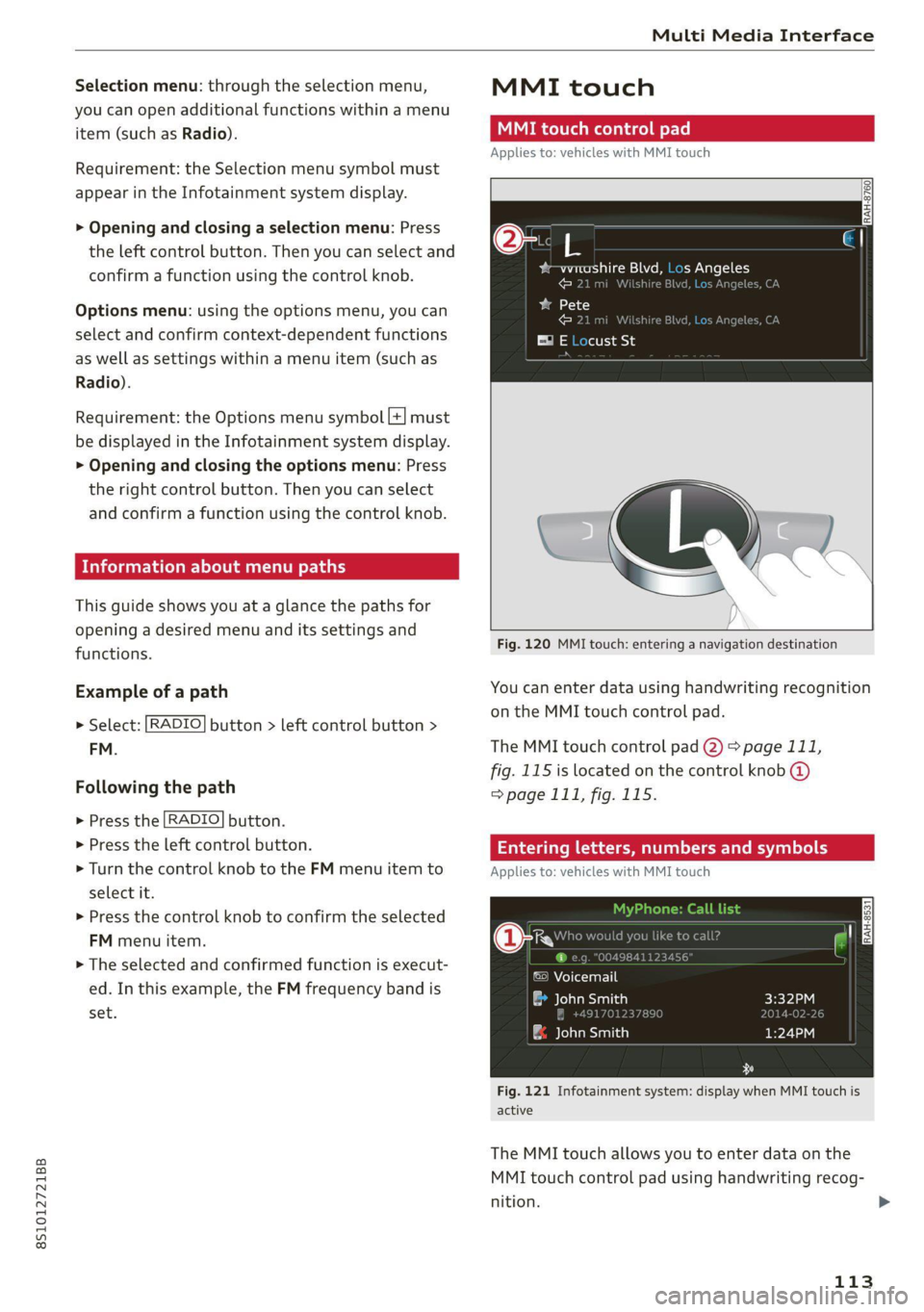
Fig. 120 MMI touch: entering a navigation destination
You can enter data using handwriting recognition
on the MMI touch control pad.
The MMI touch control pad 2) > page 111,
fig. 115 is located on the control knob @
=> page 111, fig. 115.
Entering lette umbers
Applies to: vehicles with MMI touch
ane) cy
©) Voicemail
eau)
| ae lavaeiatiea)
Fig. 121 Infotainment system: display when MMI touch is
active
The MMI touch allows you to enter data on the
MMI touch control pad using handwriting recog-
nition.
113
>