2020 AUDI E-TRON warning lights
[x] Cancel search: warning lightsPage 145 of 316
4KE012721BE
Driver assistance
of the vehicle when necessary, for example by ap-
plying the brakes.
— Ifa vehicle that was already detected @ turns
or changes lanes, the system will react to the
vehicle ahead of it (2).
— When driving into a curve > fig. 104 and out of
a curve, the system may react to a vehicle in the
adjacent lane and apply the brakes. You can
override the system by pressing the accelerator
pedal briefly.
— The system works with the various sensors and
cameras in the vehicle. Vehicles can only be de-
tected once they are within the area and range
covered by the sensors > page 128, fig. 94.
— When driving around tight curves, a vehicle
driving ahead that was previously detected may
no longer be detected, and the adaptive cruise
assist may accelerate unexpectedly.
— The system does not react to a stationary vehi-
cle in the same lane if it expects that you can
easily drive around the stationary vehicle by
turning the steering wheel.
— The system cannot react to stationary objects,
such as vehicles at the end of a traffic jam, es-
pecially when traveling at high speeds.
— The system has a limited ability to detect
vehicles that are a short distance ahead, off to
the side of your vehicle, or moving into your
lane.
— Objects that are difficult to detect, such as mo-
torcycles, vehicles with high ground clearance,
or vehicles with an overhanging load, may be
detected late or not detected at all.
— The system does not respond to people, ani-
mals, or objects that are crossing or approach-
ing from the opposite direction.
ZA WARNING
Observe the safety precautions and note the
limits of the assist systems, sensors, and
cameras > page 127.
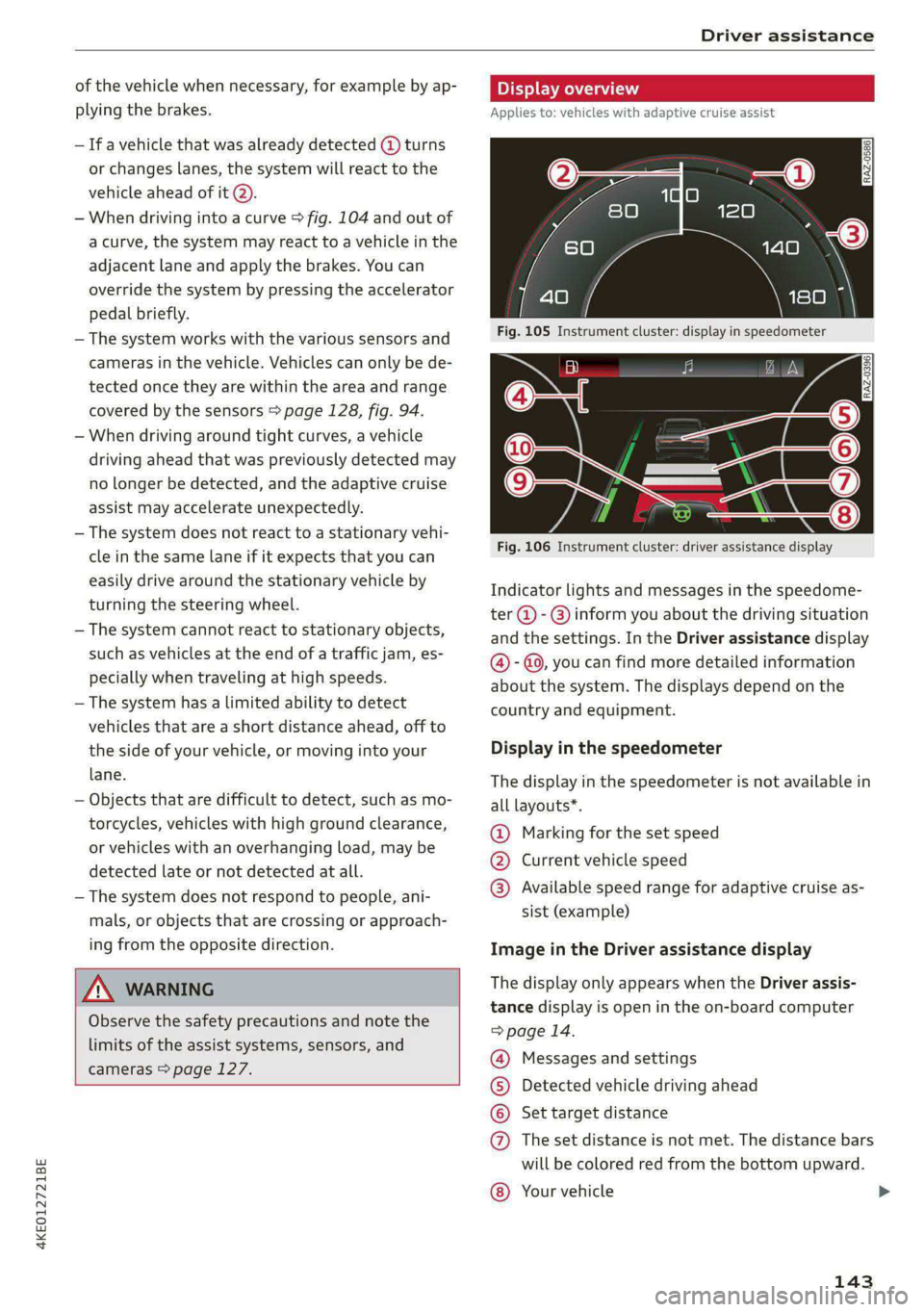
Display overview
Applies to: vehicles with adaptive cruise assist
3 g S
eS ee
RAZ-0396
Fig. 106 Instrument cluster: driver assistance display
Indicator lights and messages in the speedome-
ter @ -@) inform you about the driving situation
and the settings. In the Driver assistance display
@ - @, you can find more detailed information
about the system. The displays depend on the
country and equipment.
Display in the speedometer
The display in the speedometer is not available in
all layouts*.
@ Marking for the set speed
@® Current vehicle speed
@® Available speed range for adaptive cruise as-
sist (example)
Image in the Driver assistance display
The display only appears when the Driver assis-
tance display is open in the on-board computer
=> page 14.
Messages and settings
Detected vehicle driving ahead
Set target distance
The set distance is not met. The distance bars
will be colored red from the bottom upward.
COO®
Your vehicle ©
143
>
Page 146 of 316

Driver assistance
© Availability of lane departure warning and
lane guidance for adaptive cruise assist
@ Availability of lane guidance for adaptive
cruise assist
Indicator lights
fA - The speed/distance control is active. No
vehicles were detected ahead. The stored speed
is maintained.
A - The speed/distance control is active. A vehi-
cle was detected ahead. The system controls the
speed and distance from the vehicle driving
ahead, and accelerates and brakes automatically.
(Al - The speed/distance control is active but the
vehicle is not ready to drive. A vehicle was de-
tected ahead. Your vehicle is stationary and will
not start driving automatically.
B - The speed/distance control is active but the
vehicle is not ready to drive. No vehicles were de-
tected ahead. Your vehicle is stationary and will
not start driving automatically.
A - The automatic braking is not enough to
maintain a sufficient distance to a vehicle driving
ahead. You must intervene > page 150, Driver in-
tervention request.
& - The indicator light turns on if the steering
intervention request is providing a warning. Al-
ways keep your hands on the steering wheel so
you can be ready to steer at any time > page 146.
ZX WARNING
Observe the safety precautions and note the
limits of the assist systems, sensors, and
cameras > page 127.
144
Using adaptive cruise assist
Applies to: vehicles with adaptive cruise assist
[RAZ-0096|
B4M-0232
Fig. 108 Operating lever: changing the speed
Switching on
> To switch on the adaptive cruise assist, pull the
lever up to position @ until it engages.
Storing the speed and activating regulation
If you have switched the system on, you can set
the current speed as the “regulated speed” and
activate regulation:
> Press the [SET] button (2). The set speed is indi-
cated with a marking in the speedometer (@)
=> page 143, fig. 105 and shown in the instru-
ment cluster > /\.
> To save the speed while the vehicle is station-
ary, also hold the brake pedal down.
You can set any speed between 20 mph
(30 km/h) and the maximum possible speed
range @) > page 143, fig. 105.
Pausing cruise control
The control can be stopped at any time:
>» While driving or when the vehicle is stationary:
Press the lever away from you in the direction
of the arrow. Or
Page 149 of 316
![AUDI E-TRON 2020 Owners Manual 4KE012721BE
Driver assistance
e control
icles with adaptive cruise assist and efficiency
at}
Applies to:
assist
I |
8]
ny ‘| G3
Fig. 110 Instrument cluster: speedometer: pr](/manual-img/6/57623/w960_57623-148.png "AUDI E-TRON 2020 Owners Manual 4KE012721BE
Driver assistance
e control
icles with adaptive cruise assist and efficiency
at}
Applies to:
assist
I |
8]
ny ‘| G3
Fig. 110 Instrument cluster: speedometer: pr")
4KE012721BE
Driver assistance
e control
icles with adaptive cruise assist and efficiency
at}
Applies to:
assist
I |
8]
ny ‘| G3
Fig. 110 Instrument cluster: speedometer: predictive con-
trol display
With predictive control, efficiency assist adapts
the set speed in adaptive cruise control @ based
on detected speed limits and the upcoming
route. Once the system no longer detects any in-
cidents, adaptive cruise control will accelerate
back up to the last speed that the driver set. Af-
ter switching on the ignition, the availability of
predictive control is indicated by a message when
the adaptive cruise assist is first activated.
Incident symbols indicate the situation to which
predictive control is reacting > page 141, Situa-
tion symbols.
Requirements
— Predictive control is switched on in the MMI
> page 151.
— The adaptive cruise assist must be actively reg-
ulating > page 144.
— The system can only react to speed limits that
are 20 mph (30 km/h) or higher.
Display in the speedometer
The display depends on vehicle equipment and is
not available in all layouts*.
@ The marking shows the set speed (regulated
speed that was set by the driver or by predic-
tive control).
® ® The red band shows the difference between
the speed limit and the set speed that is set.
The marked band shows if the vehicle speed
is planned to drop below the set speed due to
the road layout.
Overriding control
The driver can override the predictive control at
any time by pressing the accelerator or brake
pedal. If the system changes the vehicle speed to
adapt to speed limits, you can change the speed
using the lever > page 144, fig. 108.
Messages
If and a message with Adaptive cruise assist:
Predictive control is displayed when there is a
malfunction, the efficiency assist functions are
unavailable or limited.
A message that indicates the cause and possible
solution may appear with some displays. The
weather conditions may be too poor or a sensor
may be covered. Clean the area in front of the
sensors > page 129 and try to turn on the sys-
tems again later.
If the malfunction remains, drive to an author-
ized Audi dealer or authorized Audi Service Facili-
ty immediately to have the malfunction correct-
ed.
Z\ WARNING
— Observe the safety precautions and note the
limits of the assist systems, sensors, and
cameras > page 127.
— Pay attention to traffic and the area around
your vehicle when predictive control is
switched on. The driver is always responsible
for assessing the traffic situation.
— The system does not consider “right of way”
rules and does not respond to traffic lights,
so lack of driver attention in these situations
can increase the risk of an accident.
— The speed when driving through curves may
be different from what you as a driver would
do or may not be suitable for the weather
and road conditions. If necessary, apply the
brakes and reduce the selected speed to be
maintained in the Adjustment to curves
along route setting to reduce the risk of an
accident.
@) Tips
— Predictive control can exceed or drop below
the maximum permitted speed. The driver
147
>
Page 155 of 316

4KE012721BE
Driver assistance
no warning in this scenario. A warning is giv-
en only if you fall below the warning thresh-
old for an extended period of time.
Lane departure warning
(ee eee aela)
Applies to: vehicles with lane departure warning
The lane departure warning can detect lane
marker lines within the limits of the system. If
you are approaching a detected lane marker and
it appears likely that you will leave the lane, the
system can warn you with corrective steering and
a steering wheel vibration, if necessary.
The system functions in the speed range of ap-
proximately 40 mph - 155 mph (65 km/h -
250 km/h).
Z\ WARNING
Observe the safety precautions and note the
limits of the assist systems, sensors, and
cameras > page 127.
Applies to: vehicles with lane departure warning
B8V-0692
Fig. 117 Turn signal lever: lane departure warning button
RAZ-0107,
Fig. 118 Instrument cluster: driver assistance display
Switching the lane departure warning on and
off
> To switch the system on or off, press the button
=> fig. 117. The respective indicator light in the
instrument cluster will turn off or on.
Display and warning
The availability and readiness to provide warn-
ings will be indicated with the [A/V EB indica-
tor lights. You can also open the Driver assis-
tance display in the on-board computer
= page 14. The display matches the functions of
the indicator lights.
@ White lines: the lane departure warning is
switched on but not ready to provide warn-
ings.
@ Green line: the lane departure warning is
ready to provide warnings on the respective
side.
@® Corrective steering will be indicated with i.
If the lane departure warning must intervene
for a long period of time, a message will re-
quest the driver to drive in the center of the
lane. The steering wheel can also vibrate to
warn you if lane boundaries are detected dur-
ing a passing maneuver.
The lane departure warning is ready to provide
warnings if an object is detected on at least one
side of the individual lane.
If the A indicator light turns on, the lane depar-
ture warning is not ready to provide warnings.
This may occur due to the following system limits
or situations:
— The necessary lane marker lines have not been
detected (for example, in a construction zone
or because the lines are obstructed by snow,
dirt, water, or lighting)
—The speed is below the activation speed
— The lane is too narrow or too wide
— The curve is too narrow
— The driver's hands are not on the steering
wheel
— Visibility is obstructed by a rise or dip.
153
Page 193 of 316

4KE012721BE
Audi connect
— Start or stop climate control
— Program the timer
— Deactivate or activate the timer
For additional information, see > page 85.
Alert services
Requirement: a key user must be set in the vehi-
cle > page 190.
You can adjust the following services in the
myAudi app. You will be notified by a push notifi-
cation and/or e-mail if an alarm is triggered for
your vehicle.
— Geofencing Alert: a permitted/prohibited zone
was entered.
— Speed Alert: a set speed was exceeded.
— Valet Alert: a set speed was exceeded or a per-
mitted/prohibited zone was entered.
ZA\ WARNING
— Do not ignore messages and warning or indi-
cator lights that turn on in the vehicle be-
cause of the information in the vehicle sta-
tus report. This could lead to break downs in
on the road, accidents and serious injuries.
— Only perform the climate control functions
if your vehicle was shut off correctly and the
ignition is switched off.
— Only perform charging functions on the
high-voltage battery if the vehicle is shut off
correctly, is connected to a suitable socket
and if the ignition is switched off.
@) Tips
For some services, you can select if you would
like to be notified with a push notification
and/or an e-mail.
Settings
Ce) atolnl Mariano) 4
> Applies to: MMI: Select on the home screen:
SETTINGS > Connection settings > Mobile
phone network.
Depending on the country, vehicle equipment,
and connection type, the following functions may
be available:
Data connection settings
Using the Data connection settings menu, you
can set when the system should connect to the
Internet. The Internet connection disconnects
automatically once the requested Audi connect
Infotainment service no longer requires any data.
— Data roaming: data roaming is switched off at
the factory. To use a data connection outside of
the country, data roaming must be switched
on. The setting is stored for the current SIM
card or the mobile device that is currently con-
nected.
— Allow MMI online services: when this function
is switched on, a data connection is automati-
cally established in order to use Audi connect
Infotainment services.
— Allow Wi-Fi devices: when the function is
switched on, mobile devices can use the Inter-
net connection through the Wi-Fi hotspot.
Access point
The connection is configured automatically based
on the SIM card being used. The following values
can be changed. You can obtain more information
from your cell phone service provider.
— Access Point Name (APN): the access point de-
pends on the cell phone service provider and is
assigned automatically.
— User name: your cell phone service provider as-
signs the user name for your online profile.
— Password: your cell phone service provider as-
signs the password for your online profile.
— Apply settings: saves the changed settings.
— Reset configuration: resets the connection set-
tings.
Data usage counter
Your current data usage is displayed.
— Reset counter: you can reset your usage statis-
tics to zero.
— Warning limit: you can set a warning limit for
your data usage (GB/MB).
191
>
Page 271 of 316

4KE012721BE
Care and cleaning
height and width of the inside of the car
wash.
—To reduce the risk of paint damage, do not
wash the vehicle in direct sunlight.
—To reduce the risk of damage, do not wash
decorative decals* with a pressure washer.
—To reduce the risk of damage to the surface,
do not use insect removing sponges, kitchen
sponges, or similar items.
— When washing matte finish painted vehicle
components:
ZA WARNING
—To reduce the risk of accidents, only wash
the vehicle when the ignition is off and fol-
low the instructions from the car wash oper-
ator.
—To reduce the risk of cuts, protect yourself
from sharp metal components when wash-
ing the underbody or the inside of the wheel
housings.
— After washing the vehicle, the braking effect
may be delayed due to moisture on the
brake rotors or ice in the winter. This in-
creases the risk of an accident. The brakes
must be dried with a few careful brake appli-
cations.
— To reduce the risk of damage to the sur-
face, do not use polishing agents or hard
wax.
— Never use protective wax. It can destroy
the matte finish effect.
@) Note — Do not place any stickers or magnetic
signs on vehicle components painted with
matte finish paint. The paint could be
damaged when the stickers or magnets
are removed.
— If you wash the vehicle in an automatic car
wash, you must fold the exterior mirrors in
to reduce the risk of damage to the mirrors.
Power folding exterior mirrors* must only
be folded in and out using the power folding (@) For the sake of the environment
function.
—To reduce the risk of damage to the rims
and tires, compare the width between the
wheels on your vehicle with the distance be-
tween the guide rails in the car wash.
Only wash the vehicle in facilities specially de-
signed for that purpose. This will reduce the
risk of dirty water contaminated with oil from
entering the sewer system.
—To reduce the risk of damage, compare the
height and width of your vehicle with the
Cleaning and care information
When cleaning and caring for individual vehicle are not listed, consult an authorized Audi dealer
components, refer to the following tables. The or authorized Audi Service Facility. Also follow
information contained there is simply recommen- __ the information found in > A.
dations. For questions or for components that
Exterior cleaning
Component Situation Solution
Windshield wiper | Deposits Soft cloth with glass cleaner > page 52
blades
Headlights/ Deposits Soft sponge with a mild soap solution®
tail lights
Sensors/ Deposits Sensors: soft cloth with a solvent-free cleaning solution
camera lenses Camera lenses: soft cloth with an alcohol-free cleaning sol-
ution
Snow/ice Hand brush/solvent-free de-icing spray >
269
Page 301 of 316

4KE012721BE
Index
A
A/C cooling mode..........-. eee eee eee ee
Accelerator pedal.............--0000 000
also refer to Accelerator pedal...........
AccessorieS ...... 0.0000 c ee eee eee 75,
Active lane assist
refer to Lane departure warning.........
refer to Lane guidance................
Adaptive cruise assist................00.
Cleaning sensors... ... 0... cee eee eee
Predictive control....................
Adaptive cruise control
refer to Adaptive cruise assist..........
Adaptive dampers « wea sv saws ss meme : 2 oe
Adjusting the air distribution.............
Adjusting the brightness.................
Adjusting the sound..............-..00-
Adjusting the temperature...............
Adjusting the vents ............0eceee eee
Adjusting the volume...............00005
Adjusting the volume (announcements) .. . .
Adjusting the welcome sound............
Airbag SySteM « » seme s eeu s = oem et Sa Eee
Air suspension..............0..00.000.
Alarm system
refer to Anti-theft alarm system..........
Alignment pin (changing the wheel).......
All-weather lights .............. eee eee ee
Allseason tires. ..... 00. .2.000200200005
All wheel drive
FOfEF TO QUAL eis << scces cs wees ce eee
Amazon Alexa integration
Media playback.............--.0-+-05
QPeration « anes «6 cases © o cusses » x ceotane ¥ # ee¥ve
AMI
refer to Audi music interface...........
Android Auto
refer to Audi smartphone interface......
Anti-freeze
Windshield washer system.............
Anti-lock braking system .............00.
Anti-Slip Regulation.................04.
Anti-theft alarm system ..........--..00--
Anti-theft wheel bolts..................
Apple CarPlay
refer to Audi smartphone interface...... 234
Aspect ratio (video) ..........-...-. 228, 230
ASR
refer to Anti-Slip Regulation............ 104
Audi adaptive light..................005. 45
Audi connect
referto CONNECt. . .c..s cc ives esas ae ss 187
Audi connect Remote & Control
refer to Vehicle control services......... 189
Audidrive'selecticn, « + sau oz scum « x newe yoo 101
Audi e-tron compact charging system..... 117
Adjusting the charging power level...... 118
Changing or attaching the power cable... 122
S@CUTING . 6... eee eee eee eee 122
Status and malfunction indicators....... 118
Audi musicinterface...........000 0c ee 225
AUGIG TINGS css = ¢ cans & ¢ eee 5s eee £ eee 226
Audi phone box. ..........00-.00 eevee 175
Audi presens@... 2.0... 0. c cece eee eee 154
M@SSAQES vcers « 5 ery § 2 eae Fe ERGY Fd eee 158
Audi pre sense front..............eeeee 155
Audi side assist
refer to Side assist............--.-+--5 158
Audi smartphone interface.............. 234
Legalinformation ¢ cscs os wae ae ewes «2 238
Audi virtual cockpit
refer to Instrument cluster.............. 11
AUTO
Automatic headlights................0- 4S
Climate control system..............0-5 83
Auto Lock (central locking) ............... 29
Automatic climate control system
refer to Climate control system.......... 82
Automatic luggage compartment lid.... 37,38
Automatic wipe/wash system............. 51
Auxiliary climate control................. 85
Average consumption.............00000. 14
Average speed .... 2.0... . cee eee eee eee 14
B
Bag hooks ......... 00 eee eee eee eee 76
Battery
Charge level display.................0.. 11
Charging (12 Volt vehicle battery)....... 246
High-voltage battery.................. 107
Page 303 of 316

4KE012721BE
Climate control system controls in the rear
Child safety lock... . 0... ccc eee eee eee 39
Closing
Automatic luggage compartment lid...... 37
Convenience closing..............-.... 40
HOO « sess eu oxsanne no seman ow eatetess cence 241
Luggage compartment lid............... 36
Luggage compartment lid with foot motion . 38
Panoramic glass roof................... 41
Sunshade (roof) ..............00 sees Al
WINOWS « nore » ¢ soyee 5 2 ewe x saueR 5 2 Re 39
Closing aid (power closing doors).......... 29
COckPIEGIMIMING s = secs ¢ & caiwes + © Hanes + Fee 49
Cockpit (overview) ..............0 000s eee 6
Collapsible sparetire................0.. 280
Collapsible tire
refer to Collapsible spare tire........... 280
Color code... 22.6... cece ee eee eee eee 297
Comfort auxiliary air conditioning.......... 86
Coming home/Leaving home
refer to Entry/exit lighting.............. 47
Compartments...........0 002. e eee eee 76
Compass inthe mirror..............00005 54
Compliance. ....... eee eee eee eee 295
Configuration wizard . ccc... eww eae es 17
CONMCCb is oo somes 2c cence 3 sewn 2 8 ee @ 8 aS 187
Data plans... ..... eee eee eee 192
Data Phivaty'ax s «meee sv oem s bees s gee 290
Emergency: call sscsss ¢ 0 west sv wawa » wenn x 194
Infotainment....................000. 187
Infotainment services. . ..0... ce. s eae 188
Online roadside assistance............. 195
Vehicle control services............005- 189
Connected devices
Device overvieW........--..00-- eee eee 237
Connections
referto Media................--- 222,226
Consumer information.................. 292
Consumption
REGUGING = gaan = 2 game
Contacts
Add destination ¢ sce x ¢ nea «a eases 4 2 cee 207
Importing and exporting.............. 184
Memory capacity. .... 0.0... cee eee eae 184
Opening (business card)............... 178
Updating imthe:MMI:. « «cece « sane © werose 184
Convenience key). «2 esse ov eis ov ema ee ee 29
Convenience closing................005 40
also refer to Vehicle key..............-. 33
Convenience opening and closing
Windows or panoramic glass roof........ 40
Cooling Mode:w« ss ceca ss eee ve pee ee eR 83
Cooling system
Coolant sesess oo serene « o sonme ao eens a 8 eee o 242
Coolant level. ........ 0. cece eee eee ee 243
Cornering light....... 2.0.0... cee eee eae 45
Cross traffic assist (intersection assistant) .. 162
Cruise controlisystemis « « icasis + « wares + weve 139
Gup holders cies s & scien 9 & eases oe ars os RE 75
Current consumption so. «esc s s eee es ces 14
D
Data plans see: « 2 ees go ewe v Seen ce eee 192
Data PRIVACY « cass 4 s eames fc See oa ee 290
Date... eee eee eee eee 14
SOtting’: + wean « x uome se ees a 2 BOE ge ee 236
Daytime running lights.................. 45
Declaration of compliance............... 295
DEF (instrument cluster)................. 11
Demo mode
refer to Presentation mode............. 211
Destination onthe map................. 202
Details... 6.0.2... eee eee 201
Determining correct load limit........... 262
Digital compass.............0 eee eee eee 54
DiMeMSIONS!. + sis a cessans 6 2 seawiiee ow ave 6 297
Dimming the exterior mirrors............. 50
Dimming the rearview mirror............. 50
Directory
SOTHINGS: cosine « i: sess + mewsnw & srnees we 0 suouses 184
also refer to Contacts..............0.. 178
Display
Cleaning « < ¢ swas + > ses yo eees te wees eo: 270
Disposal. ... 0.0.0... cee eee eee eee eee 292
Distance... 2.2.2... eee eee eee 14
Distance warning............-+..eee0ee 152
Doors
Child safety lock. ........ 0. sce eee ee 39
Door cofitact’Switch » + sews + s says x ae = 48
Mechanically unlocking and locking....... 32
Power closing/closing aid............... 29
301