2020 AUDI E-TRON key battery
[x] Cancel search: key batteryPage 115 of 316
4KE012721BE
High-voltage system
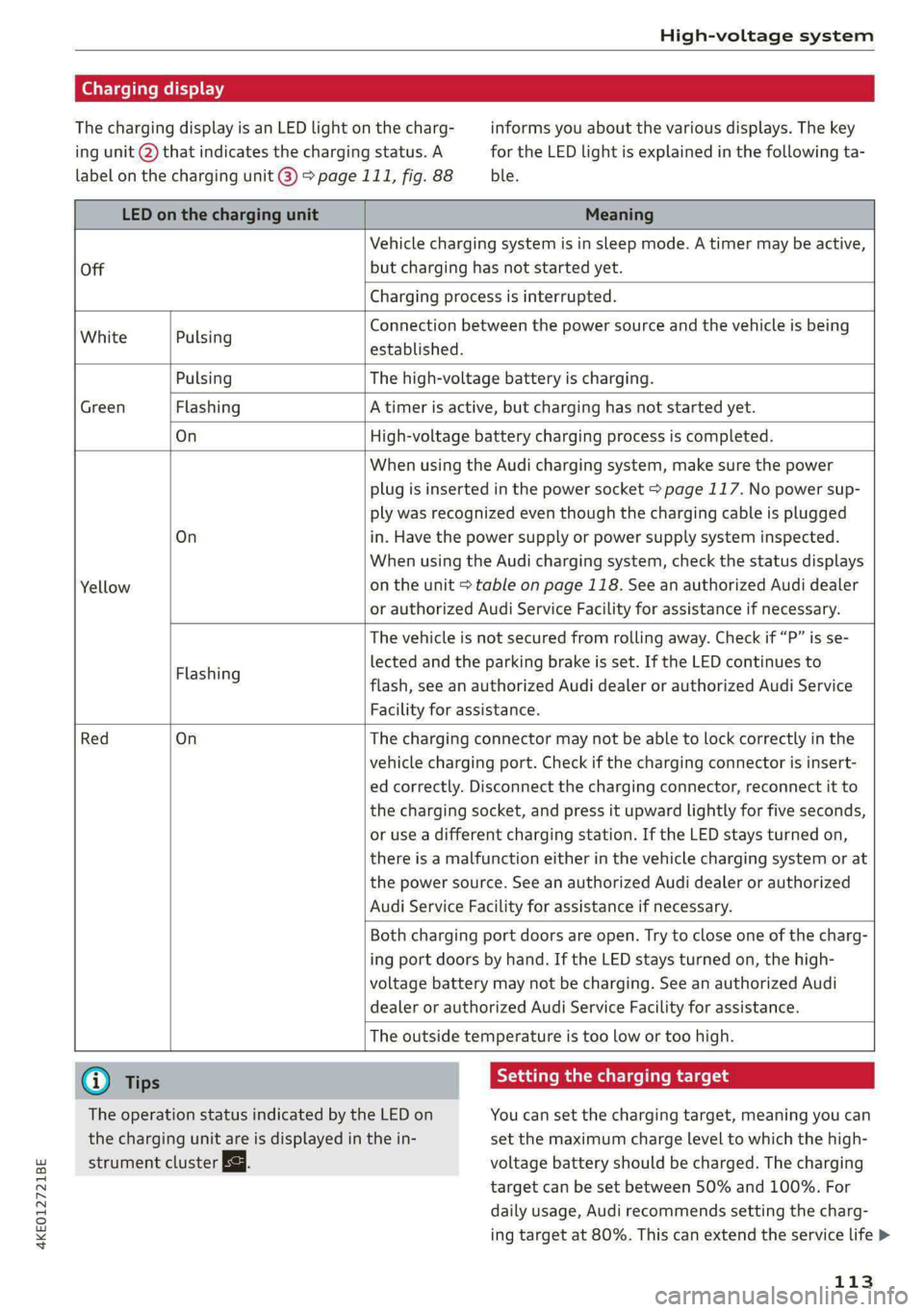
Charging display
The charging display is an LED light on the charg- informs you about the various displays. The key
ing unit @ that indicates the charging status. A for the LED light is explained in the following ta-
label on the charging unit @) 9 page 111, fig. 88 ble.
LED on the charging unit Meaning
Off
Vehicle charging system is in sleep mode. A timer may be active,
but charging has not started yet.
Charging process is interrupted.
White Pulsing
Connection between the power source and the vehicle is being
established.
Pulsing The high-voltage battery is charging.
Green Flashing A timer is active, but charging has not started yet.
On High-voltage battery charging process is completed.
On
Yellow
When using the Audi charging system, make sure the power
plug is inserted in the power socket > page 117. No power sup-
ply was recognized even though the charging cable is plugged
in. Have the power supply or power supply system inspected.
When using the Audi charging system, check the status displays
on the unit > table on page 118. See an authorized Audi dealer
or authorized Audi Service Facility for assistance if necessary.
Flashing
The vehicle is not secured from rolling away. Check if “P” is se-
lected and the parking brake is set. If the LED continues to
flash, see an authorized Audi dealer or authorized Audi Service
Facility for assistance.
Red On
The charging connector may not be able to lock correctly in the
vehicle charging port. Check if the charging connector is insert-
ed correctly. Disconnect the charging connector, reconnect it to
the charging socket, and press it upward lightly for five seconds,
or use a different charging station. If the LED stays turned on,
there is a malfunction either in the vehicle charging system or at
the power source. See an authorized Audi dealer or authorized
Audi Service Facility for assistance if necessary.
Both charging port doors are open. Try to close one of the charg-
ing port doors by hand. If the LED stays turned on, the high-
voltage battery may not be charging. See an authorized Audi
dealer or authorized Audi Service Facility for assistance.
The outside temperature is too low or too high.
G) Tips Seem Melee mle (id
The operation status indicated by the LED on You can set the charging target, meaning you can
the charging unit are is displayed in the in- set the maximum charge level to which the high-
strument cluster Eg. voltage battery should be charged. The charging
target can be set between 50% and 100%. For
daily usage, Audi recommends setting the charg-
ing target at 80%. This can extend the service life >
113
Page 125 of 316

4KE012721BE
High-voltage system
> Push the control unit in the direction of the ar-
row toward the rear > fig. 93 and let it lock into
place.
> Wrap the excess length of cable around the
charging connector mount @) when you are not
charging the high-voltage battery.
> Plug the power cable into the socket (2).
> After charging, you can hook the vehicle charg-
ing connector to the charging connector mount
©.
Locking and unlocking the Audi charging
system
> You can lock or unlock the Audi charging sys-
tem using the key provided by turning it to the
lock position @) or the unlock position 6).
Removing the Audi charging system
> Remove the power cable connector from the
socket (2).
» Unwind the cable from the charging connector
mount (2).
> To loosen the control unit from the bracket,
push the locking mechanism @) upward.
/\ WARNING
Observe the safety precautions in the assem-
bly instructions for the wall mount clip.
123
Page 193 of 316

4KE012721BE
Audi connect
— Start or stop climate control
— Program the timer
— Deactivate or activate the timer
For additional information, see > page 85.
Alert services
Requirement: a key user must be set in the vehi-
cle > page 190.
You can adjust the following services in the
myAudi app. You will be notified by a push notifi-
cation and/or e-mail if an alarm is triggered for
your vehicle.
— Geofencing Alert: a permitted/prohibited zone
was entered.
— Speed Alert: a set speed was exceeded.
— Valet Alert: a set speed was exceeded or a per-
mitted/prohibited zone was entered.
ZA\ WARNING
— Do not ignore messages and warning or indi-
cator lights that turn on in the vehicle be-
cause of the information in the vehicle sta-
tus report. This could lead to break downs in
on the road, accidents and serious injuries.
— Only perform the climate control functions
if your vehicle was shut off correctly and the
ignition is switched off.
— Only perform charging functions on the
high-voltage battery if the vehicle is shut off
correctly, is connected to a suitable socket
and if the ignition is switched off.
@) Tips
For some services, you can select if you would
like to be notified with a push notification
and/or an e-mail.
Settings
Ce) atolnl Mariano) 4
> Applies to: MMI: Select on the home screen:
SETTINGS > Connection settings > Mobile
phone network.
Depending on the country, vehicle equipment,
and connection type, the following functions may
be available:
Data connection settings
Using the Data connection settings menu, you
can set when the system should connect to the
Internet. The Internet connection disconnects
automatically once the requested Audi connect
Infotainment service no longer requires any data.
— Data roaming: data roaming is switched off at
the factory. To use a data connection outside of
the country, data roaming must be switched
on. The setting is stored for the current SIM
card or the mobile device that is currently con-
nected.
— Allow MMI online services: when this function
is switched on, a data connection is automati-
cally established in order to use Audi connect
Infotainment services.
— Allow Wi-Fi devices: when the function is
switched on, mobile devices can use the Inter-
net connection through the Wi-Fi hotspot.
Access point
The connection is configured automatically based
on the SIM card being used. The following values
can be changed. You can obtain more information
from your cell phone service provider.
— Access Point Name (APN): the access point de-
pends on the cell phone service provider and is
assigned automatically.
— User name: your cell phone service provider as-
signs the user name for your online profile.
— Password: your cell phone service provider as-
signs the password for your online profile.
— Apply settings: saves the changed settings.
— Reset configuration: resets the connection set-
tings.
Data usage counter
Your current data usage is displayed.
— Reset counter: you can reset your usage statis-
tics to zero.
— Warning limit: you can set a warning limit for
your data usage (GB/MB).
191
>
Page 302 of 316

Index
Vehicle battery (12 Volt)............... 245
Winter operation (12 Volt vehicle battery) . 245
Battery (vehicle)
refer to High-voltage battery........... 107
Blinds
refer to Panoramic glass roof............ 41
BIOCK fOUtE soe 2 » nome © x eee x x tee e + SeeE 206
BIOWER's + sas < @ acne 2 5 SRR 7 8 ER TS HOR FS 83
Bluetooth
Audio player « saws s = sews so sees ss eee ae 223
Connecting acell phone............... 173
Deleting adevice................0000- 238
DEVICE OVERVIEW’: cues & = sqeays + 2 ease & 2 eee 237
Disconnecting a device................ 238
Displaying profiles.................00. 238
Searching foradevice................. 238
Selecting adevice « wii se sna ae www ses 238
Specifying a favorite................0. 238
Boost fUmCtion wisn: 0 « sownine a » examen © 0 ageiore ¥ 0 6 91
Brake fluid
Checking the brake fluid level........... 243
Brakes... 2... eee eee eee 94
Brake fluid: « « seas s ¢ wows se eews oo eee 243
Emergency braking function............. 97
Le (0) 98
New brake pads..............2.-0 ee eee 95
Break-in security feature. ............0 eee 32
Breaking in
New brake pads..........--..----e eee 95
INCWAINESY: 2 owners « s wows ov ised @ ener oo 255
Browser
refer to Mediacenter...............04. 227
Bulb:ireplacementiin:. + ¢ csicoa vo ecneana so eosuene oo 287
Business. addressis ¢ vss so mean a 3 man x oo 206
Cc
California Proposition 65 Warning........ 240
Battery specific........... cee eee eee ee 245
CAlLlist,. sacsnis x 2 ommnes + cree & o mean = ema 177
CaMENASiics: 2 eee sv omenE © oso © 8 eNO a 128
Locations ......... ee eee eee eee eee 129
Capacities
Washer fluid reservoir................. 298
Cargo floor. .... 0... eee eee eee eee 80
Cargo mat...... 0... eee eee 80
CArQOMets, « 6 wses oo ieee © casino even & amon 79
300
Car KO Yicniie 2 wesevae 2 weaves oo ease © aseuee © ¥ emeee 33
Car phone
Serial number (IMEI) .................. 184
SWItCHING Off sazc s aes co eee se Gees BS 183
Carwash... . cece eee eee eee eee 268
Cell phone
refer to Telephone...........-..-++-5- 173
Cell phone compartment
refer to Audi phone box............... 175
Central
lockingiss « 22s x + eyes +e eee se ee 29
INUEOHLOGK Ss « cccries « arexsuowe « iranawe a 8 ese te & omaus 29
Convenience key.........--.00 eee eee 34
Convenience opening and closing......... 40
Luggage compartment lid............... 36
Mechanically unlocking and locking....... 32
MBSSAGES « sexs ¢ » meme 5 eae v ¥ eS < Be 31
Remote control: keysis & 6 ssues se smn 6 6 aero 34
Setting... 20... cece eee eee 30
Vehicle key seas = = seme = ¢ wees to eee ty ee 34
Central locking switch...............200. 31
Certification......................000. 295
Changing light bulbs................... 287
Charging
refer to Power sourceS.........--..00-0- 75
Charging clip
refer to Wall mount clip.............0 122
Charging display cewe s x ems 5 s mes xo ca F 113
Charging the battery (mobile devices). 175, 225
Charging time.................00. 000 109
Child safety lock
Climate control system controls inthe rear. 39
POWEP WIND OWSimcica & 2 since wo coausis vo dasa os 39
Rear doors... ..... eee cee eee 39
Child safety seats..... 0.0.0... ee eee eee 69
Securing to the top tether anchor........ 73
Securing with a safety belt.............. 72
Securing with LATCH). « «cess 6 scwcene @ 0 vesvene 71
CleANIING « sesuass x & smeres wo scucens & seawers ¥ w were 268
Cleaning Alcantara......... cece eee eee 271
Cleaning artificial leather............0.. 271,
Cleaning carbon components........ 270; 271
Cleaning controls...................0-. 271
Cleaning decorative parts/trim........... 270
Cleaning plastic parts.................. 270
Cleaning textiles.................0000. 271
Climate control system .............0 00 82
Page 306 of 316

Index
I
Idle
refer tO'Gears « s waws so wows 9 i oes a ce ee 90
Ignition
Switching on and off..................- 88
Imbalance (wheels) ...........5....0005 257
Immobilizer
refer to Electronic immobilizer........... 33
Indicator lights 2 wen 2s wees a news ov wee ove 7
Inspection interval............--.2+--5- 246
Instrument cluster.............2--000005 11
‘Adjusting the layout ees «sccm ew were « v oe 12
Cleaning... . 6... cece eee eee eee 270
FailUfes : seme : coe & ¢ GaGH s 2 Bem sD eee 11
Motorcodes: « s ses + eosnw + wenn ae meee a x 239
On-board computer..............2..04. 14
Operating: ; secs zs Hees so ene oo Hees so 12
Personal-profile « wscccc ao amen we eve =o mona 11
Service interval display................ 246
Software information................. 239
SWitchitig tabS's « wawy s ¢ sevas « ¢ soem « 2 eae 12
Switching the view...............-.000- 12
Vehicle functions ......... 0.0 eee eee eee 14
Version information..............0005 239
Instrument illumination................- 49
Integrated assistance. ......... 0. cee eee 17
Integrated Toll Module................. 137
Intelligent search
NaViGatiGniies + s esau x x ween 2 mewn vs Ree x 198
Interference-Causing Equipment Standard
QIGES)|s swceine oo weemces w o seavwms 2 a mvewe & a owe oo 296
Interior lighting
Intermittent mode (windshield wipers) ..... 51
International travel...............00005 192
Internet
refer to connect s = » 28: s2e5 ss een ey 187
Internet radio
refer to Online radio...............04. 218
Intersection assistant...............04. 161
TONIZEMs = wae & ¢ sete & eee be ee be ee 84
iPhone
refer to Audi music interface........... 225
304
J
Jump starting....................0000. 281
K
Key. eee eee eee 29, 33
Convenience opening and closing......... 40
Key replacement... . 00... ccs eee ee eee 33
Mechanical key............. 0000002000 33
NOt reCOGnizéd « = scias ¢ = seus ts same oe eas 89
PANIG KO Yi 2 x cscwcse 2 2 aecmtus o 0 cocoa @ 2 amances we 33
Replacing the battery.................. 35
Unlocking and locking............-...-- 34
Vehicle code « seins s x sens & 2 sees ¥ 5 wae 2 es 33
K@Y USED ic «© ees so eee ss Howe go ews ee Ges 28
Kick-COWiis: < 2 axan x x ere o 2 meme £ eee 2 oe 91
L
Lane assist
refer to Lane departure warning......... 153
refer to Lane guidance................ 153
Lane departure warning................. 153
Cleaning the camera area.............. 269
Lane guidance................--00 00 ee 146
LASERSEANME ex. 5 cscs + 4 essen « 9 aesten « oramen 128
Cleaning....... 6... cece eee eee eee 270
LATCH (securing child safety seats)......... 71
Launch Control.............0 0.00 e eee eee 91
Leather care and cleaning............... 271
Legal information
License subscriptions..............00. 238
Software information..............005 238
Software licemsesies: «sien ss mani ie x aware 2 238
Version information...............05- 238
License plate bracket...............0000. 294
Lifting points (vehicle jack).............. 278
Light/rain sensor
Headlights ....... 0... 0. cece eee ee eee 45
Intermittent mode (windshield wipers).... 51
Lighting
EXteriGr's « gsc « + awom s x ewe 4 2 rere so 45
TINGCHIONs scence » © caameue 5 © oneswue © 0 nae Bw Re © 48
LIQHtS:s & coccens v + cosnene ve accom we mene ow am © 45
Lights on the charging port
refer to Charging display............... 113
Page 309 of 316

4KE012721BE
Index
Parking lightsisvc = © cnr 2 2 eaaue 2 wee 2 eave 45
Parking lock
referto Gear. i... eee eee 90
Pass-through...........2.-.0 eee eee eee 79
Password
myAudi automatic login................ 27
Pedals... cece cece eee eee eee 91
Pedestrian detection................005 135
Perchlorate « ssc « 2 snows vv eee x 8 eeu 8 8 aoe 292
Peripheral cameras.............--000-5 166
Personal route assistance............... 205
Phone
Answering/ending acall............... 180
Connecting a second mobile device...... 174
Disconnecting a mobile device.......... 175
SettingStivans ss ows oe nase we vem «wee ws 183
Phonebook
refer to Contacts.................000- 178
Playback(media)'s « scisoue os assumes 4 6 eveseas 6 8 ane 226
Podcast
refer to Online radio................0. 218
BOT « ssisnswe 2 wanes 2 commons © 5 cemones a ateetes 3 ae 200
Point of interest
refer to Online Points of Interest........ 200
Polishing ...... 0.0.0 cece eee ences 270
Pollutant filter. ..... 00.00.00... .000000. 82
Power closing oor) « scsi oo cane ov wave a os 29
POWEFr ME@TER ecu: x = sews os sees xo aU 2 11, 13
POWEr SOUPCES®: 2 samy: = = seann 3 & eeu 8 ge 75,225
POWEr WINKOWS « cess se omnes eeeea a eee ge 39
Malfunctions. » = ses x 3 man 2 & swans ot see 39, 40
Power windows malfunction.............. 39
Predictive control: sss «sews se ees ees 147
Predictive messages...............-.00. 141
pre sense
refer to Audi presense................ 154
Presentation mode..............-+-008- 212
Presets
Radisson so cise wo econ oe eo ow 0 216
Presets list
refer to PresetS............0 02. eee ee 216
Pressure
Tire pressure monitoring system........ 266
Tit@S's s saws = s awe o & wee ez ome + eee 258
PrOte@Cting « < ¢ sews «sees go oes ye eR aes 270
Pyrotechnic elements.................. 292
Q
quattro... 2... eee eee 104
Selective wheel torque control.......... 105
QUIEKCHArGING + saz: 5 2 cae 5 2 cere se eee § 108
R
Radio... 2. ec ce eee eee 214
Ragiotextiies s 2 acum + eae os name ae eS 217
SEAGION MISE secense = creme o © ates = ater w = on 214
Radio communications equipment........ 294
Radio equipment .......... 0... e eee eae 294
Radio Standards Specification (RSS) ....... 295
Raikearrier’: « wsex 2 won a 2 meen x 2 mou 2 ow 102
Rain/light sensor
Headlight seis = 2 asics ss weenie so wena = wees 45
Intermittent mode (windshield wipers).... 51
Random
refer to Shuffle...............000000. 228
Range... . 26. eee eee 14
Range Mode.......... cece cece eee eee 93
RANGEMMONITOR: « « csesaie « i swinsin » evensvere © wears w 93
Rangeipotential esas 2 + css s « seowes ov mewn 93
Range (Clectrie) iu <2 secs 2s semi oo were vs 208
Reading lights:ss < = sews se see% s geen 5 2 pees 48
Rear cross-tratffic assist ews ss cews ss ees 171
Rear lid
refer to Luggage compartment lid........ 36
Rearview camera): « scan ss goss 2 2 ewes 9 os 166
Rear window defogger............-..0--- 84
Rear wiper blades
CHANGING i: « » mews 3 & new & ere a a wee Ho 53
Cleaning... ...... 0.2 e eee 53
REAR (climate control system)............ 83
Reception ranges. « sics as eve oe wesw a i oe 214
Recirculation: Mode ses « s gsay 2 ¢ eoyen v2 nen 84
RECUPEFAUION wis s x eaves + sees & ewe ge 14, 92
Remote control
Garage door opener...........--..+--5- 41
Remote control key............ cece eee 33
Convenience opening and closing......... 40
Key replacement.............0.-00 0 eee 33
LED s ves 2 y seme 2 9 eee 2 RARE BOG RR Be eRe 35
Replacing the battery...........e0eeeee 35
Unlocking and locking............-...-. 34
also refer to Vehicle key. « mews se sews a eo 33