2020 AUDI A6 break
[x] Cancel search: breakPage 3 of 316

4K0012721BD
Foreword
Thank you for choosing an Audi - we value your trust in us.
Your new Audi will allow you to experience the best in groundbreaking technology and premium quality
equipment that a vehicle has to offer. We recommend that you read your Owner's Manual thoroughly
so that you quickly become acquainted with your Audi and make use of all of its features.
In addition to explaining how the different features work, we provide many useful tips and information
concerning your safety, how to care for your vehicle, and how to maintain your vehicle's value. We also
give you useful tips and information on how to drive your vehicle more efficiently and in an environ-
mentally-friendly manner.
We hope you enjoy driving your Audi and we wish you safe and pleasant motoring.
AUDI AG
A WARNING
Operating, servicing and maintaining a passenger vehicle or
off-highway motor vehicle can expose you to chemicals includ-
ing engine exhaust, carbon monoxide, phthalates, and lead,
which are known to the State of California to cause cancer and
birth defects or other reproductive harm. To minimize expo-
sure, avoid breathing exhaust, do not idle the engine except as
necessary, service your vehicle in a well-ventilated area and
wear gloves or wash your hands frequently when servicing
your vehicle. For more information go to www.P65Warnings.
ca.gov/passenger-vehicle.
Page 37 of 316
4K0012721BD
Opening and closing
Mechanically unlocking and locking the
doors
If the central locking fails, you must unlock or
lock the doors separately.
[RAZ-0026|
5 a
Ss
2
<=
go a
Fig. 24 Door: mechanically locking
Unlocking or locking the driver's door with
the mechanical key
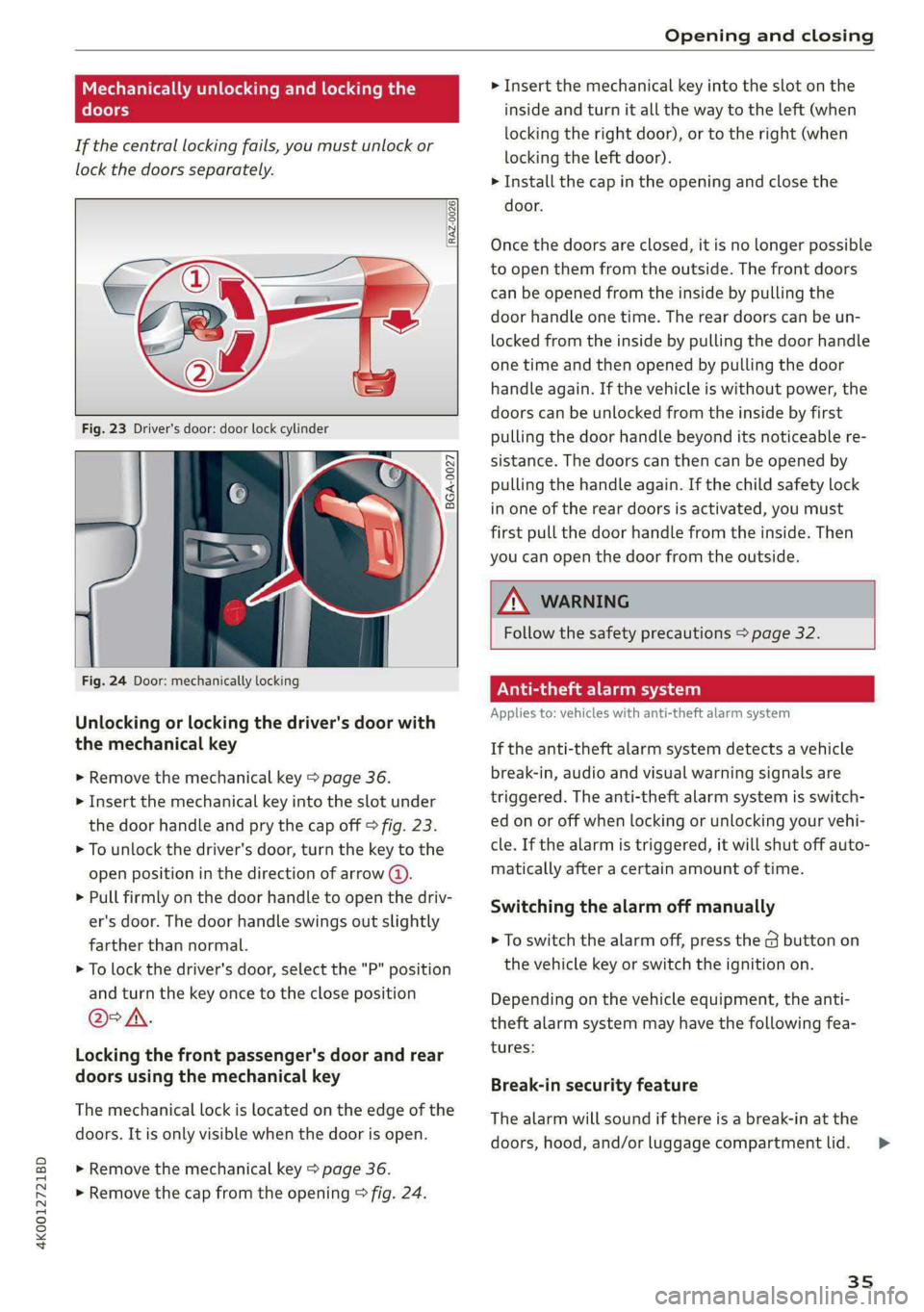
> Remove the mechanical key > page 36.
> Insert the mechanical key into the slot under
the door handle and pry the cap off > fig. 23.
> To unlock the driver's door, turn the key to the
open position in the direction of arrow @).
> Pull firmly on the door handle to open the driv-
er's door. The door handle swings out slightly
farther than normal.
> To lock the driver's door, select the "P" position
and turn the key once to the close position
@°A.
Locking the front passenger's door and rear
doors using the mechanical key
The mechanical lock is located on the edge of the
doors. It is only visible when the door is open.
> Remove the mechanical key > page 36.
> Remove the cap from the opening > fig. 24.
> Insert the mechanical key into the slot on the
inside and turn it all the way to the left (when
locking the right door), or to the right (when
locking the left door).
> Install the cap in the opening and close the
door.
Once the doors are closed, it is no longer possible
to open them from the outside. The front doors
can be opened from the inside by pulling the
door handle one time. The rear doors can be un-
locked from the inside by pulling the door handle
one time and then opened by pulling the door
handle again. If the vehicle is without power, the
doors can be unlocked from the inside by first
pulling the door handle beyond its noticeable re-
sistance. The doors can then can be opened by
pulling the handle again. If the child safety lock
in one of the rear doors is activated, you must
first pull the door handle from the inside. Then
you can open the door from the outside.
ZA\ WARNING
Follow the safety precautions > page 32.
Vea lela)
Applies to: vehicles with anti-theft alarm system
If the anti-theft alarm system detects a vehicle
break-in, audio and visual warning signals are
triggered. The anti-theft alarm system is switch-
ed on or off when locking or unlocking your vehi-
cle. If the alarm is triggered, it will shut off auto-
matically after a certain amount of time.
Switching the alarm off manually
> To switch the alarm off, press the G button on
the vehicle key or switch the ignition on.
Depending on the vehicle equipment, the anti-
theft alarm system may have the following fea-
tures:
Break-in security feature
The alarm will sound if there is a break-in at the
doors, hood, and/or luggage compartment lid.
35
>
Page 56 of 316

Lights and Vision
ZA WARNING
Curved mirror surfaces (for example convex)
enlarge the field of vision. However, they
make objects in the mirror appear smaller and
farther away. When using these mirrors to es-
timate your distance to vehicles behind you
when changing lanes, you could estimate in-
correctly, which increases the risk of an acci-
dent.
@) Note
— Applies to: vehicles with power folding exte-
rior mirrors: If the mirror housing was
moved by outside forces (such as an impact
when maneuvering), you must use the pow-
er folding function to fold the mirror all the
way out. The mirrors will make a loud noise
when they latch into place. The mirror hous-
ing must not be moved back into place by
hand because this could impair the function
of the mirror mechanism.
— Applies to: vehicles without power folding
exterior mirrors: If the mirror housing was
moved by outside forces (such as an impact
when maneuvering), you must move it back
in place by hand.
— If you wash the vehicle in an automatic car
wash, you must fold the exterior mirrors in
to reduce the risk of damage to the mirrors.
Never fold power folding exterior mirrors*
by hand. Only fold them in and out using
the power controls.
G) Tips
— Certain settings are stored automatically in
the active personal profile.
— If the power adjusting function malfunc-
tions, the glass in both mirrors can be ad-
justed by pressing on the edge of it by hand.
Dimming the mirrors
Manual dimming rearview mirror
> Pull the lever on the bottom of the mirror back.
54
Automatic dimming rearview mirror*
> The interior and exterior mirrors dim automati-
cally when light shines on them, for example
from headlights on a vehicle behind you.
Z\ WARNING
— If the glass on an automatic dimming mir-
ror* breaks, electrolyte can leak out. This
liquid can irritate the skin, eyes and respira-
tory system. If there is contact with the flu-
id, flush immediately with plenty of water.
Consult a physician if necessary.
— Repeated or long-term exposure to electro-
lyte fluid can lead to irritation of the air-
ways, especially in people with asthma or
other respiratory conditions. Take deep
breaths immediately after leaving the vehi-
cle or, if this is not possible, open all of the
doors and windows as wide as possible.
— If electrolyte fluid comes into contact with
the eyes, flush them thoroughly with plenty
of clean water for at least 15 minutes and
then seek medical attention.
— If electrolyte fluid comes into contact with
the skin, flush the affected area with clean
water for at least 15 minutes, and then
clean with soap and water and seek medical
attention. Clean affected clothing and shoes
thoroughly before wearing again.
— If the fluid was swallowed and the person is
conscious, flush the mouth with water for at
least 15 minutes. Do not induce vomiting
unless this is recommended by medical pro-
fessionals. Seek medical attention immedi-
ately.
() Note
If the glass on an automatic dimming mirror*
breaks, electrolyte can leak out. This liquid
damages plastic surfaces and paint. Clean
this liquid as quickly as possible, for example
with a wet sponge.
@ Tips
—If the light reaching the rearview mirror is
obstructed, the automatic dimming mirror*
will not function correctly.
Page 69 of 316

4K0012721BD
Sitting correctly and safely
— Do not position the safety belt over hard or
breakable objects (such as glasses, pens,
GiKe)),
— The lap belt portion of the safety belt must
sit as low as possible on the lap of pregnant
women and lie flat under the belly.
@) Note
Make sure that there are no hook-and-loop
fasteners or sharp objects such as zippers or
rivets on clothing in the area where the safety
belt is worn. Otherwise, the safety belt could
be damaged.
Fastening and unfastening safety belts
,
|
B4H-0462
aS
\
B4H-0270
Fig. 60 Releasing the belt buckle from the belt latch
Follow the safety precautions > page 65.
Fastening the safety belt
> Pull the safety belt by the belt buckle evenly
across your chest and lap.
> Insert the belt buckle in the belt latch belong-
ing to the seat until it audibly engages
> fig. 59.
> Pull on the belt to make sure that the belt is se-
curely locked in the latch.
Unfastening the safety belt
> Press the red button on the belt latch > fig. 60.
The belt buckle will pop out.
> Guide the belt back by hand so that the safety
belt can roll up more easily.
SEA leet RS etna
B- If the indicator light turns on or flashes, a
safety belt is not fastened or it has been unfas-
tened while the vehicle is in motion. Above cer-
tain speeds, additional warning tones will sound.
Depending on the equipment, the safety belts in
the rear may also be monitored using the follow-
ing indicator lights:
aI - If this indicator light turns on, the safety
belt for the corresponding rear seat is not fas-
tened.
Ba - If this indicator light turns on, the safety
belt for the rear seat has been fastened.
g- If this indicator light turns on with a white
light, the safety belt for the rear seat has been
fastened. If the indicator light flashes or turns
gray, a safety belt in the rear is not fastened or
has been unfastened while the vehicle is in mo-
tion.
Adjusting the height of the safety belt
B4G-0004
Fig. 61 Belt height adjustment for the front seats - safety
belt relay
> To move the belt higher, slide the safety belt re-
lay @ upward.
> To move the belt lower, press the release but-
ton @ and slide the safety belt relay @) down-
ward.
67
>
Page 71 of 316

4K0012721BD
Sitting correctly and safely
the memory button until the seat profile is
completely set.
Z\ WARNING
— To reduce the risk of an accident, the seat
setting can only be recalled when the vehicle
is stationary.
— In an emergency, the recall process can be
canceled by pressing the seat adjustment
button on that seat.
@) Tips
Certain settings are stored automatically in
the active personal profile.
Airbag system
General information
ZA WARNING
— If you have not fastened your safety belt,
you are in an incorrect seating position, or
you are too close to the airbag system, the
airbag system will not be able to protect
you. This increases the risk of serious or fa-
tal injuries. Make sure that every vehicle
passenger has their safety belt correctly fas-
tened and is sitting in a correct seating posi-
tion = page 60. This is necessary regardless
of whether the seat is equipped with an air-
bag or not.
— Never place your feet on the instrument
panel, out of the window, or on the seat sur-
faces. To help ensure that the airbag system
can deploy correctly, never bend forward or
lean on the door or the side window. Other-
wise, serious and possibly fatal injuries can
occur if the airbags deploy.
— People, animals, or objects between the
passengers and the airbag system can inter-
fere with the correct deployment of the air-
bag or can be thrown through the vehicle in-
terior, increasing the risk of serious or fatal
injuries. Make sure that nothing is located
between the vehicle occupants and the air-
bag system. Do not secure or transport any
objects within the deployment zone of the
airbag systems, especially on the steering
wheel, on the instrument panel, on the
doors, on the windows, or in the footwell.
— Never put stickers on the airbag system cov-
ers or cover them with any objects.
— Only lightweight clothing should be hung
from the garment hooks in the vehicle. Do
not use clothes hangers to hang clothing.
The pockets of the clothing must not con-
tain any heavy, breakable, or sharp-edged
objects. This could impair the effectiveness
of the side curtain airbags.
— You must not use seat or protective covers
that are not specifically approved for use on
Audi seats with side airbags. Since the side
airbags deploy from the seat backrest, such
covers could impair the protective function
of the side airbags.
— Damage to the original seat covers in the
side airbag deployment area must always be
repaired by an authorized Audi dealer or au-
thorized Audi Service Facility.
— Airbag system components are installed at
various locations in your vehicle. Incorrect
work or repairs on the vehicle could damage
the airbag system components or impair
their functionality. This may prevent the air-
bags from deploying or cause them to de-
ploy incorrectly in the event of an accident,
which increases the risk of serious or fatal
injuries. Only have an authorized Audi dealer
or authorized Audi Service Facility make re-
pairs or modifications to a vehicle.
— The airbag system can only provide protec-
tion during one collision. If there is another
collision, the airbag system will not deploy
again. If the airbag system has deployed,
have it replaced immediately by an author-
ized Audi dealer or authorized Audi Service
Facility.
— Fine dust may appear if the airbags deploy.
This is completely normal and does not indi-
cate a fire in the vehicle. The fine dust can ir-
ritate the skin and mucous membranes in
the eyes and can cause difficulty breathing,
particularly for individuals who have or have
69
Page 82 of 316

Stowing and using
Stowing and using
Power sources
When the ignition is switched on, you may be
able to use multiple power sources for external
devices, depending on the vehicle equipment.
12 volt sockets
You can connect electrical accessories to the 12
volt sockets. The power usage must not exceed
120 watts.
The 12 volt sockets are labeled with the 12V
symbol. They are located in the front center con-
sole, in the rear* and on the side trim panel in the
luggage compartment*.
USB ports
Applies to: vehicles with USB input
You can charge mobile devices using the USB
ports. The USB ports are labeled with the «> or
(4 symbol or CHARGE ONLY.
Cup holders
Applies to: vehicles with cup holders
[RAz-0745
ZA\ WARNING
—To reduce the risk of fatal injury, store all
connected devices securely when driving so
that they do not move around inside the ve-
hicle when braking or in the event of an acci-
dent.
— Incorrect usage can lead to serious injuries
or burns. To reduce the risk of injuries, never
leave children unattended in the vehicle
with the vehicle key.
@) Note
— Read the operating manuals for the con-
nected devices.
—To reduce the risk of damage to the vehicle
electrical system, never attempt to charge
the vehicle battery by connecting accesso-
ries that provide power to the power sour-
ces.
— Do not connect any device whose network
class (voltage) does not match the network
class designed for the socket.
— Disconnect the connectors from the power
sources carefully to reduce the risk of dam-
aging them.
80
Fig. 69 Rear center armrest*: cup holders
Front center console cup holders
> The cup holder @ may be under a cover. To
open the cup holder, tap on the strip on the
cover.
Rear center armrest* cup holders
> Fold the center armrest* downward.
> To open the cup holders @), tap on the strip on
the cover.
> To close the cup holders, slide them back and
push the top of the cover down.
Z\ WARNING
— Do not put any hot beverages in the cup
holder while the vehicle is moving. Hot bev-
erages could spill, which increases the risk
of injury.
— Do not use any breakable beverage contain-
ers (for example, made out of glass or por-
celain). You could be injured by them in the
event of an accident.
Page 83 of 316
4K0012721BD
Stowing and using
@) Note
Beverage containers in the cup holders should
always
have a lid. Otherwise, the liquid inside
could spill and cause damage to vehicle
equipment.
Storage and
compartments
Storage area behind the rear head
eel ey
Applies to: vehicles with storage area behind the rear head re-
straints
The storage area can be used to carry light pieces
of clothing.
Z\ WARNING
The storage compartment must not be used
to transport heavy objects, hard objects, or
animals. Such objects endanger vehicle occu-
pants and increase the risk of injury during
sudden driving or braking maneuvers or in an
accident.
@) Note
Make sure that the heating grid strips for the
rear window defogger are not damaged by
abrasive objects.
@ Tips
To ensure the ventilation functions correctly,
the ventilation slots between the rear window
and the storage area must not be covered.
Additional storage
Depending on the vehicle equipment, there may
be a variety of storage areas, compartments, and
retainers at various locations in the vehicle.
— Glove compartment: the glove compartment
can be locked using the mechanical key
=> page 36.
— Holders for a notepad and a pen in the glove
compartment
— Storage compartment in the cockpit on the
driver's side
— Storage compartments in the door trim panel
— Net in the front passenger's footwell
— Key compartment in the front center console
— Storage compartment under the front center
armrest
— Nets on the back of the front seats
— Garment hooks in the rear
— Storage compartment in the rear center arm-
rest
— Bag hooks in the luggage compartment
— Net in luggage compartment
ZA\ WARNING
—To reduce the risk of injury, make sure all
storage compartments are always closed
while driving.
— Loose objects can be thrown around the ve-
hicle interior during sudden driving or brak-
ing maneuvers, which increases the risk of
an accident. Store objects securely while
driving.
— Only use the storage compartments in the
door trim panels to store small objects that
will not stick out of the compartment and
impair the function of the side airbags.
— Only lightweight clothing should be hung
from the garment hooks in the vehicle. Do
not use clothes hangers to hang clothing.
The pockets of the clothing must not con-
tain any heavy, breakable, or sharp-edged
objects. This could impair the effectiveness
of the side curtain airbags.
— Make sure your view toward the rear is not
blocked, for example by hanging clothing or
objects in the vehicle.
Luggage compartment
General information
All pieces of luggage or objects must be securely
fastened in the luggage compartment. Note the
following to maintain good vehicle handling:
> Distribute the load evenly in the luggage com-
partment.
> Stow heavy luggage as far forward in the lug-
gage compartment as possible.
81
>
Page 101 of 316

4K0012721BD
Driving
ZA\ WARNING
— The parking lock must be released using the
emergency release before towing the
vehicle.
— The parking lock may only be released using
the emergency release if the parking brake
is set. If it is not working, secure the vehicle
from rolling using the brake pedal or other
suitable means, such as blocking a front and
a rear wheel. An unsecured vehicle may roll
away, which increases the risk of an acci-
dent.
— Only activate the emergency release while
on a level surface or a slight slope.
—To reduce the risk of an accident, you must
not drive when the emergency release is ac-
tivated.
Messages
& Transmission: malfunction! Safely stop vehi-
cle
Do not continue driving. Stop the vehicle as soon
as possible in a safe location and secure it so it
does not roll. See an authorized Audi dealer or
authorized Audi Service Facility for assistance.
[i Transmission: too hot. Please stop vehicle
Do not continue driving. Select "P" and contact an
authorized Audi dealer or authorized Audi Service
Facility for assistance.
[&] Transmission: too hot. Please adapt driving
style
The transmission temperature has increased sig-
nificantly. Drive very cautiously or take a break
from driving until the temperature returns to the
normal range and the indicator light turns off.
[&] Transmission: malfunction! You can contin-
ue driving. See owner's manual
There is a system malfunction in the transmis-
sion. You may continue driving. Drive to an au-
thorized Audi dealer or authorized Audi Service
Facility soon to have the malfunction corrected.
[&] Transmission: malfunction! You can contin-
ue driving with limited function. Please contact
Service
There is a system malfunction in the transmis-
sion. The transmission is switching to emergency
mode. This mode only shifts into certain gears or
may no longer shift at all. The engine may stall.
Drive to an authorized Audi dealer or authorized
Audi Service Facility immediately to have the
malfunction corrected.
[&] Transmission: malfunction! You can contin-
ue driving with limited function. No reverse
gear
There is a system malfunction in the transmis-
sion. The transmission is switching to emergency
mode. This mode only shifts into certain gears or
may no longer shift at all. The engine may stall.
You cannot engage the reverse gear. Drive to an
authorized Audi dealer or authorized Audi Service
Facility immediately to have the malfunction cor-
rected.
[&] Transmission: malfunction! You can contin-
ue driving in D until engine is off
There is a system malfunction in the transmis-
sion. The transmission is switching to emergency
mode. If you turn the engine off, you will not be
able to select any other gears after restarting the
engine. Drive to an authorized Audi dealer or au-
thorized Audi Service Facility immediately to have
the malfunction corrected.
1} Selector lever: malfunction! You can contin-
ue driving. Please contact Service
There is a system malfunction in the selector lev-
er. Drive immediately to an authorized Audi deal-
er or authorized Audi Service Facility to have the
malfunction repaired.
fs} Selector lever: malfunction! Gear change on-
ly possible if using both shift paddles.
There is a system malfunction in the selector lev-
er. You can continue driving with restricted func-
tion. The selector lever is not working. Gears can
only be selected by tapping both shift paddles at
the same time when the vehicle is stationary. The
“P” gear is automatically engaged when you turn >
99